GeezerVisonThe World Wide Web, restored to 800 pixels of glory. |
| Home|About|Gaming cabinet|Archives|How it works|Starter sites |
GeezerVison is showing python-course.eu — 4. Threads and Threading | Applications | python-course.eu 4. Threads and ThreadingBy Bernd Klein. Last modified: 07 Aug 2026. On this page ➤ Threads in PythonGeneral Definition of a Thread
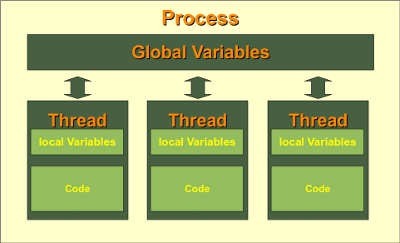
A thread is an execution path within a process. Every process has at least one thread and may create additional threads. Multiple threads belonging to the same process can execute concurrently. Threads within a process share the same address space. This means that they can access the same Python objects and, for example, shared module-level variables. At the same time, each thread has its own execution state, including its own call stack and the local variables of the functions it is currently executing.
Sharing data is one of the advantages of threads, but it can also cause problems. If several threads modify the same data at the same time, race conditions may occur. Python provides synchronization mechanisms such as locks to protect such critical sections. Threads are particularly useful for I/O-bound tasks, such as network access, file operations, or waiting for external programs. While one thread is waiting for an I/O operation to complete, another thread can continue executing. This can make a program more responsive and allows several waiting operations to overlap. Threads, CPU Cores, and the GILWith the standard build of CPython, it is important to distinguish concurrency from true parallelism. The Global Interpreter Lock (GIL) normally allows only one thread at a time to execute Python bytecode. CPU-bound Python calculations therefore usually do not become faster simply by adding more threads.
For CPU-bound work, Free-threaded builds of CPython were introduced experimentally in Python 3.13. Since Python 3.14, free-threaded Python is officially supported, although it remains optional. In a free-threaded build, the GIL can be disabled and Python threads can execute Python code in parallel on multiple CPU cores. Thread-safe programs should therefore not rely on the GIL to protect shared mutable data. Kernel Threads and User-Space Threads
In computer science, a distinction is sometimes made between threads managed by
the operating system and threads managed mainly by an application or runtime
environment. For practical Python programming, this distinction is usually of
minor importance. CPython's Threads in PythonPython provides several levels of abstraction for working with threads:
For new programs, The Low-Level _thread Module
In Python 2, the low-level module was called from thread import start_new_thread The corresponding Python 3 import would be: from _thread import start_new_thread
For new programs, however, this low-level interface is rarely necessary.
The The threading ModuleWe start with a simple example. Ten threads each wait for five seconds and print a message before and after waiting: import time
from threading import Thread
def sleeper(number):
print(f"Thread {number} sleeps for 5 seconds")
time.sleep(5)
print(f"Thread {number} woke up")
threads = []
for number in range(10):
thread = Thread(target=sleeper, args=(number,))
thread.start()
threads.append(thread)
for thread in threads:
thread.join()
The
The The order in which the final ten messages appear is not defined. A possible output is: Thread 0 sleeps for 5 seconds Thread 1 sleeps for 5 seconds Thread 2 sleeps for 5 seconds Thread 3 sleeps for 5 seconds Thread 4 sleeps for 5 seconds Thread 5 sleeps for 5 seconds Thread 6 sleeps for 5 seconds Thread 7 sleeps for 5 seconds Thread 8 sleeps for 5 seconds Thread 9 sleeps for 5 seconds Thread 2 woke up Thread 0 woke up Thread 4 woke up Thread 1 woke up Thread 7 woke up Thread 3 woke up Thread 9 woke up Thread 5 woke up Thread 6 woke up Thread 8 woke up Shared Data and Race ConditionsBecause multiple threads can access the same objects, care must be taken when shared data is modified. Consider, for example: counter += 1 Conceptually, this is a read-modify-write operation: the current value is read, incremented, and then stored again. Code should not assume that several threads can safely perform such updates to shared state without synchronization.
A import threading
counter = 0
lock = threading.Lock()
def increment():
global counter
for _ in range(100_000):
with lock:
counter += 1
threads = [threading.Thread(target=increment) for _ in range(4)]
for thread in threads:
thread.start()
for thread in threads:
thread.join()
print(counter)
The statement
For more complex communication patterns, the Defining a Thread Class
Instead of passing a function through import threading
class PrimeNumber(threading.Thread):
def __init__(self, number):
super().__init__()
self.number = number
self.is_prime = None
def run(self):
if self.number < 2:
self.is_prime = False
return
divisor = 2
while divisor * divisor <= self.number:
if self.number % divisor == 0:
self.is_prime = False
return
divisor += 1
self.is_prime = True
numbers = [97, 99, 101, 1733]
threads = [PrimeNumber(number) for number in numbers]
for thread in threads:
thread.start()
for thread in threads:
thread.join()
if thread.is_prime:
print(f"{thread.number} is a prime number")
else:
print(f"{thread.number} is not a prime number")
This example demonstrates how to define a custom thread class. It is not intended as a way to speed up large prime-number calculations with a standard CPython build, because primality testing is CPU-bound. Processes or another form of true parallelism are more appropriate for CPU-intensive work. ThreadPoolExecutor
When many similar tasks have to be executed concurrently,
A thread pool contains a limited number of worker threads. Tasks are submitted to the pool and executed by available workers. Their results can then be collected when the work has finished. from concurrent.futures import ThreadPoolExecutor
import time
def work(number):
time.sleep(1)
return number, number * number
with ThreadPoolExecutor(max_workers=4) as executor:
results = executor.map(work, range(10))
for number, square in results:
print(number, square)
The A Practical Example: Pinging Computers with Threads
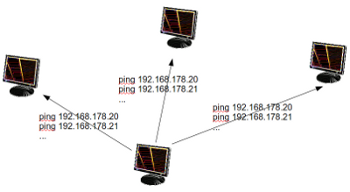
A typical use case for threads is waiting for network operations. Suppose we want to determine which IP addresses in a local network respond to a ping request. Without threads, the hosts could be checked one after another: import subprocess
def ping(ip):
result = subprocess.run(
["ping", "-c", "1", "-W", "1", ip],
stdout=subprocess.DEVNULL,
stderr=subprocess.DEVNULL,
check=False,
)
return result.returncode == 0
for suffix in range(20, 30):
ip = f"192.168.178.{suffix}"
print(f"{ip}: {'alive' if ping(ip) else 'no response'}")
The options The sequential version waits for the result of each address before checking the next one. This can be unnecessarily slow, especially when hosts do not respond.
With a from concurrent.futures import ThreadPoolExecutor
import subprocess
def ping(ip):
result = subprocess.run(
["ping", "-c", "1", "-W", "1", ip],
stdout=subprocess.DEVNULL,
stderr=subprocess.DEVNULL,
check=False,
)
return ip, result.returncode == 0
addresses = [
f"192.168.178.{suffix}"
for suffix in range(20, 70)
]
with ThreadPoolExecutor(max_workers=20) as executor:
for ip, alive in executor.map(ping, addresses):
status = "alive" if alive else "no response"
print(f"{ip}: {status}")
This is a good example of a task for which threads are especially useful.
The Python threads themselves perform very little computation. Most of their
time is spent waiting for the external A failed ping does not necessarily mean that a computer is switched off. A firewall may block ICMP packets or suppress ping replies. Summary
Live Python training 
Enjoying this page? We offer live Python training courses covering the content of this site. Upcoming online Courses See our Python training courses |
| You are visitor 01402503 — GeezerVison does not store the pages you look up. Best viewed with Netscape Navigator 4.7 or Internet Explorer 6 at 800×600. No cookies required. |