GeezerVisonThe World Wide Web, restored to 800 pixels of glory. | ||||||||||||||||||||||||||||||||||||||||||||||||||||||||||||||||||||||||||||||||||||||||
| Home|About|Gaming cabinet|Archives|How it works|Starter sites | ||||||||||||||||||||||||||||||||||||||||||||||||||||||||||||||||||||||||||||||||||||||||
GeezerVison is showing python-course.eu — 7. Magic Methods | OOP | python-course.eu 7. Magic MethodsBy Bernd Klein. Last modified: 04 Dec 2023. On this page ➤ IntroductionThe so-called magic methods have nothing to do with wizardry. You have already seen them in the previous chapters of our tutorial. They are special methods with fixed names. They are the methods with this clumsy syntax, i.e. the double underscores at the beginning and the end. They are also hard to talk about. How do you pronounce or say a method name like So what's magic about the Towards the end of this chapter of our tutorial we will introduce the We have encountered the concept of operator overloading many times in the course of this tutorial. We had used the plus sign to add numerical values, to concatenate strings or to combine lists: 4 + 5 OUTPUT:9 3.8 + 9 OUTPUT:12.8 "Peter" + " " + "Pan" OUTPUT:'Peter Pan' [3,6,8] + [7,11,13] OUTPUT:[3, 6, 8, 7, 11, 13]
It's even possible to overload the "+" operator as well as all the other operators for the purposes of your own class. To do this, you need to understand the underlying mechanism. There is a special (or a "magic") method for every operator sign. The magic method for the "+" sign is the The mechanism works like this: If we have an expression "x + y" and x is an instance of class K, then Python will check the class definition of K. If K has a method Traceback (most recent call last): File "", line 1, in TypeError: unsupported operand type(s) for +: 'K' and 'K' Live Python training 
Enjoying this page? We offer live Python training courses covering the content of this site. See our Python training courses Overview of Magic MethodsBinary Operators
Extended Assignments
Unary Operators
Comparison Operators
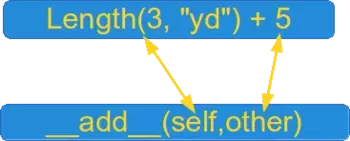
Example class: LengthWe will demonstrate the Length class and how you can overload the "+" operator for your own class. To do this, we have to overload the This class allows us to calculate expressions with mixed units like this one: 2.56 m + 3 yd + 7.8 in + 7.03 cm The class can be used like this: from unit_conversions import Length L = Length print(L(2.56,"m") + L(3,"yd") + L(7.8,"in") + L(7.03,"cm")) OUTPUT:5.57162 The listing of the class: class Length: __metric = {"mm" : 0.001, "cm" : 0.01, "m" : 1, "km" : 1000, "in" : 0.0254, "ft" : 0.3048, "yd" : 0.9144, "mi" : 1609.344 } def __init__(self, value, unit = "m" ): self.value = value self.unit = unit def Converse2Metres(self): return self.value * Length.__metric[self.unit] def __add__(self, other): l = self.Converse2Metres() + other.Converse2Metres() return Length(l / Length.__metric[self.unit], self.unit ) def __str__(self): return str(self.Converse2Metres()) def __repr__(self): return "Length(" + str(self.value) + ", '" + self.unit + "')" if __name__ == "__main__": x = Length(4) print(x) y = eval(repr(x)) z = Length(4.5, "yd") + Length(1) print(repr(z)) print(z) OUTPUT:4 Length(5.593613298337708, 'yd') 5.1148 We use the method def __iadd__(self, other): l = self.Converse2Metres() + other.Converse2Metres() self.value = l / Length.__metric[self.unit] return self Now we are capable of writing the following assignments: x += Length(1) x += Length(4, "yd") We added 1 metre in the example above by writing "x += Length(1))". Most certainly, you will agree with us that it would be more convenient to simply write "x += 1" instead. We also want to treat expressions like "Length(5,"yd") + 4.8" similarly. So, if somebody uses a type int or float, our class takes it automatically for "metre" and converts it into a Length object. It's easy to adapt our def __add__(self, other): if type(other) == int or type(other) == float: l = self.Converse2Metres() + other else: l = self.Converse2Metres() + other.Converse2Metres() return Length(l / Length.__metric[self.unit], self.unit ) def __iadd__(self, other): if type(other) == int or type(other) == float: l = self.Converse2Metres() + other else: l = self.Converse2Metres() + other.Converse2Metres() self.value = l / Length.__metric[self.unit] return self It's a safe bet that if somebody works with adding integers and floats from the right side for a while, he or she will want to have the same from the left side! SWhat will happen, if we execute the following code line:
We will get an exception:
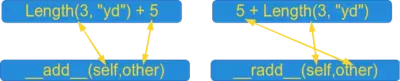
Of course, the left side has to be of type "Length", because otherwise Python tries to apply the Python provides a solution for this problem as well. It's the def __radd__(self, other): if type(other) == int or type(other) == float: l = self.Converse2Metres() + other else: l = self.Converse2Metres() + other.Converse2Metres() return Length(l / Length.__metric[self.unit], self.unit ) It's advisable to make use of the def __radd__(self, other): return Length.__add__(self,other) The following diagram illustrates the relationship between
Live Python training
Enjoying this page? We offer live Python training courses covering the content of this site. Upcoming online Courses See our Python training courses Standard Classes as Base ClassesIt's possible to use standard classes - like int, float, dict or lists - as base classes as well. We extend the list class by adding a push method: class Plist(list): def __init__(self, l): list.__init__(self, l) def push(self, item): self.append(item) if __name__ == "__main__": x = Plist([3,4]) x.push(47) print(x) OUTPUT:[3, 4, 47] This means that all the previously introduced binary and extended assignment operators exist in the "reversed" version as well: Exercises
Exercise 1Write a class with the name Ccy, similar to the previously defined Length class.Ccy should contain values in various currencies, e.g. "EUR", "GBP" or "USD". An instance should contain the amount and the currency unit. The class, you are going to design as an exercise, might be best described with the following example session: Live Python training
Enjoying this page? We offer live Python training courses covering the content of this site. See our Python training courses Solutions to our ExercisesSolution to Exercise 1""" The class "Ccy" can be used to define money values in various currencies. A Ccy instance has the string attributes 'unit' (e.g. 'CHF', 'CAD' od 'EUR' and the 'value' as a float. A currency object consists of a value and the corresponding unit. """ class Ccy: currencies = {'CHF': 1.0821202355817312, 'CAD': 1.488609845538393, 'GBP': 0.8916546282920325, 'JPY': 114.38826536281809, 'EUR': 1.0, 'USD': 1.11123458162018} def __init__(self, value, unit="EUR"): self.value = value self.unit = unit def __str__(self): return "{0:5.2f}".format(self.value) + " " + self.unit def changeTo(self, new_unit): """ An Ccy object is transformed from the unit "self.unit" to "new_unit" """ self.value = (self.value / Ccy.currencies[self.unit] * Ccy.currencies[new_unit]) self.unit = new_unit def __add__(self, other): """ Defines the '+' operator. If other is a CCy object the currency values are added and the result will be the unit of self. If other is an int or a float, other will be treated as a Euro value. """ if type(other) == int or type(other) == float: x = (other * Ccy.currencies[self.unit]) else: x = (other.value / Ccy.currencies[other.unit] * Ccy.currencies[self.unit]) return Ccy(x + self.value, self.unit) def __iadd__(self, other): """ Similar to __add__ """ if type(other) == int or type(other) == float: x = (other * Ccy.currencies[self.unit]) else: x = (other.value / Ccy.currencies[other.unit] * Ccy.currencies[self.unit]) self.value += x return self def __radd__(self, other): res = self + other if self.unit != "EUR": res.changeTo("EUR") return res # __sub__, __isub__ and __rsub__ can be defined analogue OUTPUT:Overwriting currencies.py from currencies import Ccy x = Ccy(10,"USD") y = Ccy(11) z = Ccy(12.34, "JPY") z = 7.8 + x + y + 255 + z print(z) lst = [Ccy(10,"USD"), Ccy(11), Ccy(12.34, "JPY"), Ccy(12.34, "CAD")] z = sum(lst) print(z) OUTPUT:282.91 EUR 28.40 EUR Another interesting aspect of this currency converter class in Python can be shown, if we add multiplication. You will easily understand that it makes no sense to allow expressions like """ The class "Ccy" can be used to define money values in various currencies. A Ccy instance has the string attributes 'unit' (e.g. 'CHF', 'CAD' od 'EUR' and the 'value' as a float. A currency object consists of a value and the corresponding unit. """ class Ccy: currencies = {'CHF': 1.0821202355817312, 'CAD': 1.488609845538393, 'GBP': 0.8916546282920325, 'JPY': 114.38826536281809, 'EUR': 1.0, 'USD': 1.11123458162018} def __init__(self, value, unit="EUR"): self.value = value self.unit = unit def __str__(self): return "{0:5.2f}".format(self.value) + " " + self.unit def __repr__(self): return 'Ccy(' + str(self.value) + ', "' + self.unit + '")' def changeTo(self, new_unit): """ An Ccy object is transformed from the unit "self.unit" to "new_unit" """ self.value = (self.value / Ccy.currencies[self.unit] * Ccy.currencies[new_unit]) self.unit = new_unit def __add__(self, other): """ Defines the '+' operator. If other is a CCy object the currency values are added and the result will be the unit of self. If other is an int or a float, other will be treated as a Euro value. """ if type(other) == int or type(other) == float: x = (other * Ccy.currencies[self.unit]) else: x = (other.value / Ccy.currencies[other.unit] * Ccy.currencies[self.unit]) return Ccy(x + self.value, self.unit) def __iadd__(self, other): """ Similar to __add__ """ if type(other) == int or type(other) == float: x = (other * Ccy.currencies[self.unit]) else: x = (other.value / Ccy.currencies[other.unit] * Ccy.currencies[self.unit]) self.value += x return self def __radd__(self, other): res = self + other if self.unit != "EUR": res.changeTo("EUR") return res # __sub__, __isub__ and __rsub__ can be defined analogue def __mul__(self, other): """ Multiplication is only defined as a scalar multiplication, i.e. a money value can be multiplied by an int or a float. It is not possible to multiply to money values """ if type(other)==int or type(other)==float: return Ccy(self.value * other, self.unit) else: raise TypeError("unsupported operand type(s) for *: 'Ccy' and " + type(other).__name__) def __rmul__(self, other): return self.__mul__(other) def __imul__(self, other): if type(other)==int or type(other)==float: self.value *= other return self else: raise TypeError("unsupported operand type(s) for *: 'Ccy' and " + type(other).__name__) OUTPUT:Overwriting currency_converter.py Assuming that you have saved the class under the name currency_converter, you can use it in the following way in the command shell: from currency_converter import Ccy x = Ccy(10.00, "EUR") y = Ccy(10.00, "GBP") x + y OUTPUT:Ccy(21.215104685942173, "EUR") print(x + y) OUTPUT:21.22 EUR print(2*x + y*0.9) OUTPUT:30.09 EUR Footnotes
Live Python training
Enjoying this page? We offer live Python training courses covering the content of this site. Upcoming online Courses See our Python training courses | ||||||||||||||||||||||||||||||||||||||||||||||||||||||||||||||||||||||||||||||||||||||||
| You are visitor 01402503 — GeezerVison does not store the pages you look up. Best viewed with Netscape Navigator 4.7 or Internet Explorer 6 at 800×600. No cookies required. |