GeezerVisonThe World Wide Web, restored to 800 pixels of glory. |
| Home|About|Gaming cabinet|Archives|How it works|Starter sites |
GeezerVison is showing python-course.eu — 31. Packages | Python Tutorial | python-course.eu 31. PackagesBy Bernd Klein. Last modified: 08 Nov 2023. On this page ➤ IntroductionWe learned that modules are files containing Python statements and definitions, like function and class definitions. We will learn in this chapter how to bundle multiple modules together to form a package. A package is basically a directory with Python files and a file with the name Packages are a way of structuring Python’s module namespace by using "dotted module names". A.B stands for a submodule named B in a package named A. Two different packages like P1 and P2 can both have modules with the same name, let's say A, for example. The submodule A of the package P1 and the submodule A of the package P2 can be totally different. A package is imported like a "normal" module. We will start this chapter with a simple example. Live Python training 
Enjoying this page? We offer live Python training courses covering the content of this site. See our Python training courses A Simple Example
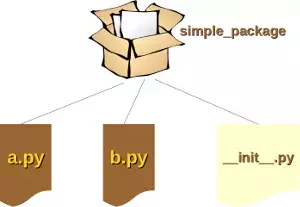
We will demonstrate with a very simple example how to create a package with some Python modules. First of all, we need a directory. The name of this directory will be the name of the package, which we want to create. We will call our package "simple_package". This directory needs to contain a file with the name The content of a.py: def bar(): print("Hello, function 'bar' from module 'a' calling") The content of b.py: def foo(): print("Hello, function 'foo' from module 'b' calling") We will also add an empty file with the name Let's see what happens, when we import simple_package from the interactive Python shell, assuming that the directory simple_package is either in the directory from which you call the shell or that it is contained in the search path or environment variable "PYTHONPATH" (from your operating system): import simple_package simple_package/a OUTPUT:--------------------------------------------------------------------------- NameError Traceback (most recent call last) <ipython-input-3-347df8a711cc> in <module> ----> 1 simple_package/a NameError: name 'a' is not defined simple_package/b OUTPUT:--------------------------------------------------------------------------- NameError Traceback (most recent call last) <ipython-input-4-e71d2904d2bd> in <module> ----> 1 simple_package/b NameError: name 'b' is not defined We can see that the package simple_package has been loaded but neither the module "a" nor the module "b"! We can import the modules a and b in the following way: from simple_package import a, b a.bar() b.foo() OUTPUT:Hello, function 'bar' from module 'a' calling Hello, function 'foo' from module 'b' calling As we have seen at the beginning of the chapter, we can't access neither "a" nor "b" by solely importing simple_package. Yet, there is a way to automatically load these modules. We can use the file
import simple_package.a
import simple_package.b
It will work now:
import simple_package simple_package.a.bar() simple_package.b.foo() OUTPUT:Hello, function 'bar' from module 'a' calling Hello, function 'foo' from module 'b' calling A More Complex PackageWe will demonstrate in the following example how we can create a more complex package. We will use the hypothetical sound-Modul which is used in the official tutorial. (see https://docs.python.org/3/tutorial/modules.html) sound |-- effects | |-- echo.py | |-- __init__.py | |-- reverse.py | `-- surround.py |-- filters | |-- equalizer.py | |-- __init__.py | |-- karaoke.py | `-- vocoder.py |-- formats | |-- aiffread.py | |-- aiffwrite.py | |-- auread.py | |-- auwrite.py | |-- __init__.py | |-- wavread.py | `-- wavwrite.py `-- __init__.py We will implement a dummy - just empty files with the right names - implementation of this structure. We will provide various variations of the implementations. To differentiate between the implementations we will call the modules soound1, sound2, sound3, and sound4. Basically, they should all be called
We will start with the package If we import the package import sound1 print(sound1) print(sound1.effects) OUTPUT:<module 'sound1' from '/data/Dropbox (Bodenseo)/Bodenseo Team Folder/melisa/notebooks_en/sound1/__init__.py'> --------------------------------------------------------------------------- AttributeError Traceback (most recent call last) <ipython-input-2-0b6d7fed3b24> in <module> 3 print(sound1) 4 ----> 5 print(sound1.effects) AttributeError: module 'sound1' has no attribute 'effects' If you also want to use the package effects, you have to import it explicitly with import sound.effects: import sound1.effects print(sound1.effects) OUTPUT:<module 'sound1.effects' from '/data/Dropbox (Bodenseo)/Bodenseo Team Folder/melisa/notebooks_en/sound1/effects/__init__.py'> It is possible to have the submodule importing done automatically when importing the """An empty sound package
This is the sound package, providing hardly anything!"""
import sound2.effects
print("sound2.effects package is getting imported!")
)
If we import the package import sound2 OUTPUT:sound2 package is getting imported! Instead of using an absolute path we could have imported the effects-package relative to the sound package. """An empty sound package
This is the sound package, providing hardly anything!"""
from . import effects
print("sound package is getting imported!")
We will demonstrate this in the module import sound3 OUTPUT:effects package is getting imported! It is also possible to automatically import the package formats, when we are importing the effects package. We can also do this with a relative path, which we will include into the from .. import formats Importing import sound4 To end this subchapter we want to show how to import the module karaoke from the package filters when we import the effects package. For this purpose we add the line from ..filters import karaoke into the """An empty effects package
This is the effects package, providing hardly anything!"""
from .. import formats
from ..filters import karaoke
print("effects package is getting imported!")
Importing sound results in the following output: import sound5 OUTPUT:formats package is getting imported! importing from the effects package: formats module is getting imported! filters package is getting imported! Module karaoke.py has been loaded! karaoke module is getting imported! effects package is getting imported! We can access and use the functions of karaoke now: sound5.filters.karaoke.func1() OUTPUT:Funktion func1 has been called! Live Python training
Enjoying this page? We offer live Python training courses covering the content of this site. Upcoming online Courses See our Python training courses Importing a Complete PackageFor the next subchapter we will use again the initial example from the previous subchapter of our tutorial. We will add a module (file) foobar (filename: from sound6 import * OUTPUT:sound package is getting imported! So we get the comforting message that the sound package has been imported. Yet, if we check with the dir function, we see that neither the module foobar nor the subpackages effects, filters and formats have been imported: for mod in ['foobar', 'effects', 'filters', 'formats']: print(mod, mod in dir()) OUTPUT:foobar False effects False filters False formats False Python provides a mechanism to give an explicit index of the subpackages and modules of a packages, which should be imported. For this purpose, we can define a list named We will add now the line __all__ = ["formats", "filters", "effects", "foobar"] to the from sound7 import * OUTPUT:sound package is getting imported! formats package is getting imported! filters package is getting imported! effects package is getting imported! foobar module is getting imported Even though it is already apparent that all the modules have been imported, we can check with dir again: for mod in ['foobar', 'effects', 'filters', 'formats']: print(mod, mod in dir()) OUTPUT:foobar True effects True filters True formats True The next question is what will be imported, if we use * in a subpackage: from sound.effects import * sound package is getting imported! effects package is getting imported! dir() ['__builtins__', '__doc__', '__loader__', '__name__', '__package__', '__spec__'] Like expected the modules inside of effects have not been imported automatically. So we can add the following We have to add to the
Now we get the intended result: from sound8 import * OUTPUT:sound package is getting imported! formats package is getting imported! filters package is getting imported! effects package is getting imported! foobar module is getting imported from sound8.effects import * OUTPUT:Module echo.py has been loaded! Module surround.py has been loaded! Module reverse.py has been loaded! from sound8.filters import * OUTPUT:Module equalizer.py has been loaded! Module karaoke.py has been loaded! Module vocoder.py has been loaded! from sound8.formats import * OUTPUT:Module aiffread.py has been loaded! Module aiffwrite.py has been loaded! Module auread.py has been loaded! Module auwrite.py has been loaded! Module wavread.py has been loaded! Module wavwrite.py has been loaded! Although certain modules are designed to export only names that follow certain patterns when you use import , it is still considered bad practice. The recommended way is to import specific modules from a package instead of using . Live Python training
Enjoying this page? We offer live Python training courses covering the content of this site. Upcoming online Courses See our Python training courses |
| You are visitor 01402503 — GeezerVison does not store the pages you look up. Best viewed with Netscape Navigator 4.7 or Internet Explorer 6 at 800×600. No cookies required. |