GeezerVisonThe World Wide Web, restored to 800 pixels of glory. |
| Home|About|Gaming cabinet|Archives|How it works|Starter sites |
GeezerVison is showing python-course.eu — 7. Type Annotations | Python Tutorial | python-course.eu 7. Type AnnotationsBy Melisa Atay. Last modified: 05 Jul 2022. On this page ➤ If you know another programming language such as C or C++, you are used to declaring what data type you are working with. For example, this is how you would declare an integer in C. int a; from this moment on, we know that "a" is of type integer. Then we would maybe assign an integer to a. a = 3 However we don't do it like that in Python. Let's go through what we already know. a = 3 print(type(a)) OUTPUT:<class 'int'> As a is assigned an integer, it belongs to the integer class itself, without us having to say a = int() beforehand. a's data type would change accordingly, when it is assigned values from other data types. a = 'hello' print(type(a)) OUTPUT:<class 'str'> a = 3.14 print(type(a)) OUTPUT:<class 'float'> If Python is capable of determining the types itself, why are even type annotations useful? Type Annotations: Why
Live Python training 
Enjoying this page? We offer live Python training courses covering the content of this site. See our Python training courses Type Annotations: HowExample 1In this example you see the def my_function(a:int,b:str)->int: return a + ord(b) print(my_function(3,'a')) OUTPUT:100
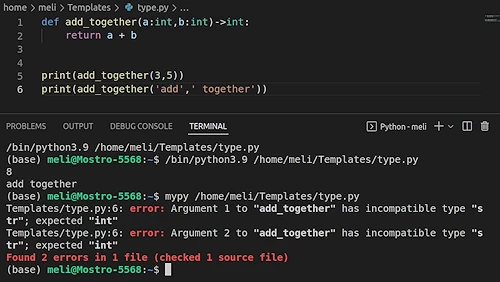
print(my_function(3,5)) OUTPUT:--------------------------------------------------------------------------- TypeError Traceback (most recent call last) /tmp/ipykernel_19492/488431691.py in <module> ----> 1 print(my_function(3,5)) /tmp/ipykernel_19492/2046822703.py in my_function(a, b) 1 def my_function(a:int,b:str)->int: ----> 2 return a + ord(b) TypeError: ord() expected string of length 1, but int found Here we receive a print(my_function('a','a')) OUTPUT:--------------------------------------------------------------------------- TypeError Traceback (most recent call last) /tmp/ipykernel_19492/1936946746.py in <module> ----> 1 print(my_function('a','a')) /tmp/ipykernel_19492/2046822703.py in my_function(a, b) 1 def my_function(a:int,b:str)->int: ----> 2 return a + ord(b) TypeError: can only concatenate str (not "int") to str Here we receive another print(my_function(4.2,'a')) OUTPUT:101.2 Interestingly our function runs now, yet our argument a is of type float and not integer as we declared at the very beginning. Example 2:In this example, we are going to see how the functions can be given variables that can work without raising any errors. However, that can be still be very problematic. def add_together(a:int,b:int)->int: return a + b def return_the_last_digit(a:int)->int: return a % 10 our_sum = add_together(38,57) print(return_the_last_digit(our_sum)) OUTPUT:5 our_sum = add_together('add',' together') print(return_the_last_digit(our_sum)) OUTPUT:--------------------------------------------------------------------------- TypeError Traceback (most recent call last) /tmp/ipykernel_19492/576833914.py in <module> ----> 1 print(return_the_last_digit(our_sum)) /tmp/ipykernel_19492/1809188113.py in return_the_last_digit(a) 1 def return_the_last_digit(a:int)->int: ----> 2 return a % 10 TypeError: not all arguments converted during string formatting How can we run a TypeError check before we actually run the program?By installing
All in all, type annotations are very useful and it can save a lot of time for you and it can make your code readable for both yourself and the others. Live Python training
Enjoying this page? We offer live Python training courses covering the content of this site. Upcoming online Courses See our Python training courses |
| You are visitor 01402503 — GeezerVison does not store the pages you look up. Best viewed with Netscape Navigator 4.7 or Internet Explorer 6 at 800×600. No cookies required. |