GeezerVisonThe World Wide Web, restored to 800 pixels of glory. | ||
| Home|About|Gaming cabinet|Archives|How it works|Starter sites | ||
GeezerVison is showing python-dependency-injector.ets-labs.org — CLI application tutorial — Dependency Injector 4.49.1 documentation CLI application tutorial¶This tutorial shows how to build a CLI application following the dependency injection principle. Start from the scratch or jump to the section: You can find complete project on the Github. What are we going to build?¶We will build a CLI application that helps to search for the movies. Let’s call it Movie Lister. How does Movie Lister work?
Movie Lister is a naive example from Martin Fowler’s article about the dependency injection and inversion of control: Here is a class diagram of the Movie Lister application: 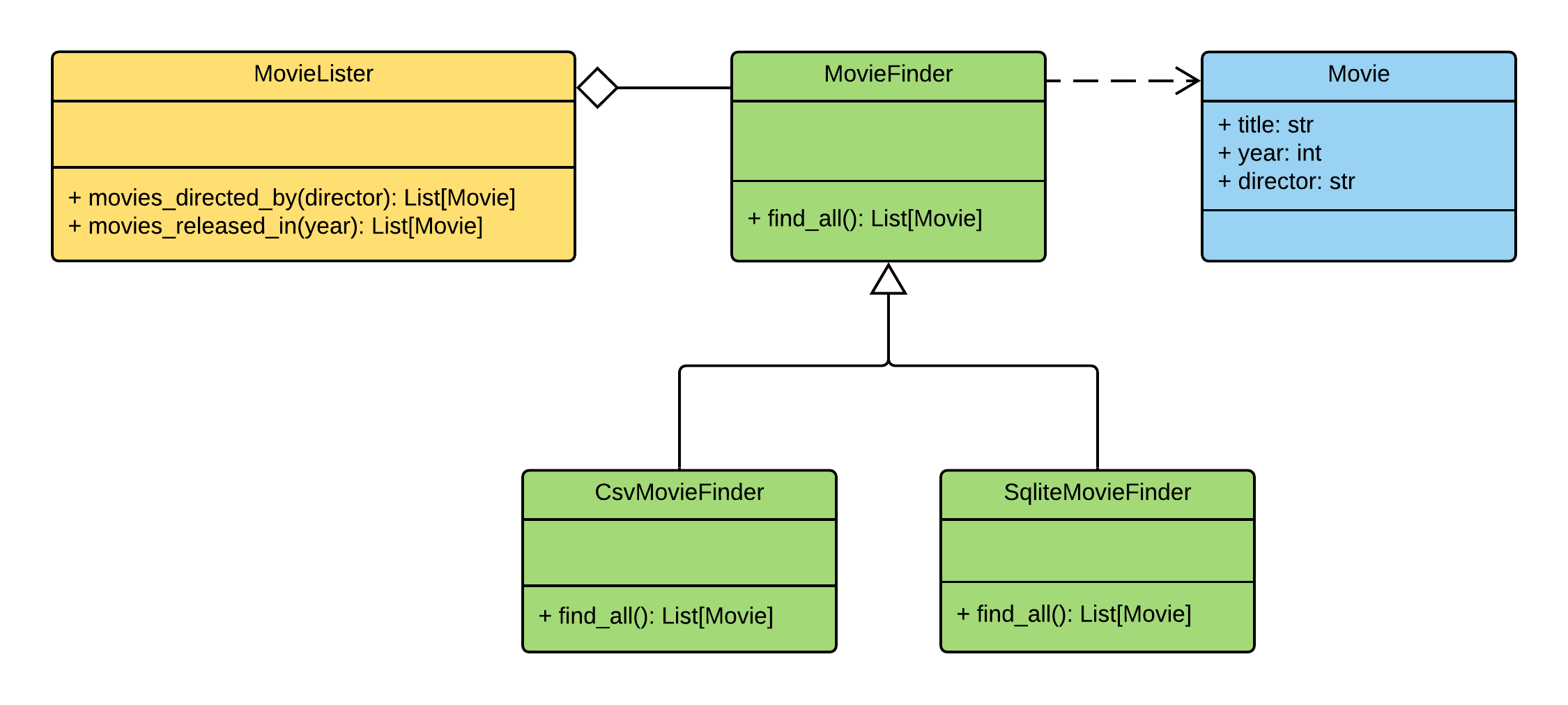
The responsibilities are split next way:
Prepare the environment¶Let’s create the environment for the project. First we need to create a project folder: mkdir movie-lister-tutorial cd movie-lister-tutorial Now let’s create and activate virtual environment: python3 -m venv venv . venv/bin/activate Project layout¶Create next structure in the project root directory. All files are empty. That’s ok for now. Initial project layout: ./ ├── movies/ │ ├── __init__.py │ ├── __main__.py │ └── containers.py ├── venv/ ├── config.yml └── requirements.txt Move on to the project requirements. Install the requirements¶Now it’s time to install the project requirements. We will use next packages:
Put next lines into the dependency-injector pyyaml pytest pytest-cov and run next in the terminal: pip install -r requirements.txt The requirements are setup. Now we will add the fixtures. Fixtures¶In this section we will add the fixtures. We will create a script that creates database files. First add the folder ./ ├── data/ │ └── fixtures.py ├── movies/ │ ├── __init__.py │ ├── __main__.py │ └── containers.py ├── venv/ ├── config.yml └── requirements.txt Second put next in the """Fixtures module.""" import csv import sqlite3 import pathlib SAMPLE_DATA = [ ("The Hunger Games: Mockingjay - Part 2", 2015, "Francis Lawrence"), ("Rogue One: A Star Wars Story", 2016, "Gareth Edwards"), ("The Jungle Book", 2016, "Jon Favreau"), ] FILE = pathlib.Path(__file__) DIR = FILE.parent CSV_FILE = DIR / "movies.csv" SQLITE_FILE = DIR / "movies.db" def create_csv(movies_data, path): with open(path, "w") as opened_file: writer = csv.writer(opened_file) for row in movies_data: writer.writerow(row) def create_sqlite(movies_data, path): with sqlite3.connect(path) as db: db.execute( "CREATE TABLE IF NOT EXISTS movies " "(title text, year int, director text)" ) db.execute("DELETE FROM movies") db.executemany("INSERT INTO movies VALUES (?,?,?)", movies_data) def main(): create_csv(SAMPLE_DATA, CSV_FILE) create_sqlite(SAMPLE_DATA, SQLITE_FILE) print("OK") if __name__ == "__main__": main() Now run in the terminal: python data/fixtures.py
You should see: OK Check that files ./ ├── data/ │ ├── fixtures.py │ ├── movies.csv │ └── movies.db ├── movies/ │ ├── __init__.py │ ├── __main__.py │ └── containers.py ├── venv/ ├── config.yml └── requirements.txt Fixtures are created. Let’s move on. Container¶In this section we will add the main part of our application - the container. Container will keep all of the application components and their dependencies. Edit """Containers module.""" from dependency_injector import containers class Container(containers.DeclarativeContainer): ... Container is empty for now. We will add the providers in the following sections. Let’s also create the Edit """Main module.""" from .containers import Container def main() -> None: ... if __name__ == "__main__": container = Container() main() Csv finder¶In this section we will build everything we need for working with the csv file formats. We will add:
After each step we will add the provider to the container. 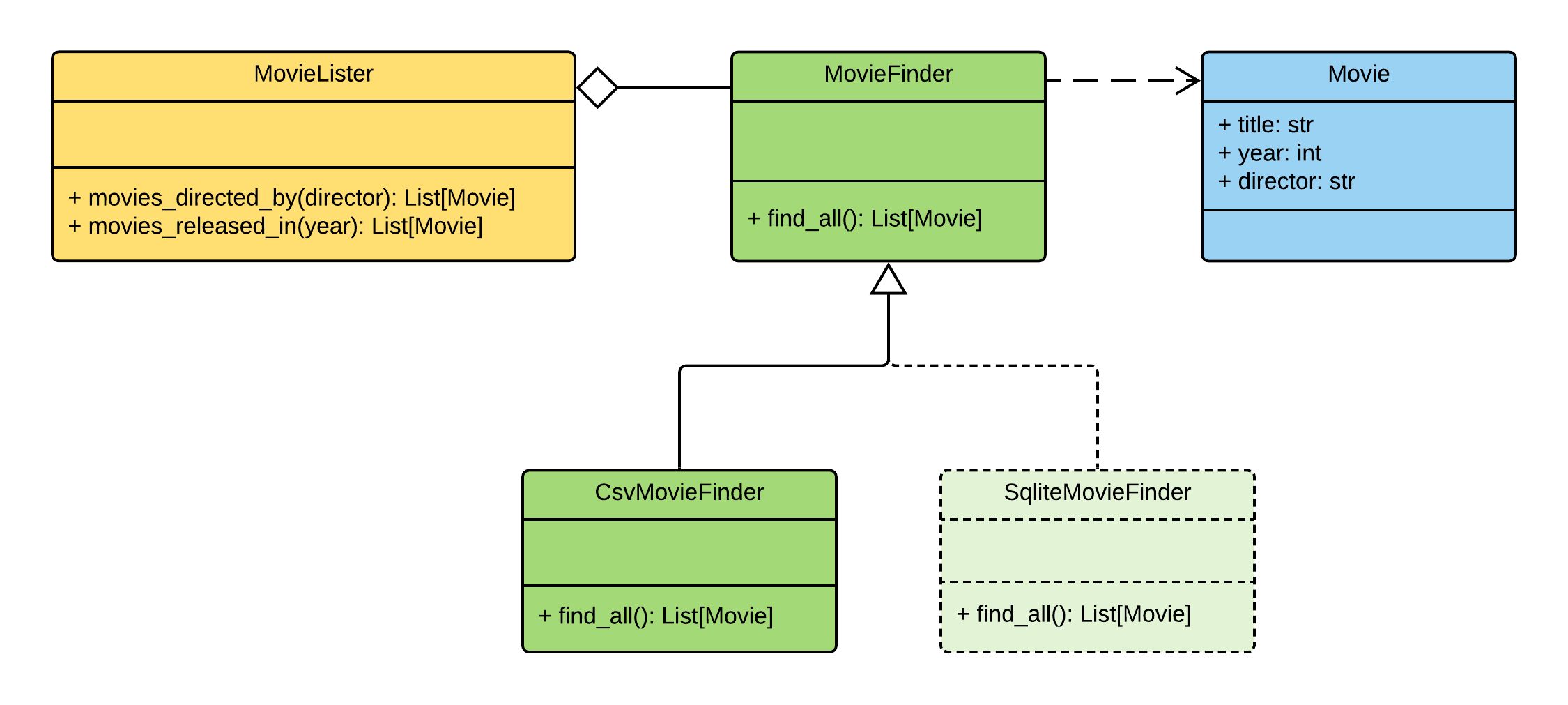
Create the ./
├── data/
│ ├── fixtures.py
│ ├── movies.csv
│ └── movies.db
├── movies/
│ ├── __init__.py
│ ├── __main__.py
│ ├── containers.py
│ └── entities.py
├── venv/
├── config.yml
└── requirements.txt
and put next into it: """Movie entities module.""" class Movie: def __init__(self, title: str, year: int, director: str): self.title = str(title) self.year = int(year) self.director = str(director) def __repr__(self): return "{0}(title={1}, year={2}, director={3})".format( self.__class__.__name__, repr(self.title), repr(self.year), repr(self.director), ) Now we need to add the Edit """Containers module.""" from dependency_injector import containers, providers from . import entities class Container(containers.DeclarativeContainer): movie = providers.Factory(entities.Movie) Note Don’t forget to remove the Ellipsis Let’s move on to the finders. Create the ./
├── data/
│ ├── fixtures.py
│ ├── movies.csv
│ └── movies.db
├── movies/
│ ├── __init__.py
│ ├── __main__.py
│ ├── containers.py
│ ├── entities.py
│ └── finders.py
├── venv/
├── config.yml
└── requirements.txt
and put next into it: """Movie finders module.""" import csv from typing import Callable, List from .entities import Movie class MovieFinder: def __init__(self, movie_factory: Callable[..., Movie]) -> None: self._movie_factory = movie_factory def find_all(self) -> List[Movie]: raise NotImplementedError() class CsvMovieFinder(MovieFinder): def __init__( self, movie_factory: Callable[..., Movie], path: str, delimiter: str, ) -> None: self._csv_file_path = path self._delimiter = delimiter super().__init__(movie_factory) def find_all(self) -> List[Movie]: with open(self._csv_file_path) as csv_file: csv_reader = csv.reader(csv_file, delimiter=self._delimiter) return [self._movie_factory(*row) for row in csv_reader] Now let’s add the csv finder into the container. Edit """Containers module.""" from dependency_injector import containers, providers from . import finders, entities class Container(containers.DeclarativeContainer): config = providers.Configuration(yaml_files=["config.yml"]) movie = providers.Factory(entities.Movie) csv_finder = providers.Singleton( finders.CsvMovieFinder, movie_factory=movie.provider, path=config.finder.csv.path, delimiter=config.finder.csv.delimiter, ) The csv finder needs the movie factory. It needs it to create the The csv finder also has a few dependencies on the configuration options. We added a configuration provider to provide these dependencies and specified the location of the configuration file. The configuration provider will parse the configuration file when we create a container instance. Not let’s define the configuration values. Edit finder: csv: path: "data/movies.csv" delimiter: "," The configuration file is ready. Move on to the lister. Create the ./
├── data/
│ ├── fixtures.py
│ ├── movies.csv
│ └── movies.db
├── movies/
│ ├── __init__.py
│ ├── __main__.py
│ ├── containers.py
│ ├── entities.py
│ ├── finders.py
│ └── listers.py
├── venv/
├── config.yml
└── requirements.txt
and put next into it: """Movie listers module.""" from .finders import MovieFinder class MovieLister: def __init__(self, movie_finder: MovieFinder): self._movie_finder = movie_finder def movies_directed_by(self, director): return [ movie for movie in self._movie_finder.find_all() if movie.director == director ] def movies_released_in(self, year): return [ movie for movie in self._movie_finder.find_all() if movie.year == year ] and edit """Containers module.""" from dependency_injector import containers, providers from . import finders, listers, entities class Container(containers.DeclarativeContainer): config = providers.Configuration(yaml_files=["config.yml"]) movie = providers.Factory(entities.Movie) csv_finder = providers.Singleton( finders.CsvMovieFinder, movie_factory=movie.provider, path=config.finder.csv.path, delimiter=config.finder.csv.delimiter, ) lister = providers.Factory( listers.MovieLister, movie_finder=csv_finder, ) All the components are created and added to the container. Let’s inject the Edit """Main module.""" from dependency_injector.wiring import Provide, inject from .listers import MovieLister from .containers import Container @inject def main(lister: MovieLister = Provide[Container.lister]) -> None: ... if __name__ == "__main__": container = Container() container.wire(modules=[__name__]) main() Now when we call Let’s add some payload to Edit """Main module.""" from dependency_injector.wiring import Provide, inject from .listers import MovieLister from .containers import Container @inject def main(lister: MovieLister = Provide[Container.lister]) -> None: print("Francis Lawrence movies:") for movie in lister.movies_directed_by("Francis Lawrence"): print("\t-", movie) print("2016 movies:") for movie in lister.movies_released_in(2016): print("\t-", movie) if __name__ == "__main__": container = Container() container.wire(modules=[__name__]) main() All set. Now we run the application. Run in the terminal: python -m movies You should see: Francis Lawrence movies:
- Movie(title='The Hunger Games: Mockingjay - Part 2', year=2015, director='Francis Lawrence')
2016 movies:
- Movie(title='Rogue One: A Star Wars Story', year=2016, director='Gareth Edwards')
- Movie(title='The Jungle Book', year=2016, director='Jon Favreau')
Our application can work with the movies database in the csv format. We also want to support the sqlite format. We will deal with it in the next section. Sqlite finder¶In this section we will add another type of the finder - the sqlite finder. Let’s get to work. Edit """Movie finders module.""" import csv import sqlite3 from typing import Callable, List from .entities import Movie class MovieFinder: def __init__(self, movie_factory: Callable[..., Movie]) -> None: self._movie_factory = movie_factory def find_all(self) -> List[Movie]: raise NotImplementedError() class CsvMovieFinder(MovieFinder): def __init__( self, movie_factory: Callable[..., Movie], path: str, delimiter: str, ) -> None: self._csv_file_path = path self._delimiter = delimiter super().__init__(movie_factory) def find_all(self) -> List[Movie]: with open(self._csv_file_path) as csv_file: csv_reader = csv.reader(csv_file, delimiter=self._delimiter) return [self._movie_factory(*row) for row in csv_reader] class SqliteMovieFinder(MovieFinder): def __init__( self, movie_factory: Callable[..., Movie], path: str, ) -> None: self._database = sqlite3.connect(path) super().__init__(movie_factory) def find_all(self) -> List[Movie]: with self._database as db: rows = db.execute("SELECT title, year, director FROM movies") return [self._movie_factory(*row) for row in rows] Now we need to add the sqlite finder to the container and update lister’s dependency to use it. Edit """Containers module.""" from dependency_injector import containers, providers from . import finders, listers, entities class Container(containers.DeclarativeContainer): config = providers.Configuration(yaml_files=["config.yml"]) movie = providers.Factory(entities.Movie) csv_finder = providers.Singleton( finders.CsvMovieFinder, movie_factory=movie.provider, path=config.finder.csv.path, delimiter=config.finder.csv.delimiter, ) sqlite_finder = providers.Singleton( finders.SqliteMovieFinder, movie_factory=movie.provider, path=config.finder.sqlite.path, ) lister = providers.Factory( listers.MovieLister, movie_finder=sqlite_finder, ) The sqlite finder has a dependency on the configuration option. Let’s update the configuration file. Edit finder: csv: path: "data/movies.csv" delimiter: "," sqlite: path: "data/movies.db" All is ready. Let’s check. Run in the terminal: python -m movies You should see: Francis Lawrence movies:
- Movie(title='The Hunger Games: Mockingjay - Part 2', year=2015, director='Francis Lawrence')
2016 movies:
- Movie(title='Rogue One: A Star Wars Story', year=2016, director='Gareth Edwards')
- Movie(title='The Jungle Book', year=2016, director='Jon Favreau')
Our application now supports both formats: csv files and sqlite databases. Every time when we need to work with the different format we need to make a code change in the container. We will improve this in the next section. Selector¶In this section we will make our application more flexible. The code change will not be needed to switch between csv and sqlite formats. We implement the
switch based on the environment variable
We will use the Edit """Containers module.""" from dependency_injector import containers, providers from . import finders, listers, entities class Container(containers.DeclarativeContainer): config = providers.Configuration(yaml_files=["config.yml"]) movie = providers.Factory(entities.Movie) csv_finder = providers.Singleton( finders.CsvMovieFinder, movie_factory=movie.provider, path=config.finder.csv.path, delimiter=config.finder.csv.delimiter, ) sqlite_finder = providers.Singleton( finders.SqliteMovieFinder, movie_factory=movie.provider, path=config.finder.sqlite.path, ) finder = providers.Selector( config.finder.type, csv=csv_finder, sqlite=sqlite_finder, ) lister = providers.Factory( listers.MovieLister, movie_finder=finder, ) The switch is the Now we need to read the value of the Edit """Main module.""" from dependency_injector.wiring import Provide, inject from .listers import MovieLister from .containers import Container @inject def main(lister: MovieLister = Provide[Container.lister]) -> None: print("Francis Lawrence movies:") for movie in lister.movies_directed_by("Francis Lawrence"): print("\t-", movie) print("2016 movies:") for movie in lister.movies_released_in(2016): print("\t-", movie) if __name__ == "__main__": container = Container() container.config.finder.type.from_env("MOVIE_FINDER_TYPE") container.wire(modules=[sys.modules[__name__]]) main() Done. Run in the terminal line by line: MOVIE_FINDER_TYPE=csv python -m movies MOVIE_FINDER_TYPE=sqlite python -m movies The output should be similar for each command: Francis Lawrence movies:
- Movie(title='The Hunger Games: Mockingjay - Part 2', year=2015, director='Francis Lawrence')
2016 movies:
- Movie(title='Rogue One: A Star Wars Story', year=2016, director='Gareth Edwards')
- Movie(title='The Jungle Book', year=2016, director='Jon Favreau')
In the next section we will add some tests. Tests¶It would be nice to add some tests. Let’s do it. We will use pytest and coverage. Create ./
├── data/
│ ├── fixtures.py
│ ├── movies.csv
│ └── movies.db
├── movies/
│ ├── __init__.py
│ ├── __main__.py
│ ├── containers.py
│ ├── entities.py
│ ├── finders.py
│ ├── listers.py
│ └── tests.py
├── venv/
├── config.yml
└── requirements.txt
and put next into it: """Tests module.""" from unittest import mock import pytest from .containers import Container @pytest.fixture def container(): container = Container( config={ "finder": { "type": "csv", "csv": { "path": "/fake-movies.csv", "delimiter": ",", }, "sqlite": { "path": "/fake-movies.db", }, }, }, ) return container @pytest.fixture def finder_mock(container): finder_mock = mock.Mock() finder_mock.find_all.return_value = [ container.movie("The 33", 2015, "Patricia Riggen"), container.movie("The Jungle Book", 2016, "Jon Favreau"), ] return finder_mock def test_movies_directed_by(container, finder_mock): with container.finder.override(finder_mock): lister = container.lister() movies = lister.movies_directed_by("Jon Favreau") assert len(movies) == 1 assert movies[0].title == "The Jungle Book" def test_movies_released_in(container, finder_mock): with container.finder.override(finder_mock): lister = container.lister() movies = lister.movies_released_in(2015) assert len(movies) == 1 assert movies[0].title == "The 33" Run in the terminal: pytest movies/tests.py --cov=movies You should see: platform darwin -- Python 3.10.0, pytest-6.2.5, py-1.10.0, pluggy-1.0.0 plugins: cov-3.0.0 collected 2 items movies/tests.py .. [100%] ---------- coverage: platform darwin, python 3.10 ----------- Name Stmts Miss Cover ------------------------------------------ movies/__init__.py 0 0 100% movies/__main__.py 16 16 0% movies/containers.py 9 0 100% movies/entities.py 7 1 86% movies/finders.py 26 13 50% movies/listers.py 8 0 100% movies/tests.py 24 0 100% ------------------------------------------ TOTAL 90 30 67% Note Take a look at the highlights in the We use Conclusion¶In this tutorial we’ve built a CLI application following the dependency injection principle.
We’ve used the With a help of Containers and Providers we have defined how to assemble application components.
We used Wiring feature to inject the dependencies into the We kept all the dependencies injected explicitly. This will help when you need to add or change something in future. You can find complete project on the Github. What’s next?

| ||
| You are visitor 01402503 — GeezerVison does not store the pages you look up. Best viewed with Netscape Navigator 4.7 or Internet Explorer 6 at 800×600. No cookies required. |