Introduction Regular expressions (“regexes”) allow defining a pattern and executing it against strings. Substrings which match the pattern are termed “matches”.
A regular expression is a sequence of characters that define a search pattern .
Regex finds utility in:
input validation find-replace operations advanced string manipulation file search or rename allow lists and deny lists … Simultaneously, regular expressions are ill-suited for other kinds of problems:
parsing XML or HTML exactly matching dates … There are several regex implementations—regex engines—each with its own quirks and features. This book will avoid going into the differences between these, instead sticking to features that are, for the most part, common across engines.
The example blocks throughout the book use JavaScript under the hood. As a result, the book may be slightly biased towards JavaScript’s regex engine.
Basics Regular expressions are typically formatted as /<rules>/<flags>. Often people will drop the slashes and flags for brevity. We’ll get into the details of flags in a later chapter .
Let’s start with the regex /p/g. For now, please take the g flag
/ p / g 1 match p ancake3 matches p ineap p le2 matches ap p le0 matches mango0 matches PlumAs we can see, /p/g matches all lowercase p characters.
Note Regular expressions are case-sensitive by default.
Instances of the regex pattern found in an input string are termed “matches”.
/ pp / g 1 match app le1 match pineapp le1 match happ iness2 matches sipp ing app le juice0 matches papayaCharacter Classes It’s possible to match a character from within a set of characters.
/ [ aeiou] / g 4 matches a vo ca do 2 matches bri nja l3 matches o ni o n0 matches rhythm/[aeiou]/g matches all vowels in our input strings.
Here’s another example of these in action:
/ p[ aeiou] / g 1 match pat 1 match pet 1 match pit 1 match spat 2 matches spot a pet 0 matches batWe match a p, followed by one of the vowels, followed by a t.
There’s an intuitive shortcut for matching a character from within a continuous range .
/ [ a- z ] / g 5 matches j o h n _s 5 matches m a t e j 295 matches Ay e s h a ?!0 matches 49520 matches LOUDWarning The regex /[a-z]/g matches only one character. In the example above, the strings have several matches each, each one character long . Not one long match.
We can combine ranges and individual characters in our regexes.
/ [ A- Z a- z 0- 9 _-] / g 6 matches j o h n _ s 7 matches m a t e j 2 9 6 matches A y e s h a ?!4 matches 4 9 5 2 4 matches L O U D Our regex /[A-Za-z0-9_-]/g matches a single character, which must be (at least) one of the following:
from A-Z from a-z from 0-9 one of _ and -. We can also “negate” these rules:
/ [ ^ aeiou] / g 6 matches U m b r el l a6 matches c aul if l ow er 0 matches ouThe only difference between the first regex of this chapter and /[^aeiou]/g is the ^ immediately after the opening bracket. Its purpose is to negate the rules defined within the brackets. We are now saying:
“match any character that is not any of a, e, i, o, and u”
Examples Prohibited username characters / [ ^ a- z A- Z _0- 9 -] / g 0 matches TheLegend270 matches WaterGuy120 matches Smokie_Bear7 matches Robert' ) ; DROP TABLE Students; --Unambiguous characters / [ A- H J- N P- Z a- k mnp- z 2- 9 ] / g 1 match f oo2 matches li ly 0 matches lI0O111 matches u n a m b i g u i t y Character Escapes Character escapes act as shorthands for some common character classes.
Digit character — \d The character escape \d matches digit characters, from 0 to 9. It is equivalent to the character class [0-9].
/ \d / g 4 matches 2 0 2 0 6 matches 1 0 0 /1 0 0 3 matches It costs $5 .4 5 6 matches 3 .1 4 1 5 9 / \d \d / g 2 matches 20 20 2 matches 10 0/10 01 match It costs $5.45 2 matches 3.14 15 9Note While 59 is also a pair of digits, most engines look for non-overlapping matches from left to right by default.
\D is the negation of \d and is equivalent to [^0-9].
/ \D / g 0 matches 20201 match 100/ 10011 matches I t c o s t s $ 5. 451 match 3. 14159Word character — \w The escape \w matches characters deemed “word characters”. These include:
lowercase alphabet — a–z uppercase alphabet — A–Z digits — 0–9 underscore — _ It is thus equivalent to the character class [a-zA-Z0-9_].
/ \w / g 6 matches j o h n _ s 7 matches m a t e j 2 9 6 matches A y e s h a ?!4 matches 4 9 5 2 4 matches L O U D 4 matches l o -f i 6 matches g e t o u t 6 matches 2 1 *2 = 4 2 (1 )/ \W / g 0 matches john_s2 matches Ayesha? ! 0 matches 49520 matches LOUD1 match lo- fi1 match get out3 matches ; - ; 6 matches 21* 2 = 42( 1) Whitespace character — \s The escape \s matches whitespace characters. The exact set of characters matched is dependent on the regex engine, but most include at least:
space tab — \t carriage return — \r new line — \n form feed — \f Many also include vertical tabs (\v). Unicode-aware engines usually match all characters in the separator category.
The technicalities, however, will usually not be important.
/ \s / g 1 match word word2 matches tabs vs spaces0 matches snake_case.jpg/ \S / g 8 matches w o r d w o r d 12 matches t a b s v s s p a c e s 14 matches s n a k e _ c a s e . j p g Any character — . While not a typical character escape, . matches any1
/ . / g 6 matches j o h n _ s 8 matches A y e s h a ? ! 4 matches 4 9 5 2 4 matches L O U D 5 matches l o - f i 7 matches g e t o u t 3 matches ; - ; 12 matches 2 1 * 2 = 4 2 ( 1 ) Except the newline character \n. This can be changed using the “dotAll” flag , if supported by the regex engine in question.↩ Escapes In regex, some characters have special meanings as we will explore across the chapters:
|{, }(, )[, ]^, $+, *, ?\. — Literal only within character classes.1 - — Sometimes a special character within character classes.When we wish to match these characters literally , we need to “escape” them.
This is done by prefixing the character with a \ .
/ \( paren\) / g 0 matches paren0 matches parents1 match (paren) 1 match a (paren) / ( paren) / g 1 match paren 1 match paren ts1 match (paren )1 match a (paren )/ example\. com / g 1 match example.com 1 match a.example.com /foo0 matches example_com0 matches example@com0 matches example_com/foo/ example. com / g 1 match example.com 1 match a.example.com /foo1 match example_com 1 match example@com 1 match example_com /foo/ A\+ / g 1 match A+ 1 match A+ B1 match 5A+ 0 matches AAA/ A+ / g 1 match A +1 match A +B1 match 5A +1 match AAA / worth \$ 5 / g 1 match worth $5 1 match worth $5 41 match not worth $5 / worth $ 5 / g 0 matches worth $50 matches worth $540 matches not worth $5Examples JavaScript in-line comments / \/ \/ . * / g 1 match console.log(); // comment 1 match console.log(); // // comment 0 matches console.log();Asterisk-surrounded substrings / \* [ ^ \* ] * \* / g 1 match here be *italics* 1 match permitted** 1 match a*b* c*d2 matches a*b* c*d* e0 matches a️bcdThe first and last asterisks are literal since they are escaped — \*.
The asterisk inside the character class does not necessarily need to be escaped1
The asterisk immediately following the character class indicates repetition of the character class , which we’ll explore in chapters that follow.
Many special characters that would otherwise have special meanings are treated literally by default inside character classes.↩ Groups Groups, as the name suggests, are meant to be used to “group” components of regular expressions. These groups can be used to:
We’ll see how to do a lot of this in later chapters, but learning how groups work will allow us to study some great examples in these later chapters.
Capturing groups Capturing groups are denoted by ( … ). Here’s an expository example:
/ a( bcd) e / g 1 match abcde 1 match abcde fg?1 match abcde Capturing groups allow extracting parts of matches.
/ \{ ( [ ^ {}] * ) \} / g 1 match {braces} 2 matches {two} {pairs} 1 match { {nested} }1 match { incomplete } }1 match {} 0 matches {unmatchedUsing your language’s regex functions, you would be able to extract the text between the matched braces for each of these strings.
Capturing groups can also be used to group regex parts for ease of repetition of said group. While we will cover repetition in detail in chapters that follow, here’s an example that demonstrates the utility of groups.
/ a( bcd) + e / g 1 match abcde fg1 match abcdbcde 1 match abcdbcdbcde f0 matches aeOther times, they are used to group logically similar parts of the regex for readability.
/ ( \d \d \d \d ) -W( \d \d ) / g 1 match 2020-W12 1 match 1970-W01 1 match 2050-W50 -61 match 12050-W50 Backreferences Backreferences allow referring to previously captured substrings .
The match from the first group would be \1, that from the second would be \2, and so on…
/ ( [ abc] ) =\1 =\1 / g 1 match a=a=a 1 match ab=b=b 0 matches a=b=cBackreferences cannot be used to reduce duplication in regexes. They refer to the match of groups, not the pattern.
/ [ abc] [ abc] [ abc] / g 1 match abc 1 match a cab le1 match aaa 1 match bbb 1 match ccc / ( [ abc] ) \1 \1 / g 0 matches abc0 matches a cable1 match aaa 1 match bbb 1 match ccc Here’s an example that demonstrates a common use-case:
/ \w + ( [ ,|] ) \w + \1 \w + / g 1 match comma,separated,values 1 match pipe|separated|values 0 matches wb|mixed,delimiters0 matches wb,mixed|delimitersThis cannot be achieved with a repeated character classes.
/ \w + [ ,|] \w + [ ,|] \w + / g 1 match comma,separated,values 1 match pipe|separated|values 1 match wb|mixed,delimiters 1 match wb,mixed|delimiters Non-capturing groups Non-capturing groups are very similar to capturing groups, except that they don’t create “captures”. They take the form (?: … ).
Non-capturing groups are usually used in conjunction with capturing groups. Perhaps you are attempting to extract some parts of the matches using capturing groups. You may wish to use a group without messing up the order of the captures . This is where non-capturing groups come handy.
Examples Query String Parameters / ^ \? ( \w + ) =( \w + ) (?: &( \w + ) =( \w + ) ) * $ / g 0 matches 0 matches ?1 match ?a=b 1 match ?a=b&foo=bar We match the first key-value pair separately because that allows us to use &, the separator, as part of the repeating group.
(Basic) HTML tags As a rule of thumb, do not use regex to match XML/HTML.1 2 3 4
However, it’s a relevant example:
/ <( [ a- z ] + ) + >( . * ) <\/ \1 > / gi 1 match <p>paragraph</p> 1 match <li>list item</li> 1 match <p><span>nesting</span></p> 0 matches <p>hmm</li>1 match <p><p>not clever</p></p></p> Names Find : \b(\w+) (\w+)\b
Replace : $2, $15
Before John Doe
Jane Doe
Sven Svensson
Janez Novak
Janez Kranjski
Tim Joe
After Doe, John
Doe, Jane
Svensson, Sven
Novak, Janez
Kranjski, Janez
Joe, Tim
Backreferences and plurals Find : \bword(s?)\b
Replace : phrase$15
Before This is a paragraph with some words.
Some instances of the word "word" are in their plural form: "words".
Yet, some are in their singular form: "word".
After This is a paragraph with some phrases.
Some instances of the phrase "phrase" are in their plural form: "phrases".
Yet, some are in their singular form: "phrase".
Repetition Repetition is a powerful and ubiquitous regex feature. There are several ways to represent repetition in regex.
Making things optional We can make parts of regex optional using the ? operator.
/ a? / g 1 match 2 matches a 3 matches a a 4 matches a a a 5 matches a a a a 6 matches a a a a a Here’s another example:
/ https? / g 1 match http 1 match https 1 match http /21 match shttp 0 matches ftpHere the s following http is optional.
We can also make capturing and non-capturing groups optional.
/ url: ( www\. ) ? example\. com / g 1 match url: example.com 1 match url: www.example.com /foo1 match Here's the url: example.com .Zero or more If we wish to match zero or more of a token, we can suffix it with *.
/ a* / g 1 match 2 matches a 2 matches aa 2 matches aaa 2 matches aaaa 2 matches aaaaa Our regex matches even an empty string "".
One or more If we wish to match one or more of a token, we can suffix it with a +.
/ a+ / g 0 matches 1 match a 1 match aa 1 match aaa 1 match aaaa 1 match aaaaa Exactly x times If we wish to match a particular token exactly x times, we can suffix it with {x}. This is functionally identical to repeatedly copy-pasting the token x times.
/ a{3} / g 0 matches 0 matches a0 matches aa1 match aaa 1 match aaa a1 match aaa aaHere’s an example that matches an uppercase six-character hex colour code.
/ #[ 0- 9 A- F ] {6} / g 1 match #AE25AE 1 match #663399 1 match How about #73FA79 ?1 match Part of #73FA79 BAC too0 matches #FFF0 matches #a2ca2cHere, the token {6} applies to the character class [0-9A-F].
Between min and max times If we wish to match a particular token between min and max (inclusive) times, we can suffix it with {min,max}.
/ a{2,4} / g 0 matches 0 matches a1 match aa 1 match aaa 1 match aaaa 1 match aaaa aWarning There must be no space after the comma in {min,max}.
At least x times If we wish to match a particular token at least x times, we can suffix it with {x,}. Think of it as {min,max}
/ a{2,} / g 0 matches 0 matches a1 match aa 1 match aaa 1 match aaaa 1 match aaaaa A note on greediness Repetition operators, by default, are greedy . They attempt to match as much as possible.
/ a* / g 2 matches aaa 2 matches aaaa 2 matches aaaaa * can match zero or more instances of a. In each of the example strings, it could just as well match, say, zero as. Yet, it matches as many as it can.
/ a{2,4} / g 1 match aaaa a1 match aaa 1 match aaaa Suffixing a repetition operator (*, +, ?, …) with a ?, one can make it “lazy”.
/ a{2,4} ? / g 2 matches aa aa a1 match aa a2 matches aa aa / ". * " / g 1 match "quote" 1 match "quote", "quote" 1 match "quote"quote" / ". * ? " / g 1 match "quote" 2 matches "quote" , "quote" 1 match "quote" quote"Now, .* matches no more than the minimum necessary to allow a match.1
[…] Lazy will stop as soon as the condition is satisfied , but greedy means it will stop only once the condition is not satisfied any more .
—Andrew S on Stack Overflow
/ <. + > / g 1 match <em>g r e e d y</em> / <. + ? > / g Examples Bitcoin address / ( [ 13] [ a- k m- z A- H J- N P- Z 0- 9 ] {26,33} ) / g 1 match 3Nxwenay9Z8Lc9JBiywExpnEFiLp6Afp8v 1 match 1HQ3Go3ggs8pFnXuHVHRytPCq5fGG8Hbhx 1 match 2016-03-09,18f1yugoAJuXcHAbsuRVLQC9TezJ YouTube Video / (?: https? :\/ \/ ) ? (?: www\. ) ? youtube\. com\/ watch\? . * ? v=( [ ^ &\s ] + ) . * / gm 1 match youtube.com/watch?feature=sth&v=dQw4w9WgXcQ 1 match https://www.youtube.com/watch?v=dQw4w9WgXcQ 1 match www.youtube.com/watch?v=dQw4w9WgXcQ 1 match youtube.com/watch?v=dQw4w9WgXcQ 1 match fakeyoutube.com/watch?v=dQw4w9WgXcQ We can adjust this to not match the last broken link using anchors , which we shall encounter soon.
In this example, we could also achieve this using /"[^"]*"/g (as is best practice).↩ Alternation Alternation allows matching one of several phrases. This is more powerful than character classes, which are limited to characters.
Delimit the set of phrases with pipes—|.
/ foo| bar| baz / g 2 matches foo baz 1 match Your foo d1 match Behind bar sOne of foo, bar, and baz
If only a part of the regex is to be “alternated”, wrap that part with a group —capturing or non-capturing.
/ Try ( foo| bar| baz) / g 1 match Try foo 1 match Try bar 1 match Try baz 1 match Try foo dTry followed by one of foo, bar, and baz
Matching numbers between 100 and 250:
/ 1\d \d | 2[ 0- 4 ] \d | 250 / g 3 matches 100 , 157 , 199 2 matches 139 + 140 = 2791 match 201 INR1 match $220 1 match 250 1 match 125 02 matches e = 2.7182 8182 ...0 matches 2510 matches 729This can be generalized to match arbitrary number ranges !
Examples Hex colours Let’s improve one of our older examples to also match shorthand hex colours.
/ #( [ 0- 9 A- F ] {6} | [ 0- 9 A- F ] {3} ) / g 1 match #AE25AE 1 match #663399 1 match How about #73FA79 ?1 match Part of #73FA79 BAC too1 match #FFF 0 matches #a2ca2cIt is important that [0-9A-F]{6} comes before [0-9A-F]{3}. Else:
/ #( [ 0- 9 A- F ] {3} | [ 0- 9 A- F ] {6} ) / g 1 match #AE2 5AE1 match #663 3991 match How about #73F A79?1 match Part of #73F A79BAC too1 match #FFF 0 matches #a2ca2cTip Regex engines try alternatives from the left to the right.
Roman numerals / ^ M{0,4} ( CM| CD| D? C{0,3} ) ( XC| XL| L? X{0,3} ) ( IX| IV| V? I{0,3} ) $ / g 1 match MMXX 1 match VI 1 match XX 1 match XI 0 matches IXI0 matches VVFlags Flags (or “modifiers”) allow us to put regexes into different “modes”.
Flags are the part after the final / in /pattern/.
Different engines support different flags. We’ll explore some of the most common flags here.
Global (g) All examples thus far have had the global flag. When the global flag isn’t enabled, the regex doesn’t match anything beyond the first match.
/ [ aeiou] / g 3 matches co ro na 2 matches ca nce l0 matches rhythm/ [ aeiou] / 1 match co rona1 match ca ncel0 matches rhythm(Case) Insensitive (i) As the name suggests, enabling this flag makes the regex case-insensitive in its matching.
/ #[ 0- 9 A- F ] {6} / i 1 match #AE25AE 1 match #663399 1 match Even #a2ca2c ?0 matches #FFF/ #[ 0- 9 A- F ] {6} / 1 match #AE25AE 1 match #663399 0 matches Even #a2ca2c?0 matches #FFF/ #[ 0- 9 A- F a- f ] {6} / 1 match #AE25AE 1 match #663399 1 match Even #a2ca2c ?0 matches #FFFMultiline (m) The multiline flag has to do with the regex’s handling of anchors when dealing with “multiline” strings—strings that include newlines (\n). By default, the regex /^foo$/ would match only "foo".
We might want it to match foo when it is in a line by itself in a multiline string.
Let’s take the string "bar\nfoo\nbaz" as an example:
bar
foo
baz
Without the multiline flag, the string above would be considered as a single line bar\nfoo\nbaz for matching purposes. The regex ^foo$ would thus not match anything.
With the multiline flag, the input would be considered as three “lines”: bar, foo, and baz. The regex ^foo$ would match the line in the middle—foo.
Dot-all (s) Limited Support JavaScript, prior to ES2018, did not support this flag. Ruby does not support the flag, instead using m for the same.
The . typically matches any character except newlines. With the dot-all flag, it matches newlines too.
Unicode (u) In the presence of the u flag, the regex and the input string will be interpreted in a unicode-aware way. The details of this are implementation-dependent, but here are some things to expect:
Whitespace extended (x) When this flag is set, whitespace in the pattern is ignored (unless escaped or in a character class ). Additionally, characters following # on any line are ignored. This allows for comments and is useful when writing complex patterns.
Here’s an example from Advanced Examples
^                   # start of line
    (
        [+-]?       # sign
        (?=\.\d|\d) # don't match `.`
        (?:\d+)?    # integer part
        (?:\.?\d*)  # fraction part
    )
    (?:             # optional exponent part
        [eE]
        (
            [+-]?   # optional sign
            \d+     # power
        )
    )?
$                   # end of line
Anchors Anchors do not match anything by themselves. Instead, they place restrictions on where matches may appear—“anchoring” matches.
You could also think about anchors as “invisible characters”.
Beginning of line — ^ Marked by a caret (^) at the beginning of the regex, this anchor makes it necessary for the rest of the regex to match from the beginning of the string .
You can think of it as matching an invisible character always present at the beginning of the string.
/ ^ p/ g 1 match p hotoshop1 match p ineapple0 matches tap0 matches apple1 match p pap0 matches mangoEnd of line — $ This anchor is marked by a dollar ($) at the end of the regex. It is analogous to the beginning of the line anchor.
You can think of it as matching an invisible character always present at the end of the string.
/ p$ / g 1 match photoshop 0 matches pineapple0 matches apple1 match app 0 matches Plum0 matches mangoThe ^ and $ anchors are often used in conjunction to ensure that the regex matches the entirety of the string, rather than merely a part.
/ ^ p$ / g 1 match p 0 matches pi0 matches pea0 matches tarp0 matches appleLet’s revisit an example from Repetition
/ ^ https? $ / g 1 match http 1 match https 0 matches http/20 matches shttp0 matches ftpIn the absence of the anchors, http/2 and shttp would also match.
Word boundary — \b A word boundary is a position between a word character and a non-word character.
The word boundary anchor, \b, matches an imaginary invisible character that exists between consecutive word and non-word characters.
/ \b p/ g 1 match p each1 match banana, p each1 match banana+p each1 match banana-p each0 matches banana_peach0 matches banana%20peach0 matches grapeNote Words characters include a-z, A-Z, 0-9, and _.
/ \b p\b / g 1 match word p word1 match (p )1 match p +q+r0 matches (paren)0 matches (loop)0 matches loops/ \b cat\b / g 1 match cat 1 match the cat ?0 matches catch0 matches concat it0 matches concatenateThere is also a non-word-boundary anchors: \B.
As the name suggests, it matches everything apart from word boundaries.
/ \B p/ g 1 match ap e1 match leap 1 match (leap )0 matches a pot0 matches pea/ \B p\B / g 1 match ap e1 match _p eel0 matches leap0 matches (leap)0 matches a pot0 matches peaTip ^…$ and \b…\b are common patterns and you will almost always need one or the other to prevent accidental matches.
Examples Trailing whitespace / \s + $ / gm 1 match abc 1 match def 0 matches abc defMarkdown headings / ^ ## / gm 0 matches # Heading 11 match ## Heading 20 matches ### Heading 30 matches #### Heading 4Without anchors:
/ ## / gm 0 matches # Heading 11 match ## Heading 21 match ### Heading 31 match #### Heading 4Lookaround Note This section is a Work In Progress.
Lookarounds can be used to verify conditions, without matching any text.
You’re only look ing, not moving.
LookaheadPositive — (?=…) Negative — (?!…) LookbehindPositive — (?<=…) Negative — (?<!…) Lookahead Positive / _(?= [ aeiou] ) / g 1 match _ a1 match e_ e0 matches _fNote how the character following the _ isn’t matched. Yet, its nature is confirmed by the positive lookahead.
/ ( . + ) _(?= [ aeiou] ) (?= \1 ) / g 1 match e_ e1 match u_ u1 match uw_ uw1 match uw_ uwa0 matches f_f0 matches a_eAfter (?=[aeiou]), the regex engine hasn’t moved and checks for (?=\1) starting after the _.
/ (?= . * #) . * / g 1 match abc#def 1 match #def 1 match abc# 0 matches abcdefNegative / _(?! [ aeiou] ) / g 0 matches _a0 matches e_e1 match _ f/ ^ (?! . * #) . * $ / g 0 matches abc#def0 matches #def0 matches abc#1 match abcdef Without the anchors, this will match the part without the # in each test case.
Negative lookaheads are commonly used to prevent particular phrases from matching.
/ foo(?! bar) / g 1 match foo baz0 matches foobarbaz0 matches bazfoobar/ ---(?: (?! ---) . ) * --- / g 1 match ---foo--- 1 match ---fo-o--- 1 match ------ --Lookbehind Limited Support JavaScript, prior to ES2018, did not support this flag.
Positive Negative Examples Password validation / ^ (?= . * \d ) (?= . * [ a- z ] ) (?= . * [ A- Z ] ) (?= . * [ a- z A- Z ] ) . {8,} $ / 0 matches hunter20 matches zsofpghedake0 matches zsofpghedak4e1 match zSoFpghEdaK4E 1 match zSoFpg!hEd!aK4E Lookarounds can be used verify multiple conditions .
Quoted strings / ( [ '"] ) (?: (?! \1 ) . ) * \1 / g 1 match foo "bar" baz1 match foo 'bar' baz1 match foo 'bat' s' baz1 match foo "bat's" baz1 match foo 'bat"s' bazWithout lookaheads, this is the best we can do:
/ ( [ '"] ) [ ^ '"] * \1 / g 1 match foo "bar" baz1 match foo 'bar' baz1 match foo 'bat' s' baz0 matches foo "bat's" baz0 matches foo 'bat"s' bazAdvanced Examples Javascript comments / \/ \* [ \s \S ] * ? \* \/ | \/ \/ . * / g 1 match const a = 0; // comment 1 match /* multiline */ [\s\S] is a hack to match any character including newlines . We avoid the dot-all flag because we need to use the ordinary . for single-line comments.
24-Hour Time / ^ ( [ 01] ? [ 0- 9 ] | 2[ 0- 3 ] ) :[ 0- 5 ] [ 0- 9 ] ( :[ 0- 5 ] [ 0- 9 ] ) ? $ / g 1 match 23:59:00 1 match 14:00 1 match 23:00 0 matches 29:000 matches 32:32Meta / <Example source="( . * ? ) " flags="( . * ? ) "> / gm 1 match <Example source="p[aeiou]t" flags="g"> 1 match <Example source="s+$" flags="gm"> 1 match <Example source="(['"])(?:(?!\1).)*\1" flags="g"> 0 matches <Example source='s+$' flags='gm'>0 matches </Example>Replace : <Example regex={/$1/$2}>
I performed this operation in commit d7a684f
Floating point numbers optional sign optional integer part optional decimal part optional exponent part / ^ ( [ +-] ? (?= \. \d | \d ) (?: \d + ) ? (?: \. ? \d * ) ) (?: [ eE] ( [ +-] ? \d + ) ) ? $ / g 1 match 987 1 match -8 1 match 0.1 1 match 2. 1 match .987 1 match +4.0 1 match 1.1e+1 1 match 1.e+1 1 match 1e2 1 match 0.2e2 1 match .987e2 1 match +4e-1 1 match -8.e+2 0 matches .The positive lookahead (?=\.\d|\d) ensures that the regex does not match ..
Latitude and Longitude / ^ ( ( -? | \+ ? ) ? \d + ( \. \d + ) ? ) ,\s * ( ( -? | \+ ? ) ? \d + ( \. \d + ) ? ) $ / g 1 match 30.0260736, -89.9766792 1 match 45, 180 1 match -90.000, -180.0 1 match 48.858093,2.294694 1 match -3.14, 3.14 1 match 045, 180.0 1 match 0, 0 0 matches -90., -180.0 matches .004, .15See also: Floating Point Numbers
MAC Addresses / ^ [ a- f 0- 9 ] {2} ( :[ a- f 0- 9 ] {2} ) {5} $ / i 1 match 01:02:03:04:ab:cd 1 match 9E:39:23:85:D8:C2 1 match 00:00:00:00:00:00 0 matches 1N:VA:L1:DA:DD:R50 matches 9:3:23:85:D8:C20 matches ac::23:85:D8:C2UUID / [ \d a- f ] {8} -( [ \d a- f ] {4} -) {3} [ \d a- f ] {12} / i 1 match 123e4567-e89b-12d3-a456-426655440000 1 match c73bcdcc-2669-4bf6-81d3-e4ae73fb11fd 1 match C73BCDCC-2669-4Bf6-81d3-E4AE73FB11FD 0 matches c73bcdcc-2669-4bf6-81d3-e4an73fb11fd0 matches c73bcdcc26694bf681d3e4ae73fb11fdIP Addresses / \b (?: (?: 2(?: [ 0- 4 ] [ 0- 9 ] | 5[ 0- 5 ] ) | [ 0- 1 ] ? [ 0- 9 ] ? [ 0- 9 ] ) \. ) {3} (?: (?: 2( [ 0- 4 ] [ 0- 9 ] | 5[ 0- 5 ] ) | [ 0- 1 ] ? [ 0- 9 ] ? [ 0- 9 ] ) ) \b / g 1 match 9.9.9.9 1 match 127.0.0.1 :80801 match It's 192.168.1.9 1 match 255.193.09.243 1 match 123.123.123.123 0 matches 123.123.123.2560 matches 0.0.x.0HSL colours Integers from 0 to 360 360300 to 359 — 3, [0-5], any digit0 to 299optionally 1 or 2 as the hundreds digit optionally any tens digit a units digit / ^ 0* (?: 360| 3[ 0- 5 ] \d | [ 12] ? \d ? \d ) $ / g 1 match 360 1 match 349 1 match 235 1 match 152 1 match 68 1 match 9 0 matches 3610 matches 404Percentages 100, optionally followed by .000…one or two digit integer, optionally followed decimal part / ^ (?: 100(?: \. 0+ ) ? | \d ? \d (?: \. \d + ) ? ) %$ / g 1 match 100% 1 match 100.0% 1 match 25% 1 match 52.32% 1 match 9% 1 match 0.5% 0 matches 100.5%0 matches 42Bringing it all together / ^ hsl\( \s * 0* (?: 360| 3[ 0- 5 ] \d | [ 12] ? \d ? \d ) \s * (?: ,\s * 0* (?: 100(?: \. 0+ ) ? | \d ? \d (?: \. \d + ) ? ) %\s * ) {2} \) $ / gi 1 match hsl(0,20%,100%) 1 match HSL(0350, 002%,4.1%) 1 match hsl(360,10% , 0.2% ) Next Steps Congratulations on getting this far!
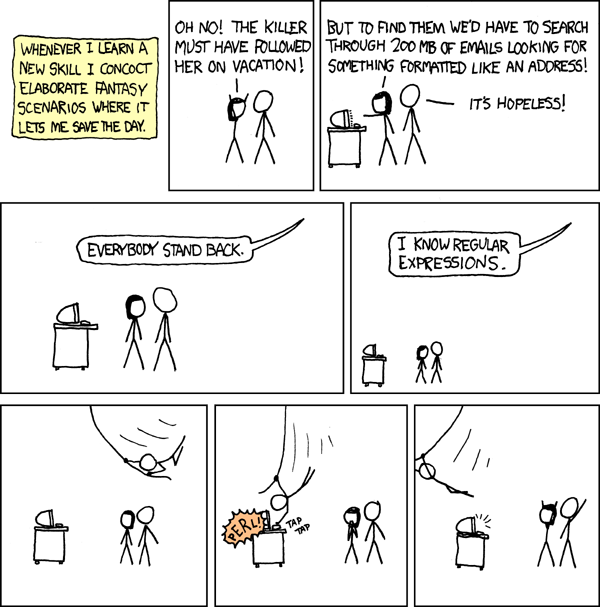
Obligatory xkcd :
If you’d like to read more about regular expressions and how they work:
Thanks for reading!