GeezerVison is showing scikit-learn.org (truncated) — Time-related feature engineering
Note
Go to the end
to download the full example code or to run this example in your browser via JupyterLite or Binder.
Time-related feature engineering#
This notebook introduces different strategies to leverage time-related features
for a bike sharing demand regression task that is highly dependent on business
cycles (days, weeks, months) and yearly season cycles.
In the process, we introduce how to perform periodic feature engineering using
the sklearn.preprocessing.SplineTransformer class and its
extrapolation="periodic" option.
# Authors: The scikit-learn developers
# SPDX-License-Identifier: BSD-3-Clause
Data exploration on the Bike Sharing Demand dataset#
We start by loading the data from the OpenML repository.
from sklearn.datasets import fetch_openml

bike_sharing = fetch_openml("Bike_Sharing_Demand", version=2, as_frame=True)
df = bike_sharing.frame
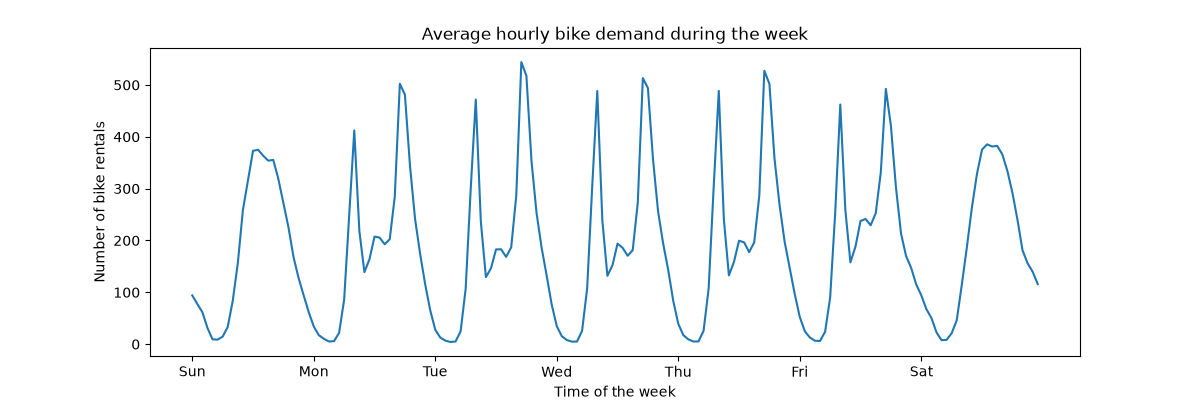
To get a quick understanding of the periodic patterns of the data, let us
have a look at the average demand per hour during a week.
Note that the week starts on a Sunday, during the weekend. We can clearly
distinguish the commute patterns in the morning and evenings of the work days
and the leisure use of the bikes on the weekends with a more spread peak
demand around the middle of the days:
import matplotlib.pyplot as plt

fig, ax = plt.subplots(figsize=(12, 4))
average_week_demand = df.groupby(["weekday", "hour"])["count"].mean()
average_week_demand.plot(ax=ax)
_ = ax.set(
    title="Average hourly bike demand during the week",
    xticks=[i * 24 for i in range(7)],
    xticklabels=["Sun", "Mon", "Tue", "Wed", "Thu", "Fri", "Sat"],
    xlabel="Time of the week",
    ylabel="Number of bike rentals",
)
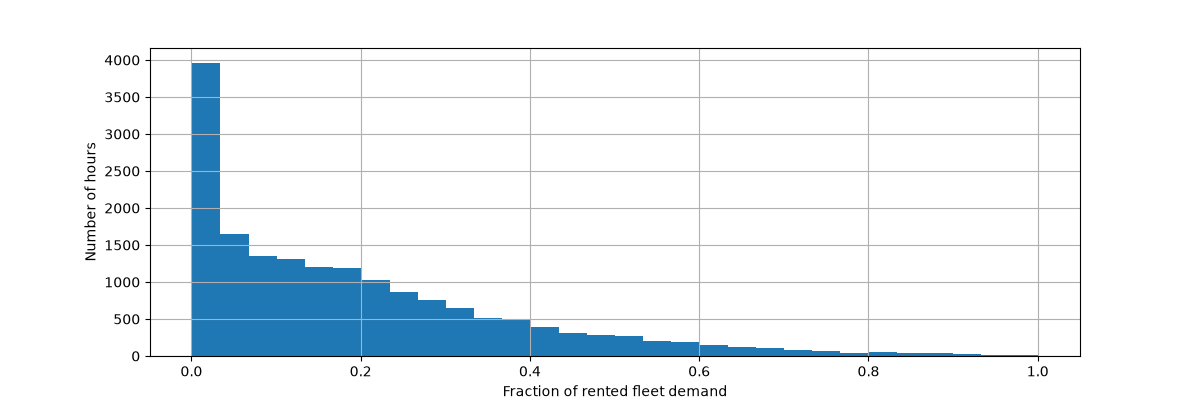
 The target of the prediction problem is the absolute count of bike rentals on
an hourly basis:
Let us rescale the target variable (number of hourly bike rentals) to predict
a relative demand so that the mean absolute error is more easily interpreted
as a fraction of the maximum demand.
Note
The fit method of the models used in this notebook all minimizes the
mean squared error to estimate the conditional mean.
The absolute error, however, would estimate the conditional median.
Nevertheless, when reporting performance measures on the test set in
the discussion, we choose to focus on the mean absolute error instead
of the (root) mean squared error because it is more intuitive to
interpret. Note, however, that in this study the best models for one
metric are also the best ones in terms of the other metric.
y = df["count"] / df["count"].max()
fig, ax = plt.subplots(figsize=(12, 4))
y.hist(bins=30, ax=ax)
_ = ax.set(
    xlabel="Fraction of rented fleet demand",
    ylabel="Number of hours",
)
 The input feature data frame is a time annotated hourly log of variables
describing the weather conditions. It includes both numerical and categorical
variables. Note that the time information has already been expanded into
several complementary columns.
X = df.drop("count", axis="columns")
X
|
season |
year |
month |
hour |
holiday |
weekday |
workingday |
weather |
temp |
feel_temp |
humidity |
windspeed |
| 0 |
spring |
0 |
1 |
0 |
False |
6 |
False |
clear |
9.84 |
14.395 |
0.81 |
0.0000 |
| 1 |
spring |
0 |
1 |
1 |
False |
6 |
False |
clear |
9.02 |
13.635 |
0.80 |
0.0000 |
| 2 |
spring |
0 |
1 |
2 |
False |
6 |
False |
clear |
9.02 |
13.635 |
0.80 |
0.0000 |
| 3 |
spring |
0 |
1 |
3 |
False |
6 |
False |
clear |
9.84 |
14.395 |
0.75 |
0.0000 |
| 4 |
spring |
0 |
1 |
4 |
False |
6 |
False |
clear |
9.84 |
14.395 |
0.75 |
0.0000 |
| ... |
... |
... |
... |
... |
... |
... |
... |
... |
... |
... |
... |
... |
| 17374 |
spring |
1 |
12 |
19 |
False |
1 |
True |
misty |
10.66 |
12.880 |
0.60 |
11.0014 |
| 17375 |
spring |
1 |
12 |
20 |
False |
1 |
True |
misty |
10.66 |
12.880 |
0.60 |
11.0014 |
| 17376 |
spring |
1 |
12 |
21 |
False |
1 |
True |
clear |
10.66 |
12.880 |
0.60 |
11.0014 |
| 17377 |
spring |
1 |
12 |
22 |
False |
1 |
True |
clear |
10.66 |
13.635 |
0.56 |
8.9981 |
| 17378 |
spring |
1 |
12 |
23 |
False |
1 |
True |
clear |
10.66 |
13.635 |
0.65 |
8.9981 |
17379 rows × 12 columns
We now introspect the distribution of the categorical variables, starting
with "weather":
X["weather"].value_counts()
weather
clear         11413
misty          4544
rain           1419
heavy_rain        3
Name: count, dtype: int64
Since there are only 3 "heavy_rain" events, we cannot use this category to
train machine learning models with cross validation. Instead, we simplify the
representation by collapsing those into the "rain" category.
X["weather"] = (
    X["weather"]
    .astype(object)
    .replace(to_replace="heavy_rain", value="rain")
    .astype("category")
)
X["weather"].value_counts()
weather
clear    11413
misty     4544
rain      1422
Name: count, dtype: int64
As expected, the "season" variable is well balanced:
X["season"].value_counts()
season
fall      4496
summer    4409
spring    4242
winter    4232
Name: count, dtype: int64
Time-based cross-validation#
Since the dataset is a time-ordered event log (hourly demand), we will use a
time-sensitive cross-validation splitter to evaluate our demand forecasting
model as realistically as possible. We use a gap of 2 days between the train
and test side of the splits. We also limit the training set size to make the
performance of the CV folds more stable.
1000 test datapoints should be enough to quantify the performance of the
model. This represents a bit less than a month and a half of contiguous test
data:
Let us manually inspect the various splits to check that the
TimeSeriesSplit works as we expect, starting with the first split:
all_splits = list(ts_cv.split(X, y))
train_0, test_0 = all_splits[0]
|
season |
year |
month |
hour |
holiday |
weekday |
workingday |
weather |
temp |
feel_temp |
humidity |
windspeed |
| 12379 |
summer |
1 |
6 |
0 |
False |
2 |
True |
clear |
22.14 |
25.760 |
0.68 |
27.9993 |
| 12380 |
summer |
1 |
6 |
1 |
False |
2 |
True |
misty |
21.32 |
25.000 |
0.77 |
22.0028 |
| 12381 |
summer |
1 |
6 |
2 |
False |
2 |
True |
rain |
21.32 |
25.000 |
0.72 |
19.9995 |
| 12382 |
summer |
1 |
6 |
3 |
False |
2 |
True |
rain |
20.50 |
24.240 |
0.82 |
12.9980 |
| 12383 |
summer |
1 |
6 |
4 |
False |
2 |
True |
rain |
20.50 |
24.240 |
0.82 |
12.9980 |
| ... |
... |
... |
... |
... |
... |
... |
... |
... |
... |
... |
... |
... |
| 13374 |
fall |
1 |
7 |
11 |
False |
1 |
True |
clear |
34.44 |
40.150 |
0.53 |
15.0013 |
| 13375 |
fall |
1 |
7 |
12 |
False |
1 |
True |
clear |
34.44 |
39.395 |
0.49 |
8.9981 |
| 13376 |
fall |
1 |
7 |
13 |
False |
1 |
True |
clear |
34.44 |
39.395 |
0.49 |
19.0012 |
| 13377 |
fall |
1 |
7 |
14 |
False |
1 |
True |
clear |
36.08 |
40.910 |
0.42 |
7.0015 |
| 13378 |
fall |
1 |
7 |
15 |
False |
1 |
True |
clear |
35.26 |
40.150 |
0.47 |
16.9979 |
1000 rows × 12 columns
|
season |
year |
month |
hour |
holiday |
weekday |
workingday |
weather |
temp |
feel_temp |
humidity |
windspeed |
| 2331 |
summer |
0 |
4 |
1 |
False |
2 |
True |
misty |
25.42 |
31.060 |
0.50 |
6.0032 |
| 2332 |
summer |
0 |
4 |
2 |
False |
2 |
True |
misty |
24.60 |
31.060 |
0.53 |
8.9981 |
| 2333 |
summer |
0 |
4 |
3 |
False |
2 |
True |
misty |
23.78 |
27.275 |
0.56 |
8.9981 |
| 2334 |
summer |
0 |
4 |
4 |
False |
2 |
True |
misty |
22.96 |
26.515 |
0.64 |
8.9981 |
| 2335 |
summer |
0 |
4 |
5 |
False |
2 |
True |
misty |
22.14 |
25.760 |
0.68 |
8.9981 |
| ... |
... |
... |
... |
... |
... |
... |
... |
... |
... |
... |
... |
... |
| 12326 |
summer |
1 |
6 |
19 |
False |
6 |
False |
clear |
26.24 |
31.060 |
0.36 |
11.0014 |
| 12327 |
summer |
1 |
6 |
20 |
False |
6 |
False |
clear |
25.42 |
31.060 |
0.35 |
19.0012 |
| 12328 |
summer |
1 |
6 |
21 |
False |
6 |
False |
clear |
24.60 |
31.060 |
0.40 |
7.0015 |
| 12329 |
summer |
1 |
6 |
22 |
False |
6 |
False |
clear |
23.78 |
27.275 |
0.46 |
8.9981 |
| 12330 |
summer |
1 |
6 |
23 |
False |
6 |
False |
clear |
22.96 |
26.515 |
0.52 |
7.0015 |
10000 rows × 12 columns
We now inspect the last split:
train_4, test_4 = all_splits[4]
|
season |
year |
month |
hour |
holiday |
weekday |
workingday |
weather |
temp |
feel_temp |
humidity |
windspeed |
| 16379 |
winter |
1 |
11 |
5 |
False |
2 |
True |
misty |
13.94 |
16.665 |
0.66 |
8.9981 |
| 16380 |
winter |
1 |
11 |
6 |
False |
2 |
True |
misty |
13.94 |
16.665 |
0.71 |
11.0014 |
| 16381 |
winter |
1 |
11 |
7 |
False |
2 |
True |
clear |
13.12 |
16.665 |
0.76 |
6.0032 |
| 16382 |
winter |
1 |
11 |
8 |
False |
2 |
True |
clear |
13.94 |
16.665 |
0.71 |
8.9981 |
| 16383 |
winter |
1 |
11 |
9 |
False |
2 |
True |
misty |
14.76 |
18.940 |
0.71 |
0.0000 |
| ... |
... |
... |
... |
... |
... |
... |
... |
... |
... |
... |
... |
... |
| 17374 |
spring |
1 |
12 |
19 |
False |
1 |
True |
misty |
10.66 |
12.880 |
0.60 |
11.0014 |
| 17375 |
spring |
1 |
12 |
20 |
False |
1 |
True |
misty |
10.66 |
12.880 |
0.60 |
11.0014 |
| 17376 |
spring |
1 |
12 |
21 |
False |
1 |
True |
clear |
10.66 |
12.880 |
0.60 |
11.0014 |
| 17377 |
spring |
1 |
12 |
22 |
False |
1 |
True |
clear |
10.66 |
13.635 |
0.56 |
8.9981 |
| 17378 |
spring |
1 |
12 |
23 |
False |
1 |
True |
clear |
10.66 |
13.635 |
0.65 |
8.9981 |
1000 rows × 12 columns
|
season |
year |
month |
hour |
holiday |
weekday |
workingday |
weather |
temp |
feel_temp |
humidity |
windspeed |
| 6331 |
winter |
0 |
9 |
9 |
False |
1 |
True |
misty |
26.24 |
28.790 |
0.89 |
12.9980 |
| 6332 |
winter |
0 |
9 |
10 |
False |
1 |
True |
misty |
26.24 |
28.790 |
0.89 |
12.9980 |
| 6333 |
winter |
0 |
9 |
11 |
False |
1 |
True |
clear |
27.88 |
31.820 |
0.79 |
15.0013 |
| 6334 |
winter |
0 |
9 |
12 |
False |
1 |
True |
misty |
27.88 |
31.820 |
0.79 |
11.0014 |
| 6335 |
winter |
0 |
9 |
13 |
False |
1 |
True |
misty |
28.70 |
33.335 |
0.74 |
11.0014 |
| ... |
... |
... |
... |
... |
... |
... |
... |
... |
... |
... |
... |
... |
| 16326 |
winter |
1 |
11 |
0 |
False |
0 |
False |
misty |
12.30 |
15.150 |
0.70 |
11.0014 |
| 16327 |
winter |
1 |
11 |
1 |
False |
0 |
False |
clear |
12.30 |
14.395 |
0.70 |
12.9980 |
| 16328 |
winter |
1 |
11 |
2 |
False |
0 |
False |
clear |
11.48 |
14.395 |
0.81 |
7.0015 |
| 16329 |
winter |
1 |
11 |
3 |
False |
0 |
False |
misty |
12.30 |
15.150 |
0.81 |
11.0014 |
| 16330 |
winter |
1 |
11 |
4 |
False |
0 |
False |
misty |
12.30 |
14.395 |
0.81 |
12.9980 |
10000 rows × 12 columns
All is well. We are now ready to do some predictive modeling!
Gradient Boosting#
Gradient Boosting Regression with decision trees is often flexible enough to
efficiently handle heterogeneous tabular data with a mix of categorical and
numerical features as long as the number of samples is large enough.
Here, we use the modern
HistGradientBoostingRegressor with native support
for categorical features. Therefore, we only need to set
categorical_features="from_dtype" such that features with categorical dtype
are considered categorical features. For reference, we extract the categorical
features from the dataframe based on the dtype. The internal trees use a dedicated
tree splitting rule for these features.
The numerical variables need no preprocessing and, for the sake of simplicity,
we only try the default hyper-parameters for this model:
Categorical features: ['season', 'holiday', 'workingday', 'weather']
Let’s evaluate our gradient boosting model with the mean absolute error of the
relative demand averaged across our 5 time-based cross-validation splits:
import numpy as np


def evaluate(model, X, y, cv, model_prop=None, model_step=None):
    cv_results = cross_validate(
        model,
        X,
        y,
        cv=cv,
        scoring=["neg_mean_absolute_error", "neg_root_mean_squared_error"],
        return_estimator=True,
    )
    if model_prop is not None:
        if model_step is not None:
            values = [
                getattr(m[model_step], model_prop) for m in cv_results["estimator"]
            ]
        else:
            values = [getattr(m, model_prop) for m in cv_results["estimator"]]
        print(f"Mean model.{model_prop} = {np.mean(values)}")
    mae = -cv_results["test_neg_mean_absolute_error"]
    rmse = -cv_results["test_neg_root_mean_squared_error"]
    print(
        f"Mean Absolute Error:     {mae.mean():.3f} +/- {mae.std():.3f}\n"
        f"Root Mean Squared Error: {rmse.mean():.3f} +/- {rmse.std():.3f}"
    )
    # To display the fitted estimator diagrams in the notebook.
    return cv_results["estimator"][0]


evaluate(gbrt, X, y, cv=ts_cv, model_prop="n_iter_")
Mean model.n_iter_ = 100.0
Mean Absolute Error:     0.044 +/- 0.003
Root Mean Squared Error: 0.068 +/- 0.005
HistGradientBoostingRegressor(random_state=42) In a Jupyter environment, please rerun this cell to show the HTML representation or trust the notebook.
On GitHub, the HTML representation is unable to render, please try loading this page with nbviewer.org.HistGradientBoostingRegressor
Parameters
|
random_state
random_state: int, RandomState instance or None, default=None
Pseudo-random number generator to control the subsampling in the
binning process, and the train/validation data split if early stopping
is enabled.
Pass an int for reproducible output across multiple function calls.
See :term:`Glossary <random_state>`.
|
42 |
|
loss
loss: {'squared_error', 'absolute_error', 'gamma', 'poisson', 'quantile'}, default='squared_error'
The loss function to use in the boosting process. Note that the
"squared error", "gamma" and "poisson" losses actually implement
"half least squares loss", "half gamma deviance" and "half poisson
deviance" to simplify the computation of the gradient. Furthermore,
"gamma" and "poisson" losses internally use a log-link, "gamma"
requires ``y > 0`` and "poisson" requires ``y >= 0``.
"quantile" uses the pinball loss.
.. versionchanged:: 0.23
Added option 'poisson'.
.. versionchanged:: 1.1
Added option 'quantile'.
.. versionchanged:: 1.3
Added option 'gamma'.
|
'squared_error' |
|
quantile
quantile: float, default=None
If loss is "quantile", this parameter specifies which quantile to be estimated
and must be between 0 and 1.
|
None |
|
learning_rate
learning_rate: float, default=0.1
The learning rate, also known as *shrinkage*. This is used as a
multiplicative factor for the leaves values. Use ``1`` for no
shrinkage.
|
0.1 |
|
max_iter
max_iter: int, default=100
The maximum number of iterations of the boosting process, i.e. the
maximum number of trees.
|
100 |
|
max_leaf_nodes
max_leaf_nodes: int or None, default=31
The maximum number of leaves for each tree. Must be strictly greater
than 1. If None, there is no maximum limit.
|
31 |
|
max_depth
max_depth: int or None, default=None
The maximum depth of each tree. The depth of a tree is the number of
edges to go from the root to the deepest leaf.
Depth isn't constrained by default.
|
None |
|
min_samples_leaf
min_samples_leaf: int, default=20
The minimum number of samples per leaf. For small datasets with less
than a few hundred samples, it is recommended to lower this value
since only very shallow trees would be built.
|
20 |
|
l2_regularization
l2_regularization: float, default=0
The L2 regularization parameter penalizing leaves with small hessians.
Use ``0`` for no regularization (default).
|
0.0 |
|
max_features
max_features: float, default=1.0
Proportion of randomly chosen features in each and every node split.
This is a form of regularization, smaller values make the trees weaker
learners and might prevent overfitting.
If interaction constraints from `interaction_cst` are present, only allowed
features are taken into account for the subsampling.
.. versionadded:: 1.4
|
1.0 |
|
max_bins
max_bins: int, default=255
The maximum number of bins to use for non-missing values. Before
training, each feature of the input array `X` is binned into
integer-valued bins, which allows for a much faster training stage.
Features with a small number of unique values may use less than
``max_bins`` bins. In addition to the ``max_bins`` bins, one more bin
is always reserved for missing values. Must be no larger than 255.
|
255 |
|
categorical_features
categorical_features: array-like of {bool, int, str} of shape (n_features) or shape (n_categorical_features,), default='from_dtype'
Indicates the categorical features.
- None : no feature will be considered categorical.
- boolean array-like : boolean mask indicating categorical features.
- integer array-like : integer indices indicating categorical
features.
- str array-like: names of categorical features (assuming the training
data has feature names).
- `"from_dtype"`: dataframe columns with dtype "Categorical" and "Enum" are
considered to be categorical features. The input must be a dataframe that
is supported by narwhals (or supports it): :func:`narwhals.from_native` must
work. This is the case, for instance, for pandas and polars DataFrames.
For each categorical feature, there must be at most `max_bins` unique
categories. Negative values for categorical features encoded as numeric
dtypes are treated as missing values. All categorical values are
converted to floating point numbers. This means that categorical values
of 1.0 and 1 are treated as the same category.
Read more in the :ref:`User Guide <categorical_support_gbdt>` and
:ref:`sphx_glr_auto_examples_ensemble_plot_gradient_boosting_categorical.py`.
.. versionadded:: 0.24
.. versionchanged:: 1.2
Added support for feature names.
.. versionchanged:: 1.4
Added `"from_dtype"` option.
.. versionchanged:: 1.6
The default value changed from `None` to `"from_dtype"`.
|
'from_dtype' |
|
monotonic_cst
monotonic_cst: array-like of int of shape (n_features) or dict, default=None
Monotonic constraint to enforce on each feature are specified using the
following integer values:
- 1: monotonic increase
- 0: no constraint
- -1: monotonic decrease
If a dict with str keys, map feature to monotonic constraints by name.
If an array, the features are mapped to constraints by position. See
:ref:`monotonic_cst_features_names` for a usage example.
Read more in the :ref:`User Guide <monotonic_cst_gbdt>`.
.. versionadded:: 0.23
.. versionchanged:: 1.2
Accept dict of constraints with feature names as keys.
|
None |
|
interaction_cst
interaction_cst: {"pairwise", "no_interactions"} or sequence of lists/tuples/sets of int, default=None
Specify interaction constraints, the sets of features which can
interact with each other in child node splits.
Each item specifies the set of feature indices that are allowed
to interact with each other. If there are more features than
specified in these constraints, they are treated as if they were
specified as an additional set.
The strings "pairwise" and "no_interactions" are shorthands for
allowing only pairwise or no interactions, respectively.
For instance, with 5 features in total, `interaction_cst=[{0, 1}]`
is equivalent to `interaction_cst=[{0, 1}, {2, 3, 4}]`,
and specifies that each branch of a tree will either only split
on features 0 and 1 or only split on features 2, 3 and 4.
See :ref:`this example<ice-vs-pdp>` on how to use `interaction_cst`.
.. versionadded:: 1.2
|
None |
|
warm_start
warm_start: bool, default=False
When set to ``True``, reuse the solution of the previous call to fit
and add more estimators to the ensemble. For results to be valid, the
estimator should be re-trained on the same data only.
See :term:`the Glossary <warm_start>`.
|
False |
|
early_stopping
early_stopping: 'auto' or bool, default='auto'
If 'auto', early stopping is enabled if the sample size is larger than
10000 or if `X_val` and `y_val` are passed to `fit`. If True, early stopping
is enabled, otherwise early stopping is disabled.
.. versionadded:: 0.23
|
'auto' |
|
scoring
scoring: str or callable or None, default='loss'
Scoring method to use for early stopping. Only used if `early_stopping`
is enabled. Options:
- str: see :ref:`scoring_string_names` for options.
- callable: a scorer callable object (e.g., function) with signature
``scorer(estimator, X, y)``. See :ref:`scoring_callable` for details.
- `None`: the :ref:`coefficient of determination <r2_score>`
(:math:`R^2`) is used.
- 'loss': early stopping is checked w.r.t the loss value.
|
'loss' |
|
validation_fraction
validation_fraction: int or float or None, default=0.1
Proportion (or absolute size) of training data to set aside as
validation data for early stopping. If None, early stopping is done on
the training data.
The value is ignored if either early stopping is not performed, e.g.
`early_stopping=False`, or if `X_val` and `y_val` are passed to fit.
|
0.1 |
|
n_iter_no_change
n_iter_no_change: int, default=10
Used to determine when to "early stop". The fitting process is
stopped when none of the last ``n_iter_no_change`` scores are better
than the ``n_iter_no_change - 1`` -th-to-last one, up to some
tolerance. Only used if early stopping is performed.
|
10 |
|
tol
tol: float, default=1e-7
The absolute tolerance to use when comparing scores during early
stopping. The higher the tolerance, the more likely we are to early
stop: higher tolerance means that it will be harder for subsequent
iterations to be considered an improvement upon the reference score.
|
1e-07 |
|
verbose
verbose: int, default=0
The verbosity level. If not zero, print some information about the
fitting process. ``1`` prints only summary info, ``2`` prints info per
iteration.
|
0 |
Fitted attributes
| Name |
Type |
Value |
do_early_stopping_
do_early_stopping_: bool
Indicates whether early stopping is used during training.
|
bool |
False |
feature_names_in_
feature_names_in_: ndarray of shape (`n_features_in_`,)
Names of features seen during :term:`fit`. Defined only when `X`
has feature names that are all strings.
.. versionadded:: 1.0
|
ndarray[object](12,) |
['season','year','month',...,'feel_temp','humidity','windspeed'] |
is_categorical_
is_categorical_: ndarray, shape (n_features, ) or None
Boolean mask for the categorical features. ``None`` if there are no
categorical features.
|
ndarray[bool](12,) |
[ True,False,False,...,False,False,False] |
n_features_in_
n_features_in_: int
Number of features seen during :term:`fit`.
.. versionadded:: 0.24
|
int |
12 |
n_iter_
n_iter_: int
The number of iterations as selected by early stopping, depending on
the `early_stopping` parameter. Otherwise it corresponds to max_iter.
|
int |
100 |
n_trees_per_iteration_
n_trees_per_iteration_: int
The number of tree that are built at each iteration. For regressors,
this is always 1.
|
int |
1 |
train_score_
train_score_: ndarray, shape (n_iter_+1,)
The scores at each iteration on the training data. The first entry
is the score of the ensemble before the first iteration. Scores are
computed according to the ``scoring`` parameter. If ``scoring`` is
not 'loss', scores are computed on a subset of at most 10 000
samples. Empty if no early stopping.
|
ndarray[float64](0,) |
[] |
validation_score_
validation_score_: ndarray, shape (n_iter_+1,)
The scores at each iteration on the held-out validation data. The
first entry is the score of the ensemble before the first iteration.
Scores are computed according to the ``scoring`` parameter. Empty if
no early stopping or if ``validation_fraction`` is None.
|
ndarray[float64](0,) |
[] |
We see that we set max_iter large enough such that early stopping took place.
This model has an average error around 4 to 5% of the maximum demand. This is
quite good for a first trial without any hyper-parameter tuning! We just had
to make the categorical variables explicit. Note that the time related
features are passed as is, i.e. without processing them. But this is not much
of a problem for tree-based models as they can learn a non-monotonic
relationship between ordinal input features and the target.
This is not the case for linear regression models as we will see in the
following.
Naive linear regression#
As usual for linear models, categorical variables need to be one-hot encoded.
For consistency, we scale the numerical features to the same 0-1 range using
MinMaxScaler, although in this case it does not
impact the results much because they are already on comparable scales:
from sklearn.linear_model import RidgeCV
from sklearn.preprocessing import MinMaxScaler, OneHotEncoder

one_hot_encoder = OneHotEncoder(handle_unknown="ignore", sparse_output=False)
alphas = np.logspace(-6, 6, 25)
naive_linear_pipeline = make_pipeline(
    ColumnTransformer(
        transformers=[
            ("categorical", one_hot_encoder, categorical_columns),
        ],
        remainder=MinMaxScaler(),
        verbose_feature_names_out=False,
    ),
    RidgeCV(alphas=alphas),
)


evaluate(
    naive_linear_pipeline, X, y, cv=ts_cv, model_prop="alpha_", model_step="ridgecv"
)
Mean model.alpha_ = 2.7298221281347037
Mean Absolute Error:     0.142 +/- 0.014
Root Mean Squared Error: 0.184 +/- 0.020
Pipeline(steps=[('columntransformer',
                 ColumnTransformer(remainder=MinMaxScaler(),
                                   transformers=[('categorical',
                                                  OneHotEncoder(handle_unknown='ignore',
                                                                sparse_output=False),
                                                  Index(['season', 'holiday', 'workingday', 'weather'], dtype='str'))],
                                   verbose_feature_names_out=False)),
                ('ridgecv',
                 RidgeCV(alphas=array([1.00000000e-06, 3.16227766e-06, 1.00000000e-05, 3.16227766e-05,
       1.00000000e-04, 3.16227766e-04, 1.00000000e-03, 3.16227766e-03,
       1.00000000e-02, 3.16227766e-02, 1.00000000e-01, 3.16227766e-01,
       1.00000000e+00, 3.16227766e+00, 1.00000000e+01, 3.16227766e+01,
       1.00000000e+02, 3.16227766e+02, 1.00000000e+03, 3.16227766e+03,
       1.00000000e+04, 3.16227766e+04, 1.00000000e+05, 3.16227766e+05,
       1.00000000e+06])))])
In a Jupyter environment, please rerun this cell to show the HTML representation or trust the notebook.
On GitHub, the HTML representation is unable to render, please try loading this page with nbviewer.org.
Parameters
|
steps
steps: list of tuples
List of (name of step, estimator) tuples that are to be chained in
sequential order. To be compatible with the scikit-learn API, all steps
must define `fit`. All non-last steps must also define `transform`. See
:ref:`Combining Estimators <combining_estimators>` for more details.
|
[('columntransformer', ...), ('ridgecv', ...)] |
|
transform_input
transform_input: list of str, default=None
The names of the :term:`metadata` parameters that should be transformed by the
pipeline before passing it to the step consuming it.
This enables transforming some input arguments to ``fit`` (other than ``X``)
to be transformed by the steps of the pipeline up to the step which requires
them. Requirement is defined via :ref:`metadata routing <metadata_routing>`.
For instance, this can be used to pass a validation set through the pipeline.
You can only set this if metadata routing is enabled, which you
can enable using ``sklearn.set_config(enable_metadata_routing=True)``.
.. versionadded:: 1.6
|
None |
|
memory
memory: str or object with the joblib.Memory interface, default=None
Used to cache the fitted transformers of the pipeline. The last step
will never be cached, even if it is a transformer. By default, no
caching is performed. If a string is given, it is the path to the
caching directory. Enabling caching triggers a clone of the transformers
before fitting. Therefore, the transformer instance given to the
pipeline cannot be inspected directly. Use the attribute ``named_steps``
or ``steps`` to inspect estimators within the pipeline. Caching the
transformers is advantageous when fitting is time consuming. See
:ref:`sphx_glr_auto_examples_neighbors_plot_caching_nearest_neighbors.py`
for an example on how to enable caching.
|
None |
|
verbose
verbose: bool, default=False
If True, the time elapsed while fitting each step will be printed as it
is completed.
|
False |
columntransformer: ColumnTransformer
Parameters
|
transformers
transformers: list of tuples
List of (name, transformer, columns) tuples specifying the
transformer objects to be applied to subsets of the data.
name : str
Like in Pipeline and FeatureUnion, this allows the transformer and
its parameters to be set using ``set_params`` and searched in grid
search.
transformer : {'drop', 'passthrough'} or estimator
Estimator must support :term:`fit` and :term:`transform`.
Special-cased strings 'drop' and 'passthrough' are accepted as
well, to indicate to drop the columns or to pass them through
untransformed, respectively.
columns : str, array-like of str, int, array-like of int, array-like of bool, slice or callable
Indexes the data on its second axis. Integers are interpreted as
positional columns, while strings can reference DataFrame columns
by name. A scalar string or int should be used where
``transformer`` expects X to be a 1d array-like (vector),
otherwise a 2d array will be passed to the transformer.
A callable is passed the input data `X` and can return any of the
above. To select multiple columns by name or dtype, you can use
:obj:`make_column_selector`.
|
[('categorical', ...)] |
|
remainder
remainder: {'drop', 'passthrough'} or estimator, default='drop'
By default, only the specified columns in `transformers` are
transformed and combined in the output, and the non-specified
columns are dropped. (default of ``'drop'``).
By specifying ``remainder='passthrough'``, all remaining columns that
were not specified in `transformers`, but present in the data passed
to `fit` will be automatically passed through. This subset of columns
is concatenated with the output of the transformers. For dataframes,
extra columns not seen during `fit` will be excluded from the output
of `transform`.
By setting ``remainder`` to be an estimator, the remaining
non-specified columns will use the ``remainder`` estimator. The
estimator must support :term:`fit` and :term:`transform`.
Note that using this feature requires that the DataFrame columns
input at :term:`fit` and :term:`transform` have identical order.
|
MinMaxScaler() |
|
verbose_feature_names_out
verbose_feature_names_out: bool, str or Callable[[str, str], str], default=True
- If True, :meth:`ColumnTransformer.get_feature_names_out` will prefix
all feature names with the name of the transformer that generated that
feature. It is equivalent to setting
`verbose_feature_names_out="{transformer_name}__{feature_name}"`.
- If False, :meth:`ColumnTransformer.get_feature_names_out` will not
prefix any feature names and will error if feature names are not
unique.
- If ``Callable[[str, str], str]``,
:meth:`ColumnTransformer.get_feature_names_out` will rename all the features
using the name of the transformer. The first argument of the callable is the
transformer name and the second argument is the feature name. The returned
string will be the new feature name.
- If ``str``, it must be a string ready for formatting. The given string will
be formatted using two field names: ``transformer_name`` and ``feature_name``.
e.g. ``"{feature_name}__{transformer_name}"``. See :meth:`str.format` method
from the standard library for more info.
.. versionadded:: 1.0
.. versionchanged:: 1.6
`verbose_feature_names_out` can be a callable or a string to be formatted.
|
False |
|
sparse_threshold
sparse_threshold: float, default=0.3
If the output of the different transformers contains sparse matrices,
these will be stacked as a sparse matrix if the overall density is
lower than this value. Use ``sparse_threshold=0`` to always return
dense. When the transformed output consists of all dense data, the
stacked result will be dense, and this keyword will be ignored.
|
0.3 |
|
n_jobs
n_jobs: int, default=None
Number of jobs to run in parallel.
``None`` means 1 unless in a :obj:`joblib.parallel_backend` context.
``-1`` means using all processors. See :term:`Glossary <n_jobs>`
for more details.
|
None |
|
transformer_weights
transformer_weights: dict, default=None
Multiplicative weights for features per transformer. The output of the
transformer is multiplied by these weights. Keys are transformer names,
values the weights.
|
None |
|
verbose
verbose: bool, default=False
If True, the time elapsed while fitting each transformer will be
printed as it is completed.
|
False |
Fitted attributes
| Name |
Type |
Value |
feature_names_in_
feature_names_in_: ndarray of shape (`n_features_in_`,)
Names of features seen during :term:`fit`. Defined only when `X`
has feature names that are all strings.
.. versionadded:: 1.0
|
ndarray[object](12,) |
['season','year','month',...,'feel_temp','humidity','windspeed'] |
n_features_in_
n_features_in_: int
Number of features seen during :term:`fit`. Only defined if the
underlying transformers expose such an attribute when fit.
.. versionadded:: 0.24
|
int |
12 |
named_transformers_
named_transformers_: :class:`~sklearn.utils.Bunch`
Read-only attribute to access any transformer by given name.
Keys are transformer names and values are the fitted transformer
objects.
|
Bunch |
{'categorical...inMaxScaler()} |
output_indices_
output_indices_: dict
A dictionary from each transformer name to a slice, where the slice
corresponds to indices in the transformed output. This is useful to
inspect which transformer is responsible for which transformed
feature(s).
.. versionadded:: 1.0
|
dict |
{'ca...al': slice(0, 11, None), 're...er': slice(11, 19, None)} |
sparse_output_
sparse_output_: bool
Boolean flag indicating whether the output of ``transform`` is a
sparse matrix or a dense numpy array, which depends on the output
of the individual transformers and the `sparse_threshold` keyword.
|
bool |
False |
transformers_
transformers_: list
The collection of fitted transformers as tuples of (name,
fitted_transformer, column). `fitted_transformer` can be an estimator,
or `'drop'`; `'passthrough'` is replaced with an equivalent
:class:`~sklearn.preprocessing.FunctionTransformer`. In case there were
no columns selected, this will be the unfitted transformer. If there
are remaining columns, the final element is a tuple of the form:
('remainder', transformer, remaining_columns) corresponding to the
``remainder`` parameter. If there are remaining columns, then
``len(transformers_)==len(transformers)+1``, otherwise
``len(transformers_)==len(transformers)``.
.. versionadded:: 1.7
The format of the remaining columns now attempts to match that of the other
transformers: if all columns were provided as column names (`str`), the
remaining columns are stored as column names; if all columns were provided
as mask arrays (`bool`), so are the remaining columns; in all other cases
the remaining columns are stored as indices (`int`).
|
list |
[('ca...al', OneHotEncoder..._output=False), Index(['seaso..., dtype='str')), ('re...er', MinMaxScaler(), ['year', 'month', 'hour', 'weekday', ...])] |
Index(['season', 'holiday', 'workingday', 'weather'], dtype='str')
Parameters
|
sparse_output
sparse_output: bool, default=True
When ``True``, it returns a SciPy sparse matrix/array
in "Compressed Sparse Row" (CSR) format.
.. versionadded:: 1.2
`sparse` was renamed to `sparse_output`
|
False |
|
handle_unknown
handle_unknown: {'error', 'ignore', 'infrequent_if_exist', 'warn'}, default='error'
Specifies the way unknown categories are handled during :meth:`transform`.
- 'error' : Raise an error if an unknown category is present during transform.
- 'ignore' : When an unknown category is encountered during
transform, the resulting one-hot encoded columns for this feature
will be all zeros. In the inverse transform, an unknown category
will be denoted as None.
- 'infrequent_if_exist' : When an unknown category is encountered
during transform, the resulting one-hot encoded columns for this
feature will map to the infrequent category if it exists. The
infrequent category will be mapped to the last position in the
encoding. During inverse transform, an unknown category will be
mapped to the category denoted `'infrequent'` if it exists. If the
`'infrequent'` category does not exist, then :meth:`transform` and
:meth:`inverse_transform` will handle an unknown category as with
`handle_unknown='ignore'`. Infrequent categories exist based on
`min_frequency` and `max_categories`. Read more in the
:ref:`User Guide <encoder_infrequent_categories>`.
- 'warn' : When an unknown category is encountered during transform
a warning is issued, and the encoding then proceeds as described for
`handle_unknown="infrequent_if_exist"`.
.. versionchanged:: 1.1
`'infrequent_if_exist'` was added to automatically handle unknown
categories and infrequent categories.
.. versionadded:: 1.6
The option `"warn"` was added in 1.6.
|
'ignore' |
|
categories
categories: 'auto' or a list of array-like, default='auto'
Categories (unique values) per feature:
- 'auto' : Determine categories automatically from the training data.
- list : ``categories[i]`` holds the categories expected in the ith
column. The passed categories should not mix strings and numeric
values within a single feature, and should be sorted in case of
numeric values.
The used categories can be found in the ``categories_`` attribute.
.. versionadded:: 0.20
|
'auto' |
|
drop
drop: {'first', 'if_binary'} or an array-like of shape (n_features,), default=None
Specifies a methodology to use to drop one of the categories per
feature. This is useful in situations where perfectly collinear
features cause problems, such as when feeding the resulting data
into an unregularized linear regression model.
However, dropping one category breaks the symmetry of the original
representation and can therefore induce a bias in downstream models,
for instance for penalized linear classification or regression models.
- None : retain all features (the default).
- 'first' : drop the first category in each feature. If only one
category is present, the feature will be dropped entirely.
- 'if_binary' : drop the first category in each feature with two
categories. Features with 1 or more than 2 categories are
left intact.
- array : ``drop[i]`` is the category in feature ``X[:, i]`` that
should be dropped.
When `max_categories` or `min_frequency` is configured to group
infrequent categories, the dropping behavior is handled after the
grouping.
.. versionadded:: 0.21
The parameter `drop` was added in 0.21.
.. versionchanged:: 0.23
The option `drop='if_binary'` was added in 0.23.
.. versionchanged:: 1.1
Support for dropping infrequent categories.
|
None |
|
dtype
dtype: number type, default=np.float64
Desired dtype of output.
|
<class 'numpy.float64'> |
|
min_frequency
min_frequency: int or float, default=None
Specifies the minimum frequency below which a category will be
considered infrequent.
- If `int`, categories with a smaller cardinality will be considered
infrequent.
- If `float`, categories with a smaller cardinality than
`min_frequency * n_samples` will be considered infrequent.
.. versionadded:: 1.1
Read more in the :ref:`User Guide <encoder_infrequent_categories>`.
|
None |
|
max_categories
max_categories: int, default=None
Specifies an upper limit to the number of output features for each input
feature when considering infrequent categories. If there are infrequent
categories, `max_categories` includes the category representing the
infrequent categories along with the frequent categories. If `None`,
there is no limit to the number of output features.
.. versionadded:: 1.1
Read more in the :ref:`User Guide <encoder_infrequent_categories>`.
|
None |
|
feature_name_combiner
feature_name_combiner: "concat" or callable, default="concat"
Callable with signature `def callable(input_feature, category)` that returns a
string. This is used to create feature names to be returned by
:meth:`get_feature_names_out`.
`"concat"` concatenates encoded feature name and category with
`feature + "_" + str(category)`.E.g. feature X with values 1, 6, 7 create
feature names `X_1, X_6, X_7`.
.. versionadded:: 1.3
|
'concat' |
Fitted attributes
| Name |
Type |
Value |
categories_
categories_: list of arrays
The categories of each feature determined during fitting
(in order of the features in X and corresponding with the output
of ``transform``). This includes the category specified in ``drop``
(if any).
|
list |
[array(['fall'... dtype=object), array(['False... dtype=object), array(['False... dtype=object), array(['clear... dtype=object)] |
drop_idx_
drop_idx_: array of shape (n_features,)
- ``drop_idx_[i]`` is the index in ``categories_[i]`` of the category
to be dropped for each feature.
- ``drop_idx_[i] = None`` if no category is to be dropped from the
feature with index ``i``, e.g. when `drop='if_binary'` and the
feature isn't binary.
- ``drop_idx_ = None`` if all the transformed features will be
retained.
If infrequent categories are enabled by setting `min_frequency` or
`max_categories` to a non-default value and `drop_idx[i]` corresponds
to an infrequent category, then the entire infrequent category is
dropped.
.. versionchanged:: 0.23
Added the possibility to contain `None` values.
|
NoneType |
None |
feature_names_in_
feature_names_in_: ndarray of shape (`n_features_in_`,)
Names of features seen during :term:`fit`. Defined only when `X`
has feature names that are all strings.
.. versionadded:: 1.0
|
ndarray[object](4,) |
['season','holiday','workingday','weather'] |
n_features_in_
n_features_in_: int
Number of features seen during :term:`fit`.
.. versionadded:: 1.0
|
int |
4 |
11 features
| season_fall |
| season_spring |
| season_summer |
| season_winter |
| holiday_False |
| holiday_True |
| workingday_False |
| workingday_True |
| weather_clear |
| weather_misty |
| weather_rain |
['year', 'month', 'hour', 'weekday', 'temp', 'feel_temp', 'humidity', 'windspeed']
Fitted attributes
| Name |
Type |
Value |
data_max_
data_max_: ndarray of shape (n_features,)
Per feature maximum seen in the data
.. versionadded:: 0.17
*data_max_*
|
ndarray[float64](8,) |
[ 1.,12.,23.,...,50., 1.,57.] |
data_min_
data_min_: ndarray of shape (n_features,)
Per feature minimum seen in the data
.. versionadded:: 0.17
*data_min_*
|
ndarray[float64](8,) |
[0. ,1. ,0. ,...,0.76,0.16,0. ] |
data_range_
data_range_: ndarray of shape (n_features,)
Per feature range ``(data_max_ - data_min_)`` seen in the data
.. versionadded:: 0.17
*data_range_*
|
ndarray[float64](8,) |
[ 1. ,11. ,23. ,...,49.24, 0.84,57. ] |
feature_names_in_
feature_names_in_: ndarray of shape (`n_features_in_`,)
Names of features seen during :term:`fit`. Defined only when `X`
has feature names that are all strings.
.. versionadded:: 1.0
|
ndarray[object](8,) |
['year','month','hour',...,'feel_temp','humidity','windspeed'] |
min_
min_: ndarray of shape (n_features,)
Per feature adjustment for minimum. Equivalent to
``min - X.min(axis=0) * self.scale_``
|
ndarray[float64](8,) |
[ 0. ,-0.09, 0. ,...,-0.02,-0.19, 0. ] |
n_features_in_
n_features_in_: int
Number of features seen during :term:`fit`.
.. versionadded:: 0.24
|
int |
8 |
n_samples_seen_
n_samples_seen_: int
The number of samples processed by the estimator.
It will be reset on new calls to fit, but increments across
``partial_fit`` calls.
|
int |
10000 |
scale_
scale_: ndarray of shape (n_features,)
Per feature relative scaling of the data. Equivalent to
``(max - min) / (X.max(axis=0) - X.min(axis=0))``
.. versionadded:: 0.17
*scale_* attribute.
|
ndarray[float64](8,) |
[1. ,0.09,0.04,...,0.02,1.19,0.02] |
8 features
| year |
| month |
| hour |
| weekday |
| temp |
| feel_temp |
| humidity |
| windspeed |
19 features
| season_fall |
| season_spring |
| season_summer |
| season_winter |
| holiday_False |
| holiday_True |
| workingday_False |
| workingday_True |
| weather_clear |
| weather_misty |
| weather_rain |
| year |
| month |
| hour |
| weekday |
| temp |
| feel_temp |
| humidity |
| windspeed |
Parameters
|
alphas
alphas: array-like of shape (n_alphas,), default=(0.1, 1.0, 10.0)
Array of alpha values to try.
Regularization strength; must be a positive float. Regularization
improves the conditioning of the problem and reduces the variance of
the estimates. Larger values specify stronger regularization.
Alpha corresponds to ``1 / (2C)`` in other linear models such as
:class:`~sklearn.linear_model.LogisticRegression` or
:class:`~sklearn.svm.LinearSVC`.
If using Leave-One-Out cross-validation, alphas must be strictly positive.
For an example on how regularization strength affects the model coefficients,
see :ref:`sphx_glr_auto_examples_linear_model_plot_ridge_coeffs.py`.
|
array([1.0000...00000000e+06]) |
|
fit_intercept
fit_intercept: bool, default=True
Whether to calculate the intercept for this model. If set
to false, no intercept will be used in calculations
(i.e. data is expected to be centered).
|
True |
|
scoring
scoring: str, callable, default=None
The scoring method to use for cross-validation. Options:
- str: see :ref:`scoring_string_names` for options.
- callable: a scorer callable object (e.g., function) with signature
``scorer(estimator, X, y)``. See :ref:`scoring_callable` for details.
- `None`: negative :ref:`mean squared error <mean_squared_error>` if cv is
None (i.e. when using leave-one-out cross-validation), or
:ref:`coefficient of determination <r2_score>` (:math:`R^2`) otherwise.
|
None |
|
cv
cv: int, cross-validation generator or an iterable, default=None
Determines the cross-validation splitting strategy.
Possible inputs for cv are:
- None, to use the efficient Leave-One-Out cross-validation
- integer, to specify the number of folds,
- :term:`CV splitter`,
- an iterable yielding (train, test) splits as arrays of indices.
For integer/None inputs, if ``y`` is binary or multiclass,
:class:`~sklearn.model_selection.StratifiedKFold` is used, else,
:class:`~sklearn.model_selection.KFold` is used.
Refer :ref:`User Guide <cross_validation>` for the various
cross-validation strategies that can be used here.
|
None |
|
gcv_mode
gcv_mode: {'auto', 'svd', 'eigen'}, default='auto'
Flag indicating which strategy to use when performing
Leave-One-Out Cross-Validation. Options are::
'auto' : same as 'eigen'
'svd' : use singular value decomposition of X when X is dense,
fallback to 'eigen' when X is sparse
'eigen' : use eigendecomposition of X X' when n_samples <= n_features
or X' X when n_features < n_samples
The 'auto' mode is the default and is intended to pick the cheaper
option depending on the shape and sparsity of the training data.
|
None |
|
store_cv_results
store_cv_results: bool, default=False
Flag indicating if the cross-validation values corresponding to
each alpha should be stored in the ``cv_results_`` attribute (see
below). This flag is only compatible with ``cv=None`` (i.e. using
Leave-One-Out Cross-Validation).
.. versionchanged:: 1.5
Parameter name changed from `store_cv_values` to `store_cv_results`.
|
False |
|
alpha_per_target
alpha_per_target: bool, default=False
Flag indicating whether to optimize the alpha value (picked from the
`alphas` parameter list) for each target separately (for multi-output
settings: multiple prediction targets). When set to `True`, after
fitting, the `alpha_` attribute will contain a value for each target.
When set to `False`, a single alpha is used for all targets.
This flag is only compatible with ``cv=None`` (i.e. using
Leave-One-Out Cross-Validation).
.. versionadded:: 0.24
|
False |
Fitted attributes
| Name |
Type |
Value |
alpha_
alpha_: float or ndarray of shape (n_targets,)
Estimated regularization parameter, or, if ``alpha_per_target=True``,
the estimated regularization parameter for each target.
|
float |
3.162 |
best_score_
best_score_: float or ndarray of shape (n_targets,)
Score of base estimator with best alpha, or, if
``alpha_per_target=True``, a score for each target.
.. versionadded:: 0.23
|
float64 |
-0.01722 |
coef_
coef_: ndarray of shape (n_features) or (n_targets, n_features)
Weight vector(s).
|
ndarray[float64](19,) |
[-0.03,-0.01, 0.01,..., 0.2 ,-0.16, 0.02] |
intercept_
intercept_: float or ndarray of shape (n_targets,)
Independent term in decision function. Set to 0.0 if
``fit_intercept = False``.
|
float64 |
-0.07789 |
n_features_in_
n_features_in_: int
Number of features seen during :term:`fit`.
.. versionadded:: 0.24
|
int |
19 |
It is affirmative to see that the selected alpha_ is in our specified
range.
The performance is not good: the average error is around 14% of the maximum
demand. This is more than three times higher than the average error of the
gradient boosting model. We can suspect that the naive original encoding
(merely min-max scaled) of the periodic time-related features might prevent
the linear regression model to properly leverage the time information: linear
regression does not automatically model non-monotonic relationships between
the input features and the target. Non-linear terms have to be engineered in
the input.
For example, the raw numerical encoding of the "hour" feature prevents the
linear model from recognizing that an increase of hour in the morning from 6
to 8 should have a strong positive impact on the number of bike rentals while
an increase of similar magnitude in the evening from 18 to 20 should have a
strong negative impact on the predicted number of bike rentals.
Time-steps as categories#
Since the time features are encoded in a discrete manner using integers (24
unique values in the “hours” feature), we could decide to treat those as
categorical variables using a one-hot encoding and thereby ignore any
assumption implied by the ordering of the hour values.
Using one-hot encoding for the time features gives the linear model a lot
more flexibility as we introduce one additional feature per discrete time
level.
one_hot_linear_pipeline = make_pipeline(
    ColumnTransformer(
        transformers=[
            ("categorical", one_hot_encoder, categorical_columns),
            ("one_hot_time", one_hot_encoder, ["hour", "weekday", "month"]),
        ],
        remainder=MinMaxScaler(),
        verbose_feature_names_out=False,
    ),
    RidgeCV(alphas=alphas),
)

evaluate(one_hot_linear_pipeline, X, y, cv=ts_cv)
Mean Absolute Error:     0.099 +/- 0.011
Root Mean Squared Error: 0.131 +/- 0.011
Pipeline(steps=[('columntransformer',
                 ColumnTransformer(remainder=MinMaxScaler(),
                                   transformers=[('categorical',
                                                  OneHotEncoder(handle_unknown='ignore',
                                                                sparse_output=False),
                                                  Index(['season', 'holiday', 'workingday', 'weather'], dtype='str')),
                                                 ('one_hot_time',
                                                  OneHotEncoder(handle_unknown='ignore',
                                                                sparse_output=False),
                                                  ['hour', 'weekday',
                                                   'month'])],
                                   verbose_featur...
                 RidgeCV(alphas=array([1.00000000e-06, 3.16227766e-06, 1.00000000e-05, 3.16227766e-05,
       1.00000000e-04, 3.16227766e-04, 1.00000000e-03, 3.16227766e-03,
       1.00000000e-02, 3.16227766e-02, 1.00000000e-01, 3.16227766e-01,
       1.00000000e+00, 3.16227766e+00, 1.00000000e+01, 3.16227766e+01,
       1.00000000e+02, 3.16227766e+02, 1.00000000e+03, 3.16227766e+03,
       1.00000000e+04, 3.16227766e+04, 1.00000000e+05, 3.16227766e+05,
       1.00000000e+06])))])
In a Jupyter environment, please rerun this cell to show the HTML representation or trust the notebook.
On GitHub, the HTML representation is unable to render, please try loading this page with nbviewer.org.
Parameters
|
steps
steps: list of tuples
List of (name of step, estimator) tuples that are to be chained in
sequential order. To be compatible with the scikit-learn API, all steps
must define `fit`. All non-last steps must also define `transform`. See
:ref:`Combining Estimators <combining_estimators>` for more details.
|
[('columntransformer', ...), ('ridgecv', ...)] |
|
transform_input
transform_input: list of str, default=None
The names of the :term:`metadata` parameters that should be transformed by the
pipeline before passing it to the step consuming it.
This enables transforming some input arguments to ``fit`` (other than ``X``)
to be transformed by the steps of the pipeline up to the step which requires
them. Requirement is defined via :ref:`metadata routing <metadata_routing>`.
For instance, this can be used to pass a validation set through the pipeline.
You can only set this if metadata routing is enabled, which you
can enable using ``sklearn.set_config(enable_metadata_routing=True)``.
.. versionadded:: 1.6
|
None |
|
memory
memory: str or object with the joblib.Memory interface, default=None
Used to cache the fitted transformers of the pipeline. The last step
will never be cached, even if it is a transformer. By default, no
caching is performed. If a string is given, it is the path to the
caching directory. Enabling caching triggers a clone of the transformers
before fitting. Therefore, the transformer instance given to the
pipeline cannot be inspected directly. Use the attribute ``named_steps``
or ``steps`` to inspect estimators within the pipeline. Caching the
transformers is advantageous when fitting is time consuming. See
:ref:`sphx_glr_auto_examples_neighbors_plot_caching_nearest_neighbors.py`
for an example on how to enable caching.
|
None |
|
verbose
verbose: bool, default=False
If True, the time elapsed while fitting each step will be printed as it
is completed.
|
False |
columntransformer: ColumnTransformer
Parameters
|
transformers
transformers: list of tuples
List of (name, transformer, columns) tuples specifying the
transformer objects to be applied to subsets of the data.
name : str
Like in Pipeline and FeatureUnion, this allows the transformer and
its parameters to be set using ``set_params`` and searched in grid
search.
transformer : {'drop', 'passthrough'} or estimator
Estimator must support :term:`fit` and :term:`transform`.
Special-cased strings 'drop' and 'passthrough' are accepted as
well, to indicate to drop the columns or to pass them through
untransformed, respectively.
columns : str, array-like of str, int, array-like of int, array-like of bool, slice or callable
Indexes the data on its second axis. Integers are interpreted as
positional columns, while strings can reference DataFrame columns
by name. A scalar string or int should be used where
``transformer`` expects X to be a 1d array-like (vector),
otherwise a 2d array will be passed to the transformer.
A callable is passed the input data `X` and can return any of the
above. To select multiple columns by name or dtype, you can use
:obj:`make_column_selector`.
|
[('categorical', ...), ('one_hot_time', ...)] |
|
remainder
remainder: {'drop', 'passthrough'} or estimator, default='drop'
By default, only the specified columns in `transformers` are
transformed and combined in the output, and the non-specified
columns are dropped. (default of ``'drop'``).
By specifying ``remainder='passthrough'``, all remaining columns that
were not specified in `transformers`, but present in the data passed
to `fit` will be automatically passed through. This subset of columns
is concatenated with the output of the transformers. For dataframes,
extra columns not seen during `fit` will be excluded from the output
of `transform`.
By setting ``remainder`` to be an estimator, the remaining
non-specified columns will use the ``remainder`` estimator. The
estimator must support :term:`fit` and :term:`transform`.
Note that using this feature requires that the DataFrame columns
input at :term:`fit` and :term:`transform` have identical order.
|
MinMaxScaler() |
|
verbose_feature_names_out
verbose_feature_names_out: bool, str or Callable[[str, str], str], default=True
- If True, :meth:`ColumnTransformer.get_feature_names_out` will prefix
all feature names with the name of the transformer that generated that
feature. It is equivalent to setting
`verbose_feature_names_out="{transformer_name}__{feature_name}"`.
- If False, :meth:`ColumnTransformer.get_feature_names_out` will not
prefix any feature names and will error if feature names are not
unique.
- If ``Callable[[str, str], str]``,
:meth:`ColumnTransformer.get_feature_names_out` will rename all the features
using the name of the transformer. The first argument of the callable is the
transformer name and the second argument is the feature name. The returned
string will be the new feature name.
- If ``str``, it must be a string ready for formatting. The given string will
be formatted using two field names: ``transformer_name`` and ``feature_name``.
e.g. ``"{feature_name}__{transformer_name}"``. See :meth:`str.format` method
from the standard library for more info.
.. versionadded:: 1.0
.. versionchanged:: 1.6
`verbose_feature_names_out` can be a callable or a string to be formatted.
|
False |
|
sparse_threshold
sparse_threshold: float, default=0.3
If the output of the different transformers contains sparse matrices,
these will be stacked as a sparse matrix if the overall density is
lower than this value. Use ``sparse_threshold=0`` to always return
dense. When the transformed output consists of all dense data, the
stacked result will be dense, and this keyword will be ignored.
|
0.3 |
|
n_jobs
n_jobs: int, default=None
Number of jobs to run in parallel.
``None`` means 1 unless in a :obj:`joblib.parallel_backend` context.
``-1`` means using all processors. See :term:`Glossary <n_jobs>`
for more details.
|
None |
|
transformer_weights
transformer_weights: dict, default=None
Multiplicative weights for features per transformer. The output of the
transformer is multiplied by these weights. Keys are transformer names,
values the weights.
|
None |
|
verbose
verbose: bool, default=False
If True, the time elapsed while fitting each transformer will be
printed as it is completed.
|
False |
Fitted attributes
| Name |
Type |
Value |
feature_names_in_
feature_names_in_: ndarray of shape (`n_features_in_`,)
Names of features seen during :term:`fit`. Defined only when `X`
has feature names that are all strings.
.. versionadded:: 1.0
|
ndarray[object](12,) |
['season','year','month',...,'feel_temp','humidity','windspeed'] |
n_features_in_
n_features_in_: int
Number of features seen during :term:`fit`. Only defined if the
underlying transformers expose such an attribute when fit.
.. versionadded:: 0.24
|
int |
12 |
named_transformers_
named_transformers_: :class:`~sklearn.utils.Bunch`
Read-only attribute to access any transformer by given name.
Keys are transformer names and values are the fitted transformer
objects.
|
Bunch |
{'categorical...inMaxScaler()} |
output_indices_
output_indices_: dict
A dictionary from each transformer name to a slice, where the slice
corresponds to indices in the transformed output. This is useful to
inspect which transformer is responsible for which transformed
feature(s).
.. versionadded:: 1.0
|
dict |
{'ca...al': slice(0, 11, None), 'on...me': slice(11, 54, None), 're...er': slice(54, 59, None)} |
sparse_output_
sparse_output_: bool
Boolean flag indicating whether the output of ``transform`` is a
sparse matrix or a dense numpy array, which depends on the output
of the individual transformers and the `sparse_threshold` keyword.
|
bool |
False |
transformers_
transformers_: list
The collection of fitted transformers as tuples of (name,
fitted_transformer, column). `fitted_transformer` can be an estimator,
or `'drop'`; `'passthrough'` is replaced with an equivalent
:class:`~sklearn.preprocessing.FunctionTransformer`. In case there were
no columns selected, this will be the unfitted transformer. If there
are remaining columns, the final element is a tuple of the form:
('remainder', transformer, remaining_columns) corresponding to the
``remainder`` parameter. If there are remaining columns, then
``len(transformers_)==len(transformers)+1``, otherwise
``len(transformers_)==len(transformers)``.
.. versionadded:: 1.7
The format of the remaining columns now attempts to match that of the other
transformers: if all columns were provided as column names (`str`), the
remaining columns are stored as column names; if all columns were provided
as mask arrays (`bool`), so are the remaining columns; in all other cases
the remaining columns are stored as indices (`int`).
|
list |
[('ca...al', OneHotEncoder..._output=False), Index(['seaso..., dtype='str')), ('on...me', OneHotEncoder..._output=False), ['hour', 'weekday', 'month']), ('re...er', MinMaxScaler(), ['year', 'temp', 'fe...mp', 'hu...ty', ...])] |
Index(['season', 'holiday', 'workingday', 'weather'], dtype='str')
Parameters
|
sparse_output
sparse_output: bool, default=True
When ``True``, it returns a SciPy sparse matrix/array
in "Compressed Sparse Row" (CSR) format.
.. versionadded:: 1.2
`sparse` was renamed to `sparse_output`
|
False |
|
handle_unknown
handle_unknown: {'error', 'ignore', 'infrequent_if_exist', 'warn'}, default='error'
Specifies the way unknown categories are handled during :meth:`transform`.
- 'error' : Raise an error if an unknown category is present during transform.
- 'ignore' : When an unknown category is encountered during
transform, the resulting one-hot encoded columns for this feature
will be all zeros. In the inverse transform, an unknown category
will be denoted as None.
- 'infrequent_if_exist' : When an unknown category is encountered
during transform, the resulting one-hot encoded columns for this
feature will map to the infrequent category if it exists. The
infrequent category will be mapped to the last position in the
encoding. During inverse transform, an unknown category will be
mapped to the category denoted `'infrequent'` if it exists. If the
`'infrequent'` category does not exist, then :meth:`transform` and
:meth:`inverse_transform` will handle an unknown category as with
`handle_unknown='ignore'`. Infrequent categories exist based on
`min_frequency` and `max_categories`. Read more in the
:ref:`User Guide <encoder_infrequent_categories>`.
- 'warn' : When an unknown category is encountered during transform
a warning is issued, and the encoding then proceeds as described for
`handle_unknown="infrequent_if_exist"`.
.. versionchanged:: 1.1
`'infrequent_if_exist'` was added to automatically handle unknown
categories and infrequent categories.
.. versionadded:: 1.6
The option `"warn"` was added in 1.6.
|
'ignore' |
|
categories
categories: 'auto' or a list of array-like, default='auto'
Categories (unique values) per feature:
- 'auto' : Determine categories automatically from the training data.
- list : ``categories[i]`` holds the categories expected in the ith
column. The passed categories should not mix strings and numeric
values within a single feature, and should be sorted in case of
numeric values.
The used categories can be found in the ``categories_`` attribute.
.. versionadded:: 0.20
|
'auto' |
|
drop
drop: {'first', 'if_binary'} or an array-like of shape (n_features,), default=None
Specifies a methodology to use to drop one of the categories per
feature. This is useful in situations where perfectly collinear
features cause problems, such as when feeding the resulting data
into an unregularized linear regression model.
However, dropping one category breaks the symmetry of the original
representation and can therefore induce a bias in downstream models,
for instance for penalized linear classification or regression models.
- None : retain all features (the default).
- 'first' : drop the first category in each feature. If only one
category is present, the feature will be dropped entirely.
- 'if_binary' : drop the first category in each feature with two
categories. Features with 1 or more than 2 categories are
left intact.
- array : ``drop[i]`` is the category in feature ``X[:, i]`` that
should be dropped.
When `max_categories` or `min_frequency` is configured to group
infrequent categories, the dropping behavior is handled after the
grouping.
.. versionadded:: 0.21
The parameter `drop` was added in 0.21.
.. versionchanged:: 0.23
The option `drop='if_binary'` was added in 0.23.
.. versionchanged:: 1.1
Support for dropping infrequent categories.
|
None |
|
dtype
dtype: number type, default=np.float64
Desired dtype of output.
|
<class 'numpy.float64'> |
|
min_frequency
min_frequency: int or float, default=None
Specifies the minimum frequency below which a category will be
considered infrequent.
- If `int`, categories with a smaller cardinality will be considered
infrequent.
- If `float`, categories with a smaller cardinality than
`min_frequency * n_samples` will be considered infrequent.
.. versionadded:: 1.1
Read more in the :ref:`User Guide <encoder_infrequent_categories>`.
|
None |
|
max_categories
max_categories: int, default=None
Specifies an upper limit to the number of output features for each input
feature when considering infrequent categories. If there are infrequent
categories, `max_categories` includes the category representing the
infrequent categories along with the frequent categories. If `None`,
there is no limit to the number of output features.
.. versionadded:: 1.1
Read more in the :ref:`User Guide <encoder_infrequent_categories>`.
|
None |
|
feature_name_combiner
feature_name_combiner: "concat" or callable, default="concat"
Callable with signature `def callable(input_feature, category)` that returns a
string. This is used to create feature names to be returned by
:meth:`get_feature_names_out`.
`"concat"` concatenates encoded feature name and category with
`feature + "_" + str(category)`.E.g. feature X with values 1, 6, 7 create
feature names `X_1, X_6, X_7`.
.. versionadded:: 1.3
|
'concat' |
Fitted attributes
| Name |
Type |
Value |
categories_
categories_: list of arrays
The categories of each feature determined during fitting
(in order of the features in X and corresponding with the output
of ``transform``). This includes the category specified in ``drop``
(if any).
|
list |
[array(['fall'... dtype=object), array(['False... dtype=object), array(['False... dtype=object), array(['clear... dtype=object)] |
drop_idx_
drop_idx_: array of shape (n_features,)
- ``drop_idx_[i]`` is the index in ``categories_[i]`` of the category
to be dropped for each feature.
- ``drop_idx_[i] = None`` if no category is to be dropped from the
feature with index ``i``, e.g. when `drop='if_binary'` and the
feature isn't binary.
- ``drop_idx_ = None`` if all the transformed features will be
retained.
If infrequent categories are enabled by setting `min_frequency` or
`max_categories` to a non-default value and `drop_idx[i]` corresponds
to an infrequent category, then the entire infrequent category is
dropped.
.. versionchanged:: 0.23
Added the possibility to contain `None` values.
|
NoneType |
None |
feature_names_in_
feature_names_in_: ndarray of shape (`n_features_in_`,)
Names of features seen during :term:`fit`. Defined only when `X`
has feature names that are all strings.
.. versionadded:: 1.0
|
ndarray[object](4,) |
['season','holiday','workingday','weather'] |
n_features_in_
n_features_in_: int
Number of features seen during :term:`fit`.
.. versionadded:: 1.0
|
int |
4 |
11 features
| season_fall |
| season_spring |
| season_summer |
| season_winter |
| holiday_False |
| holiday_True |
| workingday_False |
| workingday_True |
| weather_clear |
| weather_misty |
| weather_rain |
['hour', 'weekday', 'month']
Parameters
|
sparse_output
sparse_output: bool, default=True
When ``True``, it returns a SciPy sparse matrix/array
in "Compressed Sparse Row" (CSR) format.
.. versionadded:: 1.2
`sparse` was renamed to `sparse_output`
|
False |
|
handle_unknown
handle_unknown: {'error', 'ignore', 'infrequent_if_exist', 'warn'}, default='error'
Specifies the way unknown categories are handled during :meth:`transform`.
- 'error' : Raise an error if an unknown category is present during transform.
- 'ignore' : When an unknown category is encountered during
transform, the resulting one-hot encoded columns for this feature
will be all zeros. In the inverse transform, an unknown category
will be denoted as None.
- 'infrequent_if_exist' : When an unknown category is encountered
during transform, the resulting one-hot encoded columns for this
feature will map to the infrequent category if it exists. The
infrequent category will be mapped to the last position in the
encoding. During inverse transform, an unknown category will be
mapped to the category denoted `'infrequent'` if it exists. If the
`'infrequent'` category does not exist, then :meth:`transform` and
:meth:`inverse_transform` will handle an unknown category as with
`handle_unknown='ignore'`. Infrequent categories exist based on
`min_frequency` and `max_categories`. Read more in the
:ref:`User Guide <encoder_infrequent_categories>`.
- 'warn' : When an unknown category is encountered during transform
a warning is issued, and the encoding then proceeds as described for
`handle_unknown="infrequent_if_exist"`.
.. versionchanged:: 1.1
`'infrequent_if_exist'` was added to automatically handle unknown
categories and infrequent categories.
.. versionadded:: 1.6
The option `"warn"` was added in 1.6.
|
'ignore' |
|
categories
categories: 'auto' or a list of array-like, default='auto'
Categories (unique values) per feature:
- 'auto' : Determine categories automatically from the training data.
- list : ``categories[i]`` holds the categories expected in the ith
column. The passed categories should not mix strings and numeric
values within a single feature, and should be sorted in case of
numeric values.
The used categories can be found in the ``categories_`` attribute.
.. versionadded:: 0.20
|
'auto' |
|
drop
drop: {'first', 'if_binary'} or an array-like of shape (n_features,), default=None
Specifies a methodology to use to drop one of the categories per
feature. This is useful in situations where perfectly collinear
features cause problems, such as when feeding the resulting data
into an unregularized linear regression model.
However, dropping one category breaks the symmetry of the original
representation and can therefore induce a bias in downstream models,
for instance for penalized linear classification or regression models.
- None : retain all features (the default).
- 'first' : drop the first category in each feature. If only one
category is present, the feature will be dropped entirely.
- 'if_binary' : drop the first category in each feature with two
categories. Features with 1 or more than 2 categories are
left intact.
- array : ``drop[i]`` is the category in feature ``X[:, i]`` that
should be dropped.
When `max_categories` or `min_frequency` is configured to group
infrequent categories, the dropping behavior is handled after the
grouping.
.. versionadded:: 0.21
The parameter `drop` was added in 0.21.
.. versionchanged:: 0.23
The option `drop='if_binary'` was added in 0.23.
.. versionchanged:: 1.1
Support for dropping infrequent categories.
|
None |
|
dtype
dtype: number type, default=np.float64
Desired dtype of output.
|
<class 'numpy.float64'> |
|
min_frequency
min_frequency: int or float, default=None
Specifies the minimum frequency below which a category will be
considered infrequent.
- If `int`, categories with a smaller cardinality will be considered
infrequent.
- If `float`, categories with a smaller cardinality than
`min_frequency * n_samples` will be considered infrequent.
.. versionadded:: 1.1
Read more in the :ref:`User Guide <encoder_infrequent_categories>`.
|
None |
|
max_categories
max_categories: int, default=None
Specifies an upper limit to the number of output features for each input
feature when considering infrequent categories. If there are infrequent
categories, `max_categories` includes the category representing the
infrequent categories along with the frequent categories. If `None`,
there is no limit to the number of output features.
.. versionadded:: 1.1
Read more in the :ref:`User Guide <encoder_infrequent_categories>`.
|
None |
|
feature_name_combiner
feature_name_combiner: "concat" or callable, default="concat"
Callable with signature `def callable(input_feature, category)` that returns a
string. This is used to create feature names to be returned by
:meth:`get_feature_names_out`.
`"concat"` concatenates encoded feature name and category with
`feature + "_" + str(category)`.E.g. feature X with values 1, 6, 7 create
feature names `X_1, X_6, X_7`.
.. versionadded:: 1.3
|
'concat' |
Fitted attributes
| Name |
Type |
Value |
categories_
categories_: list of arrays
The categories of each feature determined during fitting
(in order of the features in X and corresponding with the output
of ``transform``). This includes the category specified in ``drop``
(if any).
|
list |
[array([ 0, 1..., 21, 22, 23]), array([0, 1, 2, 3, 4, 5, 6]), array([ 1, 2..., 10, 11, 12])] |
drop_idx_
drop_idx_: array of shape (n_features,)
- ``drop_idx_[i]`` is the index in ``categories_[i]`` of the category
to be dropped for each feature.
- ``drop_idx_[i] = None`` if no category is to be dropped from the
feature with index ``i``, e.g. when `drop='if_binary'` and the
feature isn't binary.
- ``drop_idx_ = None`` if all the transformed features will be
retained.
If infrequent categories are enabled by setting `min_frequency` or
`max_categories` to a non-default value and `drop_idx[i]` corresponds
to an infrequent category, then the entire infrequent category is
dropped.
.. versionchanged:: 0.23
Added the possibility to contain `None` values.
|
NoneType |
None |
feature_names_in_
feature_names_in_: ndarray of shape (`n_features_in_`,)
Names of features seen during :term:`fit`. Defined only when `X`
has feature names that are all strings.
.. versionadded:: 1.0
|
ndarray[object](3,) |
['hour','weekday','month'] |
n_features_in_
n_features_in_: int
Number of features seen during :term:`fit`.
.. versionadded:: 1.0
|
int |
3 |
43 features
| hour_0 |
| hour_1 |
| hour_2 |
| hour_3 |
| hour_4 |
| hour_5 |
| hour_6 |
| hour_7 |
| hour_8 |
| hour_9 |
| hour_10 |
| hour_11 |
| hour_12 |
| hour_13 |
| hour_14 |
| hour_15 |
| hour_16 |
| hour_17 |
| hour_18 |
| hour_19 |
| hour_20 |
| hour_21 |
| hour_22 |
| hour_23 |
| weekday_0 |
| weekday_1 |
| weekday_2 |
| weekday_3 |
| weekday_4 |
| weekday_5 |
| weekday_6 |
| month_1 |
| month_2 |
| month_3 |
| month_4 |
| month_5 |
| month_6 |
| month_7 |
| month_8 |
| month_9 |
| month_10 |
| month_11 |
| month_12 |
['year', 'temp', 'feel_temp', 'humidity', 'windspeed']
Fitted attributes
| Name |
Type |
Value |
data_max_
data_max_: ndarray of shape (n_features,)
Per feature maximum seen in the data
.. versionadded:: 0.17
*data_max_*
|
ndarray[float64](5,) |
[ 1. ,39.36,50. , 1. ,57. ] |
data_min_
data_min_: ndarray of shape (n_features,)
Per feature minimum seen in the data
.. versionadded:: 0.17
*data_min_*
|
ndarray[float64](5,) |
[0. ,0.82,0.76,0.16,0. ] |
data_range_
data_range_: ndarray of shape (n_features,)
Per feature range ``(data_max_ - data_min_)`` seen in the data
.. versionadded:: 0.17
*data_range_*
|
ndarray[float64](5,) |
[ 1. ,38.54,49.24, 0.84,57. ] |
feature_names_in_
feature_names_in_: ndarray of shape (`n_features_in_`,)
Names of features seen during :term:`fit`. Defined only when `X`
has feature names that are all strings.
.. versionadded:: 1.0
|
ndarray[object](5,) |
['year','temp','feel_temp','humidity','windspeed'] |
min_
min_: ndarray of shape (n_features,)
Per feature adjustment for minimum. Equivalent to
``min - X.min(axis=0) * self.scale_``
|
ndarray[float64](5,) |
[ 0. ,-0.02,-0.02,-0.19, 0. ] |
n_features_in_
n_features_in_: int
Number of features seen during :term:`fit`.
.. versionadded:: 0.24
|
int |
5 |
n_samples_seen_
n_samples_seen_: int
The number of samples processed by the estimator.
It will be reset on new calls to fit, but increments across
``partial_fit`` calls.
|
int |
10000 |
scale_
scale_: ndarray of shape (n_features,)
Per feature relative scaling of the data. Equivalent to
``(max - min) / (X.max(axis=0) - X.min(axis=0))``
.. versionadded:: 0.17
*scale_* attribute.
|
ndarray[float64](5,) |
[1. ,0.03,0.02,1.19,0.02] |
5 features
| year |
| temp |
| feel_temp |
| humidity |
| windspeed |
59 features
| season_fall |
| season_spring |
| season_summer |
| season_winter |
| holiday_False |
| holiday_True |
| workingday_False |
| workingday_True |
| weather_clear |
| weather_misty |
| weather_rain |
| hour_0 |
| hour_1 |
| hour_2 |
| hour_3 |
| hour_4 |
| hour_5 |
| hour_6 |
| hour_7 |
| hour_8 |
| hour_9 |
| hour_10 |
| hour_11 |
| hour_12 |
| hour_13 |
| hour_14 |
| hour_15 |
| hour_16 |
| hour_17 |
| hour_18 |
| hour_19 |
| hour_20 |
| hour_21 |
| hour_22 |
| hour_23 |
| weekday_0 |
| weekday_1 |
| weekday_2 |
| weekday_3 |
| weekday_4 |
| weekday_5 |
| weekday_6 |
| month_1 |
| month_2 |
| month_3 |
| month_4 |
| month_5 |
| month_6 |
| month_7 |
| month_8 |
| month_9 |
| month_10 |
| month_11 |
| month_12 |
| year |
| temp |
| feel_temp |
| humidity |
| windspeed |
Parameters
|
alphas
alphas: array-like of shape (n_alphas,), default=(0.1, 1.0, 10.0)
Array of alpha values to try.
Regularization strength; must be a positive float. Regularization
improves the conditioning of the problem and reduces the variance of
the estimates. Larger values specify stronger regularization.
Alpha corresponds to ``1 / (2C)`` in other linear models such as
:class:`~sklearn.linear_model.LogisticRegression` or
:class:`~sklearn.svm.LinearSVC`.
If using Leave-One-Out cross-validation, alphas must be strictly positive.
For an example on how regularization strength affects the model coefficients,
see :ref:`sphx_glr_auto_examples_linear_model_plot_ridge_coeffs.py`.
|
array([1.0000...00000000e+06]) |
|
fit_intercept
fit_intercept: bool, default=True
Whether to calculate the intercept for this model. If set
to false, no intercept will be used in calculations
(i.e. data is expected to be centered).
|
True |
|
scoring
scoring: str, callable, default=None
The scoring method to use for cross-validation. Options:
- str: see :ref:`scoring_string_names` for options.
- callable: a scorer callable object (e.g., function) with signature
``scorer(estimator, X, y)``. See :ref:`scoring_callable` for details.
- `None`: negative :ref:`mean squared error <mean_squared_error>` if cv is
None (i.e. when using leave-one-out cross-validation), or
:ref:`coefficient of determination <r2_score>` (:math:`R^2`) otherwise.
|
None |
|
cv
cv: int, cross-validation generator or an iterable, default=None
Determines the cross-validation splitting strategy.
Possible inputs for cv are:
- None, to use the efficient Leave-One-Out cross-validation
- integer, to specify the number of folds,
- :term:`CV splitter`,
- an iterable yielding (train, test) splits as arrays of indices.
For integer/None inputs, if ``y`` is binary or multiclass,
:class:`~sklearn.model_selection.StratifiedKFold` is used, else,
:class:`~sklearn.model_selection.KFold` is used.
Refer :ref:`User Guide <cross_validation>` for the various
cross-validation strategies that can be used here.
|
None |
|
gcv_mode
gcv_mode: {'auto', 'svd', 'eigen'}, default='auto'
Flag indicating which strategy to use when performing
Leave-One-Out Cross-Validation. Options are::
'auto' : same as 'eigen'
'svd' : use singular value decomposition of X when X is dense,
fallback to 'eigen' when X is sparse
'eigen' : use eigendecomposition of X X' when n_samples <= n_features
or X' X when n_features < n_samples
The 'auto' mode is the default and is intended to pick the cheaper
option depending on the shape and sparsity of the training data.
|
None |
|
store_cv_results
store_cv_results: bool, default=False
Flag indicating if the cross-validation values corresponding to
each alpha should be stored in the ``cv_results_`` attribute (see
below). This flag is only compatible with ``cv=None`` (i.e. using
Leave-One-Out Cross-Validation).
.. versionchanged:: 1.5
Parameter name changed from `store_cv_values` to `store_cv_results`.
|
False |
|
alpha_per_target
alpha_per_target: bool, default=False
Flag indicating whether to optimize the alpha value (picked from the
`alphas` parameter list) for each target separately (for multi-output
settings: multiple prediction targets). When set to `True`, after
fitting, the `alpha_` attribute will contain a value for each target.
When set to `False`, a single alpha is used for all targets.
This flag is only compatible with ``cv=None`` (i.e. using
Leave-One-Out Cross-Validation).
.. versionadded:: 0.24
|
False |
Fitted attributes
| Name |
Type |
Value |
alpha_
alpha_: float or ndarray of shape (n_targets,)
Estimated regularization parameter, or, if ``alpha_per_target=True``,
the estimated regularization parameter for each target.
|
float |
1 |
best_score_
best_score_: float or ndarray of shape (n_targets,)
Score of base estimator with best alpha, or, if
``alpha_per_target=True``, a score for each target.
.. versionadded:: 0.23
|
float64 |
-0.008231 |
coef_
coef_: ndarray of shape (n_features) or (n_targets, n_features)
Weight vector(s).
|
ndarray[float64](59,) |
[ 0.01,-0.03, 0. ,..., 0.18,-0.07,-0.04] |
intercept_
intercept_: float or ndarray of shape (n_targets,)
Independent term in decision function. Set to 0.0 if
``fit_intercept = False``.
|
float64 |
0.04408 |
n_features_in_
n_features_in_: int
Number of features seen during :term:`fit`.
.. versionadded:: 0.24
|
int |
59 |
The average error rate of this model is 10% which is much better than using
the original (ordinal) encoding of the time feature, confirming our intuition
that the linear regression model benefits from the added flexibility to not
treat time progression in a monotonic manner.
However, this introduces a very large number of new features. If the time of
the day was represented in minutes since the start of the day instead of
hours, one-hot encoding would have introduced 1440 features instead of 24.
This could cause some significant overfitting. To avoid this we could use
sklearn.preprocessing.KBinsDiscretizer instead to re-bin the number
of levels of fine-grained ordinal or numerical variables while still
benefitting from the non-monotonic expressivity advantages of one-hot
encoding.
Finally, we also observe that one-hot encoding completely ignores the
ordering of the hour levels while this could be an interesting inductive bias
to preserve to some level. In the following we try to explore smooth,
non-monotonic encoding that locally preserves the relative ordering of time
features.
Trigonometric features#
As a first attempt, we can try to encode each of those periodic features
using a sine and cosine transformation with the matching period.
Each ordinal time feature is transformed into 2 features that together encode
equivalent information in a non-monotonic way, and more importantly without
any jump between the first and the last value of the periodic range.
Let us visualize the effect of this feature expansion on some synthetic hour
data with a bit of extrapolation beyond hour=23:
import pandas as pd

hour_df = pd.DataFrame(
    np.arange(26).reshape(-1, 1),
    columns=["hour"],
)
hour_df["hour_sin"] = sin_transformer(24).fit_transform(hour_df)["hour"]
hour_df["hour_cos"] = cos_transformer(24).fit_transform(hour_df)["hour"]
hour_df.plot(x="hour")
_ = plt.title("Trigonometric encoding for the 'hour' feature")
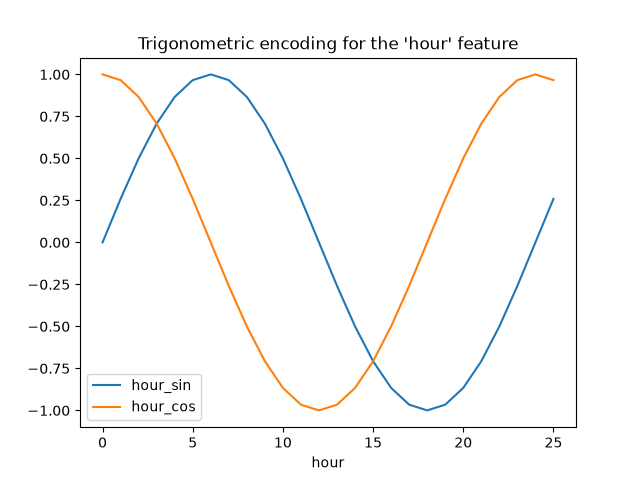 Let’s use a 2D scatter plot with the hours encoded as colors to better see
how this representation maps the 24 hours of the day to a 2D space, akin to
some sort of a 24 hour version of an analog clock. Note that the “25th” hour
is mapped back to the 1st hour because of the periodic nature of the
sine/cosine representation.
fig, ax = plt.subplots(figsize=(7, 5))
sp = ax.scatter(hour_df["hour_sin"], hour_df["hour_cos"], c=hour_df["hour"])
ax.set(
    xlabel="sin(hour)",
    ylabel="cos(hour)",
)
_ = fig.colorbar(sp)
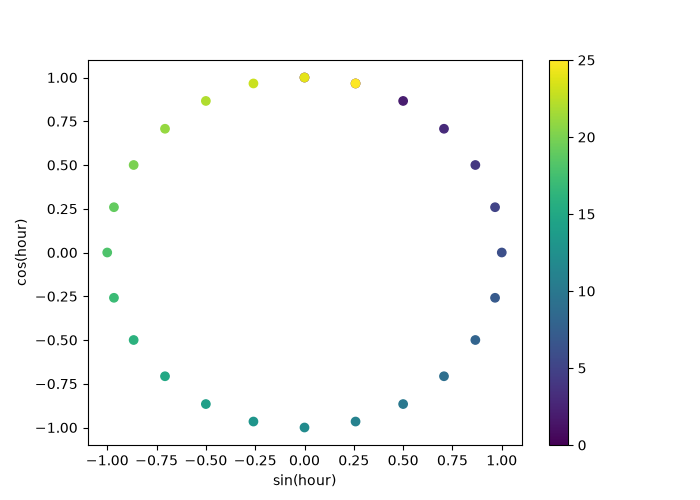 We can now build a feature extraction pipeline using this strategy:
cyclic_cossin_transformer = ColumnTransformer(
    transformers=[
        ("categorical", one_hot_encoder, categorical_columns),
        ("month_sin", sin_transformer(12), ["month"]),
        ("month_cos", cos_transformer(12), ["month"]),
        ("weekday_sin", sin_transformer(7), ["weekday"]),
        ("weekday_cos", cos_transformer(7), ["weekday"]),
        ("hour_sin", sin_transformer(24), ["hour"]),
        ("hour_cos", cos_transformer(24), ["hour"]),
    ],
    remainder=MinMaxScaler(),
    verbose_feature_names_out=True,
)
cyclic_cossin_linear_pipeline = make_pipeline(
    cyclic_cossin_transformer,
    RidgeCV(alphas=alphas),
)
evaluate(cyclic_cossin_linear_pipeline, X, y, cv=ts_cv)
Mean Absolute Error:     0.125 +/- 0.014
Root Mean Squared Error: 0.166 +/- 0.020
Pipeline(steps=[('columntransformer',
                 ColumnTransformer(remainder=MinMaxScaler(),
                                   transformers=[('categorical',
                                                  OneHotEncoder(handle_unknown='ignore',
                                                                sparse_output=False),
                                                  Index(['season', 'holiday', 'workingday', 'weather'], dtype='str')),
                                                 ('month_sin',
                                                  FunctionTransformer(feature_names_out='one-to-one',
                                                                      func=<function sin_transformer.<locals>.<lambda> at 0x7e1...
                 RidgeCV(alphas=array([1.00000000e-06, 3.16227766e-06, 1.00000000e-05, 3.16227766e-05,
       1.00000000e-04, 3.16227766e-04, 1.00000000e-03, 3.16227766e-03,
       1.00000000e-02, 3.16227766e-02, 1.00000000e-01, 3.16227766e-01,
       1.00000000e+00, 3.16227766e+00, 1.00000000e+01, 3.16227766e+01,
       1.00000000e+02, 3.16227766e+02, 1.00000000e+03, 3.16227766e+03,
       1.00000000e+04, 3.16227766e+04, 1.00000000e+05, 3.16227766e+05,
       1.00000000e+06])))])
In a Jupyter environment, please rerun this cell to show the HTML representation or trust the notebook.
On GitHub, the HTML representation is unable to render, please try loading this page with nbviewer.org.
Parameters
|
steps
steps: list of tuples
List of (name of step, estimator) tuples that are to be chained in
sequential order. To be compatible with the scikit-learn API, all steps
must define `fit`. All non-last steps must also define `transform`. See
:ref:`Combining Estimators <combining_estimators>` for more details.
|
[('columntransformer', ...), ('ridgecv', ...)] |
|
transform_input
transform_input: list of str, default=None
The names of the :term:`metadata` parameters that should be transformed by the
pipeline before passing it to the step consuming it.
This enables transforming some input arguments to ``fit`` (other than ``X``)
to be transformed by the steps of the pipeline up to the step which requires
them. Requirement is defined via :ref:`metadata routing <metadata_routing>`.
For instance, this can be used to pass a validation set through the pipeline.
You can only set this if metadata routing is enabled, which you
can enable using ``sklearn.set_config(enable_metadata_routing=True)``.
.. versionadded:: 1.6
|
None |
|
memory
memory: str or object with the joblib.Memory interface, default=None
Used to cache the fitted transformers of the pipeline. The last step
will never be cached, even if it is a transformer. By default, no
caching is performed. If a string is given, it is the path to the
caching directory. Enabling caching triggers a clone of the transformers
before fitting. Therefore, the transformer instance given to the
pipeline cannot be inspected directly. Use the attribute ``named_steps``
or ``steps`` to inspect estimators within the pipeline. Caching the
transformers is advantageous when fitting is time consuming. See
:ref:`sphx_glr_auto_examples_neighbors_plot_caching_nearest_neighbors.py`
for an example on how to enable caching.
|
None |
|
verbose
verbose: bool, default=False
If True, the time elapsed while fitting each step will be printed as it
is completed.
|
False |
columntransformer: ColumnTransformer
Parameters
|
transformers
transformers: list of tuples
List of (name, transformer, columns) tuples specifying the
transformer objects to be applied to subsets of the data.
name : str
Like in Pipeline and FeatureUnion, this allows the transformer and
its parameters to be set using ``set_params`` and searched in grid
search.
transformer : {'drop', 'passthrough'} or estimator
Estimator must support :term:`fit` and :term:`transform`.
Special-cased strings 'drop' and 'passthrough' are accepted as
well, to indicate to drop the columns or to pass them through
untransformed, respectively.
columns : str, array-like of str, int, array-like of int, array-like of bool, slice or callable
Indexes the data on its second axis. Integers are interpreted as
positional columns, while strings can reference DataFrame columns
by name. A scalar string or int should be used where
``transformer`` expects X to be a 1d array-like (vector),
otherwise a 2d array will be passed to the transformer.
A callable is passed the input data `X` and can return any of the
above. To select multiple columns by name or dtype, you can use
:obj:`make_column_selector`.
|
[('categorical', ...), ('month_sin', ...), ...] |
|
remainder
remainder: {'drop', 'passthrough'} or estimator, default='drop'
By default, only the specified columns in `transformers` are
transformed and combined in the output, and the non-specified
columns are dropped. (default of ``'drop'``).
By specifying ``remainder='passthrough'``, all remaining columns that
were not specified in `transformers`, but present in the data passed
to `fit` will be automatically passed through. This subset of columns
is concatenated with the output of the transformers. For dataframes,
extra columns not seen during `fit` will be excluded from the output
of `transform`.
By setting ``remainder`` to be an estimator, the remaining
non-specified columns will use the ``remainder`` estimator. The
estimator must support :term:`fit` and :term:`transform`.
Note that using this feature requires that the DataFrame columns
input at :term:`fit` and :term:`transform` have identical order.
|
MinMaxScaler() |
|
sparse_threshold
sparse_threshold: float, default=0.3
If the output of the different transformers contains sparse matrices,
these will be stacked as a sparse matrix if the overall density is
lower than this value. Use ``sparse_threshold=0`` to always return
dense. When the transformed output consists of all dense data, the
stacked result will be dense, and this keyword will be ignored.
|
0.3 |
|
n_jobs
n_jobs: int, default=None
Number of jobs to run in parallel.
``None`` means 1 unless in a :obj:`joblib.parallel_backend` context.
``-1`` means using all processors. See :term:`Glossary <n_jobs>`
for more details.
|
None |
|
transformer_weights
transformer_weights: dict, default=None
Multiplicative weights for features per transformer. The output of the
transformer is multiplied by these weights. Keys are transformer names,
values the weights.
|
None |
|
verbose
verbose: bool, default=False
If True, the time elapsed while fitting each transformer will be
printed as it is completed.
|
False |
|
verbose_feature_names_out
verbose_feature_names_out: bool, str or Callable[[str, str], str], default=True
- If True, :meth:`ColumnTransformer.get_feature_names_out` will prefix
all feature names with the name of the transformer that generated that
feature. It is equivalent to setting
`verbose_feature_names_out="{transformer_name}__{feature_name}"`.
- If False, :meth:`ColumnTransformer.get_feature_names_out` will not
prefix any feature names and will error if feature names are not
unique.
- If ``Callable[[str, str], str]``,
:meth:`ColumnTransformer.get_feature_names_out` will rename all the features
using the name of the transformer. The first argument of the callable is the
transformer name and the second argument is the feature name. The returned
string will be the new feature name.
- If ``str``, it must be a string ready for formatting. The given string will
be formatted using two field names: ``transformer_name`` and ``feature_name``.
e.g. ``"{feature_name}__{transformer_name}"``. See :meth:`str.format` method
from the standard library for more info.
.. versionadded:: 1.0
.. versionchanged:: 1.6
`verbose_feature_names_out` can be a callable or a string to be formatted.
|
True |
Fitted attributes
| Name |
Type |
Value |
feature_names_in_
feature_names_in_: ndarray of shape (`n_features_in_`,)
Names of features seen during :term:`fit`. Defined only when `X`
has feature names that are all strings.
.. versionadded:: 1.0
|
ndarray[object](12,) |
['season','year','month',...,'feel_temp','humidity','windspeed'] |
n_features_in_
n_features_in_: int
Number of features seen during :term:`fit`. Only defined if the
underlying transformers expose such an attribute when fit.
.. versionadded:: 0.24
|
int |
12 |
named_transformers_
named_transformers_: :class:`~sklearn.utils.Bunch`
Read-only attribute to access any transformer by given name.
Keys are transformer names and values are the fitted transformer
objects.
|
Bunch |
{'categorical...inMaxScaler()} |
output_indices_
output_indices_: dict
A dictionary from each transformer name to a slice, where the slice
corresponds to indices in the transformed output. This is useful to
inspect which transformer is responsible for which transformed
feature(s).
.. versionadded:: 1.0
|
dict |
{'ca...al': slice(0, 11, None), 'ho...os': slice(16, 17, None), 'ho...in': slice(15, 16, None), 'mo...os': slice(12, 13, None), ...} |
sparse_output_
sparse_output_: bool
Boolean flag indicating whether the output of ``transform`` is a
sparse matrix or a dense numpy array, which depends on the output
of the individual transformers and the `sparse_threshold` keyword.
|
bool |
False |
transformers_
transformers_: list
The collection of fitted transformers as tuples of (name,
fitted_transformer, column). `fitted_transformer` can be an estimator,
or `'drop'`; `'passthrough'` is replaced with an equivalent
:class:`~sklearn.preprocessing.FunctionTransformer`. In case there were
no columns selected, this will be the unfitted transformer. If there
are remaining columns, the final element is a tuple of the form:
('remainder', transformer, remaining_columns) corresponding to the
``remainder`` parameter. If there are remaining columns, then
``len(transformers_)==len(transformers)+1``, otherwise
``len(transformers_)==len(transformers)``.
.. versionadded:: 1.7
The format of the remaining columns now attempts to match that of the other
transformers: if all columns were provided as column names (`str`), the
remaining columns are stored as column names; if all columns were provided
as mask arrays (`bool`), so are the remaining columns; in all other cases
the remaining columns are stored as indices (`int`).
|
list |
[('ca...al', OneHotEncoder..._output=False), Index(['seaso..., dtype='str')), ('mo...in', FunctionTrans...7e1dbc43da60>), ['month']), ('mo...os', FunctionTrans...7e1dbc43db10>), ['month']), ('we...in', FunctionTrans...7e1dbc43dbc0>), ['weekday']), ...] |
Index(['season', 'holiday', 'workingday', 'weather'], dtype='str')
Parameters
|
sparse_output
sparse_output: bool, default=True
When ``True``, it returns a SciPy sparse matrix/array
in "Compressed Sparse Row" (CSR) format.
.. versionadded:: 1.2
`sparse` was renamed to `sparse_output`
|
False |
|
handle_unknown
handle_unknown: {'error', 'ignore', 'infrequent_if_exist', 'warn'}, default='error'
Specifies the way unknown categories are handled during :meth:`transform`.
- 'error' : Raise an error if an unknown category is present during transform.
- 'ignore' : When an unknown category is encountered during
transform, the resulting one-hot encoded columns for this feature
will be all zeros. In the inverse transform, an unknown category
will be denoted as None.
- 'infrequent_if_exist' : When an unknown category is encountered
during transform, the resulting one-hot encoded columns for this
feature will map to the infrequent category if it exists. The
infrequent category will be mapped to the last position in the
encoding. During inverse transform, an unknown category will be
mapped to the category denoted `'infrequent'` if it exists. If the
`'infrequent'` category does not exist, then :meth:`transform` and
:meth:`inverse_transform` will handle an unknown category as with
`handle_unknown='ignore'`. Infrequent categories exist based on
`min_frequency` and `max_categories`. Read more in the
:ref:`User Guide <encoder_infrequent_categories>`.
- 'warn' : When an unknown category is encountered during transform
a warning is issued, and the encoding then proceeds as described for
`handle_unknown="infrequent_if_exist"`.
.. versionchanged:: 1.1
`'infrequent_if_exist'` was added to automatically handle unknown
categories and infrequent categories.
.. versionadded:: 1.6
The option `"warn"` was added in 1.6.
|
'ignore' |
|
categories
categories: 'auto' or a list of array-like, default='auto'
Categories (unique values) per feature:
- 'auto' : Determine categories automatically from the training data.
- list : ``categories[i]`` holds the categories expected in the ith
column. The passed categories should not mix strings and numeric
values within a single feature, and should be sorted in case of
numeric values.
The used categories can be found in the ``categories_`` attribute.
.. versionadded:: 0.20
|
'auto' |
|
drop
drop: {'first', 'if_binary'} or an array-like of shape (n_features,), default=None
Specifies a methodology to use to drop one of the categories per
feature. This is useful in situations where perfectly collinear
features cause problems, such as when feeding the resulting data
into an unregularized linear regression model.
However, dropping one category breaks the symmetry of the original
representation and can therefore induce a bias in downstream models,
for instance for penalized linear classification or regression models.
- None : retain all features (the default).
- 'first' : drop the first category in each feature. If only one
category is present, the feature will be dropped entirely.
- 'if_binary' : drop the first category in each feature with two
categories. Features with 1 or more than 2 categories are
left intact.
- array : ``drop[i]`` is the category in feature ``X[:, i]`` that
should be dropped.
When `max_categories` or `min_frequency` is configured to group
infrequent categories, the dropping behavior is handled after the
grouping.
.. versionadded:: 0.21
The parameter `drop` was added in 0.21.
.. versionchanged:: 0.23
The option `drop='if_binary'` was added in 0.23.
.. versionchanged:: 1.1
Support for dropping infrequent categories.
|
None |
|
dtype
dtype: number type, default=np.float64
Desired dtype of output.
|
<class 'numpy.float64'> |
|
min_frequency
min_frequency: int or float, default=None
Specifies the minimum frequency below which a category will be
considered infrequent.
- If `int`, categories with a smaller cardinality will be considered
infrequent.
- If `float`, categories with a smaller cardinality than
`min_frequency * n_samples` will be considered infrequent.
.. versionadded:: 1.1
Read more in the :ref:`User Guide <encoder_infrequent_categories>`.
|
None |
|
max_categories
max_categories: int, default=None
Specifies an upper limit to the number of output features for each input
feature when considering infrequent categories. If there are infrequent
categories, `max_categories` includes the category representing the
infrequent categories along with the frequent categories. If `None`,
there is no limit to the number of output features.
.. versionadded:: 1.1
Read more in the :ref:`User Guide <encoder_infrequent_categories>`.
|
None |
|
feature_name_combiner
feature_name_combiner: "concat" or callable, default="concat"
Callable with signature `def callable(input_feature, category)` that returns a
string. This is used to create feature names to be returned by
:meth:`get_feature_names_out`.
`"concat"` concatenates encoded feature name and category with
`feature + "_" + str(category)`.E.g. feature X with values 1, 6, 7 create
feature names `X_1, X_6, X_7`.
.. versionadded:: 1.3
|
'concat' |
Fitted attributes
| Name |
Type |
Value |
categories_
categories_: list of arrays
The categories of each feature determined during fitting
(in order of the features in X and corresponding with the output
of ``transform``). This includes the category specified in ``drop``
(if any).
|
list |
[array(['fall'... dtype=object), array(['False... dtype=object), array(['False... dtype=object), array(['clear... dtype=object)] |
drop_idx_
drop_idx_: array of shape (n_features,)
- ``drop_idx_[i]`` is the index in ``categories_[i]`` of the category
to be dropped for each feature.
- ``drop_idx_[i] = None`` if no category is to be dropped from the
feature with index ``i``, e.g. when `drop='if_binary'` and the
feature isn't binary.
- ``drop_idx_ = None`` if all the transformed features will be
retained.
If infrequent categories are enabled by setting `min_frequency` or
`max_categories` to a non-default value and `drop_idx[i]` corresponds
to an infrequent category, then the entire infrequent category is
dropped.
.. versionchanged:: 0.23
Added the possibility to contain `None` values.
|
NoneType |
None |
feature_names_in_
feature_names_in_: ndarray of shape (`n_features_in_`,)
Names of features seen during :term:`fit`. Defined only when `X`
has feature names that are all strings.
.. versionadded:: 1.0
|
ndarray[object](4,) |
['season','holiday','workingday','weather'] |
n_features_in_
n_features_in_: int
Number of features seen during :term:`fit`.
.. versionadded:: 1.0
|
int |
4 |
11 features
| season_fall |
| season_spring |
| season_summer |
| season_winter |
| holiday_False |
| holiday_True |
| workingday_False |
| workingday_True |
| weather_clear |
| weather_misty |
| weather_rain |
<lambda> FunctionTransformer
Parameters
|
func
func: callable, default=None
The callable to use for the transformation. This will be passed
the same arguments as transform, with args and kwargs forwarded.
If func is None, then func will be the identity function.
|
<function sin...x7e1dbc43da60> |
|
feature_names_out
feature_names_out: callable, 'one-to-one' or None, default=None
Determines the list of feature names that will be returned by the
`get_feature_names_out` method. If it is 'one-to-one', then the output
feature names will be equal to the input feature names. If it is a
callable, then it must take two positional arguments: this
`FunctionTransformer` (`self`) and an array-like of input feature names
(`input_features`). It must return an array-like of output feature
names. The `get_feature_names_out` method is only defined if
`feature_names_out` is not None.
See ``get_feature_names_out`` for more details.
.. versionadded:: 1.1
|
'one-to-one' |
|
inverse_func
inverse_func: callable, default=None
The callable to use for the inverse transformation. This will be
passed the same arguments as inverse transform, with args and
kwargs forwarded. If inverse_func is None, then inverse_func
will be the identity function.
|
None |
|
validate
validate: bool, default=False
Indicate that the input X array should be checked before calling
``func``. The possibilities are:
- If False, there is no input validation.
- If True, then X will be converted to a 2-dimensional NumPy array or
sparse matrix. If the conversion is not possible an exception is
raised.
.. versionchanged:: 0.22
The default of ``validate`` changed from True to False.
|
False |
|
accept_sparse
accept_sparse: bool, default=False
Indicate that func accepts a sparse matrix as input. If validate is
False, this has no effect. Otherwise, if accept_sparse is false,
sparse matrix inputs will cause an exception to be raised.
|
False |
|
check_inverse
check_inverse: bool, default=True
Whether to check that or ``func`` followed by ``inverse_func`` leads to
the original inputs. It can be used for a sanity check, raising a
warning when the condition is not fulfilled.
.. versionadded:: 0.20
|
True |
|
kw_args
kw_args: dict, default=None
Dictionary of additional keyword arguments to pass to func.
.. versionadded:: 0.18
|
None |
|
inv_kw_args
inv_kw_args: dict, default=None
Dictionary of additional keyword arguments to pass to inverse_func.
.. versionadded:: 0.18
|
None |
<lambda> FunctionTransformer
Parameters
|
func
func: callable, default=None
The callable to use for the transformation. This will be passed
the same arguments as transform, with args and kwargs forwarded.
If func is None, then func will be the identity function.
|
<function cos...x7e1dbc43db10> |
|
feature_names_out
feature_names_out: callable, 'one-to-one' or None, default=None
Determines the list of feature names that will be returned by the
`get_feature_names_out` method. If it is 'one-to-one', then the output
feature names will be equal to the input feature names. If it is a
callable, then it must take two positional arguments: this
`FunctionTransformer` (`self`) and an array-like of input feature names
(`input_features`). It must return an array-like of output feature
names. The `get_feature_names_out` method is only defined if
`feature_names_out` is not None.
See ``get_feature_names_out`` for more details.
.. versionadded:: 1.1
|
'one-to-one' |
|
inverse_func
inverse_func: callable, default=None
The callable to use for the inverse transformation. This will be
passed the same arguments as inverse transform, with args and
kwargs forwarded. If inverse_func is None, then inverse_func
will be the identity function.
|
None |
|
validate
validate: bool, default=False
Indicate that the input X array should be checked before calling
``func``. The possibilities are:
- If False, there is no input validation.
- If True, then X will be converted to a 2-dimensional NumPy array or
sparse matrix. If the conversion is not possible an exception is
raised.
.. versionchanged:: 0.22
The default of ``validate`` changed from True to False.
|
False |
|
accept_sparse
accept_sparse: bool, default=False
Indicate that func accepts a sparse matrix as input. If validate is
False, this has no effect. Otherwise, if accept_sparse is false,
sparse matrix inputs will cause an exception to be raised.
|
False |
|
check_inverse
check_inverse: bool, default=True
Whether to check that or ``func`` followed by ``inverse_func`` leads to
the original inputs. It can be used for a sanity check, raising a
warning when the condition is not fulfilled.
.. versionadded:: 0.20
|
True |
|
kw_args
kw_args: dict, default=None
Dictionary of additional keyword arguments to pass to func.
.. versionadded:: 0.18
|
None |
|
inv_kw_args
inv_kw_args: dict, default=None
Dictionary of additional keyword arguments to pass to inverse_func.
.. versionadded:: 0.18
|
None |
<lambda> FunctionTransformer
Parameters
|
func
func: callable, default=None
The callable to use for the transformation. This will be passed
the same arguments as transform, with args and kwargs forwarded.
If func is None, then func will be the identity function.
|
<function sin...x7e1dbc43dbc0> |
|
feature_names_out
feature_names_out: callable, 'one-to-one' or None, default=None
Determines the list of feature names that will be returned by the
`get_feature_names_out` method. If it is 'one-to-one', then the output
feature names will be equal to the input feature names. If it is a
callable, then it must take two positional arguments: this
`FunctionTransformer` (`self`) and an array-like of input feature names
(`input_features`). It must return an array-like of output feature
names. The `get_feature_names_out` method is only defined if
`feature_names_out` is not None.
See ``get_feature_names_out`` for more details.
.. versionadded:: 1.1
|
'one-to-one' |
|
inverse_func
inverse_func: callable, default=None
The callable to use for the inverse transformation. This will be
passed the same arguments as inverse transform, with args and
kwargs forwarded. If inverse_func is None, then inverse_func
will be the identity function.
|
None |
|
validate
validate: bool, default=False
Indicate that the input X array should be checked before calling
``func``. The possibilities are:
- If False, there is no input validation.
- If True, then X will be converted to a 2-dimensional NumPy array or
sparse matrix. If the conversion is not possible an exception is
raised.
.. versionchanged:: 0.22
The default of ``validate`` changed from True to False.
|
False |
|
accept_sparse
accept_sparse: bool, default=False
Indicate that func accepts a sparse matrix as input. If validate is
False, this has no effect. Otherwise, if accept_sparse is false,
sparse matrix inputs will cause an exception to be raised.
|
False |
|
check_inverse
check_inverse: bool, default=True
Whether to check that or ``func`` followed by ``inverse_func`` leads to
the original inputs. It can be used for a sanity check, raising a
warning when the condition is not fulfilled.
.. versionadded:: 0.20
|
True |
|
kw_args
kw_args: dict, default=None
Dictionary of additional keyword arguments to pass to func.
.. versionadded:: 0.18
|
None |
|
inv_kw_args
inv_kw_args: dict, default=None
Dictionary of additional keyword arguments to pass to inverse_func.
.. versionadded:: 0.18
|
None |
<lambda> FunctionTransformer
Parameters
|
func
func: callable, default=None
The callable to use for the transformation. This will be passed
the same arguments as transform, with args and kwargs forwarded.
If func is None, then func will be the identity function.
|
<function cos...x7e1dbc43dc70> |
|
feature_names_out
feature_names_out: callable, 'one-to-one' or None, default=None
Determines the list of feature names that will be returned by the
`get_feature_names_out` method. If it is 'one-to-one', then the output
feature names will be equal to the input feature names. If it is a
callable, then it must take two positional arguments: this
`FunctionTransformer` (`self`) and an array-like of input feature names
(`input_features`). It must return an array-like of output feature
names. The `get_feature_names_out` method is only defined if
`feature_names_out` is not None.
See ``get_feature_names_out`` for more details.
.. versionadded:: 1.1
|
'one-to-one' |
|
inverse_func
inverse_func: callable, default=None
The callable to use for the inverse transformation. This will be
passed the same arguments as inverse transform, with args and
kwargs forwarded. If inverse_func is None, then inverse_func
will be the identity function.
|
None |
|
validate
validate: bool, default=False
Indicate that the input X array should be checked before calling
``func``. The possibilities are:
- If False, there is no input validation.
- If True, then X will be converted to a 2-dimensional NumPy array or
sparse matrix. If the conversion is not possible an exception is
raised.
.. versionchanged:: 0.22
The default of ``validate`` changed from True to False.
|
False |
|
accept_sparse
accept_sparse: bool, default=False
Indicate that func accepts a sparse matrix as input. If validate is
False, this has no effect. Otherwise, if accept_sparse is false,
sparse matrix inputs will cause an exception to be raised.
|
False |
|
check_inverse
check_inverse: bool, default=True
Whether to check that or ``func`` followed by ``inverse_func`` leads to
the original inputs. It can be used for a sanity check, raising a
warning when the condition is not fulfilled.
.. versionadded:: 0.20
|
True |
|
kw_args
kw_args: dict, default=None
Dictionary of additional keyword arguments to pass to func.
.. versionadded:: 0.18
|
None |
|
inv_kw_args
inv_kw_args: dict, default=None
Dictionary of additional keyword arguments to pass to inverse_func.
.. versionadded:: 0.18
|
None |
<lambda> FunctionTransformer
Parameters
|
func
func: callable, default=None
The callable to use for the transformation. This will be passed
the same arguments as transform, with args and kwargs forwarded.
If func is None, then func will be the identity function.
|
<function sin...x7e1dbc43dd20> |
|
feature_names_out
feature_names_out: callable, 'one-to-one' or None, default=None
Determines the list of feature names that will be returned by the
`get_feature_names_out` method. If it is 'one-to-one', then the output
feature names will be equal to the input feature names. If it is a
callable, then it must take two positional arguments: this
`FunctionTransformer` (`self`) and an array-like of input feature names
(`input_features`). It must return an array-like of output feature
names. The `get_feature_names_out` method is only defined if
`feature_names_out` is not None.
See ``get_feature_names_out`` for more details.
.. versionadded:: 1.1
|
'one-to-one' |
|
inverse_func
inverse_func: callable, default=None
The callable to use for the inverse transformation. This will be
passed the same arguments as inverse transform, with args and
kwargs forwarded. If inverse_func is None, then inverse_func
will be the identity function.
|
None |
|
validate
validate: bool, default=False
Indicate that the input X array should be checked before calling
``func``. The possibilities are:
- If False, there is no input validation.
- If True, then X will be converted to a 2-dimensional NumPy array or
sparse matrix. If the conversion is not possible an exception is
raised.
.. versionchanged:: 0.22
The default of ``validate`` changed from True to False.
|
False |
|
accept_sparse
accept_sparse: bool, default=False
Indicate that func accepts a sparse matrix as input. If validate is
False, this has no effect. Otherwise, if accept_sparse is false,
sparse matrix inputs will cause an exception to be raised.
|
False |
|
check_inverse
check_inverse: bool, default=True
Whether to check that or ``func`` followed by ``inverse_func`` leads to
the original inputs. It can be used for a sanity check, raising a
warning when the condition is not fulfilled.
.. versionadded:: 0.20
|
True |
|
kw_args
kw_args: dict, default=None
Dictionary of additional keyword arguments to pass to func.
.. versionadded:: 0.18
|
None |
|
inv_kw_args
inv_kw_args: dict, default=None
Dictionary of additional keyword arguments to pass to inverse_func.
.. versionadded:: 0.18
|
None |
<lambda> FunctionTransformer
Parameters
|
func
func: callable, default=None
The callable to use for the transformation. This will be passed
the same arguments as transform, with args and kwargs forwarded.
If func is None, then func will be the identity function.
|
<function cos...x7e1dbc43ddd0> |
|
feature_names_out
feature_names_out: callable, 'one-to-one' or None, default=None
Determines the list of feature names that will be returned by the
`get_feature_names_out` method. If it is 'one-to-one', then the output
feature names will be equal to the input feature names. If it is a
callable, then it must take two positional arguments: this
`FunctionTransformer` (`self`) and an array-like of input feature names
(`input_features`). It must return an array-like of output feature
names. The `get_feature_names_out` method is only defined if
`feature_names_out` is not None.
See ``get_feature_names_out`` for more details.
.. versionadded:: 1.1
|
'one-to-one' |
|
inverse_func
inverse_func: callable, default=None
The callable to use for the inverse transformation. This will be
passed the same arguments as inverse transform, with args and
kwargs forwarded. If inverse_func is None, then inverse_func
will be the identity function.
|
None |
|
validate
validate: bool, default=False
Indicate that the input X array should be checked before calling
``func``. The possibilities are:
- If False, there is no input validation.
- If True, then X will be converted to a 2-dimensional NumPy array or
sparse matrix. If the conversion is not possible an exception is
raised.
.. versionchanged:: 0.22
The default of ``validate`` changed from True to False.
|
False |
|
accept_sparse
accept_sparse: bool, default=False
Indicate that func accepts a sparse matrix as input. If validate is
False, this has no effect. Otherwise, if accept_sparse is false,
sparse matrix inputs will cause an exception to be raised.
|
False |
|
check_inverse
check_inverse: bool, default=True
Whether to check that or ``func`` followed by ``inverse_func`` leads to
the original inputs. It can be used for a sanity check, raising a
warning when the condition is not fulfilled.
.. versionadded:: 0.20
|
True |
|
kw_args
kw_args: dict, default=None
Dictionary of additional keyword arguments to pass to func.
.. versionadded:: 0.18
|
None |
|
inv_kw_args
inv_kw_args: dict, default=None
Dictionary of additional keyword arguments to pass to inverse_func.
.. versionadded:: 0.18
|
None |
['year', 'temp', 'feel_temp', 'humidity', 'windspeed']
Fitted attributes
| Name |
Type |
Value |
data_max_
data_max_: ndarray of shape (n_features,)
Per feature maximum seen in the data
.. versionadded:: 0.17
*data_max_*
|
ndarray[float64](5,) |
[ 1. ,39.36,50. , 1. ,57. ] |
data_min_
data_min_: ndarray of shape (n_features,)
Per feature minimum seen in the data
.. versionadded:: 0.17
*data_min_*
|
ndarray[float64](5,) |
[0. ,0.82,0.76,0.16,0. ] |
data_range_
data_range_: ndarray of shape (n_features,)
Per feature range ``(data_max_ - data_min_)`` seen in the data
.. versionadded:: 0.17
*data_range_*
|
ndarray[float64](5,) |
[ 1. ,38.54,49.24, 0.84,57. ] |
feature_names_in_
feature_names_in_: ndarray of shape (`n_features_in_`,)
Names of features seen during :term:`fit`. Defined only when `X`
has feature names that are all strings.
.. versionadded:: 1.0
|
ndarray[object](5,) |
['year','temp','feel_temp','humidity','windspeed'] |
min_
min_: ndarray of shape (n_features,)
Per feature adjustment for minimum. Equivalent to
``min - X.min(axis=0) * self.scale_``
|
ndarray[float64](5,) |
[ 0. ,-0.02,-0.02,-0.19, 0. ] |
n_features_in_
n_features_in_: int
Number of features seen during :term:`fit`.
.. versionadded:: 0.24
|
int |
5 |
n_samples_seen_
n_samples_seen_: int
The number of samples processed by the estimator.
It will be reset on new calls to fit, but increments across
``partial_fit`` calls.
|
int |
10000 |
scale_
scale_: ndarray of shape (n_features,)
Per feature relative scaling of the data. Equivalent to
``(max - min) / (X.max(axis=0) - X.min(axis=0))``
.. versionadded:: 0.17
*scale_* attribute.
|
ndarray[float64](5,) |
[1. ,0.03,0.02,1.19,0.02] |
5 features
| year |
| temp |
| feel_temp |
| humidity |
| windspeed |
22 features
| categorical__season_fall |
| categorical__season_spring |
| categorical__season_summer |
| categorical__season_winter |
| categorical__holiday_False |
| categorical__holiday_True |
| categorical__workingday_False |
| categorical__workingday_True |
| categorical__weather_clear |
| categorical__weather_misty |
| categorical__weather_rain |
| month_sin__month |
| month_cos__month |
| weekday_sin__weekday |
| weekday_cos__weekday |
| hour_sin__hour |
| hour_cos__hour |
| remainder__year |
| remainder__temp |
| remainder__feel_temp |
| remainder__humidity |
| remainder__windspeed |
Parameters
|
alphas
alphas: array-like of shape (n_alphas,), default=(0.1, 1.0, 10.0)
Array of alpha values to try.
Regularization strength; must be a positive float. Regularization
improves the conditioning of the problem and reduces the variance of
the estimates. Larger values specify stronger regularization.
Alpha corresponds to ``1 / (2C)`` in other linear models such as
:class:`~sklearn.linear_model.LogisticRegression` or
:class:`~sklearn.svm.LinearSVC`.
If using Leave-One-Out cross-validation, alphas must be strictly positive.
For an example on how regularization strength affects the model coefficients,
see :ref:`sphx_glr_auto_examples_linear_model_plot_ridge_coeffs.py`.
|
array([1.0000...00000000e+06]) |
|
fit_intercept
fit_intercept: bool, default=True
Whether to calculate the intercept for this model. If set
to false, no intercept will be used in calculations
(i.e. data is expected to be centered).
|
True |
|
scoring
scoring: str, callable, default=None
The scoring method to use for cross-validation. Options:
- str: see :ref:`scoring_string_names` for options.
- callable: a scorer callable object (e.g., function) with signature
``scorer(estimator, X, y)``. See :ref:`scoring_callable` for details.
- `None`: negative :ref:`mean squared error <mean_squared_error>` if cv is
None (i.e. when using leave-one-out cross-validation), or
:ref:`coefficient of determination <r2_score>` (:math:`R^2`) otherwise.
|
None |
|
cv
cv: int, cross-validation generator or an iterable, default=None
Determines the cross-validation splitting strategy.
Possible inputs for cv are:
- None, to use the efficient Leave-One-Out cross-validation
- integer, to specify the number of folds,
- :term:`CV splitter`,
- an iterable yielding (train, test) splits as arrays of indices.
For integer/None inputs, if ``y`` is binary or multiclass,
:class:`~sklearn.model_selection.StratifiedKFold` is used, else,
:class:`~sklearn.model_selection.KFold` is used.
Refer :ref:`User Guide <cross_validation>` for the various
cross-validation strategies that can be used here.
|
None |
|
gcv_mode
gcv_mode: {'auto', 'svd', 'eigen'}, default='auto'
Flag indicating which strategy to use when performing
Leave-One-Out Cross-Validation. Options are::
'auto' : same as 'eigen'
'svd' : use singular value decomposition of X when X is dense,
fallback to 'eigen' when X is sparse
'eigen' : use eigendecomposition of X X' when n_samples <= n_features
or X' X when n_features < n_samples
The 'auto' mode is the default and is intended to pick the cheaper
option depending on the shape and sparsity of the training data.
|
None |
|
store_cv_results
store_cv_results: bool, default=False
Flag indicating if the cross-validation values corresponding to
each alpha should be stored in the ``cv_results_`` attribute (see
below). This flag is only compatible with ``cv=None`` (i.e. using
Leave-One-Out Cross-Validation).
.. versionchanged:: 1.5
Parameter name changed from `store_cv_values` to `store_cv_results`.
|
False |
|
alpha_per_target
alpha_per_target: bool, default=False
Flag indicating whether to optimize the alpha value (picked from the
`alphas` parameter list) for each target separately (for multi-output
settings: multiple prediction targets). When set to `True`, after
fitting, the `alpha_` attribute will contain a value for each target.
When set to `False`, a single alpha is used for all targets.
This flag is only compatible with ``cv=None`` (i.e. using
Leave-One-Out Cross-Validation).
.. versionadded:: 0.24
|
False |
Fitted attributes
| Name |
Type |
Value |
alpha_
alpha_: float or ndarray of shape (n_targets,)
Estimated regularization parameter, or, if ``alpha_per_target=True``,
the estimated regularization parameter for each target.
|
float |
1 |
best_score_
best_score_: float or ndarray of shape (n_targets,)
Score of base estimator with best alpha, or, if
``alpha_per_target=True``, a score for each target.
.. versionadded:: 0.23
|
float64 |
-0.01384 |
coef_
coef_: ndarray of shape (n_features) or (n_targets, n_features)
Weight vector(s).
|
ndarray[float64](22,) |
[-0. ,-0.04, 0.01,..., 0.18,-0.03,-0.03] |
intercept_
intercept_: float or ndarray of shape (n_targets,)
Independent term in decision function. Set to 0.0 if
``fit_intercept = False``.
|
float64 |
0.04623 |
n_features_in_
n_features_in_: int
Number of features seen during :term:`fit`.
.. versionadded:: 0.24
|
int |
22 |
The performance of our linear regression model with this simple feature
engineering is a bit better than using the original ordinal time features but
worse than using the one-hot encoded time features. We will further analyze
possible reasons for this disappointing outcome at the end of this notebook.
Periodic spline features#
We can try an alternative encoding of the periodic time-related features
using spline transformations with a large enough number of splines, and as a
result a larger number of expanded features compared to the sine/cosine
transformation:
from sklearn.preprocessing import SplineTransformer


def periodic_spline_transformer(period, n_splines=None, degree=3):
    if n_splines is None:
        n_splines = period
    n_knots = n_splines + 1  # periodic and include_bias is True
    return SplineTransformer(
        degree=degree,
        n_knots=n_knots,
        knots=np.linspace(0, period, n_knots).reshape(n_knots, 1),
        extrapolation="periodic",
        include_bias=True,
    )
Again, let us visualize the effect of this feature expansion on some
synthetic hour data with a bit of extrapolation beyond hour=23:
hour_df = pd.DataFrame(
    np.linspace(0, 26, 1000).reshape(-1, 1),
    columns=["hour"],
)
splines = periodic_spline_transformer(24, n_splines=12).fit_transform(hour_df)
splines_df = pd.DataFrame(
    splines,
    columns=[f"spline_{i}" for i in range(splines.shape[1])],
)
pd.concat([hour_df, splines_df], axis="columns").plot(x="hour", cmap=plt.cm.tab20b)
_ = plt.title("Periodic spline-based encoding for the 'hour' feature")
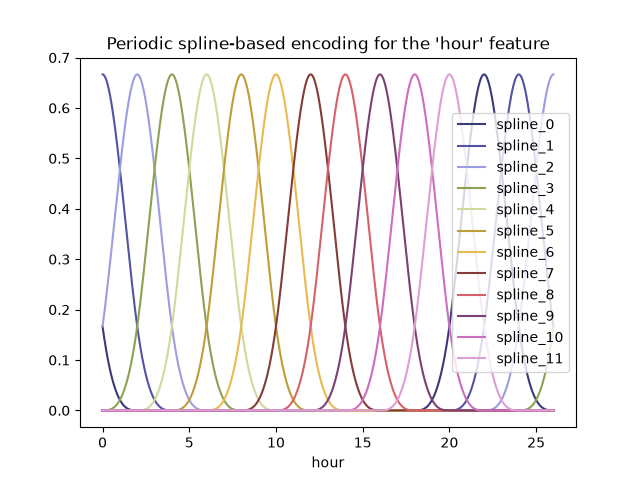 Thanks to the use of the extrapolation="periodic" parameter, we observe
that the feature encoding stays smooth when extrapolating beyond midnight.
We can now build a predictive pipeline using this alternative periodic
feature engineering strategy.
It is possible to use fewer splines than discrete levels for those ordinal
values. This makes spline-based encoding more efficient than one-hot encoding
while preserving most of the expressivity:
cyclic_spline_transformer = ColumnTransformer(
    transformers=[
        ("categorical", one_hot_encoder, categorical_columns),
        ("cyclic_month", periodic_spline_transformer(12, n_splines=6), ["month"]),
        ("cyclic_weekday", periodic_spline_transformer(7, n_splines=3), ["weekday"]),
        ("cyclic_hour", periodic_spline_transformer(24, n_splines=12), ["hour"]),
    ],
    remainder=MinMaxScaler(),
    verbose_feature_names_out=False,
)
cyclic_spline_linear_pipeline = make_pipeline(
    cyclic_spline_transformer,
    RidgeCV(alphas=alphas),
)
evaluate(cyclic_spline_linear_pipeline, X, y, cv=ts_cv)
Mean Absolute Error:     0.097 +/- 0.011
Root Mean Squared Error: 0.132 +/- 0.013
Pipeline(steps=[('columntransformer',
                 ColumnTransformer(remainder=MinMaxScaler(),
                                   transformers=[('categorical',
                                                  OneHotEncoder(handle_unknown='ignore',
                                                                sparse_output=False),
                                                  Index(['season', 'holiday', 'workingday', 'weather'], dtype='str')),
                                                 ('cyclic_month',
                                                  SplineTransformer(extrapolation='periodic',
                                                                    knots=array([[ 0.],
       [ 2.],
       [ 4.],
       [ 6.],
       [ 8.],
       [10.],
       [12.]]),
                                                                    n_knots...
                 RidgeCV(alphas=array([1.00000000e-06, 3.16227766e-06, 1.00000000e-05, 3.16227766e-05,
       1.00000000e-04, 3.16227766e-04, 1.00000000e-03, 3.16227766e-03,
       1.00000000e-02, 3.16227766e-02, 1.00000000e-01, 3.16227766e-01,
       1.00000000e+00, 3.16227766e+00, 1.00000000e+01, 3.16227766e+01,
       1.00000000e+02, 3.16227766e+02, 1.00000000e+03, 3.16227766e+03,
       1.00000000e+04, 3.16227766e+04, 1.00000000e+05, 3.16227766e+05,
       1.00000000e+06])))])
In a Jupyter environment, please rerun this cell to show the HTML representation or trust the notebook.
On GitHub, the HTML representation is unable to render, please try loading this page with nbviewer.org.
Parameters
|
steps
steps: list of tuples
List of (name of step, estimator) tuples that are to be chained in
sequential order. To be compatible with the scikit-learn API, all steps
must define `fit`. All non-last steps must also define `transform`. See
:ref:`Combining Estimators <combining_estimators>` for more details.
|
[('columntransformer', ...), ('ridgecv', ...)] |
|
transform_input
transform_input: list of str, default=None
The names of the :term:`metadata` parameters that should be transformed by the
pipeline before passing it to the step consuming it.
This enables transforming some input arguments to ``fit`` (other than ``X``)
to be transformed by the steps of the pipeline up to the step which requires
them. Requirement is defined via :ref:`metadata routing <metadata_routing>`.
For instance, this can be used to pass a validation set through the pipeline.
You can only set this if metadata routing is enabled, which you
can enable using ``sklearn.set_config(enable_metadata_routing=True)``.
.. versionadded:: 1.6
|
None |
|
memory
memory: str or object with the joblib.Memory interface, default=None
Used to cache the fitted transformers of the pipeline. The last step
will never be cached, even if it is a transformer. By default, no
caching is performed. If a string is given, it is the path to the
caching directory. Enabling caching triggers a clone of the transformers
before fitting. Therefore, the transformer instance given to the
pipeline cannot be inspected directly. Use the attribute ``named_steps``
or ``steps`` to inspect estimators within the pipeline. Caching the
transformers is advantageous when fitting is time consuming. See
:ref:`sphx_glr_auto_examples_neighbors_plot_caching_nearest_neighbors.py`
for an example on how to enable caching.
|
None |
|
verbose
verbose: bool, default=False
If True, the time elapsed while fitting each step will be printed as it
is completed.
|
False |
columntransformer: ColumnTransformer
Parameters
|
transformers
transformers: list of tuples
List of (name, transformer, columns) tuples specifying the
transformer objects to be applied to subsets of the data.
name : str
Like in Pipeline and FeatureUnion, this allows the transformer and
its parameters to be set using ``set_params`` and searched in grid
search.
transformer : {'drop', 'passthrough'} or estimator
Estimator must support :term:`fit` and :term:`transform`.
Special-cased strings 'drop' and 'passthrough' are accepted as
well, to indicate to drop the columns or to pass them through
untransformed, respectively.
columns : str, array-like of str, int, array-like of int, array-like of bool, slice or callable
Indexes the data on its second axis. Integers are interpreted as
positional columns, while strings can reference DataFrame columns
by name. A scalar string or int should be used where
``transformer`` expects X to be a 1d array-like (vector),
otherwise a 2d array will be passed to the transformer.
A callable is passed the input data `X` and can return any of the
above. To select multiple columns by name or dtype, you can use
:obj:`make_column_selector`.
|
[('categorical', ...), ('cyclic_month', ...), ...] |
|
remainder
remainder: {'drop', 'passthrough'} or estimator, default='drop'
By default, only the specified columns in `transformers` are
transformed and combined in the output, and the non-specified
columns are dropped. (default of ``'drop'``).
By specifying ``remainder='passthrough'``, all remaining columns that
were not specified in `transformers`, but present in the data passed
to `fit` will be automatically passed through. This subset of columns
is concatenated with the output of the transformers. For dataframes,
extra columns not seen during `fit` will be excluded from the output
of `transform`.
By setting ``remainder`` to be an estimator, the remaining
non-specified columns will use the ``remainder`` estimator. The
estimator must support :term:`fit` and :term:`transform`.
Note that using this feature requires that the DataFrame columns
input at :term:`fit` and :term:`transform` have identical order.
|
MinMaxScaler() |
|
verbose_feature_names_out
verbose_feature_names_out: bool, str or Callable[[str, str], str], default=True
- If True, :meth:`ColumnTransformer.get_feature_names_out` will prefix
all feature names with the name of the transformer that generated that
feature. It is equivalent to setting
`verbose_feature_names_out="{transformer_name}__{feature_name}"`.
- If False, :meth:`ColumnTransformer.get_feature_names_out` will not
prefix any feature names and will error if feature names are not
unique.
- If ``Callable[[str, str], str]``,
:meth:`ColumnTransformer.get_feature_names_out` will rename all the features
using the name of the transformer. The first argument of the callable is the
transformer name and the second argument is the feature name. The returned
string will be the new feature name.
- If ``str``, it must be a string ready for formatting. The given string will
be formatted using two field names: ``transformer_name`` and ``feature_name``.
e.g. ``"{feature_name}__{transformer_name}"``. See :meth:`str.format` method
from the standard library for more info.
.. versionadded:: 1.0
.. versionchanged:: 1.6
`verbose_feature_names_out` can be a callable or a string to be formatted.
|
False |
|
sparse_threshold
sparse_threshold: float, default=0.3
If the output of the different transformers contains sparse matrices,
these will be stacked as a sparse matrix if the overall density is
lower than this value. Use ``sparse_threshold=0`` to always return
dense. When the transformed output consists of all dense data, the
stacked result will be dense, and this keyword will be ignored.
|
0.3 |
|
n_jobs
n_jobs: int, default=None
Number of jobs to run in parallel.
``None`` means 1 unless in a :obj:`joblib.parallel_backend` context.
``-1`` means using all processors. See :term:`Glossary <n_jobs>`
for more details.
|
None |
|
transformer_weights
transformer_weights: dict, default=None
Multiplicative weights for features per transformer. The output of the
transformer is multiplied by these weights. Keys are transformer names,
values the weights.
|
None |
|
verbose
verbose: bool, default=False
If True, the time elapsed while fitting each transformer will be
printed as it is completed.
|
False |
Fitted attributes
| Name |
Type |
Value |
feature_names_in_
feature_names_in_: ndarray of shape (`n_features_in_`,)
Names of features seen during :term:`fit`. Defined only when `X`
has feature names that are all strings.
.. versionadded:: 1.0
|
ndarray[object](12,) |
['season','year','month',...,'feel_temp','humidity','windspeed'] |
n_features_in_
n_features_in_: int
Number of features seen during :term:`fit`. Only defined if the
underlying transformers expose such an attribute when fit.
.. versionadded:: 0.24
|
int |
12 |
named_transformers_
named_transformers_: :class:`~sklearn.utils.Bunch`
Read-only attribute to access any transformer by given name.
Keys are transformer names and values are the fitted transformer
objects.
|
Bunch |
{'categorical...inMaxScaler()} |
output_indices_
output_indices_: dict
A dictionary from each transformer name to a slice, where the slice
corresponds to indices in the transformed output. This is useful to
inspect which transformer is responsible for which transformed
feature(s).
.. versionadded:: 1.0
|
dict |
{'ca...al': slice(0, 11, None), 'cy...ur': slice(20, 32, None), 'cy...th': slice(11, 17, None), 'cy...ay': slice(17, 20, None), ...} |
sparse_output_
sparse_output_: bool
Boolean flag indicating whether the output of ``transform`` is a
sparse matrix or a dense numpy array, which depends on the output
of the individual transformers and the `sparse_threshold` keyword.
|
bool |
False |
transformers_
transformers_: list
The collection of fitted transformers as tuples of (name,
fitted_transformer, column). `fitted_transformer` can be an estimator,
or `'drop'`; `'passthrough'` is replaced with an equivalent
:class:`~sklearn.preprocessing.FunctionTransformer`. In case there were
no columns selected, this will be the unfitted transformer. If there
are remaining columns, the final element is a tuple of the form:
('remainder', transformer, remaining_columns) corresponding to the
``remainder`` parameter. If there are remaining columns, then
``len(transformers_)==len(transformers)+1``, otherwise
``len(transformers_)==len(transformers)``.
.. versionadded:: 1.7
The format of the remaining columns now attempts to match that of the other
transformers: if all columns were provided as column names (`str`), the
remaining columns are stored as column names; if all columns were provided
as mask arrays (`bool`), so are the remaining columns; in all other cases
the remaining columns are stored as indices (`int`).
|
list |
[('ca...al', OneHotEncoder..._output=False), Index(['seaso..., dtype='str')), ('cy...th', SplineTransfo... n_knots=7), ['month']), ('cy...ay', SplineTransfo... n_knots=4), ['weekday']), ('cy...ur', SplineTransfo... n_knots=13), ['hour']), ...] |
Index(['season', 'holiday', 'workingday', 'weather'], dtype='str')
Parameters
|
sparse_output
sparse_output: bool, default=True
When ``True``, it returns a SciPy sparse matrix/array
in "Compressed Sparse Row" (CSR) format.
.. versionadded:: 1.2
`sparse` was renamed to `sparse_output`
|
False |
|
handle_unknown
handle_unknown: {'error', 'ignore', 'infrequent_if_exist', 'warn'}, default='error'
Specifies the way unknown categories are handled during :meth:`transform`.
- 'error' : Raise an error if an unknown category is present during transform.
- 'ignore' : When an unknown category is encountered during
transform, the resulting one-hot encoded columns for this feature
will be all zeros. In the inverse transform, an unknown category
will be denoted as None.
- 'infrequent_if_exist' : When an unknown category is encountered
during transform, the resulting one-hot encoded columns for this
feature will map to the infrequent category if it exists. The
infrequent category will be mapped to the last position in the
encoding. During inverse transform, an unknown category will be
mapped to the category denoted `'infrequent'` if it exists. If the
`'infrequent'` category does not exist, then :meth:`transform` and
:meth:`inverse_transform` will handle an unknown category as with
`handle_unknown='ignore'`. Infrequent categories exist based on
`min_frequency` and `max_categories`. Read more in the
:ref:`User Guide <encoder_infrequent_categories>`.
- 'warn' : When an unknown category is encountered during transform
a warning is issued, and the encoding then proceeds as described for
`handle_unknown="infrequent_if_exist"`.
.. versionchanged:: 1.1
`'infrequent_if_exist'` was added to automatically handle unknown
categories and infrequent categories.
.. versionadded:: 1.6
The option `"warn"` was added in 1.6.
|
'ignore' |
|
categories
categories: 'auto' or a list of array-like, default='auto'
Categories (unique values) per feature:
- 'auto' : Determine categories automatically from the training data.
- list : ``categories[i]`` holds the categories expected in the ith
column. The passed categories should not mix strings and numeric
values within a single feature, and should be sorted in case of
numeric values.
The used categories can be found in the ``categories_`` attribute.
.. versionadded:: 0.20
|
'auto' |
|
drop
drop: {'first', 'if_binary'} or an array-like of shape (n_features,), default=None
Specifies a methodology to use to drop one of the categories per
feature. This is useful in situations where perfectly collinear
features cause problems, such as when feeding the resulting data
into an unregularized linear regression model.
However, dropping one category breaks the symmetry of the original
representation and can therefore induce a bias in downstream models,
for instance for penalized linear classification or regression models.
- None : retain all features (the default).
- 'first' : drop the first category in each feature. If only one
category is present, the feature will be dropped entirely.
- 'if_binary' : drop the first category in each feature with two
categories. Features with 1 or more than 2 categories are
left intact.
- array : ``drop[i]`` is the category in feature ``X[:, i]`` that
should be dropped.
When `max_categories` or `min_frequency` is configured to group
infrequent categories, the dropping behavior is handled after the
grouping.
.. versionadded:: 0.21
The parameter `drop` was added in 0.21.
.. versionchanged:: 0.23
The option `drop='if_binary'` was added in 0.23.
.. versionchanged:: 1.1
Support for dropping infrequent categories.
|
None |
|
dtype
dtype: number type, default=np.float64
Desired dtype of output.
|
<class 'numpy.float64'> |
|
min_frequency
min_frequency: int or float, default=None
Specifies the minimum frequency below which a category will be
considered infrequent.
- If `int`, categories with a smaller cardinality will be considered
infrequent.
- If `float`, categories with a smaller cardinality than
`min_frequency * n_samples` will be considered infrequent.
.. versionadded:: 1.1
Read more in the :ref:`User Guide <encoder_infrequent_categories>`.
|
None |
|
max_categories
max_categories: int, default=None
Specifies an upper limit to the number of output features for each input
feature when considering infrequent categories. If there are infrequent
categories, `max_categories` includes the category representing the
infrequent categories along with the frequent categories. If `None`,
there is no limit to the number of output features.
.. versionadded:: 1.1
Read more in the :ref:`User Guide <encoder_infrequent_categories>`.
|
None |
|
feature_name_combiner
feature_name_combiner: "concat" or callable, default="concat"
Callable with signature `def callable(input_feature, category)` that returns a
string. This is used to create feature names to be returned by
:meth:`get_feature_names_out`.
`"concat"` concatenates encoded feature name and category with
`feature + "_" + str(category)`.E.g. feature X with values 1, 6, 7 create
feature names `X_1, X_6, X_7`.
.. versionadded:: 1.3
|
'concat' |
Fitted attributes
| Name |
Type |
Value |
categories_
categories_: list of arrays
The categories of each feature determined during fitting
(in order of the features in X and corresponding with the output
of ``transform``). This includes the category specified in ``drop``
(if any).
|
list |
[array(['fall'... dtype=object), array(['False... dtype=object), array(['False... dtype=object), array(['clear... dtype=object)] |
drop_idx_
drop_idx_: array of shape (n_features,)
- ``drop_idx_[i]`` is the index in ``categories_[i]`` of the category
to be dropped for each feature.
- ``drop_idx_[i] = None`` if no category is to be dropped from the
feature with index ``i``, e.g. when `drop='if_binary'` and the
feature isn't binary.
- ``drop_idx_ = None`` if all the transformed features will be
retained.
If infrequent categories are enabled by setting `min_frequency` or
`max_categories` to a non-default value and `drop_idx[i]` corresponds
to an infrequent category, then the entire infrequent category is
dropped.
.. versionchanged:: 0.23
Added the possibility to contain `None` values.
|
NoneType |
None |
feature_names_in_
feature_names_in_: ndarray of shape (`n_features_in_`,)
Names of features seen during :term:`fit`. Defined only when `X`
has feature names that are all strings.
.. versionadded:: 1.0
|
ndarray[object](4,) |
['season','holiday','workingday','weather'] |
n_features_in_
n_features_in_: int
Number of features seen during :term:`fit`.
.. versionadded:: 1.0
|
int |
4 |
11 features
| season_fall |
| season_spring |
| season_summer |
| season_winter |
| holiday_False |
| holiday_True |
| workingday_False |
| workingday_True |
| weather_clear |
| weather_misty |
| weather_rain |
Parameters
|
n_knots
n_knots: int, default=5
Number of knots of the splines if `knots` equals one of
{'uniform', 'quantile'}. Must be larger or equal 2. Ignored if `knots`
is array-like.
|
7 |
|
knots
knots: {'uniform', 'quantile'} or array-like of shape (n_knots, n_features), default='uniform'
Set knot positions such that first knot <= features <= last knot.
- If 'uniform', `n_knots` number of knots are distributed uniformly
from min to max values of the features.
- If 'quantile', they are distributed uniformly along the quantiles of
the features.
- If an array-like is given, it directly specifies the sorted knot
positions including the boundary knots. Note that, internally,
`degree` number of knots are added before the first knot, the same
after the last knot.
|
array([[ 0.],... [12.]]) |
|
extrapolation
extrapolation: {'error', 'constant', 'linear', 'continue', 'periodic'}, default='constant'
If 'error', values outside the min and max values of the training
features raises a `ValueError`. If 'constant', the value of the
splines at minimum and maximum value of the features is used as
constant extrapolation. If 'linear', a linear extrapolation is used.
If 'continue', the splines are extrapolated as is, i.e. option
`extrapolate=True` in :class:`scipy.interpolate.BSpline`. If
'periodic', periodic splines with a periodicity equal to the distance
between the first and last knot are used. Periodic splines enforce
equal function values and derivatives at the first and last knot.
For example, this makes it possible to avoid introducing an arbitrary
jump between Dec 31st and Jan 1st in spline features derived from a
naturally periodic "day-of-year" input feature. In this case it is
recommended to manually set the knot values to control the period.
|
'periodic' |
|
degree
degree: int, default=3
The polynomial degree of the spline basis. Must be a non-negative
integer.
|
3 |
|
include_bias
include_bias: bool, default=True
If False, then the last spline element inside the data range
of a feature is dropped. As B-splines sum to one over the spline basis
functions for each data point, they implicitly include a bias term,
i.e. a column of ones. It acts as an intercept term in a linear models.
|
True |
|
order
order: {'C', 'F'}, default='C'
Order of output array in the dense case. `'F'` order is faster to compute, but
may slow down subsequent estimators.
|
'C' |
|
handle_missing
handle_missing: {'error', 'zeros'}, default='error'
Specifies the way missing values are handled.
- 'error' : Raise an error if `np.nan` values are present during :meth:`fit`.
- 'zeros' : Encode splines of missing values with values `0`.
Note that `handle_missing='zeros'` differs from first imputing missing values
with zeros and then creating the spline basis. The latter creates spline basis
functions which have non-zero values at the missing values
whereas this option simply sets all spline basis function values to zero at the
missing values.
.. versionadded:: 1.8
|
'error' |
|
sparse_output
sparse_output: bool, default=False
Will return sparse CSR matrix if set True else will return an array.
.. versionadded:: 1.2
|
False |
6 features
| month_sp_0 |
| month_sp_1 |
| month_sp_2 |
| month_sp_3 |
| month_sp_4 |
| month_sp_5 |
Parameters
|
n_knots
n_knots: int, default=5
Number of knots of the splines if `knots` equals one of
{'uniform', 'quantile'}. Must be larger or equal 2. Ignored if `knots`
is array-like.
|
4 |
|
knots
knots: {'uniform', 'quantile'} or array-like of shape (n_knots, n_features), default='uniform'
Set knot positions such that first knot <= features <= last knot.
- If 'uniform', `n_knots` number of knots are distributed uniformly
from min to max values of the features.
- If 'quantile', they are distributed uniformly along the quantiles of
the features.
- If an array-like is given, it directly specifies the sorted knot
positions including the boundary knots. Note that, internally,
`degree` number of knots are added before the first knot, the same
after the last knot.
|
array([[0. ...[7. ]]) |
|
extrapolation
extrapolation: {'error', 'constant', 'linear', 'continue', 'periodic'}, default='constant'
If 'error', values outside the min and max values of the training
features raises a `ValueError`. If 'constant', the value of the
splines at minimum and maximum value of the features is used as
constant extrapolation. If 'linear', a linear extrapolation is used.
If 'continue', the splines are extrapolated as is, i.e. option
`extrapolate=True` in :class:`scipy.interpolate.BSpline`. If
'periodic', periodic splines with a periodicity equal to the distance
between the first and last knot are used. Periodic splines enforce
equal function values and derivatives at the first and last knot.
For example, this makes it possible to avoid introducing an arbitrary
jump between Dec 31st and Jan 1st in spline features derived from a
naturally periodic "day-of-year" input feature. In this case it is
recommended to manually set the knot values to control the period.
|
'periodic' |
|
degree
degree: int, default=3
The polynomial degree of the spline basis. Must be a non-negative
integer.
|
3 |
|
include_bias
include_bias: bool, default=True
If False, then the last spline element inside the data range
of a feature is dropped. As B-splines sum to one over the spline basis
functions for each data point, they implicitly include a bias term,
i.e. a column of ones. It acts as an intercept term in a linear models.
|
True |
|
order
order: {'C', 'F'}, default='C'
Order of output array in the dense case. `'F'` order is faster to compute, but
may slow down subsequent estimators.
|
'C' |
|
handle_missing
handle_missing: {'error', 'zeros'}, default='error'
Specifies the way missing values are handled.
- 'error' : Raise an error if `np.nan` values are present during :meth:`fit`.
- 'zeros' : Encode splines of missing values with values `0`.
Note that `handle_missing='zeros'` differs from first imputing missing values
with zeros and then creating the spline basis. The latter creates spline basis
functions which have non-zero values at the missing values
whereas this option simply sets all spline basis function values to zero at the
missing values.
.. versionadded:: 1.8
|
'error' |
|
sparse_output
sparse_output: bool, default=False
Will return sparse CSR matrix if set True else will return an array.
.. versionadded:: 1.2
|
False |
3 features
| weekday_sp_0 |
| weekday_sp_1 |
| weekday_sp_2 |
Parameters
|
n_knots
n_knots: int, default=5
Number of knots of the splines if `knots` equals one of
{'uniform', 'quantile'}. Must be larger or equal 2. Ignored if `knots`
is array-like.
|
13 |
|
knots
knots: {'uniform', 'quantile'} or array-like of shape (n_knots, n_features), default='uniform'
Set knot positions such that first knot <= features <= last knot.
- If 'uniform', `n_knots` number of knots are distributed uniformly
from min to max values of the features.
- If 'quantile', they are distributed uniformly along the quantiles of
the features.
- If an array-like is given, it directly specifies the sorted knot
positions including the boundary knots. Note that, internally,
`degree` number of knots are added before the first knot, the same
after the last knot.
|
array([[ 0.],... [24.]]) |
|
extrapolation
extrapolation: {'error', 'constant', 'linear', 'continue', 'periodic'}, default='constant'
If 'error', values outside the min and max values of the training
features raises a `ValueError`. If 'constant', the value of the
splines at minimum and maximum value of the features is used as
constant extrapolation. If 'linear', a linear extrapolation is used.
If 'continue', the splines are extrapolated as is, i.e. option
`extrapolate=True` in :class:`scipy.interpolate.BSpline`. If
'periodic', periodic splines with a periodicity equal to the distance
between the first and last knot are used. Periodic splines enforce
equal function values and derivatives at the first and last knot.
For example, this makes it possible to avoid introducing an arbitrary
jump between Dec 31st and Jan 1st in spline features derived from a
naturally periodic "day-of-year" input feature. In this case it is
recommended to manually set the knot values to control the period.
|
'periodic' |
|
degree
degree: int, default=3
The polynomial degree of the spline basis. Must be a non-negative
integer.
|
3 |
|
include_bias
include_bias: bool, default=True
If False, then the last spline element inside the data range
of a feature is dropped. As B-splines sum to one over the spline basis
functions for each data point, they implicitly include a bias term,
i.e. a column of ones. It acts as an intercept term in a linear models.
|
True |
|
order
order: {'C', 'F'}, default='C'
Order of output array in the dense case. `'F'` order is faster to compute, but
may slow down subsequent estimators.
|
'C' |
|
handle_missing
handle_missing: {'error', 'zeros'}, default='error'
Specifies the way missing values are handled.
- 'error' : Raise an error if `np.nan` values are present during :meth:`fit`.
- 'zeros' : Encode splines of missing values with values `0`.
Note that `handle_missing='zeros'` differs from first imputing missing values
with zeros and then creating the spline basis. The latter creates spline basis
functions which have non-zero values at the missing values
whereas this option simply sets all spline basis function values to zero at the
missing values.
.. versionadded:: 1.8
|
'error' |
|
sparse_output
sparse_output: bool, default=False
Will return sparse CSR matrix if set True else will return an array.
.. versionadded:: 1.2
|
False |
12 features
| hour_sp_0 |
| hour_sp_1 |
| hour_sp_2 |
| hour_sp_3 |
| hour_sp_4 |
| hour_sp_5 |
| hour_sp_6 |
| hour_sp_7 |
| hour_sp_8 |
| hour_sp_9 |
| hour_sp_10 |
| hour_sp_11 |
['year', 'temp', 'feel_temp', 'humidity', 'windspeed']
Fitted attributes
| Name |
Type |
Value |
data_max_
data_max_: ndarray of shape (n_features,)
Per feature maximum seen in the data
.. versionadded:: 0.17
*data_max_*
|
ndarray[float64](5,) |
[ 1. ,39.36,50. , 1. ,57. ] |
data_min_
data_min_: ndarray of shape (n_features,)
Per feature minimum seen in the data
.. versionadded:: 0.17
*data_min_*
|
ndarray[float64](5,) |
[0. ,0.82,0.76,0.16,0. ] |
data_range_
data_range_: ndarray of shape (n_features,)
Per feature range ``(data_max_ - data_min_)`` seen in the data
.. versionadded:: 0.17
*data_range_*
|
ndarray[float64](5,) |
[ 1. ,38.54,49.24, 0.84,57. ] |
feature_names_in_
feature_names_in_: ndarray of shape (`n_features_in_`,)
Names of features seen during :term:`fit`. Defined only when `X`
has feature names that are all strings.
.. versionadded:: 1.0
|
ndarray[object](5,) |
['year','temp','feel_temp','humidity','windspeed'] |
min_
min_: ndarray of shape (n_features,)
Per feature adjustment for minimum. Equivalent to
``min - X.min(axis=0) * self.scale_``
|
ndarray[float64](5,) |
[ 0. ,-0.02,-0.02,-0.19, 0. ] |
n_features_in_
n_features_in_: int
Number of features seen during :term:`fit`.
.. versionadded:: 0.24
|
int |
5 |
n_samples_seen_
n_samples_seen_: int
The number of samples processed by the estimator.
It will be reset on new calls to fit, but increments across
``partial_fit`` calls.
|
int |
10000 |
scale_
scale_: ndarray of shape (n_features,)
Per feature relative scaling of the data. Equivalent to
``(max - min) / (X.max(axis=0) - X.min(axis=0))``
.. versionadded:: 0.17
*scale_* attribute.
|
ndarray[float64](5,) |
[1. ,0.03,0.02,1.19,0.02] |
5 features
| year |
| temp |
| feel_temp |
| humidity |
| windspeed |
37 features
| season_fall |
| season_spring |
| season_summer |
| season_winter |
| holiday_False |
| holiday_True |
| workingday_False |
| workingday_True |
| weather_clear |
| weather_misty |
| weather_rain |
| month_sp_0 |
| month_sp_1 |
| month_sp_2 |
| month_sp_3 |
| month_sp_4 |
| month_sp_5 |
| weekday_sp_0 |
| weekday_sp_1 |
| weekday_sp_2 |
| hour_sp_0 |
| hour_sp_1 |
| hour_sp_2 |
| hour_sp_3 |
| hour_sp_4 |
| hour_sp_5 |
| hour_sp_6 |
| hour_sp_7 |
| hour_sp_8 |
| hour_sp_9 |
| hour_sp_10 |
| hour_sp_11 |
| year |
| temp |
| feel_temp |
| humidity |
| windspeed |
Parameters
|
alphas
alphas: array-like of shape (n_alphas,), default=(0.1, 1.0, 10.0)
Array of alpha values to try.
Regularization strength; must be a positive float. Regularization
improves the conditioning of the problem and reduces the variance of
the estimates. Larger values specify stronger regularization.
Alpha corresponds to ``1 / (2C)`` in other linear models such as
:class:`~sklearn.linear_model.LogisticRegression` or
:class:`~sklearn.svm.LinearSVC`.
If using Leave-One-Out cross-validation, alphas must be strictly positive.
For an example on how regularization strength affects the model coefficients,
see :ref:`sphx_glr_auto_examples_linear_model_plot_ridge_coeffs.py`.
|
array([1.0000...00000000e+06]) |
|
fit_intercept
fit_intercept: bool, default=True
Whether to calculate the intercept for this model. If set
to false, no intercept will be used in calculations
(i.e. data is expected to be centered).
|
True |
|
scoring
scoring: str, callable, default=None
The scoring method to use for cross-validation. Options:
- str: see :ref:`scoring_string_names` for options.
- callable: a scorer callable object (e.g., function) with signature
``scorer(estimator, X, y)``. See :ref:`scoring_callable` for details.
- `None`: negative :ref:`mean squared error <mean_squared_error>` if cv is
None (i.e. when using leave-one-out cross-validation), or
:ref:`coefficient of determination <r2_score>` (:math:`R^2`) otherwise.
|
None |
|
cv
cv: int, cross-validation generator or an iterable, default=None
Determines the cross-validation splitting strategy.
Possible inputs for cv are:
- None, to use the efficient Leave-One-Out cross-validation
- integer, to specify the number of folds,
- :term:`CV splitter`,
- an iterable yielding (train, test) splits as arrays of indices.
For integer/None inputs, if ``y`` is binary or multiclass,
:class:`~sklearn.model_selection.StratifiedKFold` is used, else,
:class:`~sklearn.model_selection.KFold` is used.
Refer :ref:`User Guide <cross_validation>` for the various
cross-validation strategies that can be used here.
|
None |
|
gcv_mode
gcv_mode: {'auto', 'svd', 'eigen'}, default='auto'
Flag indicating which strategy to use when performing
Leave-One-Out Cross-Validation. Options are::
'auto' : same as 'eigen'
'svd' : use singular value decomposition of X when X is dense,
fallback to 'eigen' when X is sparse
'eigen' : use eigendecomposition of X X' when n_samples <= n_features
or X' X when n_features < n_samples
The 'auto' mode is the default and is intended to pick the cheaper
option depending on the shape and sparsity of the training data.
|
None |
|
store_cv_results
store_cv_results: bool, default=False
Flag indicating if the cross-validation values corresponding to
each alpha should be stored in the ``cv_results_`` attribute (see
below). This flag is only compatible with ``cv=None`` (i.e. using
Leave-One-Out Cross-Validation).
.. versionchanged:: 1.5
Parameter name changed from `store_cv_values` to `store_cv_results`.
|
False |
|
alpha_per_target
alpha_per_target: bool, default=False
Flag indicating whether to optimize the alpha value (picked from the
`alphas` parameter list) for each target separately (for multi-output
settings: multiple prediction targets). When set to `True`, after
fitting, the `alpha_` attribute will contain a value for each target.
When set to `False`, a single alpha is used for all targets.
This flag is only compatible with ``cv=None`` (i.e. using
Leave-One-Out Cross-Validation).
.. versionadded:: 0.24
|
False |
Fitted attributes
| Name |
Type |
Value |
alpha_
alpha_: float or ndarray of shape (n_targets,)
Estimated regularization parameter, or, if ``alpha_per_target=True``,
the estimated regularization parameter for each target.
|
float |
1 |
best_score_
best_score_: float or ndarray of shape (n_targets,)
Score of base estimator with best alpha, or, if
``alpha_per_target=True``, a score for each target.
.. versionadded:: 0.23
|
float64 |
-0.008547 |
coef_
coef_: ndarray of shape (n_features) or (n_targets, n_features)
Weight vector(s).
|
ndarray[float64](37,) |
[ 0. ,-0.03, 0.01,..., 0.15,-0.06,-0.04] |
intercept_
intercept_: float or ndarray of shape (n_targets,)
Independent term in decision function. Set to 0.0 if
``fit_intercept = False``.
|
float64 |
0.03652 |
n_features_in_
n_features_in_: int
Number of features seen during :term:`fit`.
.. versionadded:: 0.24
|
int |
37 |
Spline features make it possible for the linear model to successfully
leverage the periodic time-related features and reduce the error from ~14% to
~10% of the maximum demand, which is similar to what we observed with the
one-hot encoded features.
Qualitative analysis of the impact of features on linear model predictions#
Here, we want to visualize the impact of the feature engineering choices on
the time related shape of the predictions.
To do so we consider an arbitrary time-based split to compare the predictions
on a range of held out data points.
naive_linear_pipeline.fit(X.iloc[train_0], y.iloc[train_0])
naive_linear_predictions = naive_linear_pipeline.predict(X.iloc[test_0])

one_hot_linear_pipeline.fit(X.iloc[train_0], y.iloc[train_0])
one_hot_linear_predictions = one_hot_linear_pipeline.predict(X.iloc[test_0])

cyclic_cossin_linear_pipeline.fit(X.iloc[train_0], y.iloc[train_0])
cyclic_cossin_linear_predictions = cyclic_cossin_linear_pipeline.predict(X.iloc[test_0])

cyclic_spline_linear_pipeline.fit(X.iloc[train_0], y.iloc[train_0])
cyclic_spline_linear_predictions = cyclic_spline_linear_pipeline.predict(X.iloc[test_0])
We visualize those predictions by zooming on the last 96 hours (4 days) of
the test set to get some qualitative insights:
last_hours = slice(-96, None)
fig, ax = plt.subplots(figsize=(12, 4))
fig.suptitle("Predictions by linear models")
ax.plot(
    y.iloc[test_0].values[last_hours],
    "x-",
    alpha=0.2,
    label="Actual demand",
    color="black",
)
ax.plot(naive_linear_predictions[last_hours], "x-", label="Ordinal time features")
ax.plot(
    cyclic_cossin_linear_predictions[last_hours],
    "x-",
    label="Trigonometric time features",
)
ax.plot(
    cyclic_spline_linear_predictions[last_hours],
    "x-",
    label="Spline-based time features",
)
ax.plot(
    one_hot_linear_predictions[last_hours],
    "x-",
    label="One-hot time features",
)
_ = ax.legend()
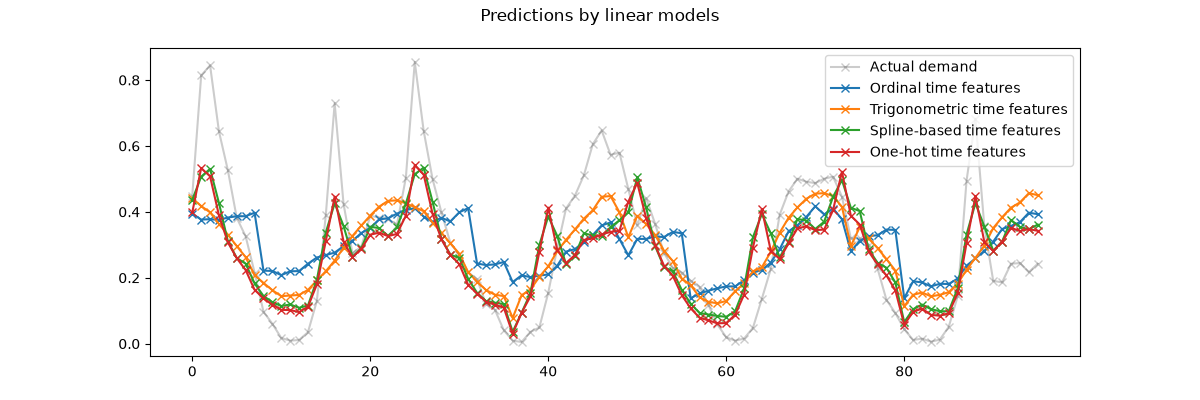 We can draw the following conclusions from the above plot:
The raw ordinal time-related features are problematic because they do
not capture the natural periodicity: we observe a big jump in the
predictions at the end of each day when the hour features goes from 23 back
to 0. We can expect similar artifacts at the end of each week or each year. As expected, the trigonometric features (sine and cosine) do not have
these discontinuities at midnight, but the linear regression model fails to
leverage those features to properly model intra-day variations.
Using trigonometric features for higher harmonics or additional
trigonometric features for the natural period with different phases could
potentially fix this problem. the periodic spline-based features fix those two problems at once: they
give more expressivity to the linear model by making it possible to focus
on specific hours thanks to the use of 12 splines. Furthermore the
extrapolation="periodic" option enforces a smooth representation between
hour=23 and hour=0. The one-hot encoded features behave similarly to the periodic
spline-based features but are more spiky: for instance they can better
model the morning peak during the week days since this peak lasts shorter
than an hour. However, we will see in the following that what can be an
advantage for linear models is not necessarily one for more expressive
models.
We can also compare the number of features extracted by each feature
engineering pipeline:
naive_linear_pipeline[:-1].transform(X).shape
one_hot_linear_pipeline[:-1].transform(X).shape
cyclic_cossin_linear_pipeline[:-1].transform(X).shape
cyclic_spline_linear_pipeline[:-1].transform(X).shape
This confirms that the one-hot encoding and the spline encoding strategies
create a lot more features for the time representation than the alternatives,
which in turn gives the downstream linear model more flexibility (degrees of
freedom) to avoid underfitting.
Finally, we observe that none of the linear models can approximate the true
bike rentals demand, especially for the peaks that can be very sharp at rush
hours during the working days but much flatter during the week-ends: the most
accurate linear models based on splines or one-hot encoding tend to forecast
peaks of commuting-related bike rentals even on the week-ends and
under-estimate the commuting-related events during the working days.
These systematic prediction errors reveal a form of under-fitting and can be
explained by the lack of interactions terms between features, e.g.
“workingday” and features derived from “hours”. This issue will be addressed
in the following section.
Modeling pairwise interactions with splines and polynomial features#
Linear models do not automatically capture interaction effects between input
features. It does not help that some features are marginally non-linear as is
the case with features constructed by SplineTransformer (or one-hot
encoding or binning).
However, it is possible to use the PolynomialFeatures class on coarse
grained spline encoded hours to model the “workingday”/”hours” interaction
explicitly without introducing too many new variables:
from sklearn.pipeline import FeatureUnion
from sklearn.preprocessing import PolynomialFeatures

hour_workday_interaction = make_pipeline(
    ColumnTransformer(
        [
            ("cyclic_hour", periodic_spline_transformer(24, n_splines=8), ["hour"]),
            (
                "workingday",
                FunctionTransformer(
                    lambda x: x == "True", feature_names_out="one-to-one"
                ),
                ["workingday"],
            ),
        ],
        verbose_feature_names_out=False,
    ),
    PolynomialFeatures(degree=2, interaction_only=True, include_bias=False),
)
Those features are then combined with the ones already computed in the
previous spline-base pipeline. We can observe a nice performance improvement
by modeling this pairwise interaction explicitly:
cyclic_spline_interactions_pipeline = make_pipeline(
    FeatureUnion(
        [
            ("marginal", cyclic_spline_transformer),
            ("interactions", hour_workday_interaction),
        ],
        verbose_feature_names_out=True,
    ).set_output(transform="pandas"),
    RidgeCV(alphas=alphas),
)
evaluate(cyclic_spline_interactions_pipeline, X, y, cv=ts_cv)
Mean Absolute Error:     0.078 +/- 0.009
Root Mean Squared Error: 0.104 +/- 0.009
Pipeline(steps=[('featureunion',
                 FeatureUnion(transformer_list=[('marginal',
                                                 ColumnTransformer(remainder=MinMaxScaler(),
                                                                   transformers=[('categorical',
                                                                                  OneHotEncoder(handle_unknown='ignore',
                                                                                                sparse_output=False),
                                                                                  Index(['season', 'holiday', 'workingday', 'weather'], dtype='str')),
                                                                                 ('cyclic_month',
                                                                                  SplineTransformer(extrapolation='periodic',
                                                                                                    knots=array([[ 0.],
       [ 2....
                 RidgeCV(alphas=array([1.00000000e-06, 3.16227766e-06, 1.00000000e-05, 3.16227766e-05,
       1.00000000e-04, 3.16227766e-04, 1.00000000e-03, 3.16227766e-03,
       1.00000000e-02, 3.16227766e-02, 1.00000000e-01, 3.16227766e-01,
       1.00000000e+00, 3.16227766e+00, 1.00000000e+01, 3.16227766e+01,
       1.00000000e+02, 3.16227766e+02, 1.00000000e+03, 3.16227766e+03,
       1.00000000e+04, 3.16227766e+04, 1.00000000e+05, 3.16227766e+05,
       1.00000000e+06])))])
In a Jupyter environment, please rerun this cell to show the HTML representation or trust the notebook.
On GitHub, the HTML representation is unable to render, please try loading this page with nbviewer.org.
Parameters
|
steps
steps: list of tuples
List of (name of step, estimator) tuples that are to be chained in
sequential order. To be compatible with the scikit-learn API, all steps
must define `fit`. All non-last steps must also define `transform`. See
:ref:`Combining Estimators <combining_estimators>` for more details.
|
[('featureunion', ...), ('ridgecv', ...)] |
|
transform_input
transform_input: list of str, default=None
The names of the :term:`metadata` parameters that should be transformed by the
pipeline before passing it to the step consuming it.
This enables transforming some input arguments to ``fit`` (other than ``X``)
to be transformed by the steps of the pipeline up to the step which requires
them. Requirement is defined via :ref:`metadata routing <metadata_routing>`.
For instance, this can be used to pass a validation set through the pipeline.
You can only set this if metadata routing is enabled, which you
can enable using ``sklearn.set_config(enable_metadata_routing=True)``.
.. versionadded:: 1.6
|
None |
|
memory
memory: str or object with the joblib.Memory interface, default=None
Used to cache the fitted transformers of the pipeline. The last step
will never be cached, even if it is a transformer. By default, no
caching is performed. If a string is given, it is the path to the
caching directory. Enabling caching triggers a clone of the transformers
before fitting. Therefore, the transformer instance given to the
pipeline cannot be inspected directly. Use the attribute ``named_steps``
or ``steps`` to inspect estimators within the pipeline. Caching the
transformers is advantageous when fitting is time consuming. See
:ref:`sphx_glr_auto_examples_neighbors_plot_caching_nearest_neighbors.py`
for an example on how to enable caching.
|
None |
|
verbose
verbose: bool, default=False
If True, the time elapsed while fitting each step will be printed as it
is completed.
|
False |
featureunion: FeatureUnion
Parameters
|
transformer_list
transformer_list: list of (str, transformer) tuples
List of transformer objects to be applied to the data. The first
half of each tuple is the name of the transformer. The transformer can
be 'drop' for it to be ignored or can be 'passthrough' for features to
be passed unchanged.
.. versionadded:: 1.1
Added the option `"passthrough"`.
.. versionchanged:: 0.22
Deprecated `None` as a transformer in favor of 'drop'.
|
[('marginal', ...), ('interactions', ...)] |
|
n_jobs
n_jobs: int, default=None
Number of jobs to run in parallel.
``None`` means 1 unless in a :obj:`joblib.parallel_backend` context.
``-1`` means using all processors. See :term:`Glossary <n_jobs>`
for more details.
.. versionchanged:: v0.20
`n_jobs` default changed from 1 to None
|
None |
|
transformer_weights
transformer_weights: dict, default=None
Multiplicative weights for features per transformer.
Keys are transformer names, values the weights.
Raises ValueError if key not present in ``transformer_list``.
|
None |
|
verbose
verbose: bool, default=False
If True, the time elapsed while fitting each transformer will be
printed as it is completed.
|
False |
|
verbose_feature_names_out
verbose_feature_names_out: bool, default=True
If True, :meth:`get_feature_names_out` will prefix all feature names
with the name of the transformer that generated that feature.
If False, :meth:`get_feature_names_out` will not prefix any feature
names and will error if feature names are not unique.
.. versionadded:: 1.5
|
True |
Index(['season', 'holiday', 'workingday', 'weather'], dtype='str')
Parameters
|
sparse_output
sparse_output: bool, default=True
When ``True``, it returns a SciPy sparse matrix/array
in "Compressed Sparse Row" (CSR) format.
.. versionadded:: 1.2
`sparse` was renamed to `sparse_output`
|
False |
|
handle_unknown
handle_unknown: {'error', 'ignore', 'infrequent_if_exist', 'warn'}, default='error'
Specifies the way unknown categories are handled during :meth:`transform`.
- 'error' : Raise an error if an unknown category is present during transform.
- 'ignore' : When an unknown category is encountered during
transform, the resulting one-hot encoded columns for this feature
will be all zeros. In the inverse transform, an unknown category
will be denoted as None.
- 'infrequent_if_exist' : When an unknown category is encountered
during transform, the resulting one-hot encoded columns for this
feature will map to the infrequent category if it exists. The
infrequent category will be mapped to the last position in the
encoding. During inverse transform, an unknown category will be
mapped to the category denoted `'infrequent'` if it exists. If the
`'infrequent'` category does not exist, then :meth:`transform` and
:meth:`inverse_transform` will handle an unknown category as with
`handle_unknown='ignore'`. Infrequent categories exist based on
`min_frequency` and `max_categories`. Read more in the
:ref:`User Guide <encoder_infrequent_categories>`.
- 'warn' : When an unknown category is encountered during transform
a warning is issued, and the encoding then proceeds as described for
`handle_unknown="infrequent_if_exist"`.
.. versionchanged:: 1.1
`'infrequent_if_exist'` was added to automatically handle unknown
categories and infrequent categories.
.. versionadded:: 1.6
The option `"warn"` was added in 1.6.
|
'ignore' |
|
categories
categories: 'auto' or a list of array-like, default='auto'
Categories (unique values) per feature:
- 'auto' : Determine categories automatically from the training data.
- list : ``categories[i]`` holds the categories expected in the ith
column. The passed categories should not mix strings and numeric
values within a single feature, and should be sorted in case of
numeric values.
The used categories can be found in the ``categories_`` attribute.
.. versionadded:: 0.20
|
'auto' |
|
drop
drop: {'first', 'if_binary'} or an array-like of shape (n_features,), default=None
Specifies a methodology to use to drop one of the categories per
feature. This is useful in situations where perfectly collinear
features cause problems, such as when feeding the resulting data
into an unregularized linear regression model.
However, dropping one category breaks the symmetry of the original
representation and can therefore induce a bias in downstream models,
for instance for penalized linear classification or regression models.
- None : retain all features (the default).
- 'first' : drop the first category in each feature. If only one
category is present, the feature will be dropped entirely.
- 'if_binary' : drop the first category in each feature with two
categories. Features with 1 or more than 2 categories are
left intact.
- array : ``drop[i]`` is the category in feature ``X[:, i]`` that
should be dropped.
When `max_categories` or `min_frequency` is configured to group
infrequent categories, the dropping behavior is handled after the
grouping.
.. versionadded:: 0.21
The parameter `drop` was added in 0.21.
.. versionchanged:: 0.23
The option `drop='if_binary'` was added in 0.23.
.. versionchanged:: 1.1
Support for dropping infrequent categories.
|
None |
|
dtype
dtype: number type, default=np.float64
Desired dtype of output.
|
<class 'numpy.float64'> |
|
min_frequency
min_frequency: int or float, default=None
Specifies the minimum frequency below which a category will be
considered infrequent.
- If `int`, categories with a smaller cardinality will be considered
infrequent.
- If `float`, categories with a smaller cardinality than
`min_frequency * n_samples` will be considered infrequent.
.. versionadded:: 1.1
Read more in the :ref:`User Guide <encoder_infrequent_categories>`.
|
None |
|
max_categories
max_categories: int, default=None
Specifies an upper limit to the number of output features for each input
feature when considering infrequent categories. If there are infrequent
categories, `max_categories` includes the category representing the
infrequent categories along with the frequent categories. If `None`,
there is no limit to the number of output features.
.. versionadded:: 1.1
Read more in the :ref:`User Guide <encoder_infrequent_categories>`.
|
None |
|
feature_name_combiner
feature_name_combiner: "concat" or callable, default="concat"
Callable with signature `def callable(input_feature, category)` that returns a
string. This is used to create feature names to be returned by
:meth:`get_feature_names_out`.
`"concat"` concatenates encoded feature name and category with
`feature + "_" + str(category)`.E.g. feature X with values 1, 6, 7 create
feature names `X_1, X_6, X_7`.
.. versionadded:: 1.3
|
'concat' |
Fitted attributes
| Name |
Type |
Value |
categories_
categories_: list of arrays
The categories of each feature determined during fitting
(in order of the features in X and corresponding with the output
of ``transform``). This includes the category specified in ``drop``
(if any).
|
list |
[array(['fall'... dtype=object), array(['False... dtype=object), array(['False... dtype=object), array(['clear... dtype=object)] |
drop_idx_
drop_idx_: array of shape (n_features,)
- ``drop_idx_[i]`` is the index in ``categories_[i]`` of the category
to be dropped for each feature.
- ``drop_idx_[i] = None`` if no category is to be dropped from the
feature with index ``i``, e.g. when `drop='if_binary'` and the
feature isn't binary.
- ``drop_idx_ = None`` if all the transformed features will be
retained.
If infrequent categories are enabled by setting `min_frequency` or
`max_categories` to a non-default value and `drop_idx[i]` corresponds
to an infrequent category, then the entire infrequent category is
dropped.
.. versionchanged:: 0.23
Added the possibility to contain `None` values.
|
NoneType |
None |
feature_names_in_
feature_names_in_: ndarray of shape (`n_features_in_`,)
Names of features seen during :term:`fit`. Defined only when `X`
has feature names that are all strings.
.. versionadded:: 1.0
|
ndarray[object](4,) |
['season','holiday','workingday','weather'] |
n_features_in_
n_features_in_: int
Number of features seen during :term:`fit`.
.. versionadded:: 1.0
|
int |
4 |
11 features
| season_fall |
| season_spring |
| season_summer |
| season_winter |
| holiday_False |
| holiday_True |
| workingday_False |
| workingday_True |
| weather_clear |
| weather_misty |
| weather_rain |
|