GeezerVisonThe World Wide Web, restored to 800 pixels of glory. |
| Home|About|Gaming cabinet|Archives|How it works|Starter sites |
GeezerVison is showing search.google — Lens Search what you see with LensNot sure how to describe something in words? Use your camera, an image, or a screenshot to search. Check out Lens on desktop or look for the icon on mobile. Explore more arrow_downwardCreate & transform images in Lens
With the new create mode in Google Lens, you can snap a photo and instantly change its style. Whether it's a selfie or a picture of your surroundings, give it a new look with a simple prompt.
Try it now
Shop what you see
Spot something you like? Use your camera or a screenshot to look up who makes it, how much it costs, and where to buy it. Refine your search with text to find versions with different patterns, colors, or sizes.
Try it now
Explore the world around you
Find out what plant is in your friend's apartment or what kind of dog you saw at the park. You can also use Lens to learn more about artwork, murals, and landmarks.
Try it now
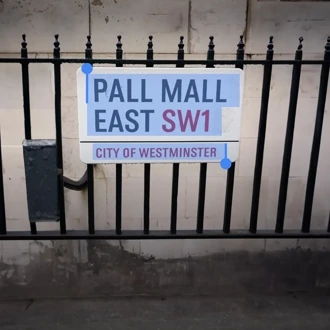
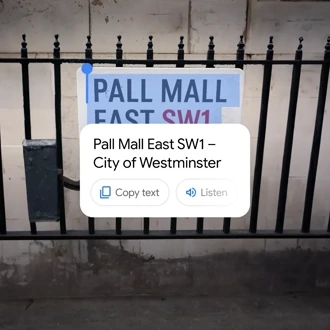
Copy or translate text
Use your camera to instantly translate menus, signs, handwriting, or anything else in over 100 languages. Or, copy text to your phone or computer.
Try it now
Ask questions about what you see with Lens
Never let a question go unanswered. Just open Lens in the Google app, hold the shutter button and ask whatever’s on your mind — the same way you’d point at something and ask your friend about it.
Get step-by-step homework help
Stuck on a problem? Quickly find explainers, videos, and results from the web for math, history, chemistry, biology, physics, and more.
Try it now
Search as you browse
With Google Lens in Chrome desktop, easily select, search and ask questions about anything you see on the web, all without leaving your current tab.
Try it in Chrome
Lens is available on all your devices and in your favorite apps 

Try it now in the Google app Lens is also available in the Camera app of select Android devices. Shopping results in Lens are available in Austria, Australia, Belgium, Brazil, Canada, Chile, Colombia, Czech Republic, Denmark, France, Germany, India, Indonesia, Ireland, Italy, Japan, Malaysia, Mexico, Netherlands, New Zealand, Norway, Philippines, Poland, Portugal, Russia, Singapore, South Africa, South Korea, Spain, Sweden, Switzerland, Turkey, UAE, United Kingdom, and United States. More ways to search Voice 

Can't remember the name of the song? Just hum the tune
Hum, whistle, or sing a melody to find the song you're looking for.
 Search Search "what to watch" for some movie night inspiration
Search "what to watch" and browse for shows and movies by genre, streaming service, and channel.

 AR 
Explore iconic landmarks with AR in Search
Try searching "Eiffel Tower" and click "View in 3D".

 Lens Copy and paste with your camera
Use Lens to quickly copy text from signs, notes, and more using your camera.
|
| You are visitor 01402503 — GeezerVison does not store the pages you look up. Best viewed with Netscape Navigator 4.7 or Internet Explorer 6 at 800×600. No cookies required. |


