GeezerVisonThe World Wide Web, restored to 800 pixels of glory. |
| Home|About|Gaming cabinet|Archives|How it works|Starter sites |
GeezerVison is showing stackify.com — PHP Monolog Tutorial: A Step by Step Guide - Stackify
Retrace will reach End of Life on March 31, 2027. Click here to learn more.
PHP Monolog Tutorial: A Step by Step Guide
By: jmendez | July 13, 2018  In application development or maintenance, logging is very important. It gives you the right amount of data that you need to help you monitor your application, logs, databases, code, and web services. Monolog is the existing standard logging library for PHP. It is most popular in PHP frameworks such as Laravel and Symfony, where it implements a common interface for logging libraries. This article talks about the step-by-step process of using PHP Monolog in your application. Monolog InstallationThe basic way to use Monolog in PHP is to install the latest version of the Composer library in your project using this command. You can download it here: https://getcomposer.org/. Linuxsudo php composer.phar require monolog/monolog Windowscomposer require monolog/monolog In case you are not using composer, download the PSR-3 source code and install to your application. Make sure that you are using namespaces (to avoid a headache) so that you don’t require a lot of files. Create loggersFirst, when you create a logger, channel name should be included, so that you can distinguish your list of loggers. $logger = new MonologLogger('channel-name');
$app->container->logger = $logger;
In the example above, ‘channel-name’ should be included in every log entry. This way you can easily look up and filter the entries; createanother channel for each component. Examples of these channels might include ‘database’, ‘security’, ’business’, and others. Loggers by nature don’t know how to handle logs, but we also have what are called handlers that can handle logs. require_once(DIR.'/vendor/autoload.php');
use MonologLogger;
use MonologHandlerStreamHandler;
$logger = new Logger('channel-name');
$logger->pushHandler(new StreamHandler(DIR.'/app.log', Logger::DEBUG));
$logger->info('This is a log! ^_^ ');
$logger->warning('This is a log warning! ^_^ ');
$logger->error('This is a log error! ^_^ ');
If you are using PHP 7.4 you will need to use this slightly modified code: require __DIR__ . '/vendor/autoload.php'; use Monolog\Handler\StreamHandler; use Monolog\Logger; $logger = new Logger('channel-name');
$logger->pushHandler(new StreamHandler(__DIR__ . '/app.log', Logger::DEBUG));
Handlers can be pushed as many as you need to a Logger instance. These types of handler will decide the kind of logs to be handled. In the example provided above, StreamHandler, reports entries in the file system app.log. Intensity levelAn intensity level is added to each log entry, along with channel name to allow you to check and filter the entries. As illustrated in RFC 5424 which describes the syslog protocol, the following levels of intensity are applied in Monolog.
An info log entry of a channel called ‘channel-name’, for example, looks like this: [2018-07-05 11:10:35] channel-name.INFO: This is a log entry! [2018-07-09 02:58:27] channel-name.WARNING: This is a log warning! ^_^ [] [] [2018-07-09 02:58:27] channel-name.ERROR: This is a log error! ^_^ [] [] Monolog stores one add for each type of intensity level, likely, error, notice, warning, info, and so on. PHP example codeThe following code is the basic sample setup to log to a file and to firephp on the Debug level. require_once(DIR.'/vendor/autoload.php');
use MonologLogger;
use MonologHandlerStreamHandler;
use MonologHandlerFirePHPHandler;
$logger = new Logger('logger');
$logger->pushHandler(new StreamHandler(DIR.'/test_app.log', Logger::DEBUG));
$logger->pushHandler(new FirePHPHandler());
$logger->error('Logger is now Ready');
In the sample, it has two handlers in the stack to provide records in two different ways. FirePHPHandlers are described as it is joined on top of the stack. This permits you to tentatively append a logger with bubbling disabled, if you want to revoke other configured loggers. Handler orderWhen you add a log entry handler to the logger instance, it matters which order you push the handler. When a log entry is added, it will directly go to the handler stack. When a handler’s constructor is set to false, it stops traversing through the handler stack. require_once(DIR.'/vendor/autoload.php');
use MonologLogger;
use MonologHandlerStreamHandler;
use MonologHandlerSwiftMailerHandler;
// Create the Transport
$transporter = new Swift_SmtpTransport('smtp.example.com', 465, 'ssl');
$transporter->setUsername('[email protected]');
$transporter->setPassword('123456');
// Create the Mailer using your created Transport
$mailer = new Swift_Mailer($transporter);
// Create a message
$message = (new Swift_Message('A CRITICAL log was added'));
$message->setFrom(['[email protected]' => 'Someone FROM']);
$message->setTo(['[email protected]' => 'SomeoneTO']);
$logger = new Logger('default');
$logger->pushHandler(new StreamHandler(DIR.'/test.log', Logger::INFO));
$logger->pushHandler(new SwiftMailerHandler($mailer, $message, Logger::CRITICAL, false));
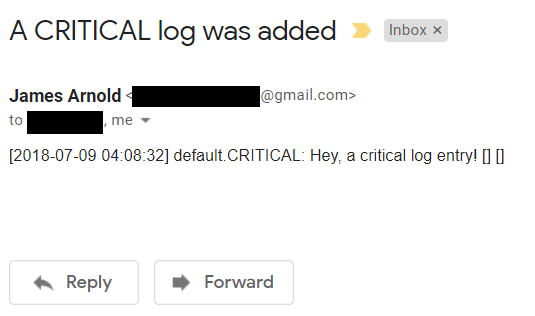
$logger->addCritical('Hey, a critical log entry!');
First, you need to install SwiftMailer (composer require swiftmailer/swiftmailer) to be able to use the SwiftMailerHandler. For you to be able to send emails, you need to use Swift_SmtpTransport, Swift_Message, and Swift_Mailer to join $mailer and $message to the SwiftMailerHandler instance. When you examine the last parameter of SwiftMailer’s constructor, it returns false for the last parameter, called $bubble parameter. Technically, by default, it returns true, but when set to false it means that it stops traversing the handler stack. This is a technique in which making the StreamHandler that is located at the bottom of the stack; it never store logs in the file system if SwiftMailerHandler manages the entry. ArrayArray passing is as simple as the following code: $username = 'jmendez';
$logger->addInfo('User registered', ['username' => $username]);
This is a way to pass an array to the add method such as addDebug, addInfo, etc. ProcessorsIn Monolog, you can create your own processor even though it provides a lot of processors by default. Processors are used to include information in log entries such as client’s IP and browser, and others. Here’s a sample code snippet: $logger = new Logger('default');
$logger->pushHandler(new StreamHandler(DIR.'/test.log', Logger::INFO));
$logger->pushProcessor(function ($entry) {
$entry['extra']['data'] = 'Hello world!';
return $entry;
});
$logger->addInfo('User registered', ['username'=>'jmendez']);
The sample above would simply store the log entry in this format [2018-07-05 11:18:29] default.INFO: User registered {'username':'jmendez'} {"data":"Hello world!"}
You can also use the built-in processor that Monolog provides. You directly use the class and push an instance using the pushProcessor method. Here is sample code using pushProcessor. use MonologLogger;
use MonologHandlerStreamHandler;
use MonologProcessorWebProcessor;
$logger = new Logger('default');
$logger->pushHandler(new StreamHandler(DIR.'/test.log', Logger::INFO));
$logger->pushProcessor(new WebProcessor());
$logger->addInfo('User registered', ['username'=>'jmendez']);
FormattersIn Monolog, there are a lot of formatters that can be used. You can find some built-in formatters here. You can also customize the format of the logs that are written in files, emails, databases, and other handlers. $record['formatted'] is the most common way to use a handler with a value to be directly put into the log device. Formatters can be customized, so you can write your own. Here is a simple configuration for a built-in formatter class that formats the log sent by email, which can be understandable by everyone who will be using your system. use MonologLogger;
use MonologHandlerSwiftMailerHandler;
use MonologFormatterHtmlFormatter;
// Create the Transport
$transporter = new Swift_SmtpTransport('smtp.gmail.com', 465, 'ssl');
$transporter->setUsername('[email protected]');
$transporter->setPassword(123456);
// Create the Mailer using your created Transport
$mailer = new Swift_Mailer($transporter);
// Create a message
$message = (new Swift_Message('A CRITICAL log was added'));
$message->setFrom(['[email protected]' => 'From User']);
$message->setTo(['[email protected]' => 'To User']);
$message->setContentType("text/html");
$logger = new Logger('default');
$mailerHandler = new SwiftMailerHandler($mailer, $message, Logger::CRITICAL);
$mailerHandler->setFormatter(new HtmlFormatter());
$logger->pushHandler($mailerHandler);
$logger->addCritical('This is a critical message!');
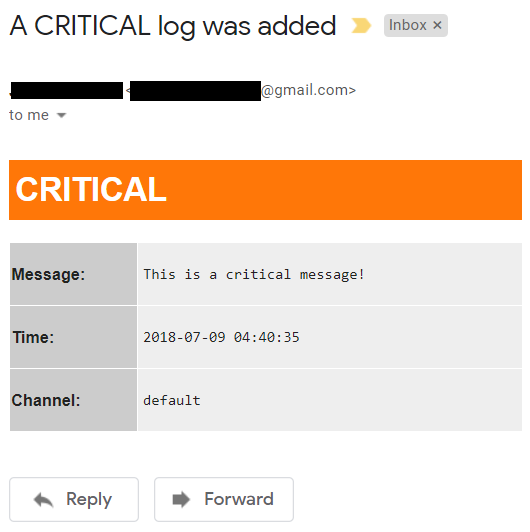
In the example, I am using an HtmlFormatter object to the SwiftMailer and then define the $message and set content type to text/html. In the email, this would look like this:
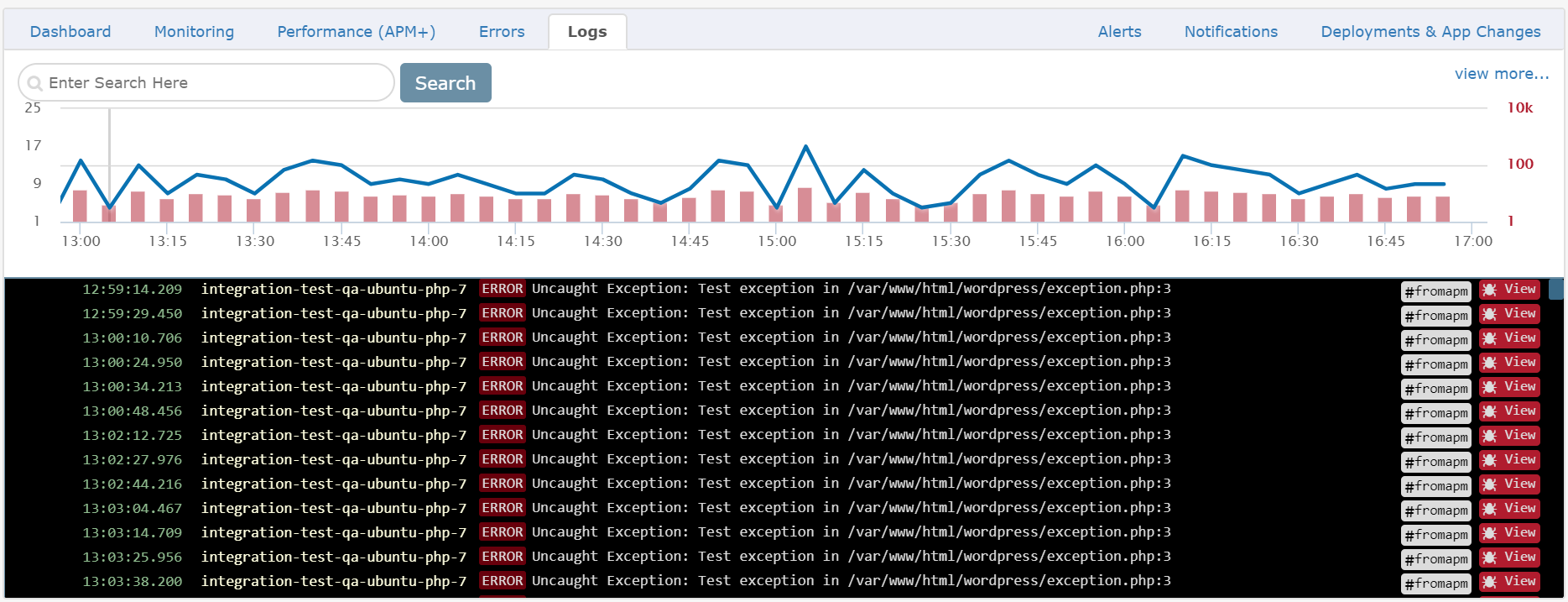
Most of the third-party handlers, formatters and processors can be found in the wiki. You can always write your own if you want.! 😉 Send your logs to RetraceLogs are crucial part in every application, it gives you information about your entire application and check whatever blindspot in your application. One of the advantage in using Retrace in your application is that it can support centralized logging. Centralized logging gives you the complete view of your environment. In manual PHP application, you go through the process of finding and guessing some of the errors and logs in your system. Below is an example of log monitoring work in Retrace.
More informationSee the following articles about PHP logging: SummaryMonolog is integrated into most of the popular frameworks like Laravel, Symfony, Slim, and many others, as of today, Monolog is one of the excellent tools available for logging libraries. I hope this article guides you, and helps you in logging your PHP applications. Retrace gives convenience in monitoring logs and troubleshoot problems quickly. Sign up for a free trial of Retrace and try it today! Related posts:Improve Your Code with Retrace APMStackify's APM tools are used by thousands of .NET, Java, PHP, Node.js, Python, & Ruby developers all over the world. 

Get the latest news, tips, and guides on software development.Join the community of 40,000 developers that subscribe to our newsletter. Popular Posts
indobet
toto slot
toto
toto
bobatoto daftar
logototo
patentoto
situs toto slot 4D
toto
bayitoto
popotogel prize hongkong malam ini
joker11
lingkartoto
depo 5k
slot
sbobet88
sbobet88
https://nolimithoki.dev/
dinasti33 slot
slot jepang
https://www.juara288.asia/
slot 4d
toto
toto
situs toto
flokitoto
slot gacor
logototo
slot depo 5k
bobatoto
bobatoto
bobatoto
sontogel
mpo slot
situs toto
slot
situs slot
bobatoto
kari4d
kari4d
kari4d
kari4d
pascol4d
pascol4d
pascol4d
slot gacor
bento11 link
slot gacor
toto
toto slot
toto
situs slot
situs slot
situs slot
https://www.asupan188.dev/
slot gacor gampang menang
toto
slot gacor
bwo303
situs toto
toto slot
slot gacor
slot88
slot gacor
situs slot
link slot
slot gacor
pucuk4d
PASCOL4D
situs slot
link slot
pajaktoto
slotvip
situs toto
toto slot
situs slot
situs slot
situs slot
toto
slot gacor
slot777
situs slot
link slot
situs judi bola
POPOTOGEL : Situs Resmi Bandar Toto Togel Macau dengan Prediksi Gokil Pasti Akurat
link slot
slot gacor
situs slot
slot gacor
slot gacor
situs slot
link slot
gacor
Slot88
Slot88
slot gacor
situs toto
toto
slot pulsa
slot777
link slot gacor
situs gacor
slot gacor
leon188
slot gacor
slot gacor
slot gacor
Slot88
slot gacor
situs slot
slot gacor
Slot88
slot gacor
slot terbaru
slot gacor
situs gacor
situs slot
slot gacor
situs slot
Situs Slot
POPOTOGEL: Regulasi Bandar Situs Togel Resmi & Bola Mix Parlay Asia Terpercaya
StreamEast
Jpmania
slot resmi
slot
slot resmi
slot
bayitoto
patentoto
link gacor
slot gacor
kari4d
slot gacor
AMANAHTOTO
slot gacor
slot gacor
AMANAHTOTO
pascol4d
kari4d
AMANAHTOTO
kari4d
bragatoto
dokter88
slot gacor
slot game
patentoto
pucuk4d
rokokbet
rokokbet
kari4d
pascol4d
LOGIN PASCOL4D
pucuk4d
roma77
judi bola
slot depo 10k
mpo slot
Girang4d
KARI4D
StreamEast
AMANAHTOTO
jutatoto
PARLAY
slot88
slot depo 5k
hoki99
pascol4d
pkv games
roma77
Slot
poker
slot
indobet
toto slot
toto
toto
bobatoto daftar
logototo
patentoto
situs toto slot 4D
toto
bayitoto
popotogel prize hongkong malam ini
joker11
lingkartoto
depo 5k
slot
sbobet88
sbobet88
https://nolimithoki.dev/
dinasti33 slot
slot jepang
https://www.juara288.asia/
slot 4d
toto
toto
situs toto
flokitoto
slot gacor
logototo
slot depo 5k
bobatoto
bobatoto
bobatoto
sontogel
mpo slot
situs toto
slot
situs slot
bobatoto
kari4d
kari4d
kari4d
kari4d
pascol4d
pascol4d
pascol4d
slot gacor
bento11 link
slot gacor
toto
toto slot
toto
situs slot
situs slot
situs slot
https://www.asupan188.dev/
slot gacor gampang menang
toto
slot gacor
bwo303
situs toto
toto slot
slot gacor
slot88
slot gacor
situs slot
link slot
slot gacor
pucuk4d
PASCOL4D
situs slot
link slot
pajaktoto
slotvip
situs toto
toto slot
situs slot
situs slot
situs slot
toto
slot gacor
slot777
situs slot
link slot
situs judi bola
POPOTOGEL : Situs Resmi Bandar Toto Togel Macau dengan Prediksi Gokil Pasti Akurat
link slot
slot gacor
situs slot
slot gacor
slot gacor
situs slot
link slot
gacor
Slot88
Slot88
slot gacor
situs toto
toto
slot pulsa
slot777
link slot gacor
situs gacor
slot gacor
leon188
slot gacor
slot gacor
slot gacor
Slot88
slot gacor
situs slot
slot gacor
Slot88
slot gacor
slot terbaru
slot gacor
situs gacor
situs slot
slot gacor
situs slot
Situs Slot
POPOTOGEL: Regulasi Bandar Situs Togel Resmi & Bola Mix Parlay Asia Terpercaya
StreamEast
Jpmania
slot resmi
slot
slot resmi
slot
bayitoto
patentoto
link gacor
slot gacor
kari4d
slot gacor
AMANAHTOTO
slot gacor
slot gacor
AMANAHTOTO
pascol4d
kari4d
AMANAHTOTO
kari4d
bragatoto
dokter88
slot gacor
slot game
patentoto
pucuk4d
rokokbet
rokokbet
kari4d
pascol4d
LOGIN PASCOL4D
pucuk4d
roma77
judi bola
slot depo 10k
mpo slot
Girang4d
KARI4D
StreamEast
AMANAHTOTO
jutatoto
PARLAY
slot88
slot depo 5k
hoki99
pascol4d
pkv games
roma77
Slot
poker
slot
|
| You are visitor 01402503 — GeezerVison does not store the pages you look up. Best viewed with Netscape Navigator 4.7 or Internet Explorer 6 at 800×600. No cookies required. |