GeezerVisonThe World Wide Web, restored to 800 pixels of glory. |
| Home|About|Gaming cabinet|Archives|How it works|Starter sites |
GeezerVison is showing stackwallet.com — Stack Wallet | Open-source, non-custodial and privacy-preserving wallet for Monero, Bitcoin, Bitcoin Cash, Firo, Epic Cash, Namecoin, Wownero, Litecoin, and Dogecoin Stack WalletThe first open-source, non-custodial, privacy-preserving cryptocurrency wallet for all crypto fans 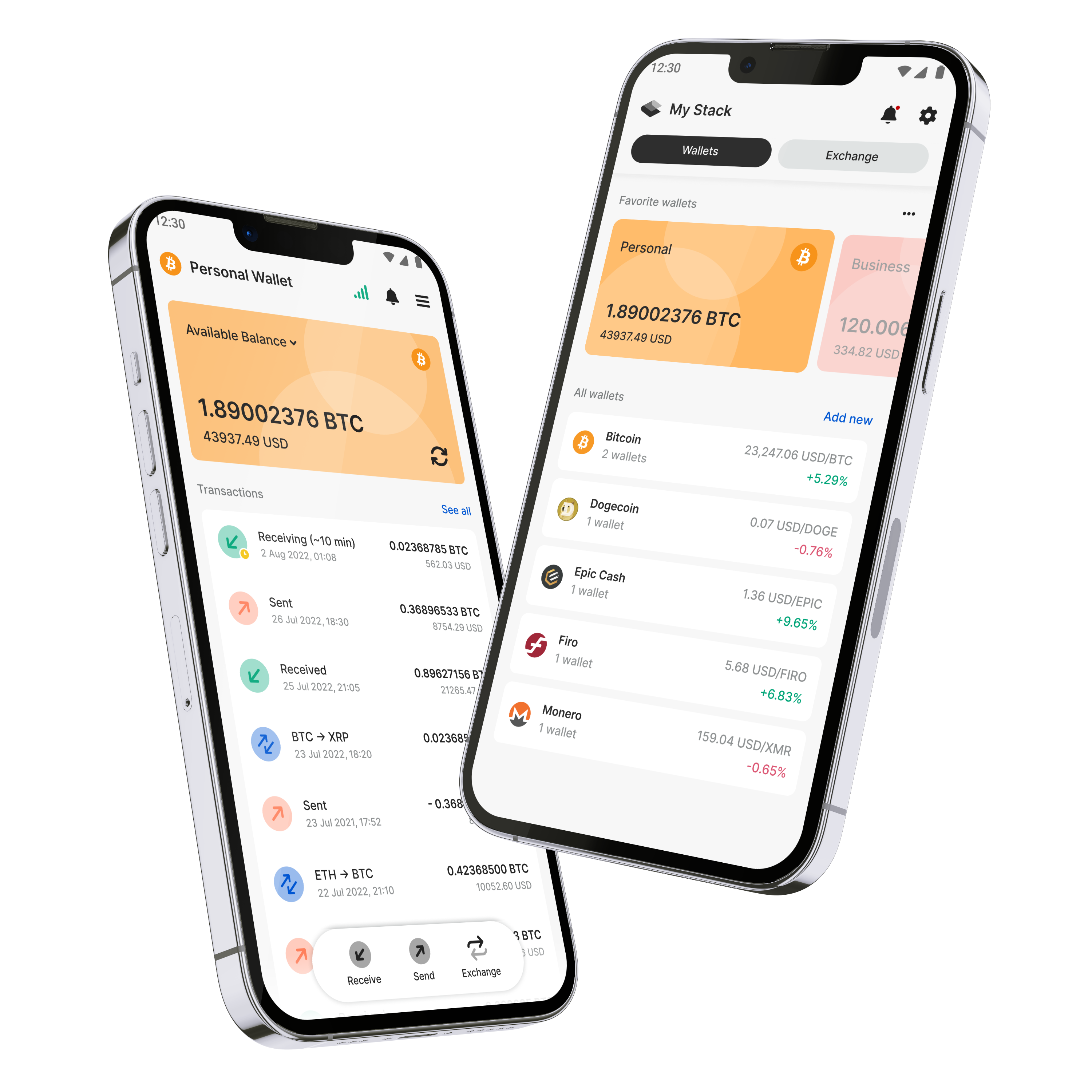

Stack on Google PlayStack Wallet is available on Google Play for Android smartphones. Download Stack
Stack Wallet is open-sourceThe best and most secure applications are made together. Reap the benefits of security, power, and stability that only a fully open-source codebase can offer. Not partially open. Not mostly open. Completely open. Stack Wallet is non-custodialStack Wallet keeps all private keys in your hands. That means, we never touch your money. We just make the "piggybank", and you control all of the money inside it. 

Stack Wallet is privacy-preservingAll privacy technologies implemented in the cryptocurrencies we support are turned on by default. Keep your funds safe from prying eyes. 
Multicurrency supportSend, receive, and store Monero, Bitcoin, Bitcoin Cash, Firo, Epic Cash, Namecoin, Wownero, Litecoin, and Dogecoin. 
Built-in exchangeWe’ve partnered with some of the best in the ecosystem to exchange your crypto in a quick, secure, and easy manner. Even for cryptos not on Stack Wallet! 
Custom backupBack up your Stack Wallet data to easily restore it or transfer between devices (protected by a custom-designed secure technology). 
Multiwallet address bookCreate multiple cryptocurrency addresses for your contacts and easily access them for a quick and painless transaction. 
Favorite walletsWith many wallets in one Stack, you surely will have some that you use most. Give them the attention they deserve with our Favorites feature (toggle it on or off). 
User-friendlyThe days of cryptocurrency and open source being difficult to use are a thing of the past. Use crypto like a pro with our meticulously designed interface that makes everything simple. 
and more...Auto connect to our nodes for a seamless experience, or choose your own! Smart sync: Sync to the blockchain when is convenient for you. Minimize wait times before using your coins. Custom made backup capabilities mean you can safely and securely restore ALL of yours wallets in two easy steps. Save multiple cryptocurrency addresses under one contact and assign an emoji Testnet support: Most coins we support come with their testnet alternatives also. Simply enter advanced mode. SegWit support: Bitcoin uses SegWit technology automatically, saving you on fees. Post Technology: Mimblewimble coins utilize Post technology, turning the painful sending and receiving process into a simple, one-and-done affair. and many more to come! What is a recovery key/phrase/seed?
These terms, used interchangeably here and in most places, all refer to the string of words provided to you when you first set up a new crypto wallet. This is how you recover and restore your wallet in case of loss or catastrophe. WRITE IT DOWN!
How does Stack Wallet make money?
Stack Wallet charges a tiny fee alongside our third-party exchange providers to utilize the built-in exchange. But for standard sending and receiving of any cryptocurrency, all fees go to the blockchain miners. We do NOT make money by selling user data (not like we collect much anyways, see our Privacy Policy), nor by utilizing ads.
How does the exchange process work?
Stack Wallet partners with third-party exchange providers to do any and all exchanges. We do not do any exchanges ourselves. These third-parties are built in to our app for a seamless experience, however. Just go through the exchange flow, and you will be sending your funds to the third-party exchange, who will then send back the coin you are exchanging too. It’s that easy! For more, please see our article that breaks the exchange process even further.
Does Stack Wallet support multiple wallets for the same cryptocurrency?
We sure do! Just remember to back up each recovery key separately.
Do I still need to write down my recovery key if I use Stack Wallet Backup?
Yes. Stack Wallet Backup is a convenience feature that makes it simple and easy to restore all of your wallets at once. But sometimes technology fails. In the very unlikely event that SWB does fail (due to file corruption, file misplacement, etc.) then having your seeds written down ensures you still have access to your funds. You'll just have to restore them all one at a time.
Does Stack Wallet Backup work with other wallets?
Unforunately, no. There is no set standard for multicoin wallet backups. Probably because most of them are closed-source. Who knows? Maybe Stack Wallet will pave the way toward interoperability here.
How can I get my coin of choice onto Stack Wallet?
Drop us a line on any of our social media accounts. We're happy to talk with you and/or your community to see what we can do to bring your project to Stack Wallet.
How do I restore my wallet?
If the wallet’s unique recovery phrase (seed) has been stored properly, then restoring your wallet is as easy as selecting the “Add New” option from your My Stack page, letting us know which currency the wallet holds, and then choosing “Restore Wallet” on the following page. You can then enter your preferred name and the complete seed phrase you have saved for the wallet, and you will soon see it right back in your Stack!
Still have questions?Check out our support channels, ask the community or email us at supportnon-custodial@stackwopen-sourceallet.com. We are here to help! |
| You are visitor 01402503 — GeezerVison does not store the pages you look up. Best viewed with Netscape Navigator 4.7 or Internet Explorer 6 at 800×600. No cookies required. |