GeezerVison is showing surfalize.com — Surfalize · Surface analysis, in the browser
AlphaSurfalize is in active development. Features and results may change at any time.
ISO 25178 · Surface Metrology
Surface analysis,
in the browser.
Full topography analysis that runs entirely on your own computer: nothing is uploaded, nothing is stored on a server. Every parameter and operation is validated against analytic soft gauges.
100% local processing
Your data never leaves your machine. No upload, no account, no server-side storage.
Validated against soft gauges
More than 500 test cases on analytic surfaces with exactly known results, from roughness parameters to filters and form removal.
View validation results
250.0 µm
250.0 µm
Sa0.342 µm
Sq0.487 µm
Sz3.21 µm
Sdr8.4 %
Capabilities
01
Interactive visualisation
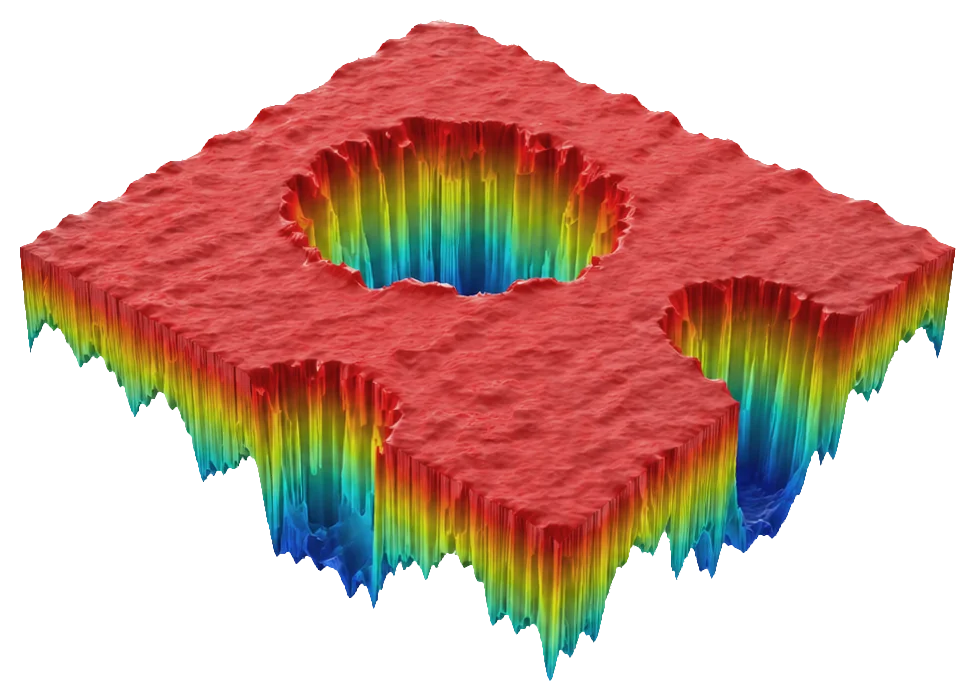
False-colour height maps, interactive 3D surface rendering, power spectral density, autocorrelation and Abbott–Firestone curves — rendered live in the browser.
02
Non-destructive work tree
Chain operators in a branching work tree. Update the current plots as you preprocess, or spawn a new result for each step — originals are always preserved.
03
Full operator set
Levelling, three-point levelling, polynomial detrending, Gaussian filtering, outlier removal, gap filling, masking, cropping and rotation — chainable in any order.
04
Geometry & volume
Measure distances, angles and diameters, fit circles and lines to detected edges, and compute the material and void volume over any rectangle, circle or polygon.
05
Cavity arrays
Detect every cavity in a textured or etched array automatically, measure depth, volume and bottom roughness per cavity, and map any result across rows and columns.
06
Batch & reports
Run one workflow across many files and export parameter tables as CSV and plots as print-resolution PNG, or save the whole view as a multi-page PDF report.
Parameters
Every ISO 25178 areal parameter
Height, hybrid, spatial, functional, feature and volume parameters computed directly from surface topography per ISO 25178-2 and validated against reference software — including the feature parameters (new). Full ISO 21920 profile (R) parameters are available on any extracted profile.
View full parameter list
Sa Sq Sz Sp
Sv Ssk Sku Sdr
Sdq Sal Str Sk
Spk Svk Smr1 Smr2
Sxp Spd Svd Spc
Svc S5p S5v S10z
Vmp Vmc Vvv Vvc
Workflow
01 Load Drop your topography file into the browser. All processing happens locally. 02 Operate Apply operators from the ribbon — update the current plots in place, or branch off a new result. 03 Analyse Select parameters and compute. View height maps, Abbott–Firestone and PSD plots. 04 Export Run batch analysis across multiple files and export a full parameter table as CSV.
Supported formats
.sur.vk3.vk4.vk6.vk7
.opd.plu.plux.al3d.lext
.nms.oir.os3d.sdf.sflz
.tmd.x3p.zmg.zon.dat
.fits.gwy.hdat.xyz
Ready to analyse your surfaces?
No installation required. Runs entirely in your browser. Your data never leaves your machine.
Columns
Layout
Theme
2D plot resolution
Image export
Drop a topography file or click to browse
.sur · .vk4 · .opd · .xyz · .sdf · and more
Columns
2
Drag the empty canvas or middle-drag to pan · wheel / shift-wheel to scroll
Z scale
0.35×
Detail
≤ 250
Solid sides
Side fill
Annotations
Lighting
Ambient0.80
Diffuse0.60
Specular0.15
Roughness0.50
Axes
Axes
Grid
Label sizeauto
Tick sizeauto
Tick step
Camera angle
Azimuth45°
Elevation35°
Distance2.16
Surfalize · Surface Topography Analysis
A browser-based surface-metrology analyzer implementing the ISO 25178 areal and ISO 21920 profile parameter sets.
Powered by a pure-JavaScript port of the surfalize library — every computation runs client-side in your browser. No server, no installation, and your data never leaves your machine.
Load files
Drop multiple topography files or click to browse
Hold Ctrl/Cmd to select multiple files · .sur · .vk4 · .opd · .xyz · and more
Workflow to replay —
Click a chip to export that panel for every file. A pinned colour range is reused across files so the images stay comparable.
Tables
Load files
Drop topography files to convert or click to browse
Any supported input format · each file is re-saved as the target format below
Convert to
Format
One file downloads directly; several are packaged into a single zip. Options apply to every file (image layers are written only for files that carry them).
|