GeezerVisonThe World Wide Web, restored to 800 pixels of glory. |
| Home|About|Gaming cabinet|Archives|How it works|Starter sites |
GeezerVison is showing testng.org — ReportNG - An HTML/XML reporting plug-in for TestNG 
ReportNGAn HTML/XML Reporting Plug-in for TestNG
Current Stable Version: 1.2.2
Source Code
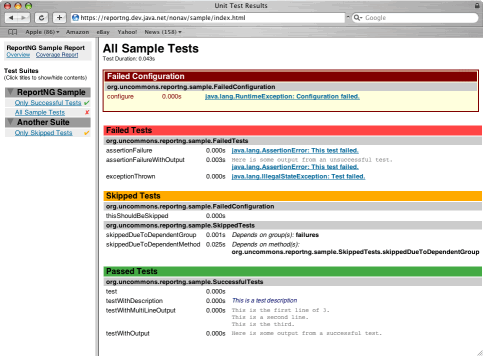
ReportNG is a simple HTML reporting plug-in for the TestNG unit-testing framework. It is intended as a replacement for the default TestNG HTML report. The default report is comprehensive but is not so easy to understand at-a-glance. ReportNG provides a simple, colour-coded view of the test results. ReportNG generates 100% valid XHTML 1.0 files. The output can be customised by over-riding the default stylesheet with your own CSS file. Since version 0.9.0, ReportNG also includes a second reporter that produces JUnit format XML output. This enables TestNG to integrate with tools, such as Hudson, that understand these XML files. This is an alternative to the JUnit XML reporter that is provided with TestNG. The ReportNG implementation maps each test class to a single <testsuite> element, resulting in one XML file per test class. This is different from the approach taken by the core TestNG implementation. The ReportNG version of the JUnit reporter ignores TestNG's notion of suites to produce output that is closer to what you would get if you were using JUnit. The current version is 1.2.2, which has been tested with TestNG 6.14.3. 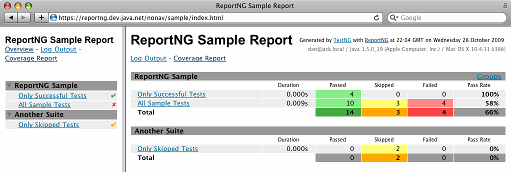
Sample Reports
How to use ReportNGApache Ant
To use the reporting plug-in, set the org.uncommons.reportng.HTMLReporter
org.uncommons.reportng.JUnitXMLReporter
You may also want to disable the default TestNG reporters by setting the Your Ant task will probably look something like this: <testng classpathref="test-path"
outputdir="${test-results.dir}"
haltonfailure="true"
useDefaultListeners="false"
listeners="org.uncommons.reportng.HTMLReporter,org.uncommons.reportng.JUnitXMLReporter">
<xmlfileset dir="." includes="testng.xml"/>
<sysproperty key="org.uncommons.reportng.title" value="My Test Report"/>
</testng>
The MavenAdd ReportNG as a Maven dependency <dependency>
<groupId>org.testng</groupId>
<artifactId>reportng</artifactId>
<version>1.2.2</version>
<scope>test</scope>
</dependency>
Now ReportNG reports will be generated for each test run. ReportNG wires-in the below mentioned mandatory listeners via Service Providers Interface, so no additional work needs to be done to start consuming them.
Other Build SystemsIf you are using Gradle, Tomek Kaczanowski has written these instructions on how to use ReportNG. If you are using the command line, an IDE plug-in or some other build system, please refer to the TestNG documentation to find out how to register custom listeners/reporters. Supported System Properties
The following optional system properties can be set (via nested
|
| You are visitor 01402775 — GeezerVison does not store the pages you look up. Best viewed with Netscape Navigator 4.7 or Internet Explorer 6 at 800×600. No cookies required. |