kernel-installer
Automatic install script for The Linux kernel
Inspired by LinuxKernelBuild


Build and install optimized Linux kernels on Debian, Ubuntu, Fedora and RHEL
Use-case profiles, CachyOS source + BORE, Clang LTO, CPU tuning, named kernels, and QEMU boot verification.
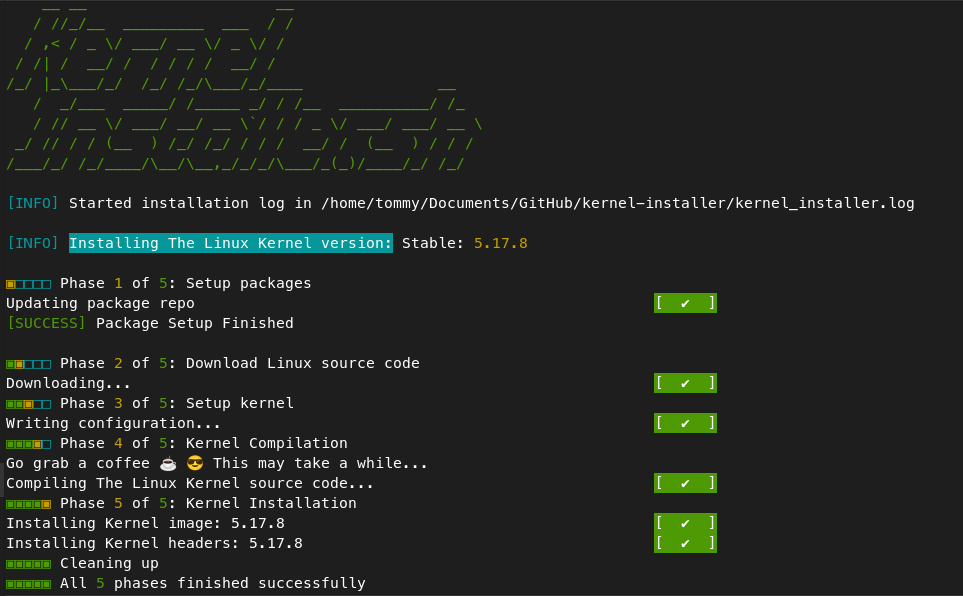
Highlights
- Use-case profiles —
--profile desktop|workstation|gaming|server|laptop applies HZ/preempt/MGLRU/BBR/cgroup settings for the workload.
- CachyOS source + BORE —
--source cachyos --sched bore builds the pinned CachyOS 7.3.6-3 source with CONFIG_CACHY and CONFIG_SCHED_BORE.
- CPU tuning —
--cpu generic|native|zen4|x86-64-v3|x86-64-v4. native needs compiler support; with CachyOS’s Rust config it also needs a rustc with APXF support, otherwise use x86-64-v3/zen4.
- Clang LTO —
--lto thin|full with clang/lld.
- Named kernels — automatic localversion (
7.3.6-cachyos-workstation-bore) and --kernel-tag.
- Boot verification — QEMU boot smoke test in CI for every distro target.
See Optimization profiles, CachyOS source and BORE, and Kernel naming.
Dependencies
Missing packages are installed when running the script.
# Debian/Ubuntu
wget curl git rsync fakeroot cpio kmod build-essential patch libncurses-dev xz-utils zstd libssl-dev bc lz4 libelf-dev flex bison gawk debhelper dpkg-dev procps apt-transport-https libdw-dev python3 ca-certificates openssl
# Fedora/RHEL
wget curl git rsync ca-certificates procps-ng findutils diffutils hostname bc binutils bison dwarves elfutils-devel elfutils-libelf-devel flex gawk gcc make patch openssl openssl-devel perl python3 ncurses-devel cpio kmod xz lz4 zstd rpm-build dracut grubby
gnupg is also installed on demand when tarball verification needs gpg/gpgv, and kexec-tools when --kexec is used.
On Debian-based systems lsb-release is required; the script offers to install it if it is missing.
Notes
- This script reverts bug #1086172 Enable more ZRAM compression options by default (kernel 6.12 and newer)
- Sets default compression to zstd (change it with
--default-compression), and enables support for the rest of the algorithms
- Options are:
lz4 compression support (ZRAM_BACKEND_LZ4) [Y/n/?] y
lz4hc compression support (ZRAM_BACKEND_LZ4HC) [Y/n/?] y
zstd compression support (ZRAM_BACKEND_ZSTD) [Y/n/?] y
deflate compression support (ZRAM_BACKEND_DEFLATE) [Y/n/?] y
842 compression support (ZRAM_BACKEND_842) [Y/n/?] y
lzo and lzo-rle compression support (ZRAM_BACKEND_LZO) [Y/n/?] y
Default zram compressor
1. lzo-rle (ZRAM_DEF_COMP_LZORLE)
2. lzo (ZRAM_DEF_COMP_LZO)
3. lz4 (ZRAM_DEF_COMP_LZ4) (NEW)
4. lz4hc (ZRAM_DEF_COMP_LZ4HC) (NEW)
> 5. zstd (ZRAM_DEF_COMP_ZSTD)
6. deflate (ZRAM_DEF_COMP_DEFLATE) (NEW)
7. 842 (ZRAM_DEF_COMP_842) (NEW)
Download the script
Download, review, then run as root:
curl -fsSLO https://github.com/tmiland/kernel-installer/raw/main/kernel_installer.sh
sudo bash kernel_installer.sh            # add options as needed, e.g. --stable
Quick install with default options:
With Curl:
curl -fsSL https://github.com/tmiland/kernel-installer/raw/main/kernel_installer.sh | sudo bash
With Wget:
wget -qO - https://github.com/tmiland/kernel-installer/raw/main/kernel_installer.sh | sudo bash
With options (e.g. --stable):
curl -fsSL https://github.com/tmiland/kernel-installer/raw/main/kernel_installer.sh | sudo bash -s -- --stable
The installer must run as root: pipe into sudo bash (as above) or run
sudo bash kernel_installer.sh. A run as a regular user exits immediately with a
“must be run as root” error instead of prompting or installing anything.
On systems without sudo, become root first. If the root password is not set:
Then:
When run outside a git checkout, a pinned and checksum-verified copy of the
function library (src/slib.sh) is fetched automatically.
For latest release
curl -s https://api.github.com/repos/tmiland/kernel-installer/releases/latest \
| grep "browser_download_url.*sh" \
| cut -d : -f 2,3 \
| tr -d \" \
| wget -qi -
The release provides kernel_installer.sh and SHA256SUMS; --update verifies the download against the checksum before replacing the script.
For main branch
wget https://github.com/tmiland/kernel-installer/raw/main/kernel_installer.sh
Set execute permission:
chmod +x kernel_installer.sh
For usage, run:
Help output
Usage:  kernel_installer.sh [options]
  If called without arguments, installs stable kernel 7.3.6 using /opt/linux-kernel

  --help                 |-h   display this help and exit
  --kernel               |-k   kernel version of choice
  --stable               |-s   stable kernel version 7.3.6
  --mainline             |-m   mainline kernel version 7.4-rc2
  --longterm             |-l   longterm kernel version 6.18.63
  --dir                  |-d   install directory
  --kexec                |-x   load new kernel without reboot
  --config               |-c   set configuration target
  --custom-config        |-cc  set custom configuration directive, can be used multiple times
  --profile              |-p   optimization profile (see --list-profiles)
  --list-profiles        |-lp  list optimization profiles and exit
  --base-config          |-bc  profile base config: running, a path, cachyos, or none
  --source               |      kernel source: vanilla (kernel.org) or cachyos (pinned)
  --cachyos-latest       |      build the latest stable CachyOS release (unpinned config/patch)
  --sched                |      scheduler for the cachyos source: eevdf, bore, or bmq
  --cpu                  |      CPU tuning: generic, native, zen4, x86-64-v3, x86-64-v4
  --lto                  |      LTO: none, thin, or full (requires clang/lld)
  --hz                   |      timer frequency: 100, 250, 300, 500, 600, 750, 1000
  --bbr3                 |      make BBRv3 the default TCP congestion control (cachyos)
  --binder               |      enable Android Binder IPC and binderfs (Waydroid)
  --sched-ext            |      enable sched_ext and BTF for userspace BPF schedulers
  --rt                   |      build a PREEMPT_RT real-time kernel (6.12+)
  --hardened             |      apply the pinned linux-hardened patch (vanilla 7.3.1)
  --autofdo <profile>    |      build with an AutoFDO sample profile (clang 17+)
  --autofdo-collect      |      build a profiling kernel for AutoFDO (clang 17+)
  --config-only          |      validate the configuration and exit before compiling
  --no-sign              |      disable automatic Secure Boot kernel signing
  --kernel-tag           |      custom localversion suffix (default: auto from source/profile)
  --verbose              |-v   increase verbosity
  --get-verified-tarball |-gvt cryptographically verify kernel tarball (default)
  --nproc                |-n   set the number of processing units to use
  --enable-debug-info    |-edi enable debug info
  --lowlatency           |-low convert generic config to lowlatency
  --list-installed       |-li  list installed kernels
  --default-compression  |-dc  select default compression algorithm
  --changelog            |-cl  view changelog for kernel version
  --update               |-upd check for a verified script update
  --uninstall            |-u   uninstall kernel (default: running kernel; use -k for another)

  Installed kernel version: 7.3.4  | Script version: 1.10.1
The versions shown are looked up live from kernel.org each time the script runs.
To use opt –kernel:
./kernel_installer.sh --kernel 5.17.8
Else use:
./kernel_installer.sh --stable, --mainline or --longterm separately
To use –dir opt:
./kernel_installer.sh --dir /path/to/dir
The source is downloaded and built in a linux-kernel subdirectory (here /path/to/dir/linux-kernel, default /opt/linux-kernel), which is removed after a successful install. The script refuses to use a directory that is not empty unless it created it in a previous run.
The path passed to --dir is the parent. It must be owned by you (or root) and must not be group/other-writable unless it is sticky; the installer creates a missing parent with mode 0700. If it reports Install directory parent ... is writable by group or others, run chmod 700 /path/to/parent or choose a private directory.
To load kernel without reboot:
./kernel_installer.sh --kexec
To use –config:
./kernel_installer.sh --config menuconfig
default is olddefconfig
Configuration targets
As listed by make help in the kernel source (7.3); older kernels may lack some of them.
With the default olddefconfig, the build uses the source tree’s current
.config as its base. Profile builds (--profile) default to copying the
running kernel’s config (/boot/config-$(uname -r)) first; use
--base-config /path to choose another config, or --base-config none to
keep the historical arch-defconfig behavior.
config          - Update current config utilising a line-oriented program
nconfig         - Update current config utilising a ncurses menu based program
menuconfig      - Update current config utilising a menu based program
xconfig         - Update current config utilising a Qt based front-end
gconfig         - Update current config utilising a GTK+ based front-end
oldconfig       - Update current config utilising a provided .config as base
localmodconfig  - Update current config disabling modules not loaded
localyesconfig  - Update current config converting local mods to core
defconfig       - New config with default from ARCH supplied defconfig
savedefconfig   - Save current config as ./defconfig (minimal config)
allnoconfig     - New config where all options are answered with no
allyesconfig    - New config where all options are accepted with yes
allmodconfig    - New config selecting modules when possible
alldefconfig    - New config with all symbols set to default
randconfig      - New config with random answer to all options
yes2modconfig   - Change answers from yes to mod if possible
mod2yesconfig   - Change answers from mod to yes if possible
mod2noconfig    - Change answers from mod to no if possible
listnewconfig   - List new options
helpnewconfig   - List new options and help text
olddefconfig    - Same as oldconfig but sets new symbols to their default value without prompting
tinyconfig      - Configure the tiniest possible kernel
Optimization profiles
Profiles apply a small set of kernel configuration changes for an intended
workload. They are starting points, not guarantees: benchmark the result with
your own build/game/server workload.
./kernel_installer.sh --list-profiles
./kernel_installer.sh --profile workstation
./kernel_installer.sh --profile server --base-config /boot/config-$(uname -r)
./kernel_installer.sh --profile desktop --base-config none
A profile build uses the running kernel’s config as its base by default, so
the resulting kernel keeps the drivers the machine already uses. Use
--base-config /path for another config, or --base-config none to start
from the historical arch defconfig (useful in containers and CI). The
repeatable --custom-config directives are applied after the profile, so they
can override any profile value.
| Profile |
Best for |
Key settings |
desktop |
daily interactive desktop |
HZ 1000, full preempt, THP madvise, MGLRU, BBR, O2 |
workstation |
LLM/Android builds plus a responsive desktop |
desktop + PSI/cgroup CPU limits, BBR default |
gaming |
latency-sensitive games |
desktop timer/preempt settings, O2 |
server |
network/storage throughput |
HZ 250, relaxed preempt, MGLRU, BBR default, NR_CPUS 256, O2 |
laptop |
battery and thermals |
HZ 300, relaxed preempt, schedutil, AMD/Intel P-state, energy model, MGLRU, O2 |
lowlatency |
audio/live interactive work (legacy alias) |
HZ 1000, full preempt, LATENCYTOP; not PREEMPT_RT |
Notes:
--lowlatency is kept as an alias for --profile lowlatency. Combining it
with a different --profile is an error.-
The workstation/server profiles enable the cgroup knobs systemd needs
(MEMCG, CGROUP_BPF, FAIR_GROUP_SCHED, CFS_BANDWIDTH). Use them with a
build slice, for example:
systemd-run --user --scope --slice=build.slice \
  -p CPUWeight=50 -p IOWeight=50 -p MemoryHigh=75% \
  bash -lc 'make -j$(( $(nproc) - 2 ))'
The kernel profile reduces scheduler latency; the cgroup is what reserves
capacity for the desktop under a sustained build.
server/laptop use relaxed preemption (PREEMPT_LAZY where the kernel
provides it, otherwise voluntary). On current x86 kernels the old
PREEMPT_NONE/PREEMPT_VOLUNTARY choices are not both available.- BBR:
workstation/server make it the default (DEFAULT_BBR); the other
profiles enable the module but leave the default congestion control alone.
Use sysctl net.ipv4.tcp_congestion_control=bbr and
sysctl net.core.default_qdisc=fq if you want BBR at runtime.
- Not included in the first cut: BORE/CACHY (require the CachyOS patchset),
sched_ext (requires
DEBUG_INFO_BTF and pahole, which conflicts with the
default debug-info-off build), O3 (not exposed by vanilla 7.3.6; CachyOS
carries an out-of-tree O3 option), LTO, and native CPU tuning. These are
separate follow-ups.
CachyOS source and BORE
The CachyOS source tree carries the CachyOS base patchset (CONFIG_CACHY).
It is pinned to 7.3.6-3 and verified with the CachyOS release keys; the
config and BORE patch are pinned by commit and SHA256.
sudo ./kernel_installer.sh -d /path/to/parent \
  --source cachyos --sched bore --profile workstation
# resulting kernel release: 7.3.6-cachyos-workstation-bore

# or track the latest stable CachyOS release without an installer update
sudo ./kernel_installer.sh --cachyos-latest --sched bore --profile workstation
--source cachyos builds the pinned CachyOS source instead of kernel.org.
It uses the pinned CachyOS config by default, so --base-config cachyos is
implied; --base-config running, a path, or none still override it.
Version options (--stable, --mainline, --longterm, --kernel) are only
accepted if they match the pinned 7.3.6 source.--cachyos-latest resolves the latest stable CachyOS release at runtime
and uses the current config/BORE/BMQ patches from the
CachyOS repositories. The source tarball is still GPG-verified; the config
and patches are fetched over HTTPS without pinned SHA256 values, so this
mode is not bit-reproducible. Use --source cachyos for the pinned source.--sched bore applies the pinned BORE scheduler patch and enables
CONFIG_SCHED_BORE=y plus CONFIG_CACHY=y. It requires
--source cachyos: the BORE patch does not apply cleanly to the vanilla
kernel.org 7.3.6 tree. --sched eevdf is the default and does not apply
the BORE patch.--sched bmq applies the pinned PRJC/BMQ patch and enables
CONFIG_SCHED_ALT=y + CONFIG_SCHED_BMQ=y. It requires --source cachyos
and is mutually exclusive with BORE. BMQ targets desktop interactivity; the
patch is pinned by SHA256 like the BORE patch.- CI builds and boots the BORE kernel with Clang ThinLTO on Debian 13 and
Ubuntu 24.04, with the
workstation profile. Native CPU tuning is available
but is not part of the default CI matrix because it depends on the build
host’s toolchain.
- Checkout runs verify the CachyOS source with
src/keys/cachyos.asc; piped
runs fetch the same pinned fingerprints from keys.openpgp.org.
- The CachyOS pins live in
kernel_installer.sh (CACHYOS_*). Update the
source tag, PKGBUILD revision, config SHA256, patch revision and patch
SHA256 together; a mismatch fails closed.
--cpu generic|native|zen4|x86-64-v3|x86-64-v4 selects the CPU target.
generic is the default and portable. native uses X86_NATIVE_CPU and
builds for the machine doing the build (it may not boot optimally on another
machine). zen4, x86-64-v3, and x86-64-v4 require --source cachyos;
they use the CachyOS MZEN4/X86_64_VERSION options.--lto none|thin|full enables Clang LTO. thin/full install
clang, lld, and llvm on demand, configure LTO_CLANG_THIN/FULL, and
build with LLVM=1 LLVM_IAS=1; none is the default. The kernel is
boot-smoked after the build.- This is the CachyOS base patchset plus BORE or BMQ, not the full CachyOS
variant matrix. The remaining wiki features are separate follow-ups;
sched_ext, PREEMPT_RT, linux-hardened, and AutoFDO are available through
--sched-ext, --rt, --hardened, and --autofdo.
Kernel naming
Optimized builds get a CONFIG_LOCALVERSION so they are distinguishable in
uname -r, /lib/modules, the headers package, DKMS, initramfs, GRUB and the
.deb names:
<version>-<source>-<profile>[-<scheduler>][-<cpu>][-<lto>][-hz<n>][-bbr3][-binder][-sched-ext][-rt][-autofdo]
| Build |
uname -r |
| CachyOS BORE workstation, generic CPU, no LTO |
7.3.6-cachyos-workstation-bore |
| same + native CPU |
7.3.6-cachyos-workstation-bore-native |
| same + native + ThinLTO |
7.3.6-cachyos-workstation-bore-native-lto |
| same + 600 Hz + BBR3 + Binder + sched_ext |
7.3.6-cachyos-workstation-bore-hz600-bbr3-binder-sched-ext |
| same + PREEMPT_RT |
7.3.6-cachyos-workstation-bore-rt |
| vanilla workstation + linux-hardened |
7.3.1-hardened1-vanilla-workstation |
| vanilla workstation + AutoFDO |
7.3.6-vanilla-workstation-autofdo |
| CachyOS EEVDF server |
7.3.6-cachyos-server |
| vanilla desktop |
7.3.6-vanilla-desktop |
--kernel-tag <suffix> overrides the generated suffix. The default vanilla
build without a profile stays untagged. CONFIG_LOCALVERSION_AUTO is disabled
for named builds. A new localversion is a new kernel release, so DKMS modules
must be rebuilt for it; the installer warns when dkms status -k <release>
finds no modules. Rebuild them for the named release with:
# use the release printed by the installer
sudo dkms autoinstall -k 7.3.6-cachyos-workstation-bore
# or, after booting that kernel:
sudo dkms autoinstall -k "$(uname -r)"
Use the full release for removal, e.g. --uninstall -k "$(uname -r)"
(the default without -k).
Build configuration options
These flags are applied after the profile and before --custom-config:
| Option |
Effect |
Notes |
--hz <n> |
CONFIG_HZ=n plus the matching HZ_<n> |
100/250/300/1000 on both sources; 500/600/750 require --source cachyos |
--bbr3 |
BBRv3 as the default TCP congestion control |
CachyOS source only; per-socket override remains |
--binder |
Android Binder IPC and binderfs |
for Waydroid; already enabled by the CachyOS config |
--sched-ext |
SCHED_CLASS_EXT and BTF |
kernel 6.12+; re-enables debug info, installs dwarves (pahole); heavier build |
--rt |
PREEMPT_RT real-time kernel |
kernel 6.12+; disables dynamic preemption; throughput cost |
--sched-ext does not replace BORE at build time. It enables the sched_ext
class; run a userspace scheduler such as scx_rusty or scx_lavd to attach
one, and stop it to return to the default scheduler. The debug info and BTF
that sched_ext needs increase the build time and vmlinux size.
--rt is the mainline PREEMPT_RT kernel, not the lowlatency profile. It
makes almost the whole kernel preemptible for audio, robotics and industrial
workloads, and costs throughput; use it only when you need deterministic
latency.
Hardened variant
--hardened builds vanilla 7.3.1 with the pinned
linux-hardened
v7.3.1-hardened1 patch, after verifying its SHA256:
sudo ./kernel_installer.sh --hardened --profile workstation
# resulting kernel release: 7.3.1-hardened1-vanilla-workstation
The patch sets EXTRAVERSION = -hardened1, so the hardened marker comes from
the kernel version itself. The patch is generated against exactly 7.3.1; it
does not apply to 7.3.4. The
variant is vanilla-only: it cannot be combined with --source cachyos, BORE,
or the CachyOS-only CPU/BBR3/HZ choices. The patch adds hardening defaults
such as CONFIG_SECURITY_PERF_EVENTS_RESTRICT=y; see the linux-hardened
documentation for the full set.
The flags are part of the localversion, so builds that differ only by these
options do not collide in /lib/modules or DKMS:
7.3.6-cachyos-workstation-bore-lto-hz600-bbr3-binder-sched-ext
AutoFDO
AutoFDO is profile-guided optimization from hardware sampling. You build a
profiling kernel, run a representative workload while perf records branch
samples, convert the samples into an AutoFDO profile, and rebuild the kernel
with that profile. Clang then places the hot code and branches where the CPU
can fetch them faster. It is not a scheduler or instrumentation; the gain
depends on how well the workload matches the profile.
Requirements: clang/LLVM 17 or newer, a kernel source with
CONFIG_AUTOFDO_CLANG (7.x; not 6.12), and an x86 CPU with LBR or BRS
(Zen 3 BRS, Zen 4+ amd_lbr_v2).
# 1. profiling kernel (no profile yet)
sudo ./kernel_installer.sh --autofdo-collect --profile workstation
# reboot into it, then sample the workload
perf record --pfm-events RETIRED_TAKEN_BRANCH_INSTRUCTIONS:k \
  -a -N -b -c 500009 -o perf.data -- <your workload>
# 2. convert (create_llvm_prof from the AutoFDO project)
create_llvm_prof --binary=/path/to/vmlinux-<release> \
  --profile=perf.data --out=autofdo.profdata
# 3. rebuild with the profile
sudo ./kernel_installer.sh --autofdo autofdo.profdata --profile workstation
The --autofdo-collect build saves vmlinux-<release> in the --dir parent
directory (default /opt), because the profile conversion needs the
unstripped binary. --autofdo <profile> passes the profile to clang and tags
the kernel -autofdo; --autofdo-collect tags it -autofdo-collect.
Limits: the profile is workload-specific; regenerate it when the kernel or
the workload changes. If the source enables Rust and your rustc lacks
sample-profile support, disable Rust for the AutoFDO build with
--custom-config 'scripts/config --disable RUST'.
Secure Boot auto-signing
When a MOK key pair is present, the installer signs the kernel it installs and
verifies the signature before finishing:
Signed kernel image: /boot/vmlinuz-7.3.4-...
Defaults are /var/lib/shim-signed/mok/MOK.priv and MOK.der (the pair
created by Debian/Ubuntu’s update-secureboot-policy); override them with
SIGNING_KEY / SIGNING_CERT (a PEM certificate is also accepted), or pass
--no-sign to skip signing. Install sbsigntool (Debian/Ubuntu) or
sbsigntools (Fedora/RHEL, EPEL) first; it is not in the dependency list.
When the key pair or sbsign/sbverify is missing while Secure Boot is
enabled, the install stops instead of producing an unbootable kernel; with
Secure Boot disabled it warns and continues.
The key must be RSA. Debian’s shim is built without EC support, so an
ECDSA-signed kernel signs fine but is rejected at boot with bad shim
signature. The installer refuses to sign with a non-RSA certificate; pass
--no-sign if that is intentional.
The installer also writes /etc/dkms/framework.conf.d/secure-boot.conf before
installing the packages, so modules built by the kernel postinst or a later
dkms autoinstall are signed with the same key. An existing drop-in with
different content is left untouched. Automatic module signing needs DKMS 3 or
newer; older versions ignore framework.conf.d and the installer warns.
Enroll the key once, then enable Secure Boot in the firmware:
sudo mokutil --import /var/lib/shim-signed/mok/MOK.der  # reboot, enroll in MOK manager
mokutil --sb-state                                      # SecureBoot enabled
sbverify --list /boot/vmlinuz-<release>                 # the release just installed
kbuild has no hook for signing the kernel image (CONFIG_MODULE_SIG_KEY covers
modules only), so signing runs on the installed /boot/vmlinuz-<release> after
the package is unpacked. A failed signing or verification step is reported as
an installation error rather than leaving the kernel silently unsigned.
Custom configuration directives
In order to enable specific kernel configs, one can use --custom-config like the following example:
./kernel_installer.sh --custom-config "scripts/config --set-val CONFIG_DM_VDO m"
The directive must be a scripts/config command; raw CONFIG_* assignments (e.g. CONFIG_DM_VDO=y) are not accepted.
Note that --custom-config can be used multiple times like:
./kernel_installer.sh --custom-config "scripts/config --set-val CONFIG_DM_VDO m" --custom-config "scripts/config --set-val CONFIG_KERNEL_ZSTD y"
Boot smoke test
scripts/boot-smoke.sh boots the installed kernel in QEMU with a minimal
initramfs and requires a BOOT_SMOKE_OK marker on the serial console. CI runs
it after installation in every distro install job, including the profile
smoke job. It proves that the built kernel image boots; it is not a full-OS
boot or a performance benchmark.
./scripts/boot-smoke.sh --version "$(uname -r)"
Requires QEMU, a static C compiler, cpio, and mknod as root (or run it
under fakeroot). Use --timeout to change the 180-second limit.
Tarball verification
Stable, longterm and --kernel tarballs are cryptographically verified by default
(--get-verified-tarball is accepted but no longer needed). The sha256sums.asc
file is checked against the kernel.org autosigner key, and the tarball against
the Linus Torvalds / Greg Kroah-Hartman signatures. Checkout runs use the
bundled src/keys/kernel.org.asc; piped runs fetch the keys via WKD.
- Linux kernel releases PGP signatures
- Source script get-verified-tarball
- Installs
gnupg if gpg/gpgv are not available
- A throwaway keyring is used by default; set
GNUPGHOME=/path to reuse one. Keys are selected by exact address and exported by fingerprint (a user ID that merely contains the address is not trusted)
- Mainline snapshots from git.kernel.org are not signed and are not verified
To skip verification:
GET_VERIFIED_TARBALL=0 ./kernel_installer.sh
Used together:
./kernel_installer.sh --stable --config menuconfig --kexec --dir /path/to/dir
Watch install log:
tail -f /var/log/kernel-installer/kernel_installer.log
- installation log in
/var/log/kernel-installer/kernel_installer.log (a root-only directory), started fresh on every install; the previous install’s log is kept as kernel_installer.log.1 in the same directory, and --list-installed / --uninstall leave both alone
- set
LOGFILE to log somewhere else, e.g. LOGFILE=/root/kernel-build.log ./kernel_installer.sh
- when the output is not a terminal (a pipe, a file, CI), the spinner and colors are turned off
- ./src/slib.sh function script is sourced remotely if not found locally
- This script is a combination of functions for spinners, colors and logging
Full write-up on the blog: https://tmiland.com/kernel-installer/
Uninstall kernel
To uninstall previously installed kernel:
./kernel_installer.sh --uninstall --kernel 5.17.7
- The
linux-image-<version> and linux-headers-<version> packages (Fedora/RHEL: kernel-<version> and kernel-devel-<version>) are removed
- On Debian-based systems
apt asks for confirmation; on Fedora/RHEL they are removed without a prompt
Testing
Tested and working on: Debian 12/13, Ubuntu 22.04/24.04 and Fedora 44 (see test-install.yml)
Maintenance
Pinning CachyOS
The scheduled Pin CachyOS workflow checks the latest stable CachyOS release
weekly, updates the source/config/BORE/BMQ pins, bumps the patch version, and
validates the configuration. It opens a PR, waits for the fast checks, and
merges it automatically. The Auto release workflow then waits for the full
build matrix on main, tags the merged commit, and publishes the release with
kernel_installer.sh and SHA256SUMS.
One-time repository settings:
- Settings → Actions → General → Allow GitHub Actions to create and approve
pull requests.
- A
main branch protection that does not require a human approval for the
bot’s pin PR; the fast checks still gate the merge.
- The auto-release is created by
github-actions[bot] and uploads its own
assets, because a token-created release does not trigger the Release assets
workflow.
Users who want the newest release immediately can use --cachyos-latest
without waiting for the pin.
Updating the vendored slib
src/slib.sh is a curated subset of virtualmin/slib (tracked via tmiland/slib). Updates are two-phase, and CI enforces the second one on main:
# Phase 1 - vendor the new file (defaults to tmiland/slib@master)
scripts/update-slib.sh
git add src/slib.sh && git commit -m 'chore: update vendored slib.sh' && git push

# Phase 2 - pin the pushed commit (updates SLIB_REV / SLIB_SHA256)
scripts/update-slib.sh --finalize <commit>
git add kernel_installer.sh && git commit -m 'chore: bump slib pin' && git push
- Use
--source virtualmin/slib to pull upstream directly. Sync your fork first with gh repo sync tmiland/slib -b master.
- Sources contain extra Virtualmin-only helpers and are not lint-clean as-is (e.g.
#!/bin/sh shebang); the vendored copy is a trimmed, lint-clean subset. Review git diff src/slib.sh and the helper’s shellcheck output before committing.
- Until phase 2 lands on
main, the slib pin CI job fails (that is the reminder).
Feature request and bug reports
Donations

- PayPal me
- [BTC] : 33mjmoPxqfXnWNsvy8gvMZrrcG3gEa3YDM
Disclaimer
* **Use at own risk ***
License
MIT License
