GeezerVison is showing w3c.github.io — requestIdleCallback()
requestIdleCallback()
Cooperative Scheduling of Background Tasks
This document defines an API that web page authors can use to
cooperatively schedule background tasks such that they do not introduce
delays to other high priority tasks that share the same event loop, such as
input processing, animations and frame compositing. The user agent is in a
better position to determine when background tasks can be run without
introducing user-perceptible delays or jank in animations and input
response, based on its knowledge of currently scheduled tasks, vsync
deadlines, user-interaction and so on. Using this API should therefore
result in more appropriate scheduling of background tasks during times when
the browser would otherwise be idle.
The Web Performance Working Group maintains a test suite for the specification. Please see the Working Group's implementation report. Vendors interested in implementing this document SHOULD join the mailing lists below and take part in the discussions.
Introduction
Web pages often want to execute computation tasks on the browser's event
loop which are not time-critical, but might take a significant portion of
time to perform. Examples of such background tasks include recording
analytics data, long running data processing operations, client-side
templating and pre-rendering of content likely to become visible in the
near future. These tasks must share the event loop with other time-critical
operations, such as reacting to input and performing script-based
animations using {{AnimationFrameProvider/requestAnimationFrame()}}. These
background tasks are typically performed by scheduling a callback using
{{WindowOrWorkerGlobalScope/setTimeout()}} and running the background task during that
callback.
A disadvantage of this approach is that the author of the script has no
way to inform the user-agent as to whether a given {{WindowOrWorkerGlobalScope/setTimeout()}} callback is
time-critical or could be delayed until the browser is otherwise idle. In
addition, the user agent isn't able to provide the callback with any
information about how long it can continue to execute without delaying
time-critical operations and causing jank or other user-perceptible delays.
As a result, the easiest way forward is for the author is to simply call
{{WindowOrWorkerGlobalScope/setTimeout()}} with a very small value, and then execute the minimum possible
chunk of work in the resulting callback and reschedule additional work with
another call to {{WindowOrWorkerGlobalScope/setTimeout()}}. This is less than optimal because there is
extra overhead from having to post many small tasks on the user agent's
event loop and schedule their execution. It also relies on the user-agent
interleaving other time-critical work between each of these callbacks
appropriately, which is difficult since the user-agent can't make accurate
assumptions on how long each of these callbacks are likely to take.
The API described in this document allows script authors to request the
user-agent to schedule a callback when it would otherwise be idle. The user
agent provides an estimation of how long it expects to remain idle as a
deadline passed to the callback. The page author can use the deadline to
ensure that these background tasks don't impact latency-critical events
such as animation and input response.
Here is an example of using the API to write a background task.
<!DOCTYPE html>
<title>Scheduling background tasks using requestIdleCallback</title>
<script>
var requestId = 0;
var pointsTotal = 0;
var pointsInside = 0;

function piStep() {
  var r = 10;
  var x = Math.random() `*` r `*` 2 - r;
  var y = Math.random() `*` r `*` 2 - r;
  return (Math.pow(x, 2) + Math.pow(y, 2) < Math.pow(r, 2))
}
function refinePi(deadline) {
  while (deadline.timeRemaining() > 0) {
    if (piStep())
      pointsInside++;
    pointsTotal++;
  }
  currentEstimate = (4 `*` pointsInside / pointsTotal);
  textElement = document.getElementById("piEstimate");
  textElement.innerHTML="Pi Estimate: " + currentEstimate;
  requestId = window.requestIdleCallback(refinePi);
}
function start() {
  requestId = window.requestIdleCallback(refinePi);
}
function stop() {
  if (requestId)
    window.cancelIdleCallback(requestId);
  requestId = 0;
}
</script>
<button onclick="start()">Click me to start!</button>
<button onclick="stop()">Click me to stop!</button>
<div id="piEstimate">Not started</div>
Idle Periods
After input processing, rendering and compositing for a given frame has
been completed, the user agent's main thread often becomes idle until
either: the next frame begins; another pending task becomes eligible to
run; or user input is received. This specification provides a means to
schedule execution of callbacks during this otherwise idle time via a
{{Window/requestIdleCallback()}} API.
Callbacks posted via the {{Window/requestIdleCallback()}} API become eligible to
run during user agent defined idle periods. When an idle callback is run it
will be given a deadline which corresponds to the end of the current idle
period. The decision as to what constitutes an idle period is user agent
defined, however the expectation is that they occur in periods of
quiescence where the browser expects to be idle.
One example of an idle period is the time between committing a given
frame to the screen and starting processing on the next frame during active
animations, as shown in . Such idle periods will
occur frequently during active animations and screen updates, but will
typically be very short (i.e., less than 16ms for devices with a 60Hz vsync
cycle).
Example of an inter-frame idle period
The web-developer should be careful to account for all work
performed by operations during an idle callback. Some operations, such as
resolving a promise or triggering a page layout, may cause subsequent tasks
to be scheduled to run after the idle callback has finished. In such cases,
the application should account for this additional work by yielding before
the deadline expires to allow these operations to be performed before the
next frame deadline.
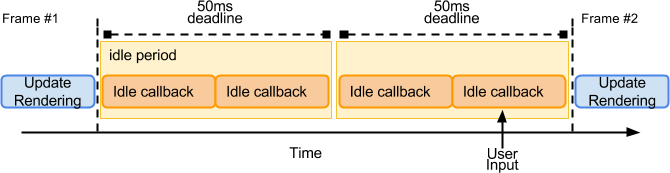
Another example of an idle period is when the user agent is idle with no
screen updates occurring. In such a situation the user agent may have no
upcoming tasks with which it can bound the end of the idle period. In order
to avoid causing user-perceptible delays in unpredictable tasks, such as
processing of user input, the length of these idle periods should be capped
to a maximum value of 50ms. Once an idle period is
finished the user agent can schedule another idle period if it remains
idle, as shown in , to enable background work to
continue to occur over longer idle time periods.
Example of an idle period when there are no pending frame updates
During an idle period the user agent will run idle callbacks in FIFO
order until either the idle period ends or there are no more idle callbacks
eligible to be run. As such, the user agent will not necessarily run all
currently posted idle callbacks within a single idle period. Any remaining
idle tasks are eligible to run during the next idle period.
To deliver the best performance developers are encouraged
to eliminate unnecessary callbacks (e.g. requestAnimationFrame, setTimeout,
and so on) that do not perform meaningful work; do not keep such callbacks
firing and waiting for events to react, instead schedule them as necessary
to react to events once they become available. Such pattern improves
overall efficiency, and enables the user agent to schedule long idle
callbacks (up to 50ms) that can be used to efficiently perform large blocks
of background work.
Only idle tasks which posted before the start of the current idle period
are eligible to be run during the current idle period. As a result, if an
idle callback posts another callback using {{Window/requestIdleCallback()}}, this
subsequent callback won't be run during the current idle period. This
enables idle callbacks to re-post themselves to be run in a future idle
period if they cannot complete their work by a given deadline - i.e.,
allowing code patterns like the following example, without causing the
callback to be repeatedly executed during a too-short idle period:
function doWork(deadline) {
  if (deadline.timeRemaining() <= 5) {
    // This will take more than 5ms so wait until we
    // get called back with a long enough deadline.
    requestIdleCallback(doWork);
    return;
  }
  // do work...
}
At the start of the next idle period newly posted idle callbacks are
appended to the end of the runnable idle callback list, thus ensuring that
reposting callbacks will be run round-robin style, with each callback
getting a chance to be run before that of an earlier task's reposted
callback.
Future versions of this specification could allow other
scheduling strategies. For example, schedule idle callback within the same
idle period, a period that has at least X milliseconds of idle
time, and so on. Current specification only supports the case for
scheduling into the next idle period, at which time the callback can
execute its logic, or repost itself into the next idle period.
When the user agent determines that the web page is not user visible it
can throttle idle periods to reduce the power usage of the device, for
example, only triggering an idle period every 10 seconds rather than
continuously.
A final subtlety to note is that there is no guarantee that a user agent
will have any idle CPU time available during heavy page load. As such, it
is entirely acceptable that the user agent does not schedule any idle
period, which would result in the idle callbacks posted via the
{{Window/requestIdleCallback()}} API being postponed for a potentially unbounded
amount of time. For cases where the author prefers to execute the callback
within an idle period, but requires a time bound within which it can be
executed, the author can provide the timeout property in the options
argument to {{Window/requestIdleCallback()}}: if the specified timeout is reached
before the callback is executed within an idle period, a task is queued to
execute it.
The maximum deadline of 50ms is derived from
studies [[RESPONSETIME]] which show that that a response to user input
within 100ms is generally perceived as instantaneous to humans. Capping
idle deadlines to 50ms means that even if the user input occurs immediately
after the idle task has begun, the user agent still has a remaining 50ms in
which to respond to the user input without producing user perceptible
lag.
The IDL fragments in this specification MUST be interpreted as required
for conforming IDL fragments.
This specification defines a single conformance class:
conforming user agent
A user agent is considered to be a conforming user agent if it
satisfies all of the MUST-, REQUIRED- and SHALL-level criteria in this
specification. A conforming user agent must also be a conforming implementation of the IDL fragment in section .
{{Window}} interface extensions
The partial interface in the IDL fragment below is used to expose the
{{Window/requestIdleCallback()}} operation on the
{{Window}} object.
A list of idle request callbacks. The list MUST be
initially empty and each entry in this list is identified by a number,
which MUST be unique within the list for the lifetime of the {{Window}}
object.
A list of runnable idle callbacks. The list MUST be
initially empty and each entry in this list is identified by a number,
which MUST be unique within the list of the lifetime of the {{Window}}
object.
An idle callback identifier, which is a number which MUST
initially be zero.
The requestIdleCallback() method
When {{Window/requestIdleCallback}}(|callback|, |options|) is
invoked with a given IdleRequestCallback
and optional IdleRequestOptions, the user agent
MUST run the following steps:
Let window be this {{Window}} object.
Increment the window's idle callback identifier
by one.
Let handle be the current value of window's
idle callback identifier.
Push callback to the end of window's list of idle request callbacks, associated with handle.
Return handle and then continue running this algorithm
asynchronously.
The following steps run in parallel and queue a timer
similar to setTimeout() if the optional timeout property is
provided. From here, the idle and timeout callbacks are raced and
cancel each other—e.g. if the idle callback is scheduled first, then
it cancels the timeout callback, and vice versa.
If the timeout
property is present in options and has a positive
value:
Wait for timeout milliseconds.
Wait until all invocations of this algorithm, whose
timeout added to their posted time occurred before this
one's, have completed.
Optionally, wait a further user-agent defined length of time.
This is intended to allow user agents to pad
timeouts as needed to optimise the power usage of the device. For
example, some processors have a low-power mode where the
granularity of timers is reduced; on such platforms, user agents
can slow timers down to fit this schedule instead of requiring
the processor to use the more accurate mode with its associated
higher power usage.
Queue a task on the queue associated with the idle-task
task source, which performs the invoke idle callback timeout algorithm, passing handle and
window as arguments.
{{Window/requestIdleCallback()}}
only schedules a single callback, which will be executed during a
single idle period. If the callback cannot complete its work before
the given deadline then it should call
{{Window/requestIdleCallback()}} again
(which may be done from within the callback) to schedule a future callback
for the continuation of its task, and exit immediately to return control
back to the event loop.
The cancelIdleCallback() method
The {{Window/cancelIdleCallback()}} method is used to cancel a
previously made request to schedule an idle callback. When
{{Window/cancelIdleCallback}}(|handle|) is invoked, the user agent
MUST run the following steps:
Let window be this {{Window}} object.
Find the entry in either the window's list of idle request callbacks or list of runnable idle callbacks that is
associated with the value handle.
If there is such an entry, remove it from both window's
list of idle request callbacks and the list of runnable idle callbacks.
{{Window/cancelIdleCallback()}}
might be invoked for an entry in window's list of idle request callbacks or the list of runnable idle callbacks.
In either case the entry should be removed from the list so that the
callback does not run.
The IdleDeadline interface
Each {{IdleDeadline}} has an associated get deadline time algorithm, which
returns a {{DOMHighResTimeStamp}} representing the absolute time in
milliseconds of the deadline. The deadline is initially set to return zero.
When the timeRemaining() method is invoked on
an IdleDeadline object it MUST return the remaining duration before
the deadline expires as a {{DOMHighResTimeStamp}}, which SHOULD be
enough to allow measurement while preventing timing attack - see
"Privacy and Security" section of [[HR-TIME]]. This value is calculated
by performing the following steps:
Let now be a {{DOMHighResTimeStamp}} representing
current high resolution time in milliseconds.
Let deadline be the result of calling {{IdleDeadline}}'s get deadline time algorithm.
Let timeRemaining be deadline -
now.
If timeRemaining is negative, set it to 0.
Return timeRemaining.
Each IdleDeadline has an associated timeout, which is
initially false. The didTimeout getter MUST
return timeout.
The invoke idle callback timeout algorithm sets
timeout to true to specify that the callback is being executed
outside an idle period, due to it having exceeded the value of the
IdleRequestOptions's timeout property which was passed when the
callback was registered.
Processing
Start an idle period algorithm
To start an idle period given {{Window}} window and
getDeadline, an algorithm that returns a {{DOMHighResTimeStamp}}: [[HR-TIME]]
The algorithm is called
by the event loop processing model
when it determines that the event loop is otherwise idle.
Optionally, if the user agent determines the idle period should
be delayed, return from this algorithm.
This is intended to allow user agents to delay the
start of idle periods as needed to optimise the power usage of the
device. For example, if the {{Document}}'s [=Document/visibility state=] is "hidden" then the user agent can
throttle idle period generation, for example limiting the Document to
one idle period every 10 seconds to optimize for power usage.
Let pending_list be window's list of idle request callbacks.
Let run_list be window's list of runnable idle callbacks.
Append all entries from pending_list into
run_list preserving order.
Clear pending_list.
Queue a task on the queue associated with the idle-task
task source, which performs the steps defined in the invoke idle callbacks algorithm with window and getDeadline as
parameters.
The time between now and the deadline is referred
to as the idle period. There can only be one idle period
active at a given time for any given {{Window}}. The idle period can end
early if the user agent determines that it is no longer idle. If so,
the next idle period cannot start until after deadline.
Invoke idle callbacks algorithm
To invoke idle callbacks algorithm given {{Window}} window and
getDeadline, an algorithm returning a {{DOMHighResTimeStamp}}: [[HR-TIME]].
If the user-agent believes it should end the idle period early due
to newly scheduled high-priority work, return from the algorithm.
Let now be the current time.
If now is less than the result of calling getDeadline and the
window's list of runnable idle callbacks is not empty:
Pop the top callback from window's
list of runnable idle callbacks.
Let deadlineArg be a new IdleDeadline whose
get deadline time algorithm is getDeadline.
[=Invoke=] callback with « deadlineArg » and "`report`".
If window's list of runnable idle callbacks
is not empty, queue a task which performs the steps in the
invoke idle callbacks algorithm with getDeadline
and window as a parameters and return from this
algorithm
The user agent is free to end an idle period early, even
if deadline has not yet occurred, by deciding return from the
algorithm in step 1. For example, the user agent may decide to do this
if it determines that higher priority work has become runnable.
Invoke idle callback timeout algorithm
The invoke idle callback timeout algorithm:
Let callback be the result of finding the entry in
window's list of idle request callbacks or the list of runnable idle callbacks that is associated with the value
given by the handle argument passed to the algorithm.
If callback is not undefined:
Remove callback from both window's list of idle request callbacks and the list of runnable idle callbacks.
Let now be the current time.
Let deadlineArg be a new IdleDeadline.
Set the get deadline time algorithm associated with deadlineArg to
an algorithm returning now and set the timeout associated with
deadlineArg to true.
[=Invoke=] callback with « deadlineArg » and "`report`".
Privacy Considerations
When an idle callback is scheduled the user agent provides an estimate
of how long it expects to remain idle. This information can be used to
estimate the time taken by other application tasks and related browser work
within that frame. However, developers can already access this information
via other means - e.g. mark beginning of the frame via
requestAnimationFrame, estimate the time of the next frame, and use that
information to compute "remaining time" within any callback.
To mitigate cache and statistical fingerprinting attacks, the resolution
of the time estimates returned by the IdleDeadline interface should
be [=coarsen time|coarsened=] based on
[=environment settings object/cross-origin isolated capability=] to ensure this API is not
exposing more information than what's exposed by other web-exposed timers. [[HR-TIME]]
Security Considerations
TBD
Acknowledgments
The editors would like to thank the following people for contributing to
this specification: Sami Kyostila, Alex Clarke, Boris Zbarsky, Marcos
Caceres, Jonas Sicking, Robert O'Callahan, David Baron, Todd Reifsteck,
Tobin Titus, Elliott Sprehn, Tetsuharu OHZEKI, Lon Ingram, Domenic Denicola,
Philippe Le Hegaret and Anne van Kesteren.
You are visitor 01402503 — GeezerVison does not store the pages you look up. Best viewed with Netscape Navigator 4.7 or Internet Explorer 6 at 800×600. No cookies required.