GeezerVisonThe World Wide Web, restored to 800 pixels of glory. | ||||||||||||||||||||||||||||||||||||||||
| Home|About|Gaming cabinet|Archives|How it works|Starter sites | ||||||||||||||||||||||||||||||||||||||||
GeezerVison is showing w3c.github.io — Touch Events - Level 2 This specification was published by the Touch Events Community Group. It is not a W3C Standard nor is it on the W3C Standards Track. Please note that under the W3C Community Final Specification Agreement (FSA) other conditions apply. This version of the specification includes fixes and improvements to Touch Events Level 1, and incorporates the features previously published as Touch Event Extensions. There is currently no intention to carry on further work on the Touch Events specification. This document has been maintained up to this point to reflect additions and changes made in user agents since the release of the original Touch Events Level 1 specification. The Community Group considers Touch Events a legacy API – authors are strongly encouraged to adopt Pointer Events instead. The Touch Events specification defines a set of low-level events that represent one or more points of contact with a touch-sensitive surface, and changes of those points with respect to the surface and any DOM elements displayed upon it (e.g. for touch screens) or associated with it (e.g. for drawing tablets without displays). It also addresses pen-tablet devices, such as drawing tablets, with consideration toward stylus capabilities. IntroductionUser Agents that run on terminals which provide touch input to use web applications typically use interpreted mouse events to allow users to access interactive web applications. However, these interpreted events, being normalized data based on the physical touch input, tend to have limitations on delivering the intended user experience. Additionally, it is not possible to handle concurrent input regardless of device capability, due to constraints of mouse events: both system level limitations and legacy compatibility. Meanwhile, native applications are capable of handling both cases with the provided system APIs. The Touch Events specification provides a solution to this problem by specifying interfaces to allow web applications to directly handle touch events, and multiple touch points for capable devices. This specification defines conformance criteria that apply to a single product: the user agent that implements the interfaces that it contains. WindowProxy is defined in [[!HTML5]]. WebIDL ConformanceThe IDL blocks in this specification are conforming IDL fragments as defined by the WebIDL specification [[!WEBIDL]]. A conforming user agent must also be a conforming JavaScript implementation of this IDL fragments in this specification, with the following exception:
Note: Both ways of reflecting IDL attributes allow for simply getting and setting the property on the platform object to work. For example, given a Touch InterfaceThis interface describes an individual touch point for a touch event. Touch objects are immutable; after one is created, its attributes must not change. enum TouchType {
"direct",
"stylus"
};
dictionary TouchInit {
required long identifier;
required EventTarget target;
double clientX = 0;
double clientY = 0;
double screenX = 0;
double screenY = 0;
double pageX = 0;
double pageY = 0;
float radiusX = 0;
float radiusY = 0;
float rotationAngle = 0;
float force = 0;
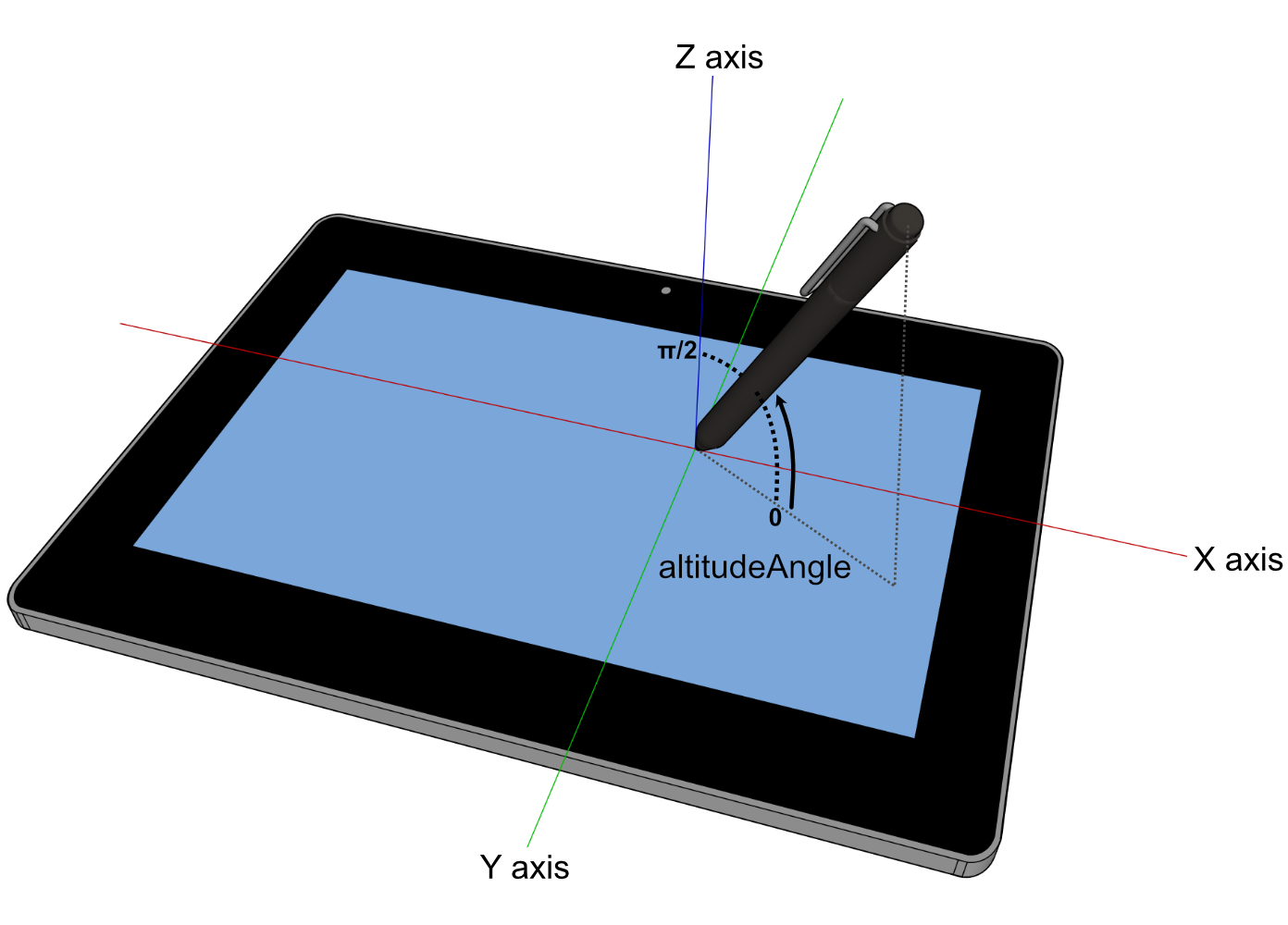
double altitudeAngle = 0;
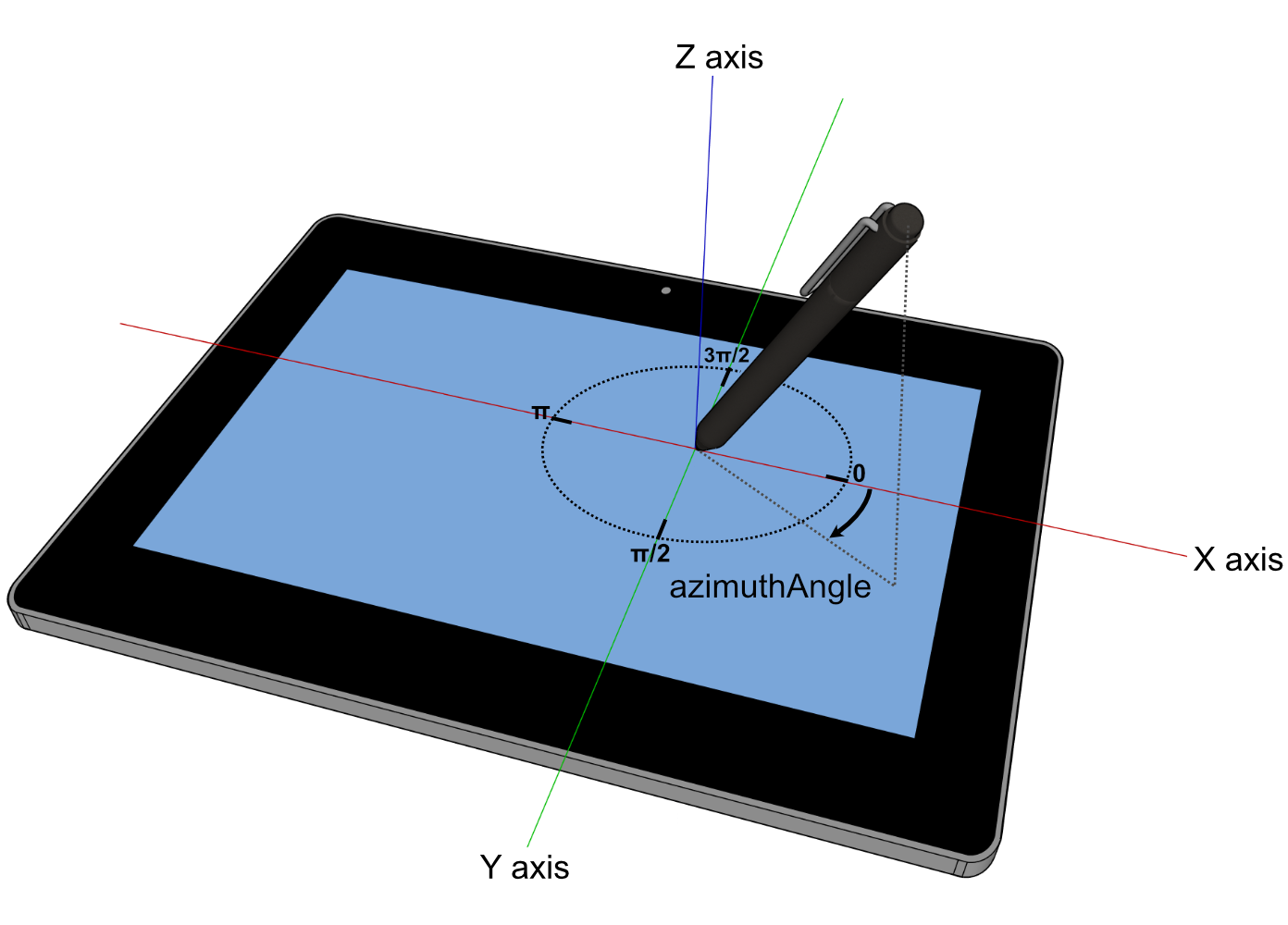
double azimuthAngle = 0;
TouchType touchType = "direct";
};
[Exposed=Window]
interface Touch {
constructor(TouchInit touchInitDict);
readonly attribute long identifier;
readonly attribute EventTarget target;
readonly attribute double screenX;
readonly attribute double screenY;
readonly attribute double clientX;
readonly attribute double clientY;
readonly attribute double pageX;
readonly attribute double pageY;
readonly attribute float radiusX;
readonly attribute float radiusY;
readonly attribute float rotationAngle;
readonly attribute float force;
readonly attribute float altitudeAngle;
readonly attribute float azimuthAngle;
readonly attribute TouchType touchType;
};
TouchList InterfaceThis interface defines a list of individual points of contact for a touch event. TouchList objects are immutable; after one is created, its contents must not change. A [Exposed=Window]
interface TouchList {
readonly attribute unsigned long length;
getter Touch? item (unsigned long index);
};
TouchEvent InterfaceThis interface defines the touchstart, touchend, touchmove, and touchcancel event types. TouchEvent objects are immutable; after one is created and initialized, its attributes must not change. The TouchEventInit dictionary is used by the dictionary TouchEventInit : EventModifierInit {
sequence<Touch> touches = [];
sequence<Touch> targetTouches = [];
sequence<Touch> changedTouches = [];
};
[Exposed=Window]
interface TouchEvent : UIEvent {
constructor(DOMString type, optional TouchEventInit eventInitDict = {});
readonly attribute TouchList touches;
readonly attribute TouchList targetTouches;
readonly attribute TouchList changedTouches;
readonly attribute boolean altKey;
readonly attribute boolean metaKey;
readonly attribute boolean ctrlKey;
readonly attribute boolean shiftKey;
getter boolean getModifierState (DOMString keyArg);
};
TouchEvent Implementer's NoteUser agents should ensure that all Touch objects available from a given TouchEvent are all associated to the same document that the TouchEvent was dispatched to. To implement this, user agents should maintain a notion of the current touch-active document. On first touch, this is set to the target document where the touch was created. When all active touch points are released, the touch-active document is cleared. All TouchEvents are dispatched to the current touch-active document, and each Touch object it contains refers only to DOM elements (and co-ordinates) in that document. If a touch starts entirely outside the currently touch-active document, then it is ignored entirely. Usage ExamplesThe examples below demonstrate the relations between the different TouchList members defined in a TouchEvent.
|
| Event Type | Sync / Async | Bubbling phase | Composed | Trusted proximal event target types | Interface | Cancelable | Default Action |
|---|---|---|---|---|---|---|---|
| touchstart | Sync | Yes | Yes | Document, Element |
TouchEvent | Varies | undefined |
| touchend | Sync | Yes | Yes | Document, Element |
TouchEvent | Varies | Varies: user agents may dispatch mouse and click events |
| touchmove | Sync | Yes | Yes | Document, Element |
TouchEvent | Varies | undefined |
| touchcancel | Sync | Yes | Yes | Document, Element |
TouchEvent | No | none |
Cancelability of touch events
Canceling a touch event can prevent or otherwise interrupt scrolling (which could be happening in parallel with script execution). For maximum scroll performance, a user agent may not wait for each touch event associated with the scroll to be processed to see if it will be canceled. In such cases the user agent should generate touch events whose cancelable property is false, indicating that preventDefault cannot be used to prevent or interrupt scrolling. Otherwise cancelable will be true.
In particular, a user agent should generate only uncancelable touch events when it observes that there are no non-passive listeners for the event.
The touchstart event
A user agent must dispatch this event type to indicate when the user places a touch point on the touch surface.
The target of this event must be an Element. If the touch point is within a frame, the event should be dispatched to an element in the child browsing context of that frame.
If this event is canceled, it should prevent any default actions caused by any touch events associated with the same active touch point, including mouse events or scrolling.
The touchend event
A user agent must dispatch this event type to indicate when the user removes a touch point from the touch surface, also including cases where the touch point physically leaves the touch surface, such as being dragged off of the screen.
The target of this event must be the same Element on which the touch point started when it was first placed on the surface, even if the touch point has since moved outside the interactive area of the target element.
The touch point or points that were removed must be included in the changedTouches attribute of the TouchEvent, and must not be included in the touches and targetTouches attributes.
If this event is canceled, any sequence of touch events that includes this event must not be interpreted as a click.
The touchmove event
A user agent must dispatch this event type to indicate when the user moves a touch point along the touch surface.
The target of this event must be the same Element on which the touch point started when it was first placed on the surface, even if the touch point has since moved outside the interactive area of the target element.
Note that the rate at which the user agent sends touchmove events is implementation-defined, and may depend on hardware capabilities and other implementation details.
A user agent should suppress the default action caused by any touchmove event until at least one touchmove event associated with the same active touch point is not canceled. Whether the default action is suppressed for touchmove events after at least one touchmove event associated with the same active touch point is not canceled is implementation dependent.
The touchcancel event
A user agent must dispatch this event type to indicate when a touch point has been disrupted in an implementation-specific manner, such as a synchronous event or action originating from the UA canceling the touch, or the touch point leaving the document window into a non-document area which is capable of handling user interactions (e.g. the UA's native user interface, or an area of the document which is managed by a plug-in). A user agent may also dispatch this event type when the user places more touch points on the touch surface than the device or implementation is configured to store, in which case the earliest Touch object in the TouchList should be removed.
The target of this event must be the same Element on which the touch point started when it was first placed on the surface, even if the touch point has since moved outside the interactive area of the target element.
The touch point or points that were removed must be included in the changedTouches attribute of the TouchEvent, and must not be included in the touches and targetTouches attributes.
Retargeting
The following section describes retargeting steps, defined in [[!WHATWG-DOM]].
Touch object has an associated unadjustedTarget (null or EventTarget). Unless stated otherwise it is null.
TouchEvent's retargeting steps, given a touchEvent, must run these steps:
-
For each Touch touch in touchEvent's
touches,targetTouches, andchangedTouchesmembers:- Set touch's unadjustedTarget to touch's
targetif touch's unadjustedTarget is null. - Set touch's
targetto the result of invoking retargeting touch's unadjustedTarget against touchEvent'starget.
- Set touch's unadjustedTarget to touch's
Conditionally exposing legacy touch event APIs
User agents have an associated boolean expose legacy touch event APIs whose value is implementation-defined.
Existing web content often use the existence of these APIs as a signal that the user agent is a touch-enabled "mobile" device, and therefore exposing these APIs on non-mobile devices, even if they are touch-enabled, could lead to a suboptimal user experience for such web content.
Extensions to the GlobalEventHandlers mixin
The following section describes extensions to the existing GlobalEventHandlers mixin, defined in [[!HTML5]], to facilitate the event handler registration. For user agents where expose legacy touch event APIs is false, this mixin must not be implemented.
partial interface mixin GlobalEventHandlers {
                    attribute EventHandler ontouchstart;
                    attribute EventHandler ontouchend;
                    attribute EventHandler ontouchmove;
                    attribute EventHandler ontouchcancel;
};
- ontouchstart
-
The event handler IDL attribute (see [[!HTML5]]) for the
touchstartevent type. - ontouchend
-
The event handler IDL attribute (see [[!HTML5]]) for the
touchendevent type. - ontouchmove
-
The event handler IDL attribute (see [[!HTML5]]) for the
touchmoveevent type. - ontouchcancel
-
The event handler IDL attribute (see [[!HTML5]]) for the
touchcancelevent type.
Interaction with Mouse Events and click
The user agent may dispatch both touch events and (for compatibility with web content not designed for touch) mouse events [[!DOM-LEVEL-2-EVENTS]] in response to the same user input. If the user agent dispatches both touch events and mouse events in response to a single user action, then the touchstart event type must be dispatched before any mouse event types for that action. If touchstart, touchmove, or touchend are canceled, the user agent should not dispatch any mouse event that would be a consequential result of the prevented touch event.
If a Web application can process touch events, it can cancel the events, and no corresponding mouse events would need to be dispatched by the user agent. If the Web application is not specifically written for touch input devices, it will react to the subsequent mouse events instead.
User agents will typically dispatch mouse and click events only for single-finger activation gestures (like tap and long press). Gestures involving movement of the touch point or multi-touch interactions – with two or more active touch points – will usually only generate touch events.
If the user agent interprets a sequence of touch events as a tap gesture, then it should dispatch mousemove, mousedown, mouseup, and click events (in that order) at the location of the touchend event for the corresponding touch input. If the contents of the document have changed during processing of the touch events, then the user agent may dispatch the mouse events to a different target than the touch events.
The default actions and ordering of any further touch and mouse events are implementation-defined, except as specified elsewhere.
The activation of an element (e.g., in some implementations, a tap) would typically produce the following event sequence (though this may vary slightly, depending on specific user agent behavior):
touchstart- Zero or more
touchmoveevents, depending on movement of the finger touchendmousemove(for compatibility with legacy mouse-specific code)mousedownmouseupclick
If, however, either the touchstart, touchmove or touchend event has been canceled during this interaction, no mouse or click events will be fired, and the resulting sequence of events would simply be:
touchstart- Zero or more
touchmoveevents, depending on movement of the finger touchend
Even if a user agent supports Touch Events, this does not necessarily mean that a touchscreen is the only input mechanism available to users. Particularly in the case of touch-enabled laptops, or traditional "touch only" devices (such as phones and tablets) with paired external input devices, users may use the touchscreen in conjunction with a trackpad, mouse or keyboard. For this reason, developers should avoid binding event listeners with "either touch or mouse/keyboard" conditional code, as this results in sites/application that become touch-exclusive, preventing users from being able to use any other input mechanism.
// conditional "touch OR mouse/keyboard" event binding
// DON'T DO THIS, as it makes interactions touch-exclusive
// on devices that have both touch and mouse/keyboard

if ('ontouchstart' in window) {
  // set up event listeners for touch
  target.addEventListener('touchend', ...);
  ...
} else {
  // set up event listeners for mouse/keyboard
  target.addEventListener('click', ...);
  ...
}
Instead, developers should handle different forms of input concurrently.
// concurrent "touch AND mouse/keyboard" event binding

// set up event listeners for touch
target.addEventListener('touchend', function(e) {
  // prevent compatibility mouse events and click
  e.preventDefault();
  ...
});
...

// set up event listeners for mouse/keyboard
target.addEventListener('click', ...);
...
To avoid processing the same interaction twice for touch (once for the touch event, and once for the compatibility mouse events), developers should make sure to cancel the touch event, suppressing the generation of any further mouse or click events. Alternatively, see the InputDeviceCapabilities API for a way to detect mouse events that were generated as a result of touch events.
Glossary
- active touch point
- A touch point which is currently on the screen and is being tracked by the user agent. The touch point becomes active when the user agent first dispatches a touchstart event indicating its appearance. It ceases to be active after the user agent dispatches a touchend or touchcancel event indicating that the touch point is removed from the surface or no longer tracked.
- touch point
- The coordinate point at which a pointer (e.g finger or stylus) intersects the target surface of an interface. This may apply to a finger touching a touch-screen, or an digital pen writing on a piece of paper.
- canceled event
- An event whose default action was prevented by means of
preventDefault(), returningfalsein an event handler, or other means as defined by [[!DOM-LEVEL-3-EVENTS]] and [[!HTML5]].
Acknowledgements
Many thanks to the WebKit engineers for developing the model used as a basis for this spec, Neil Roberts (SitePen) for his summary of WebKit touch events, Peter-Paul Koch (PPK) for his write-ups and suggestions, Robin Berjon for developing the ReSpec.js spec authoring tool, and the WebEvents WG for their many contributions.
Many others have made additional comments as the spec developed, which have led to steady improvements. Among them are Matthew Schinckel, Andrew Grieve, Cathy Chan, Boris Zbarsky, Patrick H. Lauke, and Simon Pieters. If we inadvertently omitted your name, please let me know.
The group acknowledges the following contributors to this specification's test suite: Matt Brubeck, Olli Pettay, Art Barstow, Cathy Chan and Rick Byers.
Changes Since Last Publication
This is a summary of the major changes made since the 10 October 2013 Recommendation was published. Full commit history is also available.
- Reword altitudeAngle/azimuthAngle descriptions in line with PointerEvents, add illustrations
- Add getModifierState definition
- Added force attribute to Touch
- Added radiusX and radiusY attributes to Touch
- Added rotationAngle attribute to Touch
- Upgraded co-ordinates to double type instead of long
- Update touchmove behavior on preventDefault
- Clarify effect of canceling touchend event
- Add constructor for TouchEvent and Touch
- Added legacy event initializer initTouchEvent
- Added support for uncancelable touch events and described scroll performance implications
- Indicate that all events should be "composed".
- Note about avoiding conditional "touch OR mouse/keyboard" event handling
- Added TouchEvent's retargeting steps
- Add touchType, altitudeAngle, azimuthAngle (Safari iOS 10.3 extensions for stylus)
- Add [Exposed=Window] to Constructor
- Add note to mention UA might adjusting touch target
- Remove Legacy Event Initializers (createTouch and createTouchList) and the note about initTouchEvent / createTouchList
- Conditionally expose legacy touch events API
- Add getModifierState definition to TouchEvent
Best viewed with Netscape Navigator 4.7 or Internet Explorer 6 at 800×600. No cookies required.