GeezerVisonThe World Wide Web, restored to 800 pixels of glory. | ||||||||||||||||||||||||||||||||||||
| Home|About|Gaming cabinet|Archives|How it works|Starter sites | ||||||||||||||||||||||||||||||||||||
GeezerVison is showing winpython.github.io — WinPython Download — WinPython 2026-04Released 27 October 2026, built entirely in GitHub Actions. 64-bit only. Every installer is a self-extracting 7-Zip archive: there is no setup wizard, it just unpacks a folder. Python 3.13.18, 3.14.10 and 3.15.2 · what changed · the exact version of every package is in the packages link on each build below. Python 3.14 RecommendedWinPython 3.14.10.0 — Python 3.14.10. This is the one we will keep updating over the coming year, so start here unless you have a reason not to. slim — 682 MB
The full scientific environment: Spyder, JupyterLab, the Qt stack, the data and AI libraries. slimf — 432 MB · free-threading
Free-threaded (no GIL) build. No Qt stack, and a number of binary packages are still missing upstream. Python 3.13 PreviousWinPython 3.13.18.0 — Python 3.13.18. Still built, and the safest bet if a dependency you need has no 3.14 wheel yet. slim — 674 MB
The full scientific environment, on Python 3.13. dot — 17 MB
Bare portable Python plus Python 3.15 NewWinPython 3.15.2.0 — Python 3.15.2. The first full set of 3.15 builds. Wheels are still arriving, so expect gaps. slim — 539 MB
Most of the scientific stack and the Qt stack. No Spyder or JupyterLab yet: they still wait on 3.15 wheels. slimf — 311 MB · free-threading
Free-threaded, no Qt stack. The smallest package set of the release. All files: GitHub release · SourceForge · checksums for every file (MD5, SHA-1, SHA-256, blake2b) in md5_sha1.txt. Which build should I take?Two decisions, and only two: how much do you want preinstalled, and do you want the free-threaded interpreter. The suffix on the file name is just those two answers.
Lock and requirement files for every build of the cycle, betas included, live in winpython/portable/cycle_2026_04. Want a different package set? Fork the repository, edit the requirements, and run the build workflow in your own GitHub Actions. What WinPython isA free, open-source, portable distribution of Python for Windows 10/11, aimed at scientific, data and educational work. 
slim build gives you on first launch.
Portable or not, the choice is yoursWinPython is a portable application, so by default it does not integrate into Windows Explorer. If you want that integration, the WinPython Control Panel or WPPM can register the distribution with Windows: file associations for 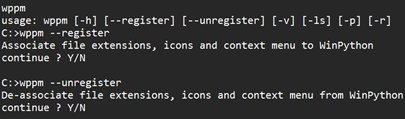
Good to know Keep the WinPython base directory path shorter than about 37 characters — for example You may need the Microsoft Visual C++ Redistributable if it is not already on the machine. Windows 7 is long gone: the last build reported to work there is WinPython64-3.8.9.0. ElsewhereDocumentationWiki — installation, environment variables, WPPM, control panel. Source and buildsgithub.com/winpython — toolchain, changelogs, lock files. Ask, report, followDiscussion group · Issue tracker | ||||||||||||||||||||||||||||||||||||
| You are visitor 01402503 — GeezerVison does not store the pages you look up. Best viewed with Netscape Navigator 4.7 or Internet Explorer 6 at 800×600. No cookies required. |