Creating a game in Python can start with a terminal version of Mastermind. Python chooses a hidden four-letter color code and gives a clue after each valid guess, showing exact matches and colors in the wrong positions.
This article shows how to build and run the game, including how its clues score repeated colors.
TL;DR
This Python game chooses a hidden color code, checks each guess, and reports exact and misplaced matches.
- Save the program as mastermind_game.py.
- Run python3 mastermind_game.py to play, or add --demo for fixed output.
- Repeated colors are allowed, and a secret color can match only once.
What Is a Mastermind Game in Python?
Mastermind is a code-breaking game in which one player chooses a hidden sequence and another submits guesses until the code is found or the turn limit runs out.
This terminal version assigns the codemaker role to Python and prints a clue after each valid guess. The person at the keyboard plays the codebreaker, without a second human or a physical board.
The code has four positions and uses the letters R, G, B, Y, O, and P for red, green, blue, yellow, orange, and purple. A clue reports exact positions and matching colors in different positions without identifying which colors earned either count.
| Clue | Meaning | Example |
|---|---|---|
| Exact | Same color in the same position | With secret RGBY, guess RRRR has one exact |
| Misplaced | Color is present in another position | With secret RGBY, guess GRBY has two misplaced |
| No match | No unused copy of that color remains | With secret RGBY, guess PPPP has none |
I use letter labels because they work in shells without terminal color support.
A unique-color variant changes both secret generation and guess validation.
Each valid guess follows the same path: parse the text, calculate the clue, then print the two values.
Data structures for the game variables
The game state is small enough to keep in ordinary Python values. The palette is a tuple of allowed symbols, the secret and each accepted guess are tuples, and the turn counter is an integer. This makes the rules visible instead of hiding them in a class hierarchy.
COLORS defines the input alphabet, CODE_LENGTH controls the number of positions, and MAX_GUESSES sets the limit. Changing CODE_LENGTH also requires updating the parser’s length message and the winning check. Keep those values consistent when you change the game size.
| Variable | Type | Purpose |
|---|---|---|
| COLORS | Tuple of strings | Allowed code symbols |
| secret | Tuple of strings | Hidden answer used for every turn |
| guess | Tuple of strings | Validated player input for one turn |
| turn | Integer | Number of valid guesses already scored |
| history | List of pairs, when added | Accepted guess and its feedback |
I keep the secret as a tuple because the scoring function only needs an ordered sequence. A dictionary would add named fields without making this game’s three pieces of state clearer.
The game menu and round flow
The current program has one mode: play a round in the terminal. argparse adds a separate demo option for a repeatable example, while normal play generates a secret and repeatedly asks for guesses. That keeps the main path short and avoids a menu prompt before the first game.
A menu can present actions such as starting a round, reading rules, or quitting. The loop below dispatches those choices and handles an invalid selection. Keep this presentation loop outside the scoring function, which returns feedback to its caller.
while True:
    print("1. Play")
    print("2. Quit")
    choice = input("Choose an option: ").strip()
    if choice == "1":
        play_round()
    elif choice == "2":
        break
    else:
        print("Choose 1 or 2.")
This menu sketch assumes a play_round function that owns one round, so the outer loop handles choices while round logic handles guesses.
Apply sanity checks before scoring
A sanity check rejects input that cannot be a legal guess before it reaches score_guess. parse_guess applies two checks in order: the tuple must contain exactly four symbols, and every symbol must belong to COLORS.
Whitespace is normalized before validation, so a player can type R G B Y or RGBY. The conversion to uppercase accepts lowercase letters. An unknown symbol triggers a clear error rather than changing the intended guess.
| Input | Result | Reason |
|---|---|---|
| rgb y | Accepted as RGBY | Spaces are removed and letters normalized |
| RGB | Rejected | Only three positions were supplied |
| RGBYX | Rejected | Five positions exceed the code length |
| RBGX | Rejected | X is outside the palette |
The exception is caught in the input loop, printed to the player, and followed by another prompt. Since the turn count changes only after scoring, a rejected guess does not spend an attempt.
Store player moves separately from game state
For a game that displays earlier attempts, keep a history list. Append an entry only after parsing succeeds, and store the clue beside the guess. A pair keeps the accepted move and its feedback together, which makes a turn-by-turn display straightforward.
history = []

# After parse_guess and score_guess succeed:
history.append((guess, (exact, misplaced)))

for number, (old_guess, clue) in enumerate(history, start=1):
    exact, misplaced = clue
    print(number, "".join(old_guess), exact, misplaced)
The sample stores validated tuples in history. That keeps displayed moves in the same normalized form accepted by the parser, and the clue stays paired with the move that produced it. The current game only checks the latest guess, so history is an optional extension.
How to Create a Mastermind Game in Python Step by Step
This section assembles the scorer and input parser into a complete command-line game.
Step 1: Count exact and misplaced matches
Counter stores the remaining symbol frequencies, and its intersection keeps the smaller count for a color present in both unmatched sequences.
With secret RRGY and guess GRRR, the second slot is exact. The unmatched secret has R, G, and Y, while the guess has G and two Rs. The function returns one exact and two misplaced.
Step 2: Validate the four-letter guess
parse_guess also verifies the length and palette before returning a tuple, raising ValueError for a wrong length or unknown symbol.
Step 3: Assemble and run the complete program
The loop scores only parsed guesses. It increments the turn after feedback and stops when the code is solved or the guess limit is reached.
Save the file in the folder you plan to use for the game. The script uses Python’s standard library and creates no data files. Run it from that directory or provide its path if the terminal is elsewhere.
The demo flag selects a fixed secret and two guesses for a repeatable transcript. Demo mode bypasses input, scores RRRR and RGBY, and exits after the winning guess.
import argparse
import random
from collections import Counter

COLORS = ("R", "G", "B", "Y", "O", "P")
CODE_LENGTH = 4
MAX_GUESSES = 8


def score_guess(secret, guess):
    exact = sum(s == g for s, g in zip(secret, guess))
    left = Counter(s for s, g in zip(secret, guess) if s != g)
    right = Counter(g for s, g in zip(secret, guess) if s != g)
    return exact, sum((left & right).values())


def parse_guess(raw):
    guess = tuple("".join(raw.strip().upper().split()))
    if len(guess) != CODE_LENGTH:
        raise ValueError("Enter exactly four letters.")
    if set(guess) - set(COLORS):
        raise ValueError("Use only R, G, B, Y, O, or P.")
    return guess


def main():
    parser = argparse.ArgumentParser()
    parser.add_argument("--demo", action="store_true")
    args = parser.parse_args()
    secret = tuple("RGBY") if args.demo else tuple(
        random.choice(COLORS) for _ in range(CODE_LENGTH)
    )
    print("Mastermind: enter four letters from R G B Y O P.")
    if args.demo:
        for turn, raw in enumerate(("RRRR", "RGBY"), 1):
            exact, misplaced = score_guess(secret, parse_guess(raw))
            print(f"Guess {turn}: {raw} -> {exact} exact, {misplaced} misplaced")
            if exact == CODE_LENGTH:
                print("You cracked the code.")
                break
        print(f"Demo secret: {' '.join(secret)}")
        return

    turn = 0
    while turn < MAX_GUESSES:
        try:
            guess = parse_guess(input(f"Guess {turn + 1}/{MAX_GUESSES}: "))
        except ValueError as error:
            print(error)
            continue
        exact, misplaced = score_guess(secret, guess)
        print(f"Clue: {exact} exact, {misplaced} misplaced")
        if exact == CODE_LENGTH:
            print(f"You cracked the code in {turn + 1} guesses.")
            return
        turn += 1
    print("No guesses left. The code was", " ".join(secret))


if __name__ == "__main__":
    main()
Run the fixed example to see one partial clue followed by a solved code:
python3 mastermind_game.py --demo
Mastermind: enter four letters from R G B Y O P.
Guess 1: RRRR -> 1 exact, 0 misplaced
Guess 2: RGBY -> 4 exact, 0 misplaced
You cracked the code.
Demo secret: R G B Y
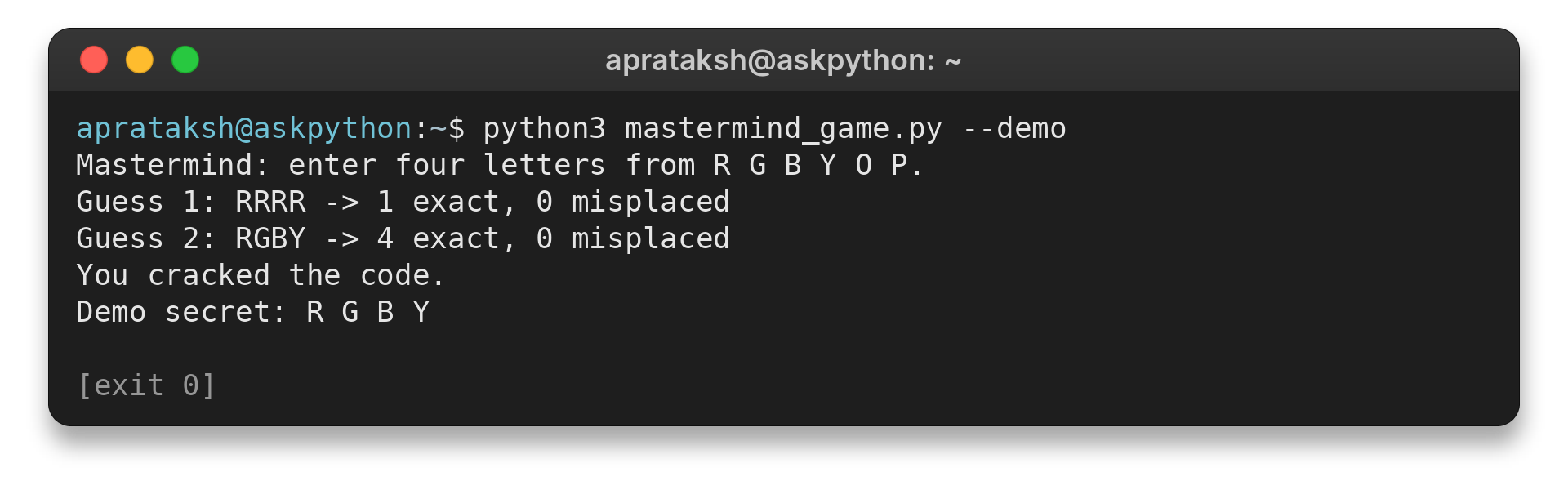
The first clue counts only the first R because the other guessed copies have no matching secret position. The final guess matches every slot, so the game reports success. The terminal image records the complete command output rather than a hand-written transcript.
Handle Repeated Colors and Invalid Guesses
These cases cover the points where a guess, a clue, or the turn loop can take a different path.
| Case | What happens | What to check |
|---|---|---|
| Guess repeats a color more often than the secret | Only available copies earn exact or misplaced matches | RGBY against RRRR returns one exact and zero misplaced |
| Guess has fewer or more than four letters | ValueError prints the required length and prompts again | Confirm the turn count does not change |
| Guess contains a character outside the palette | The parser rejects it before scoring | Try a guess containing X |
| All eight valid guesses miss | The loop prints the hidden code and ends | Test with a fixed secret and eight non-winning guesses |
| Guess matches every position | The game prints a win message and returns | Check that no later prompt appears |
I ran assertions for RRGY against GRRR and RGBY against RRRR, then checked spaced input, an unknown letter, and a winning sequence. The returned scores and parser behavior matched the expected results.
This program leaves KeyboardInterrupt and EOFError visible during development, though a version for repeated use can catch EOFError around input and print an exit message.
Check for the loss condition
The round has two endings: a correct code ends it early, while using all allowed guesses ends it as a loss. The loop’s else path prints the secret only after the limit expires. Keep that message outside the loop so it does not appear after a winning return.
| Outcome | Control flow | Player sees |
|---|---|---|
| Correct guess | Winning condition returns from main | Win message and number of guesses |
| Limit reached | Loop completes without returning | Loss message and hidden code |
| Invalid input | Exception handler asks again | Error message, same turn number |
That distinction matters when adding a replay option. Start a new round only after the current round has reached one of its two terminal outcomes, and generate a fresh secret for that new round.
When to use a class or a graphics library
A small terminal game can keep its state in local variables and functions. Object-oriented programming becomes useful when several rounds must retain separate state, or when game entities have behavior that belongs with their data. A Game class could own the secret, turn count, and history, while score_guess remains a standalone rule that is simple to test.
Pygame addresses a different need: drawing a window, handling input events, and updating a visual game loop. It adds a library dependency and a display loop, so it is a poor first step when the goal is to learn code generation, parsing, and scoring. The command-line version keeps those rules independent, which gives a later graphical version the same scorer to call.
Rock, Paper, Scissors is another suitable terminal project, but its result rule differs. It compares one player choice with one computer choice and resolves a fixed set of winning pairs. Mastermind instead keeps a secret sequence across turns and computes partial feedback, so reusing its score function for a different game would mix unrelated rules.
What to Do Next
Once the game runs, extend one rule at a time and check that the scoring function still matches the chosen rules.
I would add replay before adding a graphical interface because replay exercises the round boundary without changing how a clue is calculated. Put one round in a function that returns whether the player won, then let the outer loop ask whether to start another round. Generate a new secret inside that function so a replay does not reuse the previous answer.
Random generation makes ordinary play vary from run to run, which is expected for a guessing game. For a repeatable test, pass a known secret into a round or test score_guess directly with fixed tuples. That separates a bug in clue calculation from a guess sequence that simply did not find the randomly selected answer.
| Change | Function or value affected | Check after editing |
|---|---|---|
| More colors | COLORS | Parser accepts each symbol and generation can choose each one |
| Longer code | CODE_LENGTH and matching checks | Input length, win condition, and clue total agree |
| More attempts | MAX_GUESSES | Final valid miss reaches the loss message |
| No repeated colors | Secret generation and parse_guess | Neither generated codes nor accepted guesses contain duplicates |
Keep configuration changes together. If repeated colors are disabled only during secret generation, a player can still submit a duplicate guess. The chosen rule must be enforced at both boundaries, and the clue function should continue to count exact positions before counting remaining colors.
# Record only a parsed guess.
guess = parse_guess(raw)
history.append((guess, score_guess(secret, guess)))

# Enforce unique colors in both places.
secret = tuple(random.sample(COLORS, CODE_LENGTH))
if len(set(guess)) != CODE_LENGTH:
    raise ValueError("Use four different colors.")
Conclusion: Keep the Clue Rule Testable
Before adding history or another mode, decide which value changes after a valid guess and which stays fixed.
| Extension | State to add | First check |
|---|---|---|
| Guess history | Accepted guesses paired with clues | Each row shows the same feedback as score_guess |
| Unique-color mode | A flag controlling secret and guess rules | Generated secrets and accepted guesses follow one policy |
For the library behavior, see the Python docs for collections.Counter and random. AskPython’s Python games roundup has other project ideas, and its command-line number guessing game is another example of input and turn control.
FAQ
These answers cover the main implementation choices.
Can I make a game in Python without installing a library?
Yes. This terminal Mastermind game uses only Python’s standard library, including random and collections.Counter.
How does Mastermind score repeated colors?
Count exact positions first, then compare remaining color frequencies. Each secret copy can contribute only once.
How many guesses does this Python game allow?
The program allows eight valid guesses. Invalid entries show an error and do not consume a turn.

Aprataksh Anand
A Computer Science Engineer, content writing is Aprataksh's first rodeo. A passionate coder along with a love for gaming, he can be found passing his free time with friends in a CS:GO lobby.