GV

GeezerVison

The World Wide Web, restored to 800 pixels of glory.

Home|About|Gaming cabinet|Archives|How it works|Starter sites

On this site

  • Download SDK Installer (.exe)

This view

  • Original page
  • New address

GeezerVison is showing www.easefilter.com — EaseFilter Cloud File System SDK

...loading
  • Home
  • Solutions
  • Download
  • Programming
  • Blog
  • Book a Demo

What is a cloud file system?

A cloud file system is a hierarchical storage system in the cloud that provides shared access to file data. Users can create, delete, modify, read, and write cloud files as regular physical files, as well as organize them logically in a local directory for intuitive access.

EaseFilter Cloud File System SDK Overview

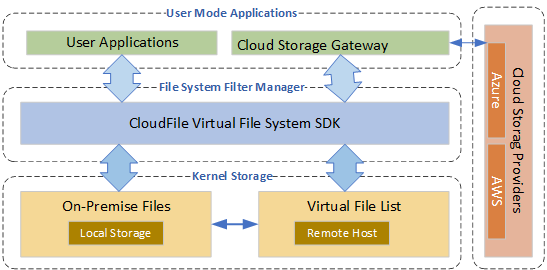
EaseFilter Cloud File System is a Windows virtual file system developed with a file system filter driver. It transparently integrates external storage into your on-premise environment, allowing existing applications to access virtual files exactly as they would local physical files—without requiring any modification to your software.

cloud file system

Key Features

  • Local File System Integration: Seamlessly maps to local folders while strictly preserving the existing security policies and access control lists (ACLs) of the original mapping folder.
  • Database Integration: Dynamically populates virtual files directly from database records without requiring physical file extraction.
  • Cloud Storage Integration: Transparently integrates files from public or private cloud storage, making them accessible instantly.
  • SMB & Network Share Integration: Unifies file access by seamlessly presenting files from SMB shares or remote network folders as local data.
  • Instant Disaster Recovery: Populates files immediately in the event of a primary site disaster, ensuring zero downtime and rapid failover.
  • Zero Physical Footprint: The cloud file folder utilizes virtual files (placeholder stubs) that do not consume any local physical disk space until the file data is explicitly requested by an application.

Cloud-Based Disaster Recovery (Cloud DR)

Cloud-based Disaster Recovery (Cloud DR) takes a modern approach based on virtualization. EaseFilter Cloud File System automatically integrates cloud storage into the on-premise storage, delivering a fully functional virtual infrastructure ready to take over during an outage. The entire system can be spun up in minutes, saving the organization from costly service interruption.

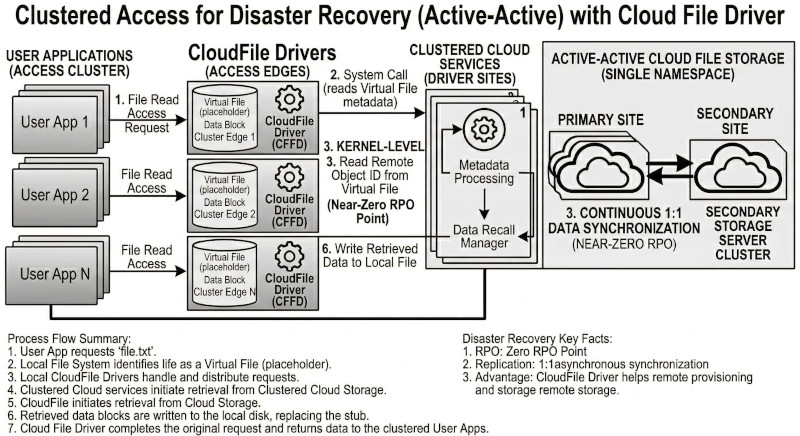
cloud disaster recovery architecture

This technical disaster recovery model establishes an Active-Active, Kernel-Level architecture designed to achieve a near-zero Recovery Point Objective (RPO) and eliminate data loss.

  • Initialization: Defines a global Single Namespace, provisions Active-Active cloud storage (Primary and Secondary sites) with cross-region replication, and installs a Cloud File Filter Driver (CFFD) in the kernel stack of client workstations.
  • Standard Operation: During a steady state, the kernel-level CFFD intercepts an application's FILE WRITE I/O. It performs a write-split, creating a local Virtual File while simultaneously and asynchronously replicating the actual data block to both the Primary and Secondary cloud sites.
  • Failover and Recovery: If a primary site failure is detected, the Secondary Site is promoted, and network redirection instantly repoints the client drivers to healthy secondary mediation nodes.
  • Active-Active Cluster System: Set up two or more active systems where virtual files can be accessed globally, distributing the load and supporting automated failover without manual interference.
  • Zero Downtime: In the event of a disaster, failover to the cloud is automatic. Retrieving files from cloud storage is highly optimized, downloading only the specific data blocks requested by the application.

Load Balancing & Distribution

Load balancing directs and controls the traffic between application servers and their visitors. By leveraging the EaseFilter Cloud File System SDK, you can run applications across multiple servers to split the traffic load, making your data available globally without requiring extra application modifications or hardware.

cloud load balancing architecture

  • Distribution (Steps 1, 2): Remote clients send requests to a Load Balancing Gateway, which distributes them across a Remote Storage Server Cluster, optimizing performance and providing fault tolerance.
  • Local Caching & Data Tiering (Step 3, 4, 5): Each storage server maintains a Local File System (LFS) cache. The CloudFile Driver transparently checks this cache first. If the data is not local, the driver performs data tiering, recalling the necessary data and metadata from remote storage seamlessly.

Cloud Archiving & Data Tiering (HSM)

Cloud archiving is a strategy for moving inactive or "cold" data to lower-cost cloud storage tiers while retaining seamless access. Using the EaseFilter Cloud File System SDK, you can implement a Hierarchical Storage Management (HSM) solution that automates data tiering without disrupting user workflows or application functionality.

  • Policy-Based Migration: Configure policies based on file age, file size, or last access time. The system automatically identifies inactive files and migrates their physical data to the cloud in the background.
  • Seamless Stubbing (Virtual Files): Once the data is successfully migrated, the local physical file is converted into a virtual file (a zero-byte "stub"). To users and applications, the file still appears in its original local directory with all original metadata, timestamps, and ACL permissions intact.
  • Transparent Recall: If an application or user attempts to open an archived virtual file, the kernel-level filter driver intercepts the request and instantly recalls the data blocks from the cloud, serving it to the application seamlessly.
  • Cost Optimization & Scalability: Drastically reduce on-premise storage hardware costs by offloading historical data and rarely accessed files to economical cloud storage buckets while instantly reclaiming expensive local disk space.

SDK Demos and Implementations

Cloud File System SDK Demo

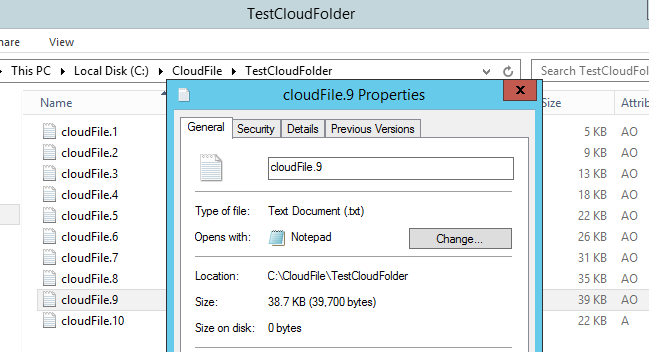
The CloudFileCSDemo is a C# project demonstrating how to use the cloud file system. Running the demo generates test files in a source folder, which instantly populate as virtual files in the "TestCloudFolder". You can create, delete, modify, read, and write these cloud files exactly like regular physical files.

cloud file folders

AWS S3 Cloud DR Demo

By connecting with AWS S3, your company can scale its infrastructure on an as-needed, pay-as-you-go basis. Quickly launch resources to ensure business continuity and minimize the impact of localized outages. Click here to view the AWS S3 Cloud DR demonstration.

CloudFile SDK Demo Video

CloudFile Virtual File SDK Demo
Integrate cloud storage with local access
CloudFile Storage SDK Setup File
×

ABOUT US

We specialize in file system filter driver development. We architect, implement and test file system filter drivers for a wide range of functionalities. We can offer several levels of assistance to meet your specific needs.

QUICK LINKS

  • Solutions
  • Demo
  • Blog
  • Book a Demo

SUBSCRIBE


CONTACT US

  • You are welcome to contact us for sales or partnership
  • Sales: [email protected]
  • Support: [email protected]
  • Info: [email protected]

COPYRIGHT EASEFILTER, ALL RIGHT RESERVED.

You are visitor 01402792 — GeezerVison does not store the pages you look up.
Best viewed with Netscape Navigator 4.7 or Internet Explorer 6 at 800×600. No cookies required.