GeezerVison is showing www.easefilter.com — Secure File Sharing with EaseFilter File Security SDK and DRM
Secure File Sharing with EaseFilter File Security SDK
Start Building Your Secure Sharing PoC Today
Get the full-featured 30-day trial SDK for free. Includes pre-built templates to test Secure File Sharing and DRM tagging instantly.
Introduction
File sharing powers collaboration—but without the right controls, it also creates risk. Contracts, designs, source code, and financial reports can be leaked, copied, or misused. Traditional access controls stop at the perimeter and rarely follow the file. The solution is secure file sharing with Digital Rights Management (DRM) using the EaseFilter File Security SDK. With EaseFilter, you embed policy enforcement into the file workflow itself, so sensitive data remains protected across endpoints, servers, hybrid cloud, and external devices.
EaseFilter Secure File Sharing Architecture
At the heart of the EaseFilter solution is a powerful file system filter driver. Unlike application-level security tools that can be bypassed or easily disabled, the filter driver operates in Kernel Mode. This is the lowest, most privileged level of the operating system.
By intercepting Input/Output (I/O) requests at the kernel level, EaseFilter has complete, uncircumventable visibility and control over all file activities (reads, writes, copies, deletions) before they execute. The architecture involves three primary layers working in concert:
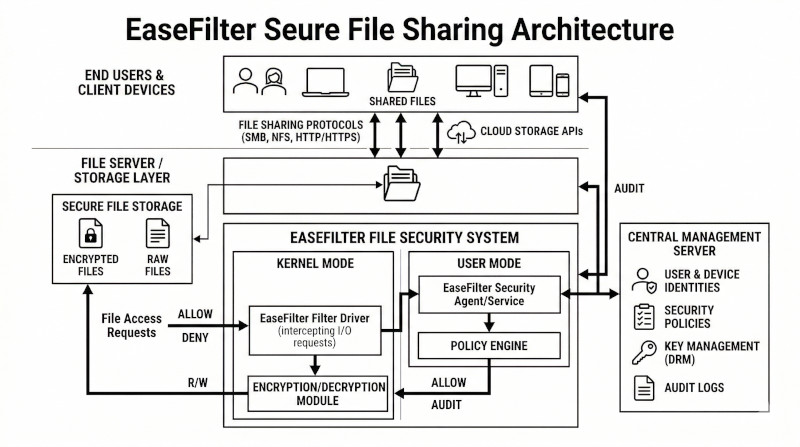
1. The Kernel Mode Layer (The Enforcer)
This is where the heavy lifting occurs.
-
EaseFilter Filter Driver: Intercepts every single file I/O request on the system.
-
Encryption/Decryption Module: Performs on-the-fly, high-speed AES encryption and decryption. Because this happens in Kernel Mode, performance overhead is minimized, and the process is entirely invisible to the end-user and their applications.
2. The User Mode Layer (The Policy Engine)
This layer communicates between the kernel driver and the central management system.
-
EaseFilter Security Agent/Service: The lightweight client installed on the endpoint.
-
Policy Engine: When the filter driver intercepts a request, it asks the Policy Engine for permission. The Policy Engine evaluates the request against rules defined by the Central Management Server.
-
Audit Logging: Records every action—allowed or denied—for compliance and forensic analysis.
3. The Central Management Server (The Brain)
This is the command center for the entire architecture.
-
User & Device Identities: Integrates with Active Directory or other IAM providers to verify who is requesting access.
-
Security Policies: Where administrators define the rules (e.g., "Only the Finance group can access files in the 'Payroll' folder, and only from corporate-owned devices, using approved applications").
-
Key Management (DRM): The most critical external component. It generates, stores, and securely delivers the encryption keys. Crucially, the keys never reside permanently on the endpoint. They are delivered in real-time, only when an access request is approved by the Policy Engine, and they are destroyed when the session ends.
Key Features of EaseFilter Secure File Sharing with DRM
- Granular File Access Control: Define who can open, read, modify, or delete a file, with rules scoped by user identity, process name, device posture, file path, file type, or network location.
- Transparent File Encryption (TFE): Encrypt data at rest and decrypt only for authorized processes. Files remain encrypted if copied outside the organization, protecting data against exfiltration.
- Usage Restrictions & View-Only: ControlsBlock print, copy-paste, screen capture, and bulk export. Set view-only permissions for external collaboration and enforce watermarking when needed.
- Secure Collaboration & Rapid Revocation: Share with partners and clients while retaining owner control. Revoke access instantly or set auto-expiry after a date or number of views.
- Auditing, Visibility & Compliance: Capture detailed logs of every open, read, write, rename, and delete event. Generate compliance-ready reports for GDPR, HIPAA, SOX, and ISO 27001.
- Cross-Environment Protection: Apply consistent DRM policies across local storage, network shares, VDI, and cloud storage in hybrid environments.
Use Case: Protecting Intellectual Property
A software company needs to share source code and design documents with an offshore team. With EaseFilter DRM, they can:
- Allow the external team to view and edit project files, but block copying and uploading to personal storage or unapproved cloud apps.
- Whitelist trusted tools (e.g., IDEs, Office apps) and block unauthorized processes from accessing protected files.
- Apply time-limited access that expires at project completion, with instant revocation if needed.
- Log every access attempt for contractual, legal, and compliance verification.
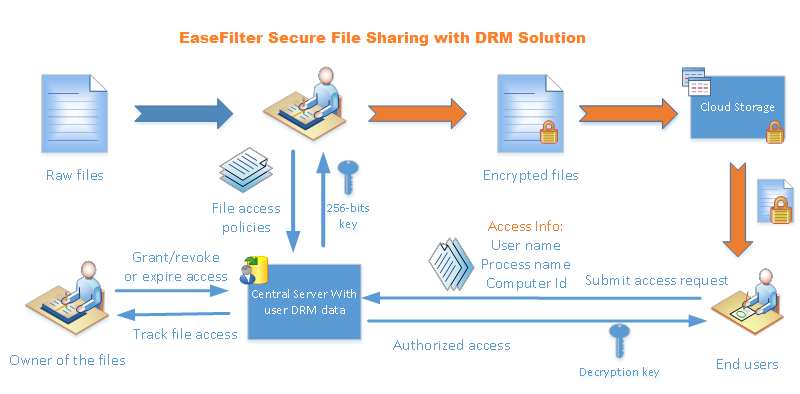
The Workflow: Securing a File Access Request
When a user attempts to open a sensitive file, the architecture executes a rapid, silent sequence:
-
Interception: The user clicks to open Financial_Q3.xlsx. The EaseFilter Filter Driver intercepts the read request in Kernel Mode.
-
Policy Check: The driver halts the request and queries the User Mode Policy Engine: "Is this user allowed to read this file?"
-
Verification: The Policy Engine checks the Central Management Server, verifying the user's identity, device status, and the specific security policy attached to that file.
-
Key Delivery & Decryption:
-
If Approved: The Central Management Server releases the specific encryption key to the Kernel Mode Encryption/Decryption Module. The module decrypts the file on the fly, presenting the plaintext data to the user's application (Excel).
-
If Denied: The request is blocked immediately, and the file remains encrypted.
-
Auditing: Regardless of the outcome, the event (who, what, where, when, and the result) is logged and sent to the Central Management Server.
Example Implementation (C#)
using EaseFilter.FilterControl;

class DRMExample
{
  static void Main(string[] args)
  {
	FileFilter autoEncryptFilter = new FileFilter();

	// Protect sensitive project documents with DRM
	autoEncryptFilter.IncludeFileMask = @"C:\Projects\Confidential\*";

	//Set up the auto encryption filter rule, the new created files in this folder will be encrypted automatically.
	//Only the authorized processes or users can read the encrypted files,

	//enable the auto encryption for this filter rule.
	autoEncryptFilter.EnableEncryption = true;
	// all process can't read the encyrpted file except the authorized processes.

	//get encryption key and iv from the server.
	autoEncryptFilter.EnableEncryptionKeyFromService = true;

	//if we enable the encryption key from service, you can authorize the encryption or decryption for every file
	//in the callback function OnFilterRequestEncryptKey.
	autoEncryptFilter.OnFilterRequestEncryptKey += OnFilterRequestEncryptKey;

	//get the 256bits encryption key with the passphrase
	autoEncryptFilter.EncryptionKey = Utils.GetKeyByPassPhrase("passPhrase", 32);

	//disable the decryption right, read the raw encrypted data for all except the authorized processes or users.
	autoEncryptFilter.EnableReadEncryptedData = false;

	FilterControl.AddFilter(autoEncryptFilter);
	FilterControl.StartFilter(
	filterType, serviceThreads, connectionTimeOut, licenseKey, ref lastError);

	Console.WriteLine("DRM protection enabled. Press Enter to stop...");
	Console.ReadLine();

	FilterControl.StopFilter();
  }
}
Business Benefits
- Stronger Security: Files stay protected inside and outside your environment.
- Prevent Data Leaks: Stop accidental sharing and malicious exfiltration.
- Enable Remote & Cloud Work: Collaborate safely with contractors, clients, and distributed teams.
- Meet Compliance: Simplify GDPR, HIPAA, SOX, and ISO reporting with auditable logs.
- Resilience: Reduce risk from insider threats, malware, and ransomware targeting critical files.
Conclusion
Secure file sharing with DRM is essential for modern collaboration. The EaseFilter File Security SDK combines file-level encryption, granular access control, usage restrictions, and audit logging to keep sensitive content protected everywhere. Whether you need to safeguard intellectual property, financial records, healthcare data, or legal documents, EaseFilter’s DRM capabilities give you continuous control without sacrificing productivity.
Secure File Sharing with DRM Demo Video

Secure File Sharing with DRM Demo
Grant or revoke shared file access anytime, anywhere.
ABOUT US
We specialize in file system filter driver development. We architect, implement and test file
system filter drivers for a wide range of functionalities. We can offer several levels of
assistance
to meet your specific needs.
COPYRIGHT EASEFILTER, ALL RIGHT RESERVED.
|