GeezerVisonThe World Wide Web, restored to 800 pixels of glory. |
| Home|About|Gaming cabinet|Archives|How it works|Starter sites |
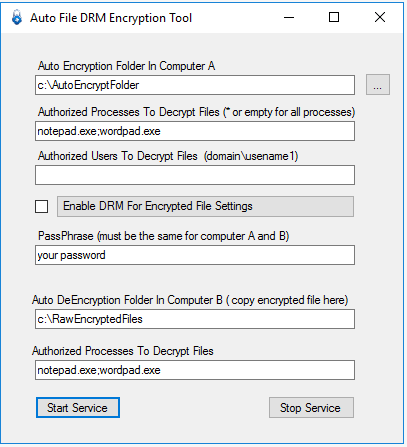
GeezerVison is showing www.easefilter.com — Auto File DRM Encryption - EaseFilter DRM protected Auto File DRM Encryption ToolStart Building Your DRM Encryption PoC TodayGet the full-featured 30-day trial SDK for free. Includes pre-built templates to test transparent auto file encryption and real-time DRM protection instantly. The Auto File DRM Encryption Tool is implemented using the EaseFilter Encryption Filter Driver (EEFD) SDK. It provides transparent, real-time file encryption at the file system level, ensuring that all protected files remain encrypted at rest. The tool embeds Digital Rights Management (DRM) metadata into each encrypted file, enabling persistent data protection. Access to file contents is restricted to authorized users or processes; any unauthorized attempt to access the file will return unreadable ciphertext. With integrated DRM enforcement, the tool supports secure file sharing while preserving ownership and access control. Permissions can be granted or revoked dynamically, regardless of the file's location. Additionally, all file access events are logged, allowing administrators to track when a file was accessed and by whom.
🚀 Core Features✅ Automatic File Encryption
✅ Granular Access Control
✅ Zero-Trust Enforcement
✅ File Format Agnostic
✅ Persistence of Encryption
✅ Explorer Integration
✅ Audit & Monitoring
EaseFilter Encryption Filter Driver (EEFD)EEFD is a file system-level encryption filter driver that transparently encrypts and decrypts data at the file level. It intercepts I/O requests directed at the file system, performing all encryption and decryption operations in memory. As a result, files remain securely encrypted on disk at all times without requiring any additional user actions. Unlike traditional encryption libraries that often involve complex integration, EEFD integrates directly into the file system. It performs real-time, on-access encryption during read and write operations, delivering maximum performance and a seamless user experience. EEFD is a mature, commercial-grade SDK designed to simplify the development of secure file encryption solutions. With its modular framework, even developers without driver development experience can build robust, transparent encryption software within a single day. How to Use DRM Encryption Tool1. Transparent file encryptionEEFD is a file system encryption filter driver that integrates directly into the file system. File encryption and decryption are performed transparently during read and write I/O operations, requiring no additional steps from the user. This approach ensures maximum performance. 2. Encrypt file with file access control policiesSetup an auto encryption folder, all the new created files in this folder will be encrypted automatically, the new written of the encrypted files also will be encrypted automatically. If you want to only encrypt the specific file type, you can setup the filter rule with the file filter mask. User or Process-Based Access Control If you want to copy or transfer encrypted files outside the computer while keeping them encrypted, you can define unauthorized processes in the policy—for example:
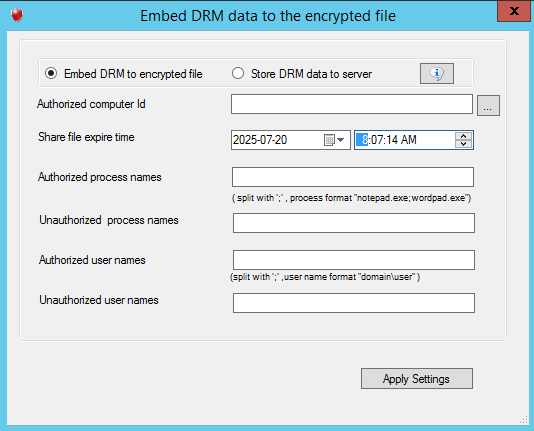
This ensures that encrypted files remain protected, even when moved or transferred. 3.Encrypt Files with DRM ProtectionWhen DRM protection is enabled, Digital Rights Management (DRM) data is embedded directly into the header of the encrypted file. This DRM metadata includes detailed access control policies such as:
You can also attach custom tag data to the encrypted file, which can be linked to your own DRM policy on a remote server. When the encrypted file is accessed, the system can use the tag data to query the server and retrieve authorization rules in real time. This ensures secure, flexible, and dynamic control over file access—anytime, anywhere.
4. Secure file sharing with DRMYou can test secure file sharing with DRM by setting up a decryption folder on another computer. Simply copy the encrypted file into this folder. Access to the file will be granted only to authorized users or processes as defined in the DRM policy. Unauthorized access attempts will result in access to raw encrypted data only. How to develop the auto file DRM encryption applicationDeveloping an auto file DRM encryption tool is straightforward with the EEFD SDK. EEFD offers a comprehensive security solution for building transparent, real-time, file-level encryption products. It enables automatic encryption of newly created files and enforces client-defined policies to authorize or block on-access encryption and decryption operations. The EEFD SDK provides APIs compatible with multiple programming languages to help you create Windows encryption applications. It includes C++ and C# demo source code demonstrating how to use these APIs effectively. Besides C++ and C#, any programming language capable of invoking Win32 native APIs can leverage EEFD’s functionality to develop secure encryption software. Setup the auto file encryption filter ruleTo use EEFD in your application, you need to configure one or more filter rules as file control policies for the filter driver. An auto file encryption filter rule includes a file filter mask that defines which files to encrypt. By default, the file filter mask is set to a folder, meaning all files within that folder will be encrypted automatically. If you want to encrypt only specific file types, you can set the file filter mask accordingly. However, be aware that your application must generate files matching those file types to ensure encryption; otherwise, files outside the mask won’t be encrypted. For example, Microsoft Office often creates temporary files without file extensions—if your filter mask targets only specific extensions, these temporary files will not be encrypted automatically. Setting up the file encryption filter rule is simple with the EEFD API method AddFileFilterRule. You just need to specify the auto-encryption folder and enable encryption in the file filter rule, as shown below: Setup the authorized whitelist processes and unauthorized blacklist processesWith the EEFD SDK, you can establish robust control policies to protect your encrypted files and prevent unauthorized access or copying of sensitive data. Using access control policies, you can define whitelist processes or users permitted to read encrypted files and access their decrypted content. Conversely, you can specify blacklist processes or users who are denied access, resulting in them receiving only the raw encrypted data. There are two methods to configure whitelist and blacklist processes or users:
If you plan to upload or distribute encrypted files outside your organization while ensuring they remain encrypted, it is essential to add the relevant upload or distribution processes to the blacklist. For example, adding backup, Explorer, or Outlook processes to the blacklist will ensure that these applications cannot decrypt the files when copying or uploading them, thereby maintaining data confidentiality beyond your network. Secure file sharing with DRMWith embedded Digital Rights Management (DRM) in your encrypted files, you can safeguard and monitor your business-critical documents—such as intellectual property and product designs—regardless of where they reside or travel. This protection extends across devices, applications, cloud services, and on-premises environments, enabling secure information sharing both inside and outside your organization. By encrypting files with integrated DRM metadata, you gain granular control over your encrypted files through custom DRM policies. You can set expiration dates, grant or revoke access rights at any time and from any location, even after the files have been distributed. EEFD supports hundreds of file types, including Microsoft Office documents, Adobe PDFs, source code files (Java, C++, etc.), and 2D/3D CAD files (DWG, PRT, STP, etc.). Embedding Custom DRM Data into Encrypted FilesTo embed DRM metadata into an encrypted file, you can either use your own custom DRM structure or utilize the built-in DRM structure supported by the EaseFilter Encryption Filter Driver. The built-in DRM format allows you to enforce detailed access control policies through the AESFlags configuration. Supported DRM Control Options
Auto File DRM Encryption Demo Video
Auto Encryption SDK Demo
Transparent, on-access file encryption seamlessly.
×
ABOUT USWe specialize in file system filter driver development. We architect, implement and test file system filter drivers for a wide range of functionalities. We can offer several levels of assistance to meet your specific needs. SUBSCRIBECONTACT US
COPYRIGHT EASEFILTER, ALL RIGHT RESERVED. |
| You are visitor 01402792 — GeezerVison does not store the pages you look up. Best viewed with Netscape Navigator 4.7 or Internet Explorer 6 at 800×600. No cookies required. |