Introduction
The EaseFilter Process Filter Driver SDK is a commercial kernel-mode development kit designed for Windows process monitoring and protection. Operating within the Windows executive layer, it intercepts process and thread operations (creation, termination, and handle requests) before they reach their intended target.
With the SDK, developers can enforce granular execution policies in real time—allowing or blocking new process creation, allowing or blocking child process creation from untrusted or sandboxed applications, and receiving instant notifications for process creation and termination events.
This enables you to build robust security, auditing, and continuous monitoring applications—empowering system administrators to block malware, audit application usage, and sandbox untrusted executables.
Architecture
The EaseFilter ecosystem relies on a client-server architecture bridging kernel space and user space:
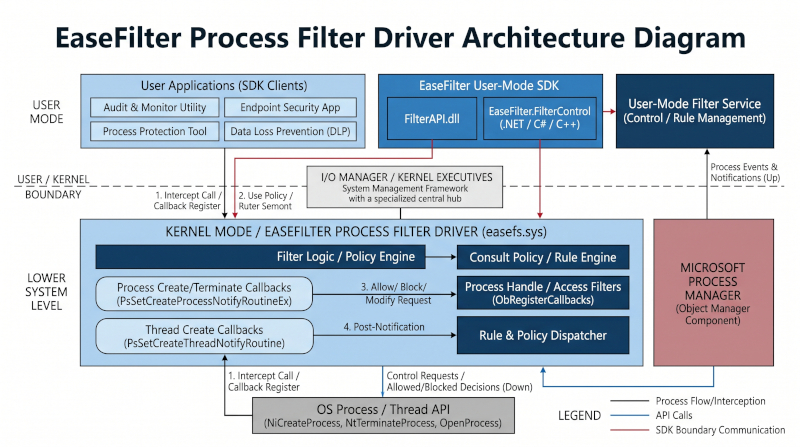
- Kernel-Mode Component (
EaseFlt.sys): The core filter driver that resides in the Windows kernel. It intercepts system calls related to process and thread creation/termination via Windows kernel callbacks (e.g., PsSetCreateProcessNotifyRoutineEx).
- User-Mode Wrapper (
FilterAPI.dll): A dynamic link library that handles communication between your user-mode application and the kernel driver.
- Managed Control Layer (
EaseFilter.FilterControl): A .NET wrapper available via NuGet, allowing C#, F#, and VB.NET applications to interface seamlessly with FilterAPI.dll.
Core Capabilities
Process and Thread Monitoring
The driver emits real-time callback notifications for critical system events:
- Process Creation: Detects when a new process is initiated, capturing context such as the parent Process ID (PID), exact executable path, and command-line arguments.
- Process Termination: Audits when and how a process exits.
- Thread Tracking: Monitors the creation and termination of threads within existing processes.
Active Protection and Blocking
Unlike user-mode hooks which can be bypassed, the kernel-level interception allows your application to definitively allow or deny execution.
- Execution Prevention: Untrusted binaries, such as downloaded malware or suspicious email attachments, can be blocked before the OS allocates memory for them.
- Rule-Based Enforcement: The control flag
DENY_NEW_PROCESS_CREATION can be applied to specific directories (e.g., preventing any executable from launching out of C:\Temp\*).
Process-Based File Access Control
When used in conjunction with the EaseFilter File System Filter Driver, you can implement strict sandboxing:
- Grant read-only access to critical system folders (
C:\Windows) for specific processes (like notepad.exe).
- Deny specific processes the ability to modify, rename, or copy sensitive files out of a protected directory.
Filter Rule Configuration
The SDK operates on a declarative rule set. Before starting the filter, you configure Filter Rules to define what the driver should watch or block.
| Rule Component |
Description |
Example |
| Process Name Mask |
The target executable path (supports wildcards). |
C:\test\* or *.exe |
| Process ID (PID) |
Target a specific, currently running process. |
4052 |
| Exclusion Masks |
Optional paths or user masks to exempt from the rule. |
Skip C:\Windows\System32\* |
| Control Flags |
Bitmask defining driver behavior for the matched rule. |
PROCESS_CREATION_NOTIFICATION |
Steps to Configure a Process Filter Rule
Before the driver can monitor or control process activities, you must define the scope of its operation by setting up a process filter rule. The SDK evaluates these rules at the kernel level to determine how to handle each process event.
Here are the procedural steps to configure a rule:
- Define the Target (Process Mask or PID): Set the baseline for what you want to monitor by assigning a process name filter mask (e.g.,
*.exe to monitor everything, or C:\untrusted\* for a specific folder) or a specific Process ID to target particular running processes.
- Exclude Specific Processes (Optional): Add excluded process name filter masks to prevent the rule from applying to certain binaries. This is critical for excluding system processes, antivirus agents, or trusted applications to maintain system stability.
- Exclude Specific Users (Optional): Add excluded user filter masks if the rule should only apply to specific user accounts (e.g., ignoring processes launched by
NT AUTHORITY\SYSTEM).
- Set Process Access Control Flags: Define the actions the driver should take when a process matches the rule. You can set flags to get notifications on process creation or termination, or deny the creation of new processes automatically based on your defined policy.
Dynamic Process Blocking via Callbacks
In addition to static rule flags, the EaseFilter SDK allows you to make dynamic, programmatic decisions in real-time. By configuring a rule to trigger a PROCESS_CREATION_NOTIFICATION, your user-mode application can inspect the process event and block it dynamically by modifying the ReturnStatus of the event argument.
For example, to selectively block cmd.exe from launching while allowing other executables:
/// Fires this event when a new process is created
static void OnProcessCreationCallback(object sender, ProcessEventArgs e)
{
    Console.WriteLine($"Process Created: {e.ImageFileName}, PID: {e.ProcessId}, Parent PID: {e.ParentProcessId}");

    // Example: Dynamically block a specific process from launching
    if (e.ImageFileName.EndsWith("cmd.exe", StringComparison.OrdinalIgnoreCase))
    {
        Console.WriteLine("Blocking cmd.exe from launching...");

        // Return STATUS_ACCESS_DENIED to the kernel to prevent execution
        e.ReturnStatus = (uint)FilterAPI.NTSTATUS.STATUS_ACCESS_DENIED;
    }
}
API Reference: Process Control Flags
The ProcessControlFlag enumeration dictates exactly how the kernel driver interacts with processes that match your defined filter rules. Because the underlying type is a bitmask (uint), you can combine multiple flags using the bitwise OR operator (|) to apply several behaviors to a single rule simultaneously.
| Flag Name |
Value |
Description & Use Case |
DENY_NEW_PROCESS_CREATION |
0x00000001 |
Hard Block Execution. The kernel driver will immediately deny the execution of any new process matching the rule. The process is killed before it can initialize. |
ENABLE_SEND_PROCESS_DENIED_EVENT |
0x00000002 |
Audit Blocked Executions. When the driver blocks a process, this flag ensures a notification is sent to your user-mode application. |
PROCESS_PRE_TERMINATION_REQUEST |
0x00000004 |
Anti-Kill Protection. Sends a synchronous callback to user-mode before a process is terminated. You can intercept this request and block the termination. |
PROCESS_LOAD_IMAGE_NOTIFICATION |
0x00000008 |
Module Monitoring. Triggers a notification whenever an executable image (EXE, DLL, or .sys driver) is mapped into virtual memory. |
DENY_CHILD_PROCESS_CREATION |
0x00000010 |
Strict Sandboxing. Prevents the monitored process from spawning any child processes, regardless of what the child process is. |
PROCESS_CREATION_NOTIFICATION |
0x00000100 |
Launch Auditing & Dynamic Blocking. Notifies your application when a process is created. Allows your application to inspect the context and decide programmatically whether to allow or deny the launch. |
PROCESS_TERMINATION_NOTIFICATION |
0x00000200 |
Exit Auditing. Generates a post-event notification after a process has terminated. |
PROCESS_HANDLE_OP_NOTIFICATION |
0x00000400 |
Handle Interception. Notifies when a process attempts to create or duplicate a handle to another process (e.g., via OpenProcess). |
THREAD_CREATION_NOTIFICATION |
0x00000800 |
Thread Auditing. Sends a notification when a new thread is spawned within a monitored process. |
THREAD_TERMINATION_NOTIFICATION |
0x00001000 |
Thread Exit Auditing. Sends a notification when a thread finishes execution or is terminated. |
THREAD_HANDLE_OP_NOTIFICATION |
0x00002000 |
Thread Manipulation Detection. Notifies when a handle for a thread is created or duplicated (OpenThread). |
Implementation Guide (C#)
Below is a standard boilerplate for initializing the Process Filter Driver, configuring a monitoring rule, and starting the kernel service.
using System;
using EaseFilter.FilterControl;

namespace ProcessMonitorApp
{
    class Program
    {
        static FilterControl filterControl = new FilterControl();

        static void Main(string[] args)
        {
            string lastError = string.Empty;
            string licenseKey = "Email us to request a trial key: [email protected]";

            // Specify that we are running a Process Filter, not a File System Filter
            FilterAPI.FilterType filterType = FilterAPI.FilterType.PROCESS_FILTER;
            int serviceThreads = 5;
            int connectionTimeOut = 10; // seconds

            try
            {
                // Setup the filter rule
                ProcessFilterRule rule = new ProcessFilterRule();
                rule.ProcessNameFilterMask = "c:\\untrusted_folder\\*";

                // Set control flags (e.g., block execution AND get notifications)
                rule.ControlFlag = FilterAPI.ProcessControlFlag.DENY_NEW_PROCESS_CREATION |
                                   FilterAPI.ProcessControlFlag.PROCESS_CREATION_NOTIFICATION;

                // Register the event handler for callbacks
                filterControl.OnProcessCreation += FilterControl_OnProcessCreation;

                // Add the rule to the control engine
                filterControl.AddProcessFilterRule(rule);

                // Start the filter driver
                if (!filterControl.StartFilter(filterType, serviceThreads, connectionTimeOut, licenseKey, ref lastError))
                {
                    Console.WriteLine("Failed to start filter: " + lastError);
                    return;
                }

                Console.WriteLine("Process Filter Driver started successfully. Press any key to exit.");
                Console.ReadKey();
            }
            finally
            {
                filterControl.StopFilter();
            }
        }

        // Event handler for process creation
        private static void FilterControl_OnProcessCreation(object sender, ProcessEventArgs e)
        {
            Console.WriteLine($"[BLOCKED] Attempted launch: {e.ImageFileName} by PID {e.ParentProcessId}");
			// Deny the new process creation with status denied.
		    //e.ReturnStatus = (uint)FilterAPI.NTSTATUS.STATUS_ACCESS_DENIED;
        }
    }
}
Common Use Cases & Implementation Examples
The following examples assume that your application has already initialized a global FilterControl instance named filterControl.
Use Case: Application Sandboxing (Preventing Child Processes)
Vulnerable applications like Microsoft Word or PDF readers are often exploited to launch malicious scripts via cmd.exe or powershell.exe. By using the DENY_CHILD_PROCESS_CREATION flag, you can sandbox an application so it is completely incapable of spawning any child processes.
// Target the application you want to sandbox
ProcessFilterRule sandboxRule = new ProcessFilterRule();
sandboxRule.ProcessNameFilterMask = "*WINWORD.EXE";

// Deny any child process from being created by this application
// Enable notifications so we can log when an attempt is blocked
sandboxRule.ControlFlag = FilterAPI.ProcessControlFlag.DENY_CHILD_PROCESS_CREATION |
                          FilterAPI.ProcessControlFlag.PROCESS_CREATION_NOTIFICATION;

// Register the rule
filterControl.AddProcessFilterRule(sandboxRule);

// (Optional) Log the blocked attempt in the creation callback
filterControl.OnProcessCreation += (sender, e) => {
    Console.WriteLine($"[SANDBOX BLOCK] {e.ParentProcessId} attempted to launch {e.ImageFileName}");
};
Use Case: Endpoint Agent Protection (Anti-Kill)
Security software, backup agents, or critical system services are prime targets for malware attempting to disable defenses. Using PROCESS_PRE_TERMINATION_REQUEST, you can intercept termination attempts (e.g., from Task Manager or malicious scripts) and block them.
// Target your critical application
ProcessFilterRule protectionRule = new ProcessFilterRule();
protectionRule.ProcessNameFilterMask = "*MySecureAgent.exe";

// Request a callback *before* the process is terminated
protectionRule.ControlFlag = FilterAPI.ProcessControlFlag.PROCESS_PRE_TERMINATION_REQUEST;

// Register the rule and the callback
filterControl.AddProcessFilterRule(protectionRule);
filterControl.OnProcessPreTermination += OnProcessPreTerminationCallback;

// Callback Implementation
static void OnProcessPreTerminationCallback(object sender, ProcessEventArgs e)
{
    Console.WriteLine($"[DEFENSE] Unauthorized attempt to kill PID: {e.ProcessId}");

    // Deny the termination request
    e.ReturnStatus = (uint)FilterAPI.NTSTATUS.STATUS_ACCESS_DENIED;
}
Use Case: Detecting DLL Injection (Image Load Auditing)
Advanced malware often injects malicious DLLs into legitimate processes (like explorer.exe or svchost.exe) to hide its execution. By monitoring loaded images using PROCESS_LOAD_IMAGE_NOTIFICATION, you can audit or block untrusted modules.
// Target the process you want to monitor (or "*" for all processes)
ProcessFilterRule auditRule = new ProcessFilterRule();
auditRule.ProcessNameFilterMask = "*explorer.exe";

// Set the flag to monitor mapped images (DLLs, EXEs)
auditRule.ControlFlag = FilterAPI.ProcessControlFlag.PROCESS_LOAD_IMAGE_NOTIFICATION;

// Register the rule and the callback
filterControl.AddProcessFilterRule(auditRule);
filterControl.OnProcessImageLoad += OnProcessImageLoadCallback;

// Callback Implementation
static void OnProcessImageLoadCallback(object sender, ProcessEventArgs e)
{
    // The ImageFileName will contain the path of the DLL being loaded
    if (e.ImageFileName.Contains("untrusted_module.dll"))
    {
        Console.WriteLine($"[ALERT] Suspicious DLL injection detected in PID {e.ProcessId}: {e.ImageFileName}");

        // Note: Depending on OS limitations, blocking image loads dynamically
        // may require additional kernel-level configuration.
    }
}
Best Practices
- Fail-Safe Defaults: When implementing
DENY_NEW_PROCESS_CREATION, ensure your filter rules are highly specific (e.g., targeting a quarantine folder or a specific unauthorized application). Using broad wildcards (*) without proper exclusions will instantly brick the OS by preventing essential Windows services from spawning child processes.
- Handle Leakage: If you are monitoring thread handle operations, ensure your user-mode callback processes the event quickly. Slow event processing in user-mode can create latency in kernel operations, causing system-wide sluggishness.
- Graceful Shutdown: Always call
filterControl.StopFilter() during application teardown to safely unregister the callbacks from the Windows Kernel. Failure to do so can leave orphaned hooks in EaseFlt.sys.