GV

GeezerVison

The World Wide Web, restored to 800 pixels of glory.

Home|About|Gaming cabinet|Archives|How it works|Starter sites

On this site

  • DSA
  • Practice Problems
  • C
  • C++
  • Java
  • Python
  • JavaScript
  • Data Science
  • Machine Learning
  • Courses
  • Linux
  • DevOps
  • Introduction to Software Testing3 min read
  • Software Development Life Cycle (SDLC)4 min read

This view

  • Original page
  • New address

GeezerVison is showing www.geeksforgeeks.org — Unit Testing - GeeksforGeeks

geeksforgeeks
search icon
  • Courses
  • Tutorials
  • Interview Prep
  • DSA
  • Practice Problems
  • C
  • C++
  • Java
  • Python
  • JavaScript
  • Data Science
  • Machine Learning
  • Courses
  • Linux
  • DevOps

Unit Testing

Last Updated : 26 Oct, 2026

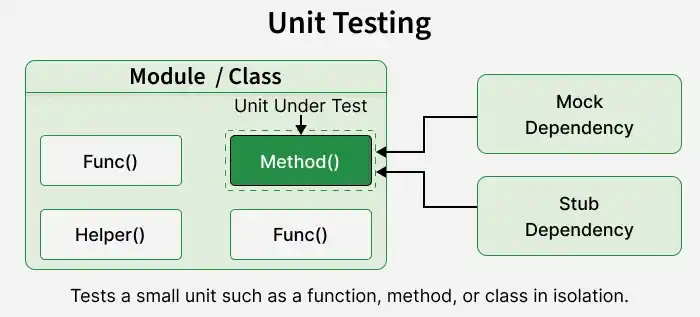
Unit Testing is a software testing technique used to verify individual units of source code, such as methods, functions, or classes, in isolation. It ensures that each unit behaves as expected according to its requirements.

  • Focuses on testing small, independent components of an application to verify their functionality.
  • Provides quick feedback by identifying errors in individual units during development.

Example: In banking applications, unit testing is used to verify interest calculations, loan eligibility rules, and transaction validation logic.

unit_testing_2

Characteristics of Unit Testing

Good unit tests should be reliable, easy to maintain, and efficient in verifying individual code components. Key characteristics include:

  • Tests individual units with minimal dependency on external systems such as databases or networks.
  • Produces consistent results when executed with the same controlled inputs and conditions.
  • Executes quickly, allowing developers to run tests frequently during development.
  • Focuses on verifying a specific behavior or expected outcome of a code component.
  • Can be executed repeatedly under controlled conditions without affecting the results.
  • Runs independently without relying on the execution order or results of other tests.
  • Uses automated testing frameworks to execute tests consistently with minimal manual effort.

Unit Testing Process

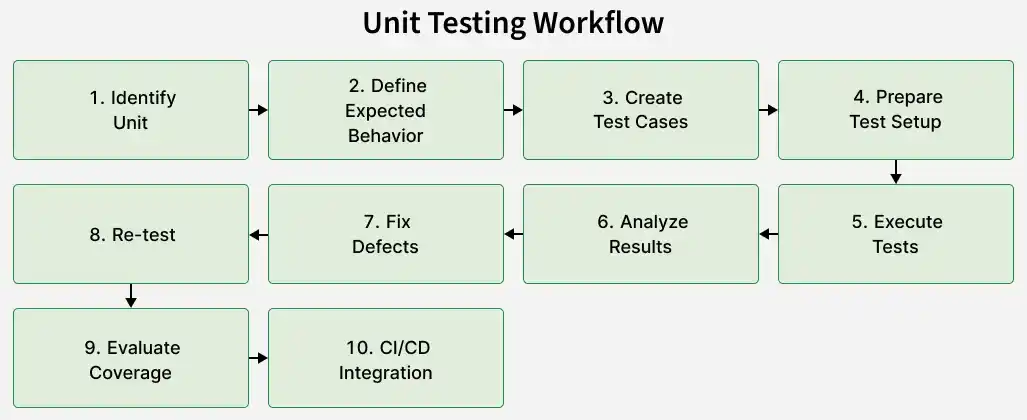
The unit testing workflow includes the following step by step process:

unit_testing_1

The following steps outline a typical process for performing unit testing effectively.

  • Select the function, method, class, or component that needs to be tested.
  • Define the expected behavior and output for different input conditions.
  • Create test cases for normal inputs, boundary values, invalid data, and exceptional conditions.
  • Prepare the required test data, objects, mocks, stubs, and dependencies.
  • Run the test cases using an appropriate unit-testing framework.
  • Compare the actual results with the expected results to identify failures.
  • Fix the defects or incorrect behavior identified during testing.
  • Run the tests again to verify the fixes and detect regressions.
  • Check code coverage to identify untested areas while keeping assertions meaningful.
  • Automate unit tests within the CI/CD pipeline to detect defects early and maintain code quality.

Components of a Unit Test

A unit test consists of several components that help verify whether an individual function or method behaves as expected. The main components are explained below.

1. Test Setup

Test setup prepares the environment and resources required before executing a unit test.

  • Initializes the necessary objects, test data, and dependencies.
  • Ensures the unit is tested under controlled conditions.

Example: Creating a calculator object before testing its addition method.

2. Test Input

Test input provides the values or conditions used to evaluate the behavior of a unit.

  • Includes valid, invalid, and boundary values to test different scenarios.
  • Helps verify how the unit responds to different inputs.

Example: Providing 2 and 3 as inputs to an addition method.

3. Test Execution

Test execution involves running the selected function or method with the prepared inputs.

  • Calls the unit being tested using the specified input values.
  • Captures the actual result for verification.

Example: Executing add(2, 3) to calculate the sum of two numbers.

4. Assertion

An assertion verifies whether the actual result matches the expected outcome.

  • Compares the actual output with the expected value.
  • Marks the test as failed when the assertion condition is not satisfied.

Example: Checking whether add(2, 3) returns the expected result 5.

5. Test Teardown

Test teardown cleans up temporary resources after test execution, when required.

  • Releases resources such as files, database connections, or temporary objects.
  • Helps prevent one test from affecting subsequent tests.

Example: Deleting a temporary file created during a unit test.

Implementation Example

The following example demonstrates unit testing in Java using TestNG.

Step 1: Create the Calculator Class

Java
public class Calculator {

    public int add(int a, int b) {
        return a + b;
    }

    public int subtract(int a, int b) {
        return a - b;
    }
}

Step 2: Create the TestNG Test Class

Java
import org.testng.Assert;
import org.testng.annotations.BeforeMethod;
import org.testng.annotations.Test;

public class CalculatorTest {

    private Calculator calculator;

    @BeforeMethod
    public void setUp() {
        calculator = new Calculator();
    }

    @Test
    public void testAdd() {
        int result = calculator.add(5, 3);
        Assert.assertEquals(result, 8);
    }

    @Test
    public void testSubtract() {
        int result = calculator.subtract(5, 3);
        Assert.assertEquals(result, 2);
    }
}

Output:

unit-testing-example-output
Unit Testing Example Output

Unit Testing Frameworks

Common frameworks include:

FrameworkDescription
JUnitWidely used framework for Java unit testing.
TestNGJava testing framework supporting unit and broader test automation.
NUnitCommon testing framework for .NET applications.
MSTestMicrosoft testing framework for .NET applications.
pytestPopular testing framework for Python applications.
JestJavaScript testing framework commonly used with JavaScript and React applications.
Google TestC++ testing framework for writing and executing unit tests.

Unit Testing Techniques

Unit tests can be designed using different testing approaches based on how much knowledge of the internal code is used. Common approaches include:

TechniqueDescription
White-Box TestingTests internal code structure, including branches, conditions, loops, exception paths, and implementation logic.
Black-Box TestingValidates a unit's behavior using inputs and expected outputs without considering internal implementation details.
Gray-Box TestingUses partial knowledge of internal code while validating external behavior to design effective test cases.

Unit Testing in CI/CD

Unit tests are commonly integrated into CI/CD pipelines to automate testing, detect defects early, and validate code changes.

  • Unit tests run automatically when code is committed, pull requests are created, or builds are triggered.
  • Test failures help identify code issues before changes reach later testing or deployment stages.
  • Builds can be stopped from progressing when required unit tests fail.
  • Developers receive quick feedback about code changes and test results.
  • Re-running unit tests helps detect regressions caused by new code modifications.

Advantages of Unit Testing

  • Helps detect defects early in development, reducing the effort required to fix them.
  • Provides quick feedback to developers by identifying errors in individual components.
  • Makes code refactoring safer by detecting regressions after changes.
  • Encourages modular, maintainable, and independently testable code design.
  • Documents expected code behavior through automated and repeatable test cases.
  • Supports CI/CD pipelines by automatically verifying code changes during development.

Limitations of Unit Testing

  • Focuses on individual units and does not verify the complete behavior of an application.
  • Cannot independently detect integration issues between different modules, services, or external systems.
  • Requires additional development time to write, update, and maintain effective test cases.
  • Poorly designed or incomplete tests may miss important defects and create false confidence in code quality.
  • Cannot fully detect UI, usability, performance, security, or end-to-end workflow issues.
  • Excessive mocking can make tests differ from real production behavior.
Comment

Explore

    Basics
    • Introduction to Software Testing3 min read
    • Principles of Software Testing - Software Testing3 min read
    • Software Development Life Cycle (SDLC)4 min read
    • Software Testing Life Cycle (STLC)3 min read
    • Types of Software Testing8 min read
    • Levels of Software Testing3 min read
    • Test Maturity Model - Software Testing5 min read
    SDLC Models
    • Waterfall Model - Software Engineering4 min read
    • Spiral Model in Software Engineering3 min read
    • Hybrid Work Model6 min read
    • Prototyping Model5 min read
    • SDLC V-Model - Software Engineering4 min read
    Types of Testing
    • Introduction to Manual Testing - Software Testing5 min read
    • Automation Testing - Software Testing5 min read
    Types of Manual
    • White box Testing - Software Engineering6 min read
    • Black Box Testing - Software Engineering5 min read
    • Gray Box Testing - Software Testing7 min read
    White Box Techniques
    • Data Flow Testing5 min read
    • Control Flow Software Testing6 min read
    • Branch Software Testing4 min read
    • Statement Coverage Testing3 min read
    • Code Coverage Testing in Software Testing7 min read
    Black Box Techniques
    • Decision Table Based Testing in Software Testing3 min read
    • Pairwise Software Testing3 min read
    • Cause Effect Graphing in Software Engineering5 min read
    • State Transition Testing4 min read
    • Software Testing - Use Case Testing4 min read
    Types of Black Box
    • Functional Testing - Software Testing4 min read
    • Non-Functional Testing4 min read
    Types of Functional
    • Unit Testing5 min read
    • Integration Testing4 min read
    • System Testing - Software Engineering5 min read
    Types of Non-Functional
    • Performance Testing - Software Testing5 min read
    • Usability Testing - Software Engineering5 min read
    • Compatibility Testing in Software Engineering5 min read
    Test Case Development
    • Testing Documentation - Software Testing5 min read
    • How to Write Test Cases in Software Testing4 min read
    Testing Techniques
    • Error Guessing in Software Testing4 min read
    • Equivalence Partitioning Method3 min read
    • Software Testing - Boundary Value Analysis5 min read
    Test Management
    • Test Plan - Software Testing5 min read
    • Software Testing - Test Case Review13 min read
    • Requirements Traceability Matrix - RTM5 min read
    Defect Tracking
    • Bugs in Software Testing6 min read
    • Bug Life Cycle in Software Development8 min read
    • Severity in Testing Vs Priority in Testing2 min read
    • Test Environment: A Beginner's Guide4 min read
    • Defect Management Process5 min read
    Other Types of Testing
    • Regression Testing - Software Engineering7 min read
    • Smoke Testing - Software Testing5 min read
    • Sanity Testing - Software Testing4 min read
    • Static Testing - Software Testing5 min read
    • Dynamic Testing - Software Testing3 min read
    • Load Testing - Software Testing6 min read
    • Stress Testing5 min read
    • Recovery Testing - Software Testing9 min read
    • Exploratory Testing4 min read
    • Visual Testing - Software Testing5 min read
    • Acceptance Testing - Software Testing4 min read
    • Alpha Testing - Software Testing5 min read
    • Beta Testing - Software Testing4 min read
    • Database Testing - Software Testing4 min read
    • Software Testing - Mainframe Testing15+ min read
    • Ad Hoc Testing in Software4 min read
    • Globalization Testing - Software Testing7 min read
    • Mutation Testing - Software Testing5 min read
    • Security Testing - Software Testing5 min read
    • Accessibility Testing - Software Testing6 min read
    • Structural Software Testing5 min read
    • Volume Testing4 min read
    • Scalability Testing - Software Testing4 min read
    • Stability Testing - Software Testing3 min read
    • Spike Testing - Software Testing5 min read
    • Negative Testing in Software Engineering9 min read
    • Positive Testing - Software Testing10 min read
    • Endurance Testing - Software Testing5 min read
    • Reliability Testing - Software Testing4 min read
    • Monkey Software Testing7 min read
    • Agile Software Testing7 min read
    • Component Software Testing2 min read
    • Graphical User Interface Testing (GUI) Testing5 min read
    • Test Strategy - Software Testing3 min read
    Software Testing Tools
    • Software Testing Tools7 min read
    • Defect Testing Tools - Software Testing6 min read
    • Automation Testing Tools7 min read
    • Cross-Browser Testing Tools - Software Testing4 min read
    • Integration Testing Tool - Software Testing5 min read
    • Software Testing - Unit Testing Tools7 min read
    • Mobile Testing Tools - Software Testing5 min read
    • Testing Tools - Software Testing4 min read
    • Penetration Testing - Software Engineering5 min read
    Differences
    • Manual Testing vs Automated Testing2 min read
    • Difference between Load Testing and Stress Testing3 min read
    • Sanity Testing Vs Smoke Testing - Software Engineering2 min read
    • Difference Between System Testing and Acceptance Testing2 min read
    • Quality Assurance (QA) vs Quality Control (QC)2 min read
    • Static Testing Vs Dynamic Testing2 min read
    • Verification Vs Validation2 min read
    • Difference between Alpha and Beta Testing4 min read
    • Black Box Vs Grey Box Vs White Box Testing3 min read
    • Globalization Testing Vs Localization Testing2 min read
    • Test Case vs Test Scenario2 min read
    • Test Strategy vs Test Plan5 min read
    • Software Testing - Boundary Value Analysis vs Equivalence Partitioning4 min read
    • Difference between SDLC and STLC3 min read
    • Software Testing - Error vs Defect vs Bug vs Fault vs Failure2 min read
    • Differences between Testing and Debugging3 min read
    • Difference between Frontend Testing and Backend Testing2 min read
    • Difference between High Level Design(HLD) and Low Level Design(LLD)3 min read
    • Software Testing - BRS vs SRS4 min read
    • Difference between Positive Testing and Negative Testing2 min read
    • Top-Down vs Bottom-Up Integration Testing2 min read
    • Difference between Use Case and Test Case4 min read
    • Monkey Testing vs Gorilla Testing2 min read
    • Difference between Stubs and Drivers4 min read
    • Difference between Component and Unit Testing3 min read
    • Difference between Software Testing and Embedded Testing5 min read
    • Difference between GUI Testing and Usability Testing5 min read
    • Difference between Tester and SDET2 min read
    • Software Testing - Desktop vs Client-Server vs Web Application Testing3 min read
    • Active Software Testing6 min read
    • Introduction to API (Application Programming Interface)5 min read
    • Difference between End-to-end Testing and Unit Testing5 min read
    • Difference Between Object-Oriented Testing and Conventional Testing5 min read
    Courses
    • Placement 360 Course2 min read
    • MERN Full Stack Course2 min read
You are visitor 01402503 — GeezerVison does not store the pages you look up.
Best viewed with Netscape Navigator 4.7 or Internet Explorer 6 at 800×600. No cookies required.