GeezerVisonThe World Wide Web, restored to 800 pixels of glory. | ||||||||||||
| Home|About|Gaming cabinet|Archives|How it works|Starter sites | ||||||||||||
GeezerVison is showing python-course.eu — 1. Object Oriented Programming | OOP | python-course.eu 1. Object Oriented ProgrammingBy Bernd Klein. Last modified: 01 Feb 2022. On this page ➤ Though Python is an object-oriented language without fuss or quibble, we have so far intentionally avoided the treatment of object-oriented programming (OOP) in the previous chapters of our Python tutorial. We skipped OOP, because we are convinced that it is easier and more fun to start learning Python without having to know about all the details of object-oriented programming. Even though we have avoided OOP, it has nevertheless always been present in the exercises and examples of our course. We used objects and methods from classes without properly explaining their OOP background. In this chapter, we will catch up on what has been missing so far. We will provide an introduction into the principles of object oriented programming in general and into the specifics of the OOP approach of Python. OOP is one of the most powerful tools of Python, but nevertheless you don't have to use it, i.e. you can write powerful and efficient programs without it as well. Though many computer scientists and programmers consider OOP to be a modern programming paradigm, the roots go back to 1960s. The first programming language to use objects was Simula 67. As the name implies, Simula 67 was introduced in the year 1967. A major breakthrough for object-oriented programming came with the programming language Smalltalk in the 1970s. You will learn to know the four major principles of object-orientation and the way Python deals with them in the next section of this tutorial on object-oriented programming:
Before we start the section about the way OOP is used in Python, we want to give you a general idea about object-oriented programming. For this purpose, we would like to draw your attention to a public library. Let's think about a huge one, like the "British Library" in London or the "New York Public Library" in New York. If it helps, you can imagine the libraries in Paris, Berlin, Ottawa or Toronto* as well. Each of these contain an organized collection of books, periodicals, newspapers, audiobooks, films and so on. Generally, there are two opposed ways of keeping the stock in a library. You can use a "closed access" method that is the stock is not displayed on open shelves. In this system, trained staff brings the books and other publications to the users on demand. Another way of running a library is open-access shelving, also known as "open shelves". "Open" means open to all users of the library not only specially trained staff. In this case the books are openly displayed. Imperative languages like C could be seen as open-access shelving libraries. The user can do everything. It's up to the user to find the books and to put them back at the right shelf. Even though this is great for the user, it might lead to serious problems in the long run. For example some books will be misplaced, so it's hard to find them again. As you may have guessed already, "closed access" can be compared to object oriented programming. The analogy can be seen like this: The books and other publications, which a library offers, are like the data in an object-oriented program. Access to the books is restricted like access to the data is restricted in OOP. Getting or returning a book is only possible via the staff. The staff functions like the methods in OOP, which control the access to the data. So, the data, - often called attributes, - in such a program can be seen as being hidden and protected by a shell, and it can only be accessed by special functions, usually called methods in the OOP context. Putting the data behind a "shell" is called Encapsulation. So a library can be regarded as a class and a book is an instance or an object of this class. Generally speaking, an object is defined by a class. A class is a formal description of how an object is designed, i.e. which attributes and methods it has. These objects are called instances as well. The expressions are in most cases used synonymously. A class should not be confused with an object. OOP in PythonEven though we haven't talked about classes and object orientation in previous chapters, we have worked with classes all the time. In fact, everything is a class in Python. Guido van Rossum has designed the language according to the principle "first-class everything". He wrote: "One of my goals for Python was to make it so that all objects were "first class." By this, I meant that I wanted all objects that could be named in the language (e.g., integers, strings, functions, classes, modules, methods, and so on) to have equal status. That is, they can be assigned to variables, placed in lists, stored in dictionaries, passed as arguments, and so forth." (Blog, The History of Python, February 27, 2009) In other words, "everything" is treated the same way, everything is a class: functions and methods are values just like lists, integers or floats. Each of these are instances of their corresponding classes. x = 42 type(x) OUTPUT:int y = 4.34 type(y) OUTPUT:float def f(x): return x + 1 type(f) OUTPUT:function import math type(math) OUTPUT:module One of the many integrated classes in Python is the list class, which we have quite often used in our exercises and examples. The list class provides a wealth of methods to build lists, to access and change elements, or to remove elements: x = [3,6,9] y = [45, "abc"] print(x[1]) OUTPUT:6 x[1] = 99 x.append(42) last = y.pop() print(last) OUTPUT:abc The variables x and y of the previous example denote two instances of the list class. In simplified terms, we have said so far that "x and y are lists". We will use the terms "object" and "instance" synonymously in the following chapters, as it is often done**. pop and append of the previous example are methods of the list class. pop returns the top (or you might think of it as the "rightest") element of the list and removes this element from the list. We will not explain how Python has implemented lists internally. We don't need this information, because the list class provides us with all the necessary methods to access the data indirectly. That is, the encapsulation details are encapsulated. We will learn about encapsulation later. Live Python training 
Enjoying this page? We offer live Python training courses covering the content of this site. See our Python training courses A Minimal Class in Python
We will design and use a robot class in Python as an example to demonstrate the most important terms and ideas of object orientation. We will start with the simplest class in Python. class Robot:
pass
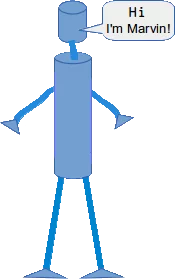
We can realize the fundamental syntactical structure of a class in Python: A class consists of two parts: the header and the body. The header usually consists of just one line of code. It begins with the keyword "class" followed by a blank and an arbitrary name for the class. The class name is "Robot" in our case. The class name is followed by a listing of other class names, which are classes from which the defined class inherits. These classes are called superclasses, base classes or sometimes parent classes. If you look at our example, you will see that this listing of superclasses is not obligatory. You don't have to bother about inheritance and superclasses for now. We will introduce them later. The body of a class consists of an indented block of statements. In our case a single statement, the "pass" statement. A class object is created, when the definition is left normally, i.e. via the end. This is basically a wrapper around the contents of the namespace created by the class definition. It's hard to believe, especially for C++ or Java programmers, but we have already defined a complete class with just three words and two lines of code. We are capable of using this class as well: class Robot: pass if __name__ == "__main__": x = Robot() y = Robot() y2 = y print(y == y2) print(y == x) OUTPUT:True False We have created two different robots x and y in our example. Besides this, we have created a reference y2 to y, i.e. y2 is an alias name for y. AttributesThose who have learned already another object-oriented language, must have realized that the terms attributes and properties are usually used synonymously. It may even be used in the definition of an attribute, like Wikipedia does: "In computing, an attribute is a specification that defines a property of an object, element, or file. It may also refer to or set the specific value for a given instance of such." Even in normal English usage the words "attribute" and "property" can be used in some cases as synonyms. Both can have the meaning "An attribute, feature, quality, or characteristic of something or someone". Usually an "attribute" is used to denote a specific ability or characteristic which something or someone has, like black hair, no hair, or a quick perception, or "her quickness to grasp new tasks". So, think a while about your outstanding attributes. What about your "outstanding properties"? Great, if one of your strong points is your ability to quickly understand and adapt to new situations! Otherwise, you would not be learning Python! Let's get back to Python: We will learn later that properties and attributes are essentially different things in Python. This subsection of our tutorial is about attributes in Python. So far our robots have no attributes. Not even a name, like it is customary for ordinary robots, isn't it? So, let's implement a name attribute. "type designation", "build year" etc. are easily conceivable as further attributes as well***. Attributes are created inside a class definition, as we will soon learn. We can dynamically create arbitrary new attributes for existing instances of a class. We do this by joining an arbitrary name to the instance name, separated by a dot ".". In the following example, we demonstrate this by creating an attribute for the name and the year built: class Robot: pass x = Robot() y = Robot() x.name = "Marvin" x.build_year = "1979" y.name = "Caliban" y.build_year = "1993" print(x.name) OUTPUT:Marvin print(y.build_year) OUTPUT:1993 As we have said before: This is not the way to properly create instance attributes. We introduced this example, because we think that it may help to make the following explanations easier to understand. If you want to know, what's happening internally: The instances possess dictionaries x.__dict__ OUTPUT:{'name': 'Marvin', 'build_year': '1979'}
y.__dict__ OUTPUT:{'name': 'Caliban', 'build_year': '1993'}
Attributes can be bound to class names as well. In this case, each instance will possess this name as well. Watch out, what happens, if you assign the same name to an instance: class Robot(object): pass x = Robot() Robot.brand = "Kuka" x.brand OUTPUT:'Kuka' x.brand = "Thales" Robot.brand OUTPUT:'Kuka' y = Robot() y.brand OUTPUT:'Kuka' Robot.brand = "Thales" y.brand OUTPUT:'Thales' x.brand OUTPUT:'Thales' If you look at the x.__dict__ OUTPUT:{'brand': 'Thales'}
y.__dict__ OUTPUT:{}
Robot.__dict__ OUTPUT:mappingproxy({'__module__': '__main__',
'__dict__': <attribute '__dict__' of 'Robot' objects>,
'__weakref__': <attribute '__weakref__' of 'Robot' objects>,
'__doc__': None,
'brand': 'Thales'})
If you try to access y.brand, Python checks first, if "brand" is a key of the y. If an attribute name is not in included in either of the dictionary, the attribute name is not defined. If you try to access a non-existing attribute, you will raise an AttributeError: x.energy OUTPUT:--------------------------------------------------------------------------- AttributeError Traceback (most recent call last) <ipython-input-28-82fa0f11497d> in <module> ----> 1x.energy AttributeError: 'Robot' object has no attribute 'energy' By using the function getattr, you can prevent this exception, if you provide a default value as the third argument: getattr(x, 'energy', 100) OUTPUT:100 Binding attributes to objects is a general concept in Python. Even function names can be attributed. You can bind an attribute to a function name in the same way, we have done so far to other instances of classes: def f(x): return 42 f.x = 42 print(f.x) OUTPUT:42 This can be used as a replacement for the static function variables of C and C++, which are not possible in Python. We use a counter attribute in the following example: def f(x): f.counter = getattr(f, "counter", 0) + 1 return "Monty Python" for i in range(10): f(i) print(f.counter) OUTPUT:10 Some uncertainty may arise at this point. It is possible to assign attributes to most class instances, but this has nothing to do with defining classes. We will see soon how to assign attributes when we define a class. To properly create instances of classes, we also need methods. You will learn in the following subsection of our Python tutorial, how you can define methods. Live Python training
Enjoying this page? We offer live Python training courses covering the content of this site. Upcoming online Courses See our Python training courses Methods
Methods in Python are essentially functions in accordance with Guido's saying "first-class everything". Let's define a function "hi", which takes an object "obj" as an argument and assumes that this object has an attribute "name". We will also define our basic Robot class again: def hi(obj): print("Hi, I am " + obj.name + "!") class Robot: pass x = Robot() x.name = "Marvin" hi(x) OUTPUT:Hi, I am Marvin! We will now bind the function „hi“ to a class attribute „say_hi“! def hi(obj): print("Hi, I am " + obj.name) class Robot: say_hi = hi x = Robot() x.name = "Marvin" Robot.say_hi(x) OUTPUT:Hi, I am Marvin "say_hi" is called a method. Usually, it will be called like this: x.say_hi() It is possible to define methods like this, but you shouldn't do it. The proper way to do it:
We have seen that a method differs from a function only in two aspects:
As a matter of fact, "self" is not a Python keyword. It's just a naming convention! So C++ or Java programmers are free to call it "this", but this way they are risking that others might have greater difficulties in understanding their code! Most other object-oriented programming languages pass the reference to the object (self) as a hidden parameter to the methods. You saw before that the calls Robot.say_hi(x)". and "x.say_hi()" are equivalent. "x.say_hi()" can be seen as an "abbreviated" form, i.e. Python automatically binds it to the instance name. Besides this "x.say_hi()" is the usual way to call methods in Python and in other object oriented languages. For a Class C, an instance x of C and a method m of C the following three method calls are equivalent:
Before you proceed with the following text, you may mull over the previous example for awhile. Can you figure out, what is wrong in the design? There is more than one thing about this code, which may disturb you, but the essential problem at the moment is the fact that we create a robot and that after the creation, we shouldn't forget about naming it! If we forget it, say_hi will raise an error. We need a mechanism to initialize an instance right after its creation. This is the The
|




| Naming | Type | Meaning |
|---|---|---|
| name | Public | These attributes can be freely used inside or outside a class definition. |
| _name | Protected | Protected attributes should not be used outside the class definition, unless inside a subclass definition. |
| __name | Private | This kind of attribute is inaccessible and invisible. It's neither possible to read nor write to those attributes, except inside the class definition itself. |
We want to demonstrate the behaviour of these attribute types with an example class:
class A():
    def __init__(self):
        self.__priv = "I am private"
        self._prot = "I am protected"
        self.pub = "I am public"
We store this class (attribute_tests.py) and test its behaviour in the following interactive Python shell:
from attribute_tests import A
x = A()
x.pub
OUTPUT:
'I am public'
x.pub = x.pub + " and my value can be changed"
x.pub
OUTPUT:
'I am public and my value can be changed'
x._prot
OUTPUT:
'I am protected'
x.__priv
OUTPUT:
---------------------------------------------------------------------------
AttributeError                            Traceback (most recent call last)
<ipython-input-6-f75b36b98afa> in <module>
----> 1x.__priv
AttributeError: 'A' object has no attribute '__priv'
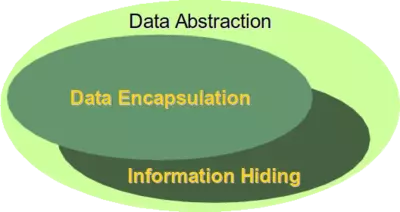
The error message is very interesting. One might have expected a message like "__priv is private". We get the message "AttributeError: 'A' object has no attribute __priv instead, which looks like a "lie". There is such an attribute, but we are told that there isn't. This is perfect information hiding. Telling a user that an attribute name is private, means that we make some information visible, i.e. the existence or non-existence of a private variable.
Our next task is rewriting our Robot class. Though we have Getter and Setter methods for the name and the build_year, we can access the attributes directly as well, because we have defined them as public attributes. Data Encapsulation means, that we should only be able to access private attributes via getters and setters.
We have to replace each occurrence of self.name and self.build_year by self.__name and self.__build_year.
The listing of our revised class:
class Robot:
    def __init__(self, name=None, build_year=2000):
        self.__name = name
        self.__build_year = build_year
    def say_hi(self):
        if self.__name:
            print("Hi, I am " + self.__name)
        else:
            print("Hi, I am a robot without a name")
    def set_name(self, name):
        self.__name = name
    def get_name(self):
        return self.__name
    def set_build_year(self, by):
        self.__build_year = by
    def get_build_year(self):
        return self.__build_year
    def __repr__(self):
        return "Robot('" + self.__name + "', " +  str(self.__build_year) +  ")"
    def __str__(self):
        return "Name: " + self.__name + ", Build Year: " +  str(self.__build_year)
if __name__ == "__main__":
    x = Robot("Marvin", 1979)
    y = Robot("Caliban", 1943)
    for rob in [x, y]:
        rob.say_hi()
        if rob.get_name() == "Caliban":
            rob.set_build_year(1993)
        print("I was built in the year " + str(rob.get_build_year()) + "!")
OUTPUT:
Hi, I am Marvin
I was built in the year 1979!
Hi, I am Caliban
I was built in the year 1993!
Every private attribute of our class has a getter and a setter. There are IDEs for object-oriented programming languages, who automatically provide getters and setters for every private attribute as soon as an attribute is created.
This may look like the following class:
class A():
    def __init__(self, x, y):
        self.__x = x
        self.__y = y
    def GetX(self):
        return self.__x
    def GetY(self):
        return self.__y
    def SetX(self, x):
        self.__x = x
    def SetY(self, y):
        self.__y = y
There are at least two good reasons against such an approach. First of all not every private attribute needs to be accessed from outside. Second, we will create non-pythonic code this way, as you will learn soon.
Destructor
What we said about constructors holds true for destructors as well. There is no "real" destructor, but something similar, i.e. the method __del__. It is called when the instance is about to be destroyed and if there is no other reference to this instance. If a base class has a __del__() method, the derived class's __del__() method, if any, must explicitly call it to ensure proper deletion of the base class part of the instance.
The following script is an example with __init__ and __del__:
class Robot():
    def __init__(self, name):
        print(name + " has been created!")
    def __del__(self):
        print ("Robot has been destroyed")
if __name__ == "__main__":
    x = Robot("Tik-Tok")
    y = Robot("Jenkins")
    z = x
    print("Deleting x")
    del x
    print("Deleting z")
    del z
    del y
OUTPUT:
Tik-Tok has been created!
Jenkins has been created!
Deleting x
Deleting z
Robot has been destroyed
Robot has been destroyed
The usage of the __del__ method is very problematic. If we change the previous code to personalize the deletion of a robot, we create an error:
class Robot():
    def __init__(self, name):
        print(name + " has been created!")
    def __del__(self):
        print (self.name + " says bye-bye!")
if __name__ == "__main__":
    x = Robot("Tik-Tok")
    y = Robot("Jenkins")
    z = x
    print("Deleting x")
    del x
    print("Deleting z")
    del z
    del y
OUTPUT:
Tik-Tok has been created!
Jenkins has been created!
Deleting x
Deleting z
We are accessing an attribute which doesn't exist anymore. We will learn later, why this is the case.
Footnotes:
+ The picture on the right side is taken in the Library of the Court of Appeal for Ontario, located downtown Toronto in historic Osgoode Hall
++ "Objects are Python's abstraction for data. All data in a Python program is represented by objects or by relations between objects. (In a sense, and in conformance to Von Neumann's model of a "stored program computer", code is also represented by objects.) Every object has an identity, a type and a value." (excerpt from the official Python Language Reference)
+++ "attribute" stems from the Latin verb "attribuere" which means "to associate with"
++++ Jogger ticketed for trespassing
+++++ There is a way to access a private attribute directly. In our example, we can do it like this: x._Robot__build_year You shouldn't do this under any circumstances!
Live Python training
Enjoying this page? We offer live Python training courses covering the content of this site.
Upcoming online Courses
See our Python training courses
Best viewed with Netscape Navigator 4.7 or Internet Explorer 6 at 800×600. No cookies required.