GeezerVisonThe World Wide Web, restored to 800 pixels of glory. | ||||||||||||||
| Home|About|Gaming cabinet|Archives|How it works|Starter sites | ||||||||||||||
GeezerVison is showing www.visualcplusdotnet.com — An introduction to the C++/CLI (C++ .NET) and the MSIL/CIL bytecode used in the .NET programming < Index #1 | Index # 2 | C++ .Net Not So New Keywords >
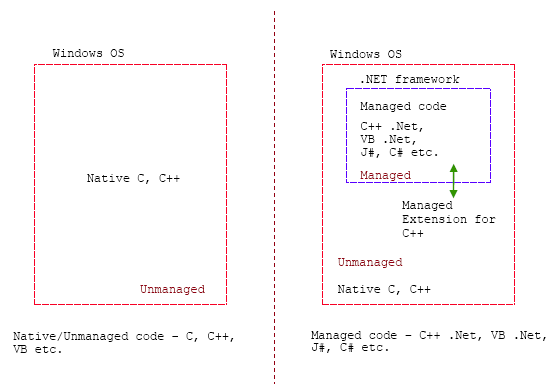
Unmanaged, Managed Extensions for C++, Managed and .Net Framework
In this module you will acquire knowledge about the .Net Framework. Try to understand the new terms used such as Unmanaged, Managed, Managed Extension for C++, CIL, CLI, MSIL etc. The topics that available are:
Introduction
C++/CLI
The Managed C++ extensions were significantly revised to clarify and simplify syntax and expand functionality to include managed generics. These new extensions were designated C++/CLI and included in Microsoft Visual Studio 2005. C++/CLI (Common Language Infrastructure) is the newer language specification that superseded Managed Extensions for C++. Completely reviewed to simplify the older Managed C++ syntax, it provides much more clarity over code readability than Managed C++. Like Microsoft C# (ECMA-334), C++/CLI is standardized by European Computer Manufacturers Association (ECMA-372) and ISO/IEC . It is currently only available on Visual C++ 2005. Common Language Runtime (CLR) is the name chosen by Microsoft for the virtual machine component of their .NET initiative. It is Microsoft's implementation of the Common Language Infrastructure (CLI) standard, which defines an execution environment for program code. The CLR runs a form of bytecode called the Common Intermediate Language (CIL, Microsoft version is MSIL). The CLR runs on Microsoft Windows operating systems.
MSIL/CIL
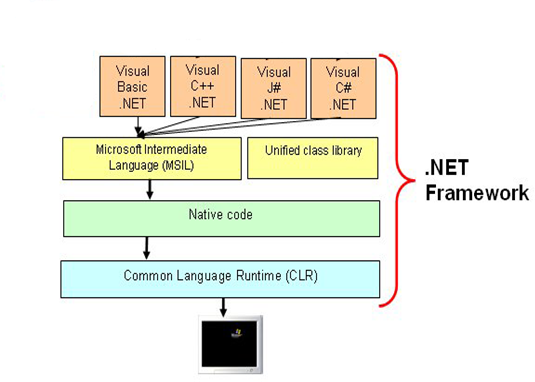
In general, Common Intermediate Language (CIL) is the lowest-level human-readable programming language in the Common Language Infrastructure and in the .NET Framework. Languages which target the .NET Framework for example, compile to CIL, which is assembled into bytecode. CIL resembles an object oriented assembly language, and is entirely stack-based. It is executed by a virtual machine. The primary .NET languages are C#, Visual Basic .NET and Managed C++. CIL was originally known as Microsoft Intermediate Language (MSIL). Due to standardization of C# and the Common Language Infrastructure, the bytecode is now officially known as CIL. CIL is still often referred to as MSIL, however, and has been backronymed to mean Machine Symbolic Intermediate Language. This is especially true of longtime veterans of the .NET languages (Microsoft changed to Machine). Microsoft Intermediate Language (MSIL) is a byte-code that Microsoft .NET technology uses to accomplish platform independence and runtime safety seems similar to the already matured Java. During compilation of .NET programming languages, the source code is translated into MSIL code rather than machine-specific object code as done previously in C/C++. MSIL is a CPU and platform independent instruction set that can be executed in any environment supporting the .NET framework. MSIL code is verified for safety during runtime, providing better security and reliability than natively compiled binaries.
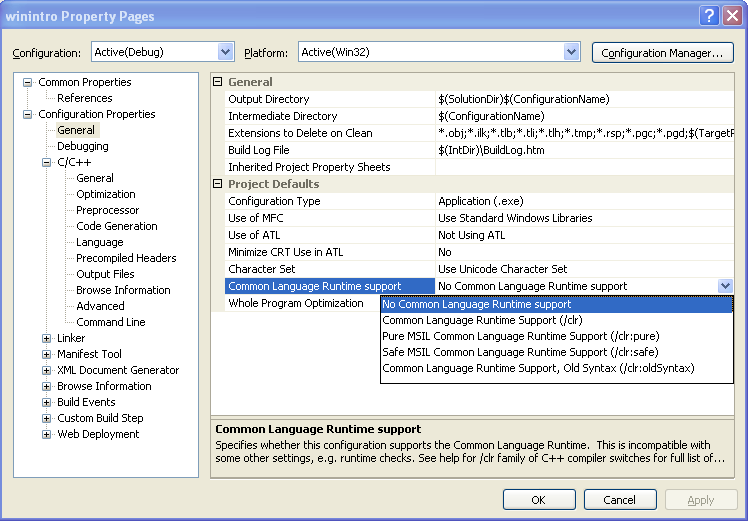
See all the Hello World example in various programming languages at Wiki that include the CLI. For your Visual C++ Express Edition 2005 and Visual C++ .Net 2005, click your Project menu → your_project_name Properties... → Configuration Properties → the General link. By default /clr compiler option (Common Language Runtime support) is shown below.
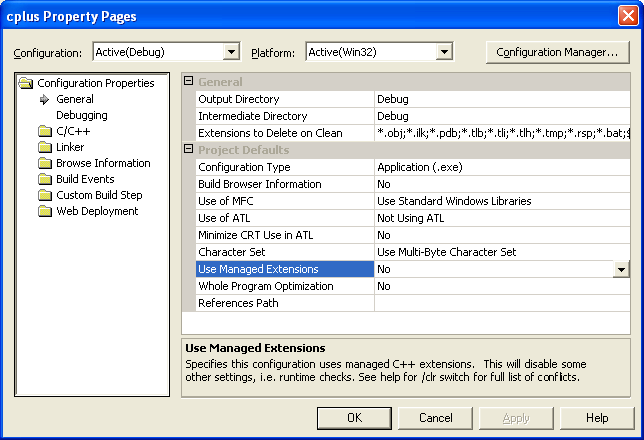
For Visual C++ .Net 2003, click Project menu → your_project_name Properties... → Configuration Properties menu → General folder → Use Managed Extensions setting. Clearly VC++ 2003 uses Managed C++.
In VC++ 2005 EE, functions are managed by default when /clr compiler option is used. The compiler ignores the managed and unmanaged pragmas if /clr is not used in the compilation. Each implementation of C and C++ supports some features unique to its host machine or operating system. Some programs, for instance, need to exercise precise control over the memory areas where data is placed or to control the way certain functions receive parameters. The #pragma directives offer a way for each compiler to offer machine- and operating system-specific features while retaining overall compatibility with the C and C++ languages. Pragmas are machine- or operating system-specific by definition, and are usually different for every compiler. Pragmas can be used in conditional statements, to provide new preprocessor functionality, or to provide implementation-defined information to the compiler. For .NET Programming, Visual C++ supports the creation of the following distinct types of components and applications (this is more visible if you compile through the command line). There will be more support when the .Net Framework is updated (now we have version 1.0, 1.1 (SP1), 2.0 SP2 and 3.5 (also include for Linux and Mac OS (SP1). Also available the .Net Compact Framework 2.0 SP1). The following Table gives brief description regarding /clr options.
< Index #1 | Index # 2 | C++ .Net Not So New Keywords > | ||||||||||||||
| You are visitor 01402503 — GeezerVison does not store the pages you look up. Best viewed with Netscape Navigator 4.7 or Internet Explorer 6 at 800×600. No cookies required. | ||||||||||||||