JavaScript: Add items in a blank array and display the items
JavaScript Array: Exercise-13 with Solution
Add Items to Array
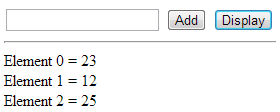
Write a JavaScript program to add items to a blank array and display them.
Sample Screen:
Sample Solution:
HTML Code:
<!DOCTYPE html>
<html>
<head>
<meta charset=utf-8 />
<title>JS Bin</title>
<style>
body {padding-top:50px}
</style>
</head>
<body>
<input type="text" id="text1"></input>
<input type="button" id="button1" value="Add" onclick="add_element_to_array();"></input>
<input type="button" id="button2" value="Display" onclick="display_array();"></input>
<div id="Result"></div>
</body>
</html>
JavaScript Code:
// Initialize a variable 'x' with 0
var x = 0;

// Initialize an empty array
var array = Array();

// Function to add an element to the array
function add_element_to_array() {
  // Get the value from the input with id "text1" and assign it to the array at index 'x'
  array[x] = document.getElementById("text1").value;

  // Display an alert indicating the added element and its index
  alert("Element: " + array[x] + " Added at index " + x);

  // Increment the index variable 'x'
  x++;

  // Clear the value of the input with id "text1"
  document.getElementById("text1").value = "";
}

// Function to display the elements of the array
function display_array() {
  var e = "<hr/>"; // Initialize a string with a horizontal line

  // Iterate through the array and create a string representation of each element
  for (var y = 0; y < array.length; y++) {
    e += "Element " + y + " = " + array[y] + "<br/>";
  }

  // Set the innerHTML of the element with id "Result" to the generated string
  document.getElementById("Result").innerHTML = e;
}
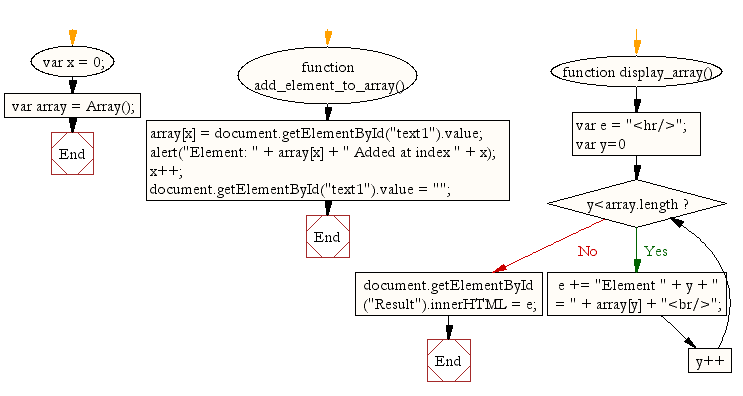
Flowchart:
ES6 Version:
// Initialize a variable 'x' with 0
let x = 0;
// Initialize an empty array
const array = [];
// Function to add an element to the array
const add_element_to_array = () => {
// Get the value from the input with id "text1" and assign it to the array at index 'x'
array[x] = document.getElementById("text1").value;
// Display an alert indicating the added element and its index
alert(`Element: ${array[x]} Added at index ${x}`);
// Increment the index variable 'x'
x++;
// Clear the value of the input with id "text1"
document.getElementById("text1").value = "";
};
// Function to display the elements of the array
const display_array = () => {
let e = "
"; // Initialize a string with a horizontal line
// Iterate through the array and create a string representation of each element
array.forEach((element, y) => {
e += `Element ${y} = ${element}
`;
});
// Set the innerHTML of the element with id "Result" to the generated string
document.getElementById("Result").innerHTML = e;
};
Live Demo:
See the Pen JavaScript: Add items in a blank array and display the items - array-ex-13 by w3resource (@w3resource) on CodePen.
For more Practice: Solve these Related Problems:
- Write a JavaScript function that adds new items to an initially empty array using push and unshift.
- Write a JavaScript function that dynamically populates an array based on user input and displays the final array.
- Write a JavaScript function that inserts items at specified indices in an array and handles index out-of-bound errors.
- Write a JavaScript function that appends items to an array using the spread operator and returns the updated array.
Go to:
PREV : Sum and Product of Array.
NEXT : Remove Duplicates.
Improve this sample solution and post your code through Disqus.