NumPy: Move axes of an array to new positions
Move Array Axes to Alternate Positions
Write a NumPy program to move array axes to alternate positions. Other axes remain in their original order.
Pictorial Presentation:
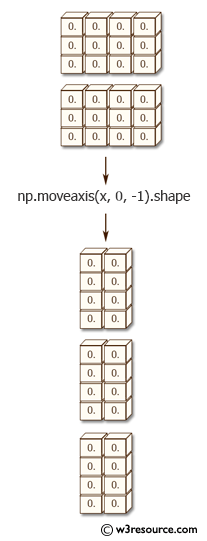
Sample Solution :
Python Code :
# Importing the NumPy library with an alias 'np'
import numpy as np

# Creating a NumPy array filled with zeros of shape (2, 3, 4)
x = np.zeros((2, 3, 4))

# Moving the axis at index 0 to the last position (-1)
# The shape of the array after moving the axis from index 0 to index -1
print(np.moveaxis(x, 0, -1).shape)

# Moving the axis at the last position (-1) to index 0
# The shape of the array after moving the axis from index -1 to index 0
print(np.moveaxis(x, -1, 0).shape)
Sample Output:
(3, 4, 2)
(4, 2, 3)
Explanation:
x = np.zeros((2, 3, 4)): This line creates a 3D array x with the given shape (2, 3, 4), filled with zeros.
print(np.moveaxis(x, 0, -1).shape): The np.moveaxis() function takes three arguments: the input array, the source axis, and the destination axis. In this case, it moves axis 0 (the first axis) to the last position (-1). As a result, the shape of the new array is (3, 4, 2).
print(np.moveaxis(x, -1, 0).shape): This line moves the last axis (-1) to the first position (0). As a result, the shape of the new array is (4, 2, 3).
For more Practice: Solve these Related Problems:
- Write a NumPy program to rearrange the axes of a 3D array so that the first axis moves to the last position.
- Use np.moveaxis to cyclically permute the axes of an array and verify the new order matches the expected pattern.
- Implement an algorithm that reorders axes into alternate positions while keeping the remaining axes unchanged.
- Create a function that accepts an array and a new axis order list, then returns the rearranged array.
Go to:
PREV : Change Two Array Axes
NEXT : Move Axis to Desired Position
Python-Numpy Code Editor:
Have another way to solve this solution? Contribute your code (and comments) through Disqus.