NumPy: Remove specific elements in a NumPy array
Remove Specific Elements in Array
Write a NumPy program to remove specific elements from a NumPy array.
Pictorial Presentation:
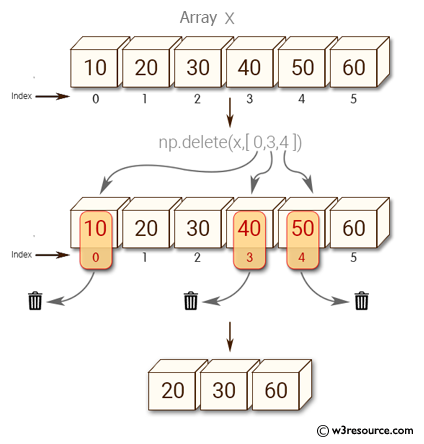
Sample Solution:
Python Code:
# Importing the NumPy library and aliasing it as 'np'
import numpy as np

# Creating a NumPy array 'x' containing integers
x = np.array([10, 20, 30, 40, 50, 60, 70, 80, 90, 100])

# Creating a list 'index' containing indices of elements to be deleted from array 'x'
index = [0, 3, 4]

# Printing a message indicating the original array will be displayed
print("Original array:")

# Printing the original array 'x' with its elements
print(x)

# Printing a message indicating the deletion of elements at specified indices
print("Delete first, fourth and fifth elements:")

# Deleting elements from array 'x' at the specified indices mentioned in the 'index' list
# The resulting array 'new_x' contains elements of 'x' after deletion
new_x = np.delete(x, index)

# Printing the modified array 'new_x' after deleting elements at specified indices
print(new_x)
Sample Output:
Original array:
[ 10  20  30  40  50  60  70  80  90 100]
Delete first, fourth and fifth elements:
[ 20  30  60  70  80  90 100]
Explanation:
In the above code –
x = np.array(...) – This line creates a NumPy array 'x' with the given elements.
index = [0, 3, 4]: Define a list 'index' containing the indices of the elements we want to delete from the array 'x'.
new_x = np.delete(x, index): Use the np.delete() function to delete the elements from 'x' at the specified indices. The result is a new array 'new_x' with the specified elements removed.
For more Practice: Solve these Related Problems:
- Write a NumPy program to remove elements at specific indices from a 1D array using np.delete.
- Create a function that takes an array and a list of indices to remove, then returns the filtered array.
- Test the element removal on an array and verify that the remaining elements preserve their original order.
- Compare the performance of np.delete with slicing techniques for removing multiple elements from an array.
Go to:
PREV : Replace Array Elements > Specified
NEXT : Replace Negative Values with 0
Python-Numpy Code Editor:
Have another way to solve this solution? Contribute your code (and comments) through Disqus.