Python: Get the size of an object in bytes
Object Size Finder
Write a Python program to get the size of an object in bytes.
Pictorial Presentation:
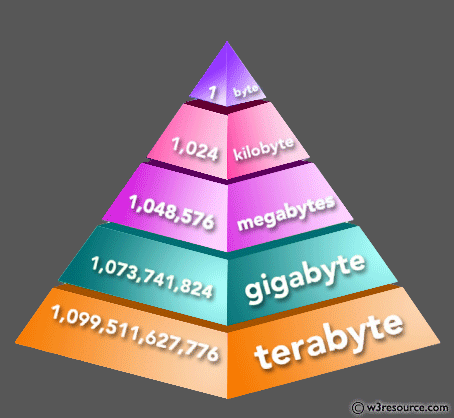
Sample Solution:
Python Code:
import sys  # Import the sys module to use sys.getsizeof()

# Define three strings and assign values to them
str1 = "one"
str2 = "four"
str3 = "three"
x = 0
y = 112
z = 122.56

# Print the size in bytes of each variable
print("Size of ", str1, "=", str(sys.getsizeof(str1)) + " bytes")
print("Size of ", str2, "=", str(sys.getsizeof(str2)) + " bytes")
print("Size of ", str3, "=", str(sys.getsizeof(str3)) + " bytes")
print("Size of", x, "=", str(sys.getsizeof(x)) + " bytes")
print("Size of", y, "=", str(sys.getsizeof(y)) + " bytes")

# Define a list and assign values to it
L = [1, 2, 3, 'Red', 'Black']

# Print the size in bytes of the list
print("Size of", L, "=", sys.getsizeof(L), " bytes")

# Define a tuple and assign values to it
T = ("Red", [8, 4, 6], (1, 2, 3))

# Print the size in bytes of the tuple
print("Size of", T, "=", sys.getsizeof(T), " bytes")

# Define a set and assign values to it
S = {'apple', 'orange', 'apple', 'pear'}

# Print the size in bytes of the set
print("Size of", S, "=", sys.getsizeof(S), " bytes")

# Define a dictionary and assign values to it
D = {'Name': 'David', 'Age': 6, 'Class': 'First'}

# Print the size in bytes of the dictionary
print("Size of", D, "=", sys.getsizeof(S), " bytes")
Sample Output:
Size of  one = 52 bytes
Size of  four = 53 bytes
Size of  three = 54 bytes
Size of 0 = 24 bytes
Size of 112 =28 bytes
Size of [1, 2, 3, 'Red', 'Black'] = 104  bytes
Size of ('Red', [8, 4, 6], (1, 2, 3)) = 72  bytes
Size of {'orange', 'pear', 'apple'} = 224  bytes
Size of {'Name': 'David', 'Age': 6, 'Class': 'First'} = 224  bytes
For more Practice: Solve these Related Problems:
- Write a Python program to compare the memory size of different data structures.
- Write a Python program to get the size of a user-defined class object.
- Write a Python program to measure memory usage before and after creating a large list.
- Write a Python program to calculate the size of nested objects.
Go to:
Previous: Write a Python program to find the available built-in modules.
Next: Write a Python program to get the current value of the recursion limit.
Python Code Editor: