GeezerVisonThe World Wide Web, restored to 800 pixels of glory. |
| Home|About|Gaming cabinet|Archives|How it works|Starter sites |
GeezerVison is showing zetcode.com — Java validation filter - validate data with Java filter Java validation filterlast modified January 27, 2024 In this article we show how to validate data entered by the user in a web application. Validation is a common task and is covered in Java web frameworks such as Stripes, Ninja framework, or Play framework. In this article we will validate data with a simple custom validation filter. The sources are available at the author's Github repository.
A filter is an object that performs filtering tasks on either the request to a resource,
or on the response from a resource, or both. Filters perform filtering in the
Filters can be used for various tasks such as authentication, logging, data compression, image conversion, or encryption. In our example, we use a filter to validate input data. In our application, we have a HTML form that takes input from a user. The form has two input tags: user name and email. The input is being validated with a filter. To validate the email format, we use the Apache Commons Validator. The project is built with Maven in NetBeans IDE. We deploy the application on Tomcat. 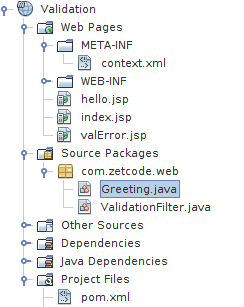
The figure shows the project structure in NetBeans. We have three JSP pages, two Java classes, and two XML configuration files. pom.xml
<?xml version="1.0" encoding="UTF-8"?>
<project xmlns="http://maven.apache.org/POM/4.0.0"
         xmlns:xsi="http://www.w3.org/2001/XMLSchema-instance"
         xsi:schemaLocation="http://maven.apache.org/POM/4.0.0
                        http://maven.apache.org/xsd/maven-4.0.0.xsd">

    <modelVersion>4.0.0</modelVersion>

    <groupId>com.zetcode</groupId>
    <artifactId>Validation</artifactId>
    <version>1.0-SNAPSHOT</version>
    <packaging>war</packaging>

    <name>Validation</name>

    <dependencies>
        <dependency>
            <groupId>javax</groupId>
            <artifactId>javaee-web-api</artifactId>
            <version>7.0</version>
            <scope>provided</scope>
        </dependency>

        <dependency>
            <groupId>jstl</groupId>
            <artifactId>jstl</artifactId>
            <version>1.2</version>
        </dependency>

        <dependency>
            <groupId>commons-validator</groupId>
            <artifactId>commons-validator</artifactId>
            <version>1.5.1</version>
        </dependency>

    </dependencies>

    <build>
        <plugins>
            <plugin>
                <groupId>org.apache.maven.plugins</groupId>
                <artifactId>maven-compiler-plugin</artifactId>
                <version>3.1</version>
                <configuration>
                    <source>1.8</source>
                    <target>1.8</target>
                    <compilerArguments>
                        <endorseddirs>${endorsed.dir}</endorseddirs>
                    </compilerArguments>
                </configuration>
            </plugin>
            <plugin>
                <groupId>org.apache.maven.plugins</groupId>
                <artifactId>maven-war-plugin</artifactId>
                <version>2.3</version>
                <configuration>
                    <failOnMissingWebXml>false</failOnMissingWebXml>
                </configuration>
            </plugin>

        </plugins>
    </build>

</project>
This is the context.xml
<?xml version="1.0" encoding="UTF-8"?>
<Context path="/Validation"/>
In the index.jsp
<%@page contentType="text/html" pageEncoding="UTF-8"%>
<!DOCTYPE html>
<html>
    <head>
        <meta http-equiv="Content-Type" content="text/html; charset=UTF-8">
        <title>Validation</title>
    </head>
    <body>

        <p>
            Enter your name and email:
        </p>

        <form method="post" action="Greet">

            Name: <input type="text" name="username"> <br>
            Email: <input type="text" name="email"> <br>

            <input type="submit" value="Submit">

        </form>


    </body>
</html>
The <form method="post" action="Greet"> ... </form>
Upon submitting the form, the hello.jsp
<%@page contentType="text/html" pageEncoding="UTF-8"%>
<%@ taglib prefix="c" uri="http://java.sun.com/jsp/jstl/core" %>
<!DOCTYPE html>
<html>
    <head>
        <meta http-equiv="Content-Type" content="text/html; charset=UTF-8">
        <title>Greeting</title>
    </head>
    <body>
        Hello <c:out value="${param.username}"/>! <br>
        Your email is <c:out value="${param.email}"/>.
    </body>
</html>
When the input data passes the validation test, the valError.jsp
<%@page contentType="text/html" pageEncoding="UTF-8"%>
<%@ taglib prefix="c" uri="http://java.sun.com/jsp/jstl/core" %>
<!DOCTYPE html>
<html>
    <head>
        <meta http-equiv="Content-Type" content="text/html; charset=UTF-8">
        <title>Error</title>
    </head>
    <body>
        <p>
            <c:out value="${errMsg}"/>
        </p>
    </body>
</html>
If the validation fails, the ValidationFilter.java
package com.zetcode.web;

import java.io.IOException;
import javax.servlet.Filter;
import javax.servlet.FilterChain;
import javax.servlet.FilterConfig;
import javax.servlet.RequestDispatcher;
import javax.servlet.ServletException;
import javax.servlet.ServletRequest;
import javax.servlet.ServletResponse;
import javax.servlet.annotation.WebFilter;
import org.apache.commons.validator.routines.EmailValidator;

@WebFilter(filterName = "ValidationFilter", urlPatterns = {"/Greet"})
public class ValidationFilter implements Filter {

    public ValidationFilter() { }

    @Override
    public void doFilter(ServletRequest request, ServletResponse response,
            FilterChain chain)
            throws IOException, ServletException {

        String erpg = "valError.jsp";

        String userName = request.getParameter("username");
        String email = request.getParameter("email");
        boolean valid = EmailValidator.getInstance().isValid(email);

        if (userName == null || "".equals(userName)
                || email == null || "".equals(email)) {

            request.setAttribute("errMsg", "One or both fields are empty");

            RequestDispatcher rd = request.getRequestDispatcher(erpg);
            rd.include(request, response);

        } else if (!valid) {

            request.setAttribute("errMsg", "Email format not valid");
            RequestDispatcher rd = request.getRequestDispatcher(erpg);
            rd.include(request, response);
        } else {

            chain.doFilter(request, response);
        }

    }

    @Override
    public void destroy() { }

    @Override
    public void init(FilterConfig filterConfig) { }

}
The validation of data is performed in the @WebFilter(filterName = "ValidationFilter", urlPatterns = {"/Greet"})
The public class ValidationFilter implements Filter {
A filter implements the @Override
public void doFilter(ServletRequest request, ServletResponse response,
FilterChain chain)
throws IOException, ServletException {
...
}
The actual work is done in the String userName = request.getParameter("username");
String email = request.getParameter("email");
With the boolean valid = EmailValidator.getInstance().isValid(email);
Using the Apache Commons Validator's if (userName == null || "".equals(userName)
|| email == null || "".equals(email)) {
request.setAttribute("errMsg", "One or both fields are empty");
RequestDispatcher rd = request.getRequestDispatcher(erpg);
rd.include(request, response);
} else if (!valid) {
request.setAttribute("errMsg", "Email format not valid");
RequestDispatcher rd = request.getRequestDispatcher(erpg);
rd.include(request, response);
} else {
chain.doFilter(request, response);
}
If the data fails to validate, the processing is dispatched to the
error page with the Greeting.java
package com.zetcode.web;

import java.io.IOException;
import javax.servlet.RequestDispatcher;
import javax.servlet.ServletException;
import javax.servlet.annotation.WebServlet;
import javax.servlet.http.HttpServlet;
import javax.servlet.http.HttpServletRequest;
import javax.servlet.http.HttpServletResponse;

@WebServlet(name = "Greeting", urlPatterns = {"/Greet"})
public class Greeting extends HttpServlet {

    @Override
    protected void doPost(HttpServletRequest request, HttpServletResponse response)
            throws ServletException, IOException {
        response.setContentType("text/html;charset=UTF-8");

        String page = "/hello.jsp";
        RequestDispatcher disp = getServletContext().getRequestDispatcher(page);
        disp.forward(request, response);
    }
}
The 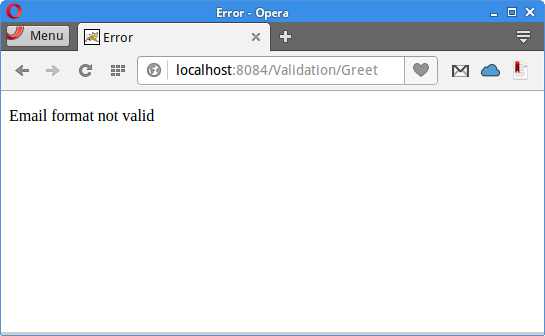
The application responds with an error message if the email has an incorrect format. This was the validation filter tutorial. We have built a web application using JSTL, JSP, Apache Commons Validator, Tomcat, and Maven. SourceAuthorMy name is Jan Bodnar, and I am a passionate programmer with extensive programming experience. I have been writing programming articles since 2007. To date, I have authored over 1,400 articles and 8 e-books. I possess more than ten years of experience in teaching programming. List all Java tutorials. |
| You are visitor 01402503 — GeezerVison does not store the pages you look up. Best viewed with Netscape Navigator 4.7 or Internet Explorer 6 at 800×600. No cookies required. |