GeezerVisonThe World Wide Web, restored to 800 pixels of glory. |
| Home|About|Gaming cabinet|Archives|How it works|Starter sites |
GeezerVison is showing zetcode.com — JavaScript JSON from URL - Fetching Data Explained JavaScript read JSON from URLlast modified last modified October 18, 2023 In this article we show how to read data in JSON format from the provided URL. We use JQuery, Fetch API, and XMLHttpRequest. URLA Uniform Resource Locator (URL), is a reference to a web resource that specifies its location on a computer network and a mechanism for retrieving it. A web resource is any data that can be obtained via web, such as HTML documents, PDF files, PNG images, JSON data, or plain text. A generic URL has the following form: scheme:[//[user:password@]host[:port]][/]path[?query][#fragment] The square brackets indicate that the part is optional. A scheme is a way of addressing resources, such as http, ftp, mailto, or file. The part following two slashes is called the authority part. The authority part contains 1) an optional authentication section of a user name and password, separated by a colon, followed by an at symbol (@) 2) a host, which is either a host name of or an IP address, 3) an optional port number, separated from the host by a colon. A path is a road to the resource on the host. It may or may not resemble or map exactly to a file system path. Query string is used to add some criteria to the request for the resource. It is often a sequence of key/value pairs. The final part is an optional fragment, which points to a secondary resource, such as a heading. It is separated from the query string by a hash (#). JSON
JSON (JavaScript Object Notation) is a lightweight data-interchange format.
It is easy for humans to read and write and for machines to parse and generate.
The official Internet media type for JSON is
In our examples, we use JSON data from {
"time": "11:27:26 AM",
"milliseconds_since_epoch": 1494934046126,
"date": "05-16-2017"
}
The GET request returns this JSON string. Reading JSON with JQueryjQuery is a JavaScript library which is used to manipulate DOM. With jQuery, we can find, select, traverse, and manipulate parts of a HTML document.
The JQuery jQuery.getJSON( url [, data ] [, success ] )
This is the method signature. The $.ajax({
dataType: "json",
url: url,
data: data,
success: success
});
js_read_json_url.html
<!DOCTYPE html>
<html lang="en">
<head>
<title>JavaScript - read JSON from URL</title>
    <script src="https://code.jquery.com/jquery-3.2.1.min.js"></script>
</head>

<body>
    <div class="mypanel"></div>

    <script>
    $.getJSON('http://time.jsontest.com', function(data) {

        var text = `Date: ${data.date}<br>
                    Time: ${data.time}<br>
                    Unix time: ${data.milliseconds_since_epoch}`


        $(".mypanel").html(text);
    });
    </script>

</body>
</html>
In the example, we read JSON data from var text = `Date: ${data.date}<br>
Time: ${data.time}<br>
Unix time: ${data.milliseconds_since_epoch}`
We build the message using the JavaScript template string. $(".mypanel").html(text);
With JQuery's 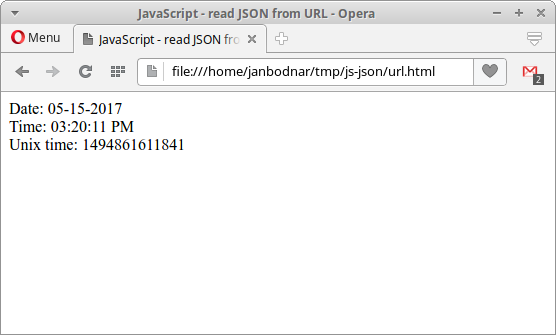
In the figure we can see the current date, time, and Unix time. Reading JSON with Fetch API
Fetch API is interface for fetching resources. It is similar to
<script>
fetch('http://time.jsontest.com')
    .then(res => res.json())
    .then((out) => {
        console.log('Output: ', out);
}).catch(err => console.error(err));
</script>
The example reads JSON data with Fetch API and prints the returned data to the console. To see the output, we need to activate the developer console of our browser.
The Reading JSON with XMLHttpRequest
XMLHttpRequest API provides client functionality for transferring
data between a client and a server. It allows an easy way to retrieve data from
a URL without having to do a full page refresh. As a consequence, a web page has
to update just a part of the page without disrupting what the user is doing.
<script>

var getJSON = function(url, callback) {

    var xhr = new XMLHttpRequest();
    xhr.open('GET', url, true);
    xhr.responseType = 'json';

    xhr.onload = function() {

        var status = xhr.status;

        if (status == 200) {
            callback(null, xhr.response);
        } else {
            callback(status);
        }
    };

    xhr.send();
};

getJSON('http://time.jsontest.com',  function(err, data) {

    if (err != null) {
        console.error(err);
    } else {

        var text = `Date: ${data.date}
Time: ${data.time}
Unix time: ${data.milliseconds_since_epoch}`

        console.log(text);
    }
});

</script>
This example reads JSON data with var xhr = new XMLHttpRequest();
A new instance of xhr.open('GET', url, true);
The xhr.responseType = 'json';
The xhr.onload = function() {
var status = xhr.status;
if (status == 200) {
callback(null, xhr.response);
} else {
callback(status);
}
};
In the xhr.send();
The SourceIn this article we have read JSON data in JavaScript with JQuery, Fetch API, and XMLHttpRequest. AuthorMy name is Jan Bodnar, and I am a passionate programmer with extensive programming experience. I have been writing programming articles since 2007. To date, I have authored over 1,400 articles and 8 e-books. I possess more than ten years of experience in teaching programming. |
| You are visitor 01402520 — GeezerVison does not store the pages you look up. Best viewed with Netscape Navigator 4.7 or Internet Explorer 6 at 800×600. No cookies required. |