Flick, release, or click.
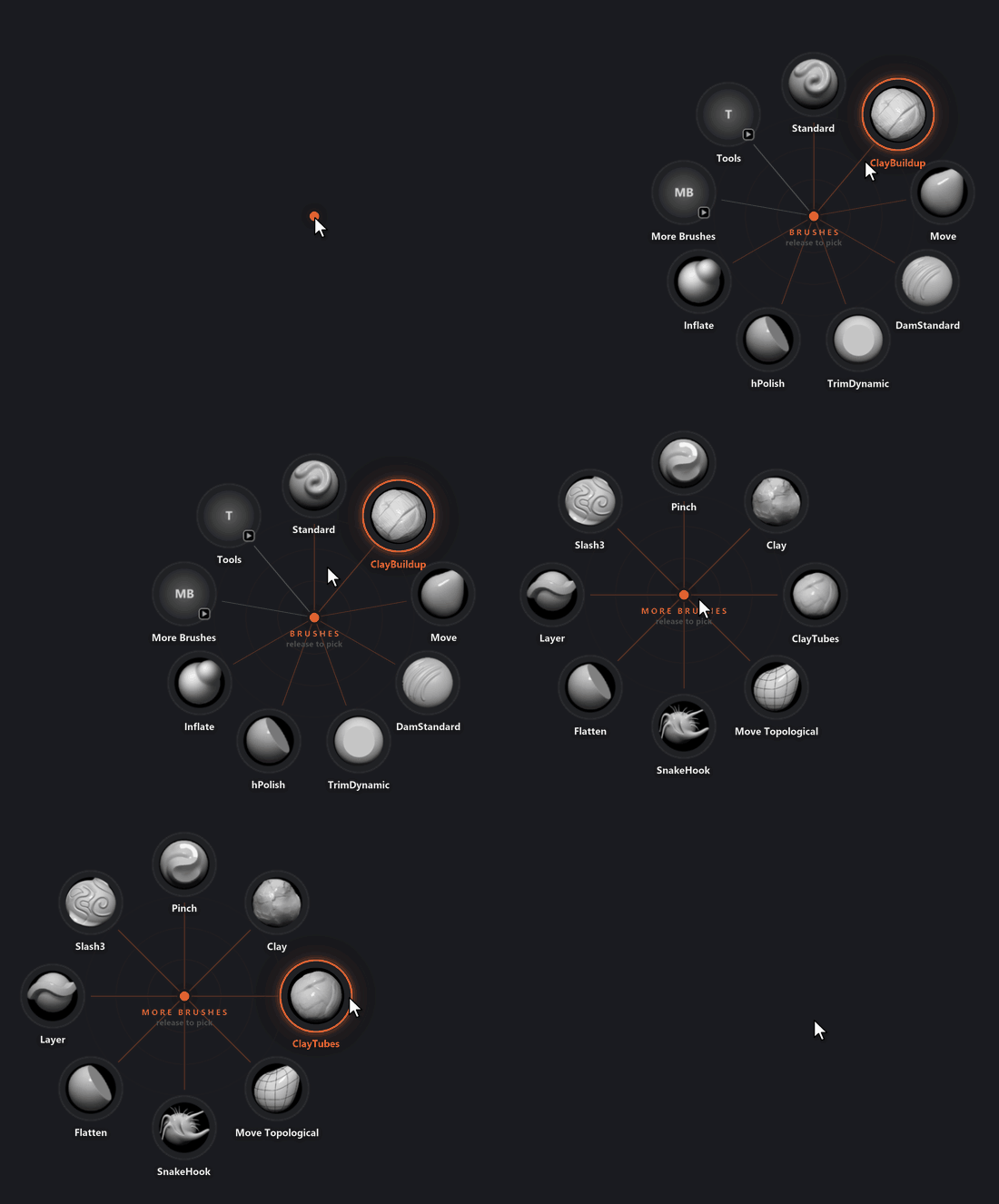
Hold the hotkey and flick past a slot, or move toward it and release. Or tap the hotkey and click. A pick that arrives mid-stroke waits until you lift the pen.
GeezerVisonThe World Wide Web, restored to 800 pixels of glory. |
| Home|About|Gaming cabinet|Archives|How it works|Starter sites |
GeezerVison is showing zorbit.lol — ZOrbit — a radial brush menu for ZBrush Free forever · Open source ZOrbitA radial brush menu for ZBrush Press Q over ZBrush and a ring of your favourite brushes and buttons appears around the cursor. Flick toward one and let go. ⌨Q is just the default. Use any key or combination, and give each menu its own.
Try it: click a slot, or press on the ring and drag toward one. More Brushes and Tools fan out in place, and SubDivide fans out of Tools when there is room (if not, it opens as a ring). This preview uses the starter menus with those three set to fan out; inside ZBrush the slots and keys are yours.
Speed
1× is the real speed
FreeOpen sourceNo accountNo trialNo subscriptionTwelve open animationsSeven built-in looksSubmenusFan-out submenusAny hotkeyFlick to pickPlain JSON menusGPL-3.0
FreeOpen sourceNo accountNo trialNo subscriptionTwelve open animationsSeven built-in looksSubmenusFan-out submenusAny hotkeyFlick to pickPlain JSON menusGPL-3.0
12open animations
2rings deep in one stroke
0accounts to make
11kinds of slot
Flick, release, or click.Hold the hotkey and flick past a slot, or move toward it and release. Or tap the hotkey and click. A pick that arrives mid-stroke waits until you lift the pen.
More than brushes.A slot can select a brush, an alpha, a material or a texture, press any ZBrush button, set a slider, flip a switch, run several of those in a row, or open another ring. Hover a submenu and one stroke reaches an item two rings deep. If ZBrush does not have the alpha, material or texture yet, ZOrbit loads it from its file first. 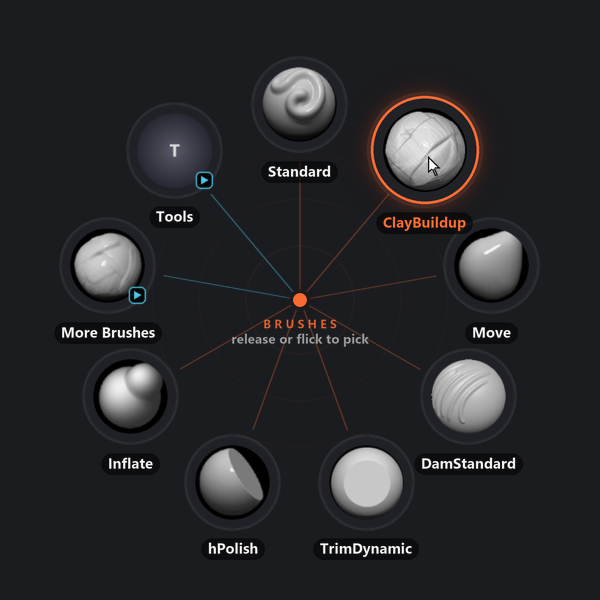
Fans that open in place.Switch a submenu to fan out and it opens where it is. Its items spread in an arc beyond its slot, the ring you came from stays put, and a fan item can fan out again, up to three deep. Release, click or flick to pick, just as on the ring. Near a screen edge it opens as a ring instead. One switch per menu in Studio, or 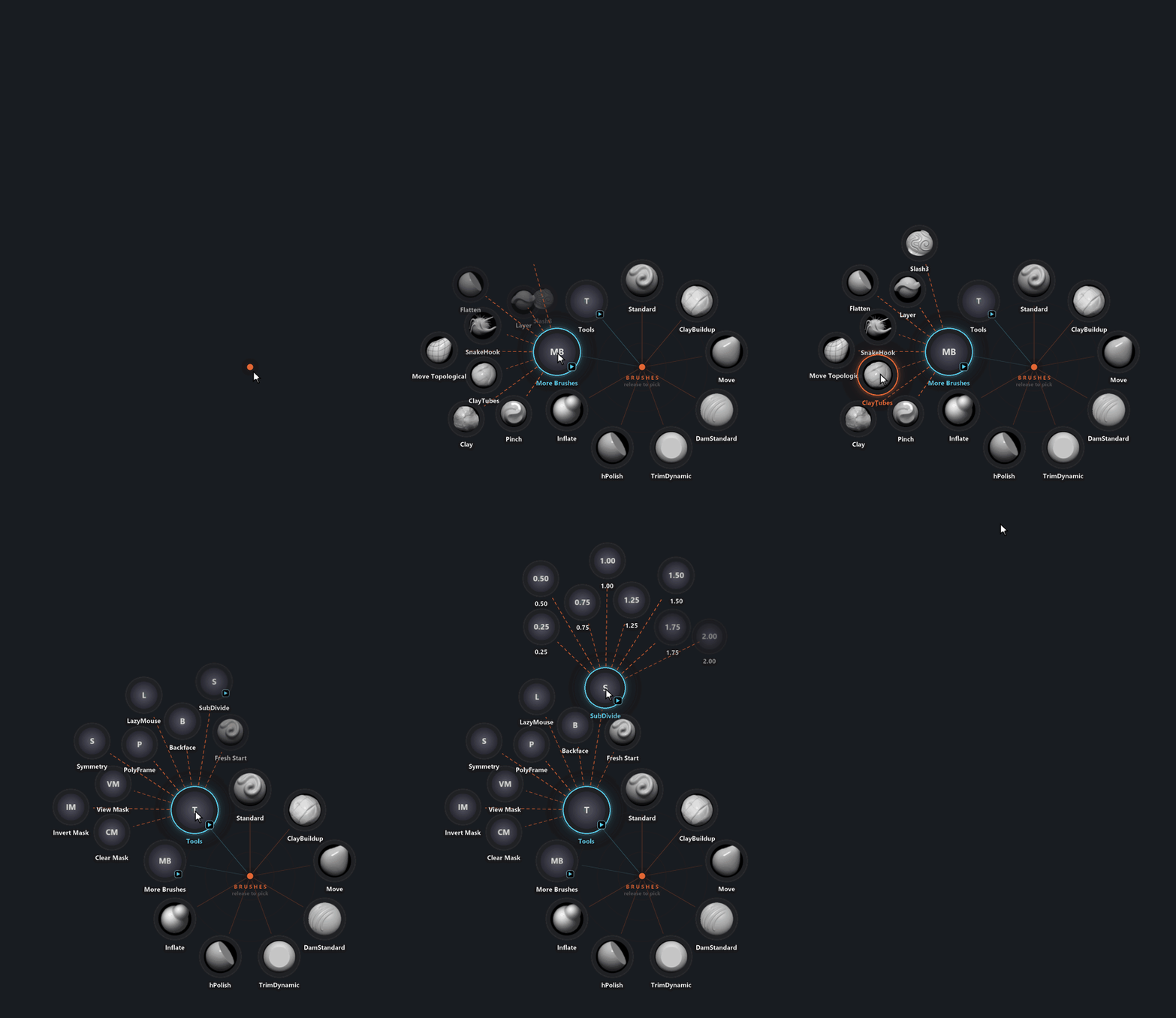
Tag it. Colour it. Fan it.Tag your brushes, alphas, materials and textures, then colour their slots by tag. Show the colour as an icon tint, a glow, or a band through the ring, and set how strong each one is. A tag slot opens a fan of every item with that tag. Tag colours on the Studio Look screen has a switch and an opacity for each of the three. 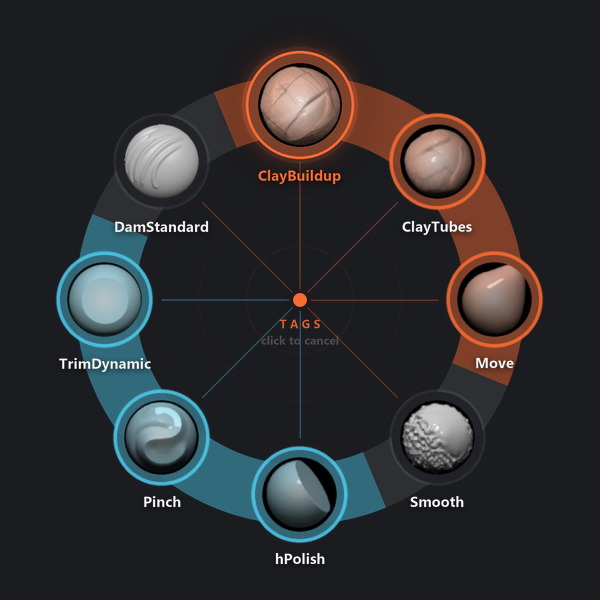
A browser for everything.Press Alt+B and the Browser opens over ZBrush. It has four tabs, Brushes, Alphas, Materials and Textures, each with search, folders, tag chips and thumbnails. Press Enter to pick. Star an item once to make it a favourite, or press Ctrl+D. Recent lists your last picks.
BrushesAlphasMaterialsTextures
Search
★Favourites
Recent
All brushes
BlockingDetailing
 Clay  ClayBuildup★  ClayTubes  DamStandard★  Flatten  Move Any key you like.Q is only where it starts. Record a new hotkey in Studio by pressing it: a letter, a digit, F1 to F24 or punctuation, with any mix of Ctrl, Alt and Shift. Give every menu its own key and open them straight from the canvas. By default ZBrush never sees the key, so its own shortcut for that key doesn’t fire as well. Switch that off per menu if you want both. Hotkeys
BrushesQ
ToolsAlt+G
MaskingF5
MaterialsCtrl+Shift+1
Your next menu
`
Give the ring a look.The Look screen in Studio (Alt+2) sets how the ring is drawn. Pick one of six slot shapes: circle, rounded square, squircle, hexagon, octagon or diamond. Choose a hub style, a glow colour, a label colour and a size for the slots. Seven looks come built in, from Classic and Soft to Crystal, Circuit, Diamonds and Minimal. Set it for every menu, for one menu, or for a single slot. Save your own look with New from current, and every menu that uses it follows when you change it. More in the docs. 
Too many brushes for one ring.When a menu has more items than fit, it no longer has to grow. Under When full on the Look screen, choose Grow, as before, or Second ring, which puts the rest on a ring outside the first. Or choose More slot: the last slot opens a ring with the rest. Fans are never split. You can choose differently for each menu. Studio’s preview shows the result as you pick. 
Dark, light, or ZBrush’s own.The Theme setting in Studio has four choices. Dark is the default. Light is for ZBrush or Windows set to a light theme. Follow Windows changes with Windows’ app colour mode. Match ZBrush uses the interface colours you stored in ZBrush with Preferences > Config > Store Config. ZOrbit only reads that file and never writes it, and without a stored scheme it shows Dark. The theme applies to the ring, the browser and Studio together. Themes are experimental, and the colours will change as they are tuned. If something reads badly, say so on issue #32. More in the docs.
Theme
The ring in Dark, Light and Match ZBrush, the last with ZBrush’s stock colours. The Studio picture below follows the same switch.
Edit it in Studio.ZOrbit Studio shows a live preview of the real ring. Drag brushes in from a searchable library, record hotkeys, change shapes, colours, size and animation. Twelve open animations, from instant to a swirling spiral. Keep profiles, say one for sculpting and one for hard-surface work, and switch between them without a restart. The first time Studio opens, a Setup screen walks you through the install. It finds ZBrush, says whether to restart it, and has you try the ring once. After that Studio offers a short tour, nine stops, once. You can take it again from Settings > Studio.
Theme
The same switch as above, here on Studio’s Menus screen. 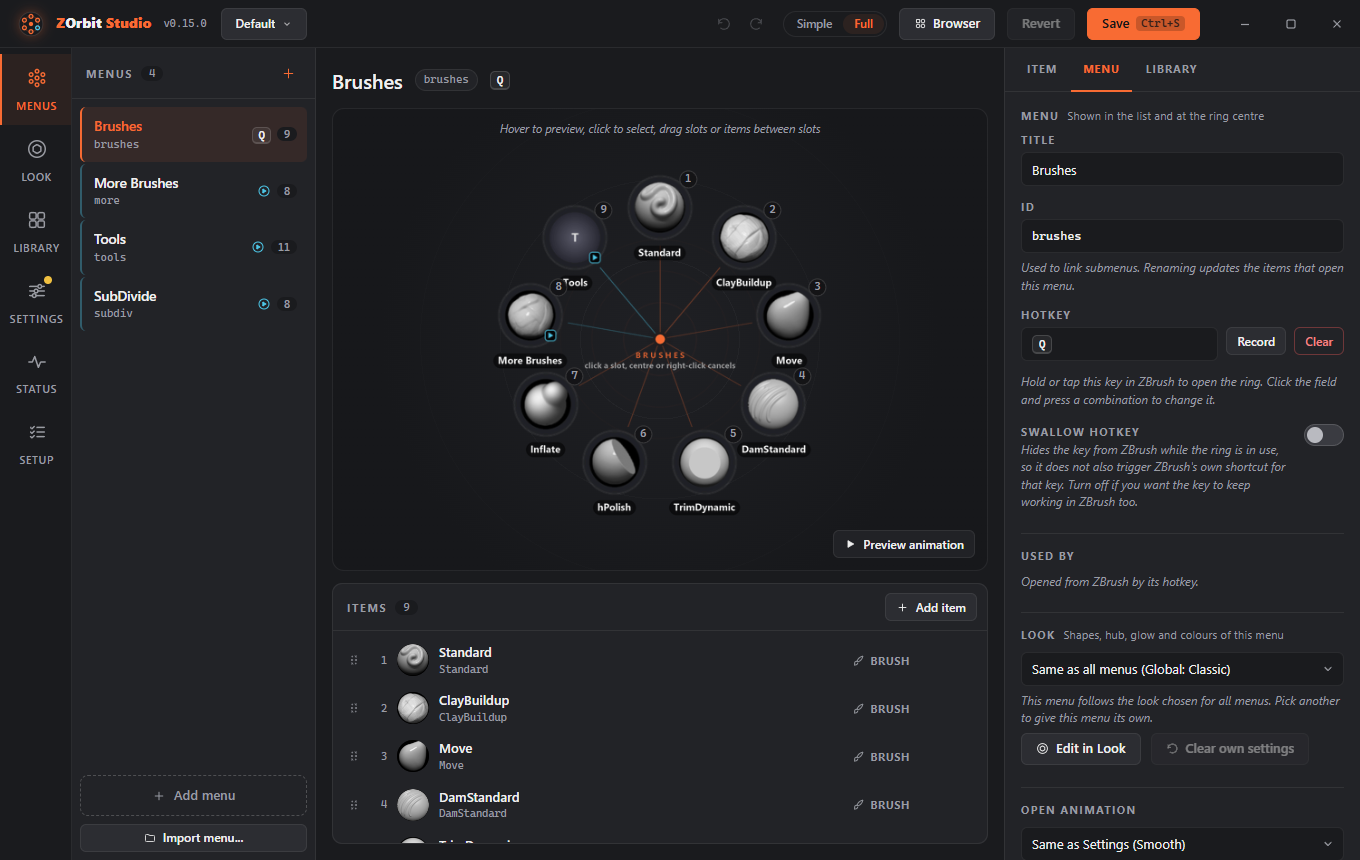
It starts and stops with ZBrush. Your menus live in plain JSON, so you can back them up, share them and keep them in version control. Settings > Import and export saves your menus, settings and tags to one file.
ZBrush 2022 to 2025: after installing, open Studio, go to Settings > Older ZBrush, and click Install. Then restart that ZBrush. Needs Windows 10 or 11 and the Microsoft Edge WebView2 runtime (part of Windows 11 and of up-to-date Windows 10). The basicsWhat is ZOrbit?A radial menu for ZBrush on Windows. Hold a hotkey over the canvas and a ring of your brushes and buttons appears around the cursor. Flick toward one, or move to it and let go, and ZBrush switches. You set up the rings in ZOrbit Studio. Is it really free?Yes. There is no licence key, no account, no trial and no expiry date, and you can use it on as many machines as you like. Can I use it for paid work?Yes. The GPL lets you run the program for any purpose, and it does not cover what you sculpt with it. Which versions of ZBrush and Windows does it work with?ZBrush 2022 or newer, on 64-bit Windows 10 or 11. ZBrush 2026 and newer load the plugin the installer sets up. ZBrush 2022 to 2025 need one extra step in Studio, see older ZBrush. ZBrush Core and ZBrushCore Mini are not supported, because they do not load plugins. Is there a Mac or Linux version?No. ZOrbit relies on Windows to catch the hotkey and draw the ring, so it runs on Windows only. Is ZOrbit running when ZBrush is closed?No. ZBrush starts it through the plugin, and it quits a few seconds after ZBrush closes. While it runs it has an icon in the notification area. Left-click it to open Studio. Its right-click menu opens the browser, reloads your menus, switches profile, opens the logs folder and quits ZOrbit. Is it made by Maxon?No. ZOrbit is an independent project. It is not affiliated with or endorsed by Maxon. ZBrush is a trademark of Maxon. Install and updatesDo I need administrator rights?Not for the installer. It installs for your user only. The one exception is the plugin for ZBrush 2022 to 2025. If your account cannot write to that ZBrush’s folder, which can happen under Program Files, Windows asks you to approve it while Studio copies the plugin in. Where does it install, and what does it change?It installs to Why do I have to restart ZBrush?ZBrush reads Is there a first-run setup?Yes. On a fresh install Studio opens on a Setup screen. It lists whether ZBrush was found, whether the plugin is loaded, whether ZBrush needs a restart, and has you try the ring once. Press Finish or Skip for now when you are done. If you close Studio without either, Setup comes back next time. It is Alt+6 in Studio, and Show Setup on next start at the bottom of the screen brings it back. I use ZBrush 2022, 2023, 2024 or 2025. What is different?Those versions have no Python API, so ZOrbit gives them a ZScript plugin with the same Zplugin > ZOrbit palette. Open Studio, go to Setup (Alt+6) and click Install next to your version. Settings > Older ZBrush in Full mode has the same list. If your version is not listed, use Add a ZBrush folder. Then restart that ZBrush. What is the WebView2 runtime, and do I need it?Studio draws its window with Microsoft Edge WebView2. It is part of Windows 11 and of up-to-date Windows 10, so you most likely have it already. If not, get it from Microsoft. Is there a portable version?Yes. Unzip the portable zip somewhere permanent and run How do I update?When Studio opens it asks GitHub whether there is a newer release. If there is, the new version number appears in orange at the top. Click it to read the release notes, then press Download and install. Studio fetches the installer from GitHub, checks its SHA-256, runs it over your install and reopens when it is done. It stops ZOrbit, replaces the program and leaves your menus alone. Then restart ZBrush. You can also download the installer from the release page and run it yourself. A portable copy gets a link to the download page instead. On ZBrush 2022 to 2025, Settings > Older ZBrush then shows Update available. Click Update and restart that ZBrush. Can I turn off the update check?Yes. Switch off Settings > Studio > Check for updates. While it is off, no request is made. How do I uninstall?Open Windows Settings > Apps > Installed apps, find ZOrbit and choose Uninstall. Restart ZBrush afterwards so it lets go of the plugin. The uninstaller removes only its own entry from The uninstaller also removes the plugin from every ZBrush 2022 to 2025 that Studio’s Setup lists. If it could not clean a folder, it names it, and you delete Does uninstalling delete my menus?No. Your menus and settings are in I used Radial Menu for ZBrush. Do my menus carry over?Yes. ZOrbit is the same project under a new name. Run the new installer over the old install. It moves the program, removes the old shortcut and plugin path entry, and copies your menus, settings and tags to the Default profile in Using the ringHow do I pick something: flick, release or click?All three work, with the same hotkey:
A press shorter than 250 ms counts as a tap. You can change that with Tap time in Settings (Full mode), from 0 to 1000 ms. Do I have to point right at the icon?No. A slot is chosen by the direction of the cursor from the centre, so pointing toward it is enough. Inside the small dead zone in the middle nothing is picked. A slot answers to at most a quarter of the circle, so on a ring of one to three slots, pointing away from all of them picks nothing. What if I pick in the middle of a stroke?The pick waits until you lift the pen or release the mouse button, then ZBrush switches. In ZBrush 2026 and newer the tool never changes halfway through a stroke, so a pick that feels a moment late is doing this on purpose. ZBrush 2022 to 2025 cannot wait and apply the pick at once. How do I close the ring without picking anything?Any of these:
With flick switched off, clicking outside the ring cancels too. Where does the ring appear? What about screen edges and several monitors?Centred on your cursor, with slots laid out clockwise from the top. Near a screen edge it moves just enough to stay fully on screen. Its sizes scale for high-DPI screens automatically. Does the ring take focus away from ZBrush?No. The ring window never takes keyboard focus, so ZBrush stays the active window underneath it. What is the Browser?A window with your brushes, alphas, materials and textures on four tabs, each with search, folders, tag chips and thumbnails. Press Alt+B to open it over ZBrush. New installs have that hotkey. If your Switch tabs with Ctrl+Tab, type to search, use the arrow keys to move and press Enter to pick. Press the hotkey again while it is in front and the keyboard goes back to ZBrush. Opened from Studio or the Start menu, it works without ZBrush running, so you can browse and tag items on their own. Ctrl+N opens another browser window, up to six, each with its own tab, size and place. See the docs. How do Favourites and Recent work?Hover an item in the Browser or the Library and press the star in its corner, or select it and press Ctrl+D. Favourites is the first entry in the folders list on every tab. It lists starred items most used first until you give the tab an order of your own: open Favourites and drag a card to a new place. A Most used button puts the tab back. Each tab keeps its own order. Recent sits under Favourites and lists every brush, alpha, material or texture you picked in ZBrush, newest first, up to 24 per tab. A What is the strip?A small bar of one tab’s favourites that stays on top of ZBrush and never takes the keyboard from it, so one click on a thumbnail picks the item. Turn it on with the strip button in the browser’s header (Show as a strip). Once it is on, X on the browser goes back to the strip instead of hiding the window. Click the star at the top of the strip for its menu: switch the tab, lay the strip out vertically or horizontally, open the full browser or hide the strip. Drag a thumbnail to change your Favourites order, and drag the grip to move the strip. It steps aside while another program is in front. See the docs. Does it work with a pen tablet?The ring opens from a keyboard key, so you point with the pen as you would with a mouse. Keys sent by a tablet driver work like the real key. In ZBrush 2026 and newer a pick made mid-stroke waits for the pen to lift, and after each pick ZOrbit nudges the cursor by zero pixels to wake ZBrush’s pen tracking. HotkeysCan I use a key other than Q?Yes. In Studio, click the hotkey field on the Menus screen and press the keys you want. Or type it into the menu file, for example Which keys and modifiers can I use?Any mix of Ctrl, Alt and Shift, with a letter, a digit, F1 to F24, Can I have several menus, each on its own key?Yes. Give each menu its own hotkey and open it straight from the canvas. Two menus cannot share a key: the second is reported as a problem and ignored. A menu with no hotkey works as a submenu. Will ZBrush’s own shortcut for that key fire as well?That depends on the menu. A menu swallows its hotkey by default, so ZBrush never sees it. The starter Brushes menu has Swallow hotkey off, so ZBrush still sees Q and goes to Draw mode as the ring opens. To let a key reach ZBrush too, switch off Swallow hotkey in that menu’s settings (Full mode), or set Does the hotkey do anything outside ZBrush?No. It only works while ZBrush is the front window, and in every other program the key behaves as normal. It is also left alone while a Windows dialog such as Save As is in front or a Windows text box has the focus, so you can type the key there. The browser hotkey works while the browser is in front as well. Keys sent by a tablet driver, a macro tool or a key remapper work like the real key. Can a Stream Deck or a script open a menu or pick a brush?Yes. Run
Menus, submenus and fansWhat can a slot do besides select a brush?Each slot does one of these:
In Studio, Simple mode offers brush, alpha, material, texture, press, toggle, menu and empty. The rest need Full mode. The docs describe each type. Can a slot load an alpha, material or texture?Yes. Use What are tags, and how do I use them?A tag is a coloured label for brushes, alphas, materials and textures. An item can have several, and they all share one set of tags. In the Library, select items and press Tag..., or right-click one, then click a tag to put it on or take it off. With two or more tag chips on, the Match switch chooses whether an item needs any of them or all of them. Favourites is a built-in tag with a star. It cannot be deleted or renamed. A tag slot, such as What is an auto slot?A slot that holds a brush ZOrbit picked for you. Every brush you pick from a ring or the Browser scores a point, and points fade with a half-life of two weeks, so last week’s brushes count for more than last month’s. A menu’s auto slots hold its best-scoring brushes, leaving out any brush the menu already has as an ordinary item. Add one with Add item > Auto in Full mode. The ring does not reshuffle under your hand. A brush keeps its slot until another brush takes it, and a newcomer has to be among the best after two picks in a row. A slot nothing has filled yet is a faint plus and says This slot is empty when you pick it. Each menu learns on its own, so changing a menu’s id resets what its auto slots learned. See the docs. How many slots can a ring have?There is no hard limit, but rings work best with 4 to 12. Each slot gets an equal share of the circle, so a crowded ring leaves less room to aim. How do I find the path of a ZBrush button?Join the palette and button names with colons, as ZBrush shows them, for example What can a steps slot contain?Brush, alpha, material, texture, press, set, toggle, capture, tool, project and layout actions, run in order. Steps cannot open menus or hold more steps, and they cannot hold auto, tag, browser or recent items. Put a tool or project step last. The starter menus have a Fresh Start slot that clears the mask and then picks the Standard brush. Can a slot load a tool, open a project, load a layout or save a picture?Yes, with four item types that Studio shows in Full mode. A Capture slot saves ZBrush’s document as a PNG in a folder, with no dialog. With the folder left empty, it goes to the ZBrush folder inside your Pictures folder. A Tool slot loads a A Project slot goes through ZBrush’s own check for unsaved work, so ZBrush asks whether to save first. A layout lasts until ZBrush closes, unless you press Store Config. A file that is not there is a problem only when you pick the slot, and then nothing is sent. The paths of Tool, Project and Layout slots stay out of an exported menu. In ZBrush 2022 to 2025 the plugin has to be up to date. See the docs. Can a slot open my last projects or tools?Yes, with a Recent slot ( A project goes through ZBrush’s own check for unsaved work, so ZBrush asks whether to save changes first. The fan holds as many files as Tag fan slots allows, 12 unless you change it. A slot with no files to show is a faint clock and says This slot is empty. See the docs. Can I use my own brushes?Yes, if ZBrush has them loaded or ZOrbit can find the Can ZOrbit find brushes, alphas, materials and textures in my own folders?Yes, in ZBrush 2026 and newer. Add the folder in Studio, with Add a folder... under the folders on the Library screen, or on Settings > Library folders. The browser, the Library and the ring then search it after ZBrush’s own folders, and it shows as a folder of its own. Subfolders are searched, except those whose names start with an underscore. Forgetting a folder only takes it off the list, and a toast with an Undo button follows. Packs often reuse file names, so a file whose name is already taken is listed with its pack folder, such as 10 (Crack Alphas Vol 1). The lists belong to this PC, not to a profile. ZBrush 2022 to 2025 do not search these folders: an item that only they have is listed, but a pick says it could not be found in ZBrush. See the docs. I have several versions of ZBrush installed. Whose folders does ZOrbit list?Those of the ZBrush that is running, or of the newest one when several run. With none running it uses the newest installed. A running ZBrush 2022 to 2025 gives its own installation’s folders. The app reads the library again a few seconds after another ZBrush starts, and the browser follows on its next rescan or when you press Rescan. A ZBrush running as administrator cannot be seen, so it counts as none running. See Brush in the docs. Can I give a slot its own label or icon?Yes. How do submenus work?Put a Can I stop submenus opening on hover?Yes. Switch off Open submenus on hover in Settings (Full mode), or set What is the difference between a submenu and a fan?A plain submenu replaces the current ring with a new one. A fan opens in place: its items spread in an arc beyond its slot, and the ring you came from stays on screen. Switch on Fan out when opened from another menu in the submenu’s settings, or add How do I pick from a fan?The same ways as on the ring: release over an item, click it, or flick past it. Release on the fan’s own slot to keep it open and click. Moving the cursor away from a fan closes it. Can a fan open another fan?Yes, up to three deep, and the earlier fans stay visible. Where there is no room for a fan by a screen edge, or it would lead back to a menu already open on the way, it opens as a ring instead. A fan menu also has a hotkey. What happens when I press it?It opens as a normal ring. Fanning only applies when the menu is opened from another menu. What is in the starter menus?Brushes on Q, with the submenus More Brushes and Tools. Tools holds masking, symmetry, PolyFrame, LazyMouse and other switches, a Browser slot, a Favourites slot and a SubDivide submenu. They use only brushes that come with ZBrush, so they work on any install. Looks and animationWhich open animations are there? Can I turn them off?Twelve: smooth, bounce, pop, zoom, fade, drift, fancy, spiral, ripple, breath, mist and snappy. Snappy has no animation at all. Closing is always instant, so a pick never waits for an animation. Can one menu have its own animation?Yes. Choose one under Open animation in the menu’s settings, or add Can I make the ring bigger or smaller?Yes, on the Look screen in Studio (Alt+2). Ring radius goes from 60 to 400 pixels (145 by default), slot size from 32 to 160 (72) and the dead zone in the middle from 10 to 120 (38). Simple mode has one Ring size slider that moves the three together. A single slot can also be 75% to 125% of the rest. Can I change the colours, or hide the names?Yes. There are five colours: slot fill, accent, highlight, text and lines. Any you leave alone keep the default of your theme, and Reset all colours puts them back. They are on the Look screen. There is also a glow colour and a label colour, and each takes a theme colour or any hex colour. To show icons only, set Labels to none. Tags have colours of their own, see tag colours. Is there a light look, or can it match ZBrush’s colours?Yes. Settings > Theme has Dark, which is the default, Light, Follow Windows and Match ZBrush. Follow Windows changes with Windows’ app colour mode. Match ZBrush uses the interface colours you stored in ZBrush with Preferences > Config > Store Config. ZOrbit only reads that file and never writes it, and without a stored scheme you get Dark. The theme applies to the ring, the browser and Studio together, and a colour you set under Colours still wins. Themes are experimental and their colours will change. If something reads badly, say so on issue #32. See the docs. What is a look, and how do I make my own?A look is a named set of look settings: the slot shape, the hub, the glow, the labels and the colours. Seven come built in: Classic, Soft, Tiles, Crystal, Circuit, Diamonds and Minimal. They change the style only, never the size of the ring or your five colours. On the Look screen (Alt+2), choose one for every menu or for one menu. New from current saves your own, and a menu that uses a look follows it when you edit it. A badge on each setting says where its value comes from, and clicking it goes there. See the docs. Can one slot look different from the rest?Yes. In Full mode the Look screen has a This slot level. Click a slot in the preview and give it its own shape, size (75% to 125%), fill and rim colours, icon size, label colour or glow colour. The item panel’s Style field lists what a slot has and has an Edit in Look link. What happens when a menu has too many items for the ring?That is the When full setting on the Look screen. Grow, the default, makes the ring bigger until every slot fits. Second ring keeps the radius and puts the rest on a ring outside it; only the outer ring picks on a flick. More slot ends the ring with a slot that opens the rest as a ring of its own. Fans are never split. A note above the item list in Studio says when a ring is full and how many items fit. How do I colour slots by tag?Open Tag colours on the Look screen (Full mode). An item’s first tag can show on its slot as an icon tint, a glow or a band through the ring. Each has its own switch and an opacity, and a preview beside them shows the result. The tint and the band are on by default. A ring with no tagged slots has no band. Studio and your filesWhat does Studio do?It edits your menus. The Menus screen has a live preview drawn by the same code as the real ring. The Library lets you search every brush, alpha, material and texture ZBrush can load, tag them and drag them in. Setup walks a new install through its first steps. Look covers the shape, size, labels, colours and open animation of the ring, and Settings covers the theme, timing, your own library folders and the ZBrush bridge. Status shows whether ZBrush, the app and the bridge are running. What are Simple and Full mode?The Simple and Full switch in Studio’s top bar chooses how much you see. Simple shows the everyday controls. Full shows every control, such as the rarer item types, the Colours and Tag colours groups on the Look screen and the ZBrush bridge settings. It changes only what Studio shows. The ring and your files are the same in both, and a setting that Simple hides keeps its value. A fresh install starts in Simple. After that Studio opens in the mode you left it in. If you cannot find a setting or an item type, press Full. See the docs. Is there a tour of Studio?Yes. Studio offers a short guided tour once, after you finish or skip Setup. It lights up one part of the window at a time, six stops in all, and ends with Revert and Save. It changes no menu and no setting. If you used Studio before the tour existed, it does not ask, but you can take it from Settings > Studio, next to What’s new. Can I keep more than one setup?Yes. A profile is a whole setup: menus and settings, tags, and the usage that fills the auto slots and Recent. Keep one for sculpting and one for hard-surface work, say. The button next to the Studio wordmark switches or makes one, and so does the Profile menu on the tray icon. Nothing restarts, and the ring follows within half a second. Each profile is a folder under Does Studio need to stay open?No. The ring is drawn by a separate small app that starts and stops with ZBrush and reads your menus itself. Close Studio once you have saved. Do changes apply right away?Yes. The app reads the file again as soon as it changes, new hotkeys included. There is no need to restart ZBrush. Can I undo in Studio?Yes. Ctrl+Z undoes, Ctrl+Y or Ctrl+Shift+Z redoes, and Revert goes back to what is saved on disk. Closing with unsaved changes shows what you would lose and asks first. Where are my menus, and can I edit the file by hand?They are in What happens if I break the JSON?The app keeps using the last good version and logs the error. Studio opens a recovery screen with the error, its line and column, and buttons to open the folder, restore the backup (when there is one), start from the defaults or try again. The unreadable file is kept as The file is valid, but something in it is wrong. Then what?Studio shows a problems pill. Each entry says what is wrong in plain words and jumps to the menu, item or setting to fix. The app skips bad items and logs what it skipped, and out-of-range settings fall back to their defaults. How do I back up my menus or keep them in version control?Settings > Import and export has an Export button that saves your menus, settings and tags to one How do I share my menus with someone?Export from Settings > Import and export and send them the To share a single menu, press Export menu... on the Menu tab. The file holds the menu, its submenus, their tags and any looks of your own they use. The other person adds it with Import menu..., which puts it after their menus and overwrites nothing. See the docs. How do I go back to the starter menus?Delete TroubleshootingI press Q and nothing happens.Work down this list:
There is no Zplugin > ZOrbit in ZBrush.ZBrush did not load the plugin. Restart ZBrush, then check that your user environment variable The ring opens, but picking does nothing.Open Zplugin > ZOrbit > Status and check that the listener says verified. If not, bind the fallback key: Ctrl+Alt+click Zplugin > ZOrbit > Apply, press F9, then Preferences > Hotkeys > Store. On ZBrush 2022 to 2025 the ring opens, but picks do nothing.Picks there arrive through the bridge key. Hover Zplugin > ZOrbit > Apply and check its hotkey matches the bridge key in Studio, F9 unless you changed it. If you bound a key by hand, press Preferences > Hotkeys > Store, or the binding is gone after a restart. If Settings > Older ZBrush says Update available, update the plugin. A slot shows letters instead of a picture.There is no thumbnail for it. For a brush, ZOrbit found no Studio does not open, or its window stays blank.Studio needs the WebView2 runtime. Install or repair it, then read Where are the logs?In Where do I report a bug or ask for help?On the issue tracker. Say what you did, what you expected and what happened. Press Copy report on Studio’s Status screen and paste the result: it gathers the versions, your ZBrush installs, the Status cards and the ends of the logs, with your Windows user name and folders hidden. Report a bug next to it opens the bug form with the versions filled in. Look the report over before you post it. Privacy, safety and licenceWhy does Windows say “Windows protected your PC”?The installer is not code-signed yet, and SmartScreen warns about any program it does not recognise. It does not mean Windows found a problem. Choose More info, then Run anyway. If the warning has no Run anyway, Smart App Control is on: use the portable zip instead of the installer. Some antivirus programs also quarantine a program they do not know. Restore it and add an exclusion for the install folder. The install section and the docs have the other ways through. How do I check that my download is the real one?Each release has a file called Does ZOrbit send any data?No. There is no account, no tracking and no telemetry. The only network requests are Studio’s update check, which asks GitHub for the latest release and sends nothing about you or your menus, and the installer download when you press Download and install. The app that draws the ring and the ZBrush plugin make no network requests. On your own PC, the app keeps a count of which brushes you pick, and your recent picks, in Does it need an internet connection?No. Everything works offline. If the update check cannot reach GitHub, Studio notes it in its log and carries on. ZOrbit uses a keyboard hook. What does it see?Windows needs a hook for ZOrbit to catch your hotkey before ZBrush does. The hook only compares each key press with your menu hotkeys. It does not record or store keys. What can ZOrbit do inside ZBrush?Only what is on your menus: select a brush, alpha, material or texture, press a button, set a slider, flip a switch, save the document as a PNG, load a tool, project or layout, or run a list of those. A command from another program, such as a Stream Deck button, can do the same. It does them through ZBrush’s own commands, and I would rather not run a binary I did not build.Then build it from the source. All of it is in the repository. You need Windows, Python 3.14 and the packages in What is the licence? Can I change ZOrbit?The GNU GPL-3.0. You can study, change and share it. If you distribute a changed version, you publish its source under the same licence. Third-party parts and their licences are listed in Can I contribute?Yes. Fork the repository, make a focused change and open a pull request. CONTRIBUTING.md has the details. Nothing matches that. Try another word, or ask on the issue tracker. Hold Q. Flick. Done.Free, open source, and yours to keep. |
| You are visitor 01402792 — GeezerVison does not store the pages you look up. Best viewed with Netscape Navigator 4.7 or Internet Explorer 6 at 800×600. No cookies required. |