GeezerVison is showing bern.aimes-soft.com — Bern · Cross-platform native UI framework for Rust
01 / why bern
Why build apps with Bern.为什么用 Bern 写跨平台软件。
01
Compiled native UI, zero lock-in编译成真原生,无框架锁定
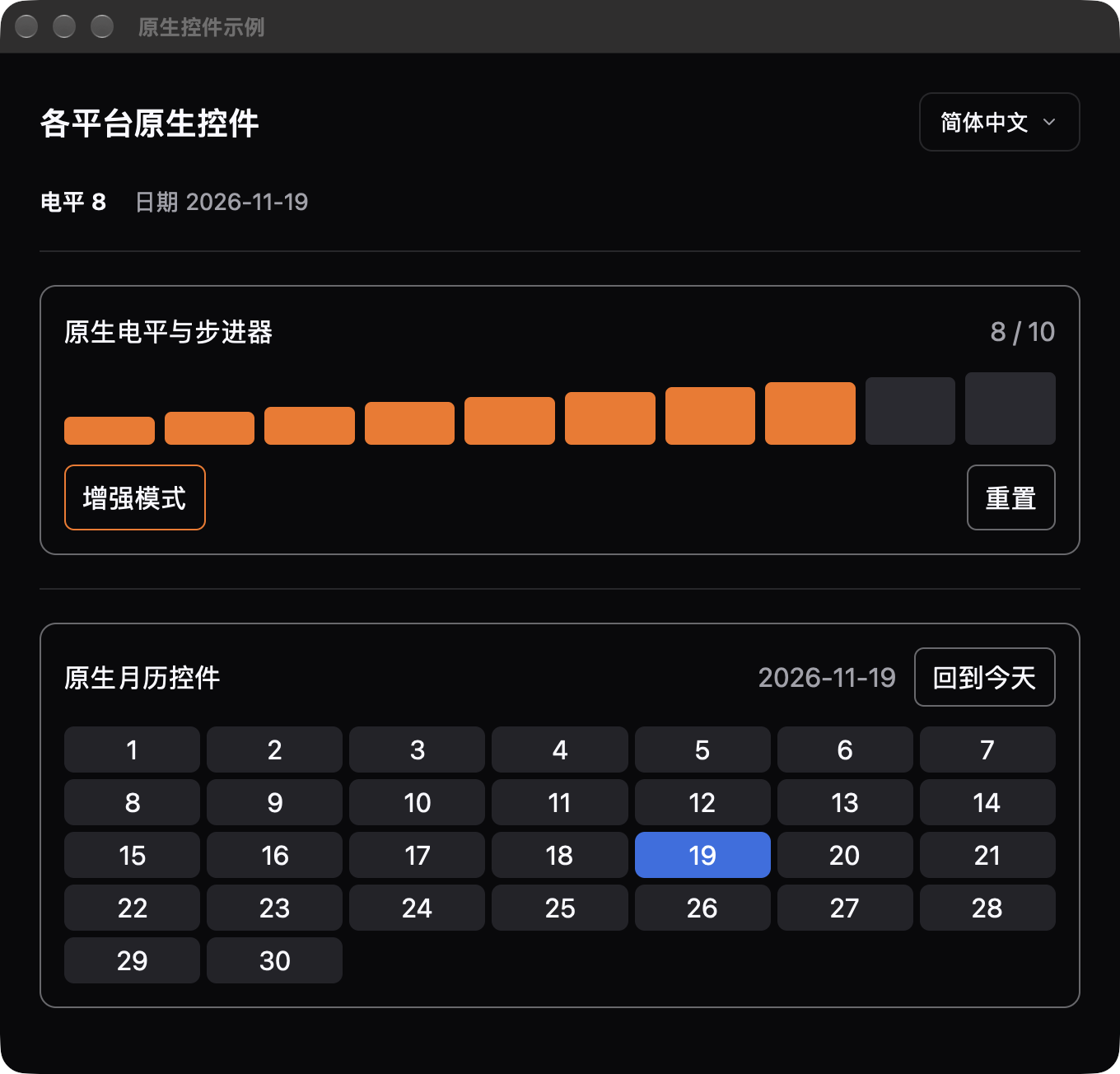
Generates SwiftUI, WinUI 3, GTK 4, Compose and Web code with zero WebView by default, switches to ui = "gpui" for GPU rendering, and ejects anytime via bern eject into standalone FFI-wired native IDE projects.构建期生成 SwiftUI、WinUI 3、GTK 4、Compose 与 Web 代码,默认无 WebView,需要统一 GPU 绘制可切 ui = "gpui";随时用 bern eject 导出配好 Rust FFI 的独立原生工程。
02
Plain Rust business logic业务纯 Rust,不与 GUI 纠缠
A typed protocol separates your engine from every window and widget. Use tokio, rusqlite or any Rust crate freely, and unit-test logic with plain cargo test.协议把业务引擎与窗口控件彻底隔开。照常使用 tokio、rusqlite 等任意 Rust 生态 crate,不开窗口即可用 cargo test 独立单测。
03
Checked at compile time写漏在编译期直接报错
Missing translations, a feature omitted from compact or watch layouts, or an invalid command binding all fail bern check with the exact file and line.少写一种语言、窄屏或手表漏掉功能入口、按钮绑错状态或命令,在 bern check 阶段直接报错并指到具体文件行号。
04
Command-driven by design一切操作皆命令
Every UI action flows through one command catalog — giving you a matching app CLI, SKILL.md for AI agents and opt-in in-process JS scripting automatically.界面、应用 CLI、SKILL.md 与可选进程内 JS 共用同一份命令目录;写完界面即刻具备脚本化与 AI 按语义操控能力。
02 / build in rust
How you build an app in Rust.用 Rust 怎么编写软件。
From data model to release packages, you stay in Rust — no hand-written Swift, C++ or Kotlin. Every app separates into three small crates and ships through one CLI.从数据模型到各平台安装包全程只写 Rust,不用手写 Swift、C++ 或 Kotlin。每个应用拆成协议、引擎与界面三个 crate,由 bern 贯通检查、运行与打包。
1tasks-protocol/
Declares value types, read-only state and typed command signatures.定义值类型、只读状态快照与类型化命令签名。
2tasks-core/
Plain Rust engine implementing commands — zero UI traits or threads.纯普通 Rust 实现业务逻辑,不碰 UI、可直接单测。
3tasks-ui/
Declarative ui! views in Rust with drafts and inline tr! i18n.用 ui! 声明界面、局部草稿与多语言文案。
4Bern.toml
bern check → bern run → bern package across every target.声明目标平台,check / run / package 一键交付。
# Verify, run natively, and ship release bundles from the same Rust workspace$ bern check # types, translations & layout coverage$ bern run # SwiftUI on macOS / WinUI 3 on Windows / GTK 4 on Linux$ bern run --target web_app # or Android, iOS, GPUI, Web$ bern package # .dmg / installer / .deb / .apk / .ipa / Web$ bern eject --target macos # standalone Xcode / Gradle / VS / Cargo + Rust FFI project# Every command also powers the generated app CLI and SKILL.md$ tasks ui inspect
$ tasks tasks add --title "Ship v1.0"
03 / interactive preview
One declaration. Every platform's own look.一份声明,长成每个平台自己的样子。
The code is a real ui! declaration; edit the green text and the app follows. Switch the device and the platform: the same declaration takes each one's layout and controls. The preview is drawn to each platform's guidelines.左边是一份真实的 ui! 声明,改绿色的字,右边的应用跟着变。换设备、换平台,同一份声明换上各自的布局和控件。右边是按各平台规范画的示意。
04 / built for AI
Built for AI, both ways.为 AI 而建:写得准,也用得上。
Because views are checked at compile time and every action goes through the command catalog, AI agents work reliably both when writing UI code and when driving a running app.正因为界面受编译器约束、所有交互都走同一套命令目录,AI 无论帮你写代码还是操作运行中的应用,都有明确边界可循。
What the AI forgets, the compiler remembers.漏掉的,编译器替它记着。
AI rarely gets interface code wrong; it leaves things out. Elsewhere those wait for a user to find them. In Bern they do not compile, and the error says where, so an agent fixes it and builds again.AI 写界面很少写错,常常写漏。在别的框架里,要等用户自己撞上;在 Bern 里它们过不了编译,错误写清在哪里,Agent 改完直接再编。
B102a string missing a language文案少写了一种语言
B201a feature with no entry in some layout功能在某个布局里没有入口
Skills + CLI: names, not coordinates.Skills + CLI:按名称操作,不靠坐标。
Enable the control channel and Bern generates SKILL.md from the app CLI's command catalog. Agents inspect controls by name, invoke commands through the same code path as a click, and capture live window screenshots directly.开启控制通道后,Bern 从应用 CLI 的命令目录生成 SKILL.md。Agent 按名称发现并操作控件,与用户点击走同一条代码路径,还可直接截取实时窗口画面。
Semantic control inspection plus built-in window screenshot按语义查询和操作控件,同时内置 window screenshot 截屏验图
The same CLI runs business commands, locally or over SSH同一份 CLI 也能执行业务命令,本机和 SSH 远端都能用
A disabled or blocked button returns an error code, not a silent click按钮被禁用、被挡住时返回错误码,而不是一次没效果的点击
The release showcase, median of at least 3 runs: Apple M4 · macOS 27, Intel i5-13490F · Windows 11. Hello World: a GitHub-hosted Apple M1, median of 10.发布版展示应用,至少 3 次取中位数:Apple M4 · macOS 27,Intel i5-13490F · Windows 11。Hello World:GitHub 托管的 Apple M1,10 次取中位数。
06 / extend
GPUI, watches, NativeView, eject — and in-process JS.GPUI、手表端、NativeView、原生导出与进程内 JS。
Use Bern as a declarative UI framework for GPUI.把 Bern 当作 GPUI 的声明式 UI 框架。
GPUI gives Rust fast GPU rendering, without a built-in widget library. Set ui = "gpui" on macOS, Windows or Linux and your ui! declarations compile to GPUI with the full control set, automatic skeletons, semantic themes, spring motion, compile-time checks and Skills + CLI included.GPUI 带来高性能 GPU 渲染,但本身不带标准控件库。在 macOS、Windows 或 Linux 上指定 ui = "gpui",一份 ui! 即刻拥有全套标准控件、自动骨架图、语义深浅色主题、弹簧动效、编译期检查与 Skills + CLI。
No hand-drawing forms, tables, trees, split panes, dialogs or skeletons无需从零手画表单、表格、树形视图、分栏、对话框与骨架图
Drop into raw GPUI elements anywhere with NativeView(gpui:)需要自定义 GPU 绘制时用 NativeView(gpui:) 直接写原生 GPUI
Switch back to SwiftUI / WinUI 3 / GTK 4 or expand to mobile without rewriting logic随时切回系统原生控件或扩展到移动端,业务逻辑无需重写
Watches, TV and deep system integration.同一套引擎,覆盖手表、电视与桌面系统集成。
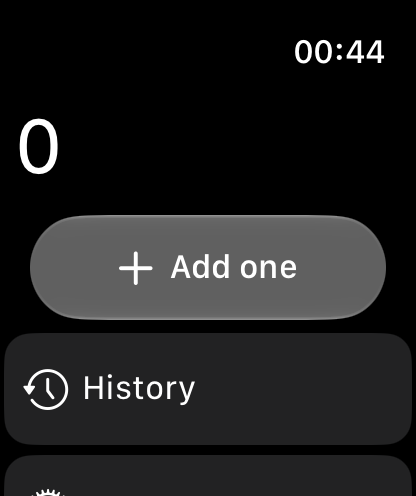
Target Apple Watch (watchOS SwiftUI), Wear OS (Compose Material 3) and tvOS alongside desktop and phone. Declare a Layout(size: watch) or tv branch and the compiler prunes unused layouts per device.在桌面和手机之外,同样原生生成 Apple Watch(watchOS SwiftUI)、Wear OS(Compose Material 3)与 tvOS。声明 Layout(size: watch) 或 tv 布局分支,编译器按设备自动裁剪。
watchOS & Wear OS · native SwiftUI and Compose Material 3 watch layouts with crown/rotary inputwatchOS 与 Wear OS · 原生 SwiftUI 与 Compose Material 3 手表布局及表冠滚动
Automatic skeletons · projected straight from your ui! tree with 120 ms anti-flicker across all 6 backends默认骨架图 · 编译期直接从 ui! 树投影,全六端自带 120 ms 防闪烁与无障碍播报
Co-located native views, still CLI-operable.紧邻嵌入原生代码,依然完全受 CLI 管控。
Need an AppKit NSDatePicker, WinUI 3 NumberBox, Android RatingBar, GTK LevelBar or a Three.js canvas? Place platform files right beside your .rs file with NativeView. Bern generates narrow typed props and registers every declared control entry in the CLI automatically.需要 AppKit NSDatePicker、WinUI 3 NumberBox、Android RatingBar、GTK LevelBar 或 Three.js 画布?用 NativeView 把各平台文件紧邻放在 .rs 同目录。Bern 自动生成强类型接口并把声明的功能入口全部注册进 CLI。
Every NativeView must declare Bern CLI entries — never an automation black box每个 NativeView 必须声明规范化功能入口,绝不沦为黑盒
All display text flows through tr! with compile-time l10n linting on native files文案经 tr! 传入,编译器静态提示原生文件里的硬编码文案
Targets without a native file fall back cleanly to standard Bern controls未提供原生文件的平台自动回退到 Fallback 标准控件
Eject to standalone native projects — or use as a Rust-FFI starter.一键导出独立原生工程:零锁定,也是现成的 Rust FFI 启动模板。
Run bern eject anytime to export standard Xcode (.xcodeproj), Android Gradle, Visual Studio (.sln / .vcxproj), standalone Cargo, or zero-bundler Web projects with UI sources split per component and window — leaving your Bern repo untouched. Even if you plan to hand-write native UI from day one, bern new + bern eject scaffolds a working multi-platform app with Rust FFI, state bindings, and IDE build scripts already wired up.随时运行 bern eject,即可在不改动原 Bern 仓库的前提下,导出按组件与窗口拆好文件的标准 Xcode(.xcodeproj)、Android Gradle、Visual Studio(.sln / .vcxproj)、独立 Cargo 或零打包器 Web 工程。即使你原本就打算手写原生 UI 调用 Rust 核心,也可以直接用 bern new + bern eject 快速生成配好 C ABI / FFI 桥接与各端 IDE 构建脚本的起步模板。
Zero lock-in · clean split files, no Do not edit banners, and relaxed protocol checks so native projects evolve freely零框架锁定 · 按组件拆文件、清除生成标记并放宽协议指纹校验,脱身后可按普通原生工程自由演进
FFI & IDE builds pre-wired · Xcode Run Script, Gradle NDK/JNI, Visual Studio MSBuild, and WASM build scripts ready out of the boxFFI 与构建链路开箱即用 · Xcode 构建脚本、Gradle NDK/JNI、VS MSBuild 与 WASM 脚本已自动接好,免去手配桥接的繁琐
--engine source or --engine prebuilt · vendor an offline Rust workspace, or embed XCFramework / .so / .lib / app.wasm so native teams build with no Rust installed源码与预编译双模式 · 默认 --engine source 打包离线 Rust 工作区;--engine prebuilt 直接嵌入二进制,原生开发者无需装 Rust 即可编译
# Offline Rust workspace + standard native IDE project (works cross-host)$ bern eject --target macos --out ./native-macos
# Or precompile the Rust engine so native teams build without Rust installed$ bern eject --target ios --engine prebuilt --release --out ./native-ios
native-macos/ # zero Bern dependency — open directly in Xcode
├── MyApp.xcodeproj/ # wired with Build Rust Engine / XCFramework
├── Sources/
│ ├── App/ · Models/ · Styles/
│ ├── Views/ # split per component, no Do not edit banners
│ └── Windows/ · Native/ · Runtime/
└── rust/ # offline Rust engine + C FFI bridge
In-process JavaScript with bern.cli and host policies.进程内 JavaScript:内置 bern.cli 与黑白名单。
Apps without scripting link zero JS engine. Enable javascript = true on a target and every isolated context (in-process Boa on native targets, Web Worker on the Web) gets globalThis.bern.cli(...) routed straight to your command catalog — no hidden WebView processes, no extra IPC socket.未启用脚本的应用不链接任何 JS 引擎。在目标上开启 javascript = true 后,每个隔离上下文(原生端统一进程内 Boa,Web 端为 Web Worker)自动内置 globalThis.bern.cli(...) 直通命令目录——无隐藏 WebView 进程,也无需额外 IPC 套接字。
CliPolicy::allow_all() by default — every new app command is immediately scriptable默认 CliPolicy::allow_all(),软件新增功能自动可被脚本调用
Restrict untrusted plugins on the Rust host side with allowlists, denylists, state filters and live hooks面向第三方插件时在 Rust 侧用白名单、黑名单、状态过滤与动态拦截器严格控权
One async Promise API accepting CLI lines, argv arrays or canonical ids + JSON params统一 Promise 接口,支持命令行字符串、参数数组与规范命令 ID + JSON 参数
bern::script · CliPolicy + bern.cli
// Rust host: allowlist / denylist enforced before executionlet js = bern::script::Context::with_policy(
bern::script::CliPolicy::allow_only([
"media.*", "@queries", "state", "catalog",
])
.deny("media.bind")
.deny_state("account.*")
.with_label("example.plugin"),
)?;
// JavaScript: same catalog as the app CLI, in processawait bern.cli("media seek --player-id main --position-ms 90000");
const snapshot = await bern.cli("state");
Rust 1.99, plus the toolchain of each platform you build: Xcode, Visual Studio, GTK, Android Studio. bern doctor tells you what is missing.需要 Rust 1.99,以及要构建的平台各自的工具链:Xcode、Visual Studio、GTK、Android Studio。缺什么,bern doctor 会告诉你。
Install bern安装 bern
Prebuilt binaries for macOS, Windows and Linux; or compile from source with cargo install bern-cli.macOS、Windows、Linux 提供预编译版本;也可通过 cargo install bern-cli 从源码编译。
$ cargo binstall bern-cli
Create an app创建应用
Scaffolds a standard Cargo workspace with separate protocol, engine and interface crates.生成协议、引擎与界面分离的标准 Cargo 工作区脚手架。
$ bern new my_app
$ cd my_app
Check and run检查并运行
Verify translations and layouts with bern check, then launch your host OS target or any target in Bern.toml.用 bern check 做编译期校验,随后运行本机原生目标或 Bern.toml 中的任意目标。
$ bern check
$ bern run
$ bern run --target gpui_macos
$ bern run --target web_app
Ship it打包发布
Outputs release bundles (.dmg, .ipa, .apk, .deb, installers and static Web archives) with the app CLI and SKILL.md where IPC is enabled.按 release 输出各端安装包(.dmg、.ipa、.apk、.deb、安装程序与静态 Web 包),启用 IPC 时自动附带应用 CLI 与 SKILL.md。
$ bern package
Bern · Cross-platform native UI framework for Rust
You are visitor 01402792 — GeezerVison does not store the pages you look up. Best viewed with Netscape Navigator 4.7 or Internet Explorer 6 at 800×600. No cookies required.