GV

GeezerVison

The World Wide Web, restored to 800 pixels of glory.

Home|About|Gaming cabinet|Archives|How it works|Starter sites

On this site

  • Login
  • 0
  • Subscribe!
  • Hungarian
  • Spanish
  • French
  • Turkish
  • Arabic
  • Russian
  • Chinese
  • Portuguese
  • Japanese
  • About UsAll about Chimera Tool.
  • FeaturesThe key features of Chimera Tool.

This view

  • Original page
  • New address

GeezerVison is showing chimeratool.com — How to enable USB debugging mode on Android? - ChimeraTool help

How to enable USB debugging mode on Android?

In this help, we are going to show you how to enable USB debugging on your device. After you allow USB debugging, you will be able to connect your device to Chimera in ADB mode.

SamsungADB

This document created at Sep 12, 2016, 5:39:13 PM and modified at Nov 10, 2026, 5:36:04 AM.

back iconBack
HelpFAQVideos
How to enable USB debugging mode on Android?
 

Android 4.2.x - 15.x

 
On newer Android devices, the Developer Options menu and USB Debugging option have been hidden

First, you need to enable "Developer Options Menu".

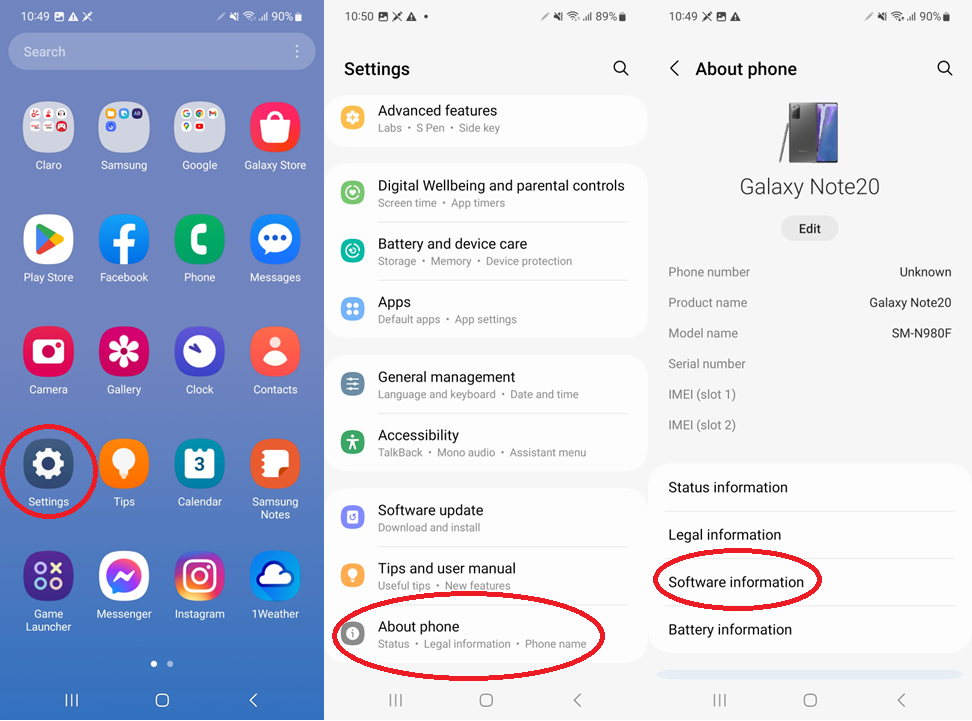
We will show you an example on Android 13

     1. Go to "Settings".
     2. Scroll down to the bottom and tap "About phone" or "About tablet",
     3. Go to "Software information".

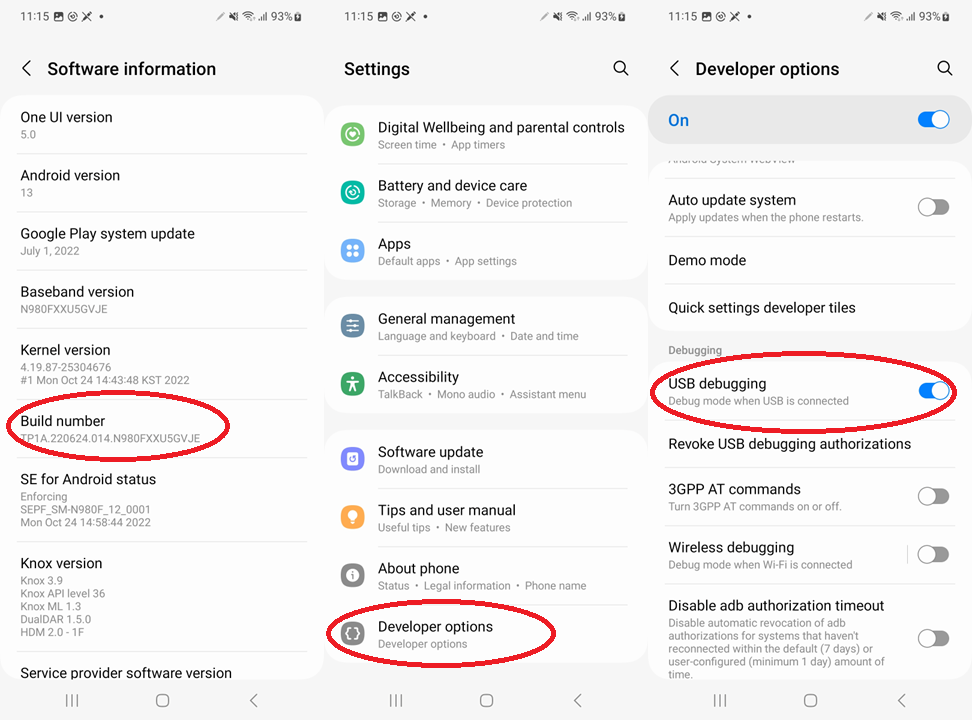
     4. Tap the Build number field seven times to enable Developer Options.
     5. Tap the Back button and you'll see the Developer options menu under the About phone menu
     6. Go to Settings>Developer Options>USB Debugging. Tap the USB Debugging checkbox.


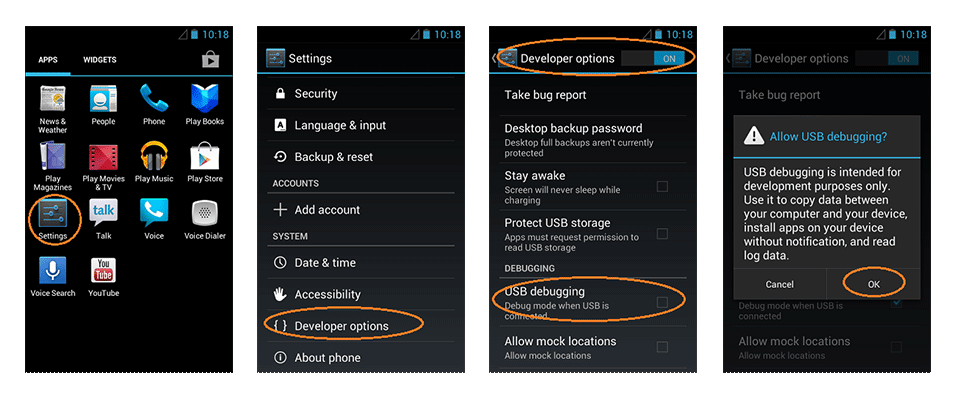
Android 3.0- 4.1.x

Settings > Developer Options > USB Debugging.


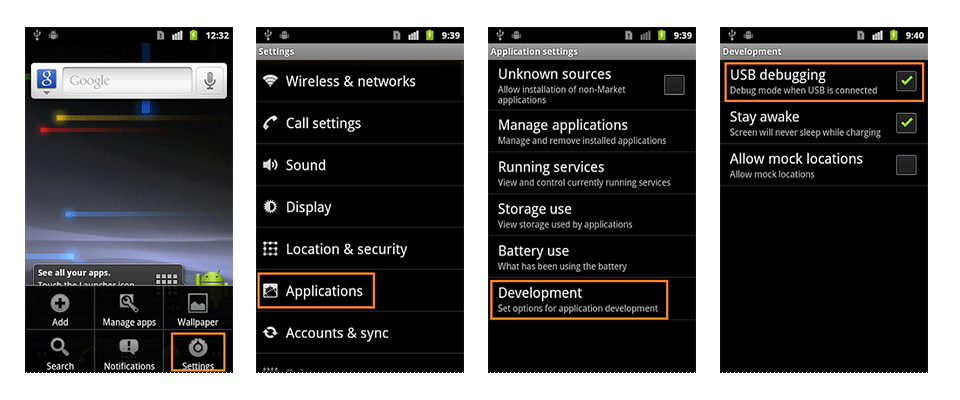
Android 2.0-2.3.x

Settings > Applications > Development > USB Debugging.

Login required to continue!

Login

Was this help useful?

YesNo

Thank you for your answer!

FAQ

Check Frequently Asked Questions about ChimeraTool features!

Video Guide

Watch our YouTube video tutorials about ChimeraTool features!

Martview forum

Martview is not our official forum but it can bring help to all our customers, since the questions asked are answered by professionally relevant users and administrators there.

Open forum

Test Points Library

A continuously updated collection of Test Point photos, PCB Diagrams and Blueprints to help everyone easily find the test point pins on smartphone motherboards - all at one place!

Open Test point library

GSMHosting forum

This is our official English-language forum. We recommend it for all of our users, because many problems and errors have been described and answered here over the years.

Open forum

iconPopular Helps

2,689Loyalty time bonus2,028Loyalty credit bonus986Samsung Modem Mode832Resellers Sales System727Mediatek Bootrom/Preloader mode702How to enable USB debugging mode on Android?638Easy-Firmware account integration618IMEI Repair- Legal Information481Chimera Autoroot

iconPopular Tags

SamsungHuaweiBlackBerryLicenceIMEI repairBuyADBCreditsMediaTek (MTK)LGMTKHTCPatch CERTFRP LockFirmware updateRootingAuthenticatorLumiaNetwork Factory ResetFilesModelsResellersXiaomiFactory resetFastbootDetach-attachEDL modeSIM cardEUBDriver
You are visitor 01402503 — GeezerVison does not store the pages you look up.
Best viewed with Netscape Navigator 4.7 or Internet Explorer 6 at 800×600. No cookies required.