GeezerVisonThe World Wide Web, restored to 800 pixels of glory. |
| Home|About|Gaming cabinet|Archives|How it works|Starter sites |
GeezerVison is showing codescracker.com — Delete a Row from a Table in SQL
Delete a Row from a Table in SQLThis post is created to describe how to delete a row or a record from a table in SQL. So to achieve this task, we have the DELETE FROM statement. Here is its general form. DELETE FROM tableName WHERE condition; For example: DELETE FROM customer WHERE id=3; The above SQL query will delete a row whose "id" value is equal to 3 from the table named "customer." Don't forget to include the WHERE clause to delete a specific row or number of rows from a table, until and unless you need to delete all the records or rows. That is, to delete all the rows of a table named "customer." Here is the SQL query you need to write. DELETE FROM customer; ExampleNow let me create an example of deleting a row from a table in SQL. But before taking an example, let me show you the table data with which I'm going to work. 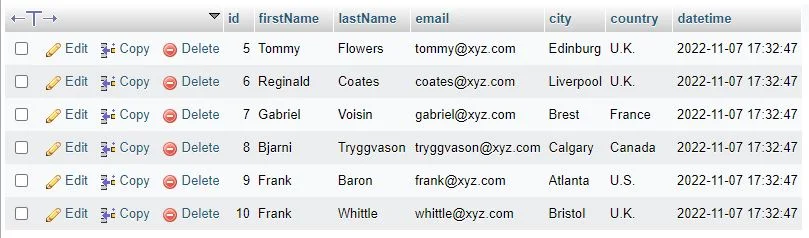
Now, through the following SQL query, a row whose id value is 7 will be deleted from the table. DELETE FROM customer WHERE id=7; After executing the above SQL query, here is the output you will see: 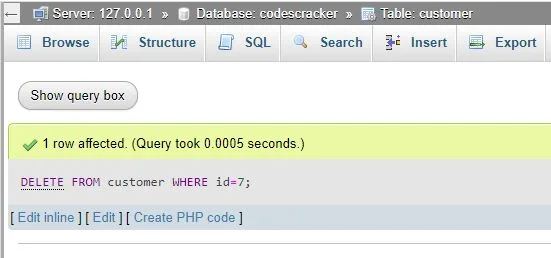
And here is the new snapshot of the table after executing the above SQL query, which deleted a row. 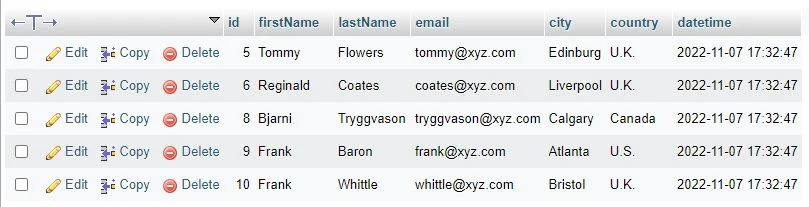
« Previous Topic Next Topic » Practice Quizzes
Test your programming and computer science knowledge with interactive MCQs and topic-based quizzes. Popular Topics
Explore the most popular programming and computer science tutorials on CodesCracker. |
| You are visitor 01402503 — GeezerVison does not store the pages you look up. Best viewed with Netscape Navigator 4.7 or Internet Explorer 6 at 800×600. No cookies required. |