GeezerVisonThe World Wide Web, restored to 800 pixels of glory. | ||||||||||||
| Home|About|Gaming cabinet|Archives|How it works|Starter sites | ||||||||||||
GeezerVison is showing coincheck.com — Exchange API document | Cryptocurrency Exchange, Coincheck
Overviewcoincheck allows roughly two kinds of APIs; Public API and Private API. Public API allows you to browse order status and order book. Private API allows you to create and cancel new orders, and to check your balance. Request URL
AuthenticationPlease authenticate to use a Private API. Generate API KeyFirst, please create your API Key. You can create one here. Please don't share your Access key and Secret Access key with others Make a request using these keys. Permission settingsBy generating an API key, you can set a permission for each function. And you can also give permission to IP addresses you prefer. 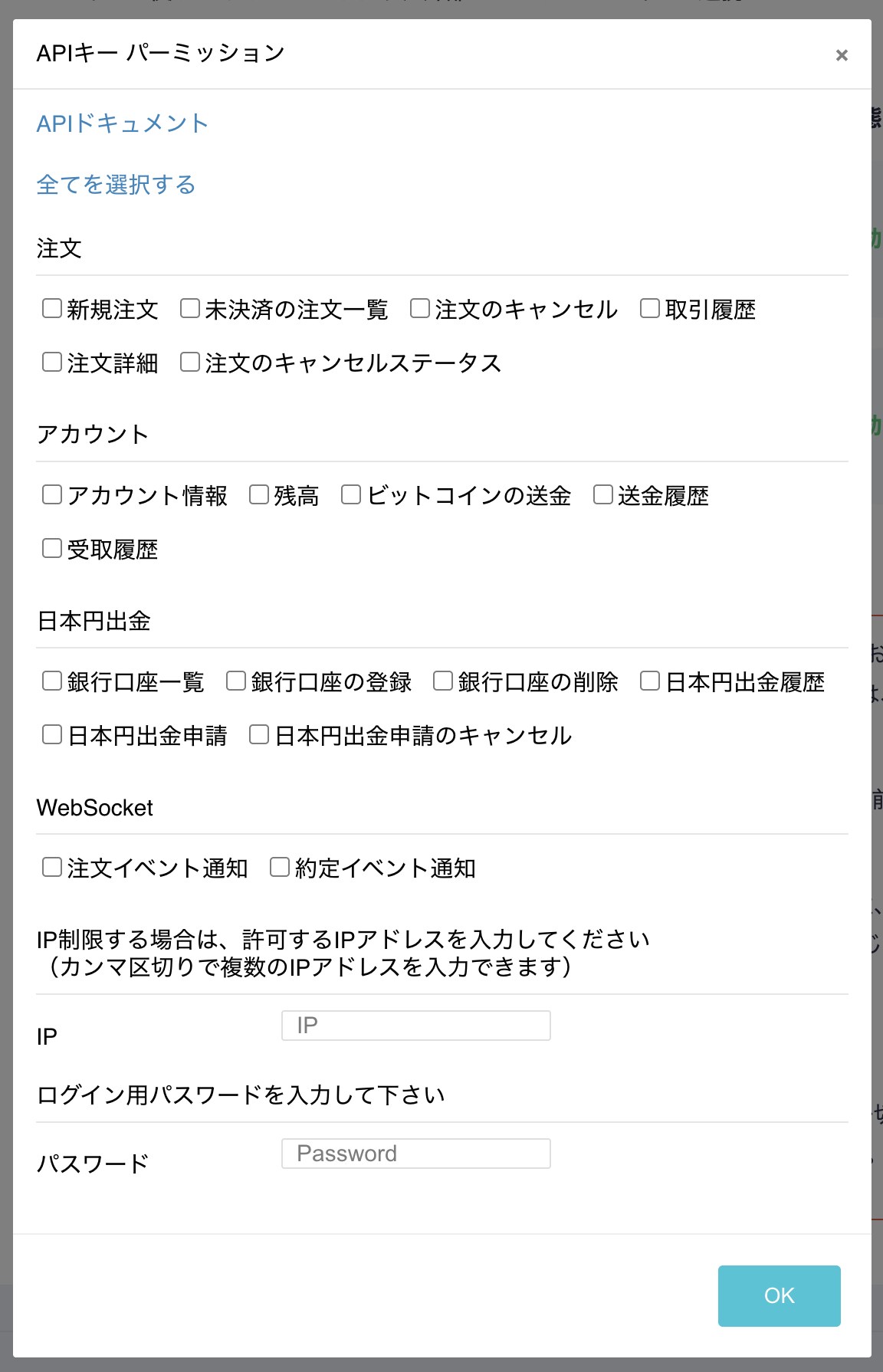
Making a RequestFor requests that require authentication, you have to add information below to HTTP Header.
Create SignatureSIGNATURE is a HMAC-SHA256 encoded message containing: ACCESS-NONCE, Request URL and Request body by using API key. Rubyrequire "openssl"
nonce = (Time.now.to_f * 1000).to_i.to_s
url = "https://coincheck.com/api/accounts/balance"
body = "hoge=foo"
message = nonce + url + body
secret = "API_SECRET"
OpenSSL::HMAC.hexdigest(OpenSSL::Digest.new("sha256"), secret, message)
# => "3919705fea4b0cd073b9c6e01e139f3b056782c57c5cffd5aea6d8c4ac98bef7"
PHP$strUrl = "https://coincheck.com/api/accounts/balance";
$intNonce = (int) (microtime(true) * 1000);
$arrQuery = array("hoge" => "foo");
$strAccessSecret = "API_SECRET";
$strMessage = $intNonce . $strUrl . http_build_query($arrQuery);
$strSignature = hash_hmac("sha256", $strMessage, $strAccessSecret);
# => "3bc1f33d802056c61ba8c8108f6ffb7527bcd184461a3ea0fed3cee0a22ae15d"
Request sampleRubyrequire 'net/http'
require 'uri'
require 'openssl'
key = "API_KEY"
secret = "API_SECRET"
uri = URI.parse "https://coincheck.com/api/accounts/balance"
nonce = (Time.now.to_f * 1000).to_i.to_s
message = nonce + uri.to_s
signature = OpenSSL::HMAC.hexdigest(OpenSSL::Digest.new("sha256"), secret, message)
headers = {
"ACCESS-KEY" => key,
"ACCESS-NONCE" => nonce,
"ACCESS-SIGNATURE" => signature
}
https = Net::HTTP.new(uri.host, uri.port)
https.use_ssl = true
response = https.start {
https.get(uri.request_uri, headers)
}
puts response.body
Javaimport com.google.api.client.http.*;
import com.google.api.client.http.apache.ApacheHttpTransport;
import com.google.api.client.json.jackson2.JacksonFactory;
import org.apache.commons.codec.binary.Hex;
import javax.crypto.Mac;
import javax.crypto.spec.SecretKeySpec;
import java.io.IOException;
import java.security.InvalidKeyException;
import java.security.NoSuchAlgorithmException;
import java.util.HashMap;
import java.util.Map;
public class CoincheckApi {
private String apiKey;
private String apiSecret;
public static void main(String[] args) {
String key = "API_KEY";
String secret = "API_SECRET";
CoincheckApi api = new CoincheckApi(key, secret);
System.out.println(api.getTicker());
System.out.println(api.getBalance());
}
public CoincheckApi(String apiKey, String apiSecret) {
this.apiKey = apiKey;
this.apiSecret = apiSecret;
}
public String getTicker() {
String url = "https://coincheck.com/api/accounts/ticker";
String jsonString = requestByUrlWithHeader(url, createHeader(url));
return jsonString;
}
public String getBalance() {
String url = "https://coincheck.com/api/accounts/balance";
String jsonString = requestByUrlWithHeader(url, createHeader(url));
return jsonString;
}
private Map<String, String> createHeader(String url) {
Map<String, String> map = new HashMap<String, String>();
String nonce = createNonce();
map.put("ACCESS-KEY", apiKey);
map.put("ACCESS-NONCE", nonce);
map.put("ACCESS-SIGNATURE", createSignature(apiSecret, url, nonce));
return map;
}
private String createSignature(String apiSecret, String url, String nonce) {
String message = nonce + url;
return HMAC_SHA256Encode(apiSecret, message);
}
private String createNonce() {
long currentUnixTime = System.currentTimeMillis();
String nonce = String.valueOf(currentUnixTime);
return nonce;
}
private String requestByUrlWithHeader(String url, final Map<String, String> headers){
ApacheHttpTransport transport = new ApacheHttpTransport();
HttpRequestFactory factory = transport.createRequestFactory(new HttpRequestInitializer() {
public void initialize(final HttpRequest request) throws IOException {
request.setConnectTimeout(0);
request.setReadTimeout(0);
request.setParser(new JacksonFactory().createJsonObjectParser());
final HttpHeaders httpHeaders = new HttpHeaders();
for (Map.Entry<String, String> e : headers.entrySet()) {
httpHeaders.set(e.getKey(), e.getValue());
}
request.setHeaders(httpHeaders);
}
});
String jsonString;
try {
HttpRequest request = factory.buildGetRequest(new GenericUrl(url));
HttpResponse response = request.execute();
jsonString = response.parseAsString();
} catch (IOException e) {
e.printStackTrace();
jsonString = null;
}
return jsonString;
}
public static String HMAC_SHA256Encode(String secretKey, String message) {
SecretKeySpec keySpec = new SecretKeySpec(
secretKey.getBytes(),
"hmacSHA256");
Mac mac = null;
try {
mac = Mac.getInstance("hmacSHA256");
mac.init(keySpec);
} catch (NoSuchAlgorithmException e) {
// can't recover
throw new RuntimeException(e);
} catch (InvalidKeyException e) {
// can't recover
throw new RuntimeException(e);
}
byte[] rawHmac = mac.doFinal(message.getBytes());
return Hex.encodeHexString(rawHmac);
}
}
LibrariesWe developed a library for each programming language to be helpful when You use API of coincheck and distribute it. RubyLibrariy is available, if you execute the following commands than a command-line or $ gem install ruby_coincheck_client if you describe it as follows in Gemfile under Bundler environment. gem 'ruby_coincheck_client' We can download the gem file from GitHub. coincheckjp/ruby_coincheck_client PHPAdd the following to composer.json. {
"require": {
"coincheck/coincheck": "1.0.0"
}
}
Package install $ composer install We can download the package file from GitHub. Scalaval key = "YOUR-KEY-HERE" val secret = "YOUR-SECRET-HERE" import net.pocketengineer.coincheckscala.CoinCheckApiService import net.pocketengineer.coincheckscala.model._ val cc = new CoinCheckApiService(key, secret) // Ticker val ticker: Ticker = cc.getTicker // OrderBook val orderBook: OrderBook = cc.getOrderBook // Account Info val balance: Balance = cc.getAccountInfo // Trade val orderId: Long = cc.tradeBtc(28400, 0.01F, BUY) // OpenOrder val openOrders: List[OpenOrder] = cc.getOpenOrder // Cancel Order val isSuccess: Boolean = cc.cancelOrder(ORDER_ID) Build sbt assembly PaginationAt Some API pagination of coincheck It is possible to get by dividing the data. PARAMETERS
{"success":true,"pagination":{"limit":1,"order":"desc","starting_after":null,"ending_before":null},"data":[{"id":10,"pair":"btc_jpy","status":"open","created_at":"2015-12-02T05:27:53.000Z","closed_at":null,"open_rate":"43553.0","closed_rate":null,"amount":"1.51347797","all_amount":"1.51045705","side":"sell","pl":"-8490.81029287","new_order":{"id":23104033,"side":"sell","rate":null,"amount":null,"pending_amount":"0","status":"complete","created_at":"2015-12-02T05:27:52.000Z"},"close_orders":[{"id":23755132,"side":"buy","rate":"10000.0","amount":"1.0","pending_amount":"0.0","status":"cancel","created_at":"2015-12-05T05:03:56.000Z"}]}]}
Public APIPublic API allows you to browse order status, order transactions and order book. TickerCheck latest information If pair is not specified, you can get the information of btc_jpy. HTTP REQUEST
PARAMETERS
{"last":27390,"bid":26900,"ask":27390,"high":27659,"low":26400,"volume":"50.29627103","timestamp":1423377841}
RESPONSE ITEMS
Public tradesYou can get current order transactions. HTTP REQUEST
PARAMETERS
{"success":true,"pagination":{"limit":1,"order":"desc","starting_after":null,"ending_before":null},"data":[{"id":82,"amount":"0.28391","rate":"35400.0","pair":"btc_jpy","order_type":"sell","created_at":"2015-01-10T05:55:38.000Z"},{"id":81,"amount":"0.1","rate":"36120.0","pair":"btc_jpy","order_type":"buy","created_at":"2015-01-09T15:25:13.000Z"}]}
※ For itayose, order_type will be null. Order BookFetch order book information. HTTP REQUEST
PARAMETERS
{"asks":[[27330,"2.25"],[27340,"0.45"]],"bids":[[27240,"1.1543"],[26800,"1.2226"]]}
RESPONSE ITEMS
Calc RateTo calculate the rate from the order of the exchange. HTTP REQUEST
PARAMETERS
{"success":true,"rate": 60000, "price": 60000, "amount": 1.0}
RESPONSE ITEMS
Standard RateStandard Rate of Coin. HTTP REQUEST
PARAMETERS
{"rate": "60000"}
RESPONSE ITEMS
Status RetrievalRetrieving the status of the exchange. For a description of the exchange status, please refer to this page. HTTP REQUEST
PARAMETERS
    {
  "exchange_status": [
    {
      "pair": "btc_jpy",
      "status": "available",
      "timestamp": 1795930882,
      "availability": {
        "order": true,
        "market_order": true,
        "cancel": true
      }
    },
    {
      "pair": "eth_jpy",
      "status": "available",
      "timestamp": 1795930882,
      "availability": {
        "order": true,
        "market_order": true,
        "cancel": true
      }
    },
    {
      "pair": "etc_jpy",
      "status": "available",
      "timestamp": 1795930882,
      "availability": {
        "order": true,
        "market_order": true,
        "cancel": true
      }
    },
    {
      "pair": "lsk_jpy",
      "status": "available",
      "timestamp": 1795930882,
      "availability": {
        "order": true,
        "market_order": true,
        "cancel": true
      }
    },
    {
      "pair": "xrp_jpy",
      "status": "available",
      "timestamp": 1795930882,
      "availability": {
        "order": true,
        "market_order": true,
        "cancel": true
      }
    },
    {
      "pair": "xem_jpy",
      "status": "available",
      "timestamp": 1795930882,
      "availability": {
        "order": true,
        "market_order": true,
        "cancel": true
      }
    },
    {
      "pair": "bch_jpy",
      "status": "available",
      "timestamp": 1795930882,
      "availability": {
        "order": true,
        "market_order": true,
        "cancel": true
      }
    },
    {
      "pair": "mona_jpy",
      "status": "available",
      "timestamp": 1795930882,
      "availability": {
        "order": true,
        "market_order": true,
        "cancel": true
      }
    },
    {
      "pair": "iost_jpy",
      "status": "available",
      "timestamp": 1795930882,
      "availability": {
        "order": true,
        "market_order": true,
        "cancel": true
      }
    },
    {
      "pair": "chz_jpy",
      "status": "available",
      "timestamp": 1795930882,
      "availability": {
        "order": true,
        "market_order": true,
        "cancel": true
      }
    },
    {
      "pair": "imx_jpy",
      "status": "available",
      "timestamp": 1795930882,
      "availability": {
        "order": true,
        "market_order": true,
        "cancel": true
      }
    },
    {
      "pair": "shib_jpy",
      "status": "available",
      "timestamp": 1795930882,
      "availability": {
        "order": true,
        "market_order": true,
        "cancel": true
      }
    },
    {
      "pair": "avax_jpy",
      "status": "available",
      "timestamp": 1795930882,
      "availability": {
        "order": true,
        "market_order": true,
        "cancel": true
      }
    },
    {
      "pair": "fnct_jpy",
      "status": "available",
      "timestamp": 1795930882,
      "availability": {
        "order": true,
        "market_order": true,
        "cancel": true
      }
    },
    {
      "pair": "dai_jpy",
      "status": "available",
      "timestamp": 1795930882,
      "availability": {
        "order": true,
        "market_order": true,
        "cancel": true
      }
    },
    {
      "pair": "wbtc_jpy",
      "status": "available",
      "timestamp": 1795930882,
      "availability": {
        "order": true,
        "market_order": true,
        "cancel": true
      }
    },
    {
      "pair": "bril_jpy",
      "status": "available",
      "timestamp": 1795930882,
      "availability": {
        "order": true,
        "market_order": true,
        "cancel": true
      }
    },
    {
      "pair": "doge_jpy",
      "status": "available",
      "timestamp": 1795930882,
      "availability": {
        "order": true,
        "market_order": true,
        "cancel": true
      }
    },
    {
      "pair": "pepe_jpy",
      "status": "available",
      "timestamp": 1795930882,
      "availability": {
        "order": true,
        "market_order": true,
        "cancel": true
      }
    },
    {
      "pair": "mask_jpy",
      "status": "available",
      "timestamp": 1795930882,
      "availability": {
        "order": true,
        "market_order": true,
        "cancel": true
      }
    },
    {
      "pair": "mana_jpy",
      "status": "available",
      "timestamp": 1795930882,
      "availability": {
        "order": true,
        "market_order": true,
        "cancel": true
      }
    },
    {
      "pair": "trx_jpy",
      "status": "available",
      "timestamp": 1795930882,
      "availability": {
        "order": true,
        "market_order": true,
        "cancel": true
      }
    },
    {
      "pair": "grt_jpy",
      "status": "available",
      "timestamp": 1795930882,
      "availability": {
        "order": true,
        "market_order": true,
        "cancel": true
      }
    },
    {
      "pair": "sol_jpy",
      "status": "available",
      "timestamp": 1795930882,
      "availability": {
        "order": true,
        "market_order": true,
        "cancel": true
      }
    },
    {
      "pair": "fpl_jpy",
      "status": "available",
      "timestamp": 1795930882,
      "availability": {
        "order": true,
        "market_order": true,
        "cancel": true
      }
    },
    {
      "pair": "sui_jpy",
      "status": "available",
      "timestamp": 1795930882,
      "availability": {
        "order": true,
        "market_order": true,
        "cancel": true
      }
    }
  ]
}
RESPONSE ITEMS
Private APIPrivate API allows you to order, cancel new orders and make sure your balance. OrderYou can use API about orders in exchange. New orderPublish new order to exchange. For example if you'd like buy 10 BTC as 30000 JPY/BTC, you need to specify following parameters. In case of buying order, if selling order which is lower than specify price is already exist, we settle in low price order. In case of to be short selling order, remain as unsettled order. It is also true for selling order. About rate limitNew order to the exchange can be up to 4 requests per second. If exceeded, it will return 429:too_many_requests error. Limits are not per currency pair. Limits may be changed depending on the system load status. About order_typeThere 4 types of order_type .
"buy"Limit, Spot, Buy
"sell"Limit, Spot, Sell
"market_buy"Market, Spot, Buy In MarketBuy you have to specify JPY not BTC.
"market_sell"Market, Spot, Sell
HTTP REQUEST
PARAMETERS
{"success": true, "id": 12345, "rate": "30010.0", "amount": "1.3", "order_type": "sell", "time_in_force": "good_til_cancelled", "stop_loss_rate": null, "pair": "btc_jpy", "created_at": "2015-01-10T05:55:38.000Z"}
RESPONSE ITEMS
Order detailsYou can get the details of the order. About rate limitOrder details API calls can be requested to the exchange at most once per second. If exceeded, it will return 429:too_many_requests error. Limits are not per currency pair. Limits may be changed depending on the system load status. HTTP REQUEST
PARAMETERS
    {
  "success": true,
  "id": 12345,
  "pair": "btc_jpy",
  "status": "PARTIALLY_FILLED_EXPIRED",
  "order_type": "buy",
  "rate": "0.1",
  "stop_loss_rate": null,
  "maker_fee_rate": "0.001",
  "taker_fee_rate": "0.001",
  "amount": "1.0",
  "market_buy_amount": null,
  "executed_amount": "0",
  "executed_market_buy_amount": null,
  "expired_type": "self_trade_prevention",
  "prevented_match_id": 123,
  "expired_amount": "1.0",
  "expired_market_buy_amount": null,
  "time_in_force": "good_til_cancelled",
  "created_at": "2015-01-10T05:55:38.000Z"
}
RESPONSE ITEMS
Unsettled order listYou can get a unsettled order list. HTTP REQUEST
{"success":true,"orders":[{"id":202835,"order_type":"buy","rate":26890,"pair":"btc_jpy","pending_amount":"0.5527", "pending_market_buy_amount": null,"stop_loss_rate": null, "created_at": "2015-01-10T05:55:38.000Z"},{"id":202836,"order_type":"sell","rate":26990,"pair":"btc_jpy","pending_amount":"0.77", "pending_market_buy_amount": null,"stop_loss_rate": null, "created_at": "2015-01-10T05:55:38.000Z"},{"id":38632107,"order_type":"buy","rate":null,"pair":"btc_jpy","pending_amount":null,"pending_market_buy_amount": "10000.0", "stop_loss_rate":"50000.0","created_at":"2016-02-23T12:14:50.000Z"}]}
RESPONSE ITEMS
Cancel OrderNew OrderOr, you can cancel by specifyingunsettle order list's ID. HTTP REQUEST
PARAMETERS
{"success": true, "id": 12345}
RESPONSE ITEMS
Order cancellation statusYou can refer to the cancellation processing status of the order. HTTP REQUEST
PARAMETERS
{"success": true, "id": 12345, "cancel": true, "created_at": "2020-07-29T17:09:33.000Z"}
RESPONSE ITEMS
※1 Expired orders are also treated as canceled orders. Transaction historyDisplay your transaction history HTTP REQUEST
{"success":true,"transactions":[{"id":38,"order_id":49,"created_at":"2015-11-18T07:02:21.000Z","funds":{"btc":"0.1","jpy":"-4096.135"},"pair":"btc_jpy","rate":"40900.0","fee_currency":"JPY","fee":"6.135","liquidity":"T","side":"buy"},{"id":37,"order_id":48,"created_at":"2015-11-18T07:02:21.000Z","funds":{"btc":"-0.1","jpy":"4094.09"},"pair":"btc_jpy","rate":"40900.0","fee_currency":"JPY","fee":"-4.09","liquidity":"M","side":"sell"}]}
RESPONSE ITEMS
Transaction history (Pagination)Display your transaction history HTTP REQUEST
{"success":true,"pagination":{"limit":1,"order":"desc","starting_after":null,"ending_before":null},"data":[{"id":38,"order_id":49,"created_at":"2015-11-18T07:02:21.000Z","funds":{"btc":"0.1","jpy":"-4096.135"},"pair":"btc_jpy","rate":"40900.0","fee_currency":"JPY","fee":"6.135","liquidity":"T","side":"buy"},{"id":37,"order_id":48,"created_at":"2015-11-18T07:02:21.000Z","funds":{"btc":"-0.1","jpy":"4094.09"},"pair":"btc_jpy","rate":"40900.0","fee_currency":"JPY","fee":"-4.09","liquidity":"M","side":"sell"}]}
RESPONSE ITEMS
AccountYou can get balance and various information. BalanceCheck your account balance. It doesn't include jpy_reserved use unsettled orders injpy btc. HTTP REQUEST
{"success": true, "jpy": "0.8401", "btc": "7.75052654", "jpy_reserved": "3000.0", "btc_reserved": "3.5002", "jpy_lending": "0", "btc_lending": "0.1", "jpy_lend_in_use": "0", "btc_lend_in_use": "0.3", "jpy_lent": "0", "btc_lent": "1.2", "jpy_debt": "0", "btc_debt": "0", "jpy_tsumitate": "10000.0", "btc_tsumitate": "0.4034"}
RESPONSE ITEMSThis API dynamically returns balances for all currencies of the authenticated account. The above are representative examples (JPY, BTC). For each currency, the following 7 types of balance are returned (<currency> is the currency)
Send Crypto AssetSending crypto assets to a specified address. HTTP REQUEST
PARAMETERS
PURPOSE TYPESThe following is a list of keys that can be specified for purpose_type. Depending on the value of purpose_type, it may be necessary to specify detailed information in object format in purpose_details.
{"success": true, "id": "276", "address": "1v6zFvyNPgdRvhUufkRoTtgyiw1xigncc", "amount": "1.5", "fee": "0.002"}
RESPONSE ITEMS
Sending HistoryCrypto asset send history HTTP REQUEST
PARAMETERS
{"success": true, "sends": [{ "id": 2, "amount": "10.0", "currency": "XRP", "fee": "0.15", "address": "rLW9gnQo7BQhU6igk5keqYnH3TVrCxGRzm", "address_tag": "123456", "status": "confirmed", "created_at": "2015-06-13T08:25:20.000Z" }, { "id": 1, "amount": "5.0", "currency": "XRP", "fee": "0.15", "address": "rEPRpXUq6i3fcNs3RZVJzmwdyagmAF2JyE", "address_tag": null, "status": "pending", "created_at": "2015-06-13T08:21:18.000Z" }] }
RESPONSE ITEMS
Deposits HistoryCrypto asset deposit history HTTP REQUEST
PARAMETERS
{"success": true, "deposits": [{ "id": 2, "amount": "0.05", "currency": "BTC", "address": "13PhzoK8me3u5nHzzFD85qT9RqEWR9M4Ty", "status": "confirmed", "confirmed_at": "2015-06-13T08:29:18.000Z", "created_at": "2015-06-13T08:22:18.000Z" }, { "id": 1, "amount": "0.01", "currency": "BTC", "address": "13PhzoK8me3u5nHzzFD85qT9RqEWR9M4Ty", "status": "received", "confirmed_at": "2015-06-13T08:21:18.000Z", "created_at": "2015-06-13T08:21:18.000Z" }] }
RESPONSE ITEMS
Account informationDisplay account information. HTTP REQUEST
    {
  "success": true,
  "id": 10000,
  "email": "t**[email protected]",
  "identity_status": "identity_pending",
  "bitcoin_address": "1v6zFvyNPgdRvhUufkRoTtgyiw1xigncc",
  "taker_fee": "0.15",
  "maker_fee": "0.0",
  "exchange_fees": {
    "btc_jpy": {
      "maker_fee_rate": "0.0",
      "taker_fee_rate": "0.0"
    },
    "eth_jpy": {
      "maker_fee_rate": "0.0",
      "taker_fee_rate": "0.0"
    },
    "etc_jpy": {
      "maker_fee_rate": "0.05",
      "taker_fee_rate": "0.1"
    },
    "lsk_jpy": {
      "maker_fee_rate": "0.0",
      "taker_fee_rate": "0.0"
    },
    "xrp_jpy": {
      "maker_fee_rate": "0.0",
      "taker_fee_rate": "0.0"
    },
    "xem_jpy": {
      "maker_fee_rate": "0.0",
      "taker_fee_rate": "0.0"
    },
    "bch_jpy": {
      "maker_fee_rate": "0.0",
      "taker_fee_rate": "0.0"
    },
    "mona_jpy": {
      "maker_fee_rate": "0.0",
      "taker_fee_rate": "0.0"
    },
    "iost_jpy": {
      "maker_fee_rate": "0.05",
      "taker_fee_rate": "0.1"
    },
    "chz_jpy": {
      "maker_fee_rate": "0.0",
      "taker_fee_rate": "0.0"
    },
    "imx_jpy": {
      "maker_fee_rate": "0.0",
      "taker_fee_rate": "0.0"
    },
    "shib_jpy": {
      "maker_fee_rate": "0.0",
      "taker_fee_rate": "0.0"
    },
    "avax_jpy": {
      "maker_fee_rate": "0.0",
      "taker_fee_rate": "0.0"
    },
    "fnct_jpy": {
      "maker_fee_rate": "0.05",
      "taker_fee_rate": "0.1"
    },
    "dai_jpy": {
      "maker_fee_rate": "0.0",
      "taker_fee_rate": "0.0"
    },
    "wbtc_jpy": {
      "maker_fee_rate": "0.0",
      "taker_fee_rate": "0.0"
    },
    "bril_jpy": {
      "maker_fee_rate": "0.05",
      "taker_fee_rate": "0.1"
    },
    "doge_jpy": {
      "maker_fee_rate": "0.0",
      "taker_fee_rate": "0.0"
    },
    "pepe_jpy": {
      "maker_fee_rate": "0.0",
      "taker_fee_rate": "0.0"
    },
    "mask_jpy": {
      "maker_fee_rate": "0.0",
      "taker_fee_rate": "0.0"
    },
    "mana_jpy": {
      "maker_fee_rate": "0.0",
      "taker_fee_rate": "0.0"
    },
    "trx_jpy": {
      "maker_fee_rate": "0.0",
      "taker_fee_rate": "0.0"
    },
    "grt_jpy": {
      "maker_fee_rate": "0.0",
      "taker_fee_rate": "0.0"
    },
    "sol_jpy": {
      "maker_fee_rate": "0.0",
      "taker_fee_rate": "0.0"
    },
    "fpl_jpy": {
      "maker_fee_rate": "0.05",
      "taker_fee_rate": "0.1"
    },
    "sui_jpy": {
      "maker_fee_rate": "0.0",
      "taker_fee_rate": "0.0"
    }
  }
}
RESPONSE ITEMS
Withdraw JPYYou can withdraw JPY through this API. Bank account listDisplay list of bank account you registered (withdrawal). HTTP REQUEST
{"success":true,"data":[{"id":243,"bank_name":"みずほ","branch_name":"東京営業部","bank_account_type":"futsu","number":"****456","name":"タナカ タロウ"}]}
RESPONSE ITEMS
Register bank accountRegister bank account for withdrawal. HTTP REQUEST
PARAMETERS
{"success":true,"data":{"id":641,"bank_name":"熊本","branch_name":"田中","bank_account_type":"futsu","number":"****456","name":"hoge"}}
RESPONSE ITEMS
Remove bank accountWill remove your bank account. HTTP REQUEST
PARAMETERS
{"success":true}
Withdraw historyDisplay Japanese YEN withdrawal request history. HTTP REQUEST
{"success":true,"pagination":{"limit":25,"order":"desc","starting_after":null,"ending_before":null},"data":[{"id":398,"status":"finished","amount":"242742.0","currency":"JPY","created_at":"2014-12-04T15:00:00.000Z","bank_account_id":243,"fee":"400.0", "is_fast": true}]}
RESPONSE ITEMS
Create withdrawRequest Japanese Yen withdrawal HTTP REQUEST
PARAMETERS
{"success":true,"data":{"id":1043,"status":"pending","amount":"10000.0","currency":"JPY","created_at":"2015-08-31T11:32:45.213Z","bank_account_id":243,"fee":"300.0"}}
RESPONSE ITEMS
Cancel withdrawalCancel withdrawal request. You can only cancel a withdrawal request that has the pending status. HTTP REQUEST
PARAMETERS
{"success":true}
WebSocket APIIn addition to the REST API, Coincheck Exchange provides a WebSocket API. The WebSocket API allows you to receive market data and updates to your account's order status in real time. Unlike traditional HTTP polling with REST APIs, the WebSocket API enables low-latency and efficient communication through server-initiated data delivery. Because trade data is pushed the moment it occurs, this API is ideal for real-time monitoring applications. There are two types of WebSocket APIs available: Public WebSocket APIThe Public WebSocket API allows anyone to receive market data—such as trade history and order book updates—in real time. No authentication is required, making it ideal for use cases such as price monitoring, chart rendering, and alert systems. Private WebSocket APIThe Private WebSocket API delivers real-time updates for order events and trade executions. Authentication is required to use this API. It enables real-time monitoring of your trading activity and is well-suited for building automated trading systems and order management tools. Public WebSocket APIOverviewThe Public WebSocket API is available without authentication. After establishing a connection, you can subscribe to multiple currency pair channels and monitor the entire market efficiently with a single WebSocket connection. Data is pushed approximately every 0.1 seconds when a trade occurs. We recommend implementing automatic reconnection logic in case of network interruptions. Connection Flow1. Establish WebSocket ConnectionConnect to the following URI: wss://ws-api.coincheck.com 2. Subscribe to ChannelsOnce connected, send a subscribe message to begin receiving updates from the desired channel. Example//JavaScript Supported Currency Pairsbtc_jpy, eth_jpy, etc_jpy, lsk_jpy, xrp_jpy, xem_jpy, bch_jpy, mona_jpy, iost_jpy, chz_jpy, imx_jpy, shib_jpy, avax_jpy, fnct_jpy, dai_jpy, wbtc_jpy, bril_jpy, doge_jpy, pepe_jpy, mask_jpy, mana_jpy, trx_jpy, grt_jpy, sol_jpy, fpl_jpy, sui_jpy Commandssubscribe CommandBegins subscribing to a specific channel. With the Public WebSocket API, each subscribe command can subscribe to only one channel. To subscribe to multiple channels, send a separate subscribe command for each. REQUEST ITEMS{"type":"subscribe","channel":"channel_name_to_subscribe"}
REQUEST EXAMPLE{"type":"subscribe","channel":"btc_jpy-trades"}
Public trades ChannelThe Public Trades Channel pushes information on recent transactions every 0.1 seconds. Specify the desired currency pair as [pair] based on the list of supported pairs above. REQUEST ITEMS{"type":"subscribe","channel":"[pair]-trades"}
RESPONSE ITEMS["transaction timestamp (unix time)", "transaction ID","pair","transaction rate","transaction amount","order side","ID of the Taker","ID of the Maker","ID of the Itayose order"] ※ Only information on Taker or Itayose orders is pushed through the stream. ※ Itayose is a separate category from Taker/Maker. Since all matched buy and sell information is streamed, the total aggregated volume will not match the actual total transaction volume. ※ For regular trades, the Itayose order ID will be null. For Itayose trades, the Taker/Maker order IDs will be null. REQUEST EXAMPLE{"type":"subscribe","channel":"btc_jpy-trades"}
RESPONSE EXAMPLES※ The transaction information will be pushed as a 2-dimensional array. [["1663318663","2357062","btc_jpy","2820896.0","5.0","sell","1193401","2078767",null],["1663318892","2357068","btc_jpy","2820357.0","0.7828","buy","4456513","8046665",null]] Order Book ChannelSend the difference of order book information at regular intervals. Specify the desired currency pair as [pair] based on the list of supported pairs above. REQUEST ITEMS{"type":"subscribe", "channel":"[pair]-orderbook"}
RESPONSE ITEMS["[pair]",{"bids":[["order rate","order amount"],["order rate","order amount"]],"asks":[["order rate","order amount"],["order rate","order amount"]], "last_update_at": "timestamp (unix time)"}]
※ "bids" refer to buy orders, and "asks" refer to sell orders. REQUEST EXAMPLE{"type":"subscribe","channel":"btc_jpy-orderbook"}
RESPONSE EXAMPLES["btc_jpy",{"bids":[["148634.0","0.12"],["148633.0","0.0574"]],"asks":[["148834.0","0.0812"],["148833.0","1.0581"]],"last_update_at":"1659321701"}]
Private WebSocket APIOverviewThe Private WebSocket API requires authentication. Similar to the REST API, you must use your ACCESS-KEY, ACCESS-NONCE, and ACCESS-SIGNATURE to log in before receiving real-time events related to your orders and executions. The channels you can subscribe to depend on the permissions granted to your API key. If your connection is interrupted, or if the API key is updated or revoked, the Private WebSocket connection will be automatically closed. We recommend implementing automatic reconnection in your application. Connection Flow1. Preparation
2. Establish WebSocket ConnectionConnect to the following URI: wss://stream.coincheck.com 3. Authentication (login)To authenticate, use the ACCESS-KEY, ACCESS-NONCE, and ACCESS-SIGNATURE as described in the Authentication section. 4. Subscribe to ChannelsAfter successful authentication, send a subscribe request for the desired channels. Ruby ExampleFor the Private WebSocket API, the uri must always be wss://stream.coincheck.com/private . require 'uri'
require 'openssl'
key = "API_KEY"
secret = "API_SECRET"
# URI is a fixed value
uri = URI.parse "wss://stream.coincheck.com/private"
nonce = (Time.now.to_f * 1000).to_i.to_s
# => "1756746080103"
message = nonce + uri.to_s
signature = OpenSSL::HMAC.hexdigest(
OpenSSL::Digest.new("sha256"),
secret,
message
)
# => "577ea3f3900bac682d65751d76fcc21ea11a8a57431e6e8e83efbba8effd4265"
Example: Connect Using websocatwebsocat is a command-line WebSocket client that you can use to test the Private WebSocket API. The following example demonstrates the login and channel subscription flow. Use the generated ACCESS-KEY, ACCESS-NONCE, and ACCESS-SIGNATURE to authenticate. Once logged in, you may subscribe to any enabled private channels. You can also unsubscribe from channels as needed. Note that channels must be enabled in the Authentication Authentication permissions section to be accessible. $ websocat wss://stream.coincheck.com/
{"type":"login","access_key":"ACCESS_KEY","access_nonce":"1756746080103","access_signature":"577ea3f3900bac682d65751d76fcc21ea11a8a57431e6e8e83efbba8effd4265"}
{"success":true,"available_channels":["order-events","execution-events"]}
{"type":"subscribe","channels":["order-events","execution-events"]}
{"type":"unsubscribe","channels":["order-events"]}
^C
Commandslogin CommandPerforms authentication. REQUEST ITEMS{
"type":"login",
"access_key":"ACCESS-KEY",
"access_nonce":"ACCESS-NONCE",
"access_signature":"ACCESS-SIGNATURE"
}
REQUEST EXAMPLE{"type":"login","access_key":"ACCESS_KEY","access_nonce":"1756746080103","access_signature":"577ea3f3900bac682d65751d76fcc21ea11a8a57431e6e8e83efbba8effd4265"}
RESPONSE ITEMS{
"success": "true if authentication succeeded, false otherwise",
"available_channels": "list of channels authorized for the current API key"
}
RESPONSE EXAMPLE{
"success":true,
"available_channels":["order-events","execution-events"]
}
subscribe CommandBegins subscription to one or more channels. The Private WebSocket API allows subscribing to multiple channels with a single subscribe command. REQUEST ITEMS{
"type":"subscribe",
"channels": "Channels to subscribe (multiple channels allowed in array format)"
}
REQUEST EXAMPLE{"type":"subscribe","channels":["order-events","execution-events"]}
unsubscribe CommandStops subscription to specified channels. REQUEST ITEMS{
"type":"unsubscribe",
"channels": "List of channels to unsubscribe (multiple channels allowed in array format)"
}
REQUEST EXAMPLE{"type":"unsubscribe","channels":["order-events","execution-events"]}
Order Events ChannelThis channel delivers order-related events. The following order event types may be received:
Note: Messages are not re-delivered. To retrieve missed events, please use the Order Detail endpoint in the REST API. REQUEST ITEMS{"type":"subscribe","channels":["order-events"]}
RESPONSE ITEMS{
"channel": "order-events",
"id": "Order ID (It's the same ID in Order Detail)",
"pair": "Deal pair",
"order_event": "Event type",
"order_type": "Order type",
"rate": "Order rate",
"stop_loss_rate": "Stop Loss Order's Rate",
"maker_fee_rate": "Maker fee rate",
"taker_fee_rate": "Taker fee rate",
"amount": "Order amount",
"market_buy_amount": "Market buy amount",
"latest_executed_amount": "Latest executed amount",
"latest_executed_market_buy_amount": "Latest executed market buy amount",
"expired_type": "Reasons for Expiration",
"prevented_match_id": "Prevented match ID",
"expired_amount": "Expired amount",
"expired_market_buy_amount": "Expired market buy amount",
"time_in_force": "Time In Force",
"event_time": "Event time"
}
RESPONSE EXAMPLE{
"channel": "order-events",
"id": 12345,
"pair": "btc_jpy",
"order_event": "EXPIRY",
"order_type": "buy",
"rate": "0.1",
"stop_loss_rate": null,
"maker_fee_rate": "0.001",
"taker_fee_rate": "0.001",
"amount": "1.0",
"market_buy_amount": null,
"latest_executed_amount": "0",
"latest_executed_market_buy_amount": null,
"expired_type": "self_trade_prevention",
"prevented_match_id": 123,
"expired_amount": "1.0",
"expired_market_buy_amount": null,
"time_in_force": "good_til_cancelled",
"event_time": "2015-01-10T05:55:38.000Z"
}
Execution Events ChannelThis channel delivers execution-related events. Messages are not re-delivered. To retrieve missed executions, please use the Transaction history endpoint in the REST API. REQUEST ITEMS{"type":"subscribe","channels":["execution-events"]}
RESPONSE ITEMS{
"channel": "execution-events",
"id": "Order ID (It's the same ID in Transaction history)",
"order_id": "Order ID",
"event_time": "Event time",
"funds": {
"btc": "Balance change",
"jpy": "Balance change"
},
"pair": "Pair",
"rate": "Rate",
"fee_currency": "Fee currency",
"fee": "Fee amount",
"liquidity": "'T' (Taker) or 'M' (Maker) or 'itayose'",
"side": "buy"
}
RESPONSE EXAMPLE{
"channel": "execution-events",
"id": 38,
"order_id": 49,
"event_time": "2015-11-18T07:02:21.000Z",
"funds": {
"btc": "0.1",
"jpy": "-4096.135"
},
"pair": "btc_jpy",
"rate": "40900.0",
"fee_currency": "JPY",
"fee": "6.135",
"liquidity": "T",
"side": "buy"
}
| ||||||||||||
| You are visitor 01402792 — GeezerVison does not store the pages you look up. Best viewed with Netscape Navigator 4.7 or Internet Explorer 6 at 800×600. No cookies required. |