GeezerVisonThe World Wide Web, restored to 800 pixels of glory. | |||||||||||||||||||||||||
| Home|About|Gaming cabinet|Archives|How it works|Starter sites | |||||||||||||||||||||||||
GeezerVison is showing colemakmods.github.io — Colemak Mod-DH - Keyboard effort grid Typing Effort GridThis page presents method of calculating a keyboard effort grid in a more objective and rigorous way than is usual, with the intention of using the results in keyboard layout analysis software. If you want to skip over the methodological details, you can jump direct to the results. » BackgroundMany keyboard analyses use at their heart a way to measure the effort involved a typing each key. This typically involves considering a number of factors, such as the distance a key is from the home position and the finger being used to type the said key. Although these factors seem reasonable, they are often both simplistic and overly subjective. 
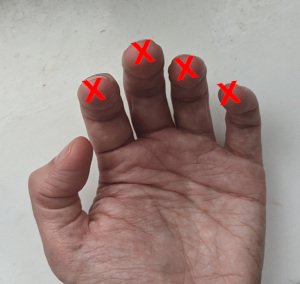
NB: the analysis on the Mod-DH pages has now been updated to use the effort grids calculated on this page. In keyboard analyses, it's not possible to eliminate personal judgement entirely, so some subjectivity will always be present. Nonetheless, the ease with which each key is typed can be considered in more detail by including several relevant factors, and using these factors to construct a systematic model. Note, a comprehensive keyboard analysis should include more components than just an effort grid: there are influences such as bigram analysis, hand and finger balance, and rolls/alternation, which also play a part. These factors are outside the scope this article, as the focus here is on one element only: deriving a more accurate and rigorous keyboard typing effort model based on real-world hand and keyboard geometry. The Layout Analysis Tool on these pages incorporates the effort grid described here, along with some additional factors, as described on the Compare Layouts page. » NotationTo identify keys by name, they are referred to by their Qwerty labels unless explicitly mentioned.» Finger lengths and Angle of ApproachThe home key positions A S D F J K L ; are right underneath the fingers when using classic touch-tying technique. It might be imagined that natural home positions of the fingers therefore corresponds to the centre of these 8 keys. But we know the fingers are not all the same lengths. Indeed, a new generation of column-staggered keyboards has appeared which recognise hand geometry explicitly: the middle fingers are longer, the pinkies shorter, and the ring and index fingers somewhere in between. The geometry of these column-staggered keyboard can be used to inform where the relaxed home-key finger positions naturally lie. This treatement is based on the geometry of the Atreus keyboard, although other column-staggered keyboards have similar designs.
The hands don't approach the keyboard at right angles to the keyboard (assuming a traditional, non-split type). A comfortable posture should involve laying out the keyboard directly in front of the user, with wrists straight and forearms approaching the keyboard symmetrically and at an angle. Using the Atreus keyboard as an example, it's notable that this assumption is built-in, by virtue of the columns being laid out at a 10° angle relative to vertical. In split and widely separated keyboards, this angle would be unnecessary, but is certainly needed for single-piece keyboards. Putting these two observations together, we can overlay the staggered key positions of the Atreus, to guide us toward more natural home positions on a standard, staggered keyboard. 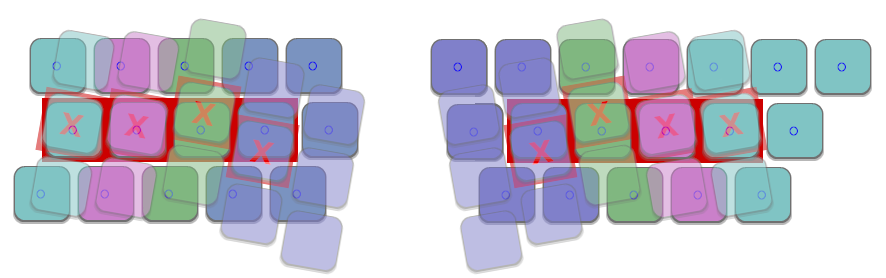
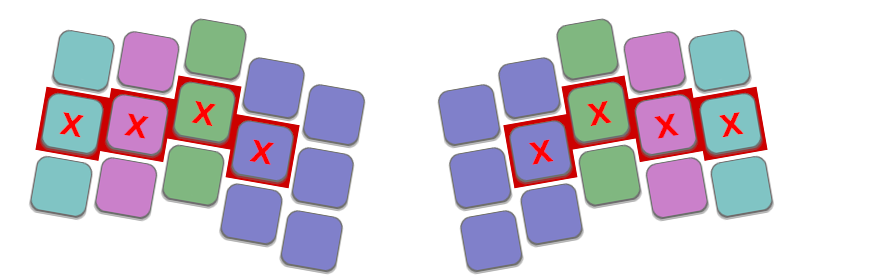
Overlay toggle
What's notable is that (i) the ring and pinky finger home positions coincide closely, (ii) the middle finger home position is naturally a bit higher than the centre of the D and K keys, and (iii) the index finger home position is significantly below the centre of the F and J positions, reaching about ⅓ of a key unit towards the bottom row. My personal observation is that this pattern corresponds closely with what I've noticed in practise. When using a traditional keyboard, it's slightly easier for the middle finger to reach the upper row, and also significantly easier for the index finger to reach down the C and M keys. » Finger strengthNot all fingers are created equal, and there is broad agreement that the index and middle fingers are strongest, the pinkies the weakest. This applies both to the action of pressing a key, and to the curling inward/outward motion used to reach keys on the top and bottom rows; in either case there will be more strain on pinkies than index fingers for the same distance moved. Quantifying the relative strengths of each finger numerically is still a subjective matter - in this model, a finger effort factor is defined as follows:
» Lateral MotionIn common with my fork of the patorjk analyzer, this model also assumes lateral motion of the hand is more costly than simply curling a finger inward or outward. Consequently, motions that are transverse to the direction of the forearm are penalized more heavily than directions that are aligned (the mesial direction). Using the geometry of the Atreus keyboard as a guide, the angle-of-approach of the arms is set to 10° from the vertical. In this model the lateral movement multiplier (Px) is set to 2.0, making such motions more costly than moving any individual finger. 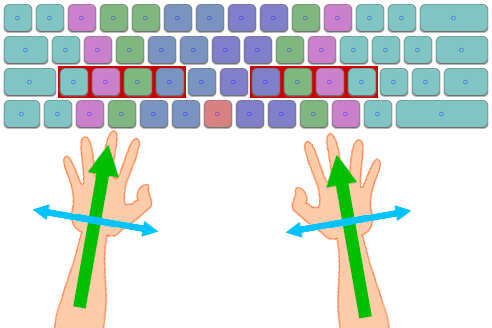
» Key sizeAt noted in the Finger Lengths section, the index fingers may rest over the lower part of the F and J keys rather than over the centre. Nevertheless, it's still easy for those fingers to type their respective home keys - fingers do not necessarily need to travel to the central point of a key to successfully strike it. This observation becomes especially relevant when considering larger keys: taking the left-shift key for example, the point at which it is usually pressed is significantly to the right of its midpoint. A further note on these lines is that it may be easier strike keys such as E and R slightly right of centre, to mitigate the wrong-way stagger on the left-half of traditional keyboards. We can infer that there is an region surrounding the central point of a key where it can be successfully typed. So instead of basing distance calculations on a key's central point, it is more accurate to consider the distance to the nearest point in this activation area. In this model, the activation area is defined as a box of margin 0.3u within the key's footprint. » Fitts's LawFitts's Law is a predictive model of human movement which can be used to estimate the time or effort it takes to perform a variety of actions, based on the distance and size of the target. This observation is used to inform the model of typing. Fitts's Law suggests that the distance-based penalty should use logarithmic, rather than linear scaling, so in this model uses the formula used for the lateral distance-based penality is: Fx = Log2 ( 1 + Pd Dx) ...where Pd is a distance-based penalty constant, Dx is the lateral distance to the target key. The formula for the mesial component (y-direction) is equivalent. » Creating a new modelPutting all these observations together makes it possible to create a new model of keyboard effort grid for any arbitrary keyboard geometry, by calculating the effort values from base principles. In summary, the model works like this:
The total effort value for each key, Ptotal, is calculated with the formula: Ptotal = Pf + dist( Pf Fy, Px Fx ) ...where Pf is the finger-based penalty, Px is the lateral-movement penalty, and Fx, Fy are the two components of the distance penalty with Fitt's Law applied. The dist(x,y) function is sqrt(x2 + y2). » ResultsStandard KeyboardUsing this new model, the effort scores for each key on a standard keyboard can be calculated. The finger whose effort value is lowest is used to provide at objective indication of which finger should be used to type each key. 

Show by score
Show by finger
Standard Keyboard with traditional finger patternIn this case, instead of calculating the optimal finger for each key, the fingers are 

Show by score
Show by finger
Matrix KeyboardSince the model can be applied to arbitrary keyboard geometries, it's possible to calculate the effort grid for non-traditional designs, such as this matrix-like layout. In this case the board is assumed to be split, and the user is free to angle each half appropriately, so the model's 10° angle-of-approach factor is not required in this case. 

Show by score
Show by finger
| |||||||||||||||||||||||||
| You are visitor 01402503 — GeezerVison does not store the pages you look up. Best viewed with Netscape Navigator 4.7 or Internet Explorer 6 at 800×600. No cookies required. |