GeezerVisonThe World Wide Web, restored to 800 pixels of glory. | ||
| Home|About|Gaming cabinet|Archives|How it works|Starter sites | ||
GeezerVison is showing cplusplus.com — Dev-C++ C++ Language
Dev-C++Originally released by Bloodshed Software, but abandoned in 2006, it has recently been forked by Orwell, including a choice of more recent compilers. It can be downloaded from: <a href="http://orwelldevcpp.blogspot.com/">http://orwelldevcpp.blogspot.com</a> InstallationRun the downloaded executable file, and follow its instructions. The default options are fine.Support for C++11By default, support for the most recent version of C++ is not enabled. It shall be explicitly enabled by going to:Tools -> Compiler Options 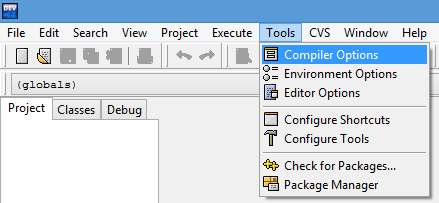 Here, select the "Settings" tab, and within it, the "Code Generation" tab. There, in "Language standard (-std)" select "ISO C++ 11": 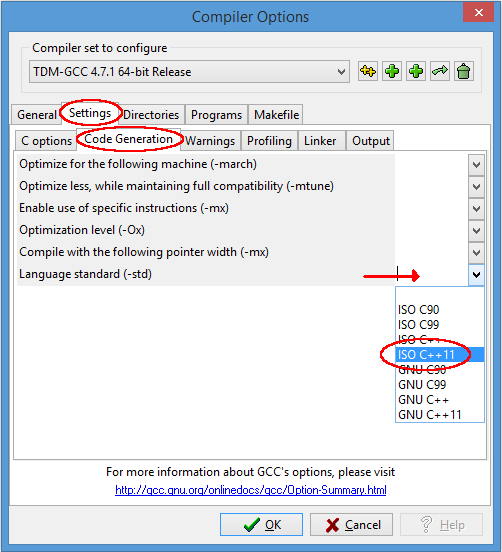 Ok that. You are now ready to compile C++11! Compiling console applicationsTo compile and run simple console applications such as those used as examples in these tutorials it is enough with opening the file with Dev-C++ and hitF11.As an example, try: File -> New -> Source File (or Ctrl+N)There, write the following:
Then: File -> Save As... (or Ctrl+Alt+S)And save it with some file name with a .cpp extension, such as example.cpp.Now, hitting F11 should compile and run the program.If you get an error on the type of x, the compiler does not understand the new meaning given to auto since C++11. Please, make sure you downloaded the latest version as linked above, and that you enabled the compiler options to compile C++11 as described above.TutorialYou are now ready to begin the language tutorial: click here!.
Home page | Privacy policy
© cplusplus.com, 2000-2026 - All rights reserved - v3.3.4s Spotted an error? contact us | ||
| You are visitor 01402503 — GeezerVison does not store the pages you look up. Best viewed with Netscape Navigator 4.7 or Internet Explorer 6 at 800×600. No cookies required. |