GV

GeezerVison

The World Wide Web, restored to 800 pixels of glory.

Home|About|Gaming cabinet|Archives|How it works|Starter sites

On this site

  • Docs
  • Web Platform
  • Isolated Web Apps (IWA)
  • Capabilities
  • Automation and testing
  • ChromeDriver
  • Extensions
  • Chrome Web Store
  • Chromium
  • Web on Android
  • Origin trials
  • Release notes
  • DevTools
  • Lighthouse

This view

  • Original page
  • New address

GeezerVison is showing developer.chrome.com — Page load is not fast enough on mobile networks | Lighthouse | Chrome for Developers

Page load is not fast enough on mobile networks Stay organized with collections Save and categorize content based on your preferences.

Caution: PWA testing in Lighthouse is deprecated. For more information on its deprecation see Chrome's updated Installability Criteria. For guidance on testing, refer to the PWA documentation.

Many users of your page visit on a slow cellular network connection. Making your page load quickly on a mobile network helps to ensure a positive experience for your mobile users.

Note: A fast page load on a mobile network is a baseline requirement for a site to be considered a Progressive Web App. See the Core Progressive Web App checklist.

How the Lighthouse page load speed audit fails

Lighthouse flags pages that don't load fast enough on mobile:

Lighthouse audit showing page doesn't load fast enough on mobile

Two main metrics affect how users perceive load time:

  • First Meaningful Paint (FMP), which measures when the primary content of the page appears visually complete
  • Time to Interactive (TTI), which measures when the page is fully interactive

For example, if a page appears visually complete after 1 second, but the user can't interact with it for 10 seconds, users will likely perceive the page load time as 10 seconds.

Lighthouse computes what the TTI would be on a slow 4G network connection. If the time to interactive is more than 10 seconds, the audit fails.

Note: In the Lighthouse report UI the full PWA badge is given when you pass all of the audits in all of the PWA subcategories (Fast and reliable, Installable, and PWA optimized).

How to improve your overall Performance score

Unless you have a specific reason for focusing on a particular metric, it's usually better to focus on improving your overall Performance score.

Use the Diagnostics section of your Lighthouse report to determine which improvements will have the most value for your page. The more significant the opportunity, the greater the effect it will have on your Performance score. For example, the following Lighthouse screenshot shows that eliminating render-blocking resources will yield the biggest improvement:
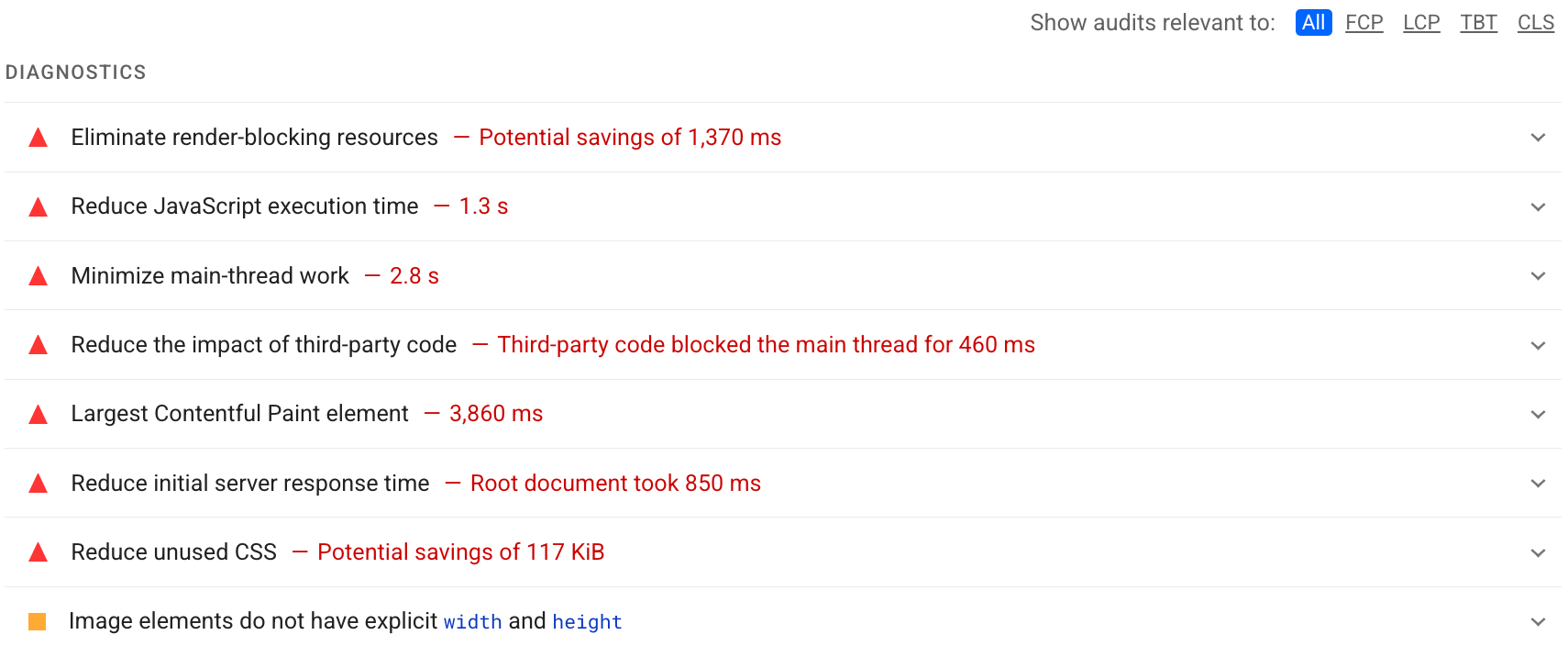
Lighthouse: Diagnostics section showing a number of audits and their impact
Lighthouse: Diagnostics section

See the Performance audits to learn how to address the opportunities identified in your Lighthouse report.

Resources

  • Source code for Page load is not fast enough on mobile networks audit
  • Baseline Progressive Web App Checklist
  • Critical Rendering Path
  • Get Started With Analyzing Runtime Performance
  • Record load performance
  • Optimizing Content Efficiency
  • Rendering Performance

Except as otherwise noted, the content of this page is licensed under the Creative Commons Attribution 4.0 License, and code samples are licensed under the Apache 2.0 License. For details, see the Google Developers Site Policies. Java is a registered trademark of Oracle and/or its affiliates.

Last updated 2024-04-16 UTC.

You are visitor 01402503 — GeezerVison does not store the pages you look up.
Best viewed with Netscape Navigator 4.7 or Internet Explorer 6 at 800×600. No cookies required.