Node Operations
Here are all the operations related to nodes on Klever Blockchain
This segment presents instructions on how to set up a new node on the Klever network, its system requirements and how to update its status, as well as a quick introduction to Klever's technology.
Introduction
A Deep Dive Into Klever Blockchain
Blockchain is difficult, but it shouldn't be.
1. What is Klever
Klever Blockchain is a trusted permissionless blockchain network for the emerging decentralized economy, providing a safer, faster and smarter cryptocurrency experience for all users globally to enter and thrive.
A blockchain network does not have an intrinsic value in and of itself, but in fact is only as valuable as what the platform offers its users in terms of usable products and opportunities to participate in the network.
With this in mind, we present Klever Blockchain to allow users on a global scale to access indispensable services and products. These include market-leading crypto wallet, crypto swap, web browser, exchange, staking, payment channels, loans, liquidity pools, decentralized finance, game assets, supply chains, logistic records, notary, stored value, gift cards, rewards, loyalty programs, collectibles, banking, ownership and more.
We strive to create a network where trustless technologies empower businesses and individuals in an open global economy using secure, fast and innovative on-chain peer-to-peer applications.
2. Architecture Overview
Building and deploying blockchain apps should be simple, cheap, and easy for all developers to do, and that is exactly what Klever Blockchain enables.
Instead of being a smart-contracts platform, Klever Blockchain will provide prebuilt and ready-to-use functionalities for developers to build decentralized applications.
Our goal is to have a secure and efficient blockchain coordinated by a Proof of Stake consensus mechanism composed of 21 validators, which are randomly selected among the masternodes for the consensus group in each Epoch.
Nodes will sign-off messages broadcasted to the network building a reliability rank of each operator. Nodes with bad behavior will be jailed. Until this jail time isn’t cleared, those ill-behaved nodes will not participate in the validators selection pool.
On top of that, a customized version of the Practical Byzantine Fault Tolerance algorithm (PBFT) was implemented for network reliability and resilience, ensuring a fast full confirmation of blocks.
System Requirements
What you need to run a node on Klever Blockchain.
Tip: Before setting up your node, use the Benchmark Tool to verify that your machine meets the performance requirements to run a validator node.
To run a node on Klever Blockchain, you need the following minimum setup:
- A CPU with 4 cores.
- x86_64 systems (Intel/AMD): Must support AVX or SSE 4.2 instruction sets for smart contract execution.
- ARM systems (Apple Silicon, ARM servers): Use native ARM64 builds.
- A RAM with 8GB.
- An SSD with 200 GB.
- An internet connection speed of at least 100 Mbps.
- Linux or MacOS.
The Klever node requires AVX or SSE 4.2 CPU instructions for smart contract execution. If missing, you'll see:
TRACE[...] error=could not create wasmer instance: The target x86_64 without AVX or SSE 4.2 is not yet supported
Check your system:
# Step 1: Check architecture first
uname -m  # Returns: x86_64 (Intel/AMD) or arm64 (Apple Silicon or other ARM64 systems)
For x86_64 systems only:
# Linux - Check for AVX/SSE 4.2
grep -o '\(avx\|sse4_2\)' /proc/cpuinfo | sort -u

# macOS Intel - Check for AVX/SSE 4.2
sysctl hw.optional.sse4_2 hw.optional.avx1_0
For ARM systems (Apple Silicon M1/M2/M3/M4):
- These CPU feature checks are not applicable to ARM.
- You must use native ARM64 builds of Klever node.
- No additional verification is required beyond confirming ARM architecture.
Common issues:
- VMs (KVM/VMware/VirtualBox): Enable CPU pass-through in hypervisor settings (host-passthrough for KVM, enable VT-x/AMD-V for VMware/VirtualBox)
- Cloud instances: Use instance types with full CPU support (AWS: T3+, GCP: N2/N2D, Azure: Dv4/Ev4+)
- Docker containers: Use host CPU features — verify the host system meets AVX/SSE 4.2 requirements
- Apple Silicon (M1/M2/M3/M4): Use native ARM64 builds, not x86_64 emulation
- Older hardware: Requires Intel Sandy Bridge (2011+) or AMD Bulldozer (2011+)
Impact: Without AVX/SSE 4.2, smart contracts will NOT work. Validators cannot participate in consensus for blocks with smart contracts. Observer nodes can sync but cannot execute/validate smart contracts.
Docker Installation
To start with Klever blockchain, make sure you have Docker installed and download the latest Klever Toolchain image.
Follow instructions on https://docs.docker.com/engine/install to install Docker.
To download Klever Toolchain, type:
docker pull kleverapp/klever-go:latest
Warning: Before running the following Docker commands, you'll need to change the ownership of your local files to user ID 999: chown -R 999 .
How To Create A Wallet
To create a wallet, choosing the output folder, first create the output folder and then run the operator with create-wallet command:
mkdir wallet
docker run -it --rm \
    -v $(pwd)/wallet:/opt/klever-blockchain \
    --entrypoint=/usr/local/bin/operator \
    kleverapp/klever-go:latest account create
This will generate the wallet and return the address asociated with it, as seen below:
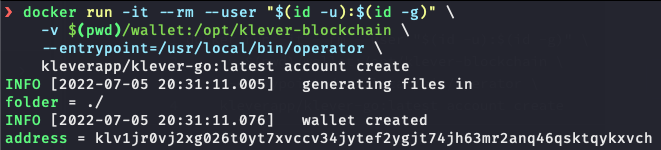
If the output directory does not exist, it will be created but you may run into file permission issues.
To check your wallet certificate and address, type:
docker run -it --rm \
    -v $(pwd)/wallet:/opt/klever-blockchain \
    --entrypoint=/usr/local/bin/operator \
    kleverapp/klever-go:latest account address
This should show your address, as seen below:
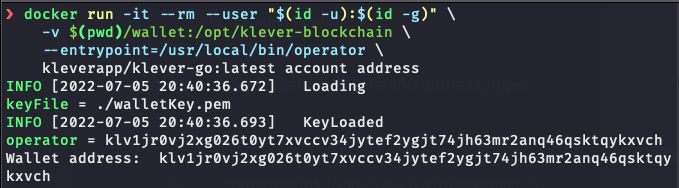
How To Run A Node
Commands to run a node
Klever nodes run inside a docker container, check System Requirements section to download Klever Toolchain first.
Create statics directory
Create a folder where all the data will be stored:
mkdir -p $(pwd)/node/config $(pwd)/node/db $(pwd)/node/logs
Network genesis config
Download latest config file and extract into your config directory
For MainNet
curl -k https://backup.mainnet.klever.org/config.mainnet.108.tar.gz \
    | tar -xz -C ./node
For TestNet
curl -k https://backup.testnet.klever.org/config.testnet.109.tar.gz \
    | tar -xz -C ./node
Set the /log credentials
The config package ships the /log route secured with Basic Auth (secured: true in config/api.yaml), and its credentials entries are placeholders. Until you replace them, every request to /log is refused. The rest of the node runs normally.
If you want to read the live log stream over the API, set your own credentials. The password field holds the hex sha256 digest of the password, not the password itself:
printf '%s' 'your-password' | sha256sum | cut -d' ' -f1
Then edit ./node/config/api.yaml:
credentials:
  - username: <operator>
    password: <hex sha256 digest from the command above>
If you don't need /log, leave the placeholders as they are, or set open: false on the route to remove it. See Securing the Node API for details.
Create your validator BLS Key
Execute a command inside the docker container to create wallets for validators. The data is then forwarded to the directory created previously.
docker run -it --rm -v $(pwd)/node/config:/opt/klever-blockchain \
    --entrypoint='' kleverapp/klever-go:latest keygenerator
Run your node the first time
The command for running a node comes with a few settings: it includes mappings for cryptographic keys, data directories and logs, as well as network ports, the application that will run when the docker image is executed and the file of node validators signature.
MainNet
docker run -it --rm \
    --name klever-node \
    -v $(pwd)/node/config:/opt/klever-blockchain/config/node \
    -v $(pwd)/node/db:/opt/klever-blockchain/db \
    -v $(pwd)/node/logs:/opt/klever-blockchain/logs \
    --network=host \
    --entrypoint=/usr/local/bin/validator \
    kleverapp/klever-go:latest \
    '--log-save'
The table below shows what each part of the command is supposed to do.
Import genesis config and the generated .pem file (BLS Key).
-v $(pwd)/node/db:/opt/klever-blockchain/db
Select the destination DB folder.
-v $(pwd)/node/logs:/opt/klever-blockchain/logs
Save log files and set the log folders
-v $(pwd)/config:/opt/klever-blockchain/config/node
If one wants to monitor the node using log files, the flag --use-log-view must be passed. Otherwise, the standard view is a visual interface as seen below.
When you are done setting up and running your node, you are expected to see information about your node, the blockchain itself, as well as data from your own computer, just like the example below:
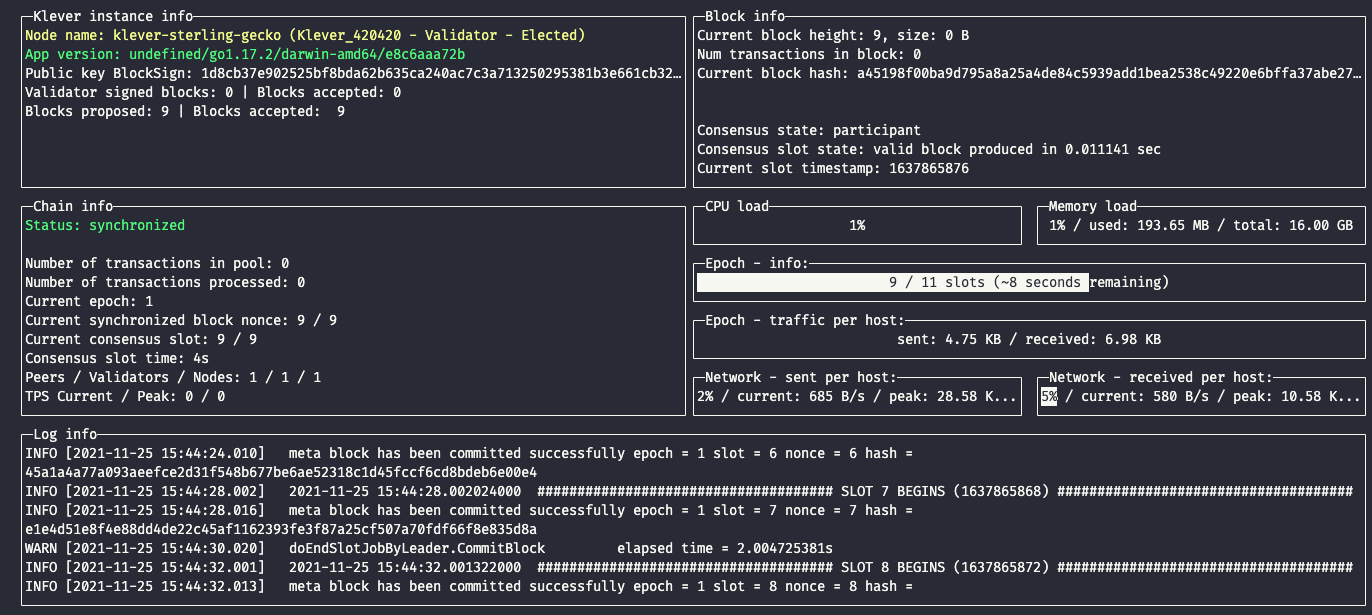 A node running, showing how many blocks were proposed and accepted, current blocks, slots and connected nodes, last generated hash, computational information, epoch and network processes and a basic log info segment.
Keep the node API private
With the commands on this page, the REST and WebSocket API binds to its default, localhost:8080. Because the container uses --network=host, that is the host's loopback interface: tools on the same machine (curl localhost:8080/node/status, the operator CLI) work, and the API is not reachable from the internet.
The node performs no access control of its own. Do not add --rest-api-interface=0.0.0.0:8080 (or :8080) to make the API public: that publishes /subscribe and every other open route to anyone who can reach the port. If you need the API off-host, for example for an indexer's WebSocket feed:
- keep the node bound to
localhost:8080; - put a reverse proxy in front that terminates TLS and requires authentication;
- firewall port
8080so only the proxy can reach it.
Securing the Node API has the full configuration and a checklist.
Run node in the background the first time
When running in the background, add parameter --use-log-view and replace --rm for -d
docker run -it -d --restart unless-stopped \
    --name klever-node \
    -v $(pwd)/node/config:/opt/klever-blockchain/config/node \
    -v $(pwd)/node/db:/opt/klever-blockchain/db \
    -v $(pwd)/node/logs:/opt/klever-blockchain/logs \
    --network=host \
    --entrypoint=/usr/local/bin/validator \
    kleverapp/klever-go:latest \
    '--log-save' '--use-log-view'
If you are running your node in the background, you can either verify logs in ./node/logs folder or use the docker command:
docker logs -f --tail 5 klever-node
You can speed up your node's first synchronization by using the FullNode database backup
For MainNet
curl -k https://backup.mainnet.klever.org/kleverchain.mainnet.latest.tar.gz \
    | tar -xz -C ./node
For TestNet
curl -k https://backup.testnet.klever.org/kleverchain.testnet.latest.tar.gz | tar -xz -C ./node
You can also opt for using fast sync with --start-in-epoch flag. This will indicate node to download last epoch only and start sync from there.
After the first node run, the subsequent commands must remove the flag --start-in-epoch.
This flag is only for node initialization without a db, if the node already has a db, you just need to sync from the last block saved or delete the database and start from the last epoch info.
Are You On Windows
If you're using Windows OS, there a few steps before running your node.
First of all, you need to install WSL, which is a way of using Linux inside your windows system. Make sure you have the 2.0 version.
Then, you should install a Linux distribution of your preference through the Microsoft Store app, which comes with Microsoft Windows (you could just type 'store' on the search bar).
And finally, you need to install Docker and enable the integration with WSL, on the settings menu.
Now, you are good to go. You can use the following instructions on the Linux environment to run your node, being attentive to user permission (typing 'sudo' before the following commands will mostly solve any problems).
Download Klever node
Download the application from Klever's repository using docker:
docker pull kleverapp/klever-go:latest
Create statics directory
Create a folder where all the data will be stored:
mkdir -p $(pwd)/node/config $(pwd)/node/db $(pwd)/node/logs
Create your validator BLS Key
Execute a command inside the docker container to create wallets for validators. The data is then forwarded to the directory created previously.
docker run -it --rm -v $(pwd)/node:/opt/klever-blockchain \
    --entrypoint='' kleverapp/klever-go:latest keygenerator
Run your node
The command for running a node comes with a few settings: it includes mappings for cryptographic keys, data directories and logs, as well as network ports, the application that will run when the docker image is executed and the file of node validators signature.
docker run -it --rm \
    --name klever-node \
    -v $(pwd)/node/config:/opt/klever-blockchain/config/node \
    -v $(pwd)/node/db:/opt/klever-blockchain/db \
    -v $(pwd)/node/logs:/opt/klever-blockchain/logs \
    --network=host \
    --entrypoint=/usr/local/bin/validator \
    kleverapp/klever-go-testnet:latest \
    '--log-save'
When you are done setting up and running your node, you are expected to see information about your node, the blockchain itself, as well as data from your own computer, just like the example below:
A node running, showing how many blocks were proposed and accepted, current blocks, slots and connected nodes, last generated hash, computational information, epoch and network processes and a basic log info segment.
Time Synchronization
Consensus runs in fixed time slots, so every validator has to agree on what time it is. A host clock that drifts by a few tens of milliseconds is enough to make your node miss signatures and log small consensus quorum warnings. This section explains how the node keeps time and how to set up and monitor the host clock.
How the node keeps time
The node has its own NTP client. It reads the servers from the ntp section of config.yaml. The config package ships these values:
ntp:
  hosts:
    - time.google.com
    - time.cloudflare.com
    - time.windows.com
    - time.apple.com
  port: 123
  timeoutMilliseconds: 100
  syncPeriodSeconds: 3600
About once per syncPeriodSeconds (one hour, plus or minus 20%), the node sends 10 queries to each host. It drops the highest and lowest 30% of the answers and stores the harmonic mean of the rest as a clock offset. Slot and subslot timing then use the host clock plus that offset.
The node does not discipline the host clock. It measures the offset once per sync and adds it until the next sync, so between syncs the node's time drifts exactly as fast as the host clock drifts. If the host clock loses 30 ms in an hour, the node's slot timing is up to 30 ms off just before the next sync.
The node also rejects a sync in two cases, and then keeps using the previous offset:
- fewer than about a third of the queries got an answer. The log says
ntp sync FAILED: insufficient responses. Check that outbound UDP port 123 is open. - the measured offset is larger than 1 second. The log says
ntp sync FAILED: offset out of bounds. The host clock is badly wrong; fix it before anything else.
Why the host clock still matters
Parts of the node read the host clock directly, without the NTP offset: the P2P layer's message caches and peer timers, and the timestamps in the logs. Even the corrected time is only as stable as the host clock between syncs.
Keep the host clock within ±2 ms of UTC at all times.
The node container uses the host's clock. Docker containers share the host kernel clock, so time is set up on the host, not inside the container.
Recommended setup: chrony
Most Debian and Ubuntu installs use systemd-timesyncd, a simple client that follows one server and polls it as rarely as every 34 minutes. chrony combines several sources, keeps adjusting the clock's frequency continuously, and handles the drifting clocks of cloud VMs much better.
Install it. On Debian and Ubuntu the chrony package replaces systemd-timesyncd, so apt removes it for you:
sudo apt-get update
sudo apt-get install -y chrony
sudo systemctl enable --now chrony
In /etc/chrony/chrony.conf, use several independent sources:
# Several stratum 1/2 sources for redundancy
pool 2.debian.pool.ntp.org iburst maxsources 4
server time.cloudflare.com iburst
server time.google.com iburst

# Step the clock at start if it is off by more than 1 s, slew it afterwards
makestep 1.0 3

# Save the measured drift so the clock settles faster after a reboot
driftfile /var/lib/chrony/chrony.drift
Restart chrony after editing the file:
sudo systemctl restart chrony
Verify the host clock
chronyc tracking | grep -E "System time|RMS offset|Frequency"
chronyc sources -v
chronyc sourcestats
In chronyc tracking, System time is the current offset from NTP time and RMS offset is its long-term average. Both should stay under 0.002 seconds (2 ms). In chronyc sources, the source marked ^* is the one chrony follows. Several sources should be reachable (Reach 377 once they have settled).
If you stay on systemd-timesyncd, at least poll more often. In /etc/systemd/timesyncd.conf:
[Time]
PollIntervalMinSec=16
PollIntervalMaxSec=64
Then run sudo systemctl restart systemd-timesyncd and check the result with timedatectl timesync-status.
Monitor clock drift
From v1.7.20, the node publishes two clock metrics. They are on /node/metrics in Prometheus text format and on /node/status as JSON:
| Metric | Meaning |
|---|---|
klv_clock_offset_ns | Offset measured at the last successful sync, in nanoseconds. Negative means the host clock is fast, positive means it is slow. |
klv_clock_last_sync_timestamp | Unix time, in seconds, of the last successful sync. 0 until the first sync succeeds. |
curl -s localhost:8080/node/metrics | grep klv_clock
Alert on two conditions:
- The host clock is drifting:
abs(klv_clock_offset_ns)above your tolerance. A tolerance of 2 ms (2e6) matches the target above. - NTP sync has stopped:
time() - klv_clock_last_sync_timestampabove twicesyncPeriodSeconds(7200 s with the default).
For example, as Prometheus alerting rules:
groups:
  - name: klever-clock
    rules:
      - alert: KleverClockOffsetHigh
        expr: abs(klv_clock_offset_ns) > 2e6
        for: 5m
      - alert: KleverNtpSyncStale
        expr: klv_clock_last_sync_timestamp > 0 and time() - klv_clock_last_sync_timestamp > 7200
        for: 5m
Troubleshooting: small consensus quorum warnings
The node logs a worker statistics warning with small consensus quorum when a block carries fewer signatures than the consensus group. To count them:
docker logs --since 1h klever-node 2>&1 | grep -c "small consensus quorum"
- A few per hour is normal: some validator was slow or offline for a slot.
- Dozens per hour usually means a clock problem, often your own. In one investigation a validator whose host clock drifted 23 to 38 ms between syncs logged about 60 times more warnings than usual. After the host clock was held within ±2 ms, the rate went back to normal.
To check your own clock:
- Run
chronyc tracking(ortimedatectl timesync-status) and look at the current offset. - Check
klv_clock_offset_nsandklv_clock_last_sync_timestampas described above. - Compare the two timestamps on a
SLOT … BEGINSlog line. The outer one comes from the host clock and the one inside the banner is the node's corrected time. A gap of more than 5 ms means the host clock is not tracking UTC.
Cloud VM caveats
Cloud VMs, such as Hetzner Cloud and other KVM-based instances, usually run on kvm-clock. The hypervisor adjusts it, and long uptimes or noisy neighbours make it less stable. The Frequency line of chronyc tracking shows how hard chrony is working to correct it.
If the offset will not stay within ±2 ms with chrony:
- reboot the host periodically, for example every 6 to 12 months;
- or move the validator to a dedicated-CPU or bare-metal instance.
How To Stop A Node
Stop a node with the following command:
docker stop klever-node
How To Restart A Node
Restart the node:
docker restart klever-node
How To Backup Db Folder
First, you need to stop the node:
docker stop klever-node
Then compress the DB folder:
tar -czvf filename.tar.gz $(pwd)/node/db
How To Upgrade Node Docker Image Version
First, stop the node:
docker stop klever-node
Upgrade image:
docker pull kleverapp/klever-go:latest
Then you can recreate the node with a new image. Don't forget to delete the container if running in the background:
docker rm klever-node
When the release notes say the config package changed, download the new package as in "Network genesis config" under How To Run A Node before you recreate the container. A new image with an old config package can leave security settings behind, such as authentication on /log. Re-apply your own changes to api.yaml (credentials) and config.yaml (for example redundancyLevel) after extracting it.
How to Set Up Your Own Indexer
A Indexer is a specialized node that connects to Elasticsearch to store and organize blockchain data in a searchable format. This allows for efficient querying and retrieval of blockchain information such as transactions, blocks, accounts, and other network data. Additionally, once you have an indexer running, you can enable WebSocket subscriptions for real-time blockchain data monitoring.
Prerequisites
- Docker and Docker Compose installed on your system
- Basic understanding of Klever node operations
- Sufficient system resources, especially for Elasticsearch (minimum 4GB RAM recommended)
- Elasticsearch knowledge for production setups
Setting Up the Indexer
What you will learn:
- Enable and configure the Elasticsearch connector in the
external.yamlfile - Start your node with the external.yaml configuration properly set with Elasticsearch connector enabled
- Verify the setup by checking for the confirmation message: "Node is running with a valid indexer"
1. Set Up Elasticsearch
The most resource-intensive part is Elasticsearch itself. Here's a Docker Compose setup for development:
Folder Structure:
your-folder/
├── docker-compose.yml
└── elasticsearch/
    ├── elasticsearch.yml
    └── jvm.options
docker-compose.yml:
version: '3'

services:
  es01:
    image: docker.elastic.co/elasticsearch/elasticsearch:8.2.3
    container_name: es01
    environment:
      - node.name=es01
      - cluster.name=klever-cluster
      - cluster.routing.allocation.disk.threshold_enabled=false
      - bootstrap.memory_lock=true
      - xpack.security.enabled=false
      - xpack.security.http.ssl.enabled=false
      - network.host=0.0.0.0
      - discovery.type=single-node
    ulimits:
      memlock:
        soft: -1
        hard: -1
    volumes:
      - data01:/usr/share/elasticsearch/data
      - ./elasticsearch/elasticsearch.yml:/usr/share/elasticsearch/config/elasticsearch.yml
      - ./elasticsearch/jvm.options:/usr/share/elasticsearch/config/jvm.options.d/jvm.options
    ports:
      - 9200:9200
volumes:
  data01:
    driver: local
elasticsearch/jvm.options:
-Xms4g
-Xmx4g
elasticsearch/elasticsearch.yml:
cluster.name: klever-cluster
node.name: klever-es-node-1
bootstrap.memory_lock: true
http.cors.enabled: true
http.cors.allow-origin: "*"
http.cors.allow-methods: OPTIONS, HEAD, GET, POST, PUT, DELETE
http.cors.allow-headers: X-Requested-With,X-Auth-Token,Content-Type,Content-Length
xpack.security.enabled: false
xpack.license.self_generated.type: basic
2. Start Elasticsearch
Run in your folder:
docker-compose up -d
This will expose Elasticsearch on port 9200. Verify it's running:
docker ps
3. Configure external.yaml
Configure your node's external.yaml file to connect to Elasticsearch:
elasticSearchConnector:
  enabled: true
  indexerCacheSize: 100
  url: http://localhost:9200
  useKibana: true
  username:
  password:
  enabledIndexes:
    - transactions
    - blocks
    - accounts
    - accountshistory
    - assets
    - proposals
    - marketplaces
    - network-parameters
    - rating
    - epoch
    - accountskda
    - peersaccounts
    - marketplaceorders
    - itos
    - kdapools
    - logs
    - scdeploys
4. Start Your Node
Start your Klever node with the updated configuration. On startup, you should see the confirmation message:
"Node is running with a valid indexer"
This confirms that your node is now acting as an indexer.
5. WebSocket Endpoint
Once the indexer is running, your node will expose a WebSocket endpoint for real-time data:
ws://localhost:8080/subscribe
The API binds to localhost by default, so this endpoint is reachable only from the node host. To serve it to other machines, put a reverse proxy with TLS and authentication in front of it rather than binding the node to all interfaces; see "Keep the node API private" under How To Run A Node.
Important Notes
Production Considerations:
- Its is recommended to not run a node as both validator and indexer - use a dedicated observer node for indexing
- Resource intensive - Elasticsearch requires considerable RAM and storage
- Production clusters - Setting up a production-grade Elasticsearch cluster is beyond the scope of this tutorial. Please refer to the official documentation for detailed instructions.
Resource Requirements:
- Minimum 4GB RAM for Elasticsearch JVM
- Additional storage for indexed data
- Network bandwidth for real-time data processing
How To Set Up A Fallback Node
Set up a redundant backup node for high availability
A fallback node (also known as a redundancy node) provides high availability by automatically taking over when the main node becomes inactive. This ensures continuous operation of your validator without manual intervention.
Understanding Redundancy Levels
The Klever Blockchain supports different redundancy levels:
- -1: Redundancy disabled
- 0: Main instance (default)
- 1: First backup node
- 2: Second backup node
- 3+: Additional backup levels
Configuration Steps
1. Configure the redundancyLevel in your config.yaml file
preferences:
  # RedundancyLevel represents the level of redundancy used by the node (-1 = disabled, 0 = main instance (default),
  # 1 = first backup, 2 = second backup, etc.)
  redundancyLevel: 1
2. For main node (redundancyLevel: 0)
Your main node should be configured with redundancyLevel: 0 (which is the default). No additional configuration is needed.
3. For backup nodes (redundancyLevel: 1, 2, 3...)
Configure backup nodes with the appropriate redundancy level. Higher numbers indicate lower priority backups.
preferences:
  redundancyLevel: 1  # First backup
How It Works
- Main Node Active: The main node (level 0) operates normally while backup nodes remain inactive
- Main Node Inactive: If the main node fails to participate in consensus for 5 consecutive slots, the first backup node (level 1) automatically becomes active
- Cascading Failover: If the first backup also fails, the second backup (level 2) takes over, and so on
Running Your Fallback Node
Use the same docker command as a regular node, but ensure your config.yaml file has the correct redundancyLevel:
docker run -it --rm \
    --name klever-fallback-node \
    -v $(pwd)/node/config:/opt/klever-blockchain/config/node \
    -v $(pwd)/node/db:/opt/klever-blockchain/db \
    -v $(pwd)/node/logs:/opt/klever-blockchain/logs \
    --network=host \
    --entrypoint=/usr/local/bin/validator \
    kleverapp/klever-go:latest \
    '--log-save'
Monitoring Redundancy Status
You can monitor your node's redundancy status through:
- Node logs: Check if your node is active or in backup mode
- REST API: Query the node status endpoint to see redundancy information
- Visual interface: The node's terminal interface shows redundancy level and status
Best Practices
- Geographic Distribution: Deploy backup nodes in different locations for maximum availability
- Network Connectivity: Ensure all nodes have reliable internet connections
- Regular Monitoring: Monitor all nodes to ensure they're ready to take over when needed
- Database Backups: Keep database backups synchronized between main and backup nodes
How To Send Using Cli
To use your wallet with Klever Toolchain, you will need to map your wallet private key (the .pem file created in the session How to create a wallet) into the toolchain by adding:
-v $(pwd)/wallet:/opt/klever-blockchain
Or if you are using a self-hosted node, use --network=host to access the local node API. You can also use a public node by adding an environment variable into the toolchain:
-e KLEVR_NODE=https://node.mainnet.klever.org
Send tokens with the following code:
docker run -it --rm \
    -v $(pwd)/wallet:/opt/klever-blockchain \
    --network=host \
    --entrypoint=/usr/local/bin/operator \
    kleverapp/klever-go:latest \
    --key-file=./walletKey.pem \
    --node=https://node.mainnet.klever.org \
    account send klv1h7vx629mwuv4pnecn0k9clxp9rt7rquat3kvydgu8npt20e0ntjq3jhd40 137
On the last line, after the "send" command (send klv1h7vx629mwuv4pnecn0k9clxp9rt7rquat3kvydgu8npt20e0ntjq3jhd40 137), the code represents the following scheme: [TO] [AMOUNT].
[TO] is the address to whom the tokens are being sent.
[AMOUNT] is how much is being sent.
--kda is the Asset ID.
If no --kda is passed, as in the example above, the default KDA is KLV.
Here is another example, sending KFI:
docker run -it --rm \
    -v $(pwd)/wallet:/opt/klever-blockchain \
    --network=host \
    --entrypoint=/usr/local/bin/operator \
    kleverapp/klever-go:latest \
    --key-file=./walletKey.pem \
    --node=https://node.mainnet.klever.org \
    account send klv1h7vx629mwuv4pnecn0k9clxp9rt7rquat3kvydgu8npt20e0ntjq3jhd40 \
    137 --kda=KFI
How to Unjail a Validator
Understanding these common causes will help you prevent future jailing incidents:
- Low Rating: Rating drops below minimum threshold due to missed blocks/signatures
- Consecutive Missed Blocks: Failing to propose blocks when selected as leader
- Poor Validator Performance: Missing validator signatures consistently
- Network Issues: Connection problems preventing participation in consensus
Prerequisites
Before attempting to unjail your validator, ensure you have:
- Root Cause Resolution: Fixed the underlying issue that caused the jailing
- Node Synchronization: Your validator node is running and fully synchronized
- Owner Account Access: Access to the validator owner's private key (.pem file)
- Network Connectivity: Stable connection to Klever network
- Sufficient KLV Balance: Ensure the owner account has enough KLV to cover transaction fees
Using Klever Operator CLI
operator validator unjail [OWNER_ADDRESS] [flags]
What Happens When Unjailing
The unjailing process performs several important operations:
- Immediate Effects:
- Rating Reset: Validator's rating is reset to the starting rating (5,000,001)
- Temporary Rating Clear: Any temporary rating penalties are removed
- List Migration: Validator moves from "Jailed" to "Waiting" list
- Post-Unjail Process:
- Queue Position: Validator enters the waiting queue for selection
- Index Assignment: Gets a new position based on current block nonce
- Eligibility Wait: May take 1-3 epochs to become eligible for selection
- Selection Process: Must wait to be selected for active validation again
All Cli Operations
If you are using your local node, you should use the regular command:
operator [command] [arguments] --[flags]
If you are using the docker image operator, use the generic command version:
docker run -it --rm \
    -v $(pwd)/wallet:/opt/klever-blockchain \
    --network=host \
    --entrypoint=/usr/local/bin/operator \
    kleverapp/klever-go:latest \
    --key-file=./walletKey.pem \
    --node=https://node.mainnet.klever.org \
    [command] [arguments] --[flags]
Operator
Klever Operator
Synopsis
OPERATOR interface to Klever Blockchain
Type 'operator --help' for detailsoperator [flags]
Options
  -c, --create-only               only create transaction to be signed later
      --fromAddress string        overwrite fromAddress
  -h, --help                      help for operator
      --kdaFee string             use KDA to pay for fees
  -k, --key-file string           set walelt pem file --key-file=./walletKey.pem (default "./walletKey.pem")
      --message stringArray       set TX message --message="MyMessage"
  -m, --multi-files stringArray   add more files to sign tx. Ex: -m=./file.pem -m=./file2.pem
  -n, --node string               entrypoint to node API --node=http://node.testnet.klever.org (default "http://localhost:8080")
      --nonce uint                set TX nonce --nonce=33
  -p, --password string[="*"]     --password=MY_SECRET
      --password-file string      path to a file containing the password
      --permID int32              set TX permission ID --permID=0
SEE ALSO
- operator account - account actions
- operator broadcast - broadcast a transaction
- operator fb -
- operator gov - governance actions
- operator kapps - kapps actions
- operator kda - kda actions
- operator ms - multisign actions: create, sign, and broadcast multisig transactions
- operator sign - sign a transaction
- operator tx-by-id - get transaction by id
- operator validator - validator actions
- operator version - Show version
Auto generated by spf13/cobra on 6-Mar-2023
Operator Account
account actions
operator account [flags]
Options
-h, --help help for address
Options inherited from parent commands
  -c, --create-only               only create transaction to be signed later
      --fromAddress string        overwrite fromAddress
      --kdaFee string             use KDA to pay for fees
  -k, --key-file string           set walelt pem file --key-file=./walletKey.pem (default "./walletKey.pem")
      --message stringArray       set TX message --message="MyMessage"
  -m, --multi-files stringArray   add more files to sign tx. Ex: -m=./file.pem -m=./file2.pem
  -n, --node string               entrypoint to node API --node=http://node.testnet.klever.org (default "http://localhost:8080")
      --nonce uint                set TX nonce --nonce=33
  -p, --password string[="*"]     --password=MY_SECRET
      --password-file string      path to a file containing the password
      --permID int32              set TX permission ID --permID=0
SEE ALSO
- operator - Klever Operator
- operator account address - returns wallet address
- operator account allowance - return account allowance on a given KDA
- operator account balance - returns wallet balance
- operator account batchsend - create several transfer transactions: batchsend --values Addr1=Val1 Addr2=Val2...
- operator account claim - claim transaction
- operator account create - create a new wallet PEM file
- operator account CSV - send transactions based on a CSV file
- operator account delegate - delegate a bucket to a validator
- operator account export-sk - export-sk: print hex-encoded private key from a PEM file
- operator account freeze - freeze an asset
- operator account import-sk - import-sk: creates a PEM file from a hex-encoded secret key
- operator account info - returns account details
- operator account permission - set wallet permission
- operator account send - create a transfer transaction: send [TO][AMOUNT]
- operator account set-name - set an account name
- operator account undelegate - undelegate bucket id
- operator account unfreeze - unfreeze asset bucket
- operator account withdraw - withdraw asset
Auto generated by spf13/cobra on 6-Mar-2023
Operator Account Address
returns wallet address
operator account address [flags]
Options
-h, --help help for address
Options inherited from parent commands
  -c, --create-only               only create transaction to be signed later
      --fromAddress string        overwrite fromAddress
      --kdaFee string             use KDA to pay for fees
  -k, --key-file string           set walelt pem file --key-file=./walletKey.pem (default "./walletKey.pem")
      --message stringArray       set TX message --message="MyMessage"
  -m, --multi-files stringArray   add more files to sign tx. Ex: -m=./file.pem -m=./file2.pem
  -n, --node string               entrypoint to node API --node=http://node.testnet.klever.org (default "http://localhost:8080")
      --nonce uint                set TX nonce --nonce=33
  -p, --password string[="*"]     --password=MY_SECRET
      --password-file string      path to a file containing the password
      --permID int32              set TX permission ID --permID=0
SEE ALSO
- operator account - account actions
Auto generated by spf13/cobra on 6-Mar-2023
Operator Account Allowance
return account allowance on a given KDA
operator account allowance [flags]
Options
-h, --help help for allowance
Options inherited from parent commands
  -c, --create-only               only create transaction to be signed later
      --fromAddress string        overwrite fromAddress
      --kdaFee string             use KDA to pay for fees
  -k, --key-file string           set walelt pem file --key-file=./walletKey.pem (default "./walletKey.pem")
      --message stringArray       set TX message --message="MyMessage"
  -m, --multi-files stringArray   add more files to sign tx. Ex: -m=./file.pem -m=./file2.pem
  -n, --node string               entrypoint to node API --node=http://node.testnet.klever.org (default "http://localhost:8080")
      --nonce uint                set TX nonce --nonce=33
  -p, --password string[="*"]     --password=MY_SECRET
      --password-file string      path to a file containing the password
      --permID int32              set TX permission ID --permID=0
SEE ALSO
- operator account - account actions
Auto generated by spf13/cobra on 6-Mar-2023
Operator Account Balance
returns wallet balance
operator account balance[flags]
Options
-h, --help help for balance
Options inherited from parent commands
  -c, --create-only               only create transaction to be signed later
      --fromAddress string        overwrite fromAddress
      --kdaFee string             use KDA to pay for fees
  -k, --key-file string           set walelt pem file --key-file=./walletKey.pem (default "./walletKey.pem")
      --message stringArray       set TX message --message="MyMessage"
  -m, --multi-files stringArray   add more files to sign tx. Ex: -m=./file.pem -m=./file2.pem
  -n, --node string               entrypoint to node API --node=http://node.testnet.klever.org (default "http://localhost:8080")
      --nonce uint                set TX nonce --nonce=33
  -p, --password string[="*"]     --password=MY_SECRET
      --password-file string      path to a file containing the password
      --permID int32              set TX permission ID --permID=0
SEE ALSO
- operator account - account actions
Auto generated by spf13/cobra on 6-Mar-2023
Operator Account Batchsend
create several transfer transactions: batchsend --values Addr1=Val1 Addr2=Val2 ...
operator account batchsend [flags]
Options
  -h, --help                    help for batchsend
      --kda string              --kda=KDAID-0000 (default "KLV")
      --values stringToString   --values 'addr1=val1, addr2=val2, addr3=val3' (default [])
Options inherited from parent commands
  -c, --create-only               only create transaction to be signed later
      --fromAddress string        overwrite fromAddress
      --kdaFee string             use KDA to pay for fees
  -k, --key-file string           set walelt pem file --key-file=./walletKey.pem (default "./walletKey.pem")
      --message stringArray       set TX message --message="MyMessage"
  -m, --multi-files stringArray   add more files to sign tx. Ex: -m=./file.pem -m=./file2.pem
  -n, --node string               entrypoint to node API --node=http://node.testnet.klever.org (default "http://localhost:8080")
      --nonce uint                set TX nonce --nonce=33
  -p, --password string[="*"]     --password=MY_SECRET
      --password-file string      path to a file containing the password
      --permID int32              set TX permission ID --permID=0
SEE ALSO
- operator account - account actions
Auto generated by spf13/cobra on 6-Mar-2023
Operator Account Claim
claim transaction
operator account claim [CLAIM_TYPE] [flags]
Options
  -h, --help        help for claim
      --id string   --id=KDAID-00000 (default "KLV")
Options inherited from parent commands
  -c, --create-only               only create transaction to be signed later
      --fromAddress string        overwrite fromAddress
      --kdaFee string             use KDA to pay for fees
  -k, --key-file string           set walelt pem file --key-file=./walletKey.pem (default "./walletKey.pem")
      --message stringArray       set TX message --message="MyMessage"
  -m, --multi-files stringArray   add more files to sign tx. Ex: -m=./file.pem -m=./file2.pem
  -n, --node string               entrypoint to node API --node=http://node.testnet.klever.org (default "http://localhost:8080")
      --nonce uint                set TX nonce --nonce=33
  -p, --password string[="*"]     --password=MY_SECRET
      --password-file string      path to a file containing the password
      --permID int32              set TX permission ID --permID=0
SEE ALSO
- operator account - account actions
Auto generated by spf13/cobra on 6-Mar-2023
Operator Account Create
create new wallet pem file
operator account create [flags]
Options
-h, --help help for create
Options inherited from parent commands
  -c, --create-only               only create transaction to be signed later
      --fromAddress string        overwrite fromAddress
      --kdaFee string             use KDA to pay for fees
  -k, --key-file string           set walelt pem file --key-file=./walletKey.pem (default "./walletKey.pem")
      --message stringArray       set TX message --message="MyMessage"
  -m, --multi-files stringArray   add more files to sign tx. Ex: -m=./file.pem -m=./file2.pem
  -n, --node string               entrypoint to node API --node=http://node.testnet.klever.org (default "http://localhost:8080")
      --nonce uint                set TX nonce --nonce=33
  -p, --password string[="*"]     --password=MY_SECRET
      --password-file string      path to a file containing the password
      --permID int32              set TX permission ID --permID=0
SEE ALSO
- operator account - account actions
Auto generated by spf13/cobra on 6-Mar-2023
Operator Account Csv
send transactions based on CSV file
operator account csv FILENAME [flags]
Options
-h, --help help for csv
Options inherited from parent commands
  -c, --create-only               only create transaction to be signed later
      --fromAddress string        overwrite fromAddress
      --kdaFee string             use KDA to pay for fees
  -k, --key-file string           set walelt pem file --key-file=./walletKey.pem (default "./walletKey.pem")
      --message stringArray       set TX message --message="MyMessage"
  -m, --multi-files stringArray   add more files to sign tx. Ex: -m=./file.pem -m=./file2.pem
  -n, --node string               entrypoint to node API --node=http://node.testnet.klever.org (default "http://localhost:8080")
      --nonce uint                set TX nonce --nonce=33
  -p, --password string[="*"]     --password=MY_SECRET
      --password-file string      path to a file containing the password
      --permID int32              set TX permission ID --permID=0
SEE ALSO
- operator account - account actions
Auto generated by spf13/cobra on 6-Mar-2023
Operator Account Delegate
delegate bucket to validator
operator account delegate [TO] [flags]
Options
      --bucketID string   --bucketID=000...000
  -h, --help              help for delegate
Options inherited from parent commands
  -c, --create-only               only create transaction to be signed later
      --fromAddress string        overwrite fromAddress
      --kdaFee string             use KDA to pay for fees
  -k, --key-file string           set walelt pem file --key-file=./walletKey.pem (default "./walletKey.pem")
      --message stringArray       set TX message --message="MyMessage"
  -m, --multi-files stringArray   add more files to sign tx. Ex: -m=./file.pem -m=./file2.pem
  -n, --node string               entrypoint to node API --node=http://node.testnet.klever.org (default "http://localhost:8080")
      --nonce uint                set TX nonce --nonce=33
  -p, --password string[="*"]     --password=MY_SECRET
      --password-file string      path to a file containing the password
      --permID int32              set TX permission ID --permID=0
SEE ALSO
- operator account - account actions
Auto generated by spf13/cobra on 6-Mar-2023
Operator Account Export Sk.Js
export-sk print hex encoded private key from pem file
operator account export-sk [flags]
Options
-h, --help help for export-sk
Options inherited from parent commands
  -c, --create-only               only create transaction to be signed later
      --fromAddress string        overwrite fromAddress
      --kdaFee string             use KDA to pay for fees
  -k, --key-file string           set walelt pem file --key-file=./walletKey.pem (default "./walletKey.pem")
      --message stringArray       set TX message --message="MyMessage"
  -m, --multi-files stringArray   add more files to sign tx. Ex: -m=./file.pem -m=./file2.pem
  -n, --node string               entrypoint to node API --node=http://node.testnet.klever.org (default "http://localhost:8080")
      --nonce uint                set TX nonce --nonce=33
  -p, --password string[="*"]     --password=MY_SECRET
      --password-file string      path to a file containing the password
      --permID int32              set TX permission ID --permID=0
SEE ALSO
- operator account - account actions
Auto generated by spf13/cobra on 6-Mar-2023
Operator Account Export Sk
export-sk print hex encoded private key from pem file
operator account export-sk [flags]
Options
-h, --help help for export-sk
Options inherited from parent commands
  -c, --create-only               only create transaction to be signed later
      --fromAddress string        overwrite fromAddress
      --kdaFee string             use KDA to pay for fees
  -k, --key-file string           set walelt pem file --key-file=./walletKey.pem (default "./walletKey.pem")
      --message stringArray       set TX message --message="MyMessage"
  -m, --multi-files stringArray   add more files to sign tx. Ex: -m=./file.pem -m=./file2.pem
  -n, --node string               entrypoint to node API --node=http://node.testnet.klever.org (default "http://localhost:8080")
      --nonce uint                set TX nonce --nonce=33
  -p, --password string[="*"]     --password=MY_SECRET
      --password-file string      path to a file containing the password
      --permID int32              set TX permission ID --permID=0
SEE ALSO
- operator account - account actions
Auto generated by spf13/cobra on 6-Mar-2023
Operator Account Freeze
freeze asset
operator account freeze [AMOUNT] [flags]
Options
  -h, --help         help for freeze
      --kda string   --kda=KDAID-00000 (default "KLV")
Options inherited from parent commands
  -c, --create-only               only create transaction to be signed later
      --fromAddress string        overwrite fromAddress
      --kdaFee string             use KDA to pay for fees
  -k, --key-file string           set walelt pem file --key-file=./walletKey.pem (default "./walletKey.pem")
      --message stringArray       set TX message --message="MyMessage"
  -m, --multi-files stringArray   add more files to sign tx. Ex: -m=./file.pem -m=./file2.pem
  -n, --node string               entrypoint to node API --node=http://node.testnet.klever.org (default "http://localhost:8080")
      --nonce uint                set TX nonce --nonce=33
  -p, --password string[="*"]     --password=MY_SECRET
      --password-file string      path to a file containing the password
      --permID int32              set TX permission ID --permID=0
SEE ALSO
- operator account - account actions
Auto generated by spf13/cobra on 6-Mar-2023
Operator Account Import Sk
import-sk creates pem file from hex encoded secret key
operator account import-sk [flags]
Options
  -h, --help          help for import-sk
      --path string   file to be generated
Options inherited from parent commands
  -c, --create-only               only create transaction to be signed later
      --fromAddress string        overwrite fromAddress
      --kdaFee string             use KDA to pay for fees
  -k, --key-file string           set walelt pem file --key-file=./walletKey.pem (default "./walletKey.pem")
      --message stringArray       set TX message --message="MyMessage"
  -m, --multi-files stringArray   add more files to sign tx. Ex: -m=./file.pem -m=./file2.pem
  -n, --node string               entrypoint to node API --node=http://node.testnet.klever.org (default "http://localhost:8080")
      --nonce uint                set TX nonce --nonce=33
  -p, --password string[="*"]     --password=MY_SECRET
      --password-file string      path to a file containing the password
      --permID int32              set TX permission ID --permID=0
SEE ALSO
- operator account - account actions
Auto generated by spf13/cobra on 6-Mar-2023
Operator Account Info
returns account details
operator account info[flags]
Options
-h, --help help for info
Options inherited from parent commands
  -c, --create-only               only create transaction to be signed later
      --fromAddress string        overwrite fromAddress
      --kdaFee string             use KDA to pay for fees
  -k, --key-file string           set walelt pem file --key-file=./walletKey.pem (default "./walletKey.pem")
      --message stringArray       set TX message --message="MyMessage"
  -m, --multi-files stringArray   add more files to sign tx. Ex: -m=./file.pem -m=./file2.pem
  -n, --node string               entrypoint to node API --node=http://node.testnet.klever.org (default "http://localhost:8080")
      --nonce uint                set TX nonce --nonce=33
  -p, --password string[="*"]     --password=MY_SECRET
      --password-file string      path to a file containing the password
      --permID int32              set TX permission ID --permID=0
SEE ALSO
- operator account - account actions
Auto generated by spf13/cobra on 6-Mar-2023
Operator Account Permission
Set wallet permission to configure multi-signature accounts and delegate transaction authority.
operator account permission [flags]
Options
  -h, --help               help for permission
      --perm stringArray   --perm='{"type":1, "threshold": 2, "operations":"0fff", "signers": [{"address":"klv1fpwjz234gy8aaae3gx0e8q9f52vymzzn3z5q0s5h60pvktzx0n0qwvtux5", "weight": 1},{"address":"klv18cgjm6mfahuvnl3vj8kx3fph8qvth048we0486cd8xp9nenm4saqg0h9jl", "weight": 1}]}'
Permission Parameters
The --perm flag accepts a JSON object with the following parameters:
type
- Type:
integer - Required: Yes
- Valid Values:
0- Owner: Grants full access to all transaction types (operations field not required)1- User: Grants limited access only to operations specified in the operations field
- Description: Permission level type
permissionName
- Type:
string - Required: No
- Constraints: Maximum 100 characters, must be valid UTF-8
- Description: Human-readable name to identify this permission (helpful for organization)
threshold
- Type:
integer - Required: Yes
- Constraints: Must be positive, cannot exceed total weight of all signers
- Description: Minimum combined weight of signatures required to execute a transaction
operations
-
Type:
string(hexadecimal) -
Required: Only when type=1 (User permission)
-
Constraints: Maximum 8 bytes (16 hex characters)
-
Description: Hexadecimal bitmap of allowed contract types. Each bit represents a specific transaction type (LSB is rightmost):
- Bit 0: Transfer
- Bit 1: CreateAsset
- Bit 2: CreateValidator
- Bit 3: ValidatorConfig
- Bit 4: Freeze
- Bit 5: Unfreeze
- Bit 6: Delegate
- Bit 7: Undelegate
- Bit 8: Withdraw
- Bit 9: Claim
- Bit 10: Unjail
- Bit 11: AssetTrigger
- Bit 12: SetAccountName
- Bit 13: Proposal
- Bit 14: Vote
- Bit 15: ConfigITO
- Bit 16: SetITOPrices
- Bit 17: Buy
- Bit 18: Sell
- Bit 19: CancelMarketOrder
- Bit 20: CreateMarketplace
- Bit 21: ConfigMarketplace
- Bit 22: UpdateAccountPermission
- Bit 23: Deposit
- Bit 24: ITOTrigger
Example:
0x01AF= binary0000 0001 1010 1111enables Transfer, CreateAsset, CreateValidator, ValidatorConfig, Unfreeze, Undelegate, Withdraw, Claim
signers
-
Type:
array of objects -
Required: Yes
-
Constraints: Maximum 10 signers per permission
-
Description: List of addresses authorized to sign with their respective weights
Signer Object:
address(string, required): Valid Klever address (klv1...)weight(integer, required): Signature weight, must be positive
System Constraints
- Maximum permissions per account: 20
- Maximum signers per permission: 10
- Maximum permission name length: 100 characters
- Maximum operations size: 8 bytes (16 hex characters)
Practical Examples
Example 1: Basic Multi-Signature Setup (2-of-3)
Create a permission requiring any 2 signatures from 3 authorized addresses for transfers:
operator account permission \
  --key-file=./walletKey.pem \
  --node=https://node.testnet.klever.org \
  --perm='{
    "type": 1,
    "permissionName": "Multi-sig Transfers",
    "threshold": 2,
    "operations": "01",
    "signers": [
      {"address": "{ADDRESS HERE}", "weight": 1},
      {"address": "{ADDRESS HERE}", "weight": 1},
      {"address": "{ADDRESS HERE}", "weight": 1}
    ]
  }'
Example 2: Weighted Multi-Signature with CEO Override
Configure permissions where CEO can approve alone (weight 3) or any two managers together (weights 2+2):
operator account permission \
  --key-file=./walletKey.pem \
  --node=https://node.testnet.klever.org \
  --perm='{
    "type": 1,
    "permissionName": "Treasury Operations",
    "threshold": 3,
    "operations": "0fff",
    "signers": [
      {"address": "{ADDRESS HERE}", "weight": 3},
      {"address": "{ADDRESS HERE}", "weight": 2},
      {"address": "{ADDRESS HERE}", "weight": 2}
    ]
  }'
Example 3: Owner Permission Transfer
Transfer full ownership to a new address (CAUTION: You lose control unless you include your address):
operator account permission \
  --key-file=./walletKey.pem \
  --node=https://node.testnet.klever.org \
  --perm='{
    "type": 0,
    "permissionName": "New Owner",
    "threshold": 1,
    "signers": [
      {"address": "{ADDRESS HERE}", "weight": 1}
    ]
  }'
Example 4: Delegated Validator Management
Grant validator management permissions (Create/Config Validator, Delegate, Undelegate, Unjail) to an operator:
operator account permission \
  --key-file=./walletKey.pem \
  --node=https://node.testnet.klever.org \
  --perm='{
    "type": 1,
    "permissionName": "Validator Operator",
    "threshold": 1,
    "operations": "04cc",
    "signers": [
      {"address": "{ADDRESS HERE}", "weight": 1}
    ]
  }'
Operations breakdown: 0x04CC = binary 0000 0100 1100 1100
- Bit 2: CreateValidator
- Bit 3: ValidatorConfig
- Bit 6: Delegate
- Bit 7: Undelegate
- Bit 10: Unjail
Example 5: Asset Management Permission
Grant permission to manage assets (CreateAsset, AssetTrigger operations):
operator account permission \
  --key-file=./walletKey.pem \
  --node=https://node.testnet.klever.org \
  --perm='{
    "type": 1,
    "permissionName": "Asset Manager",
    "threshold": 1,
    "operations": "0802",
    "signers": [
      {"address": "{ADDRESS HERE}", "weight": 1}
    ]
  }'
Operations breakdown: 0x0802 = binary 0000 1000 0000 0010
- Bit 1: CreateAsset
- Bit 11: AssetTrigger
Important Notes
Permission ID (PermID): After setting account permissions, transactions must specify the correct PermID. The first permission gets PermID=0, second gets PermID=1, etc. The default Owner permission at index 0 (PermID=0) is used when no PermID is specified in a transaction; all other permissions must be explicitly referenced with their PermID.
Ownership Warning: When setting Owner type permissions (type=0), be extremely careful. If you don't include your own address in the signers, you will permanently lose control of the account.
Multi-Signature Transactions: When using multi-signature permissions, the transaction initiator specifies the PermID during transaction creation. All required signers then provide their signatures using the -m (multi-files) flag.
Options inherited from parent commands
  -c, --create-only               only create transaction to be signed later
      --fromAddress string        overwrite fromAddress
      --kdaFee string             use KDA to pay for fees
  -k, --key-file string           set walelt pem file --key-file=./walletKey.pem (default "./walletKey.pem")
      --message stringArray       set TX message --message="MyMessage"
  -m, --multi-files stringArray   add more files to sign tx. Ex: -m=./file.pem -m=./file2.pem
  -n, --node string               entrypoint to node API --node=http://node.testnet.klever.org (default "http://localhost:8080")
      --nonce uint                set TX nonce --nonce=33
  -p, --password string[="*"]     --password=MY_SECRET
      --password-file string      path to a file containing the password
      --permID int32              set TX permission ID --permID=0
SEE ALSO
- operator account - account actions
Auto generated by spf13/cobra on 6-Mar-2023
Operator Account Send
create a transfer transaction: send [TO] [AMOUNT]
operator account send [TO] [AMOUNT] [flags]
Options
  -h, --help         help for send
      --kda string   --kda=KDAID-0000 (default "KLV")
Options inherited from parent commands
  -c, --create-only               only create transaction to be signed later
      --fromAddress string        overwrite fromAddress
      --kdaFee string             use KDA to pay for fees
  -k, --key-file string           set walelt pem file --key-file=./walletKey.pem (default "./walletKey.pem")
      --message stringArray       set TX message --message="MyMessage"
  -m, --multi-files stringArray   add more files to sign tx. Ex: -m=./file.pem -m=./file2.pem
  -n, --node string               entrypoint to node API --node=http://node.testnet.klever.org (default "http://localhost:8080")
      --nonce uint                set TX nonce --nonce=33
  -p, --password string[="*"]     --password=MY_SECRET
      --password-file string      path to a file containing the password
      --permID int32              set TX permission ID --permID=0
SEE ALSO
- operator account - account actions
Auto generated by spf13/cobra on 6-Mar-2023
Operator Account Set Name
set an account name
operator account set-name [NAME] [flags]
Options
-h, --help help for set-name
Options inherited from parent commands
  -c, --create-only               only create transaction to be signed later
      --fromAddress string        overwrite fromAddress
      --kdaFee string             use KDA to pay for fees
  -k, --key-file string           set walelt pem file --key-file=./walletKey.pem (default "./walletKey.pem")
      --message stringArray       set TX message --message="MyMessage"
  -m, --multi-files stringArray   add more files to sign tx. Ex: -m=./file.pem -m=./file2.pem
  -n, --node string               entrypoint to node API --node=http://node.testnet.klever.org (default "http://localhost:8080")
      --nonce uint                set TX nonce --nonce=33
  -p, --password string[="*"]     --password=MY_SECRET
      --password-file string      path to a file containing the password
      --permID int32              set TX permission ID --permID=0
SEE ALSO
- operator account - account actions
Auto generated by spf13/cobra on 6-Mar-2023
Operator Account Undelegate
undelegate bucket id
operator account undelegate [flags]
Options
      --bucketID string   --bucketID=000...000
  -h, --help              help for undelegate
Options inherited from parent commands
  -c, --create-only               only create transaction to be signed later
      --fromAddress string        overwrite fromAddress
      --kdaFee string             use KDA to pay for fees
  -k, --key-file string           set walelt pem file --key-file=./walletKey.pem (default "./walletKey.pem")
      --message stringArray       set TX message --message="MyMessage"
  -m, --multi-files stringArray   add more files to sign tx. Ex: -m=./file.pem -m=./file2.pem
  -n, --node string               entrypoint to node API --node=http://node.testnet.klever.org (default "http://localhost:8080")
      --nonce uint                set TX nonce --nonce=33
  -p, --password string[="*"]     --password=MY_SECRET
      --password-file string      path to a file containing the password
      --permID int32              set TX permission ID --permID=0
SEE ALSO
- operator account - account actions
Auto generated by spf13/cobra on 6-Mar-2023
Operator Account Unfreeze
unfreeze asset bucket
operator account unfreeze [flags]
Options
      --bucketID string   --bucketID=000...000
  -h, --help              help for unfreeze
      --kda string        --kda=KDAID-00000 (default "KLV")
Options inherited from parent commands
  -c, --create-only               only create transaction to be signed later
      --fromAddress string        overwrite fromAddress
      --kdaFee string             use KDA to pay for fees
  -k, --key-file string           set walelt pem file --key-file=./walletKey.pem (default "./walletKey.pem")
      --message stringArray       set TX message --message="MyMessage"
  -m, --multi-files stringArray   add more files to sign tx. Ex: -m=./file.pem -m=./file2.pem
  -n, --node string               entrypoint to node API --node=http://node.testnet.klever.org (default "http://localhost:8080")
      --nonce uint                set TX nonce --nonce=33
  -p, --password string[="*"]     --password=MY_SECRET
      --password-file string      path to a file containing the password
      --permID int32              set TX permission ID --permID=0
SEE ALSO
- operator account - account actions
Auto generated by spf13/cobra on 6-Mar-2023
Operator Account Withdraw
withdraw asset
operator account withdraw [flags]
Options
  -h, --help         help for withdraw
      --kda string   --kda=KDAID-00000 (default "KLV")
Options inherited from parent commands
  -c, --create-only               only create transaction to be signed later
      --fromAddress string        overwrite fromAddress
      --kdaFee string             use KDA to pay for fees
  -k, --key-file string           set walelt pem file --key-file=./walletKey.pem (default "./walletKey.pem")
      --message stringArray       set TX message --message="MyMessage"
  -m, --multi-files stringArray   add more files to sign tx. Ex: -m=./file.pem -m=./file2.pem
  -n, --node string               entrypoint to node API --node=http://node.testnet.klever.org (default "http://localhost:8080")
      --nonce uint                set TX nonce --nonce=33
  -p, --password string[="*"]     --password=MY_SECRET
      --password-file string      path to a file containing the password
      --permID int32              set TX permission ID --permID=0
SEE ALSO
- operator account - account actions
Auto generated by spf13/cobra on 6-Mar-2023
Operator Account
account actions
operator account [flags]
Options
-h, --help help for account
Options inherited from parent commands
  -c, --create-only               only create transaction to be signed later
      --fromAddress string        overwrite fromAddress
      --kdaFee string             use KDA to pay for fees
  -k, --key-file string           set walelt pem file --key-file=./walletKey.pem (default "./walletKey.pem")
      --message stringArray       set TX message --message="MyMessage"
  -m, --multi-files stringArray   add more files to sign tx. Ex: -m=./file.pem -m=./file2.pem
  -n, --node string               entrypoint to node API --node=http://node.testnet.klever.org (default "http://localhost:8080")
      --nonce uint                set TX nonce --nonce=33
  -p, --password string[="*"]     --password=MY_SECRET
      --password-file string      path to a file containing the password
      --permID int32              set TX permission ID --permID=0
SEE ALSO
- operator - Klever Operator
- operator account address - returns wallet address
- operator account allowance - return account allowance on a given KDA
- operator account balance - returns wallet balance
- operator account batchsend - create several transfer transactions: batchsend --values Addr1=Val1 Addr2=Val2...
- operator account claim - claim transaction
- operator account create - create a new wallet PEM file
- operator account CSV - send transactions based on a CSV file
- operator account delegate - delegate a bucket to a validator
- operator account export-sk - export-sk: print hex-encoded private key from a PEM file
- operator account freeze - freeze an asset
- operator account import-sk - import-sk: creates a PEM file from a hex-encoded secret key
- operator account info - returns account details
- operator account permission - set wallet permission
- operator account send - create a transfer transaction: send [TO][AMOUNT]
- operator account set-name - set an account name
- operator account undelegate - undelegate bucket id
- operator account unfreeze - unfreeze asset bucket
- operator account withdraw - withdraw asset
Auto generated by spf13/cobra on 6-Mar-2023
Operator Broadcast
broadcast a transaction
operator broadcast [Transaction] [flags]
Options
-h, --help help for broadcast
Options inherited from parent commands
  -c, --create-only               only create transaction to be signed later
      --fromAddress string        overwrite fromAddress
      --kdaFee string             use KDA to pay for fees
  -k, --key-file string           set walelt pem file --key-file=./walletKey.pem (default "./walletKey.pem")
      --message stringArray       set TX message --message="MyMessage"
  -m, --multi-files stringArray   add more files to sign tx. Ex: -m=./file.pem -m=./file2.pem
  -n, --node string               entrypoint to node API --node=http://node.testnet.klever.org (default "http://localhost:8080")
      --nonce uint                set TX nonce --nonce=33
  -p, --password string[="*"]     --password=MY_SECRET
      --password-file string      path to a file containing the password
      --permID int32              set TX permission ID --permID=0
SEE ALSO
- operator - Klever Operator
Auto generated by spf13/cobra on 6-Mar-2023
Operator Fb
operator fb [Address/TXHASH] [flags]
Options
      --fb-node string   forwarding to
  -h, --help             help for fb
Options inherited from parent commands
  -c, --create-only               only create transaction to be signed later
      --fromAddress string        overwrite fromAddress
      --kdaFee string             use KDA to pay for fees
  -k, --key-file string           set walelt pem file --key-file=./walletKey.pem (default "./walletKey.pem")
      --message stringArray       set TX message --message="MyMessage"
  -m, --multi-files stringArray   add more files to sign tx. Ex: -m=./file.pem -m=./file2.pem
  -n, --node string               entrypoint to node API --node=http://node.testnet.klever.org (default "http://localhost:8080")
      --nonce uint                set TX nonce --nonce=33
  -p, --password string[="*"]     --password=MY_SECRET
      --password-file string      path to a file containing the password
      --permID int32              set TX permission ID --permID=0
SEE ALSO
- operator - Klever Operator
Auto generated by spf13/cobra on 6-Mar-2023
Operator Gov Create Proposal
create a network proposal upgrade
operator gov create-proposal [flags]
Options
      --description string          --description description of the proposal
      --duration uint32             --duration [epochs] (default = 4) (default 4)
  -h, --help                        help for create-proposal
      --parameters stringToString   --parameters '0=10000,1=250000,5=1000' (default [])
Options inherited from parent commands
  -c, --create-only               only create transaction to be signed later
      --fromAddress string        overwrite fromAddress
      --kdaFee string             use KDA to pay for fees
  -k, --key-file string           set walelt pem file --key-file=./walletKey.pem (default "./walletKey.pem")
      --message stringArray       set TX message --message="MyMessage"
  -m, --multi-files stringArray   add more files to sign tx. Ex: -m=./file.pem -m=./file2.pem
  -n, --node string               entrypoint to node API --node=http://node.testnet.klever.org (default "http://localhost:8080")
      --nonce uint                set TX nonce --nonce=33
  -p, --password string[="*"]     --password=MY_SECRET
      --password-file string      path to a file containing the password
      --permID int32              set TX permission ID --permID=0
SEE ALSO
- operator gov - governance actions
Auto generated by spf13/cobra on 6-Mar-2023
Operator Gov Vote
vote for network proposal
operator gov vote [PROPOSAL_ID] [VOTE_AMOUNT] [VOTE_TYPE] [flags]
Options
-h, --help help for vote
Options inherited from parent commands
  -c, --create-only               only create transaction to be signed later
      --fromAddress string        overwrite fromAddress
      --kdaFee string             use KDA to pay for fees
  -k, --key-file string           set walelt pem file --key-file=./walletKey.pem (default "./walletKey.pem")
      --message stringArray       set TX message --message="MyMessage"
  -m, --multi-files stringArray   add more files to sign tx. Ex: -m=./file.pem -m=./file2.pem
  -n, --node string               entrypoint to node API --node=http://node.testnet.klever.org (default "http://localhost:8080")
      --nonce uint                set TX nonce --nonce=33
  -p, --password string[="*"]     --password=MY_SECRET
      --password-file string      path to a file containing the password
      --permID int32              set TX permission ID --permID=0
SEE ALSO
- operator gov - governance actions
Auto generated by spf13/cobra on 6-Mar-2023
Operator Gov
governance actions
operator gov [flags]
Options
-h, --help help for gov
Options inherited from parent commands
  -c, --create-only               only create transaction to be signed later
      --fromAddress string        overwrite fromAddress
      --kdaFee string             use KDA to pay for fees
  -k, --key-file string           set walelt pem file --key-file=./walletKey.pem (default "./walletKey.pem")
      --message stringArray       set TX message --message="MyMessage"
  -m, --multi-files stringArray   add more files to sign tx. Ex: -m=./file.pem -m=./file2.pem
  -n, --node string               entrypoint to node API --node=http://node.testnet.klever.org (default "http://localhost:8080")
      --nonce uint                set TX nonce --nonce=33
  -p, --password string[="*"]     --password=MY_SECRET
      --password-file string      path to a file containing the password
      --permID int32              set TX permission ID --permID=0
SEE ALSO
- operator - Klever Operator
- operator gov create-proposal - create a network proposal upgrade
- operator gov vote - vote for network proposal
Auto generated by spf13/cobra on 6-Mar-2023
Operator Kapps Buy
buy transaction
operator kapps buy [flags]
Options
      --amount float            set a buy amount
      --currencyAmount float    locks the currency amount to be spent
  -h, --help                    help for buy
      --id string               set a buy ID
      --kda string              set a KDA ID
      --type int32              set a buy type
Options inherited from parent commands
  -c, --create-only               only create transaction to be signed later
      --fromAddress string        overwrite fromAddress
      --kdaFee string             use KDA to pay for fees
  -k, --key-file string           set walelt pem file --key-file=./walletKey.pem (default "./walletKey.pem")
      --message stringArray       set TX message --message="MyMessage"
  -m, --multi-files stringArray   add more files to sign tx. Ex: -m=./file.pem -m=./file2.pem
  -n, --node string               entrypoint to node API --node=http://node.testnet.klever.org (default "http://localhost:8080")
      --nonce uint                set TX nonce --nonce=33
  -p, --password string[="*"]     --password=MY_SECRET
      --password-file string      path to a file containing the password
      --permID int32              set TX permission ID --permID=0
SEE ALSO
- operator kapps - kapps actions
Auto generated by spf13/cobra on 6-Mar-2023
Operator Kapps Cancel Market
cancel-market transaction
operator kapps cancel-market [MARKET_ID] [flags]
Options
-h, --help help for cancel-market
Options inherited from parent commands
  -c, --create-only               only create transaction to be signed later
      --fromAddress string        overwrite fromAddress
      --kdaFee string             use KDA to pay for fees
  -k, --key-file string           set walelt pem file --key-file=./walletKey.pem (default "./walletKey.pem")
      --message stringArray       set TX message --message="MyMessage"
  -m, --multi-files stringArray   add more files to sign tx. Ex: -m=./file.pem -m=./file2.pem
  -n, --node string               entrypoint to node API --node=http://node.testnet.klever.org (default "http://localhost:8080")
      --nonce uint                set TX nonce --nonce=33
  -p, --password string[="*"]     --password=MY_SECRET
      --password-file string      path to a file containing the password
      --permID int32              set TX permission ID --permID=0
SEE ALSO
- operator kapps - kapps actions
Auto generated by spf13/cobra on 6-Mar-2023
Operator Kapps Config Ito
config an ITO transaction
operator kapps config-ito [flags]
Options
      --endTime int                set ITO end time
  -h, --help                       help for config-ito
      --kda string                 set a KDA ID
      --limitPerAddress int        set limit per address
      --maxAmount float            set an ITO max amount
      --packs stringArray          --packs='{"kda":"KLV", "packs": [{"amount": 1000, "price": 2},{"amount":2000, "price": 1}]}'
      --receiver string            set an ITO receiver address
      --startTime int              set ITO start time
      --status int32               set ITO status
      --whitelist stringToString   --whitelist 'klv...=1,klv...=2, klv...=3' (default [])
      --whitelistEndTime int       set ITO whitelist end time
      --whitelistStartTime int     set ITO whitelist start time
      --whitelistStatus int32      set ITO whitelist status
Options inherited from parent commands
  -c, --create-only               only create transaction to be signed later
      --fromAddress string        overwrite fromAddress
      --kdaFee string             use KDA to pay for fees
  -k, --key-file string           set walelt pem file --key-file=./walletKey.pem (default "./walletKey.pem")
      --message stringArray       set TX message --message="MyMessage"
  -m, --multi-files stringArray   add more files to sign tx. Ex: -m=./file.pem -m=./file2.pem
  -n, --node string               entrypoint to node API --node=http://node.testnet.klever.org (default "http://localhost:8080")
      --nonce uint                set TX nonce --nonce=33
  -p, --password string[="*"]     --password=MY_SECRET
      --password-file string      path to a file containing the password
      --permID int32              set TX permission ID --permID=0
SEE ALSO
- operator kapps - kapps actions
Auto generated by spf13/cobra on 6-Mar-2023
Operator Kapps Config Marketplace
config marketplace transaction
operator kapps config-marketplace [flags]
Options
  -h, --help               help for config-marketplace
      --id string          set a marketplace ID
      --name string        set a marketplace name
      --percentage float   set a referral percentage
      --referral string    set a referral address
Options inherited from parent commands
  -c, --create-only               only create transaction to be signed later
      --fromAddress string        overwrite fromAddress
      --kdaFee string             use KDA to pay for fees
  -k, --key-file string           set walelt pem file --key-file=./walletKey.pem (default "./walletKey.pem")
      --message stringArray       set TX message --message="MyMessage"
  -m, --multi-files stringArray   add more files to sign tx. Ex: -m=./file.pem -m=./file2.pem
  -n, --node string               entrypoint to node API --node=http://node.testnet.klever.org (default "http://localhost:8080")
      --nonce uint                set TX nonce --nonce=33
  -p, --password string[="*"]     --password=MY_SECRET
      --password-file string      path to a file containing the password
      --permID int32              set TX permission ID --permID=0
SEE ALSO
- operator kapps - kapps actions
Auto generated by spf13/cobra on 6-Mar-2023
Operator Kapps Create Marketplace
create marketplace transaction
operator kapps create-marketplace [flags]
Options
  -h, --help               help for create-marketplace
      --name string        set a marketplace name
      --percentage float   set a referral percentage
      --referral string    set a referral address
Options inherited from parent commands
  -c, --create-only               only create transaction to be signed later
      --fromAddress string        overwrite fromAddress
      --kdaFee string             use KDA to pay for fees
  -k, --key-file string           set walelt pem file --key-file=./walletKey.pem (default "./walletKey.pem")
      --message stringArray       set TX message --message="MyMessage"
  -m, --multi-files stringArray   add more files to sign tx. Ex: -m=./file.pem -m=./file2.pem
  -n, --node string               entrypoint to node API --node=http://node.testnet.klever.org (default "http://localhost:8080")
      --nonce uint                set TX nonce --nonce=33
  -p, --password string[="*"]     --password=MY_SECRET
      --password-file string      path to a file containing the password
      --permID int32              set TX permission ID --permID=0
SEE ALSO
- operator kapps - kapps actions
Auto generated by spf13/cobra on 6-Mar-2023
Operator Kapps Sell
sell transaction
operator kapps sell [flags]
Options
      --currency string   set a sell currency
      --endTime int       set a sell end time
  -h, --help              help for sell
      --kda string        set a KDA ID
      --market string     set a sell market ID
      --price float       set a sell price
      --reserve float     set a sell reserve price
      --type int32        set a market type
Options inherited from parent commands
  -c, --create-only               only create transaction to be signed later
      --fromAddress string        overwrite fromAddress
      --kdaFee string             use KDA to pay for fees
  -k, --key-file string           set walelt pem file --key-file=./walletKey.pem (default "./walletKey.pem")
      --message stringArray       set TX message --message="MyMessage"
  -m, --multi-files stringArray   add more files to sign tx. Ex: -m=./file.pem -m=./file2.pem
  -n, --node string               entrypoint to node API --node=http://node.testnet.klever.org (default "http://localhost:8080")
      --nonce uint                set TX nonce --nonce=33
  -p, --password string[="*"]     --password=MY_SECRET
      --password-file string      path to a file containing the password
      --permID int32              set TX permission ID --permID=0
SEE ALSO
- operator kapps - kapps actions
Auto generated by spf13/cobra on 6-Mar-2023
Operator Kapps Set Ito Prices
set ITO prices transaction
operator kapps set-ito-prices [flags]
Options
  -h, --help                help for set-ito-prices
      --kda string          set a KDA ID
      --packs stringArray   --packs='{"kda":"KLV", "packs": [{"amount": 1000, "price": 2},{"amount":2000, "price": 1}]}'
Options inherited from parent commands
  -c, --create-only               only create transaction to be signed later
      --fromAddress string        overwrite fromAddress
      --kdaFee string             use KDA to pay for fees
  -k, --key-file string           set walelt pem file --key-file=./walletKey.pem (default "./walletKey.pem")
      --message stringArray       set TX message --message="MyMessage"
  -m, --multi-files stringArray   add more files to sign tx. Ex: -m=./file.pem -m=./file2.pem
  -n, --node string               entrypoint to node API --node=http://node.testnet.klever.org (default "http://localhost:8080")
      --nonce uint                set TX nonce --nonce=33
  -p, --password string[="*"]     --password=MY_SECRET
      --password-file string      path to a file containing the password
      --permID int32              set TX permission ID --permID=0
SEE ALSO
- operator kapps - kapps actions
Auto generated by spf13/cobra on 6-Mar-2023
Operator Kapps Trigger Ito
trigger an ITO
operator kapps trigger-ito [TRIGGER_TYPE] [flags]
Options
      --endTime int                set ITO end time
  -h, --help                       help for trigger-ito
      --kda string                 set a KDA ID
      --limitPerAddress int        set limit per address
      --maxAmount float            set an ITO max amount
      --packs stringArray          --packs='{"kda":"KLV", "packs": [{"amount": 1000, "price": 2},{"amount":2000, "price": 1}]}'
      --receiver string            set an ITO receiver address
      --startTime int              set ITO start time
      --status int32               set ITO status
      --whitelist stringToString   --whitelist 'klv...=1,klv...=2, klv...=3' (default [])
      --whitelistEndTime int       set ITO whitelist end time
      --whitelistStartTime int     set ITO whitelist start time
      --whitelistStatus int32      set ITO whitelist status
Options inherited from parent commands
  -c, --create-only               only create transaction to be signed later
      --fromAddress string        overwrite fromAddress
      --kdaFee string             use KDA to pay for fees
  -k, --key-file string           set walelt pem file --key-file=./walletKey.pem (default "./walletKey.pem")
      --message stringArray       set TX message --message="MyMessage"
  -m, --multi-files stringArray   add more files to sign tx. Ex: -m=./file.pem -m=./file2.pem
  -n, --node string               entrypoint to node API --node=http://node.testnet.klever.org (default "http://localhost:8080")
      --nonce uint                set TX nonce --nonce=33
  -p, --password string[="*"]     --password=MY_SECRET
      --password-file string      path to a file containing the password
      --permID int32              set TX permission ID --permID=0
SEE ALSO
- operator kapps - kapps actions
Auto generated by spf13/cobra on 6-Mar-2023
Operator Kapps
kapps actions
operator kapps [flags]
Options
-h, --help help for kapps
Options inherited from parent commands
  -c, --create-only               only create transaction to be signed later
      --fromAddress string        overwrite fromAddress
      --kdaFee string             use KDA to pay for fees
  -k, --key-file string           set walelt pem file --key-file=./walletKey.pem (default "./walletKey.pem")
      --message stringArray       set TX message --message="MyMessage"
  -m, --multi-files stringArray   add more files to sign tx. Ex: -m=./file.pem -m=./file2.pem
  -n, --node string               entrypoint to node API --node=http://node.testnet.klever.org (default "http://localhost:8080")
      --nonce uint                set TX nonce --nonce=33
  -p, --password string[="*"]     --password=MY_SECRET
      --password-file string      path to a file containing the password
      --permID int32              set TX permission ID --permID=0
SEE ALSO
- operator - Klever Operator
- operator kapps buy - buy transaction
- operator kapps cancel-market - cancel-market transaction
- operator kapps config-ito - config an ITO transaction
- operator kapps config-marketplace - config marketplace transaction
- operator kapps create-marketplace - create marketplace transaction
- operator kapps sell - sell transaction
- operator kapps set-ito-prices - set ITO prices transaction
- operator kapps trigger-ito - trigger an ITO
Auto generated by spf13/cobra on 6-Mar-2023
Operator Kda Create
create a new KDA
operator kda create [KDA_TYPE] [flags]
Options
      --addRolesMint strings                      KDA addRolesMint
      --addRolesSetITOPrices strings              KDA addRolesSetITOPrices
      --apr float                                 KDA apr
      --canAddRoles                               KDA canAddRoles
      --canBurn                                   KDA canBurn
      --canChangeOwner                            KDA canChangeOwner
      --canFreeze                                 KDA canFreeze
      --canMint                                   KDA canMint
      --canPause                                  KDA canPause
      --canWipe                                   KDA canWipe
  -h, --help                                      help for create
      --initialSupply float                       KDA initialSupply
      --interestType uint32                       KDA interest type
      --isNFTMintStopped                          KDA isNFTMintStopped
      --isPaused                                  KDA isPaused
      --isRoyaltiesChangeStopped                  KDA isRoyaltiesChangeStopped
      --logo string                               KDA logo
      --maxSupply float                           KDA maxSupply
      --minEpochsToClaim uint32                   KDA minEpochsToClaim
      --minEpochsToUnstake uint32                 KDA minEpochsToUnstake
      --minEpochsToWithdraw uint32                KDA minEpochsToWithdraw
      --name string                               KDA name
      --ownerAddress string                       KDA ownerAddress
      --precision uint32                          KDA precision
      --royaltiesAddress string                   KDA royaltiesAddress
      --royaltiesITOFixed float                   KDA royaltiesITOFixed
      --royaltiesITOPercentage float              KDA royaltiesITOPercentage
      --royaltiesMarketFixed float                KDA royaltiesMarketFixed
      --royaltiesMarketPercentage float           KDA royaltiesMarketPercentage
      --royaltiesTransferFixed float              KDA royaltiesTransferFixed
      --royaltiesTransferPercentage stringArray   --royaltiesTransferPercentage='{"amount": 100, "percentage": 50}'
      --splitRoyalties stringArray                --splitRoyalties='{"address":"klv...", "percentTransferPercentage": 1, "percentTransferFixed": 1, "percentMarketPercentage": 1, "percentMarketFixed": 1}, "percentITOPercentage": 1, "percentITOFixed": 1}'
      --ticker string                             KDA ticker
      --uris stringToString                       KDA uris (default [])
Options inherited from parent commands
  -c, --create-only               only create transaction to be signed later
      --fromAddress string        overwrite fromAddress
      --kdaFee string             use KDA to pay for fees
  -k, --key-file string           set walelt pem file --key-file=./walletKey.pem (default "./walletKey.pem")
      --message stringArray       set TX message --message="MyMessage"
  -m, --multi-files stringArray   add more files to sign tx. Ex: -m=./file.pem -m=./file2.pem
  -n, --node string               entrypoint to node API --node=http://node.testnet.klever.org (default "http://localhost:8080")
      --nonce uint                set TX nonce --nonce=33
  -p, --password string[="*"]     --password=MY_SECRET
      --password-file string      path to a file containing the password
      --permID int32              set TX permission ID --permID=0
SEE ALSO
- operator kda - kda actions
Auto generated by spf13/cobra on 6-Mar-2023
Operator Kda Deposit
Trigger a deposit request on KDA
operator kda deposit [amount] [flags]
Options
      --currencyID string   Currency to share
      --depositType int32   Deposit type
  -h, --help                help for deposit
      --kdaID string        Deposit to KDA ID
Options inherited from parent commands
  -c, --create-only               only create transaction to be signed later
      --fromAddress string        overwrite fromAddress
      --kdaFee string             use KDA to pay for fees
  -k, --key-file string           set walelt pem file --key-file=./walletKey.pem (default "./walletKey.pem")
      --message stringArray       set TX message --message="MyMessage"
  -m, --multi-files stringArray   add more files to sign tx. Ex: -m=./file.pem -m=./file2.pem
  -n, --node string               entrypoint to node API --node=http://node.testnet.klever.org (default "http://localhost:8080")
      --nonce uint                set TX nonce --nonce=33
  -p, --password string[="*"]     --password=MY_SECRET
      --password-file string      path to a file containing the password
      --permID int32              set TX permission ID --permID=0
SEE ALSO
- operator kda - kda actions
Auto generated by spf13/cobra on 6-Mar-2023
Operator Kda Trigger
trigger a KDA
operator kda trigger [TRIGGER_TYPE] [flags]
Options
      --addRolesMint strings                      Trigger addRolesMint
      --addRolesSetITOPrices strings              Trigger addRolesSetITOPrices
      --amount float                              Trigger amount
  -h, --help                                      help for trigger
      --kdaID string                              Trigger KDA ID
      --logo string                               Trigger logo
      --mime string                               Trigger mime
      --nftID string                              Trigger NFT ID
      --receiver string                           Trigger receiver
      --royaltiesAddress string                   KDA royaltiesAddress
      --royaltiesITOFixed float                   KDA royaltiesITOFixed
      --royaltiesITOPercentage float              KDA royaltiesITOPercentage
      --royaltiesMarketFixed float                KDA royaltiesMarketFixed
      --royaltiesMarketPercentage float           KDA royaltiesMarketPercentage
      --royaltiesTransferFixed float              KDA royaltiesTransferFixed
      --royaltiesTransferPercentage stringArray   --royaltiesTransferPercentage='{"amount": 100, "percentage": 50}'
      --splitRoyalties stringArray                --splitRoyalties='{"address":"klv...", "percentTransferPercentage": 1, "percentTransferFixed": 1, "percentMarketPercentage": 1, "percentMarketFixed": 1}, "percentITOPercentage": 1, "percentITOFixed": 1}'
      --updateKdaPool stringToString              --updateKdaPool 'active=false,adminAddress=klv-address,fixedRatioKLV=1,fixedRatioKDA=100 (default [])
      --updateStaking stringToString              --updateStaking 'apr=10, claim=1, unstake=5, withdraw=7' (claim/unstake/withdraw are the min epochs to make the respective actions) (default [])
      --uris stringToString                       Trigger uris (default [])
Options inherited from parent commands
  -c, --create-only               only create transaction to be signed later
      --fromAddress string        overwrite fromAddress
      --kdaFee string             use KDA to pay for fees
  -k, --key-file string           set walelt pem file --key-file=./walletKey.pem (default "./walletKey.pem")
      --message stringArray       set TX message --message="MyMessage"
  -m, --multi-files stringArray   add more files to sign tx. Ex: -m=./file.pem -m=./file2.pem
  -n, --node string               entrypoint to node API --node=http://node.testnet.klever.org (default "http://localhost:8080")
      --nonce uint                set TX nonce --nonce=33
  -p, --password string[="*"]     --password=MY_SECRET
      --password-file string      path to a file containing the password
      --permID int32              set TX permission ID --permID=0
SEE ALSO
- operator kda - kda actions
Auto generated by spf13/cobra on 6-Mar-2023
Operator Kda Withdraw
Trigger a withdraw request on KDA Pool
operator kda withdraw [amount] [flags]
Options
      --currencyID string   Currency to share
  -h, --help                help for withdraw
      --kdaID string        Deposit to KDA ID
Options inherited from parent commands
  -c, --create-only               only create transaction to be signed later
      --fromAddress string        overwrite fromAddress
      --kdaFee string             use KDA to pay for fees
  -k, --key-file string           set walelt pem file --key-file=./walletKey.pem (default "./walletKey.pem")
      --message stringArray       set TX message --message="MyMessage"
  -m, --multi-files stringArray   add more files to sign tx. Ex: -m=./file.pem -m=./file2.pem
  -n, --node string               entrypoint to node API --node=http://node.testnet.klever.org (default "http://localhost:8080")
      --nonce uint                set TX nonce --nonce=33
  -p, --password string[="*"]     --password=MY_SECRET
      --password-file string      path to a file containing the password
      --permID int32              set TX permission ID --permID=0
SEE ALSO
- operator kda - kda actions
Auto generated by spf13/cobra on 6-Mar-2023
Operator Kda
kda actions
operator kda [flags]
Options
-h, --help help for kda
Options inherited from parent commands
  -c, --create-only               only create transaction to be signed later
      --fromAddress string        overwrite fromAddress
      --kdaFee string             use KDA to pay for fees
  -k, --key-file string           set walelt pem file --key-file=./walletKey.pem (default "./walletKey.pem")
      --message stringArray       set TX message --message="MyMessage"
  -m, --multi-files stringArray   add more files to sign tx. Ex: -m=./file.pem -m=./file2.pem
  -n, --node string               entrypoint to node API --node=http://node.testnet.klever.org (default "http://localhost:8080")
      --nonce uint                set TX nonce --nonce=33
  -p, --password string[="*"]     --password=MY_SECRET
      --password-file string      path to a file containing the password
      --permID int32              set TX permission ID --permID=0
SEE ALSO
- operator - Klever Operator
- operator kda create - create a new KDA
- operator kda deposit - Trigger a deposit request on KDA
- operator kda trigger - trigger a KDA
- operator kda withdraw - Trigger a withdraw request on KDA Pool
Auto generated by spf13/cobra on 6-Mar-2023
Operator Sign
sign a transaction
operator sign [Transaction] [flags]
Options
-h, --help help for sign
Options inherited from parent commands
  -c, --create-only               only create transaction to be signed later
      --fromAddress string        overwrite fromAddress
      --kdaFee string             use KDA to pay for fees
  -k, --key-file string           set walelt pem file --key-file=./walletKey.pem (default "./walletKey.pem")
      --message stringArray       set TX message --message="MyMessage"
  -m, --multi-files stringArray   add more files to sign tx. Ex: -m=./file.pem -m=./file2.pem
  -n, --node string               entrypoint to node API --node=http://node.testnet.klever.org (default "http://localhost:8080")
      --nonce uint                set TX nonce --nonce=33
  -p, --password string[="*"]     --password=MY_SECRET
      --password-file string      path to a file containing the password
      --permID int32              set TX permission ID --permID=0
SEE ALSO
- operator - Klever Operator
Auto generated by spf13/cobra on 6-Mar-2023
Operator Tx By Id
get transaction by id
operator tx-by-id [HASH] [flags]
Options
-h, --help help for tx-by-id
Options inherited from parent commands
  -c, --create-only               only create transaction to be signed later
      --fromAddress string        overwrite fromAddress
      --kdaFee string             use KDA to pay for fees
  -k, --key-file string           set walelt pem file --key-file=./walletKey.pem (default "./walletKey.pem")
      --message stringArray       set TX message --message="MyMessage"
  -m, --multi-files stringArray   add more files to sign tx. Ex: -m=./file.pem -m=./file2.pem
  -n, --node string               entrypoint to node API --node=http://node.testnet.klever.org (default "http://localhost:8080")
      --nonce uint                set TX nonce --nonce=33
  -p, --password string[="*"]     --password=MY_SECRET
      --password-file string      path to a file containing the password
      --permID int32              set TX permission ID --permID=0
SEE ALSO
- operator - Klever Operator
Auto generated by spf13/cobra on 6-Mar-2023
Operator Validator Config
config a validator
operator validator config [OWNER_ADDRESS] [flags]
Options
      --bls string            set node BLS PublicKey
      --canDelegate           set if validator can delegate (default true)
      --commission float      set validator commission (default 10)
  -h, --help                  help for config
      --logo string           configure validator logo URI
      --maxDelegation float   set validator max delegation (default 1e+08)
      --name string           set validator name
      --rewards string        set validator rewards address (default "OWNER")
      --uris stringToString   validator uris (default [])
Options inherited from parent commands
  -c, --create-only               only create transaction to be signed later
      --fromAddress string        overwrite fromAddress
      --kdaFee string             use KDA to pay for fees
  -k, --key-file string           set walelt pem file --key-file=./walletKey.pem (default "./walletKey.pem")
      --message stringArray       set TX message --message="MyMessage"
  -m, --multi-files stringArray   add more files to sign tx. Ex: -m=./file.pem -m=./file2.pem
  -n, --node string               entrypoint to node API --node=http://node.testnet.klever.org (default "http://localhost:8080")
      --nonce uint                set TX nonce --nonce=33
  -p, --password string[="*"]     --password=MY_SECRET
      --password-file string      path to a file containing the password
      --permID int32              set TX permission ID --permID=0
SEE ALSO
- operator validator - validator actions
Auto generated by spf13/cobra on 6-Mar-2023
Operator Validator Create
create a validator
operator validator create [OWNER_ADDRESS] [flags]
Options
      --bls string            set node BLS PublicKey
      --canDelegate           set if validator can delegate (default true)
      --commission float      set validator commission (default 10)
  -h, --help                  help for create
      --logo string           configure validator logo URI
      --maxDelegation float   set validator max delegation (default 1e+08)
      --name string           set validator name
      --rewards string        set validator rewards address (default "OWNER")
      --uris stringToString   validator uris (default [])
Options inherited from parent commands
  -c, --create-only               only create transaction to be signed later
      --fromAddress string        overwrite fromAddress
      --kdaFee string             use KDA to pay for fees
  -k, --key-file string           set walelt pem file --key-file=./walletKey.pem (default "./walletKey.pem")
      --message stringArray       set TX message --message="MyMessage"
  -m, --multi-files stringArray   add more files to sign tx. Ex: -m=./file.pem -m=./file2.pem
  -n, --node string               entrypoint to node API --node=http://node.testnet.klever.org (default "http://localhost:8080")
      --nonce uint                set TX nonce --nonce=33
  -p, --password string[="*"]     --password=MY_SECRET
      --password-file string      path to a file containing the password
      --permID int32              set TX permission ID --permID=0
SEE ALSO
- operator validator - validator actions
Auto generated by spf13/cobra on 6-Mar-2023
Operator Validator Unjail
unjail validator
operator validator unjail [OWNER_ADDRESS] [flags]
Options
-h, --help help for unjail
Options inherited from parent commands
  -c, --create-only               only create transaction to be signed later
      --fromAddress string        overwrite fromAddress
      --kdaFee string             use KDA to pay for fees
  -k, --key-file string           set walelt pem file --key-file=./walletKey.pem (default "./walletKey.pem")
      --message stringArray       set TX message --message="MyMessage"
  -m, --multi-files stringArray   add more files to sign tx. Ex: -m=./file.pem -m=./file2.pem
  -n, --node string               entrypoint to node API --node=http://node.testnet.klever.org (default "http://localhost:8080")
      --nonce uint                set TX nonce --nonce=33
  -p, --password string[="*"]     --password=MY_SECRET
      --password-file string      path to a file containing the password
      --permID int32              set TX permission ID --permID=0
SEE ALSO
- operator validator - validator actions
Auto generated by spf13/cobra on 6-Mar-2023
Operator Validator
validator actions
operator validator [flags]
Options
-h, --help help for validator
Options inherited from parent commands
  -c, --create-only               only create transaction to be signed later
      --fromAddress string        overwrite fromAddress
      --kdaFee string             use KDA to pay for fees
  -k, --key-file string           set walelt pem file --key-file=./walletKey.pem (default "./walletKey.pem")
      --message stringArray       set TX message --message="MyMessage"
  -m, --multi-files stringArray   add more files to sign tx. Ex: -m=./file.pem -m=./file2.pem
  -n, --node string               entrypoint to node API --node=http://node.testnet.klever.org (default "http://localhost:8080")
      --nonce uint                set TX nonce --nonce=33
  -p, --password string[="*"]     --password=MY_SECRET
      --password-file string      path to a file containing the password
      --permID int32              set TX permission ID --permID=0
SEE ALSO
- operator - Klever Operator
- operator validator config - config a validator
- operator validator create - create a validator
- operator validator unjail - unjail validator
Auto generated by spf13/cobra on 6-Mar-2023
Operator Version
Show version
operator version [flags]
Options
-h, --help help for version
Options inherited from parent commands
  -c, --create-only               only create transaction to be signed later
      --fromAddress string        overwrite fromAddress
      --kdaFee string             use KDA to pay for fees
  -k, --key-file string           set walelt pem file --key-file=./walletKey.pem (default "./walletKey.pem")
      --message stringArray       set TX message --message="MyMessage"
  -m, --multi-files stringArray   add more files to sign tx. Ex: -m=./file.pem -m=./file2.pem
  -n, --node string               entrypoint to node API --node=http://node.testnet.klever.org (default "http://localhost:8080")
      --nonce uint                set TX nonce --nonce=33
  -p, --password string[="*"]     --password=MY_SECRET
      --password-file string      path to a file containing the password
      --permID int32              set TX permission ID --permID=0
SEE ALSO
- operator - Klever Operator
Auto generated by spf13/cobra on 6-Mar-2023