GV

GeezerVison

The World Wide Web, restored to 800 pixels of glory.

Home|About|Gaming cabinet|Archives|How it works|Starter sites

On this site

  • Overview
  • Package
  • Use
  • Tree
  • Deprecated
  • Index
  • Help
  • Prev Class
  • Next Class
  • Frames
  • No Frames
  • All Classes
  • java.lang.Object
  • java.awt.Component

This view

  • Original page
  • New address

GeezerVison is showing docs.oracle.com — Button (Java Platform SE 8 )

Skip navigation links
  • Overview
  • Package
  • Class
  • Use
  • Tree
  • Deprecated
  • Index
  • Help
Java™ Platform
Standard Ed. 8
  • Prev Class
  • Next Class
  • Frames
  • No Frames
  • All Classes
  • Summary: 
  • Nested | 
  • Field | 
  • Constr | 
  • Method
  • Detail: 
  • Field | 
  • Constr | 
  • Method
java.awt

Class Button

  • java.lang.Object
    • java.awt.Component
      • java.awt.Button
  • All Implemented Interfaces:
    ImageObserver, MenuContainer, Serializable, Accessible


    public class Button
    extends Component
    implements Accessible
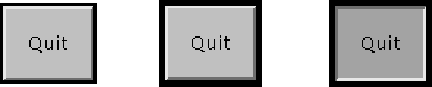
    This class creates a labeled button. The application can cause some action to happen when the button is pushed. This image depicts three views of a "Quit" button as it appears under the Solaris operating system:

    The following context describes the graphic

    The first view shows the button as it appears normally. The second view shows the button when it has input focus. Its outline is darkened to let the user know that it is an active object. The third view shows the button when the user clicks the mouse over the button, and thus requests that an action be performed.

    The gesture of clicking on a button with the mouse is associated with one instance of ActionEvent, which is sent out when the mouse is both pressed and released over the button. If an application is interested in knowing when the button has been pressed but not released, as a separate gesture, it can specialize processMouseEvent, or it can register itself as a listener for mouse events by calling addMouseListener. Both of these methods are defined by Component, the abstract superclass of all components.

    When a button is pressed and released, AWT sends an instance of ActionEvent to the button, by calling processEvent on the button. The button's processEvent method receives all events for the button; it passes an action event along by calling its own processActionEvent method. The latter method passes the action event on to any action listeners that have registered an interest in action events generated by this button.

    If an application wants to perform some action based on a button being pressed and released, it should implement ActionListener and register the new listener to receive events from this button, by calling the button's addActionListener method. The application can make use of the button's action command as a messaging protocol.

    Since:
    JDK1.0
    See Also:
    ActionEvent, ActionListener, Component.processMouseEvent(java.awt.event.MouseEvent), Component.addMouseListener(java.awt.event.MouseListener), Serialized Form
    • Nested Class Summary

      Nested Classes 
      Modifier and Type Class Description
      protected class  Button.AccessibleAWTButton
      This class implements accessibility support for the Button class.
      • Nested classes/interfaces inherited from class java.awt.Component

        Component.AccessibleAWTComponent, Component.BaselineResizeBehavior, Component.BltBufferStrategy, Component.FlipBufferStrategy
    • Field Summary

      • Fields inherited from class java.awt.Component

        accessibleContext, BOTTOM_ALIGNMENT, CENTER_ALIGNMENT, LEFT_ALIGNMENT, RIGHT_ALIGNMENT, TOP_ALIGNMENT
      • Fields inherited from interface java.awt.image.ImageObserver

        ABORT, ALLBITS, ERROR, FRAMEBITS, HEIGHT, PROPERTIES, SOMEBITS, WIDTH
    • Constructor Summary

      Constructors 
      Constructor Description
      Button()
      Constructs a button with an empty string for its label.
      Button(String label)
      Constructs a button with the specified label.
    • Method Summary

      All Methods Instance Methods Concrete Methods 
      Modifier and Type Method Description
      void addActionListener(ActionListener l)
      Adds the specified action listener to receive action events from this button.
      void addNotify()
      Creates the peer of the button.
      AccessibleContext getAccessibleContext()
      Gets the AccessibleContext associated with this Button.
      String getActionCommand()
      Returns the command name of the action event fired by this button.
      ActionListener[] getActionListeners()
      Returns an array of all the action listeners registered on this button.
      String getLabel()
      Gets the label of this button.
      <T extends EventListener>
      T[]
      getListeners(Class<T> listenerType)
      Returns an array of all the objects currently registered as FooListeners upon this Button.
      protected String paramString()
      Returns a string representing the state of this Button.
      protected void processActionEvent(ActionEvent e)
      Processes action events occurring on this button by dispatching them to any registered ActionListener objects.
      protected void processEvent(AWTEvent e)
      Processes events on this button.
      void removeActionListener(ActionListener l)
      Removes the specified action listener so that it no longer receives action events from this button.
      void setActionCommand(String command)
      Sets the command name for the action event fired by this button.
      void setLabel(String label)
      Sets the button's label to be the specified string.
      • Methods inherited from class java.awt.Component

        action, add, addComponentListener, addFocusListener, addHierarchyBoundsListener, addHierarchyListener, addInputMethodListener, addKeyListener, addMouseListener, addMouseMotionListener, addMouseWheelListener, addPropertyChangeListener, addPropertyChangeListener, applyComponentOrientation, areFocusTraversalKeysSet, bounds, checkImage, checkImage, coalesceEvents, contains, contains, createImage, createImage, createVolatileImage, createVolatileImage, deliverEvent, disable, disableEvents, dispatchEvent, doLayout, enable, enable, enableEvents, enableInputMethods, firePropertyChange, firePropertyChange, firePropertyChange, firePropertyChange, firePropertyChange, firePropertyChange, firePropertyChange, firePropertyChange, firePropertyChange, getAlignmentX, getAlignmentY, getBackground, getBaseline, getBaselineResizeBehavior, getBounds, getBounds, getColorModel, getComponentAt, getComponentAt, getComponentListeners, getComponentOrientation, getCursor, getDropTarget, getFocusCycleRootAncestor, getFocusListeners, getFocusTraversalKeys, getFocusTraversalKeysEnabled, getFont, getFontMetrics, getForeground, getGraphics, getGraphicsConfiguration, getHeight, getHierarchyBoundsListeners, getHierarchyListeners, getIgnoreRepaint, getInputContext, getInputMethodListeners, getInputMethodRequests, getKeyListeners, getLocale, getLocation, getLocation, getLocationOnScreen, getMaximumSize, getMinimumSize, getMouseListeners, getMouseMotionListeners, getMousePosition, getMouseWheelListeners, getName, getParent, getPeer, getPreferredSize, getPropertyChangeListeners, getPropertyChangeListeners, getSize, getSize, getToolkit, getTreeLock, getWidth, getX, getY, gotFocus, handleEvent, hasFocus, hide, imageUpdate, inside, invalidate, isBackgroundSet, isCursorSet, isDisplayable, isDoubleBuffered, isEnabled, isFocusable, isFocusCycleRoot, isFocusOwner, isFocusTraversable, isFontSet, isForegroundSet, isLightweight, isMaximumSizeSet, isMinimumSizeSet, isOpaque, isPreferredSizeSet, isShowing, isValid, isVisible, keyDown, keyUp, layout, list, list, list, list, list, locate, location, lostFocus, minimumSize, mouseDown, mouseDrag, mouseEnter, mouseExit, mouseMove, mouseUp, move, nextFocus, paint, paintAll, postEvent, preferredSize, prepareImage, prepareImage, print, printAll, processComponentEvent, processFocusEvent, processHierarchyBoundsEvent, processHierarchyEvent, processInputMethodEvent, processKeyEvent, processMouseEvent, processMouseMotionEvent, processMouseWheelEvent, remove, removeComponentListener, removeFocusListener, removeHierarchyBoundsListener, removeHierarchyListener, removeInputMethodListener, removeKeyListener, removeMouseListener, removeMouseMotionListener, removeMouseWheelListener, removeNotify, removePropertyChangeListener, removePropertyChangeListener, repaint, repaint, repaint, repaint, requestFocus, requestFocus, requestFocusInWindow, requestFocusInWindow, reshape, resize, resize, revalidate, setBackground, setBounds, setBounds, setComponentOrientation, setCursor, setDropTarget, setEnabled, setFocusable, setFocusTraversalKeys, setFocusTraversalKeysEnabled, setFont, setForeground, setIgnoreRepaint, setLocale, setLocation, setLocation, setMaximumSize, setMinimumSize, setName, setPreferredSize, setSize, setSize, setVisible, show, show, size, toString, transferFocus, transferFocusBackward, transferFocusUpCycle, update, validate
      • Methods inherited from class java.lang.Object

        clone, equals, finalize, getClass, hashCode, notify, notifyAll, wait, wait, wait
    • Constructor Detail

      • Button

        public Button()
               throws HeadlessException
        Constructs a button with an empty string for its label.
        Throws:
        HeadlessException - if GraphicsEnvironment.isHeadless() returns true
        See Also:
        GraphicsEnvironment.isHeadless()
      • Button

        public Button(String label)
               throws HeadlessException
        Constructs a button with the specified label.
        Parameters:
        label - a string label for the button, or null for no label
        Throws:
        HeadlessException - if GraphicsEnvironment.isHeadless() returns true
        See Also:
        GraphicsEnvironment.isHeadless()
    • Method Detail

      • addNotify

        public void addNotify()
        Creates the peer of the button. The button's peer allows the application to change the look of the button without changing its functionality.
        Overrides:
        addNotify in class Component
        See Also:
        Toolkit.createButton(java.awt.Button), Component.getToolkit()
      • getLabel

        public String getLabel()
        Gets the label of this button.
        Returns:
        the button's label, or null if the button has no label.
        See Also:
        setLabel(java.lang.String)
      • setLabel

        public void setLabel(String label)
        Sets the button's label to be the specified string.
        Parameters:
        label - the new label, or null if the button has no label.
        See Also:
        getLabel()
      • setActionCommand

        public void setActionCommand(String command)
        Sets the command name for the action event fired by this button. By default this action command is set to match the label of the button.
        Parameters:
        command - a string used to set the button's action command. If the string is null then the action command is set to match the label of the button.
        Since:
        JDK1.1
        See Also:
        ActionEvent
      • getActionCommand

        public String getActionCommand()
        Returns the command name of the action event fired by this button. If the command name is null (default) then this method returns the label of the button.
      • addActionListener

        public void addActionListener(ActionListener l)
        Adds the specified action listener to receive action events from this button. Action events occur when a user presses or releases the mouse over this button. If l is null, no exception is thrown and no action is performed.

        Refer to AWT Threading Issues for details on AWT's threading model.

        Parameters:
        l - the action listener
        Since:
        JDK1.1
        See Also:
        removeActionListener(java.awt.event.ActionListener), getActionListeners(), ActionListener
      • removeActionListener

        public void removeActionListener(ActionListener l)
        Removes the specified action listener so that it no longer receives action events from this button. Action events occur when a user presses or releases the mouse over this button. If l is null, no exception is thrown and no action is performed.

        Refer to AWT Threading Issues for details on AWT's threading model.

        Parameters:
        l - the action listener
        Since:
        JDK1.1
        See Also:
        addActionListener(java.awt.event.ActionListener), getActionListeners(), ActionListener
      • getActionListeners

        public ActionListener[] getActionListeners()
        Returns an array of all the action listeners registered on this button.
        Returns:
        all of this button's ActionListeners or an empty array if no action listeners are currently registered
        Since:
        1.4
        See Also:
        addActionListener(java.awt.event.ActionListener), removeActionListener(java.awt.event.ActionListener), ActionListener
      • getListeners

        public <T extends EventListener> T[] getListeners(Class<T> listenerType)
        Returns an array of all the objects currently registered as FooListeners upon this Button. FooListeners are registered using the addFooListener method.

        You can specify the listenerType argument with a class literal, such as FooListener.class. For example, you can query a Button b for its action listeners with the following code:

        ActionListener[] als = (ActionListener[])(b.getListeners(ActionListener.class));
        If no such listeners exist, this method returns an empty array.

        Overrides:
        getListeners in class Component
        Parameters:
        listenerType - the type of listeners requested; this parameter should specify an interface that descends from java.util.EventListener
        Returns:
        an array of all objects registered as FooListeners on this button, or an empty array if no such listeners have been added
        Throws:
        ClassCastException - if listenerType doesn't specify a class or interface that implements java.util.EventListener
        Since:
        1.3
        See Also:
        getActionListeners()
      • processEvent

        protected void processEvent(AWTEvent e)
        Processes events on this button. If an event is an instance of ActionEvent, this method invokes the processActionEvent method. Otherwise, it invokes processEvent on the superclass.

        Note that if the event parameter is null the behavior is unspecified and may result in an exception.

        Overrides:
        processEvent in class Component
        Parameters:
        e - the event
        Since:
        JDK1.1
        See Also:
        ActionEvent, processActionEvent(java.awt.event.ActionEvent)
      • processActionEvent

        protected void processActionEvent(ActionEvent e)
        Processes action events occurring on this button by dispatching them to any registered ActionListener objects.

        This method is not called unless action events are enabled for this button. Action events are enabled when one of the following occurs:

        • An ActionListener object is registered via addActionListener.
        • Action events are enabled via enableEvents.

        Note that if the event parameter is null the behavior is unspecified and may result in an exception.

        Parameters:
        e - the action event
        Since:
        JDK1.1
        See Also:
        ActionListener, addActionListener(java.awt.event.ActionListener), Component.enableEvents(long)
      • paramString

        protected String paramString()
        Returns a string representing the state of this Button. This method is intended to be used only for debugging purposes, and the content and format of the returned string may vary between implementations. The returned string may be empty but may not be null.
        Overrides:
        paramString in class Component
        Returns:
        the parameter string of this button
      • getAccessibleContext

        public AccessibleContext getAccessibleContext()
        Gets the AccessibleContext associated with this Button. For buttons, the AccessibleContext takes the form of an AccessibleAWTButton. A new AccessibleAWTButton instance is created if necessary.
        Specified by:
        getAccessibleContext in interface Accessible
        Overrides:
        getAccessibleContext in class Component
        Returns:
        an AccessibleAWTButton that serves as the AccessibleContext of this Button
        Since:
        1.3
Skip navigation links
  • Overview
  • Package
  • Class
  • Use
  • Tree
  • Deprecated
  • Index
  • Help
Java™ Platform
Standard Ed. 8
  • Prev Class
  • Next Class
  • Frames
  • No Frames
  • All Classes
  • Summary: 
  • Nested | 
  • Field | 
  • Constr | 
  • Method
  • Detail: 
  • Field | 
  • Constr | 
  • Method

Submit a bug or feature
For further API reference and developer documentation, see Java SE Documentation. That documentation contains more detailed, developer-targeted descriptions, with conceptual overviews, definitions of terms, workarounds, and working code examples.
Copyright © 1993, 2026, Oracle and/or its affiliates. All rights reserved. Use is subject to license terms. Also see the documentation redistribution policy.

You are visitor 01402775 — GeezerVison does not store the pages you look up.
Best viewed with Netscape Navigator 4.7 or Internet Explorer 6 at 800×600. No cookies required.