GV

GeezerVison

The World Wide Web, restored to 800 pixels of glory.

Home|About|Gaming cabinet|Archives|How it works|Starter sites

On this site

  • Overview
  • Package
  • Use
  • Tree
  • Deprecated
  • Index
  • Help
  • Prev Class
  • Next Class
  • Frames
  • No Frames
  • All Classes
  • java.lang.Object
  • java.awt.Component

This view

  • Original page
  • New address

GeezerVison is showing docs.oracle.com — TextArea (Java Platform SE 8 )

Skip navigation links
  • Overview
  • Package
  • Class
  • Use
  • Tree
  • Deprecated
  • Index
  • Help
Java™ Platform
Standard Ed. 8
  • Prev Class
  • Next Class
  • Frames
  • No Frames
  • All Classes
  • Summary: 
  • Nested | 
  • Field | 
  • Constr | 
  • Method
  • Detail: 
  • Field | 
  • Constr | 
  • Method
java.awt

Class TextArea

  • java.lang.Object
    • java.awt.Component
      • java.awt.TextComponent
        • java.awt.TextArea
  • All Implemented Interfaces:
    ImageObserver, MenuContainer, Serializable, Accessible


    public class TextArea
    extends TextComponent
    A TextArea object is a multi-line region that displays text. It can be set to allow editing or to be read-only.

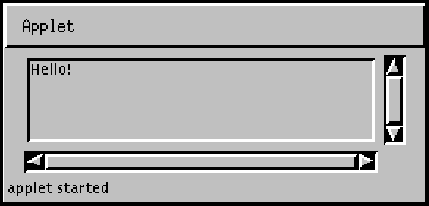
    The following image shows the appearance of a text area:

    A TextArea showing the word 'Hello!'

    This text area could be created by the following line of code:


     new TextArea("Hello", 5, 40);
     

    Since:
    JDK1.0
    See Also:
    Serialized Form
    • Nested Class Summary

      Nested Classes 
      Modifier and Type Class Description
      protected class  TextArea.AccessibleAWTTextArea
      This class implements accessibility support for the TextArea class.
      • Nested classes/interfaces inherited from class java.awt.TextComponent

        TextComponent.AccessibleAWTTextComponent
      • Nested classes/interfaces inherited from class java.awt.Component

        Component.AccessibleAWTComponent, Component.BaselineResizeBehavior, Component.BltBufferStrategy, Component.FlipBufferStrategy
    • Field Summary

      Fields 
      Modifier and Type Field Description
      static int SCROLLBARS_BOTH
      Create and display both vertical and horizontal scrollbars.
      static int SCROLLBARS_HORIZONTAL_ONLY
      Create and display horizontal scrollbar only.
      static int SCROLLBARS_NONE
      Do not create or display any scrollbars for the text area.
      static int SCROLLBARS_VERTICAL_ONLY
      Create and display vertical scrollbar only.
      • Fields inherited from class java.awt.TextComponent

        textListener
      • Fields inherited from class java.awt.Component

        accessibleContext, BOTTOM_ALIGNMENT, CENTER_ALIGNMENT, LEFT_ALIGNMENT, RIGHT_ALIGNMENT, TOP_ALIGNMENT
      • Fields inherited from interface java.awt.image.ImageObserver

        ABORT, ALLBITS, ERROR, FRAMEBITS, HEIGHT, PROPERTIES, SOMEBITS, WIDTH
    • Constructor Summary

      Constructors 
      Constructor Description
      TextArea()
      Constructs a new text area with the empty string as text.
      TextArea(int rows, int columns)
      Constructs a new text area with the specified number of rows and columns and the empty string as text.
      TextArea(String text)
      Constructs a new text area with the specified text.
      TextArea(String text, int rows, int columns)
      Constructs a new text area with the specified text, and with the specified number of rows and columns.
      TextArea(String text, int rows, int columns, int scrollbars)
      Constructs a new text area with the specified text, and with the rows, columns, and scroll bar visibility as specified.
    • Method Summary

      All Methods Instance Methods Concrete Methods Deprecated Methods 
      Modifier and Type Method Description
      void addNotify()
      Creates the TextArea's peer.
      void append(String str)
      Appends the given text to the text area's current text.
      void appendText(String str)
      Deprecated. 
      As of JDK version 1.1, replaced by append(String).
      AccessibleContext getAccessibleContext()
      Returns the AccessibleContext associated with this TextArea.
      int getColumns()
      Returns the number of columns in this text area.
      Dimension getMinimumSize()
      Determines the minimum size of this text area.
      Dimension getMinimumSize(int rows, int columns)
      Determines the minimum size of a text area with the specified number of rows and columns.
      Dimension getPreferredSize()
      Determines the preferred size of this text area.
      Dimension getPreferredSize(int rows, int columns)
      Determines the preferred size of a text area with the specified number of rows and columns.
      int getRows()
      Returns the number of rows in the text area.
      int getScrollbarVisibility()
      Returns an enumerated value that indicates which scroll bars the text area uses.
      void insert(String str, int pos)
      Inserts the specified text at the specified position in this text area.
      void insertText(String str, int pos)
      Deprecated. 
      As of JDK version 1.1, replaced by insert(String, int).
      Dimension minimumSize()
      Deprecated. 
      As of JDK version 1.1, replaced by getMinimumSize().
      Dimension minimumSize(int rows, int columns)
      Deprecated. 
      As of JDK version 1.1, replaced by getMinimumSize(int, int).
      protected String paramString()
      Returns a string representing the state of this TextArea.
      Dimension preferredSize()
      Deprecated. 
      As of JDK version 1.1, replaced by getPreferredSize().
      Dimension preferredSize(int rows, int columns)
      Deprecated. 
      As of JDK version 1.1, replaced by getPreferredSize(int, int).
      void replaceRange(String str, int start, int end)
      Replaces text between the indicated start and end positions with the specified replacement text.
      void replaceText(String str, int start, int end)
      Deprecated. 
      As of JDK version 1.1, replaced by replaceRange(String, int, int).
      void setColumns(int columns)
      Sets the number of columns for this text area.
      void setRows(int rows)
      Sets the number of rows for this text area.
      • Methods inherited from class java.awt.TextComponent

        addTextListener, enableInputMethods, getBackground, getCaretPosition, getInputMethodRequests, getListeners, getSelectedText, getSelectionEnd, getSelectionStart, getText, getTextListeners, isEditable, processEvent, processTextEvent, removeNotify, removeTextListener, select, selectAll, setBackground, setCaretPosition, setEditable, setSelectionEnd, setSelectionStart, setText
      • Methods inherited from class java.awt.Component

        action, add, addComponentListener, addFocusListener, addHierarchyBoundsListener, addHierarchyListener, addInputMethodListener, addKeyListener, addMouseListener, addMouseMotionListener, addMouseWheelListener, addPropertyChangeListener, addPropertyChangeListener, applyComponentOrientation, areFocusTraversalKeysSet, bounds, checkImage, checkImage, coalesceEvents, contains, contains, createImage, createImage, createVolatileImage, createVolatileImage, deliverEvent, disable, disableEvents, dispatchEvent, doLayout, enable, enable, enableEvents, firePropertyChange, firePropertyChange, firePropertyChange, firePropertyChange, firePropertyChange, firePropertyChange, firePropertyChange, firePropertyChange, firePropertyChange, getAlignmentX, getAlignmentY, getBaseline, getBaselineResizeBehavior, getBounds, getBounds, getColorModel, getComponentAt, getComponentAt, getComponentListeners, getComponentOrientation, getCursor, getDropTarget, getFocusCycleRootAncestor, getFocusListeners, getFocusTraversalKeys, getFocusTraversalKeysEnabled, getFont, getFontMetrics, getForeground, getGraphics, getGraphicsConfiguration, getHeight, getHierarchyBoundsListeners, getHierarchyListeners, getIgnoreRepaint, getInputContext, getInputMethodListeners, getKeyListeners, getLocale, getLocation, getLocation, getLocationOnScreen, getMaximumSize, getMouseListeners, getMouseMotionListeners, getMousePosition, getMouseWheelListeners, getName, getParent, getPeer, getPropertyChangeListeners, getPropertyChangeListeners, getSize, getSize, getToolkit, getTreeLock, getWidth, getX, getY, gotFocus, handleEvent, hasFocus, hide, imageUpdate, inside, invalidate, isBackgroundSet, isCursorSet, isDisplayable, isDoubleBuffered, isEnabled, isFocusable, isFocusCycleRoot, isFocusOwner, isFocusTraversable, isFontSet, isForegroundSet, isLightweight, isMaximumSizeSet, isMinimumSizeSet, isOpaque, isPreferredSizeSet, isShowing, isValid, isVisible, keyDown, keyUp, layout, list, list, list, list, list, locate, location, lostFocus, mouseDown, mouseDrag, mouseEnter, mouseExit, mouseMove, mouseUp, move, nextFocus, paint, paintAll, postEvent, prepareImage, prepareImage, print, printAll, processComponentEvent, processFocusEvent, processHierarchyBoundsEvent, processHierarchyEvent, processInputMethodEvent, processKeyEvent, processMouseEvent, processMouseMotionEvent, processMouseWheelEvent, remove, removeComponentListener, removeFocusListener, removeHierarchyBoundsListener, removeHierarchyListener, removeInputMethodListener, removeKeyListener, removeMouseListener, removeMouseMotionListener, removeMouseWheelListener, removePropertyChangeListener, removePropertyChangeListener, repaint, repaint, repaint, repaint, requestFocus, requestFocus, requestFocusInWindow, requestFocusInWindow, reshape, resize, resize, revalidate, setBounds, setBounds, setComponentOrientation, setCursor, setDropTarget, setEnabled, setFocusable, setFocusTraversalKeys, setFocusTraversalKeysEnabled, setFont, setForeground, setIgnoreRepaint, setLocale, setLocation, setLocation, setMaximumSize, setMinimumSize, setName, setPreferredSize, setSize, setSize, setVisible, show, show, size, toString, transferFocus, transferFocusBackward, transferFocusUpCycle, update, validate
      • Methods inherited from class java.lang.Object

        clone, equals, finalize, getClass, hashCode, notify, notifyAll, wait, wait, wait
    • Field Detail

      • SCROLLBARS_BOTH

        public static final int SCROLLBARS_BOTH
        Create and display both vertical and horizontal scrollbars.
        Since:
        JDK1.1
        See Also:
        Constant Field Values
      • SCROLLBARS_VERTICAL_ONLY

        public static final int SCROLLBARS_VERTICAL_ONLY
        Create and display vertical scrollbar only.
        Since:
        JDK1.1
        See Also:
        Constant Field Values
      • SCROLLBARS_HORIZONTAL_ONLY

        public static final int SCROLLBARS_HORIZONTAL_ONLY
        Create and display horizontal scrollbar only.
        Since:
        JDK1.1
        See Also:
        Constant Field Values
      • SCROLLBARS_NONE

        public static final int SCROLLBARS_NONE
        Do not create or display any scrollbars for the text area.
        Since:
        JDK1.1
        See Also:
        Constant Field Values
    • Constructor Detail

      • TextArea

        public TextArea()
                 throws HeadlessException
        Constructs a new text area with the empty string as text. This text area is created with scrollbar visibility equal to SCROLLBARS_BOTH, so both vertical and horizontal scrollbars will be visible for this text area.
        Throws:
        HeadlessException - if GraphicsEnvironment.isHeadless returns true
        See Also:
        GraphicsEnvironment.isHeadless()
      • TextArea

        public TextArea(String text)
                 throws HeadlessException
        Constructs a new text area with the specified text. This text area is created with scrollbar visibility equal to SCROLLBARS_BOTH, so both vertical and horizontal scrollbars will be visible for this text area.
        Parameters:
        text - the text to be displayed; if text is null, the empty string "" will be displayed
        Throws:
        HeadlessException - if GraphicsEnvironment.isHeadless returns true
        See Also:
        GraphicsEnvironment.isHeadless()
      • TextArea

        public TextArea(int rows,
                        int columns)
                 throws HeadlessException
        Constructs a new text area with the specified number of rows and columns and the empty string as text. A column is an approximate average character width that is platform-dependent. The text area is created with scrollbar visibility equal to SCROLLBARS_BOTH, so both vertical and horizontal scrollbars will be visible for this text area.
        Parameters:
        rows - the number of rows
        columns - the number of columns
        Throws:
        HeadlessException - if GraphicsEnvironment.isHeadless returns true
        See Also:
        GraphicsEnvironment.isHeadless()
      • TextArea

        public TextArea(String text,
                        int rows,
                        int columns)
                 throws HeadlessException
        Constructs a new text area with the specified text, and with the specified number of rows and columns. A column is an approximate average character width that is platform-dependent. The text area is created with scrollbar visibility equal to SCROLLBARS_BOTH, so both vertical and horizontal scrollbars will be visible for this text area.
        Parameters:
        text - the text to be displayed; if text is null, the empty string "" will be displayed
        rows - the number of rows
        columns - the number of columns
        Throws:
        HeadlessException - if GraphicsEnvironment.isHeadless returns true
        See Also:
        GraphicsEnvironment.isHeadless()
      • TextArea

        public TextArea(String text,
                        int rows,
                        int columns,
                        int scrollbars)
                 throws HeadlessException
        Constructs a new text area with the specified text, and with the rows, columns, and scroll bar visibility as specified. All TextArea constructors defer to this one.

        The TextArea class defines several constants that can be supplied as values for the scrollbars argument:

        • SCROLLBARS_BOTH,
        • SCROLLBARS_VERTICAL_ONLY,
        • SCROLLBARS_HORIZONTAL_ONLY,
        • SCROLLBARS_NONE.
        Any other value for the scrollbars argument is invalid and will result in this text area being created with scrollbar visibility equal to the default value of SCROLLBARS_BOTH.

        Parameters:
        text - the text to be displayed; if text is null, the empty string "" will be displayed
        rows - the number of rows; if rows is less than 0, rows is set to 0
        columns - the number of columns; if columns is less than 0, columns is set to 0
        scrollbars - a constant that determines what scrollbars are created to view the text area
        Throws:
        HeadlessException - if GraphicsEnvironment.isHeadless returns true
        Since:
        JDK1.1
        See Also:
        GraphicsEnvironment.isHeadless()
    • Method Detail

      • addNotify

        public void addNotify()
        Creates the TextArea's peer. The peer allows us to modify the appearance of the TextArea without changing any of its functionality.
        Overrides:
        addNotify in class TextComponent
        See Also:
        TextComponent.removeNotify()
      • insert

        public void insert(String str,
                           int pos)
        Inserts the specified text at the specified position in this text area.

        Note that passing null or inconsistent parameters is invalid and will result in unspecified behavior.

        Parameters:
        str - the non-null text to insert
        pos - the position at which to insert
        Since:
        JDK1.1
        See Also:
        TextComponent.setText(java.lang.String), replaceRange(java.lang.String, int, int), append(java.lang.String)
      • insertText

        @Deprecated
        public void insertText(String str,
                                           int pos)
        Deprecated. As of JDK version 1.1, replaced by insert(String, int).
      • append

        public void append(String str)
        Appends the given text to the text area's current text.

        Note that passing null or inconsistent parameters is invalid and will result in unspecified behavior.

        Parameters:
        str - the non-null text to append
        Since:
        JDK1.1
        See Also:
        insert(java.lang.String, int)
      • appendText

        @Deprecated
        public void appendText(String str)
        Deprecated. As of JDK version 1.1, replaced by append(String).
      • replaceRange

        public void replaceRange(String str,
                                 int start,
                                 int end)
        Replaces text between the indicated start and end positions with the specified replacement text. The text at the end position will not be replaced. The text at the start position will be replaced (unless the start position is the same as the end position). The text position is zero-based. The inserted substring may be of a different length than the text it replaces.

        Note that passing null or inconsistent parameters is invalid and will result in unspecified behavior.

        Parameters:
        str - the non-null text to use as the replacement
        start - the start position
        end - the end position
        Since:
        JDK1.1
        See Also:
        insert(java.lang.String, int)
      • replaceText

        @Deprecated
        public void replaceText(String str,
                                            int start,
                                            int end)
        Deprecated. As of JDK version 1.1, replaced by replaceRange(String, int, int).
      • getRows

        public int getRows()
        Returns the number of rows in the text area.
        Returns:
        the number of rows in the text area
        Since:
        JDK1
        See Also:
        setRows(int), getColumns()
      • setRows

        public void setRows(int rows)
        Sets the number of rows for this text area.
        Parameters:
        rows - the number of rows
        Throws:
        IllegalArgumentException - if the value supplied for rows is less than 0
        Since:
        JDK1.1
        See Also:
        getRows(), setColumns(int)
      • getColumns

        public int getColumns()
        Returns the number of columns in this text area.
        Returns:
        the number of columns in the text area
        See Also:
        setColumns(int), getRows()
      • setColumns

        public void setColumns(int columns)
        Sets the number of columns for this text area.
        Parameters:
        columns - the number of columns
        Throws:
        IllegalArgumentException - if the value supplied for columns is less than 0
        Since:
        JDK1.1
        See Also:
        getColumns(), setRows(int)
      • getScrollbarVisibility

        public int getScrollbarVisibility()
        Returns an enumerated value that indicates which scroll bars the text area uses.

        The TextArea class defines four integer constants that are used to specify which scroll bars are available. TextArea has one constructor that gives the application discretion over scroll bars.

        Returns:
        an integer that indicates which scroll bars are used
        Since:
        JDK1.1
        See Also:
        SCROLLBARS_BOTH, SCROLLBARS_VERTICAL_ONLY, SCROLLBARS_HORIZONTAL_ONLY, SCROLLBARS_NONE, TextArea(java.lang.String, int, int, int)
      • getPreferredSize

        public Dimension getPreferredSize(int rows,
                                          int columns)
        Determines the preferred size of a text area with the specified number of rows and columns.
        Parameters:
        rows - the number of rows
        columns - the number of columns
        Returns:
        the preferred dimensions required to display the text area with the specified number of rows and columns
        Since:
        JDK1.1
        See Also:
        Component.getPreferredSize()
      • preferredSize

        @Deprecated
        public Dimension preferredSize(int rows,
                                                   int columns)
        Deprecated. As of JDK version 1.1, replaced by getPreferredSize(int, int).
      • getPreferredSize

        public Dimension getPreferredSize()
        Determines the preferred size of this text area.
        Overrides:
        getPreferredSize in class Component
        Returns:
        the preferred dimensions needed for this text area
        Since:
        JDK1.1
        See Also:
        Component.getPreferredSize()
      • preferredSize

        @Deprecated
        public Dimension preferredSize()
        Deprecated. As of JDK version 1.1, replaced by getPreferredSize().
        Overrides:
        preferredSize in class Component
      • getMinimumSize

        public Dimension getMinimumSize(int rows,
                                        int columns)
        Determines the minimum size of a text area with the specified number of rows and columns.
        Parameters:
        rows - the number of rows
        columns - the number of columns
        Returns:
        the minimum dimensions required to display the text area with the specified number of rows and columns
        Since:
        JDK1.1
        See Also:
        Component.getMinimumSize()
      • minimumSize

        @Deprecated
        public Dimension minimumSize(int rows,
                                                 int columns)
        Deprecated. As of JDK version 1.1, replaced by getMinimumSize(int, int).
      • getMinimumSize

        public Dimension getMinimumSize()
        Determines the minimum size of this text area.
        Overrides:
        getMinimumSize in class Component
        Returns:
        the preferred dimensions needed for this text area
        Since:
        JDK1.1
        See Also:
        Component.getPreferredSize()
      • minimumSize

        @Deprecated
        public Dimension minimumSize()
        Deprecated. As of JDK version 1.1, replaced by getMinimumSize().
        Overrides:
        minimumSize in class Component
      • paramString

        protected String paramString()
        Returns a string representing the state of this TextArea. This method is intended to be used only for debugging purposes, and the content and format of the returned string may vary between implementations. The returned string may be empty but may not be null.
        Overrides:
        paramString in class TextComponent
        Returns:
        the parameter string of this text area
      • getAccessibleContext

        public AccessibleContext getAccessibleContext()
        Returns the AccessibleContext associated with this TextArea. For text areas, the AccessibleContext takes the form of an AccessibleAWTTextArea. A new AccessibleAWTTextArea instance is created if necessary.
        Specified by:
        getAccessibleContext in interface Accessible
        Overrides:
        getAccessibleContext in class TextComponent
        Returns:
        an AccessibleAWTTextArea that serves as the AccessibleContext of this TextArea
        Since:
        1.3
Skip navigation links
  • Overview
  • Package
  • Class
  • Use
  • Tree
  • Deprecated
  • Index
  • Help
Java™ Platform
Standard Ed. 8
  • Prev Class
  • Next Class
  • Frames
  • No Frames
  • All Classes
  • Summary: 
  • Nested | 
  • Field | 
  • Constr | 
  • Method
  • Detail: 
  • Field | 
  • Constr | 
  • Method

Submit a bug or feature
For further API reference and developer documentation, see Java SE Documentation. That documentation contains more detailed, developer-targeted descriptions, with conceptual overviews, definitions of terms, workarounds, and working code examples.
Copyright © 1993, 2026, Oracle and/or its affiliates. All rights reserved. Use is subject to license terms. Also see the documentation redistribution policy.

You are visitor 01402792 — GeezerVison does not store the pages you look up.
Best viewed with Netscape Navigator 4.7 or Internet Explorer 6 at 800×600. No cookies required.