GeezerVisonThe World Wide Web, restored to 800 pixels of glory. |
| Home|About|Gaming cabinet|Archives|How it works|Starter sites |
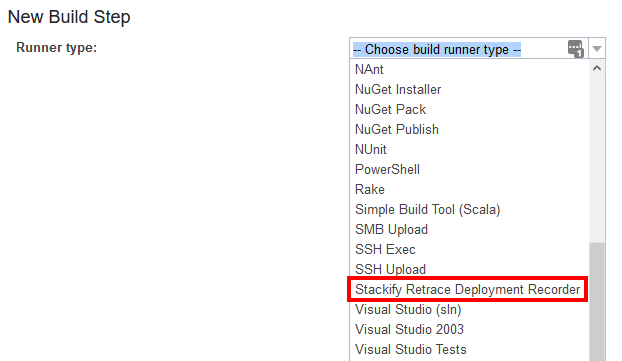
GeezerVison is showing docs.stackify.com — TeamCity Deployment Tracking Integration with Retrace With the Stackify Retrace Deployment Recorder plugin for TeamCity you can notify Retrace of a deployment with a custom build step. This will allow you to pass in TeamCity Environment variables with ease when notifying Retrace. You can view the plugin on Jetbrain's site here: Stackify Retrace Deployment Recorder Using the TeamCity Plugin
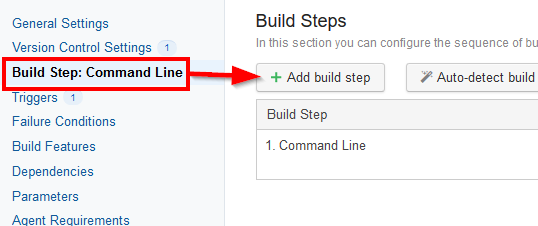
Alternative: Create a Manual Build StepInstead of using our plugin, you can also manually add a build step in TeamCity. Add a Build StepFrom your build configuration where you would like to notify Retrace of your Deployment, for example after a successful deployment, add a build step.
For the Runner Type choose Powershell or Command Line depending on the capabilities for your build agent. Configure ScriptTo see the generic examples for Bash and Powershell reference our API Code Samples guide. Windows PowershellSelect "Powershell" for the Runner Type and we will run the script from Source Code. Enter the script below into the Source Code Content and execute from an external file. You will need to specify the Action type for you Deployment Request (Start, Complete, or Cancel) as well.
Add the script below to the Powershell script content. Linux BashSelect "Command Line" as your Runner Type and choose to run a custom command. Paste the script below in the custom script content: Set VariablesAny parameter can be injected into the scripts above using the %parameter.name% syntax.
Setting the ApiKey value at your Root project will allow it to be inherited by all other projects. |
| You are visitor 01402520 — GeezerVison does not store the pages you look up. Best viewed with Netscape Navigator 4.7 or Internet Explorer 6 at 800×600. No cookies required. |