GeezerVisonThe World Wide Web, restored to 800 pixels of glory. | ||||||||||||
| Home|About|Gaming cabinet|Archives|How it works|Starter sites | ||||||||||||
GeezerVison is showing docs.voltdb.com — 4.4. Upgrading VoltDB Software Administrator's Guide4.4. Upgrading VoltDB SoftwareAs new versions of VoltDB become available, you will want to upgrade the VoltDB software on your database cluster. The simplest approach for upgrading recent versions of VoltDB — V6.8 or later — is to perform an orderly shutdown saving a final snapshot, upgrade the software on all servers, then re-start the database. (If you are upgrading from earlier versions of the software, you can still upgrade using a snapshot. But you will need to perform the save and restore operations manually.) However, upgrading using snapshots involves downtime while the software is being updated. An alternative is to use database replication (DR) — either passive DR or cross data center replication (XDCR) — to upgrade with minimal or no downtime. Using passive DR you can copy the active database contents to a new cluster, then switch the application clients to point to the new server. The advantage of this process is that the only downtime the business application sees is the time needed to promote the new cluster and redirect the clients. Using cross data center replication (XDCR), it is possible to perform an online upgrade, where there is no downtime and the database is accessible throughout the upgrade operation. If two or more clusters are already active participants in an XDCR environment, you can shutdown and upgrade the clusters, one at a time, to perform the upgrade leaving at least one cluster available at all times. The following sections describe five approaches to upgrading VoltDB software: 4.4.1. Upgrading VoltDB Using Save and RestoreUpgrading the VoltDB software on a single database cluster is easy. All you need to do is perform an orderly shutdown saving a final snapshot, upgrade the VoltDB software on all servers in the cluster, then restart the database. The steps to perform this procedure are:
This process works for any recent (V6.8 or later) release of VoltDB. 4.4.2. Upgrading Older Versions of VoltDB ManuallyTo upgrade older versions of VoltDB software (prior to V6.8), you must perform the save and restore operations manually. The steps when upgrading from older versions of VoltDB are:
4.4.3. Upgrading VoltDB With Reduced Downtime Using a DR ReplicaWhen upgrading the VoltDB software in a production environment, it is possible to minimize the disruption to client applications by upgrading across two clusters using passive database replication (DR). To use this process you need a second database cluster to act as the DR replica and you must have a unique cluster ID assigned to the current database. The basic process for upgrading the VoltDB software using DR is to:
The following sections describe in detail the prerequisites for using this process, the steps to follow, and — in case there are any issues with the updated database — the process for falling back to the previous software version. 4.4.3.1. Prerequisites for Upgrading with Passive DRThe prerequisites for using DR to upgrade VoltDB are:
The cluster ID is assigned in the For example, you would add the following element to the deployment file when starting your primary database cluster to assign it the unique ID of 3. <dr id="3"> ImportantAn important constraint to be aware of when using this process is that you must not make any schema changes during the upgrade process. This includes the period after the upgrade while you verify the application's proper operation on the new software version. If any changes are made to the schema, you may not be able to readily fall back to the previous version. 4.4.3.2. The Passive DR Upgrade ProcessThe procedure for upgrading the VoltDB software on a running database using DR is the following. In the examples,
we assume the existing database is running on a cluster with the nodes
Your upgrade is now complete. If, at any point, you decide there is an issue with your application or your database, it is possible to fall back to the previous version of VoltDB as long as you have not made any changes to the underlying database schema. The next section explains how to fall back when necessary. 4.4.3.3. Falling Back to a Previous VersionIn extreme cases, you may find there is an issue with your application and the latest version of VoltDB. Of course, you normally would discover this during testing prior to a production upgrade. However, if that is not the case and an incompatibility or other conflict is discovered after the upgrade is completed, it is possible to fall back to a previous version of VoltDB. The basic process for falling back is to the following:
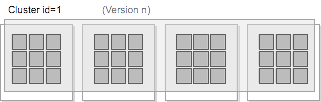
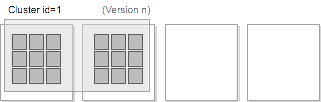
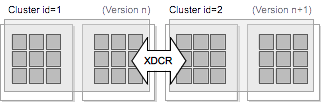
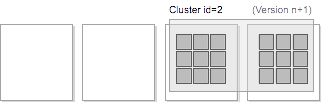
4.4.4. Performing an Online Upgrade Using Multiple XDCR ClustersIt is also possible to upgrade the VoltDB software using cross data center replication (XDCR), by simply shutting down, upgrading, and then re-initalizing each cluster, one at a time. This process requires no downtime, assuming your client applications are already designed to switch between the active clusters. Use of XDCR for upgrading the VoltDB software is easiest if you are already using XDCR because it does not require any additional hardware or reconfiguration. The following instructions assume that is the case. Of course, you could also create a new cluster and establish XDCR replication between the old and new clusters just for the purpose of upgrading VoltDB. The steps for the upgrade outlined in the following sections are the same. But first you must establish the cross data center replication between the two (or more) clusters. See the chapter on Database Replication in the Using VoltDB manual for instructions on completing this initial step. Once you have two clusters actively replicating data with XCDCR (let's call them clusters A and B), the steps for upgrading the VoltDB software on the clusters is as follows:
Note that since you are upgrading the software, you must create a new instance after the upgrade (step #3). When upgrading the software, you cannot recover the database using just the voltdb start command; you must use voltdb init --force first to create a new instance and then reload the existing data from the running cluster B. Also, be sure all data has been copied to the upgraded cluster A after step #4 and before proceeding to upgrade the
second cluster. You can do this by checking the @Statistics system procedure selector DRCONSUMER on cluster A. Once the
DRCONSUMER statistics 4.4.4.1. Falling Back to a Previous VersionIn extreme cases, you may decide after performing the upgrade that you do not want to use the latest version of VoltDB. If this happens, it is possible to fall back to the previous version of VoltDB. To "downgrade" from a new version back to the previous version, follow the steps outlined in Section 4.4.4, “Performing an Online Upgrade Using Multiple XDCR Clusters” except rather than upgrading to the new version in Step #2, reinstall the older version of VoltDB. This process is valid as long as you have not modified the schema or deployment to use any new or changed features introduced in the new version. 4.4.5. Performing an Online Upgrade With Limited HardwareWarningThe following method of upgrading VoltDB using limited hardware is deprecated, no longer recommended, and will not be supported in future releases of the product. Upgrading with save and restore or using multiple XDCR clusters are the recommended alternatives. It is possible to use XDCR and K-safety to perform an online upgrade, where the database remains accessible throughout the upgrade process, without requiring an additional cluster. As opposed to upgrading two separate XDCR clusters, this process enables an online upgrade with little or no extra hardware requirements. On the other hand, this upgrade process is quite complex and during the upgrade, the K-safety of the database is reduced. In other words, this process trades off the need for extra hardware against a more complicated upgrade process and increased risk to availability if any nodes crash unexpectedly during the upgrade. Essentially, the process for upgrading a cluster with limited additional hardware is to split the existing cluster hardware into two separate clusters, upgrading the software along the way. To make this possible, there are a several prerequisites:
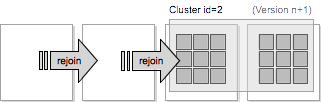
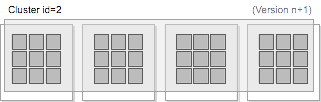
Additionally, if the K-safety value is 1 and the cluster has an odd number of nodes, you will need one additional server to complete the upgrade. (The additional server is no longer needed after the upgrade is completed.) Table 4.1, “Overview of the Online Upgrade Process” summarizes the overall process for online upgrade. Because the process is complicated and requires shutting down and restarting database servers in a specific order, it is important to create an upgrade plan before you begin. The voltadmin plan_upgrade command generates such a plan, listing the detailed steps for each phase based on your current cluster configuration. Before you attempt the online upgrade process, use voltadmin plan_upgrade to generate the plan and thoroughly review it to make sure you understand what is required. Table 4.1. Overview of the Online Upgrade Process
4.4.5.1. Falling Back to the Original Software VersionIn extreme cases, you may decide during or after performing the upgrade that you do not want to use the latest version of VoltDB. If this happens, it is possible to fall back to the previous version of VoltDB. During the phases identified as #1 and #2 in Table 4.1, “Overview of the Online Upgrade Process”, you can always rejoin the stopped nodes to the original cluster to return to your original configuration. During or after you complete phase #3, you can return to your original configuration by:
Once the original cluster is stopped as part of phase #4, the way to revert to the original software version is to repeat the entire procedure starting at phase #1 and reversing the direction — "downgrading" from the new software version to the old software version. This process is valid as long as you have not modified the schema or deployment to use any new or changed features introduced in the new version. 4.4.6. Downgrading, or Falling Back to a Previous VoltDB VersionThe sections describing the upgrade process for passive DR, active XDCR, and XDCR with limited hardware all explain how to fall back to the previous version of VoltDB in case of emergency. This section explains how to fall back, or downgrade, when using the standard save and restore process described in Section 4.4.1, “Upgrading VoltDB Using Save and Restore”. The following process works if you are reverting between two recent versions of VoltDB and you do not use any new features between the upgrade and the downgrade. There are no guarantees an attempt to downgrade will succeed if the two software versions are more than one major version apart or if you utilize a new feature from the higher version software prior to downgrading. With those caveats, the most reliable way to fall back to a previous VoltDB version is:
This process ensures that only the schema, stored procedures, and data are returned to the older version of the software, and new software features will not impact your restore process. For example: $ voltdb get schema -D ~/db/new --output=/tmp/mydb.sql $ voltdb get classes -D ~/db/new --output=/tmp/mydb.jar $ voltadmin pause $ voltadmin save /tmp mydata $ voltadmin shutdown [ downgrade VoltDB software . . . ] $ voltdb init -f -D ~/db/old --schema=/tmp/mydb.sql --classes=/top/mydb.jar $ voltdb start -D ~/db/old --pause & $ voltadmin restore /tmp mydata $ voltadmin resume | ||||||||||||
| You are visitor 01402775 — GeezerVison does not store the pages you look up. Best viewed with Netscape Navigator 4.7 or Internet Explorer 6 at 800×600. No cookies required. |