GeezerVisonThe World Wide Web, restored to 800 pixels of glory. |
| Home|About|Gaming cabinet|Archives|How it works|Starter sites |
GeezerVison is showing docs.voltdb.com — 11.2. Using Passive Database Replication Documentation11.2. Using Passive Database ReplicationThe following sections provide step-by-step instructions for setting up and running passive replication between two VoltDB clusters. The steps include:
The remaining sections discuss other aspects of managing passive DR, including:
11.2.1. Specifying the DR Tables in the SchemaFirst, you must identify which tables you wish to copy from the master to the replica. Only the selected tables are copied. You identify the tables in both the master and the replica database schema with the DR TABLE statement, For example, the following statements identify two tables to be replicated, the Customers and Orders tables: CREATE TABLE customers (
customerID INTEGER NOT NULL,
firstname VARCHAR(128),
lastname VARCHAR(128)
);
CREATE TABLE orders (
orderID INTEGER NOT NULL,
customerID INTEGER NOT NULL,
placed TIMESTAMP
);
DR TABLE customers;
DR TABLE orders;You can identify any regular table, whether partitioned or not, as a DR table, as long as the table is empty. That is, the table must have no data in it when you issue the DR TABLE statement. The important point to remember is that the schema for both databases must contain matching table definitions for any tables identified as DR tables, including the associated DR TABLE declarations. Although it is easiest to have the master and replica databases use the exact same schema, that is not necessary. The replica can have a subset or superset of the tables in the master, as long as it contains matching definitions for all of the DR tables. The replica schema can even contain additional objects not in the master schema, such as additional views. Which can be useful when using the replica for read-only or reporting workloads, just as long as the DR tables match. 11.2.2. Configuring the ClustersThe next step is to properly configure the master and replica clusters. The two database clusters can have different physical configurations (that is, different numbers of nodes, different sites per host, or a different K factor). Identical cluster configurations guarantee the most efficient replication, because the replica does not need to repartition the incoming binary logs. Differing configurations, on the other hand, may incrementally increase the time needed to apply the binary logs. Before you start the databases, you must initialize the root directories for both clusters with the appropriate DR
attributes. You enable DR in the configuration file using the
11.2.3. Starting the ClustersThe next step is to start the databases. You start the master database as normal with the voltdb start command. If you are creating a new database, you can then load the schema, including the necessary DR TABLE statements. Or you can restore a previous database instance if desired. Once the master database starts, it is ready and can interact with client applications. For the replica database, you must create a new database using the voltdb start command. You must
also use the $ voltdb start --replica When you specify the The It is usually convenient to specify the connection information when initializing the database root directory. But this property can be changed after the database is running, in case you do not know the address of the master cluster nodes before starting. (Note, however, that the cluster ID cannot be changed once the database starts.) 11.2.4. Loading the Schema and Starting ReplicationAs soon as the replica database starts with DR enabled, it will attempt to contact the master database to start replication. The replica will issue warnings that the schema does not match, since the replica does not have any schema defined yet. This is normal. The replica will periodically contact the master until the schema for DR objects on the two databases match. This gives you time to load a matching schema. As soon as the replica database has started, you can load the appropriate schema. Loading the same schema as the master database is the easiest and recommended approach. The key point is that once a matching schema is loaded, replication will begin automatically. When replication starts, the following actions occur:
If any errors occur during the snapshot transmission, replication stops and must be restarted from the beginning. However, once the third step is reached, replication proceeds independently for each unique partition and, in a K safe environment, the DR process becomes durable across node failures and rejoins and other non-fatal events. If either the master or the replica database crashes and needs to restart, it is possible to restart DR where it left off, assuming the databases are using command logging for recovery. If the master fails, you simply use the voltdb start command to restart the master database. The replica will wait for the master to recover. The master will then replay any DR logs on disk and resume DR where it left off. If the replica fails, the master will queue the DR logs to disk waiting for the replica to return. If you use the voltdb start command, including the --replica flag, on the replica cluster, the replica will perform the following actions:
Note that you must use the --replica flag when restarting the replica database if you want to resume DR where it left off. For example: $ voltdb start --replicaIf you do not include the --replica flag, the database will resume as a normal, read/write database and not attempt to contact the master database. Also, if the clusters do not agree on where DR stopped during step #3, the replica database will generate an error and stop replication. For example, if you recover from an asynchronous command log where the last few DR logs were ACKed to the master but not written to the command log, the master and the replica will be in different states when the replica recovers. If this occurs, you must restart DR from the beginning, by re-initializing the replica root directory (with the --force flag), restarting the database, and then reloading a compatible schema. Similarly, if you are not using command logging, you cannot recover the replica database and must start DR from scratch. 11.2.5. Updating the Schema During ReplicationReplication can only occur while the schema for the DR tables match on both clusters. However, you do not want to stop and reinitialize DR every time you need to change the schema. Fortunately, you do not have to. To change the schema for DR tables in passive DR, you must change the schema on the master cluster first, then change the schema on the replica cluster to match. When you change the schema on the master cluster, a message is sent to the replica as part of the binary logs indicating that the schema has changed. When the replica processes this message, it pauses all DR activity and waits for its schema to be updated so the DR tables match the master. Once the schema match again, DR processing automatically resumes. The trick is you must make sure that the replica has processed all binary logs from the original schema before making any changes to its schema. The easiest way to do this is the following:
The pause --wait command waits until all DR logs are sent and acknowledged before returning control to the user. This way you know the replica has processed all old DR logs before the schema updates occur. However, if the replica is slow in processing the binary logs (due to heavy volume or network latency) the pause --wait command may take a significant amount of time to complete, during which transactions are no longer processed on the master. An alternative is to use the voltadmin pause command in step #1 without the --wait flag. The pause command is recommended because it allows you to synchronize changes to the schema with any changes needed to the client applications to accommodate the new schema. This operation is very quick because you can immediately apply the schema change and resume the master in step #2. The schema change is applied transactionally as soon as any outstanding client transactions are completed. It does not wait for the replica. However, if you use this alternate method, before performing step #3, you must make sure any outstanding DR logs have been processed by the replica. You can do this by checking the @Statistics system procedure with the DRCONSUMER selector on the consumer cluster. As soon as the IS_PAUSED column reports "true" for all partitions, you know the replica is ready for the schema update. For example: $ echo "exec @Statistics DRCONSUMER 0" | sqlcmd 11.2.6. Stopping ReplicationIf, for any reason, you wish to stop replication of a database, there are two ways to do this: you can stop sending data from the master or you can "promote" the replica to stop it from receiving data. Since the individual partitions are replicating data independently, if possible you want to make sure all pending transfers are completed before turning off replication. So, under the best circumstances, you should perform the following steps to stop replication:
11.2.6.1. Stopping Replication on the Master if the Replica Becomes UnavailableIf the replica becomes unavailable and is not going to be recovered or restarted, you should consider stopping DR on the master database, to avoid consuming unnecessary disk space. The DR process is resilient against network glitches and node or cluster failures. This durability is achieved by the master database continually queueing DR logs in memory and — if too much memory is required — to disk while it waits for the replica to ACK the last message. This way, when the network interruption or other delay is cleared, the DR process can pick up where it left off. However, the master database has no way to distinguish a temporary network failure from an actual stoppage of DR on the replica. Therefore, if the replica stops unexpectedly, it is a good idea to restart the replica and re-initiate DR as soon as convenient. Or, if you are not going to restart DR, you should reset DR on the master to cancel the queuing of DR logs and to delete any pending logs. To reset the DR process on the master database, use the voltadmin dr reset command. For example: $ voltadmin dr reset --host=serverA Of course, if you do intend to recover and restart DR on the replica, you do not want to reset DR on the master. Resetting DR on the master will delete any queued DR logs and make restarting replication where it left off impossible and force you to start DR over from the beginning. 11.2.6.2. Database Replication and Disaster RecoveryIf unforeseen events occur that make the master database unreachable, database replication lets you replace the master with the replica and restore normal business operations with as little downtime as possible. You switch the replica from read-only to a fully functional database by promoting it. To do this, perform the following steps:
Figure 11.4, “Promoting the Replica” illustrates how database replication reduces the risk of major disasters by allowing the replica to replace the master if the master becomes unavailable. Once the master is offline and the replica is promoted, the data is no longer being replicated. As soon as normal business operations have been re-established, it is a good idea to also re-establish replication. This can be done using any of the following options:
11.2.6.3. Promoting the Replica When the Master Becomes UnavailableIf the master database becomes unreachable for whatever reason (such as catastrophic system or network failure) it may not be possible to turn off DR in an orderly fashion. In this case, you may choose to “turn on” the replica as a fully active (writable) database to replace the master. To do this, you use the voltadmin promote command. When you promote the replica database, it exits read-only mode and becomes a fully operational VoltDB database. For example, the following Linux shell command uses voltadmin to promote the replica node serverB: $ voltadmin promote --host=serverB 11.2.6.4. Reversing the Master/Replica RolesIf you do promote the replica and start using it as the primary database, you will likely want to establish a new
replica as soon as possible to return to the original production configuration and level of durability. You can do this
by creating a new replica cluster and connecting to the promoted database as described in Section 11.2.3, “Starting the Clusters”. Or, if the master database can be restarted, you can reuse that cluster as the new
replica, by modifying the configuration file to include the necessary 11.2.7. Database Replication and Read-only ClientsWhile database replication is occurring, the only changes to the replica database come from the binary logs. Client applications can connect to the replica and use it for read-only transactions, including read-only ad hoc queries and system procedures. However, any attempt to perform a write transaction from a client application returns an error. There will always be some delay between a transaction completing on the master and its results being applied on the replica. However, for read operations that do not require real-time accuracy (such as reporting), the replica can provide a useful source for offloading certain less-frequent, read-only transactions from the master. Figure 11.5. Read-Only Access to the Replica 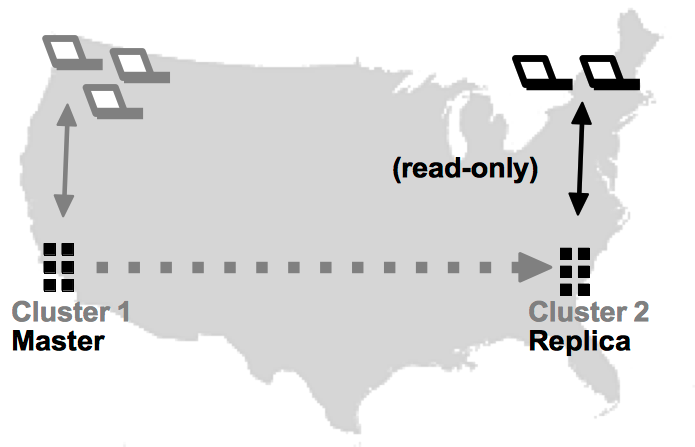 |
| You are visitor 01402775 — GeezerVison does not store the pages you look up. Best viewed with Netscape Navigator 4.7 or Internet Explorer 6 at 800×600. No cookies required. |