GeezerVisonThe World Wide Web, restored to 800 pixels of glory. | ||||||||||||||||||||||||||
| Home|About|Gaming cabinet|Archives|How it works|Starter sites | ||||||||||||||||||||||||||
GeezerVison is showing docs.wxpython.org — wx.CheckListBox — wxPython 4.3.2 Docs
|


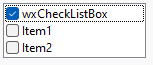
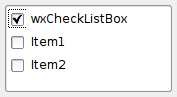
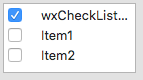


Constructor, creating and showing a list box. |
|
Checks the given item. |
|
GetCheckedItems() |
|
GetCheckedStrings() |
|
Returns a list of the indices of the currently selected items. |
|
Returns |
|
SetCheckedItems(indexes) |
|
SetCheckedStrings(strings) |
 Properties Summary

See |
|
See |
|
See |
 Class API

- class wx.CheckListBox(ListBox)
Possible constructors:
CheckListBox(parent, id=ID_ANY, pos=DefaultPosition, size=DefaultSize,
             choices=[], style=0, validator=DefaultValidator, name="listBox") -> None

CheckListBox() -> None
A CheckListBox is like a ListBox, but allows items to be checked or unchecked.
Methods
- __init__(self, *args, **kw)
 Overloaded Implementations:
__init__ (self, parent, id=ID_ANY, pos=DefaultPosition, size=DefaultSize, choices=[], style=0, validator=DefaultValidator, name=”listBox”)
Constructor, creating and showing a list box.
- Parameters:
parent (wx.Window) – Parent window. Must not be nullptr.
id (wx.WindowID) – Window identifier. The value
wx.ID_ANYindicates a default value.pos (wx.Point) – Window position.
size (wx.Size) – Window size. If DefaultSize is specified then the window is sized appropriately.
choices (list of strings) – An array of strings with which to initialise the control.
style (long) – Window style. See wx.CheckListBox.
validator (wx.Validator) – Window validator.
name (string) – Window name.
- Return type:
None
__init__ (self)
Default constructor.
- Return type:
None
- Check(self, item, check=True)
Checks the given item.
Note that calling this method does not result in a
wxEVT_CHECKLISTBOXevent being emitted.- Parameters:
item (int) – Index of item to check.
check (bool) –
Trueif the item is to be checked,Falseotherwise.
- Return type:
None
- Create(self, parent, id=ID_ANY, pos=DefaultPosition, size=DefaultSize, choices=[], style=0, validator=DefaultValidator, name=ListBoxNameStr)
- Parameters:
parent (wx.Window)
id (wx.WindowID)
pos (wx.Point)
size (wx.Size)
choices (list of strings)
style (long)
validator (wx.Validator)
name (string)
- Return type:
bool
- GetCheckedItems(self)
GetCheckedItems()
Return a sequence of integers corresponding to the checked items in the control, based on
IsChecked.
- GetCheckedStrings(self)
GetCheckedStrings()
Return a tuple of strings corresponding to the checked items of the control, based on
GetChecked.
- static GetClassDefaultAttributes(variant=WINDOW_VARIANT_NORMAL)
- Parameters:
variant (WindowVariant)
- Return type:
- GetSelections(self)
Returns a list of the indices of the currently selected items.
- Return type:
List[int]
- IsChecked(self, item)
Returns
Trueif the given item is checked,Falseotherwise.- Parameters:
item (int) – Index of item whose check status is to be returned.
- Return type:
bool
- SetCheckedItems(self, indexes)
SetCheckedItems(indexes)
Sets the checked state of items if the index of the item is found in the indexes sequence.
- SetCheckedStrings(self, strings)
SetCheckedStrings(strings)
Sets the checked state of items if the item’s string is found in the strings sequence.
Properties
- Checked
See
GetCheckedandSetChecked
- CheckedItems
See
GetCheckedItemsandSetCheckedItems
- CheckedStrings
See
GetCheckedStringsandSetCheckedStrings

Best viewed with Netscape Navigator 4.7 or Internet Explorer 6 at 800×600. No cookies required.