GeezerVisonThe World Wide Web, restored to 800 pixels of glory. |
| Home|About|Gaming cabinet|Archives|How it works|Starter sites |
GeezerVison is showing doingmathwithpython.github.io — Code and Solutions Refresh It's been 11 years, since Doing Math With Python was published. The world of software learning has changed drastically. I hope you are still continuing to learn using books, writing programs and the educators among you, i hope you are doing the same! We must persist. The book has also ended up being part of the Anthropic copyright settlement. I think it's just a sign of the times and I have become part of the history it appears! Alright, so, I am going to be doing a bit of a refresh as needed for the various code in the book and solutions to ensure that they are all working with currently latest versions of the Python programming language and the third party packages that's used for the code: sympy, matplotlib and matplotlib_venn. This will take a while, so here's the software versions i will be working with:
This post is in progress Chapter 2Programming challenges
One solution I suggested created the two lists with the data manually filled in from the google search results. The second solution, (file name: nyc_forecast_owm.py) I proposed uses the pyowm package to download the data from open weather map. A reader wrote to me recently that it doesn't work any more. I took a look at the proposed solution and realized that the API itself has changed, which means the library pyowm had also changed significantly. Not unexpected, since it's been 11 years. So, this is the new proposed solution to use the real data:
I suppose my original intention for asking the reader to use a third party package might have been an attempt to stretch the enterprising reader. However, I don't agree with that intention any more as demonstrating how to use a third party data provider isn't in the scope of the book. So, I am taking it out. I have created a new web application dedicated for this exercise so that you can download the data in CSV data format - something you learn in the book in Chapter 3 (next chapter). Reading the CSV file requires the reader to refer to Chapter 3 Here's my proposed updated solution. First download the data by:
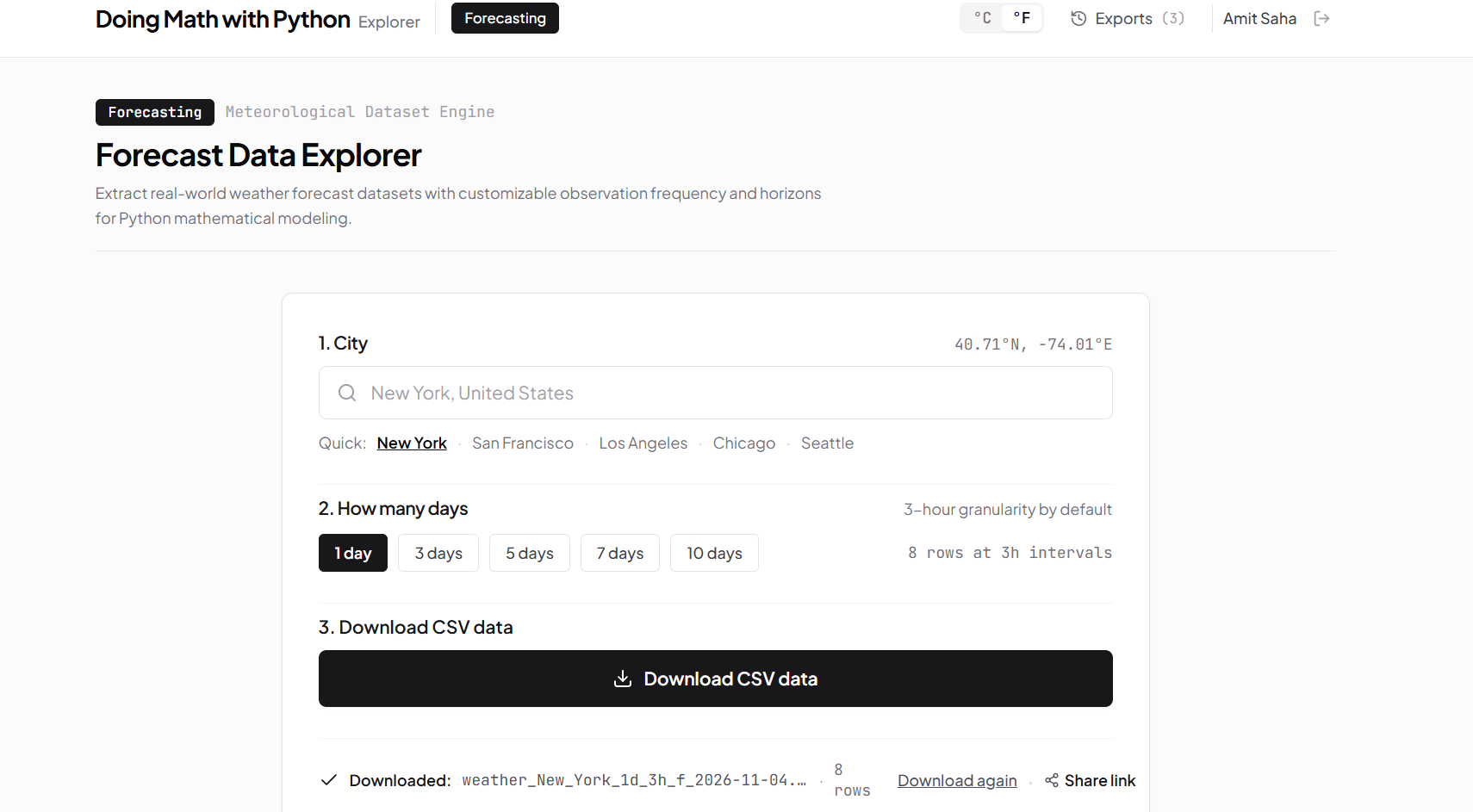
A file will be downloaded which will have the data in the following format: "Local Date & Time","Temperature" "2026-11-03 19:00","63.1" "2026-11-03 22:00","60.3" "2026-11-04 01:00","58.5" "2026-11-04 04:00","57.6" "2026-11-04 07:00","56.5" "2026-11-04 10:00","63.7" "2026-11-04 13:00","68.7" "2026-11-04 16:00","67.6" Rename the file to weather_New_York_1d_3h.csv and place in the same directory as the program. Here's the plan of what we will need to do:
You can find the updated solution here. |
| You are visitor 01402503 — GeezerVison does not store the pages you look up. Best viewed with Netscape Navigator 4.7 or Internet Explorer 6 at 800×600. No cookies required. |