GeezerVisonThe World Wide Web, restored to 800 pixels of glory. | ||||||||||||||||||||||||||||||||||||||||||||||||||||||||||||||||||||||||||||||||||||||||||||||||||||||||||||||||||||||||||||||||||||||||||||||||||||||||||||||||||||||||||||||||||||||||||||||||||||||
| Home|About|Gaming cabinet|Archives|How it works|Starter sites | ||||||||||||||||||||||||||||||||||||||||||||||||||||||||||||||||||||||||||||||||||||||||||||||||||||||||||||||||||||||||||||||||||||||||||||||||||||||||||||||||||||||||||||||||||||||||||||||||||||||
GeezerVison is showing drafts.csswg.org — CSS Values and Units Module Level 4 1. IntroductionThe value definition field of each CSS property can contain keywords,
data types (which appear between < and >),
and information on how they can be combined.
Generic data types (<length> being the most widely used)
that can be used by many properties are described in this specification,
while more specific data types (e.g., 1.1. Module InteractionsThis module replaces and extends the data type definitions in [CSS2] sections 1.4.2.1, 4.3, and A.2. 2. Value Definition SyntaxThe value definition syntax described here is used to define the set of valid values for CSS properties (and the valid syntax of many other parts of CSS). A value so described can have one or more components. 2.1. Component Value TypesComponent value types are designated in several ways:
Commas specified in the grammar are implicitly omissible in some circumstances, when used to separate optional terms in the grammar. Within a top-level list in a property or other CSS value, or a function’s argument list, a comma specified in the grammar must be omitted if:
For example, if a function can accept three arguments in order,
but all of them are optional,
the grammar can be written like:
Given this grammar, writing example(first, second, third) is valid, as is example(first, second) or example(first, third) or example(second). However, example(first, , third) is invalid, as one of those commas are no longer separating two options; similarly, example(,second) and example(first,) are invalid. example(first second) is also invalid, as commas are still required to actually separate the options. If commas were not implicitly omittable, the grammar would have to be much more complicated to properly express the ways that the arguments can be omitted, greatly obscuring the simplicity of the feature. All CSS properties also accept the CSS-wide keyword values
as the sole component of their property value.
For readability these are not listed explicitly in the property value syntax definitions.
For example, the full value definition of border-color
under CSS Cascading and Inheritance Level 3
is Note: This implies that, in general, combining these keywords with other component values in the same declaration results in an invalid declaration. For example, background: url(corner.png) no-repeat, inherit; is invalid. 2.2. Component Value CombinatorsComponent values can be arranged into property values as follows:
Juxtaposition is stronger than the double ampersand, the double ampersand is stronger than the double bar, and the double bar is stronger than the bar. Thus, the following lines are equivalent: a b | c || d && e f For reorderable combinators (||, &&), ordering of the grammar does not matter: components in the same grouping may be interleaved in any order. Thus, the following lines are equivalent: a || b || c b || a || c Note: Combinators are not associative, so grouping is significant. For example, a || b || c and a || [ b || c ] are distinct grammars: the first allows a value like b a c, but the second does not. 2.3. Component Value MultipliersEvery type, keyword, or bracketed group may be followed by one of the following modifiers:
The + and # multipliers may be stacked as +#; similarly, the # and ? multipliers, {A} and ? multipliers, and {A,B} and ? multipliers may be stacked as #?, {A}?, and {A,B}?, respectively. These stacks each represent the later multiplier applied to the result of the earlier multiplier. (These same stacks can be represented using grouping, but in complex grammars this can push the number of brackets beyond readability.) For repeated component values (indicated by *, +, or #), UAs must support at least 20 repetitions of the component. If a property value contains more than the supported number of repetitions, the declaration must be ignored as if it were invalid. 2.4. Combinator and Multiplier PatternsThere are a small set of common ways to combine multiple independent component values in particular numbers and orders. In particular, it’s common to want to express that, from a set of component value, the author must select zero or more, one or more, or all of them, and in either the order specified in the grammar or in any order. All of these can be easily expressed using simple patterns of combinators and multipliers:
Note that all of the "any order" possibilities are expressed using combinators, while the "in order" possibilities are all variants on juxtaposition. 2.5. Component Values and White SpaceUnless otherwise specified, white space and/or comments may appear before, after, and/or between components combined using the above combinators and multipliers. Note: In many cases, spaces will in fact be required between components in order to distinguish them from each other. For example, the value 1em2em would be parsed as a single <dimension-token> with the number 1 and the identifier em2em, which is an invalid unit. In this case, a space would be required before the 2 to get this parsed as the two lengths 1em and 2em. 2.6. Functional Notation DefinitionsThe syntax of a functional notation is defined as a sequence of:
The function’s arguments are considered implicitly grouped, as if surrounded by brackets ([ ... ]).
For example, a grammar like:
will match a function whose name is "example" and whose arguments match "<length> , <length>".
For example, the Selectors grammar defines pseudo-classes generically,
allowing any possibly function name after the initial colon:
<pseudo-class-selector> = : <ident-token> | : <function-token> <any-value> This represents any function name, with <any-value> as the function arguments.
Since the functional notation implicitly groups its contents,
the effect of any combinator inside it
is scoped to the function’s argument.
For example, the functional notation syntax definition
example( foo | bar ) is equivalent to example( [ foo | bar ] ).
2.7. Property Value ExamplesBelow are some examples of properties with their corresponding value definition fields
2.8. Non-Terminal Definitions and Grammar Production BlocksThe precise grammar of non-terminals, like <position> or <calc()>, is often specified in a CSS grammar production block. These are conventionally represented in a preformatted block of definitions like this:
The <foo> syntax is defined as follows:
<foo> = keyword | <bar> |
        some-really-long-pattern-of-stuff
<bar> = <length>
Each definition starts on its own line,
and consists of the non-terminal to be defined,
followed by an
In the above example, the <foo> definition covers two lines.
The third line starts a new definition for <bar>.
(A naked
= is never valid in value definition syntax,
so it’s unambiguous when a new line starts a fresh definition.)
3. Combining Values: Interpolation, Addition, and AccumulationSome procedures, for example transitions and animations, combine two CSS property values. The following combining operations—on the two computed values VA and VB yielding the computed value Vresult—are defined. For operations that are not commutative (for example, matrix multiplication, or accumulation of mismatched transform lists) VA represents the first term of the operation and VB represents the second.
These operations are only defined on computed values. (As a result, it is not necessary to define, for example, how to add a <length> value of 15pt with 5em since such values will be resolved to their canonical unit before being passed to any of the above procedures.) 3.1. Range CheckingInterpolation can result in a value outside the valid range for a property, even if all of the inputs to interpolation are valid; this especially happens when p is outside the [0, 1] range, but some easing functions can cause this to occur even within that range. If the final result after interpolation, addition, and accumulation is out-of-range for the target context the value is being used in, it does not cause the declaration to be invalid. Instead, the value must be clamped to the range allowed in the target context, exactly the same as math functions (see § 10.12 Range Checking). Note: Even if interpolation results in an out-of-range value, addition/accumulation might "correct" the result and bring it back into range. Thus, clamping is only applied to the final result of applying all interpolation-related operations. 4. Textual Data TypesThe textual data types include various keywords and identifiers as well as strings (<string>) and URLs (<url>). Aside from the casing of pre-defined keywords or as explicitly defined for a given property, no normalization is performed, not even Unicode normalization: the specified and computed value of a property are exactly the provided Unicode values after parsing (which includes character set conversion and escaping). [UNICODE] [CSS-SYNTAX-3] Strings are quoted sequences of characters reprenting arbitrary textual data. See § 4.4 Quoted Strings: the <string> type for details. CSS identifiers, generically denoted by <ident>, represent names, and are written as an unquoted sequence of (potentially escaped) characters corresponding to the <ident-token> grammar. [CSS-SYNTAX-3] Identifiers cannot be quoted; otherwise they would be interpreted as strings. CSS properties accept two classes of identifiers: pre-defined keywords and author-defined identifiers. Note: The <ident> production is not meant for property value definitions—<custom-ident> should be used instead. It is provided as a convenience for defining other syntactic constructs. All textual data types interpolate as discrete and are not additive. 4.1. Pre-defined KeywordsIn the value definition fields, keywords with a pre-defined meaning appear literally. Keywords are identifiers and are interpreted ASCII case-insensitively (i.e., [a-z] and [A-Z] are equivalent).
For example, here is the value definition for the border-collapse
property:
And here is an example of its use: table 4.1.1. CSS-wide keywords: initial, inherit and unsetAs defined above, all properties accept the CSS-wide keywords, which represent value computations common to all CSS properties. These keywords are normatively defined in the CSS Cascading and Inheritance Module. TestsOther CSS specifications can define additional CSS-wide keywords. 4.2. Unprefixed Author-defined Identifiers: the <custom-ident> typeSome properties accept arbitrary author-defined identifiers as a component value. This generic data type is denoted by <custom-ident>, and represents any valid CSS identifier that would not be misinterpreted as a pre-defined keyword in that property’s value definition. Such identifiers are fully case-sensitive (meaning they’re compared using the "identical to" operation), even in the ASCII range (e.g. example and EXAMPLE are two different, unrelated user-defined identifiers). The CSS-wide keywords are not valid <custom-ident>s. The default keyword is reserved and is also not a valid <custom-ident>. Specifications using <custom-ident> must specify clearly what other keywords are excluded from <custom-ident>, if any—for example by saying that any pre-defined keywords in that property’s value definition are excluded. Excluded keywords are excluded in all ASCII case permutations. When parsing positionally-ambiguous keywords in a property value, a <custom-ident> production can only claim the keyword if no other unfulfilled production can claim it.
For example, the shorthand declaration animation: ease-in ease-out
is equivalent to the longhand declarations
animation-timing-function: ease-in; animation-name: ease-out;.
ease-in is claimed by the <easing-function> production belonging to animation-timing-function,
leaving ease-out to be claimed by the <custom-ident> production belonging to animation-name.
Note: When designing grammars with <custom-ident>, the <custom-ident> should always be “positionally unambiguous”, so that it’s impossible to conflict with any keyword values in the property. Such conflicts can alternatively be avoided by using <dashed-ident>. 4.3. Prefixed Author-defined Identifiers: the <dashed-ident> typeSome contexts accept both author-defined identifiers and CSS-defined identifiers. If not handled carefully, this can result in difficulties adding new CSS-defined values; UAs have to study existing usage and gamble that there are sufficiently few author-defined identifiers in use matching the new CSS-defined one, so giving the new value a special CSS-defined meaning won’t break existing pages. While there are many legacy cases in CSS that mix these two values spaces in exactly this fraught way, the <dashed-ident> type is meant to be an easy way to distinguish author-defined identifiers from CSS-defined identifiers. The <dashed-ident> production is a <custom-ident>, with all the case-sensitivity that implies, with the additional restriction that it must start with two dashes (U+002D HYPHEN-MINUS). <dashed-ident>s are reserved solely for use as author-defined names. CSS will never define a <dashed-ident> for its own use.
For example, custom properties need to be distinguishable from CSS-defined properties,
as new properties are added to CSS regularly.
To allow this,
custom property names are required to be <dashed-ident>s,
as in this example:
.foo
<dashed-ident>s are also used in the @color-profile rule,
to separate author-defined color profiles
from pre-defined ones like device-cmyk,
and allow CSS to define more pre-defined (but overridable) profiles in the future
without fear of clashing with author-defined profiles:
CSS will use <dashed-ident> more in the future,
as more author-controlled syntax is added.
CSS authoring tools,
such as preprocessors that turn custom syntax into standard CSS,
should use <dashed-ident> as well,
to avoid clashing with future CSS design.
For example, if a CSS preprocessor added a new "custom" at-rule, it shouldn’t spell it @custom, as this would clash with a future official @custom rule added by CSS. Instead, it should use @--custom, which is guaranteed to never clash with anything defined by CSS. Even better, it should use @--library1-custom, so that if Library2 adds their own "custom" at-rule (spelled @--library2-custom), there’s no possibility of clash. Ideally this prefix should be customizable, if allowed by the tooling, so authors can manually avoid clashes on their own. 4.4. Quoted Strings: the <string> typeStrings, denoted by <string>, are sequences of characters representing arbitrary textual data. When written literally, they are delimited by double quotes or single quotes, and correspond to the <string-token> production. [CSS-SYNTAX-3].
Double quotes cannot occur inside double quotes, unless
escaped
(as
It is possible to break strings over several lines, for aesthetic or other reasons, but in such a case the newline itself has to be escaped with a backslash (\). The newline is subsequently removed from the string. For instance, the following two selectors are exactly the same: Example(s): a Since a string cannot directly represent a newline, to include a newline in a string, use the escape "\A". (Hexadecimal A is the line feed character in Unicode (U+000A), but represents the generic notion of "newline" in CSS.) 4.5. Resource Locators: the <url> typeThe <url> type, written with the url() and src() functions, represents a URL, which is a pointer to a resource. The syntax of <url> is: <url> = <
This example shows a URL being used as a background image:
body A url() can be written without quotation marks around the URL value, in which case it is specially-parsed as a <url-token>; see CSS Syntax 3 § 4.3.6 Consume a url token. [CSS-SYNTAX-3] Note: Because of this special parsing, url() can only express its value literally. To provide a URL by functions such as var(), use the src() notation, which does not have this special parsing rule.
For example, the following declarations are identical:
And these have the same meaning as well:
But this does not work:
...because the unescaped "(" in the value causes a parse error, so the entire declaration is thrown out as invalid. Note: The unquoted url() syntax cannot accept a <url-modifier> argument and has extra escaping requirements: parentheses, whitespace characters, single quotes (') and double quotes (") appearing in a URL must be escaped with a backslash, e.g. url(open\(parens), url(close\)parens). (In quoted <string> url()s, only newlines and the character used to quote the string need to be escaped.) Depending on the type of URL, it might also be possible to write these characters as URL-escapes (e.g. url(open%28parens) or url(close%29parens)) as described in [URL]. Some CSS contexts (such as @import) also allow a <url> to be represented by a bare <string>, without the function wrapper. In such cases the string behaves identically to a url() function containing that string.
For example, the following statements act identically:
4.5.1. Relative URLsIn order to create modular style sheets that are not dependent on the absolute location of a resource, authors should use relative URLs. Relative URLs (as defined in [URL]) are resolved to full URLs using a base URL. RFC 3986, section 3, defines the normative algorithm for this process. For CSS style sheets, the base URL is that of the style sheet itself, not that of the styled source document. Style sheets embedded within a document have the base URL associated with their container. Note: For HTML documents, the base URL is mutable. When a <url> appears in the computed value of a property, it is resolved to an absolute URL. The computed value of a URL that the UA cannot resolve to an absolute URL is the specified value.
For example, suppose the following rule:
body is located in a style sheet designated by the URL:
The background of the source document’s
The same image will be used regardless of the URL of the source document containing the 4.5.1.1. Fragment URLsTo enable element ID references to work in CSS regardless of base URL changes or shadow DOM, <url>s have special behavior when they contain only a fragment. If a <url>’s value starts with a U+0023 NUMBER SIGN ( When matching a <url> with the local url flag set:
Possibly reference find a potential indicated element,
but that is defined specifically for Note: This means that such fragments will resolve
against the contents of the current document
(or whichever node tree the stylesheet lives in,
if shadow DOM is involved)
regardless of how such relative URLs would resolve elsewhere
(ignoring, for example,
In the following example,
#anchor will resolve against #image will resolve against the elements in the HTML document itself:
When serializing a url() with the local url flag set, it must serialize as just the fragment. 4.5.2. Empty URLsIf the value of the <url> is the empty string (like url("") or url()), the url must resolve to an invalid resource (similar to what the url about:invalid does). Its computed value is url("") or src(""), whichever was specified, and it must serialize as such. TestsNote: This matches the behavior of empty urls for embedded resources elsewhere in the web platform, and avoids excess traffic re-requesting the stylesheet or host document due to editing mistakes leaving the url() value empty, which are almost certain to be invalid resources for whatever the url() shows up in. Linking on the web platform does allow empty urls, so if/when CSS gains some functionality to control hyperlinks, this restriction can be relaxed in those contexts. 4.5.3. URL Modifiers<url>s support specifying additional <url-modifier>s, which change the meaning or the interpretation of the URL somehow. A <url-modifier> is either an <ident> or a functional notation. This specification does not define any <url-modifier>s, but other specs may do so. Note: A <url> that is either unquoted or not wrapped in url() notation cannot accept any <url-modifier>s. 4.5.4. URL Processing Model
To compute the style resource base URL for a CSS rule or a CSS declaration block cssRuleOrDeclaration:
To resolve a style resource URL from a url or <url> urlValue,
and a CSS rule or a CSS declaration block cssRuleOrDeclaration:
To fetch a style resource from a url or <url> urlValue,
given an CSS rule or a css declaration block cssRuleOrDeclaration,
a string destination matching a
RequestDestination,
a "no-cors" or "cors" corsMode,
and an algorithm processResponse accepting a response
and a null, failure or byte stream:
When interpreting URLs expressed in CSS, the URL parser’s encoding argument must be omitted (i.e. use the default, UTF-8), regardless of the stylesheet encoding. Note: In other words, a URL written in CSS will always percent-encode non-ASCII codepoints using UTF-8 in the URL object (and thus whenever using the URL value for e.g. network requests), regardless of the stylesheet’s own encoding. Note that this occurs after decoding the stylesheet into Unicode code points. 5. Numeric Data TypesNumeric data types are used to represent quantities, indexes, positions, and other such values. Although many syntactic variations can exist in expressing the quantity (numeric aspect) in a given numeric value, the specified and computed value do not distinguish these variations: they represent the value’s abstract quantity, not its syntactic representation. The numeric data types include <integer>, <number>, <percentage>, and various dimensions including <length>, <angle>, <time>, <frequency>, and <resolution>. Note: While general-purpose dimensions are defined here, some other modules define additional data types (e.g. [css-grid-1] introduces fr units) whose usage is more localized. The precision and supported range of numeric values in CSS is implementation-defined, and can vary based on the property or other context a value is used in. However, within the CSS specifications, infinite precision and range is assumed. When a value cannot be explicitly supported due to range/precision limitations, it must be converted to the closest value supported by the implementation, but how the implementation defines "closest" is implementation-defined as well. If an <angle> must be converted due to exceeding the implementation-defined range of supported values, it must be clamped to the nearest supported multiple of 360deg. 5.1. Range Restrictions and Range Definition NotationProperties can restrict numeric values to some range.
If the value is outside the allowed range,
then unless otherwise specified,
the declaration is invalid and must be ignored.
Range restrictions can be annotated in the numeric type notation
using CSS bracketed range notation— Note: CSS values generally do not allow open ranges; thus only square-bracket notation is used. CSS theoretically supports infinite precision and infinite ranges for all value types; however in reality implementations have finite capacity. UAs should support reasonably useful ranges and precisions. Range extremes that are ideally unlimited are indicated using ∞ or −∞ as appropriate. For example, <length [0,∞]> indicates a non-negative length. If no range is indicated,
either by using the bracketed range notation
or in the property description,
then Values of −∞ or ∞ must be written without units, even if the value type uses units. Values of 0 can be written without units, even if the value type doesn’t allow “unitless zeroes” (such as <time>). Note: At the time of writing,
the bracketed range notation is new;
thus in most CSS specifications
any range limitations are described only in prose.
(For example, “Negative values are not allowed” or
“Negative values are invalid”
indicate a 5.2. Integers: the <integer> typeInteger values are denoted by <integer>. When written literally, an integer is one or more decimal digits 0 through 9 and corresponds to a subset of the <number-token> production in the CSS Syntax Module [CSS-SYNTAX-3]. The first digit of an integer may be immediately preceded by - or + to indicate the integer’s sign. TestsUnless otherwise specified, in the CSS specifications rounding to the nearest integer requires rounding in the direction of +∞ when the fractional portion is exactly 0.5. (For example, 1.5 rounds to 2, while -1.5 rounds to -1.) 5.2.1. Computation and Combination of <integer>Unless otherwise specified, the computed value of a specified <integer> is the specified abstract integer. Interpolation of <integer> is defined as Vresult = round((1 - p) × VA + p × VB); that is, interpolation happens in the real number space as for <number>s, and the result is converted to an <integer> by rounding to the nearest integer. Addition of <integer> is defined as Vresult = VA + VB 5.3. Real Numbers: the <number> typeNumber values are denoted by <number>, and represent real numbers, possibly with a fractional component. Tests
When written literally, a number is either an integer, or zero or more decimal digits followed by a dot (.) followed by one or more decimal digits; optionally, it can be concluded by the letter “e” or “E” followed by an integer indicating the base-ten exponent in scientific notation. It corresponds to the <number-token> production in the CSS Syntax Module [CSS-SYNTAX-3]. As with integers, the first character of a number may be immediately preceded by - or + to indicate the number’s sign. The value <zero> represents a literal number with the value 0. Expressions that merely evaluate to a <number> with the value 0 (for example, calc(0)) do not match <zero>; only literal <number-token>s do. 5.3.1. Computation and Combination of <number>Unless otherwise specified, the computed value of a specified <number> is the specified abstract number. Interpolation of <number> is defined as Vresult = (1 - p) × VA + p × VB Addition of <number> is defined as Vresult = VA + VB 5.4. Numbers with Units: dimension valuesThe general term dimension refers to a number with a unit attached to it; and is denoted by <dimension>. When written literally, a dimension is a number immediately followed by a unit identifier, which is an identifier. It corresponds to the <dimension-token> production in the CSS Syntax Module [CSS-SYNTAX-3]. Like keywords, unit identifiers are ASCII case-insensitive. CSS uses <dimension>s to specify distances (<length>), durations (<time>), frequencies (<frequency>), resolutions (<resolution>), and other quantities. 5.4.1. Compatible UnitsWhen serializing computed values [CSSOM], compatible units (those related by a static multiplicative factor, like the 96:1 factor between px and in, or the computed font-size factor between em and px) are converted into a single canonical unit. Each group of compatible units defines which among them is the canonical unit that will be used for serialization. When serializing resolved values that are used values, all value types (percentages, numbers, keywords, etc.) that represent lengths are considered compatible with lengths. Likewise any future API that returns used values must consider any values that represent distances/durations/frequencies/etc. as compatible with the relevant class of dimensions, and canonicalize accordingly. 5.4.2. Combination of DimensionsInterpolation of compatible dimensions (for example, two <length> values) is defined as Vresult = (1 - p) × VA + p × VB Addition of compatible dimensions is defined as Vresult = VA + VB 5.5. Percentages: the <percentage> typePercentage values are denoted by <percentage>, and indicates a value that is some fraction of another reference value. When written literally, a percentage consists of a number immediately followed by a percent sign %. It corresponds to the <percentage-token> production in the CSS Syntax Module [CSS-SYNTAX-3]. Percentage values are always relative to another quantity, for example a length. Each property that allows percentages also defines the quantity to which the percentage refers. This quantity can be a value of another property for the same element, the value of a property for an ancestor element, a measurement of the formatting context (e.g., the width of a containing block), or something else. 5.5.1. Computation and Combination of <percentage>Unless otherwise specified (such as in font-size, which computes its <percentage> values to <length>), the computed value of a percentage is the specified percentage. Interpolation of <percentage> is defined as Vresult = (1 - p) × VA + p × VB Addition of <percentage> is defined as Vresult = VA + VB 5.6. Mixing Percentages and DimensionsIn cases where a <percentage> can represent the same quantity as a dimension in the same component value position, and can therefore be combined with them in a calc() expression, the following convenience notations may be used in the property grammar:
For example, the width property can accept a <length> or a <percentage>,
both representing a measure of distance.
This means that width: calc(500px + 50%); is allowed—both values are converted to absolute lengths and added.
If the containing block is 1000px wide,
then width: 50%; is equivalent to width: 500px,
and width: calc(50% + 500px) thus ends up equivalent to width: calc(500px + 500px) or width: 1000px.
On the other hand, the second and third arguments of the hsl() function can only be expressed as <percentage>s. Although calc() productions are allowed in their place, they can only combine percentages with themselves, as in calc(10% + 20%). Note: Specifications should never alternate <percentage> in place of a dimension in a grammar unless they are compatible. Note: More <type-percentage> productions can be added in the future as needed. A <number-percentage> will never be added, as <number> and <percentage> can’t be combined in calc(). 5.6.1. Computation and Combination of Percentage and Dimension MixesThe computed value of a percentage-dimension mix is defined as
Interpolation of percentage-dimension value combinations (e.g. <length-percentage>, <frequency-percentage>, <angle-percentage>, <time-percentage> or equivalent notations) is defined as
Addition of <percentage> is defined the same as interpolation except by adding each component rather than interpolating it. 5.7. Ratios: the <ratio> typeRatio values are denoted by <ratio>, and represent the ratio of two numeric values. It most often represents an aspect ratio, relating a width (first) to a height (second). When written literally, a ratio has the syntax: <ratio> = <number The second <number> is optional, defaulting to 1. However, <ratio> is always serialized with both components. The computed value of a <ratio> is the pair of numbers provided. If either number in the <ratio> is 0 or infinite, it represents a degenerate ratio (and, generally, won’t do anything). If two <ratio>s need to be compared, divide the first number by the second, and compare the results. For example, 3/2 is less than 2/1, because it resolves to 1.5 while the second resolves to 2. (In other words, “tall” aspect ratios are less than “wide” aspect ratios.) 5.7.1. Combination of <ratio>The interpolation of a <ratio> is defined by converting each <ratio> to a number by dividing the first value by the second (so a ratio of 3 / 2 would become 1.5), taking the logarithm of that result (so the 1.5 would become approximately 0.176), then interpolating those values. The result during the interpolation is converted back to a <ratio> by inverting the logarithm, then interpreting the result as a <ratio> with the result as the first value and 1 as the second value. If either <ratio> is degenerate, the values cannot be interpolated.
For example,
halfway through a linear interpolation from 5 / 1 to 3 / 2,
the result is approximately the ratio 2.73 / 1
(roughly 11 / 4, slightly taller than a 3 / 1 ratio):
start = Note: Interpolating over the logarithm of the ratio means the results are scale-independent (5 / 1 to 300 / 200 would give the same results as above), that they’re symmetrical over "wide" and "tall" variants (interpolating from 1 / 5 to 2 / 3 would give a ratio approximately equal to 1 / 2.73 at the halfway point), and that they’re symmetrical over whether the width is fixed and the height is based on the ratio or vice versa. These properties are not shared by many other possible interpolation strategies. Note: Due to the properties of logarithms, any log can be used; the example here uses base-10 log, but if, say, the natural log and e was used, the intermediate results would be different but the final result would be the same. Addition of <ratio>s is not possible. 6. Distance Units: the <length> typeLengths refer to distance measurements and are denoted by <length> in the property definitions. A length is a dimension. For zero lengths the unit identifier is optional (i.e. can be syntactically represented as the <number> 0). However, if a 0 could be parsed as either a <number> or a <length> in a property (such as line-height), it must parse as a <number>. Properties may restrict the length value to some range. If the value is outside the allowed range, the declaration is invalid and must be ignored. TestsWhile some properties allow negative length values, this may complicate the formatting and there may be implementation-specific limits. If a negative length value is allowed but cannot be supported, it must be converted to the nearest value that can be supported. In cases where the used length cannot be supported, user agents must approximate it in the actual value. There are two types of length units: relative and absolute. The specified value of a length (specified length) is represented by its quantity and its unit. The computed value of a length (computed length) is the specified length resolved to an absolute length, and its unit is not distinguished: it can be represented by any absolute length unit (but will be serialized using its canonical unit, px). Tests
While the exact supported precision of numeric values, and how they are rounded to match that precision, is generally implementation-defined, <length>s in border-width and a few other properties are rounded in a specific fashion to ensure reasonable visual display. (This algorithm is called by individual properties explicitly.)
To snap a length as a line width
given a <length> len:
6.1. Relative LengthsRelative length units specify a length relative to another length. Style sheets that use relative units can more easily scale from one output environment to another. The relative units are:
Child elements do not inherit the relative values as specified for their parent; they inherit the computed values. 6.1.1. Font-relative Lengths: the em, rem, ex, rex, cap, rcap, ch, rch, ic, ric, lh, rlh unitsThe font-relative lengths refer to the font metrics either of the element on which they are used (for the local font-relative lengths) or of the root element (for the root font-relative lengths). 
Properties that affect the font size or font metrics of an element are font-affecting properties. When used in the value of any font-affecting property on the element they refer to, the font-relative lengths resolve against the computed metrics of the parent element—or against the computed metrics corresponding to the initial values of the font and line-height properties, if the element has no parent. Similarly, when lh or rlh units are used in the value of the line-height property or font-affecting properties on the element they refer to, they resolve against the computed line-height and font metrics of the parent element—or the computed metrics corresponding to the initial values of the font and line-height properties, if the element has no parent. (The other font-relative lengths continue to resolve against the element’s own metrics when used in line-height.) Note: Most properties defined in [css-fonts-4] are font-affecting properties, as is math-style and math-depth. (This isn’t necessarily an exhaustive list.) When used outside the context of an element (such as in media queries), the font-relative lengths units refer to the metrics corresponding to the initial values of the font and line-height properties. Similarly, when specified in a document with no root element, the root font-relative lengths are resolved assuming the initial values of the font and line-height properties. Note: Font-relative units such as ch and ic can trigger font downloads, if a required font is not yet loaded. The font-relative lengths are calculated in the absence of shaping. Some user-agents allow users to apply additional restrictions to font sizes in a document, such as setting minimum font sizes to ensure readability. Such restrictions must be applied to the used value of the affected properties only; they must not affect the resolution of font-relative lengths used in properties. However, in other contexts (such as in media queries), to the extent that they would impact the used font metrics, such restrictions do affect the resolution of font-relative lengths. Note: In general, respecting a user’s preferences, like minimum font sizes, is desirable; it’s useful for a media query like (min-width: 40em) to use the actual font size the document will be displayed in. However, having these preferences affect font-relative lengths in properties on an element was found to not be Web-compatible; too many pages expect these units to be exact multiples of the specified font-size, rather than the actual font-size after applying user preferences. Some user-agents apply restrictions to the line-height values on form controls. These must have no effect on the lh and rlh units. The effect on their descendants, however, is implementation-defined. 6.1.2. Viewport-percentage Lengths: the *vw, *vh, *vi, *vb, *vmin, *vmax unitsThe viewport-percentage lengths are relative to the size of the initial containing block—which is itself based on the size of either the viewport (for continuous media) or the page area (for paged media). When the height or width of the initial containing block is changed, they are scaled accordingly. 6.1.2.1. The Large, Small, and Dynamic Viewport SizesThere are four variants of the viewport-percentage length units, corresponding to three (possibly identical) notions of the viewport size.
Whether the expansion/retraction of a particular interface (A) changes the sizes of all of the viewport-percentage lengths (and the initial containing block) simultaneously or (B) contributes to the differences between the large viewport size and small viewport size is largely UA-dependent. However:
In all cases, if the value of overflow or scrollbar-gutter on the root element in either axis would cause scrollbars to appear (or space to be reserved for them) unconditionally (for example, overflow: scroll, but not overflow: auto), the computed values of the viewport-percentage lengths in that axis are reduced in accordance with the initial containing block. Otherwise, and always in the case of media queries, the viewport-percentage lengths are sized assuming that scrollbars do not exist (even if this diverges from the initial containing block). Note: The value of overflow on the body element can sometimes affect the presence of scrollbars on the root element. This does not affect the size of viewport units, however. 6.1.2.2. The Various Viewport-relative UnitsThe viewport-percentage length units are:
Tests
Note: The original (unprefixed) viewport units were defined relative to the initial containing block, which in continuous media always matched the (singular) viewport size. The dynamism of browser chrome shifting in and out during scrolling was invented later, and following Safari’s lead, most UAs mapped these units to the larger size. Defining it this way is prettier in many cases, but can also block critical content (such as toolbars, headers, and footers) in others. It’s therefore not entirely clear whether this was the best mapping, and thus earlier editions of this specifications allowed UAs to choose the mapping of these default units. However at this point the mapping to the large viewport-percentage units is presumed to be required for Web compatibility. In situations where there is no element or it hasn’t yet been styled (such as when evaluating media queries), the *vi and *vb units use the initial value of the writing-mode property to determine which axis they correspond to. 6.2. Absolute Lengths: the cm, mm, Q, in, pt, pc, px unitsThe absolute length units are fixed in relation to each other and anchored to some physical measurement. They are mainly useful when the output environment is known. The absolute units consist of the physical units (in, cm, mm, pt, pc, Q) and the visual angle unit (pixel unit) (px):
h1 Note: Lengths in publishing contexts
are sometimes written like All of the absolute length units are compatible, and px is their canonical unit. For a CSS device, these dimensions are anchored either
For print media at typical viewing distances, the anchor unit should be one of the physical units (inches, centimeters, etc). For screen media (including high-resolution devices), low-resolution devices, and devices with unusual viewing distances, it is recommended instead that the anchor unit be the pixel unit. For such devices it is recommended that the pixel unit refer to the whole number of device pixels that best approximates the reference pixel. Note: If the anchor unit is the pixel unit, the physical units might not match their physical measurements. Alternatively if the anchor unit is a physical unit, the pixel unit might not map to a whole number of device pixels. Note: This definition of the pixel unit and the physical units differs from the earlier editions of CSS1 and CSS2. In particular, in previous versions of CSS the pixel unit and the physical units were not related by a fixed ratio: the physical units were always tied to their physical measurements while the pixel unit would vary to most closely match the reference pixel. (This unfortunate change was made because too much existing content relies on the assumption of 96dpi, and breaking that assumption broke the content.) Note: Units are ASCII case-insensitive and serialize as lowercase, for example 1Q serializes as 1q. Tests
The reference pixel is the visual angle of one pixel on a device with a device pixel density of 96dpi and a distance from the reader of an arm’s length. For a nominal arm’s length of 28 inches, the visual angle is therefore about 0.0213 degrees. For reading at arm’s length, 1px thus corresponds to about 0.26 mm (1/96 inch). The image below illustrates the effect of viewing distance on the size of a reference pixel: a reading distance of 71 cm (28 inches) results in a reference pixel of 0.26 mm, while a reading distance of 3.5 m (12 feet) results in a reference pixel of 1.3 mm. 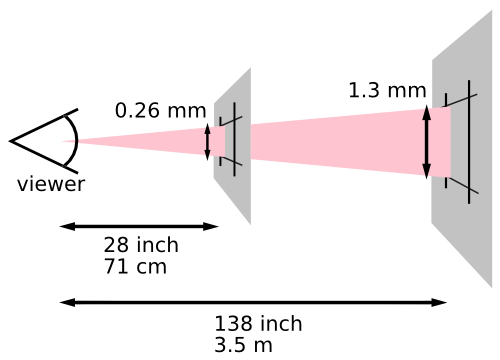
This second image illustrates the effect of a device’s resolution on the pixel unit: an area of 1px by 1px is covered by a single dot in a low-resolution device (e.g. a typical computer display), while the same area is covered by 16 dots in a higher resolution device (such as a printer). 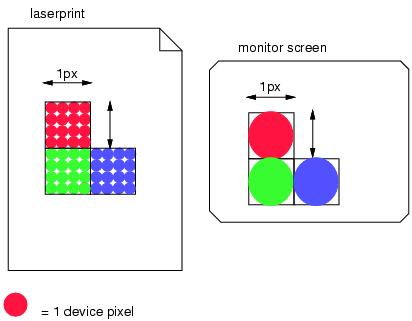
A device pixel is the smallest unit of area on the device output capable of displaying its full range of colors. For typical color screens, it’s a square or somewhat rectangular region containing a red, green, and blue subpixel. Many non-traditional outputs exist that can blur this definition, such as by displaying some colors at higher resolutions. Such devices still expose some equivalent notion of "device pixel", however. 7. Other Quantities7.1. Angle Units: the <angle> type and deg, grad, rad, turn unitsAngle values are <dimension>s denoted by <angle>. The angle unit identifiers are:
For example, a right angle is 90deg or 100grad or 0.25turn or approximately 1.57rad. All <angle> units are compatible, and deg is their canonical unit.
By convention,
when an angle denotes a direction in CSS,
it is typically interpreted as a bearing angle,
where 0deg is "up" or "north" on the screen,
and larger angles are more clockwise
(so 90deg is "right" or "east").
For example, in the linear-gradient() function, the <angle> that determines the direction of the gradient is interpreted as a bearing angle. Note: For legacy reasons, some uses of <angle> allow a bare 0 to mean 0deg. This is not true in general, however, and will not occur in future uses of the <angle> type. Tests7.2. Duration Units: the <time> type and s, ms unitsTime values are dimensions denoted by <time>. The time unit identifiers are:
All <time> units are compatible, and s is their canonical unit. Properties may restrict the time value to some range. If the value is outside the allowed range, the declaration is invalid and must be ignored. Tests7.3. Frequency Units: the <frequency> type and Hz, kHz unitsFrequency values are dimensions denoted by <frequency>. The frequency unit identifiers are:
For example, when representing sound pitches, 200Hz (or 200hz) is a bass sound, and 6kHz (or 6khz) is a treble sound. All <frequency> units are compatible, and hz is their canonical unit. Note: Units are ASCII case-insensitive and serialize as lowercase, for example 1Hz serializes as 1hz. 7.4. Resolution Units: the <resolution> type and dpi, dpcm, dppx unitsResolution units are dimensions denoted by <resolution>. The resolution unit identifiers are:
The <resolution> unit represents the size of a single "dot" in a graphical representation by indicating how many of these dots fit in a CSS in, cm, or px. For uses, see e.g. the resolution media query in [MEDIAQ] or the image-resolution property defined in [CSS3-IMAGES]. All <resolution> units are compatible, and dppx is their canonical unit. The allowed range of <resolution> values always excludes negative values, in addition to any explicit ranges that might be specified. Note that due to the 1:96 fixed ratio of CSS in to CSS px, 1dppx is equivalent to 96dpi. This corresponds to the default resolution of images displayed in CSS: see image-resolution.
The following @media rule uses Media Queries [MEDIAQ]
to assign some special style rules to devices that use two or more device pixels per CSS px unit:
8. Data Types Defined ElsewhereSome data types are defined in their own modules. This example talks about some of the most common ones used across several specifications. 8.1. Colors: the <color> typeThe <color> data type is defined in [CSS-COLOR-4]. UAs must interpret <color> as defined therein. 8.1.1. Combination of <color>Interpolation of <color> is defined in CSS Color 4 § 13. Color Interpolation. Interpolation is done between premultiplied colors, as defined in CSS Color 4 § 13.5 Interpolating with Alpha. The <color> type is not additive. Note: the CSS WG is interested to hear use-cases for addition of <color>, and may consider making <color> additive in the future. 8.2. Images: the <image> typeThe <image> data type is defined in [CSS3-IMAGES]. UAs that support CSS Images Level 3 or its successor must interpret <image> as defined therein. UAs that do not yet support CSS Images Level 3 must interpret <image> as <url>. 8.2.1. Combination of <image>Note: Interpolation of <image> is defined in CSS Images 3 § 6 Interpolation. Images are not additive. 8.3. 2D Positioning: the <position> typeThe <position> value specifies the position of a object area (e.g. background image) inside a positioning area (e.g. background positioning area). It is computed and interpreted as specified for background-position. [CSS3-BACKGROUND] <position> = Note: The background-position property also accepts a three-value syntax. This has been disallowed generically because it creates parsing ambiguities when combined with other length or percentage components in a property value. 8.3.1. Parsing <position>When specified in a grammar alongside other keywords, <length>s, or <percentage>s, <position> is greedily parsed; it consumes as many components as possible.
For example,
transform-origin defines a 3D position
as (effectively) <position> <length>?.
A value such as left 50px
will be parsed as a 2-value <position>,
with an omitted z-component;
on the other hand,
a value such as top 50px
will be parsed as a single-value <position>
followed by a <length>.
8.3.2. Serializing <position>When serializing the specified value of a <position>:
Note: <position> values are never serialized as a single value, even when a single value would produce the same behavior, to avoid causing parsing ambiguities in some grammars where a <position> is placed next to a <length>, such as transform-origin. Note: Computed values are always serialized as two offsets (without keywords) because the computed value does not preserve syntactic distinctions. 8.3.3. Combination of <position>Interpolation of <position> is defined as the independent interpolation of each component (x, y) normalized as an offset from the top left corner as a <length-percentage>. Addition of <position> is likewise defined as the independent addition each component (x, y) normalized as an offset from the top left corner as a <length-percentage>. 9. Functional NotationsA functional notation is a type of component value that can represent more complex types or invoke special processing. The syntax starts with the name of the function immediately followed by a left parenthesis (i.e. a <function-token>) followed by the argument(s) to the notation followed by a right parenthesis. Like keywords, function names are ASCII case-insensitive. White space is allowed, but optional, immediately inside the parentheses. Functions can take multiple arguments, which are formatted similarly to a CSS property value. See § 2.6 Functional Notation Definitions. Note: Some legacy functional notations, such as rgba(), use commas unnecessarily, but generally commas are only used to separate items in a list, or pieces of a grammar that would be ambiguous otherwise. If a comma is used to separate arguments, white space is optional before and after the comma.
The math functions are defined below. Other functional notations are defined in their own modules; for example the <color> functions are defined in [CSS-COLOR-4] and [CSS-COLOR-5]. 9.1. Numeric FunctionsAny functional notation that resolves solely to a numeric data type is a numeric function. As the value of a numeric function can’t, generally, be known at parse time when range restrictions are enforced, numeric functions returning out-of-range values never cause a declaration to become invalid. Instead, the value of a numeric function is clamped to the range allowed in the context it is used at computed value time if possible, and at used value time otherwise. Similarly, if a numeric function returns a non-integer value, but is used in a position that expects an <integer>, the computed value and used value are rounded to the nearest integer. Note: All math functions are numeric functions, but functions like sibling-index() are also numeric functions without being math functions.
Since widths smaller than 0px are not allowed,
these three declarations are equivalent:
Note however that width: -5px is not equivalent to width: calc(-5px)! Out-of-range values specified literally are invalid at parse-time, and cause the entire declaration to be dropped. Note: While CSS intentionally leaves numeric precision/range UA-defined, extremely large values (including, notably, ±∞) will clamp to the minimum/maximum value allowed. Even properties that can explicitly represent infinity as a keyword value, such as animation-iteration-count, will end up clamping ±∞, as math functions can’t resolve to keyword values; the numeric part of the property’s syntax still has an implicit minimum/maximum value. 9.2. Serialization of Functional Notations
Unless otherwise specified,
to serialize a functional notation:
We are inconsistent in how we handled specified values. [Issue #9720]
For example, given a function like
LINEAR-GRADIENT( to bottom , red calc( 1em + 5% ) , green calc(130px / 2) , blue 100% ):
10. Mathematical ExpressionsThe math functions (calc(), clamp(), sin(), and others defined in this chapter) allow numeric CSS values to be written as mathematical expressions. A math function represents a numeric value, one of: ...or the <length-percentage>/etc mixed types, and can be used wherever such a value would be valid. Note: Math functions differ from the more general numeric functions because they automatically inherit the calculation context where they’re used, letting you use all the values you could use "normally" in that position, with the same meaning they’d normally have. 10.1. Basic Arithmetic: calc()The calc() function is a math function that allows basic arithmetic to be performed on numerical values, using addition (+), subtraction (-), multiplication (*), division (/), and parentheses. A calc() function contains a single calculation, which is a sequence of values interspersed with operators, and possibly grouped by parentheses (matching the <calc-sum> grammar), which represents the result of evaluating the expression using standard operator precedence rules (* and / bind tighter than + and -, and operators are otherwise evaluated left-to-right). The calc() function represents the result of its contained calculation. Components of a calculation can be literal values (such as 5px), other math functions, or other expressions, such as var(), that evaluate to a valid argument type (like <length>). Math functions can be used to combine value that use different units. In this example the author wants the margin box of each section to take up 1/3 of the space, so they start with 100%/3, then subtract the element’s borders and margins. (box-sizing can automatically achieve this effect for borders and padding, but a math function is needed if you want to include margins.) section Similarly, in this example the gradient will show a color transition only in the first and last 20px of the element: .fade Math functions can also be useful just to express values in a more natural, readable fashion, rather than as an obscure decimal. For example, the following sets the font-size so that exactly 35em fits within the viewport, ensuring that roughly the same amount of text always fills the screen no matter the screen size. :root Functionality-wise, this is identical to just writing font-size: 2.857vw, but then the intent (that 35em fills the viewport) is much less clear to someone reading the code; the later reader will have to reverse the math themselves to figure out that 2.857 is meant to approximate 100/35. Standard mathematical precedence rules for the operators apply: calc(2 + 3 * 4) is equal to 14, not 20. Parentheses can be used to manipulate precedence: calc((2 + 3) * 4) is instead equal to 20. Parentheses and nesting additional calc() functions are equivalent; the preceding expression could equivalently have been written as calc(calc(2 + 3) * 4). This can be useful when building up values piecemeal via var(), such as in the following example: .aspect-ratio-box Although --ar could have been written as simply --ar: (16 / 9);, --w is used both on its own (in width) and as a calc() component (in --h), so it has to be written as a full calc() function itself. Tests10.2. Comparison Functions: min(), max(), and clamp()The comparison functions of min(), max(), and clamp() compare multiple calculations and represent the value of one of them. The min() or max() functions contain one or more comma-separated calculations, and represent the smallest (most negative) or largest (most positive) of them, respectively. The clamp() function takes three calculations—a minimum value, a central value, and a maximum value—and represents its central calculation, clamped according to its min and max calculations, favoring the min calculation if it conflicts with the max. (That is, given clamp(MIN, VAL, MAX), it represents exactly the same value as max(MIN, min(VAL, MAX))). Either the min or max calculations (or even both) can instead be the keyword none, which indicates the value is not clamped from that side. (That is, clamp(MIN, VAL, none) is equivalent to max(MIN, VAL), clamp(none, VAL, MAX) is equivalent to min(VAL, MAX), and clamp(none, VAL, none) is equivalent to just calc(VAL).) For all three functions, the argument calculations can resolve to any <number>, <dimension>, or <percentage>, but must have a consistent type or else the function is invalid; the result’s type will be the consistent type. min(), max(), and clamp() can be used to make sure a value doesn’t exceed a "safe" limit: For example, "responsive type" that sets font-size with viewport units might still want a minimum size to ensure readability: .type Note: Full math expressions are allowed in each of the arguments; there’s no need to nest a calc() inside! You can also provide more than two arguments, if you have multiple constraints to apply.
An occasional point of confusion when using min()/max()
is that you use max() to impose a minimum value on something
(that is, properties like min-width effectively use max()),
and min() to impose a maximum value on something;
it’s easy to accidentally reach for the opposite function
and try to use min() to add a minimum size.
Using clamp() can make the code read more naturally,
as the value is nestled between its minimum and maximum:
.type Or, if you only wanted to impose a minimum size, but allow the font-size to grow as large as it wants: .type
Note that clamp(),
matching CSS conventions elsewhere,
has its minimum value "win" over its maximum value
if the two are in the "wrong order".
That is, clamp(100px, ..., 50px)
will resolve to 100px,
exceeding its stated "max" value.
If alternate resolution mechanics are desired they can be achieved by combining clamp() with min() or max():
10.3. Stepped Value Functions: round(), mod(), and rem()The stepped-value functions, round(), mod(), and rem(), all transform a given value according to another "step value", in different ways. The round(<rounding-strategy>?, A, B?) function contains an optional rounding strategy, and two calculations A and B, and returns the value of A, rounded according to the rounding strategy, to the nearest integer multiple of B either above or below A. The argument calculations can resolve to any <number>, <dimension>, or <percentage>, but must have a consistent type or else the function is invalid; the result’s type will be the consistent type. If A is exactly equal to an integer multiple of B, round() resolves to A exactly (preserving whether A is 0⁻ or 0⁺, if relevant). Otherwise, there are two integer multiples of B that are potentially "closest" to A, lower B which is closer to −∞ and upper B which is closer to +∞. The following <rounding-strategy>s dictate how to choose between them:
If lower B would be zero, it is specifically equal to 0⁺; if upper B would be zero, it is specifically equal to 0⁻. If <rounding-strategy> is omitted, it defaults to nearest. (Aka rounding to the nearest integer.) If <rounding-strategy> is line-width, the type of A must match <length>. If the type of A matches <number>, then B may be omitted, and defaults to 1. If <rounding-strategy> is line-width, B may also be omitted and has special behavior (defined above) essentially defaulting it to one device pixel. In all other cases, omitting B is invalid. While round(line-width, ...) attempts to ensure that non-zero values never round to zero, passing a sufficiently small A value might cause it to be represented as 0 internally anyway. Use caution when writing very small values; round(line-width, 0.1px) is safer than round(line-width, 0.0001px), and the difference between the two is almost certainly nil in practice. CSSOM needs to specify how it rounds, and it’s probably good for CSS functions to round the same way by default. What behavior should be used? [Issue #5689]
Unlike languages like JavaScript
which have a natural "precision" to round to
(integers),
CSS values have no such precision
because values can be written in many different compatible units.
As such, the precision has to be given explicitly;
to round a width to the nearest 50px,
one can write round(var(--width), 50px).
Note: JavaScript and other programming languages
sometimes separate out the rounding strategies into separate rounding functions.
JS’s Note: The <rounding-strategy> keywords are the same as the keywords in block-step-size and have the same behavior. (block-step-size just lacks to-zero; since block sizes are always non-negative, to-zero and down would be identical.) The modulus functions mod(A, B) and rem(A, B) similarly contain two calculations A and B, and return the difference between A and the nearest integer multiple of B either above or below A. The argument calculations can resolve to any <number>, <dimension>, or <percentage>, but must have the same type, or else the function is invalid; the result will have the same type as the arguments. The two functions are very similar, and in fact return identical results if both arguments are positive or both are negative: the value of the function is equal to the value of A shifted by the integer multiple of B that brings the value between zero and B. (Specifically, the range includes zero and excludes B. More specifically, if B is positive the range starts at 0⁺, and if B is negative it starts at 0⁻.)
For example, mod(18px, 5px) resolves to the value 3px,
because subtracting 5px * 3 from 18px yields 3px,
which is the only such value between 0px and 5px.
Similarly, mod(-140deg, -90deg) resolves to the value -50deg, because adding -90deg * 1 to -140deg yields -50deg, which is the only such value between 0deg and -90deg. Evaluating either of these examples with rem() yields the exact same results. Their behavior diverges if the A value and the B step are on opposite sides of zero: mod() (short for “modulus”) continues to choose the integer multiple of B that puts the value between zero and B, as above (guaranteeing that the result will either be zero or share the sign of B, not A), while rem() (short for "remainder") chooses the integer multiple of B that puts the value between zero and -B, avoiding changing the sign of the value.
For example, mod(-18px, 5px) resolves to the value 2px:
adding 5px * 4 to -18px yields 2px,
which is between 0px and 5px.
On the other hand, rem(-18px, 5px) resolves to the value -3px: adding 5px * 3 to -18px yields -3px, which has the same sign as -18px but is between 0px and -5px. Similarly, mod(140deg, -90deg) resolves to the value -40deg (adding -90deg * 2 to 140deg, bringing it to between 0deg and -90deg), but rem(140deg, -90deg) resolves to the value 50deg. When should I choose mod() vs rem()?Typically, users of this operation are in control of the step value (B), and are modifying an unknown value A. As a result, it’s usually more expected that the result is between 0 and B, regardless of A’s sign, meaning mod() should be chosen. For example, if an author wants to know whether a length is an even or odd number of pixels, mod(A, 2px) will return either 0px or 1px (assuming the value is a whole number of pixels to begin with), regardless of the value of a. rem(A, 2px), on the other hand, will return 0px if A is an even number of pixels, but will return either 1px or -1px if it’s odd, depending on whether A is positive or negative. The opposite situation does sometimes occur,
however,
and so rem() is provided to cater to that.
As well, rem() is the behavior of JavaScript’s Note: mod() and rem() can also be defined directly in terms of other functions: mod(A, B) is equivalent to calc(A - sign(B)*round(down, A*sign(B), B)) (a hacky way to say "round(down) when B is positive, round(up) when B is negative), while rem(A, B) is equivalent to calc(A - round(to-zero, A, B)). (These expressions don’t always handle 0⁺ and 0⁻ correctly, though, because 0⁻ semantics aren’t commutative for addition.) 10.3.1. Argument RangesIn round(A, B), if B is 0, the result is NaN. If A and B are both infinite, the result is NaN. If A is infinite but B is finite, the result is the same infinity. If A is finite but B is infinite, the result depends on the <rounding-strategy> and the sign of A:
In mod(A, B) or rem(A, B), if B is 0, the result is NaN. If A is infinite, the result is NaN. In mod(A, B) only, if B is infinite and A has opposite sign to B (including an oppositely-signed zero), the result is NaN. Note: All other "infinite B" cases are valid, and just return A immediately. 10.4. Trigonometric Functions: sin(), cos(), tan(), asin(), acos(), atan(), and atan2()The trigonometric functions—sin(), cos(), tan(), asin(), acos(), atan(), and atan2()—compute the various basic trigonometric relationships. The sin(A), cos(A), and tan(A) functions all contain a single calculation which must resolve to either a <number> or an <angle>, and compute their corresponding function by interpreting the result of their argument as radians. (That is, sin(45deg), sin(.125turn), and sin(3.14159 / 4) all represent the same value, approximately .707.) They all represent a <number>, with the return type made consistent with the input calculation’s type. sin() and cos() will always return a number between −1 and 1, while tan() can return any number between −∞ and +∞. (See § 10.9 Type Checking for details on how math functions handle ∞.) The asin(A), acos(A), and atan(A) functions are the "arc" or "inverse" trigonometric functions, representing the inverse function to their corresponding "normal" trig functions. All of them contain a single calculation which must resolve to a <number>, and compute their corresponding function, interpreting their result as a number of radians, representing an <angle> with the return type made consistent with the input calculation’s type. The angle returned by asin() must be normalized to the range [-90deg, 90deg]; the angle returned by acos() to the range [0deg, 180deg]; and the angle returned by atan() to the range [-90deg, 90deg]. The atan2(A, B) function contains two comma-separated calculations, A and B. A and B can resolve to any <number>, <dimension>, or <percentage>, but must have a consistent type or else the function is invalid. The function returns the <angle> between the positive X-axis and the point (B,A), with the return type made consistent with the input calculation’s type. The returned angle must be normalized to the interval (-180deg, 180deg] (that is, greater than -180deg, and less than or equal to 180deg). Note: atan2(Y, X) is generally equivalent to atan(Y / X), but it gives a better answer when the point in question may include negative components. atan2(1, -1), corresponding to the point (-1, 1), returns 135deg, distinct from atan2(-1, 1), corresponding to the point (1, -1), which returns -45deg. In contrast, atan(1 / -1) and atan(-1 / 1) both return-45deg, because the internal calculation resolves to -1 for both. 10.4.1. Argument RangesIn sin(A), cos(A), or tan(A), if A is infinite, the result is NaN. (See § 10.9 Type Checking for details on how math functions handle NaN.) In sin(A) or tan(A), if A is 0⁻, the result is 0⁻. In tan(A), if A is one of the asymptote values
(such as 90deg, 270deg, etc),
the numeric result is implementation-defined.
If an implementation is capable of exactly representing these inputs,
it should return
+∞ for the asymptotes at Why are these implementation-defined?The tangent function is discontinuous at its asymptotes: it approaches infinity from one side and negative infinity from the other side, and isn’t defined at the exact values of the asymptote. Further, whether or not the asymptotic values are exactly representable in implementations depends on how they internally store and manipulate angles; when written in degrees the values are simple (90deg, etc), but in radians the values are transcendental (pi / 2, etc) and cannot be exactly represented. So, even defining a specific behavior for these values is difficult; if an implementation uses radians internally, it would have to do some fuzzy matching to return the defined value when the input is sufficiently close to the asymptote. The other major language for the Web, JavaScript, exposes these functions as taking radians only, so it can’t hit the exact asymptotes either (and this true for most other computer languages, too). Authors writing code in JS, then, can’t rely on any specific behavior for these values either, and it’s unlikely that their needs in CSS are significantly different. The suggested behavior for implementations that can exactly represent the asymptote values preserves round-tripping with the atan() function: tan(atan(X)) and atan(tan(X)) will both return (approximately) X for all possible X values, given this definition. It also means that within the supported output range of atan(), the function is continuous. In asin(A) or acos(A), if A is less than -1 or greater than 1, the result is NaN. In acos(A), if A is exactly 1, the result is 0. In asin(A) or atan(A), if A is 0⁻, the result is 0⁻. In atan(A), if A is +∞, the result is 90deg; if A is −∞, the result is -90deg. In atan2(Y, X), the following table gives the results for all unusual argument combinations:
Note: All of these behaviors are intended to match the "standard" definitions of these functions as implemented by most programming languages, in particular as implemented in JS. 10.5. Exponential Functions: pow(), sqrt(), hypot(), log(), exp()The exponential functions—pow(), sqrt(), hypot(), log(), and exp()—compute various exponential functions with their arguments. The pow(A, B) function contains two comma-separated calculations A and B, both of which must resolve to <number>s, and returns the result of raising A to the power of B, returning the value as a <number>. The input calculations must have a consistent type or else the function is invalid; the result’s type will be the consistent type. The sqrt(A) function contains a single calculation which must resolve to a <number>, and returns the square root of the value as a <number>, with the return type made consistent with the input calculation’s type. (sqrt(X) and pow(X, .5) are basically equivalent, differing only in some error-handling; sqrt() is a common enough function that it is provided as a convenience.) The hypot(A, …) function contains one or more comma-separated calculations, and returns the length of an N-dimensional vector with components equal to each of the calculations. (That is, the square root of the sum of the squares of its arguments.) The argument calculations can resolve to any <number>, <dimension>, or <percentage>, but must have a consistent type or else the function is invalid; the result’s type will be the consistent type. Why does hypot() allow dimensions (values with units), but pow() and sqrt() only work on numbers?You are allowed to write expressions like hypot(30px, 40px), which resolves to 50px, but you aren’t allowed to write the expression sqrt(pow(30px, 2) + pow(40px, 2)), despite the two being equivalent in most mathematical systems. There are two reasons for this: numeric precision in the exponents, and clashing expectations from authors. First, numerical precision. For a type to match a CSS production like <length>, it needs to have a single unit with its exponent set to exactly 1. Theoretically, expressions like pow(pow(30px, 3), 1/3) should result in exactly that: the inner pow(30px, 3) would resolve to a value of 27000 with a type of «[ "length" → 3 ]» (aka <length>³), and then the pow(X, 1/3) would cube-root the value back down to 30 and multiply the exponent by 1/3, giving «[ "length" → 1 ]», which matches <length>. In the realm of pure mathematics, that’s guaranteed to work out;
in the real-world of computers using binary floating-point arithmetic,
in some cases the powers might not exactly cancel out,
leaving you with an invalid math function
for confusing, hard-to-track-down reasons.
(For a JS example,
evaluate Requiring authors to cast their value down into a number, do all the math on the raw number, then finally send it back to the desired unit, while inconvenient, ensures that numerical precision won’t bite anyone: calc(pow(pow(30px / 1px, 3), 1/3) * 1px) is guaranteed to resolve to a <length>, with a value that, if not exactly 30, is at least very close to 30, even if numerical precision actually prevents the powers from exactly canceling. Second, clashing expectations. It’s not uncommon for authors to expect pow(30px, 2) to result in 900px (such as in this Sass issue); that is, just squaring the numerical value and leaving the unit alone. This, however, means the result is dependent on what unit you’re expressing the argument in; if 1em is 16px, then pow(1em, 2) would give 1em, while pow(16px, 2) would give 256px, or 16em, which are very different values for what should otherwise be identical input arguments! This sort of input dependency is troublesome for CSS, which generally allows values to be canonicalized freely; it also makes more complex expressions like pow(2em + 10px, 2) difficult to interpret. Again, requiring authors to cast their value down into a number and then back up again into the desired unit sidesteps these issues; pow(30, 2) is indeed 900, and the author can interpret that however they wish. On the other hand, hypot() doesn’t suffer from these problems. Numerical precision in units isn’t a concern, as the inputs and output all have the same type. The result isn’t unit-dependent, either, due to the nature of the operation; hypot(3em, 4em) and hypot(48px, 64px) both result in the same length when 1em equals 16px: 5em or 80px. Thus it’s fine to let author use dimensions directly in hypot(). The log(A, B?) function contains one or two calculations (representing the value to be logarithmed, and the base of the logarithm, defaulting to e), which must resolve to <number>s, and returns the logarithm base B of the value A, as a <number> with the return type made consistent with the input calculation’s type. The exp(A) function contains one calculation which must resolve to a <number>, and returns the same value as pow(e, A) as a <number> with the return type made consistent with the input calculation’s type.
The pow() function can be useful for strategies like CSS Modular Scale,
which relates all the font-sizes on a page to each other by a fixed ratio.
These sizes can be easily written into custom properties like: :root ...rather than writing out the values in pre-calculated numbers like 5.0625rem (what calc(1rem * pow(1.5, 4)) resolves to) which have less clear provenance when encountered in a stylesheet.
With a single argument,
hypot() gives the absolute value of its input;
hypot(2em) and hypot(-2em) both resolve to 2em.
With more arguments, it gives the size of the main diagonal of a box whose side lengths are given by the arguments. This can be useful for transform-related things, giving the distance that an element will actually travel when it’s translated by a particular X, Y, and Z amount. For example, hypot(30px, 40px) resolves to 50px, which is indeed the distance between an element’s starting and ending positions when it’s translated by a translate(30px, 40px) transform. If an author wanted elements to get smaller as they moved further away from their starting point (drawing some sort of word cloud, for example), they could then use this distance in their scaling factor calculations.
With a single argument,
log() provides the “natural log” of its argument,
or the log base e,
same as JavaScript.
If one instead wants log base 10 (to, for example, count the number of digits in a value) or log base 2 (counting the number of bits in a value), log(X, 10) or log(X, 2) provide those values. 10.5.1. Argument RangesIn pow(A, B), if A is negative and finite, and B is finite, B must be an integer, or else the result is NaN. If A or B are infinite or 0, the following tables give the results:
In sqrt(A), if A is +∞, the result is +∞. If A is 0⁻, the result is 0⁻. If A is less than 0, the result is NaN. In hypot(A, …), if any of the inputs are infinite, the result is +∞. In log(A, B), if B is 1 or negative, B values between 0 and 1, or greater than 1, are valid. the result is NaN. If A is negative, the result is NaN. If A is 0⁺ or 0⁻, the result is −∞. If A is 1, the result is 0⁺. If A is +∞, the result is +∞. In exp(A), if A is +∞, the result is +∞. If A is −∞, the result is 0⁺. (See § 10.9 Type Checking for details on how math functions handle NaN and infinities.)
All of these behaviors are intended to match the "standard" definitions of these functions
as implemented by most programming languages,
in particular as implemented in JS.
The only divergences from the behavior of the equivalent JS functions are that NaN is "infectious" in every function, forcing the function to return NaN if any argument calculation is NaN. Details of the JS BehaviorThere are two cases in JS where a NaN is not "infectious" to the math function it finds itself in:
The logic appears to be that,
if you replace the NaN with any Number,
the return value will be the same.
However, this logic is not applied consistently to the Because this is an error corner case, JS isn’t consistent on the matter, and NaN recognition/handling of calculations is likely done at a higher CSS level rather than in the internal math functions anyway, consistency in CSS was chosen to be more important, so all functions were defined to have "infectious" NaN. 10.6. Sign-Related Functions: abs(), sign()The sign-related functions—abs() and sign()—compute various functions related to the sign of their argument. The abs(A) function contains one calculation A, and returns the absolute value of A, as the same type as the input: if A’s numeric value is positive or 0⁺, just A again; otherwise -1 * A. The sign(A) function contains one calculation A, and returns -1 if A’s numeric value is negative, +1 if A’s numeric value is positive, 0⁺ if A’s numeric value is 0⁺, and 0⁻ if A’s numeric value is 0⁻. The return type is a <number>, made consistent with the input calculation’s type. Note: Both of these functions operate on the fully simplified/resolved form of their arguments, which may give unintuitive results at first glance. In particular, an expression like 10% might be positive or negative once it’s resolved, depending on what value it’s resolved against. For example, in background-position positive percentages resolve to a negative length, and vice versa, if the background image is larger than the background area. Thus sign(10%) might return 1 or -1, depending on how the percentage is resolved! (Or even 0, if it’s resolved against a zero length.) 10.7. Numeric KeywordsKeywords in calculations provide access to values that are difficult or impossible to represent as literals. Each keyword defines its value, its type, and when it can be resolved. 10.7.1. Numeric Constants: e, piWhile the trigonometric and exponential functions handle many complex numeric operations, some reasonable calculations must be put together more manually, and many times these include well-known constants, such as e and π. Rather than require authors to manually type out several digits of these constants, a few of them are provided directly:
Both of these keywords are <number>s, and resolve at parse time. Note: These keywords are only usable within a calculation, such as calc(pow(e, pi) - pi), or min(pi, 5, e). If used outside of a calculation, they’re treated like any other keyword: animation-name: pi; refers to an animation named "pi"; line-height: e; is invalid (not similar to line-height: 2.7, but line-height: calc(e); is). 10.7.2. Degenerate Numeric Constants: infinity, -infinity, NaNWhen a calculation or a subtree of a calculation becomes infinite or NaN, representing it with a numeric value is no longer possible. A UA may have an implementation-defined limit for values approaching infinity. To aid in serialization of these degenerate values, the following additional math constants are defined:
All of these keywords are <number>s, and resolve at parse time. As usual for CSS keywords, these are ASCII case-insensitive. Thus, calc(InFiNiTy) is perfectly valid. However, NaN must be serialized with this canonical casing. Note: As these keywords are <number>s, to get an infinite length, for example, requires an expression like calc(infinity * 1px). Note: These constants are defined mostly to make serialization of infinite/NaN values simpler and more obvious, but can be used to indicate a "largest possible value", since an infinite value gets clamped to the allowed range. It’s rare for this to be reasonable, but when it is, using infinity is clearer in its intent than just putting an enormous number in one’s stylesheet. 10.7.3. Numeric VariablesOther specifications can define additional keywords which are usable in calculations in certain contexts. For example, relative color syntax defines a number of color-channel keywords representing the value of each color channel as a <number>. Each specifications defining such keywords must define for each keyword:
10.8. SyntaxThe syntax of a math function is: < In some contexts, additional <calc-keyword> values can be defined to be valid. (For example, in relative color syntax, appropriate channel keywords are allowed.) In addition, whitespace is required on both sides of the + and - operators. (The * and / operators can be used without white space around them.) Several of the math functions above have additional constraints on what their <calc-sum> arguments can contain. Check the definitions of the individual functions for details. UAs must support calculations of at least 32 <calc-value> terms and at least 32 levels of nesting (parentheses and/or functions). For functions that support an arbitrary number of arguments (such as min()), it must also support at least 32 arguments. If a calculation contains more than the supported number of terms, arguments, or nesting it must be treated as if it were invalid. 10.9. Type CheckingA math function can be many possible types, such as <length>, <number>, etc., depending on the calculations it contains, as defined below. It can be used anywhere a value of that type is allowed.
For example, the width property accepts <length> values,
so a math function that resolves to a <length>,
such as calc(5px + 1em),
can be used in width.
Additionally, math functions that resolve to <number> can be used in any place that only accepts <integer>; the value is rounded to the nearest integer as it resolves. Operators form sub-expressions, which gain types based on their arguments. Note: In previous versions of this specification, multiplication and division were limited in what arguments they could take, to avoid producing more complex intermediate results (such as 1px * 1em, which is <length>²) and to make division-by-zero detectable at parse time. This version now relaxes those restrictions.
To determine the type of a calculation:
A value contains a percentage
if its type is «[ "percent" → 1 ]»,
or its type’s percent hint is non-null.
Two or more calculations have a consistent type
if adding the types doesn’t result in failure.
The consistent type is the result of the type addition.
To make a type base consistent
with another type input:
Math functions themselves have types, according to their contained calculations:
For each of the above, if the type is failure, the math function is invalid. A math function resolves to <number>, <length>, <angle>, <time>, <frequency>, <resolution>, <flex>, or <percentage> according to which of those productions its type matches. (These categories are mutually exclusive.) If it can’t match any of these, the math function is invalid. Note: Algebraic simplifications do not affect the validity of a math function or its resolved type. For example, calc(5px - 5px + 10s) and calc(0 * 5px + 10s) are both invalid due to the attempt to add a length and a time. Note: Note that <percentage>s relative to <number>s, such as in opacity, are not combinable with those numbers—opacity: calc(.25 + 25%) is invalid. Allowing this causes significant problems with "unit algebra" (allowing multiplication/division of <dimension>s), and in every case so far, doesn’t provide any new functionality. (For example, opacity: 25% is identical to opacity: .25; it’s just a trivial syntax transform.) You can still perform other operations with them, such as opacity: calc(100% / 3);, which is valid. Note: Because <number-token>s are always interpreted as <number>s or <integer>s, "unitless 0" <length>s aren’t supported in math functions. That is, width: calc(0 + 5px); is invalid, because it’s trying to add a <number> to a <length>, even though both width: 0; and width: 5px; are valid. Note: Although there are a few properties in which a bare <number> becomes a <length> at used-value time (specifically, line-height and tab-size), <number>s never become "length-like" in calc(). They always stay as <number>s. Note: In Quirks Mode [QUIRKS], some properties that would normally only accept <length>s are defined to also accept <number>s, interpreting them as px lengths. Like unitless zeroes, this has no effect on the parsing or behavior of math functions, though a math function that resolves to a <number> value might become valid in Quirks Mode (and have its result interpreted as a px length). 10.9.1. Calculation ContextsNumeric values can be interpreted in various calculation contexts, depending on where they are used, which defines how <percentage> values resolve, etc. For example, in top, a <percentage> value is resolved against the size of the containing block, making it act as a <length>. A single property can define multiple calculation contexts; for example, in background-size one value resolves <percentage>s against the width of the background positioning area while the other resolves them against the height. Math functions always inherit the calculation context from wherever they’re used. That is, in top: calc(25% + 50px), the <percentage> is resolved as normal for top, as if top: 25% were specified (and then has 50px added to its value). Unless otherwise defined, all other functions do not inherit a calculation context, and instead define their own calculation contexts for their numeric arguments. For example, in top: anchor(25%), the <percentage> in the anchor() function is instead defined to resolve in a completely different manner (against the height of the default anchor element). 10.9.2. Infinities, NaN, and Signed ZeroMath functions follow IEEE-754 semantics, which means they recognize the concepts of positive and negative zero, positive and negative infinity, and NaN (not a number). However, these concepts are only retained within a calculation tree; if a top-level calculation (a math function not nested directly inside of another math function) would result in one of these special values, they’re instead "censored" into a standard representable value, as defined below. Signed zeros (indicated here as 0⁺ or 0⁻) can not be written directly in CSS; 0, +0 and -0 all produce the standard "unsigned" zero, which is considered positive (0⁺) for the purposes of these rules. Signed zeroes are produced in the following ways:
Signed zeroes do not escape a top-level calculation; they’re censored into the "unsigned" zero. Infinities (indicated here as +∞ or −∞) can be written directly using the math constants infinity and -infinity, or produced as a result of some calculations:
Note: The rules for producing NaN, below, supersede the above rules for producing infinities. Infinities do not escape a top-level calculation; they’re clamped to the minimum or maximum value allowed in the context, as defined in § 10.12 Range Checking. NaN (short for "not a number") is the result of certain operations that don’t have a well-defined value. It can be written directly using the math constants NaN, or produced as a result of some calculations:
NaN does not escape a top-level calculation; it’s censored into a zero value
For example, calc(-5 * 0) produces an unsigned zero—the calculation resolves to 0⁻,
but as it’s a top-level calculation,
it’s then censored to an unsigned zero.
On the other hand, calc(1 / calc(-5 * 0)) produces −∞, same as calc(1 / (-5 * 0))—the inner calc resolves to 0⁻, and as it’s not a top-level calculation, it passes it up unchanged to the outer calc to produce −∞. If it was censored into an unsigned zero, it would instead produce +∞. 10.10. Internal RepresentationThe internal representation of a math function is a calculation tree: a tree where the branch nodes are operator nodes corresponding either to math functions (such as Min, Cos, Sqrt, etc) or to operators in a calculation (Sum, Product, Negate, and Invert, the calc-operator nodes), and the leaf nodes are either numeric values (such as numbers, dimensions, and percentages) or non-math functions that resolve to a numeric type. Math functions are turned into calculation trees depending on the function:
To parse a calculation,
given a calculation values
represented as a list of component values,
and returning a calculation tree:
10.10.1. SimplificationInternal representations of math functions are eagerly simplified to the extent possible, using standard algebraic simplifications (distributing multiplication over sums, combining similar units, etc.). When used in non-property contexts (such as in @font-face descriptors, for example), math functions are simplified as if they were specified values.
To simplify a calculation tree root:
10.11. Computed ValueThe computed value of a math function is its calculation tree simplified, using all the information available at computed value time. (Such as the em to px ratio, how to resolve percentages in some properties, etc.) Where percentages are not resolved at computed-value time, they are not resolved in math functions, e.g. calc(100% - 100% + 1px) resolves to calc(0% + 1px), not to 1px. If there are special rules for computing percentages in a value (e.g. the height property), they apply whenever a math function contains percentages. The calculation tree is again simplified at used value time; with used value time information, a math function always simplifies down to a single numeric value.
For example,
whereas font-size computes percentage values at computed value time
so that font-relative length units can be computed,
background-position has layout-dependent behavior for percentage values,
and thus does not resolve percentages until used-value time.
Due to this, background-position computation preserves the percentage in a calc() whereas font-size will compute such expressions directly into a length. Given the complexities of width and height calculations on table cells and table elements, math expressions mixing both percentages and non-zero lengths for widths and heights on table columns, table column groups, table rows, table row groups, and table cells in both auto and fixed layout tables MUST be treated as if auto had been specified. 10.12. Range CheckingThe clamping/rounding behavior of numeric functions is, for math functions, only performed on the results of a top-level calculation. Nested math functions forming a calculation tree neither clamp nor round. 10.13. Serialization
To serialize a math function fn:
To serialize a calculation tree:
To sort a calculation’s children nodes:
Tests
For example, calc(20px + 30px) would serialize as calc(50px) as a specified value,
or as 50px as a computed value.
A value like calc(20px + 0%) would serialize as calc(0% + 20px), maintaining both terms in the serialized value. (It’s important to maintain zero-valued terms, so the calc() doesn’t suddenly "change shape" in the middle of a transition when one of the values happens to have a zero value temporarily. This also removes the need to "pick a unit" when all the terms are zero.) A value like calc(20px + 2em) would serialize as calc(2em + 20px) as a specified value (maintaining both units as they’re incompatible at specified-value time, but sorting them alphabetically), or as something like 52px as a computed value (em values are converted to absolute lengths at computed-value time, so assuming 1em = 16px, they combine into 52px, which then drops the calc() wrapper.) When used in non-property contexts (such as in @font-face descriptors, for example), math functions are simplified as if they were specified values. See [CSSOM] for further information on serialization. 10.14. Combination of Math FunctionsInterpolation of math functions, with each other or with numeric values and other numeric-valued functions, is defined as Vresult = calc((1 - p) * VA + p * VB). (Simplification of the value might then reduce the expression to a smaller, simpler form.) Addition of math functions, with each other or with numeric values and other numeric-valued functions, is defined as Vresult = calc(VA + VB). (Simplification of the value might then reduce the expression to a smaller, simpler form.) Appendix A: Coordinating List-Valued PropertiesSome list-valued properties have coordinated effects: each item in their value list applies to a distinct effect, and corresponding entries in each property’s list all refer to the same effect. Often the coordinating values can also be specified together as a single entry in a list-valued shorthand property. A typical example is the list-valued background-* properties, which can specify multiple background image layers. For each property controlling how the image is sized, tiled, placed, etc., the Nth item in its list describes some effect that applies to the Nth background image. A coordinating list property group creates a coordinated value list, which has, for each entry, a value from each property in the group; these are used together to define a single effect, such as a background image layer or an animation. The used coordinated value list is assembled as follows:
A shorthand that represents a coordinated value list
as a single list collecting corresponding values into each item
cannot represent coordinating list property longhands
that have varying list lengths in their values.
Thus, if any longhands have mismatched list lengths
(excepting any longhands that have their initial value,
and thus can be omitted from the shorthand syntax),
the CSSOM representation of the shorthand’s value will return the empty string.
In the background shorthand,
the first value in the list combines the first values from background-image, 'background-position, background-attachment, etc;
the second value combines the second values; and so on.
This syntax can only represent its longhands when they have equal-length lists
(or are their initial value);
if the longhands are individually set to different lengths,
the CSSOM representation of background is just Appendix B: IANA Considerations
Registration for the
| ||||||||||||||||||||||||||||||||||||||||||||||||||||||||||||||||||||||||||||||||||||||||||||||||||||||||||||||||||||||||||||||||||||||||||||||||||||||||||||||||||||||||||||||||||||||||||||||||||||||
| Registered Token | invalid
|
|---|---|
| Intended Usage |
The |
| Contact/Change controller | CSS WG <[email protected]> (on behalf of W3C) |
| Specification | CSS Values and Units Module Level 3 |
Appendix C: Quirky Lengths
When CSS is being parsed in quirks mode, <quirky-length> is a type of <length> that is only valid in certain properties:
It is not valid in properties that include or reference these properties, such as the background shorthand, or inside functional notations such as calc(), except that they must be allowed in rect() in the clip property.
Additionally, while <quirky-length> must be valid as a <length>
when parsing the affected properties in the @supports rule,
it is not valid for those properties
when used in the CSS.supports() method.
A <quirky-length> is syntactically identical to a <number-token>, and is interpreted as a px length with the same value.
(In other words, Quirks Mode allows all px lengths in the affected properties to be written without a unit, similar to unitless zero lengths.)
Acknowledgments
Firstly, the editors would like to thank all of the contributors to the previous level of this module.
Secondly, we would like to acknowledge Anthony Frehner, Emilio Cobos Álvarez, Guillaume Lebas, Koji Ishii, Noam Rosenthal, and Xidorn Quan for their comments and suggestions, which have improved Level 4.
Changes
Recent Changes
(This is a subset of Additions Since Level 3.)
Substantial changes since 12 March 2024 Working Draft:
-
Adapt the snap as a line width algorithm to handle negative numbers. (Issue 13795)
Substantial changes since 18 December 2023 WD:
-
Added the none values to clamp(), (Issue 9713)
-
Generally fixed how type inference handles percentages. (Issue 10017)
-
Restored dependency of viewport-percentage lengths on overflow: scroll and added one on scrollbar-gutter to make it possible for 100 of these units to actually match the initial containing block. (Issue 6026)
-
Allow B to be omitted in round() if the A’s type is <number>. (Issue 9668)
Substantial changes since 27 October 2023 WD:
-
Pinned the default viewport-percentage units to the large viewport-percentage units—despite violation of the “avoid dataloss by default principle”—given existing interoperability and presumed Web-compat restriction. (Issue 6452)
-
Added an explicit definition for the CSS grammar production block convention. (Issue 2921)
-
Clarified character encoding of percent-encoded URLs. (Issue 9301)
Substantial changes since 6 April 2023 WD:
-
Punted mix() to [css-values-5]. (Issue 9343)
-
Color type defined to be non-additive. (Issue 8576)
-
Non-property contexts treat math functions as specified values. (Issue 7964)
-
Specified that URLs from CSS are always transmitted as UTF-8. (Issue 9301)
-
Fixed addition/accumulation to use the *second* value, when the two values aren’t additive/accumulative. (Issue 9070)
-
Specified that font-relative lengths are always resolved against the parent element when used in a font-* property. (Issue 8169)
-
Simplify away single-argument min() and max() functions. (Issue 9559)
Substantial changes since 19 October 2022 WD:
- Added § 2.6 Functional Notation Definitions to formally define the way that functional notation syntaxes are defined. (Issue 2921)
- Added algorithm for snap as a line width, to reflect the interoperable rules for rendering consistent stroke widths. (Issue 5210)
- Clarified grammar and computed value of mix(). (Issue 8096)
- Undefined the behavior of tan() at the asymptote values. (Issue 8527)
- Specified that negative <resolution> values are out-of-range by definition. (Issue 8532)
- Clarified that fully omitted mix() arguments are valid. (Issue 8556)
- Clarified that range clamping happens specifically to top-level calculations (rather than the unclear term "expressions"). (Issue 8158)
- Added formal definitions for <url()> and <src()> (in addition to <url>).
- Rephrased fragment-only URLs in terms of tree-scoped references. (Issue 3320)
Substantial changes since 16 December 2021 WD:
- Changed resolution of a url() with the local url flag to reference the current node tree (regardless of document base URL modifications). (Issue 3320)
- Switched censoring of NaN that escapes a math function from infinity to zero. (Issue 7067)
- Added Appendix A: Coordinating List-Valued Properties to allow this property pattern to be easily referenced. (Issue 7164)
- Restricted mix() to be the sole value of a declaration. (Issue 6700)
- Updated to match latest Fetch terminology. (Fetch PR 1413, CSS PR 7160)
- Clarified that the font-relative lengths are calculated without text shaping.
- Defined serialization of empty urls to be
url ( "" ) - Defined serialization of <position> specified values. (Issue 2274)
- Fixed definition of numbers to allow decimals in combination with scientific notation, as originally intended and as defined in [CSS-SYNTAX-3]. (Issue 7248)
- Corrected various functions to return an empty map for their type instead of «[ "number" → 1 ]». (Issue 7486)
- Clarified effect of special UA restrictions on line-height on lh and rlh. (Issue 3257)
- Defined
<notation to refer to functional notations. (Issue 5728)function () >
Substantial changes since 16 October 2021 WD:
- Switched *vi and *vb units to resolve against the computed writing mode of the element itself. (Issue 6873)
- Added § 4.5.4 URL Processing Model to define integration with CORS, etc. (Issue 562)
-
Fixed the inverted assignment of viewport-percentage length behaviors
to types of interface changes (A vs. B).
-
Changes in interface that happen as a result of scrolling
or other frequent page interactions that would disturb the user
if they resulted in substantial layout changes
must be categorized as the
former (A)latter (B) . -
Changes in interface that have a sufficiently steady state
that re-laying out the document into the adjusted space
would be beneficial to the user
must be categorized as the
latter (B)former (A) .
-
Changes in interface that happen as a result of scrolling
or other frequent page interactions that would disturb the user
if they resulted in substantial layout changes
must be categorized as the
- Defined minimum number of calc() terms, arguments, and nesting as 32. (Issue 3462)
- Defined that mod(-0, infinity) returns NaN. (Issue 4723)
- Deferred toggle() and attr() to Level 5.
Changes since 30 September 2021 WD:
- Added rex, rcap, rch, and ric units.
- Switched toggle() to use semicolons, matching with mix(). (Issue 6701)
- Fixed some wording errors in the definition of calc(). (Issue 6506)
- Imported definition of <quirky-length> from [QUIRKS]. (Issue 6100)
Changes since 7 July 2021 WD:
- Added mix() notation for representing interpolated values.
- Defined generically the computation of <integer>, <number>, <percentage>, and <length>.
- Clarified that only non-zero lengths create a percentage+length mix that switches table cells to auto sizing.
Changes since 11 November 2020 WD:
- Updated interpolation of colors to reference [CSS-COLOR-4] instead of [CSS-COLOR-3].
- Added the svh, svw, svi, svb, svmin, and svmax small viewport-percentage units; lvh, lvw, lvi, lvb, lvmin, and lvmax large viewport-percentage units; and dvh, dvw, dvi, dvb, dvmin, and dvmax dynamic viewport-percentage units. (Issue 4329 and Issue 6113)
- Clamped excessively large <angle> values to multiples of 360deg. (Issue 6105)
- Added back rules on range-checking combined values lost during move from the CSS Transitions specification. (Issue 6097)
- Specified that UA-imposed minimum font sizes apply to the used font-size and not to resolution of font-relative lengths. (Issue 5858)
- Clarified how min() and max() percentages can partially simplify. (Issue 6293)
Additions Since Level 3
Changes since CSS Values and Units Level 3:
- Explicitly undefined numeric precision/range.
- Added rules for interpolation per value type, and their clarified computed values.
- Updated interpolation of colors to reference [CSS-COLOR-4].
Additions since CSS Values and Units Level 3:
- Defined the <dashed-ident> type.
- Defined the <ratio> type.
- Added src() to the <url> type.
- Added the vi, vb, ic, cap, lh and rlh length units.
- Added the svh, svw, svi, svb, svmin, and svmax small viewport-percentage units and dvh, dvw, dvi, dvb, dvmin, and dvmax dynamic viewport-percentage units.
- Added the x alias to dppx.
- Added min(), max(), and clamp() comparison functions.
- Added round(), mod(), rem(), sin(), cos(), tan(), asin(), acos(), atan(), atan2(), pow(), sqrt(), hypot(), log(), exp(), abs(), sign() math functions.
- Added e, pi, infinity, -infinity, NaN constants for use in calc().
- Added unit algebra to calc(), allowing multiplication and division of dimensions.
- A non-integer in a calc() automatically rounds to the nearest integer when used where an <integer> is required.
- Defined serialization of math functions.
- Added a genericized definition of coordinating list property groups, to make it easier to reference the coordinating behavior of the background properties.
Security Considerations
This specification presents no new security considerations.
This specification defines the url() and src() functions (<url>), which allow CSS to make network requests. Depending on what features they are used in, these can potentially expose whether or not the user has access to resources on a network, and expose information about their contents (such as the rules within a style sheet, the size of an image, the metrics of a font). They can also allow exfiltrating data via URL.
Privacy Considerations
This specification defines units that expose the user’s screen size (the viewport-percentage lengths), default font size, and potentially some information about which fonts are available on the user’s system (the font-relative lengths).
This specification defines the url() and src() functions (<url>), which allow CSS to make network requests. Depending on what features they are used in, these can potentially expose whether or not the user has access to resources on a network, and expose information about their contents (such as the rules within a style sheet, the size of an image, the metrics of a font). They can also allow exfiltrating data via URL.
Best viewed with Netscape Navigator 4.7 or Internet Explorer 6 at 800×600. No cookies required.