GeezerVisonThe World Wide Web, restored to 800 pixels of glory. |
| Home|About|Gaming cabinet|Archives|How it works|Starter sites |
GeezerVison is showing elements.docs.remobjects.com — Setting up Xcode for Cocoa Development with VisualStudio
Setting up Xcode for Cocoa Development with VisualStudioElements compiler requires a Mac with the latest Xcode to be installed for Cocoa development.
Once Xcode is installed, and you have connected to your Mac, Elements will handle the rest. Working with Multiple Xcode VersionsIf you have multiple versions of Xcode installed on your Mac and want Elements to use a specific version (of if the one version of Xcode you have installed is for some reason not detected by default), you can explicitly select a version of Xcode from the "Command Line Tools" dropdown in the Xcode Preferences window: 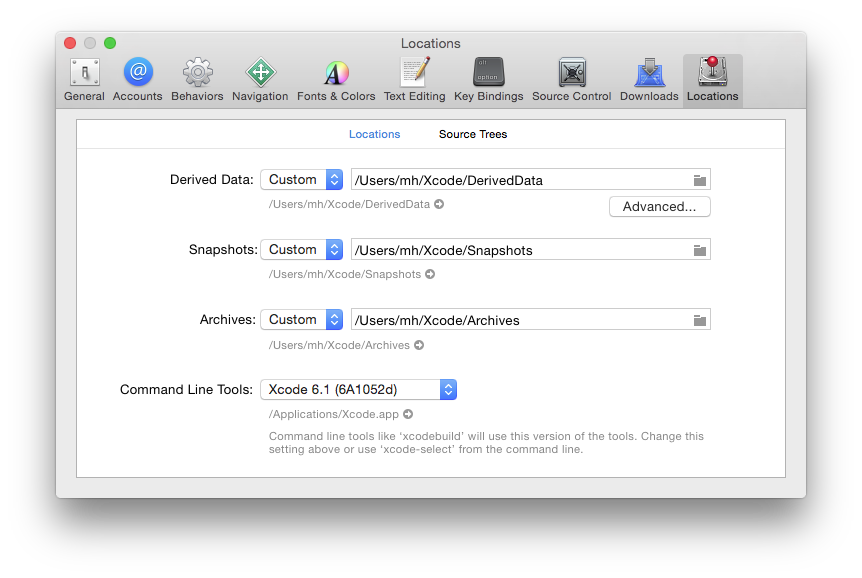
Alternatively, you can run in Terminal to switch the selected version of Xcode (where you'd replace You can also use in Terminal to find out what version of Xcode is currently selected. CrossBox uses this command line internally, so you can be assured that whatever the output is, it is what CrossBox will see, as well. SDK VersionsPlease note that in order for things to work out of the box, the version of Xcode you install needs to contain SDK versions supported/known by Elements in form of a folder with .fx files. In most cases, Elements and CrossBox will automatically determine the highest version of the SDK supported by both Elements and the version of Xcode you have installed. Any version of Elements will come with pre-built .fx files for the latest SDKs that were released at the time that version of Elements shipped, as well as support for some older SDKs. Please refer to the .fx Files topic for more details. Elements will automatically download newer (or older) SDK versions form our website as needed, on first build. You can also downlaod SDK support manually from elementscompiler.com/elements/sdks and, if needed, you can also manually import SDKs from an Xcode version; please refer to the Importing new SDKs topic for more details on this. |
| You are visitor 01402503 — GeezerVison does not store the pages you look up. Best viewed with Netscape Navigator 4.7 or Internet Explorer 6 at 800×600. No cookies required. |