
A personal study computer that has read all your lecture notes. It runs on your own machine, with no cloud, no API keys and no telemetry.

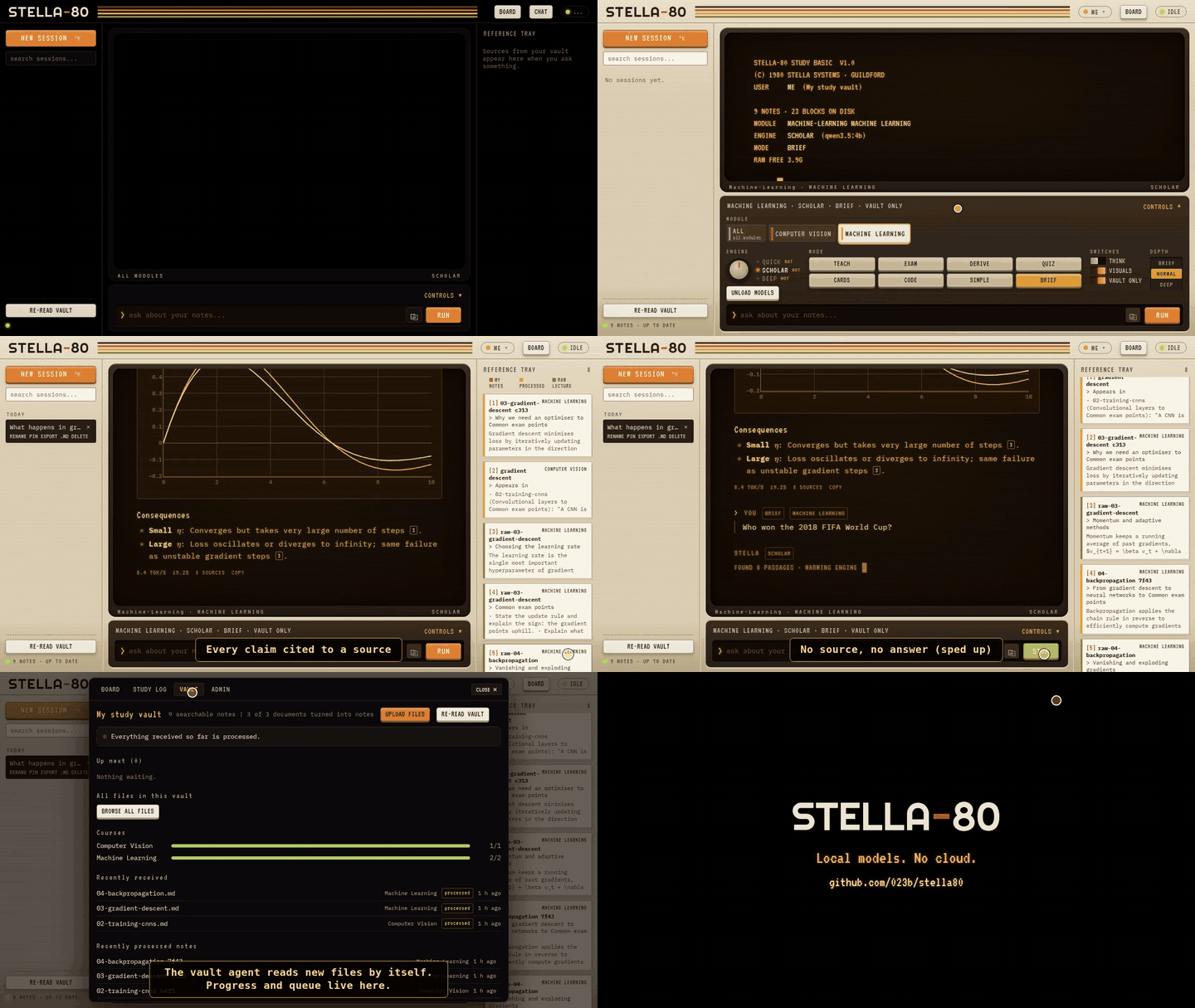
Preview above, sped up. The full 75-second video is docs/media/demo.mp4 (GitHub offers MP4 files as a download rather than a player). It shows a cited answer, the note behind a citation, a VAULT ONLY refusal, and the vault tab, recorded in real time on a CPU-only laptop; the long waits are sped up and captioned as such.
Studying? Nah. Building a study tool instead? Sure. I'd end up with a few hundred lecture files and no idea where anything was, so I built something that reads them for me, answers from them, and tells me which note the answer came from. It was meant to be just for me. Then three friends started using it, so it got logins, a leaderboard and an admin page, which was not the plan.
I built it with Claude Code. Claude wrote a lot of the code; I decided what it should do, tried it on my own courses, argued with it when it was wrong, and kept what held up. That's why there are tests and an evaluation: so you don't have to take my word for it.
STELLA-80 has two halves:
- The vault agent reads your course files in the background. That means PDFs, slides, Word documents, notebooks, spreadsheets, code and images. It turns them into an Obsidian knowledge graph with concept notes, per-course concept maps and links that bridge courses. A vision model reads the slide images too.
- The study terminal is a web UI made to feel like a piece of 80s hardware. It answers from your notes and cites its sources back to the exact slide or page.
Everything runs on local models through Ollama. The whole thing was built and is used daily on a single mini PC, a Ryzen with a Radeon 780M iGPU, serving one student and three friends.
Status: a personal tool, shared in case it is useful to someone else. Small user base (four people), one tested hardware setup, version 0.1, so expect rough edges and configuration changes between minor versions. It has an offline test suite and a small evaluation harness (below), not a production track record.
It knows your course, not the internet's version of it.
- Search combines keyword matching (BM25) with embeddings over your own notes. Answers cite their sources as [1], [2], and you can open the note behind each one. How reliably depends on the model: in the bundled evaluation a 4B model cited every answerable question with VAULT ONLY on, and 5 to 7 of 7 across two runs with it off.
- Flip the VAULT ONLY switch and the tutor answers only from your material. If something isn't there, it says so.
- In normal mode, anything the tutor adds beyond your notes is marked (general). Where your lecturer's notation differs from the textbook, it follows your lecturer's.
The knowledge graph is built carefully.
- Every concept the model extracts has to come with a quote from the source. The agent checks that quote against the original text and drops the concept if it doesn't match.
- Duplicate concepts are merged by embedding similarity and by aliases you control in
rules.yaml(for example SIFT, Scale-invariant feature transform). - Every file also gets a
_raw/copy of its text with no AI involved, so you can always check what the model saw. - The agent never edits your own notes. Generated notes keep anything you add below a marker line.
- The vault is a git repository, with a commit after every run.
It is built for small hardware.
- A RAM guard checks free memory before loading a big model, and falls back to the small one with a notice.
- Questions go through a queue so that one answer runs at a time. Everyone else sees their place in line.
- The agent throttles itself by load average, pauses between calls and releases the vision model when it is done.
- Daily study summaries are only written when the machine is idle.
There are study modes, not just a chat box.
| Mode | What you get |
|---|---|
| TEACH | Intuition, then the formal definition and maths, a worked example and common pitfalls |
| EXAM | The answer a top-mark exam script would give |
| DERIVE | Numbered steps, naming the rule used at each one |
| QUIZ | Five questions of rising difficulty, with answers hidden until you open them |
| CARDS | Flip-card revision decks |
| CODE | One minimal runnable script that demonstrates the idea |
| SIMPLE | An explanation with an everyday analogy first |
| BRIEF | Five lines, no preamble |
Answers can include LaTeX, interactive function plots and 3D surfaces (Plotly), and Mermaid diagrams. You can also paste a screenshot of a slide and ask about it. Eight tutor personas are built in, from Socratic coach to Strict teacher, or you can write your own instructions.
It has a personality. The UI has amber, green, paper and OLED themes, engine knobs and rocker switches, and a "reasoning tape" that shows the model thinking. Answers are rendered like good handwritten study notes, without emoji or "Great question!".
From the author's own deployment: about 1,000 notes from four modules. Chat history and names are blurred.
 |
 |
| Cited answers. Every [n] opens the note it came from. | The vault agent at work. Progress per course, the queue and uploads. |
 |
 |
| What the agent writes. One note per lecture, with summaries and concept links, opened here as a printout. | The control deck. Module, engine, study mode, switches and depth. |
| Solo | Shared | |
|---|---|---|
| For | You, on your laptop or desktop | A mini PC or home server that you and your friends use |
| Login | None. It only listens on 127.0.0.1 and refuses to start otherwise |
A personal passphrase per person, rate-limited |
| Extras | Group chat, a leaderboard with streaks, a study log, an admin console to add and remove people and set per-person limits (engines, THINK, daily question cap, uploads), uploads to the processing queue | |
| Access | http://127.0.0.1:8480 |
Over Tailscale (recommended) or behind a reverse proxy with HTTPS |
Each mode can be installed with Docker Compose or bare metal (a Python venv plus systemd user services). See docs/INSTALL.md.
git clone https://github.com/023b/stella80 && cd stella80
scripts/init.sh solo --sample        # or: shared
docker compose up -d
docker compose exec ollama ollama pull nomic-embed-text
docker compose exec ollama ollama pull qwen3.5:4b
# open http://127.0.0.1:8480

The diagram source is docs/architecture.mmd (also as SVG); scripts/render_diagram.py renders it.

scripts/eval.py measures retrieval (keyword vs embeddings vs hybrid), whether citations point at supporting text, how
VAULT ONLY handles questions the notes cannot answer, and speed, on a question set you can extend. Results, definitions and
the limits of the method are in docs/EVAL.md. The bundled set is tiny (three sample lectures, ten
questions), so treat the numbers as a demonstration of the harness, not a benchmark.
pip install -r requirements-dev.txt
pytest                      # 52 offline tests, about two seconds
python scripts/eval.py      # needs Ollama running with the models pulled
Everything runs through Ollama, so any model works. Pick models that fit your machine (engines: in
stella80.yaml, chat_model and vision_model in the agent config).
| Machine | QUICK | SCHOLAR | DEEP and agent |
|---|---|---|---|
| 8 GB RAM | qwen3.5:4b | qwen3.5:4b | qwen3:8b |
| 16 GB RAM | qwen3.5:4b | gemma3:12b | qwen3:8b |
| 32 GB, or a GPU with 16 GB or more (tested) | qwen3.5:4b | gemma4:26b-a4b-it-qat | qwen3:30b-a3b |
On the tested mini PC, a Radeon 780M through Vulkan gives about 13 to 14 tokens per second for QUICK and SCHOLAR. DEEP on the CPU gives about 10. That machine runs two Ollama instances, one on the iGPU for answers and one on the CPU for the agent, and both URLs can be set in the config.
- Nothing leaves your machine. Every JavaScript library and font is bundled with the app, with no CDN calls. Models run in your own Ollama.
- In shared mode, passphrases are stored as scrypt hashes and sessions are signed cookies. Each person only sees their own vault and their own questions. The leaderboard shows time, counts and topics, and anyone can hide their topics and summary.
- Shared mode has no TLS of its own. Keep it on Tailscale or a LAN, or put Caddy or nginx in front for HTTPS. Don't forward it to the open internet as plain HTTP.
- Answer quality depends on the model you run. Small models cite well but reason less well.
- The first pass over a big course takes hours on a CPU. After that, only new or changed files are read.
- Tested on Linux. macOS should work with Docker. Windows is untested.
- Answers run one at a time per machine (a queue), so four people asking at once wait for each other.
stella80/        web app (FastAPI, SQLite FTS5, vanilla JS), manage.py for accounts
agent/           vault agent and rules.yaml
tests/           offline pytest suite (retrieval, quote verification, auth)
eval/            questions.yaml for scripts/eval.py
deploy/systemd/  user units for bare metal
scripts/         init.sh, install-systemd.sh, eval.py, render_diagram.py, record_demo.py
docs/            INSTALL.md, VAULT-AGENT.md, EVAL.md, architecture diagram, RELEASING.md
examples/        sample lectures to try it with
MIT. Bundled third-party libraries and fonts keep their own licences; see THIRD_PARTY.md.