GV

GeezerVison

The World Wide Web, restored to 800 pixels of glory.

Home|About|Gaming cabinet|Archives|How it works|Starter sites

On this site

  • Sign in
  • ActionsCI/CD and automation
  • CodespacesCloud development environments
  • All Features
  • Documentation
  • Training
  • Certifications
  • Build with Copilot
  • Customize Copilot
  • Integrations
  • Trending repos
  • GitHub Sponsors
  • Developer articles
  • Enterprises

This view

  • Original page
  • New address

GeezerVison is showing github.com โ€” GitHub - 29Winter/02_Python_Datatypes: Data types specify the different sizes and values that can be stored in the variable. For example, Python stores numbers, strings, and a list of values using different data types. Learn different types of Python data types along with their respective in-built functions and methods.

BranchesTags
Open more actions menu


Latest commit


History

295 Commits
295 Commits

Folders and files

NameName
Last commit message
Last commit date
002_Python_String_Methods
 
 
003_Python_List_Methods
 
 
004_Python_Tuple_Methods
 
 
005_Python_Dictionary_Methods
 
 
006_Python_Sets_Methods
 
 
img
img
 
 
001_Python_Numbers.ipynb
 
 
002_Python_String.ipynb
 
 
003_Python_List.ipynb
 
 
004_Python_Tuple.ipynb
 
 
005_Python_Dictionary.ipynb
 
 
006_Python_Sets.ipynb
 
 
LICENSE
LICENSE
 
 
Python_List_Comprehension.ipynb
 
 
README.md
README.md
 
 
countries_data.py
countries_data.py


Repository files navigation

Last Commit Last Commit Stars Badge Forks Badge Size Pull Requests Badge Issues Badge Language MIT License

binder colab

02_Python_Datatypes

Introduction ๐Ÿ‘‹

Data types specify the different sizes and values that can be stored in the variable. For example, Python stores numbers, strings, and a list of values using different data types.

Python is a dynamically typed language; therefore, we do not need to specify the variableโ€™s type while declaring it. Whatever value we assign to the variable based on that data type will be automatically assigned. For example, name = 'Arthur' here Python will store the name variable as a str data type.

No matter what value is stored in a variable (object), a variable can be any type like int, float, str, list, set, tuple, dict, bool, etc.


Table of contents ๐Ÿ“‹

No. Name
01 Python_Numbers
02 Python_String
2.1 Python_String_Methods
03 Python_List
3.1 Python_List_Methods
04 Python_Tuple
4.1 Python_Tuple_Methods
05 Python_Dictionary
5.1 Python_Dictionary_Methods
06 Python_Sets
6.1 Python_Sets_Methods

These are online read-only versions. However you can Run โ–ถ all the codes online by clicking here โžž binder


Frequently asked questions โ”

How can I thank you for writing and sharing this tutorial? ๐ŸŒท

You can Star Badge and Fork Badge Starring and Forking is free for you, but it tells me and other people that it was helpful and you like this tutorial.

Go here if you aren't here already and click โžž โœฐ Star and โต– Fork button in the top right corner. You will be asked to create a GitHub account if you don't already have one.


How can I read this tutorial without an Internet connection? GIF

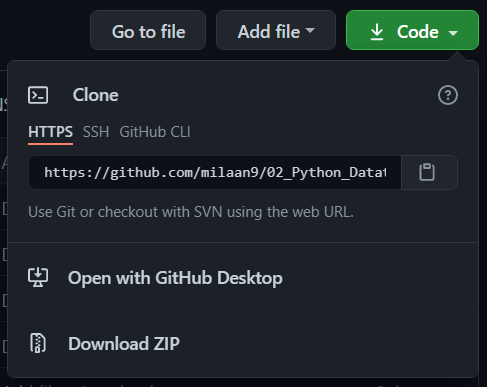
  1. Go here and click the big green โžž Code button in the top right of the page, then click โžž Download ZIP.

    Download ZIP

  2. Extract the ZIP and open it. Unfortunately I don't have any more specific instructions because how exactly this is done depends on which operating system you run.

  3. Launch ipython notebook from the folder which contains the notebooks. Open each one of them

    Kernel > Restart & Clear Output

This will clear all the outputs and now you can understand each statement and learn interactively.

If you have git and you know how to use it, you can also clone the repository instead of downloading a zip and extracting it. An advantage with doing it this way is that you don't need to download the whole tutorial again to get the latest version of it, all you need to do is to pull with git and run ipython notebook again.


Authors โœ๏ธ

I'm Dr. Milaan Parmar and I have written this tutorial. If you think you can add/correct/edit and enhance this tutorial you are most welcome๐Ÿ™

See github's contributors page for details.

If you have trouble with this tutorial please tell me about it by Create an issue on GitHub. and I'll make this tutorial better. This is probably the best choice if you had trouble following the tutorial, and something in it should be explained better. You will be asked to create a GitHub account if you don't already have one.

If you like this tutorial, please give it a โญ star.


Licence ๐Ÿ“œ

You may use this tutorial freely at your own risk. See LICENSE.

About

Data types specify the different sizes and values that can be stored in the variable. For example, Python stores numbers, strings, and a list of values using different data types. Learn different types of Python data types along with their respective in-built functions and methods.

Resources

Readme
MIT license
Activity

Stars

0 stars

Watchers

0 watching

Forks

0 forks
Report repository

Releases

Packages

Contributors

Languages

You are visitor 01402503 โ€” GeezerVison does not store the pages you look up.
Best viewed with Netscape Navigator 4.7 or Internet Explorer 6 at 800ร—600. No cookies required.